
一个JSON解析器
来源
《JavaScript语言精粹(修订版)》
代码
<!DOCTYPE html>
<html> <head>
<meta charset="UTF-8">
<title></title>
</head> <body>
<script>
var json_parse = function () {
var
at,
ch,
escapee = {
'"': '"',
'\\': '\\',
'/': '/',
b: 'b',
f: '\f',
n: '\n',
r: '\r',
t: '\t'
},
text,
// 抛出异常
error = function (m) {
throw {
name: 'SyntaxError',
message: m,
at: at,
text: text
}
},
// 获取下一个字符
next = function (c) {
if (c && c !== ch) {
error(`Expected ${c} instead of ${ch}`);
}
ch = text.charAt(at);
at += 1;
return ch;
},
// 解析一个数字值
number = function () {
var number, string = '';
// 负号
if (ch === '-') {
string = '-',
next('-')
}
// 整数
while (ch >= '0' && ch <= '9') {
string += ch;
next();
}
// 小数
if (ch === '.') {
string += '.';
while (next() && ch >= '0' && ch <= '9') {
string += ch;
}
}
// 指数
if (ch === 'e' || ch === 'E') {
string += ch;
next();
if (ch === '-' || ch === '+') {
string += ch;
next();
}
while (ch >= '0' && ch <= '9') {
string += ch;
next();
}
}
number = +string;
if (isNaN(number)) {
error('Bad number')
} else {
return number;
}
},
// 解析一个字符串值
string = function () {
var hex,
i,
string = '',
uffff;
// 字符串必须以双引号开始
if (ch === '"') {
while (next()) {
if (ch === '"') {
next();
return string;
} else if (ch === '\\') {
next();
// unicode码
if (ch === 'u') {
uffff = 0;
for (i = 0; i < 4; i++) {
hex = parseInt(next(), 16);
if (!isFinite(hex)) {
break;
}
ufff = ufff * 16 + hex;
}
string += String.fromCharCode(ufff)
}
else if (typeof escapee[ch] === 'string') { // 转义字符
string += escapee[ch]
} else {
break;
}
} else {
string += ch;
}
}
}
error('Bac string');
},
// 跳过空白
white = function () {
while (ch && ch <= ' ') {
next();
}
},
// 解析 true、false、null
word = function () {
switch (ch) {
case 't':
next('t');
next('r');
next('u');
next('e');
return true;
case 'f':
next('f');
next('a');
next('l');
next('s');
next('e');
return true;
case 'n':
next('n');
next('u');
next('l');
next('l');
return true;
}
error(`Unexpected ${ch}`)
},
// 解析一个数组值
array = function () {
var array = [];
if (ch === '[') {
next('[');
white();
if (ch === ']') {
next(']');
return array;
}
while (ch) {
array.push(value());
white();
if (ch === ']') {
next(']');
return array;
}
next(',');
white();
}
}
error('Bad array');
},
// 解析一个对象值
object = function () {
var key, object = {};
if (ch === '{') {
next('{');
white();
if (ch === '}') {
next('}');
return object;
}
while (ch) {
key = string();
white();
next(':');
object[key] = value();
white();
if (ch === '}') {
next('}');
return object;
}
next(',');
white();
}
}
error('Bad object');
},
// 解析一个JSON值。它可以是对象、数组、字符串、数字、一个词。
value = function () {
white();
switch (ch) {
case '{':
return object();
case '[':
return array();
case '"':
return string();
case '-':
return number;
default:
return ch >= '0' && ch <= '9' ? number() : word();
}
};
// 返回json_parse函数
return function (source, reviver) {
var result;
text = source;
at = 0;
ch = ' ';
result = value();
white();
if (ch) { // 多余的非空白字符
error('Syntax error');
}
return typeof reviver === 'function' ? function walk(holder, key) {
var k, v, value = holder[key];
if (value && typeof value === 'object') {
// 递归处理对象的属性
for (k in value) {
if (Object.hasOwnProperty.call(value, k)) {
v = walk(value, k);
if (v !== undefined) {
value[k] = v;
} else {
delete value[k]
}
}
}
}
// 处理对象
return reviver.call(holder, key, value);
}({ '': result }, '') : result;
}
}();
// \n是一个字符,\\n是两个字符
const str = '{"name":"饮料","price":2.5,"cool":true,"description":["雪碧","可乐"],"escapseSlash":"\\/","escapeN":"\\n"}';
console.log(json_parse(str, (key, val) => val))
</script>
</body> </html>
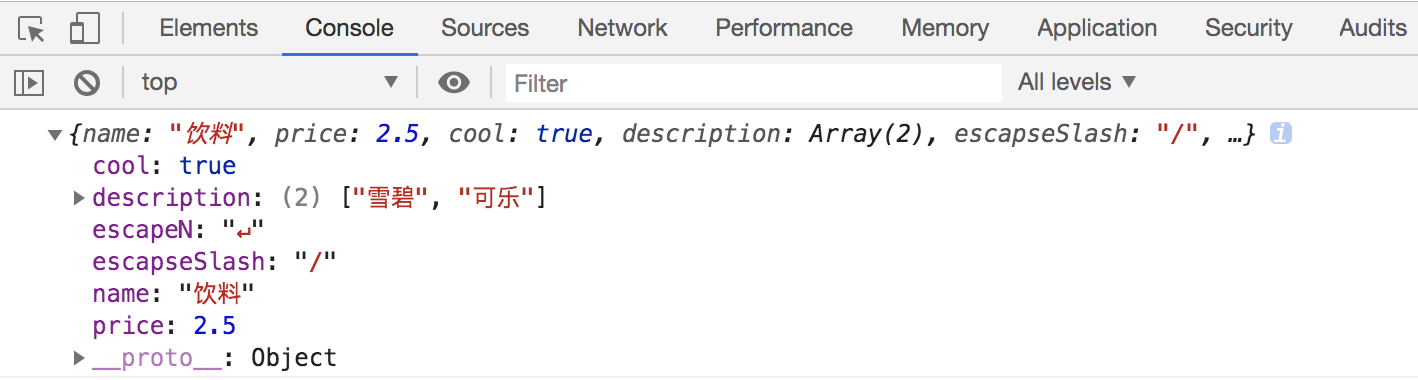
运行结果
一个JSON解析器的更多相关文章
- 一起写一个JSON解析器
[本篇博文会介绍JSON解析的原理与实现,并一步一步写出来一个简单但实用的JSON解析器,项目地址:SimpleJSON.希望通过这篇博文,能让我们以后与JSON打交道时更加得心应手.由于个人水平有限 ...
- 如何编写一个JSON解析器
编写一个JSON解析器实际上就是一个函数,它的输入是一个表示JSON的字符串,输出是结构化的对应到语言本身的数据结构. 和XML相比,JSON本身结构非常简单,并且仅有几种数据类型,以Java为例,对 ...
- 几百行代码实现一个 JSON 解析器
前言 之前在写 gscript时我就在想有没有利用编译原理实现一个更实际工具?毕竟真写一个语言的难度不低,并且也很难真的应用起来. 一次无意间看到有人提起 JSON 解析器,这类工具充斥着我们的日常开 ...
- 自己动手实现一个简单的JSON解析器
1. 背景 JSON(JavaScript Object Notation) 是一种轻量级的数据交换格式.相对于另一种数据交换格式 XML,JSON 有着诸多优点.比如易读性更好,占用空间更少等.在 ...
- 用c#自己实现一个简单的JSON解析器
一.JSON格式介绍 JSON(JavaScript Object Notation) 是一种轻量级的数据交换格式.相对于另一种数据交换格式 XML,JSON 有着很多优点.例如易读性更好,占用空间更 ...
- 面试题|手写JSON解析器
这周的 Cassidoo 的每周简讯有这么一个面试题:: 写一个函数,这个函数接收一个正确的 JSON 字符串并将其转化为一个对象(或字典,映射等,这取决于你选择的语言).示例输入: fakePars ...
- 手写Json解析器学习心得
一. 介绍 一周前,老同学阿立给我转了一篇知乎回答,答主说检验一门语言是否掌握的标准是实现一个Json解析器,网易游戏过去的Python入门培训作业之一就是五天时间实现一个Json解析器. 知乎回答- ...
- 一个简单的json解析器
实现一个简单地json解析器. 两部分组成,词法分析.语法分析 词法分析 package com.mahuan.json; import java.util.LinkedList; import ja ...
- 这个东西,写C++插件的可以用到。 RapidJSON —— C++ 快速 JSON 解析器和生成器
点这里 原文: RapidJSON —— C++ 快速 JSON 解析器和生成器 时间 2015-04-05 07:33:33 开源中国新闻原文 http://www.oschina.net/p/ ...
随机推荐
- 重置Brocade光纤交换机的管理IP地址
1.使用串口登录光纤交换机 使用RS/232 (9针)串口连接线将笔记本连至交换机的串口. 输入以下参数: Bits per second (每秒位数): 9600 Data Bits (数据位): ...
- 设置centos的yum仓库源为阿里源
前提 使我们的主机能够连接到外网 cd /etc/yum.repos.d/ #切换到yum仓库目录下 rm -rf * #删除默认配置仓库 wget -O /etc/yum.repos.d/CentO ...
- BufferedReader和PrintWriter读写中文的问题
最近用BufferedReader读一个文本文件,然后再将读出的内容用PrintWriter写入到另外一个新的文件中. 之前一直没有发现这个问题,就是如果文本内容中有中文,在读出的内容和写入的内容都会 ...
- pytho xml
转载自:https://www.cnblogs.com/gouguoqilinux/p/9168332.html xml是实现不同语言或程序直接进行数据交换的协议,跟json差不多,单json使用起来 ...
- 【洛谷P1490】买蛋糕
题目大意:给定一个正整数 N,求至少从 [1,N] 中选出多少个数能够表示出 [1,N] 中的所有整数,每个数只能被选 1 次,并求出对于最优解有多少种不同的选择方案. 题解:好题. 仅考虑用最少的不 ...
- 对items函数的理解
老师:dict的items应该是把dict转成列表,每个列表元素是一个包含key ,value的dict,元素应该是元组, {a:1, b:2, c:3} [(a, 1), (b,2), (c, ...
- 【NOIP2016提高A组模拟9.17】数格子
题目 分析 设表示每一行的状态,用一个4位的二进制来表示,当前这一行中的每一个位数对下一位有没有影响. 设\(f_{i,s}\)表示,做完了的i行,其状态为s,的方案数. 两个状态之间是否可以转移就留 ...
- Codeforces Gym 101505C : Cable Connection (计算几何)
题目链接 题意:给出第一象限的N个点,存在一直线x/a+y/b=1(a>0,y>0)使得所有点都在这条直线下面,求 min{sqrt(a^2+b^2)} 显然,这样的直线必然经过这N个点中 ...
- 【leetcode】1186. Maximum Subarray Sum with One Deletion
题目如下: Given an array of integers, return the maximum sum for a non-empty subarray (contiguous elemen ...
- Python 列表(List)Ⅱ
删除列表元素 可以使用 del 语句来删除列表的元素,如下实例: . 以上实例输http://www.xuanhe.net/出结果: 注意:我们会在接下来的章节讨论remove()方法的使用 Pyth ...