
javaweb各种框架组合案例(七):springboot+jdbcTemplete+通用dao+restful
一、介绍
1.springboot是spring项目的总结+整合
当我们搭smm,ssh,ssjdbc等组合框架时,各种配置不胜其烦,不仅是配置问题,在添加各种依赖时也是让人头疼,关键有些jar包之间还会出现冲突,让你的项目出现难以解决的问题。基于这种情况,springboot横空出世,在考虑到Struts控制层框架有漏洞,springboot放弃(大多数企业同样如此)了Struts,转而代之是springMVC,不过,springboot是自动集成springMVC的,不需要任何配置,不需要任何依赖,直接使用各种控制层注解。springboot是springcloud的基础,是开启微服务时代的钥匙。
二、新建springboot工程
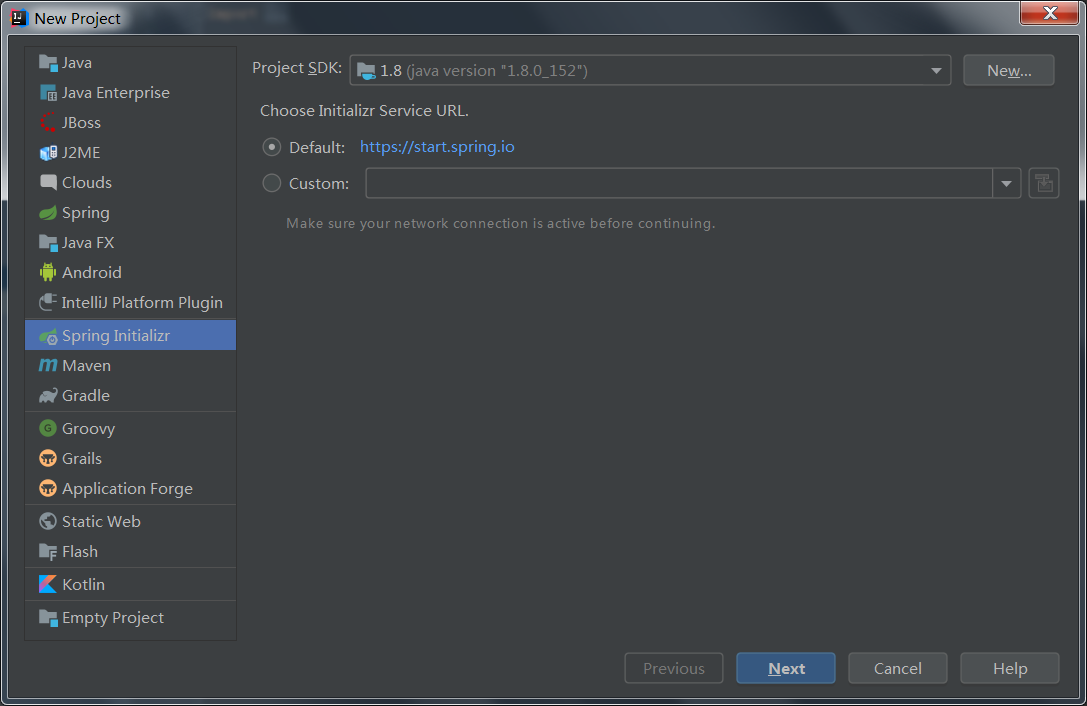
1. 使用idea2019新建project,选择spring Initializr,next
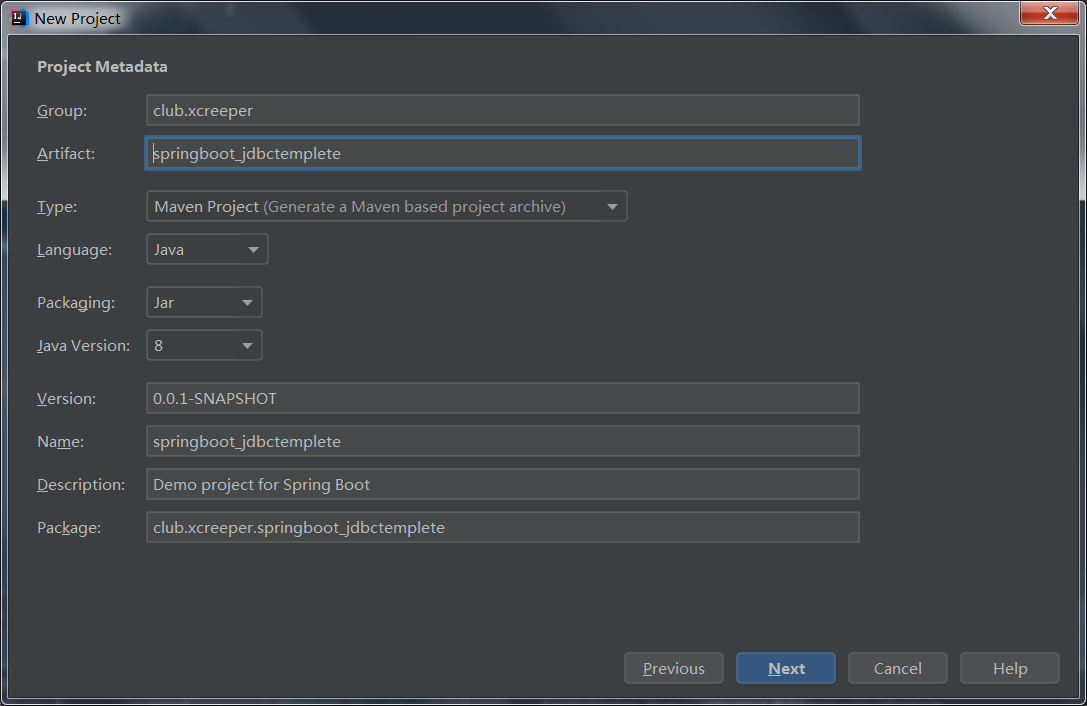
2. 填写坐标信息,next
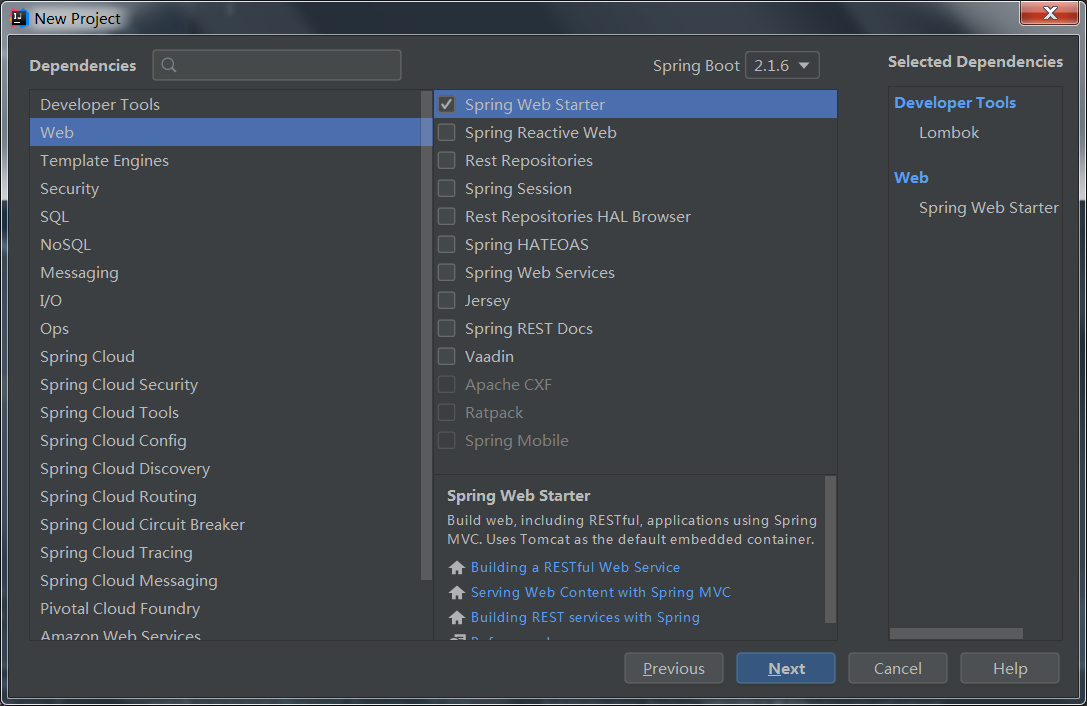
3. Developer Tools选择Lombok, Web选择Spring Web Starter,SQL选择JDBC API、MySQL Driver,next
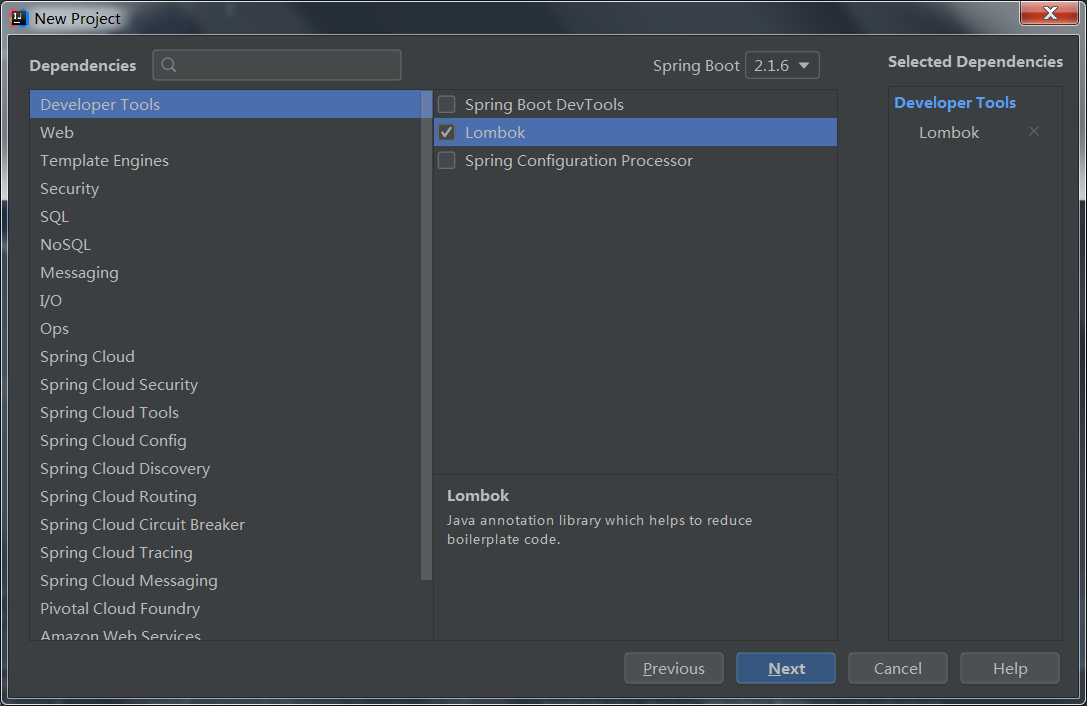
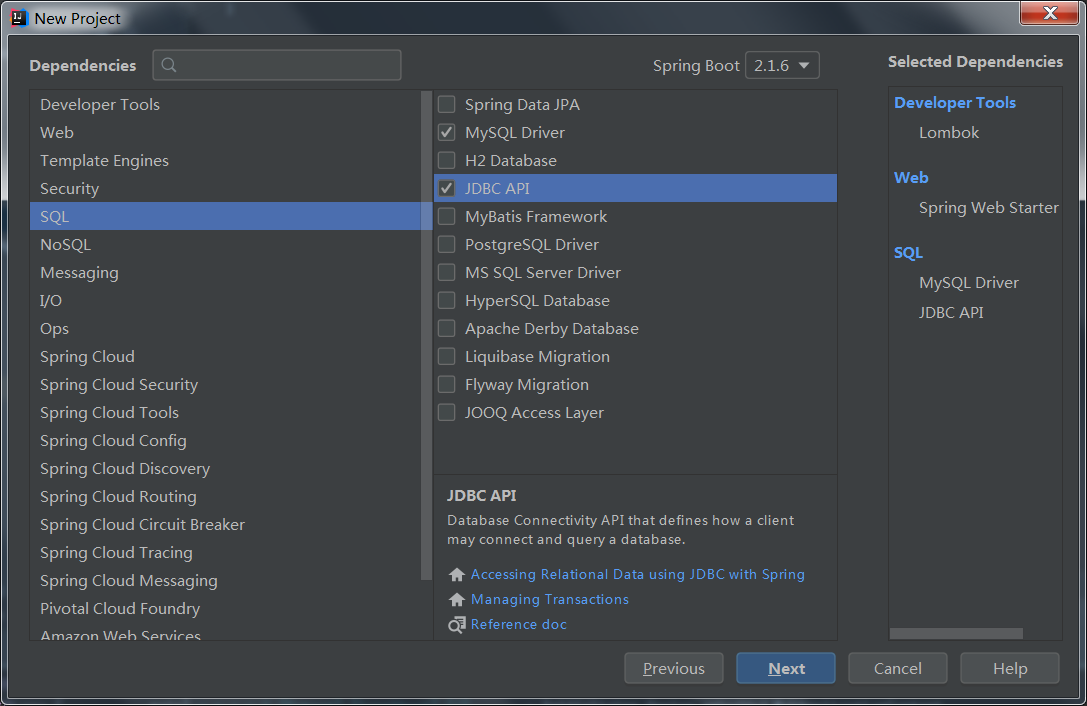
lombok是为了省去实体类中getter/setter方法,使之在运行时动态添加getter/setter
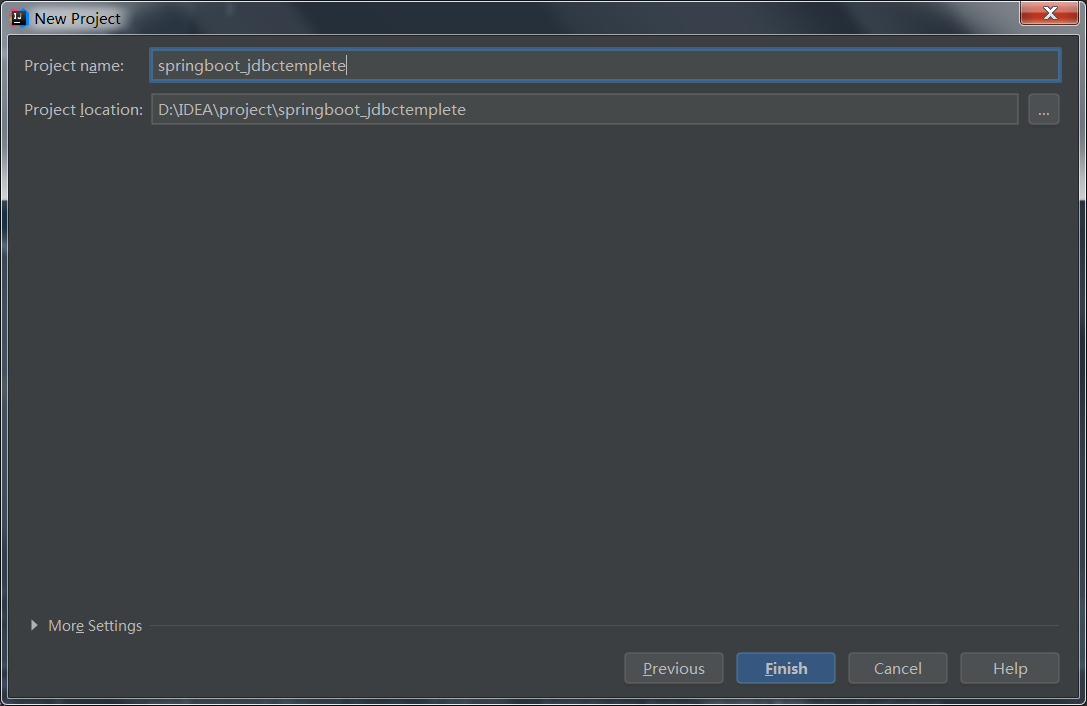
4. 填写项目名已经存放位置,finish
三、项目构建
1. 数据库准备(两张表,分别是user用户表和phone手机表,且是一对多关系)
create database ssdj;

CREATE TABLE `user` (

`id` int(11) NOT NULL AUTO_INCREMENT,

`password` varchar(255) DEFAULT NULL,

`username` varchar(255) DEFAULT NULL,

PRIMARY KEY (`id`)

) ENGINE=InnoDB AUTO_INCREMENT=2 DEFAULT CHARSET=utf8;

CREATE TABLE `phone` (

  `id` int(11) NOT NULL AUTO_INCREMENT,

  `brand` varchar(255) DEFAULT NULL,

  `user_id` int(11) DEFAULT NULL,

  PRIMARY KEY (`id`),

  KEY `FK_8t3jhwmmlxpq3qcwcy1a3alts` (`user_id`),

  CONSTRAINT `FK_8t3jhwmmlxpq3qcwcy1a3alts` FOREIGN KEY (`user_id`) REFERENCES `user` (`id`)

) ENGINE=InnoDB AUTO_INCREMENT=3 DEFAULT CHARSET=utf8;

insert into user(username,password) values(1001,123);

insert into phone(brand,user_id) values ('华为',1),('iphone',1);
2. pom.xml(不用动,默认)
3. 配置文件
application.properties
spring.datasource.driver-class-name=com.mysql.cj.jdbc.Driver

spring.datasource.url=jdbc:mysql://localhost:3306/ssdj?useUnicode=true&characterEncoding=utf-8&useSSL=false&serverTimezone=GMT

spring.datasource.username=root

spring.datasource.password=root
数据库连接要添加时区,否则可能会报错
4.项目包结构
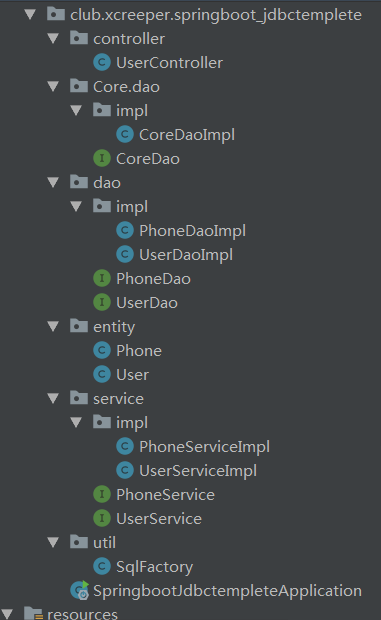
分成util、core、entity、dao、service、controller等结构包
5. 需要一个SqlFactory工具类来制造动态SQL语句
package club.xcreeper.springboot_jdbctemplete.util;

import java.lang.reflect.Field;

import java.util.HashMap;

import java.util.Map;

import org.slf4j.Logger;

import org.slf4j.LoggerFactory;

public class SqlFactory {

    private String tableName;

    public Object[] params;

    public SqlFactory(Class<?> clazz) {

        tableName = clazz.getSimpleName().toLowerCase();

    }

    private final static Logger logger = LoggerFactory.getLogger(SqlFactory.class);

    private Map<String,Object> objectToMap(Object entity) {

        Field[] fields = entity.getClass().getDeclaredFields();

        Map<String,Object> map = new HashMap<String,Object>();

        for(Field field : fields) {

            field.setAccessible(true);//允许访问属性

            Object value = null;

            try {

                value = field.get(entity);

            } catch (IllegalArgumentException | IllegalAccessException e) {

                e.printStackTrace();

            }

            if(value != null) {

                map.put(field.getName(), value);

            }

        }

        return map;

    }

    public String getDeleteSql() {

        StringBuilder sql = new StringBuilder("delete from ").append(tableName).append(" where id = ?");

        logger.info(sql.toString());

        return sql.toString();

    }

    public String getSelectOneSql() {

        StringBuilder sql = new StringBuilder("select * from ").append(tableName).append(" where id = ?");

        logger.info(sql.toString());

        return sql.toString();

    }

    public String getInsertSql(Object entity) {

        Map<String,Object> map = this.objectToMap(entity);

        map.remove("id");

        params = new Object[map.size()];

        StringBuilder stringBuiler = new StringBuilder("insert into ").append(tableName).append("(");

        for(String key : map.keySet()) {

            stringBuiler.append(key).append(",");

        }

        stringBuiler.deleteCharAt(stringBuiler.length()-1).append(") values (");

        int i = 0;

        for(String key : map.keySet()) {

            stringBuiler.append("?,");

            params[i] = map.get(key);

            i++;

        }

        stringBuiler.deleteCharAt(stringBuiler.length()-1).append(")");

        map = null;

        logger.info(stringBuiler.toString());

        return stringBuiler.toString();

    }

    public String getUpdateSql(Object entity) {

        Map<String,Object> map = this.objectToMap(entity);

        params = new Object[map.size()];

        params[params.length-1] = map.remove("id");

        StringBuilder stringBuiler = new StringBuilder("update ").append(tableName).append(" set ");

        int i = 0;

        for(String key : map.keySet()) {

            stringBuiler.append(key).append("=?,");

            params[i] = map.get(key);

            i++;

        }

        stringBuiler.deleteCharAt(stringBuiler.length()-1).append(" where id = ?");

        map = null;

        logger.info(stringBuiler.toString());

        return stringBuiler.toString();

    }

    public String getSelectList(Object entity) {

        Map<String,Object> map = this.objectToMap(entity);

        map.remove("id");

        params = new Object[map.size()];

        StringBuilder stringBuiler = new StringBuilder("select * from ").append(tableName).append(" where ");

        int i = 0;

        for(String key : map.keySet()) {

            stringBuiler.append(key).append("=? and ");

            params[i] = map.get(key);

            i++;

        }

        stringBuiler.delete(stringBuiler.length()-4, stringBuiler.length());

        map = null;

        logger.info(stringBuiler.toString());

        return stringBuiler.toString();

    }

}
SqlFactory
6.需要有一个通用的Dao接口及实现类来完成核心操作
package club.xcreeper.springboot_jdbctemplete.Core.dao;

import java.io.Serializable;

import java.util.List;

public interface CoreDao<T> {

    int insert(T t);

    int delete(Serializable id);

    int update(T t);

    T getOne(Serializable id);

    List<T> getList(T t);

}
CoreDao
package club.xcreeper.springboot_jdbctemplete.Core.dao.impl;

import club.xcreeper.springboot_jdbctemplete.Core.dao.CoreDao;

import club.xcreeper.springboot_jdbctemplete.util.SqlFactory;

import org.springframework.beans.factory.annotation.Autowired;

import org.springframework.jdbc.core.BeanPropertyRowMapper;

import org.springframework.jdbc.core.JdbcTemplate;

import java.io.Serializable;

import java.lang.reflect.ParameterizedType;

import java.util.List;

public class CoreDaoImpl<T> implements CoreDao<T> {

    private Class<T> clazz;

    private SqlFactory sqlFactory;

    @SuppressWarnings("unchecked")

    public CoreDaoImpl() {

        this.clazz =  (Class<T>)((ParameterizedType) getClass().getGenericSuperclass()).getActualTypeArguments()[0];

        sqlFactory = new SqlFactory(this.clazz);

    }

    @Autowired

    private JdbcTemplate jdbcTemplate;

    @Override

    public int insert(T t) {

        return jdbcTemplate.update(sqlFactory.getInsertSql(t),sqlFactory.params);

    }

    @Override

    public int delete(Serializable id) {

        return jdbcTemplate.update(sqlFactory.getDeleteSql(),id);

    }

    @Override

    public int update(T t) {

        return jdbcTemplate.update(sqlFactory.getUpdateSql(t),sqlFactory.params);

    }

    @Override

    public T getOne(Serializable id) {

        return jdbcTemplate.queryForObject(sqlFactory.getSelectOneSql(),new BeanPropertyRowMapper<T>(this.clazz),id);

    }

    @Override

    public List<T> getList(T t) {

        return jdbcTemplate.query(sqlFactory.getSelectList(t),new BeanPropertyRowMapper<T>(this.clazz),sqlFactory.params);

    }

}
CoreDaoImpl
7. 实体类
package club.xcreeper.springboot_jdbctemplete.entity;

import lombok.Getter;

import lombok.Setter;

import lombok.ToString;

@ToString

public class User {

    @Setter

    @Getter

    private Integer id;

    @Setter

    @Getter

    private String username;

    @Setter

    @Getter

    private String password;

}
User
package club.xcreeper.springboot_jdbctemplete.entity;

import lombok.Getter;

import lombok.Setter;

import lombok.ToString;

@ToString

public class Phone {

    @Getter@Setter

    private Integer id;

    @Getter@Setter

    private String brand;

    @Getter@Setter

    private Integer user_id;

}
Phone
8. dao接口及其实现,只需继承核心dao即可
package club.xcreeper.springboot_jdbctemplete.dao;

import club.xcreeper.springboot_jdbctemplete.Core.dao.CoreDao;

import club.xcreeper.springboot_jdbctemplete.entity.User;

public interface UserDao extends CoreDao<User> {

}
UserDao
package club.xcreeper.springboot_jdbctemplete.dao;

import club.xcreeper.springboot_jdbctemplete.Core.dao.CoreDao;

import club.xcreeper.springboot_jdbctemplete.entity.Phone;

public interface PhoneDao extends CoreDao<Phone> {

}
PhoneDao
package club.xcreeper.springboot_jdbctemplete.dao.impl;

import club.xcreeper.springboot_jdbctemplete.Core.dao.impl.CoreDaoImpl;

import club.xcreeper.springboot_jdbctemplete.dao.UserDao;

import club.xcreeper.springboot_jdbctemplete.entity.User;

import org.springframework.stereotype.Repository;

@Repository

public class UserDaoImpl extends CoreDaoImpl<User> implements UserDao {

}
UserDaoImpl
package club.xcreeper.springboot_jdbctemplete.dao.impl;

import club.xcreeper.springboot_jdbctemplete.Core.dao.impl.CoreDaoImpl;

import club.xcreeper.springboot_jdbctemplete.dao.PhoneDao;

import club.xcreeper.springboot_jdbctemplete.entity.Phone;

import org.springframework.stereotype.Repository;

@Repository

public class PhoneDaoImpl extends CoreDaoImpl<Phone> implements PhoneDao {

}
PhoneDaoImpl
9. service接口及其实现
package club.xcreeper.springboot_jdbctemplete.service;

import club.xcreeper.springboot_jdbctemplete.entity.User;

import java.util.List;

public interface UserService {

    int insert(User user);

    int delete(int id);

    int update(User user);

    User getOne(int id);

    List<User> getList(User user);

}
UserService
package club.xcreeper.springboot_jdbctemplete.service;

import club.xcreeper.springboot_jdbctemplete.entity.Phone;

import java.util.List;

public interface PhoneService {

    int insert(Phone phone);

    int delete(int id);

    int update(Phone phone);

    Phone getOne(int id);

    List<Phone> getList(Phone phone);

}
PhoneService
package club.xcreeper.springboot_jdbctemplete.service.impl;

import club.xcreeper.springboot_jdbctemplete.dao.UserDao;

import club.xcreeper.springboot_jdbctemplete.entity.User;

import club.xcreeper.springboot_jdbctemplete.service.UserService;

import org.springframework.beans.factory.annotation.Autowired;

import org.springframework.stereotype.Service;

import java.util.List;

@Service

public class UserServiceImpl implements UserService {

    @Autowired

    private UserDao userDao;

    @Override

    public int insert(User user) {

        return userDao.insert(user);

    }

    @Override

    public int delete(int id) {

        return userDao.delete(id);

    }

    @Override

    public int update(User user) {

        return userDao.update(user);

    }

    @Override

    public User getOne(int id) {

        return userDao.getOne(id);

    }

    @Override

    public List<User> getList(User user) {

        return userDao.getList(user);

    }

}
UserServiceImpl
package club.xcreeper.springboot_jdbctemplete.service.impl;

import club.xcreeper.springboot_jdbctemplete.dao.PhoneDao;

import club.xcreeper.springboot_jdbctemplete.entity.Phone;

import club.xcreeper.springboot_jdbctemplete.service.PhoneService;

import org.springframework.beans.factory.annotation.Autowired;

import org.springframework.stereotype.Service;

import java.util.List;

@Service

public class PhoneServiceImpl implements PhoneService {

    @Autowired

    private PhoneDao phoneDao;

    @Override

    public int insert(Phone phone) {

        return phoneDao.insert(phone);

    }

    @Override

    public int delete(int id) {

        return phoneDao.delete(id);

    }

    @Override

    public int update(Phone phone) {

        return phoneDao.update(phone);

    }

    @Override

    public Phone getOne(int id) {

        return phoneDao.getOne(id);

    }

    @Override

    public List<Phone> getList(Phone phone) {

        return phoneDao.getList(phone);

    }

}
PhoneServiceImpl
10. controller
package club.xcreeper.springboot_jdbctemplete.controller;

import club.xcreeper.springboot_jdbctemplete.entity.User;

import club.xcreeper.springboot_jdbctemplete.service.UserService;

import org.springframework.beans.factory.annotation.Autowired;

import org.springframework.web.bind.annotation.GetMapping;

import org.springframework.web.bind.annotation.PathVariable;

import org.springframework.web.bind.annotation.RequestMapping;

import org.springframework.web.bind.annotation.RestController;

import java.util.List;

@RestController

@RequestMapping("/user")

public class UserController {

    @Autowired

    private UserService userService;

    @GetMapping(value = "/{id}")

    public User getOne(@PathVariable int id) {

        return userService.getOne(id);

    }

    @GetMapping(params = {"username","password","username!=","password!="})

    public List<User> getList(User user) {

        return userService.getList(user);

    }

}
UserController
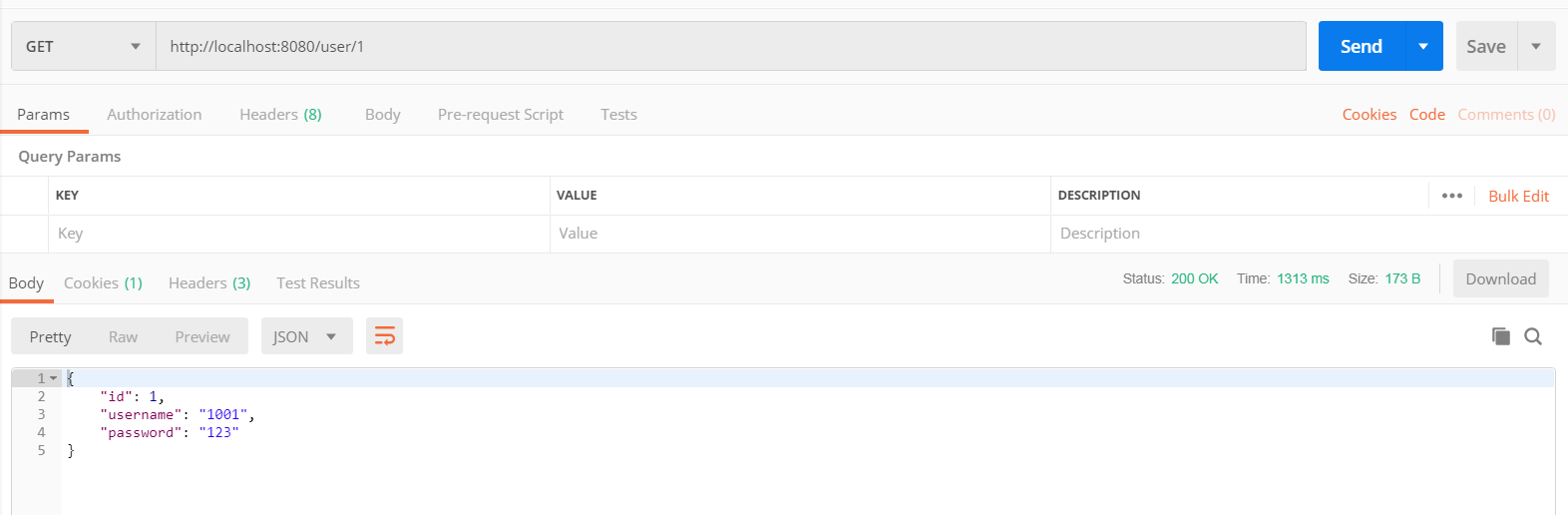
11. 启动项目,并用postman测试接口
javaweb各种框架组合案例(七):springboot+jdbcTemplete+通用dao+restful的更多相关文章
- javaweb各种框架组合案例(八):springboot+mybatis-plus+restful
一.介绍 1. springboot是spring项目的总结+整合 当我们搭smm,ssh,ssjdbc等组合框架时,各种配置不胜其烦,不仅是配置问题,在添加各种依赖时也是让人头疼,关键有些jar包之 ...
- javaweb各种框架组合案例(六):springboot+spring data jpa(hibernate)+restful
一.介绍 1.springboot是spring项目的总结+整合 当我们搭smm,ssh,ssjdbc等组合框架时,各种配置不胜其烦,不仅是配置问题,在添加各种依赖时也是让人头疼,关键有些jar包之间 ...
- javaweb各种框架组合案例(五):springboot+mybatis+generator
一.介绍 1.springboot是spring项目的总结+整合 当我们搭smm,ssh,ssjdbc等组合框架时,各种配置不胜其烦,不仅是配置问题,在添加各种依赖时也是让人头疼,关键有些jar包之间 ...
- javaweb各种框架组合案例(九):springboot+tk.mybatis+通用service
一.项目结构 二.pom.xml <?xml version="1.0" encoding="UTF-8"?> <project xmlns= ...
- javaweb各种框架组合案例(三):maven+spring+springMVC+hibernate
1.hibernate译为"越冬",指的是给java程序员带来春天,因为java程序员无需再关心各种sql了: 2.hibernate通过java类生成数据库表,通过操作对象来映射 ...
- javaweb各种框架组合案例(二):maven+spring+springMVC+mybatis
1.mybatis是比较新的半自动orm框架,效率也比较高,优点是sql语句的定制,管理与维护,包括优化,缺点是对开发人员的sql功底要求较高,如果比较复杂的查询,表与表之间的关系映射到对象与对象之间 ...
- javaweb各种框架组合案例(四):maven+spring+springMVC+spring data jpa(hibernate)【失败案例】
一.失败案例 1. 控制台报错信息 严重: Exception sending context initialized event to listener instance of class org. ...
- javaweb各种框架组合案例(一):maven+spring+springMVC+jdbcTemplate
为了体现spring jdbc对于单表操作的优势,我专门对dao层做了一个抽离,使得抽离出的核心dao具有通用性.主要技术难点是对于泛型的反射.注意:单表操作中,数据库表的字段要和实体类的属性名保持高 ...
- 程序员必懂:javaweb三大框架知识点总结
原文链接:http://www.cnblogs.com/SXTkaifa/p/5968631.html javaweb三大框架知识点总结 一.Struts2的总结 1.Struts 2的工作流程,从请 ...
随机推荐
- TestingWhiz社区版2013版下载地址
TestingWhiz社区版 https://sourceforge.net/projects/testingwhiz-community-edition/ https://sourceforge.n ...
- React-Native 之 GD (十一)加载更多功能完善 及 跳转详情页
1.加载更多功能完善 GDHome.js /** * 首页 */ import React, { Component } from 'react'; import { StyleSheet, Text ...
- 职位-CFO:CFO
ylbtech-职位-CFO:CFO 首席财务官——CFO(Chief Finance Officer)是企业治理结构发展到一个新阶段的必然产物.没有首席财务官的治理结构不是现代意义上完善的治理结构. ...
- python 设置开机启动脚本
1.创建python_auto.bat的快捷方式,放入启动项: C:\Users\Administrator\AppData\Roaming\Microsoft\Windows\Start Menu\ ...
- [转载]借助openssl解析ECC公钥
void GetPubKey(const char* FilePath, char* PubKey) { unsigned ]; unsigned char *pTmp = NULL; FILE *f ...
- Vue.js 注册组件
<!DOCTYPE html> <html lang="en"> <head> <meta charset="UTF-8&quo ...
- mssql中quotename的作用
quotename是保证字符原样输入到mssql中 eg: select * from '+QUOTENAME(@tbname) 用于所传字符为mssql保留字样
- python3.5+django2.0快速入门(一)
因为这篇教程需要用到anaconda的一些操作,如果还不懂anaconda的操作的同学可以看下这篇文章python 入门学习之anaconda篇. 创建python3+的开发环境 直接在终端输入:co ...
- [Git] 005 初识 Git 与 GitHub 之分支
在 GitHub 的 UI 界面使用 Git(多图警告) 1. 建立分支 1.1 点击左上方的 Branch: master,在输入框中填入分支名,再点击下方的 Create branch 1.2 此 ...
- [Web 前端] 009 css 常用的文本样式设置
常用的文本 css 样式 概览 参数 释义 举例 color 设置文字的颜色 color:red; font-size 设置文字的大小 font-size:12px; font-family 设置文字 ...