
SpringDataJPA使用
一、简介
SpringDataJpa是 JPA规范的一个很好的实现,简化了开发的复杂度,极大提升了开发的效率。SpringDataJpa通过 Repository接口及子接口可以很方便的实现持久化操作。
SpringDataJpa的API在线手册:https://docs.spring.io/spring-data/jpa/docs/2.1.0.RELEASE/api/
简单的看下 Repository 类层次结构图关系:
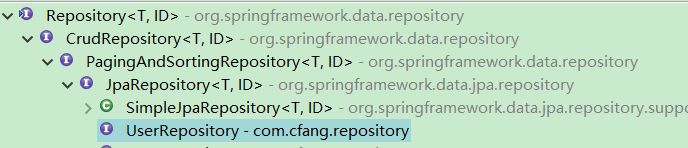
Repository:空的父接口,即是一个标记接口。
CrudRepository:Repository的子接口,提供CRUD操作
PagingAndSortingRepository:CrudRepository的子接口,增加 分页 和 排序的功能
JpaRepository:PagingAndSortingRepository、QueryByExampleExecutor的子接口,增加 批量操作 以及 QBE查询
SimpleJpaRepository:实现了JpaRepository 和 JpaSpecificationExecutor 接口,构造函数中传入 EntityManager。类上注解了@Transactional(readOnly = true),对于CUD的方法使用了注解@Transactional,局部有限原则。各种方法最终的实现都依托于 EntityManager来完成。
二、使用
1、创建springboot项目 springdata-jpa
2、src/main/resources 目录下新建 application.properties,内容如下:
db.driverClass=com.mysql.jdbc.Driver

db.jdbcUrl=jdbc:mysql://localhost:3310/boot?useUnicode=true&characterEncoding=UTF-8&useSSL=false

db.username=root

db.password=

spring.jpa.properties.hibernate.show_sql=true

spring.jpa.properties.hibernate.format_sql=true

#修改实体类的匹配命名规则,主要影响@column(name="")配置,默认是驼峰匹配法

spring.jpa.hibernate.naming.physical-strategy=org.hibernate.boot.model.naming.PhysicalNamingStrategyStandardImpl
3、创建 DataSource configuration:
package com.cfang.confingurations;

import javax.sql.DataSource;

import org.springframework.beans.factory.annotation.Value;

import org.springframework.context.annotation.Bean;

import org.springframework.context.annotation.Configuration;

import com.alibaba.druid.pool.DruidDataSource;

@Configuration

public class DataSourceConfigurations {

    @Value("${db.driverClass:com.mysql.jdbc.Driver}")

    private String driverClass;

    @Value("${db.jdbcUrl}")

    private String jdbcUrl;

    @Value("${db.username}")

    private String username;

    @Value("${db.password}")

    private String password;

    @Value("${initialSize:10}")

    private Integer initialSize;    //初始化连接池个数

    @Value("${maxActive:20}")

    private Integer maxActive;    //最大连接数

    @Value("${maxWait:60000}")

    private Long maxWait;    //获取连接等待超时时间,单位毫秒

    @Value("${timeBetweenEvictionRunsMillis:60000}")

    private Long timeBetweenEvictionRunsMillis;    //间隔多久进行一次检测,检测回收需要关闭的空闲链接,单位毫秒

    @Value("${minEvictableIdleTimeMillis:300000}")

    private Long minEvictableIdleTimeMillis;    //定义一个连接在池中的最小生存时间,单位毫秒

    @Value("${validationQuery:select 1 from dual}")

    private String validationQuery;    //用来检测连接是否有效的sql

    @Value("${testWhileIdle:true}")

    private Boolean testWhileIdle;    //申请连接的时候是否检测。如果空间时间大于timeBetweenEvictionRunsMillis,执行validationQuery检测连接是否有效

    @Value("${testOnBorrow:false}")

    private Boolean testOnBorrow;

    @Value("${testOnReturn:false}")

    private Boolean testOnReturn;    //归还连接的时候,是否validationQuery检查连接的有效性,true执行的话,降低性能

    @Value("${poolPreparedStatements:false}")

    private Boolean poolPreparedStatements;    //是否打开pscache

    @Value("${maxPoolPreparedStatementPerConnectionSize:20}")

    private int maxPoolPreparedStatementPerConnectionSize;    //指定每个连接的pscache的大小

    @Bean

    public DataSource initDataSource() {

        DruidDataSource dataSource = new DruidDataSource();

        dataSource.setDriverClassName(driverClass);

        dataSource.setUrl(jdbcUrl);

        dataSource.setUsername(username);

        dataSource.setPassword(password);

        dataSource.setInitialSize(initialSize);

        dataSource.setMaxActive(maxActive);

        dataSource.setMaxWait(maxWait);

        dataSource.setTimeBetweenEvictionRunsMillis(timeBetweenEvictionRunsMillis);

        dataSource.setMinEvictableIdleTimeMillis(minEvictableIdleTimeMillis);

        dataSource.setValidationQuery(validationQuery);

        dataSource.setTestWhileIdle(testWhileIdle);

        dataSource.setTestOnBorrow(testOnBorrow);

        dataSource.setTestOnReturn(testOnReturn);

        dataSource.setPoolPreparedStatements(poolPreparedStatements);

        if(poolPreparedStatements) {

            dataSource.setMaxPoolPreparedStatementPerConnectionSize(maxPoolPreparedStatementPerConnectionSize);

        }

        return dataSource;

    }

}
4、创建User实体
package com.cfang.entity;

import javax.persistence.Column;

import javax.persistence.Entity;

import javax.persistence.GeneratedValue;

import javax.persistence.GenerationType;

import javax.persistence.Id;

import javax.persistence.Table;

import lombok.Data;

@Entity

@Table(name = "tb_user")

@Data

public class TblUserEntity {

    @Id

    @GeneratedValue(strategy = GenerationType.IDENTITY)

    @Column(name = "id")

    private int id;

    @Column(name = "name")

    private String name;

    @Column(name = "password")

    private String password;

    @Column(name = "age")

    private int age;

}
5、创建持久化操作Repository:
package com.cfang.repository;

import java.util.List;

import org.springframework.data.domain.Page;

import org.springframework.data.domain.Pageable;

import org.springframework.data.jpa.repository.JpaRepository;

import org.springframework.data.jpa.repository.JpaSpecificationExecutor;

import org.springframework.data.jpa.repository.Modifying;

import org.springframework.data.jpa.repository.Query;

import org.springframework.data.repository.query.Param;

import com.cfang.entity.TblUserEntity;

public interface UserRepository extends JpaRepository<TblUserEntity, Integer>, JpaSpecificationExecutor<TblUserEntity>{

    /**

     *     springdata关键字命名方法,可不写实现

     */

    TblUserEntity findByName(String name);

    TblUserEntity findByNameAndAge(String name, int age);

    List<TblUserEntity> findByNameLikeAndAge(String name, int age);

    Page<TblUserEntity> findUserPageByNameLike(String name, Pageable pageable);

    /**

     * JPQL

     */

    @Query(value = "from TblUserEntity where id=?1", nativeQuery = false)

    TblUserEntity readIdByJPQL(int id);

    @Query(value = "select * from tb_user where id=:id", nativeQuery = true)

    TblUserEntity readIdBySQL(int id);

    @Modifying

    @Query(value = "update TblUserEntity set name=?2 where id=?1", nativeQuery = false)

    int updateUserNameByIdJPQL(int id, String name);

    @Modifying

    @Query(value = "update tb_user set name=:name where id=:id", nativeQuery = true)

    int updateUserNameByIdSQL(@Param("id")int id, @Param("name")String name);

    @Query(value = "from TblUserEntity where name like %?1%", nativeQuery = false)

    List<TblUserEntity> findUserByNameJPQL(String name);

    @Query(value = "select * from tb_user where name like %:name%", nativeQuery = true)

    List<TblUserEntity> findUserByNameSQL(String name);

}
6、创建 junit 测试
package com.cfang.repository;

import java.util.List;

import javax.persistence.criteria.CriteriaBuilder;

import javax.persistence.criteria.CriteriaQuery;

import javax.persistence.criteria.Predicate;

import javax.persistence.criteria.Root;

import org.junit.Test;

import org.junit.runner.RunWith;

import org.springframework.beans.factory.annotation.Autowired;

import org.springframework.boot.test.context.SpringBootTest;

import org.springframework.data.domain.Page;

import org.springframework.data.domain.PageRequest;

import org.springframework.data.domain.Pageable;

import org.springframework.data.domain.Sort;

import org.springframework.data.jpa.domain.Specification;

import org.springframework.test.annotation.Rollback;

import org.springframework.test.context.junit4.SpringJUnit4ClassRunner;

import org.springframework.test.context.web.WebAppConfiguration;

import org.springframework.transaction.annotation.Transactional;

import com.alibaba.fastjson.JSON;

import com.cfang.SpringDataJpaApplication;

import com.cfang.entity.TblUserEntity;

import com.google.common.collect.Lists;

import lombok.extern.slf4j.Slf4j;

@Slf4j

@RunWith(SpringJUnit4ClassRunner.class)

@SpringBootTest(classes = {SpringDataJpaApplication.class})

@WebAppConfiguration

public class UserTest {

    @Autowired

    private UserRepository userRepository;

    @Test

    public void findByName() {

        TblUserEntity entity = userRepository.findByName("lisi");

        log.info("result:{}", JSON.toJSONString(entity));

    }

    @Test

    public void findByNameAndAge() {

        TblUserEntity entity = userRepository.findByNameAndAge("lisi", );

        log.info("result:{}", JSON.toJSONString(entity));

    }

    @Test

    public void findByNameLikeAndAge() {

        List<TblUserEntity> entity = userRepository.findByNameLikeAndAge("li%", );

        log.info("result:{}", JSON.toJSONString(entity));

    }

    @Test

    public void readIdByJPQL() {

        TblUserEntity entity = userRepository.readIdByJPQL();

        log.info("result:{}", JSON.toJSONString(entity));

    }

    @Test

    public void readIdBySQL() {

        TblUserEntity entity = userRepository.readIdBySQL();

        log.info("result:{}", JSON.toJSONString(entity));

    }

    @Test

    @Transactional

    @Rollback(false)

    public void updateUserNameByIdJPQL() {

        int result = userRepository.updateUserNameByIdJPQL(, "wangwu");

        log.info("result:{}", result);

    }

    @Test

    @Transactional

    @Rollback(false)

    public void updateUserNameByIdSQL() {

        int result = userRepository.updateUserNameByIdSQL(, "wangwu2");

        log.info("result:{}", result);

    }

    @Test

    public void findUserByNameJPQL() {

        List<TblUserEntity> entity = userRepository.findUserByNameJPQL("li");

        log.info("result:{}", JSON.toJSONString(entity));

    }

    @Test

    public void findUserByNameSQL() {

        List<TblUserEntity> entity = userRepository.findUserByNameSQL("li");

        log.info("result:{}", JSON.toJSONString(entity));

    }

    @Test

    public void findUserPageByNameLike() {

        Pageable pageable = PageRequest.of(, , new Sort(Sort.Direction.DESC, "id"));

        Page<TblUserEntity> entity = userRepository.findUserPageByNameLike("li%", pageable);

        log.info("result:{}", JSON.toJSONString(entity));

    }

    @Test

    public void testSpecification() {

        Pageable pageable = PageRequest.of(, , Sort.Direction.DESC, "id");

        String name = "li";

        Specification<TblUserEntity> specification = new Specification<TblUserEntity>() {

            @Override

            public Predicate toPredicate(Root<TblUserEntity> root, CriteriaQuery<?> query, CriteriaBuilder criteriaBuilder) {

                List<Predicate> conditions = Lists.newArrayList();

                Predicate condition = null;

                condition = criteriaBuilder.like(root.get("name"), "%" + name + "%");

                conditions.add(condition);

                condition = criteriaBuilder.greaterThan(root.get("id"), );

                conditions.add(condition);

                Predicate[] arr = new Predicate[conditions.size()];

//                return criteriaBuilder.and(conditions.toArray(arr));

                query.where(conditions.toArray(arr));

                return null;

            }

        };

        Page<TblUserEntity> result = userRepository.findAll(specification, pageable);

        log.info("result:{}", JSON.toJSONString(result));

    }

}
ps:在进行 repository 的CUD操作的时候,必须加事务支持 @Transactional,否则会报错(截取部分出错信息):
org.springframework.dao.InvalidDataAccessApiUsageException: Executing an update/delete query; nested exception is javax.persistence.TransactionRequiredException: Executing an update/delete query
Caused by: javax.persistence.TransactionRequiredException: Executing an update/delete query
三、总结
数据进行持久化操作的时候,都是需要一个对象来进行相关操作的,原生的Hibernate中使用Session,JPA中使用EntityManager,MyBatis中使用SqlSession。上述工程中,在主类main方法中可添加如下进行查看:
@Bean

    public Object testTransactionManager(PlatformTransactionManager manager) {

        System.out.println("TransactionManager is : " + manager.getClass().getName());

        return new Object();

    }
SpringDataJpa提供了丰富的CRUD构造的方法,具体可根据实际情况查询使用。
SpringDataJPA使用的更多相关文章
- Spring-data-jpa详解,全方位介绍。
本篇进行Spring-data-jpa的介绍,几乎涵盖该框架的所有方面,在日常的开发当中,基本上能满足所有需求.这里不讲解JPA和Spring-data-jpa单独使用,所有的内容都是在和Spring ...
- 【java】spring-data-jpa 集成hibernate实现多条件分页查询
初次接触spring-data-jpa,实现多条件分页查询. 基础环境 Spring Boot+spring-data-jpa+hibernate+mysql 1.接口 要继承这个接口,这个接口提供了 ...
- 【原创】纯干货,Spring-data-jpa详解,全方位介绍。
本篇进行Spring-data-jpa的介绍,几乎涵盖该框架的所有方面,在日常的开发当中,基本上能满足所有需求.这里不讲解JPA和Spring-data-jpa单独使用,所有的内容都是在和Spring ...
- Spring-Data-JPA学习
Spring-Data-JPA结构图 网址: http://blog.sina.com.cn/s/blog_667ac0360102ecsf.html
- 纯干货,Spring-data-jpa详解,全方位介绍
本篇进行Spring-data-jpa的介绍,几乎涵盖该框架的所有方面,在日常的开发当中,基本上能满足所有需求.这里不讲解JPA和Spring-data-jpa单独使用,所有的内容都是在和Spring ...
- spring-data-jpa 中,如果使用了one-to-many , many-to-one的注释,会在Jackson进行json字符串化的时候出现错误
问题: spring-data-jpa 中,如果使用了one-to-many , many-to-one的注释,会在Jackson 2.7.0 进行json字符串化的时候出现错误. 解决办法: 通过在 ...
- SpringDataJPA入门就这么简单
一.SpringData入门 在上次学SpringBoot的时候,那时候的教程就已经涉及到了一点SpringData JPA的知识了.当时还是第一次见,觉得也没什么大不了,就是封装了Hibernate ...
- Spring Boot with Spring-Data-JPA学习案例
0x01 什么是Spring Boot? Spring Boot是用来简化Spring应用初始搭建以及开发过程的全新框架,被认为是Spring MVC的"接班人",和微服务紧密联系 ...
- Spring-Data-JPA整合MySQL和配置
一.简介 (1).MySQL是一个关系型数据库系统,是如今互联网公司最常用的数据库和最广泛的数据库.为服务端数据库,能承受高并发的访问量. (2).Spring-Data-Jpa是在JPA规范下提供的 ...
- sssp-springmvc+spring+spring-data-jpa增删改查
环境:IDE:eclipse.jdk1.7.mysql5.7.maven 项目结构图 上面目录结构你可以自己创建 搭建框架 首先加入maven依赖包以及相关插件 <dependencies> ...
随机推荐
- 初识Django之前端后端与数据库的配置
目录 一.静态文件配置 二.关于form表单的补充 三.post请求出现403问题 四.request方法初识 4.1判断当前请求方式 4.2request.POST与request.GET 五.py ...
- AOP代理
- Manacher模板( 线性求最长回文子串 )
模板 #include<stdio.h> #include<string.h> #include<algorithm> #include<map> us ...
- Sign on Fence(连续的长为W的一段中最小的数字的最大值)
题目链接:http://codeforces.com/problemset/problem/484/E 题意:给你个n,n个木板都有高度,宽度都为1 ,给你两个数[l,r]和一个w,求在[l,r]区间 ...
- Web开发者易犯的五大严重错误
无论你是编程高手,还是技术爱好者,在进行Web开发过程中,总避免不了犯各种各样的错误. 犯了错误,可以改正.但如果犯了某些错误,则会带来重大损失.遗憾.令人惊讶的是,这些错误往往是最普通,最容易避免. ...
- 基于python实现自动化办公学习笔记四
PPT(1)写PPT import win32comimport win32com.client def makeppt(path): ppt = win32com.client.Dispatch(& ...
- find查找特殊权限用法
find查找特殊权限的用法 find選項與參數: 3. 與檔案權限及名稱有關的參數: -name filename:搜尋檔案名稱為 filename 的檔案: -size [+-]SIZE:搜尋比 S ...
- nginx的域名解析
1.创建域名解析结构: ngx_resolver_create(ngx_conf_t *cf, ngx_str_t *names, ngx_uint_t n) 这里面的names是dns服务器的地址 ...
- 接口开发01--mock接口
开发接口的常见场景: 1.mock接口,模拟一些接口,在别的接口没有开发好的时候,你需要测试,可以先模拟一个假接口来测试.比如常见 2.若需要调用第三方接口时,比如支付接口. 3.查看数据,比如开放数 ...
- python2.7+appium第一个脚本(使用夜神模拟器)
搭建好环境后,可以开始准备脚本的编写工作 目录 1.安装夜神模拟器 2.使用uiautomatorviewer定位 3.运行第一个脚本 1.安装夜神模拟器 第一步:官网下载夜神模拟器,完成安装 双击下 ...