
C#内嵌Python架构实现
C#通过IronPython内嵌Python脚本,实现了对业务逻辑抽象及判断,适合在大量订单需要进行校验的场合使用。
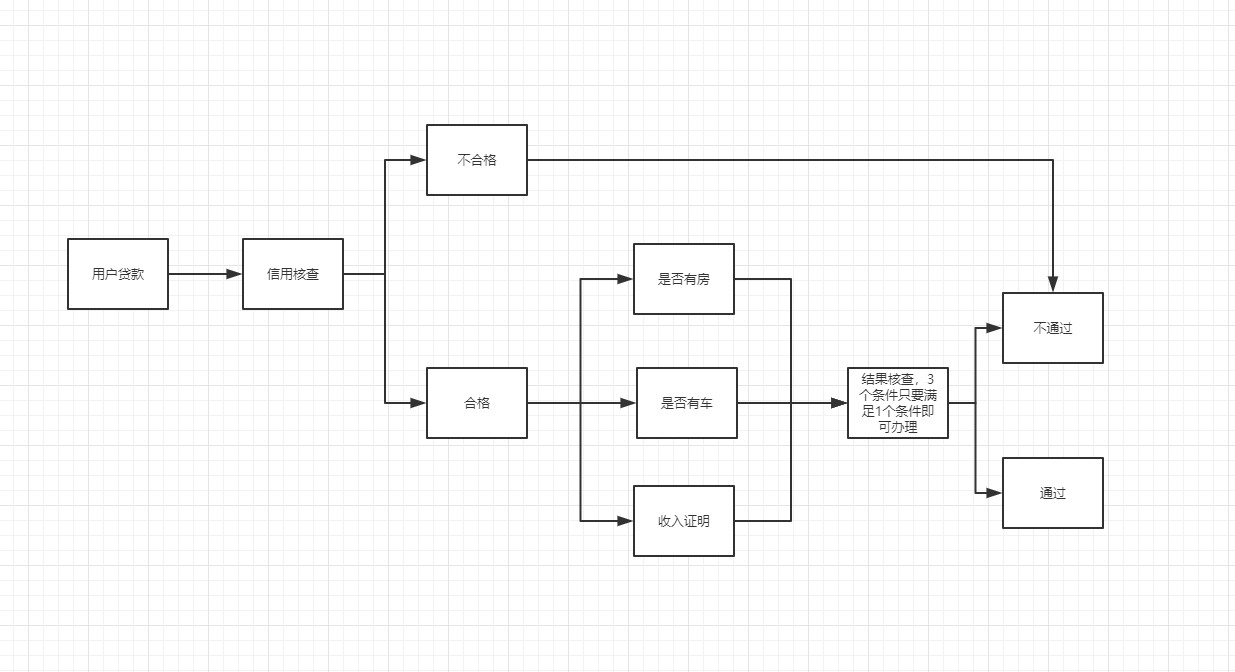
比如,贷款时会对用户进行核查,核查过程可能存在多个节点,并且节点可能会随着政策而不断改变,每个节点就相当于一个脚本,通过脚本的出口关键字来确定流程分支走向。
大概业务流程图如下:
代码实现部分
1、C#代码
using IronPython.Hosting;

using Microsoft.Scripting;

using Microsoft.Scripting.Hosting;

using System;

using System.Collections.Generic;

using System.IO;

using System.Linq;

using System.Text;

using System.Threading;

using System.Threading.Tasks;

namespace IronPython调用示例

{

    class Program

    {

        static void Main(string[] args)

        {

            string logPath = Path.Combine("logs", "log.txt");

            if (File.Exists(logPath))

            {

                File.Delete(logPath);

            }

            FileStream fileStream = new FileStream(logPath, FileMode.OpenOrCreate);

            //Console.WriteLine("------------------------以下是C#执行日志信息------------------------");

            try

            {

                string pythonCodePath = Path.Combine("templates", "pythonCode.txt");

                string sourceCodePath = Path.Combine("pys", "performer.py");

                if (!File.Exists(pythonCodePath))

                {

                    throw new Exception("Python模板不存在!");

                }

                if (!File.Exists(sourceCodePath))

                {

                    throw new Exception("Python源代码文件不存在!");

                }

                string[] pythonCodeContent = File.ReadAllText(pythonCodePath).Split(new string[] { "\r\n" }, StringSplitOptions.None);

                string[] sourceCodeContent = File.ReadAllText(sourceCodePath).Split(new string[] { "\r\n" }, StringSplitOptions.None);

                if (sourceCodeContent == null || sourceCodeContent.Length == 0)

                {

                    throw new Exception("Python代码不能为空!");

                }

                List<string> strList = new List<string>(pythonCodeContent);

                foreach (var item in sourceCodeContent)

                {

                    strList.Add("        " + item);

                }

                string codes = "";

                foreach (var s in strList)

                {

                    codes += s + Environment.NewLine;

                }

                ScriptEngine engine = Python.CreateEngine();

                ScriptSource source = engine.CreateScriptSourceFromString(codes);

                ScriptScope scope = engine.CreateScope();

                source.Execute(scope);

                dynamic performer = scope.GetVariable("performer");

                dynamic per = performer("1005");

                per.run();

                var out_param = per.out_param;

                Console.WriteLine(per.out_param);

                Console.ReadKey();

            }

            catch (Exception ex)

            {

                Console.WriteLine(ex.Message);

                Console.ReadKey();

            }

            finally

            {

                fileStream.Close();

                fileStream.Dispose();

            }

        }

    }

}
2、Python代码,模板(pythonCode.txt)
#.coding=utf-8

import db_manager

class performer():

    def __init__(self,in_param):

        self.out_param = ''

        self.in_param = in_param

    def run(self):
3、节点脚本(performer.py)
import datetime

def get_now_time():

    self.out_param = str(datetime.datetime.now())

def get_user_count():

    order_id = self.in_param

    sql = "select * from user_info where id = "+ order_id +""

    querys = db_manager.sqlserver().execute_query(sql)

    if(len(querys) >= 5):

        self.out_param = '业务办理失败,此用户在全国范围内办理号码已经超过了5个!'

    else:

        self.out_param = '初审通过,已进入人工审核阶段!'

get_now_time()

get_user_count()
注意,此项目需要安装IronPython,并且把里面bin目录复制到我们C# debug目录下,项目源代码:https://github.com/lishuyiba/PythonPerformer
C#内嵌Python架构实现的更多相关文章
- Selenium2+python自动化26-js处理内嵌div滚动条
前言 前面有篇专门用js解决了浏览器滚动条的问题,生活总是多姿多彩,有的滚动条就在页面上,这时候又得仰仗js大哥来解决啦. 一.内嵌滚动条 1.下面这张图就是内嵌div带有滚动条的样子,记住它的长相.
- python 内嵌函数, 闭包, 函数装饰器
一. 函数内嵌 闭包 在python中,函数可以作为返回值, 可以给变量赋值. 在python中, 内置函数必须被显示的调用, 否则不会执行. #!/usr/bin/env python #-*- ...
- Python内嵌函数与Lambda表达式
//2018.10.29 内嵌函数与lambda 表达式 1.如果在内嵌函数中需要改变全局变量的时候需要用到global语句对于变 量进行一定的说明与定义 2.内部的嵌套函数不可以直接在外部进行访问 ...
- 零基础入门学习Python(20)--函数:内嵌函数和闭包
知识点 global关键字 使用global关键字,可以修改全局变量: >>> count = 5 >>> def Myfun(): count = 10 prin ...
- python 里内嵌函数是可以修改外部环境里的变量的
python 里内嵌函数是可以修改外部环境里的变量的 关键是细节. 如果是简单变量类型, 那么不可以. 但是如果是容器类变量, 则没问题了. 代码如下: class G: pass def f(): ...
- Windows10内嵌Ubuntu子系统配置python开发环境
Windows10内嵌Ubuntu子系统配置python开发环境 安装pycharm. 到intellij idea网站下载Linux环境下载免费的pycharm,通过ubuntu子系统内部的/mnt ...
- Selenium2+python自动化26-js处理内嵌div滚动条【转载】
前言 前面有篇专门用js解决了浏览器滚动条的问题,生活总是多姿多彩,有的滚动条就在页面上,这时候又得仰仗js大哥来解决啦. 一.内嵌滚动条 1.下面这张图就是内嵌div带有滚动条的样子,记住它的长相.
- (十九)python 3 内嵌函数和闭包
内嵌函数:函数里又嵌套一个函数 def fun1(): print('fun1()在被调用') def fun2(): print('fun2()在被调用') fun2() 闭包: 闭包是函数里面嵌套 ...
- selenium3 + python - js 内嵌滚动处理
一.js内嵌html <!DOCTYPE html><html lang="en"><head> <meta charset=" ...
随机推荐
- flask编程规范
参考:http://dormousehole.readthedocs.org/en/latest/styleguide.html Flask遵循的是Pocoo的编程规范,Pocoo遵守PEP8的规 ...
- ArcMap基于Oracle出现sde.instances_util.check_instance_table_conflicts:: ORA-00942:表或视图不存在/table or view doesnot exist解决思路
SDE环境:Oracle12C+ArcMap10.7+WinServer2012 出现问题情况: 1.SDE可以连接正常打开,但就是无法新建要素.导入要素等: 1)在根目录新建或导入要素,弹出提示: ...
- Portal for ArcGIS启动失败,无法访问任何门户计算机,请联系您的系统管理员。
1.如题,打开Portal门户的时候,发现: 2.检查日志发现Portal for ArcGIS没启动,日志地址:D:\Program Files\ArcGIS\Portal\framework\se ...
- 2019 pycharm激活码
http://lookdiv.com 里面有,钥匙:1211268069 激活码网址里面有 lookdiv.com 里面的钥匙就是lookdiv.com
- flex属性flex-grow、flex-shrink、flex-basis
tip: 1)这些属性写在子元素中,作用于子元素(父元素中应设置display:flex) 2)作用是子元素如何分配父元素的空间 3) flex-grow 是扩展比率,当子元素宽度总和小于父元素宽度时 ...
- leetcode python丑数
# Leetcode 263 丑数### 题目描述 编写一个程序判断给定的数是否为丑数. 丑数就是只包含质因数 `2, 3, 5` 的**正整数**. **示例1:** 输入: 6 输出: true ...
- python面试题之阅读下面的代码,它的输出结果是什么?
class A(object): def go(self): print "go A go!" def stop(self): print "stop A stop!&q ...
- [ACM] POJ 1218 THE DRUNK JAILER (关灯问题)
版权声明:本文为博主原创文章,未经博主同意不得转载. https://blog.csdn.net/sr19930829/article/details/37727417 THE DRUNK JAILE ...
- HTMl中Meta标签和meta property=og标签含义
meta是head区的一个辅助性标签.其主要作用有:搜索引擎优化(SEO),定义页面使用语言,自动刷新并指向新的页面,实现网页转换时的动态效果,控制页面缓冲,网页定级评价,控制网页显示的窗口等! me ...
- 在MyEclipse中更换或修改svn的用户名和密码
1.通过删除SVN客户端的账号配置文件 (1)找到我们使用的客户端配置文件,Windows XP中的位置是在系统盘的Documents and Settings\Administrator\A ...