
css 导航菜单+下拉菜单
一、导航菜单
1.横向导航
代码如下:
<!doctype html>

<html>

<head>

    <meta charset="utf-8"/>

    <title>横向导航菜单</title>

    <style>

        body{

            margin:0;

        }

        ul{

            list-style-type:none;

            background-color: #f3f3f3;

            position: fixed;

            overflow:hidden;

            margin:0;

            padding:0;

            width:100%;

            position:fixed;

            border-bottom:1px solid #e7e7e7;

        }

        ul li{

            float:left;

            text-align: center;

        }

        ul li a{

            color:#666;

            text-decoration:none;

            padding:8px 16px;

            display:block;

            width:60px;

        }

        ul li a:hover{

            background-color:#ddd;

        }

        ul li:last-child{

            float:right;

            border-right:none;

        }

        li:last-child {

            border-bottom: none;

        }

        .active {

            background-color: #4CAF50;

            color: white;

        }

    </style>

    <link rel="stylesheet" type="text/css" href="demo02.css"/>

</head>

<body>

    <ul>

        <li><a href="#" class="active">首页</a></li>

        <li><a href="#">新闻</a></li>

        <li><a href="#">联系</a></li>

        <li style="f"><a href="#">关于</a></li>

    </ul>

    <div style="padding:20px;background-color:#1abc9c;height:1500px;">

        <h1>Fixed Top Navigation Bar</h1>

        <h2>Scroll this page to see the effect</h2>

        <h2>The navigation bar will stay at the top of the page while scrolling</h2>

        <p>Some text some text some text some text..</p>

        <p>Some text some text some text some text..</p>

        <p>Some text some text some text some text..</p>

        <p>Some text some text some text some text..</p>

        <p>Some text some text some text some text..</p>

        <p>Some text some text some text some text..</p>

        <p>Some text some text some text some text..</p>

        <p>Some text some text some text some text..</p>

        <p>Some text some text some text some text..</p>

        <p>Some text some text some text some text..</p>

        <p>Some text some text some text some text..</p>

        <p>Some text some text some text some text..</p>

        <p>Some text some text some text some text..</p>

        <p>Some text some text some text some text..</p>

        <p>Some text some text some text some text..</p>

        <p>Some text some text some text some text..</p>

        <p>Some text some text some text some text..</p>

        <p>Some text some text some text some text..</p>

        <p>Some text some text some text some text..</p>

        <p>Some text some text some text some text..</p>

    </div>

</body>

</html>
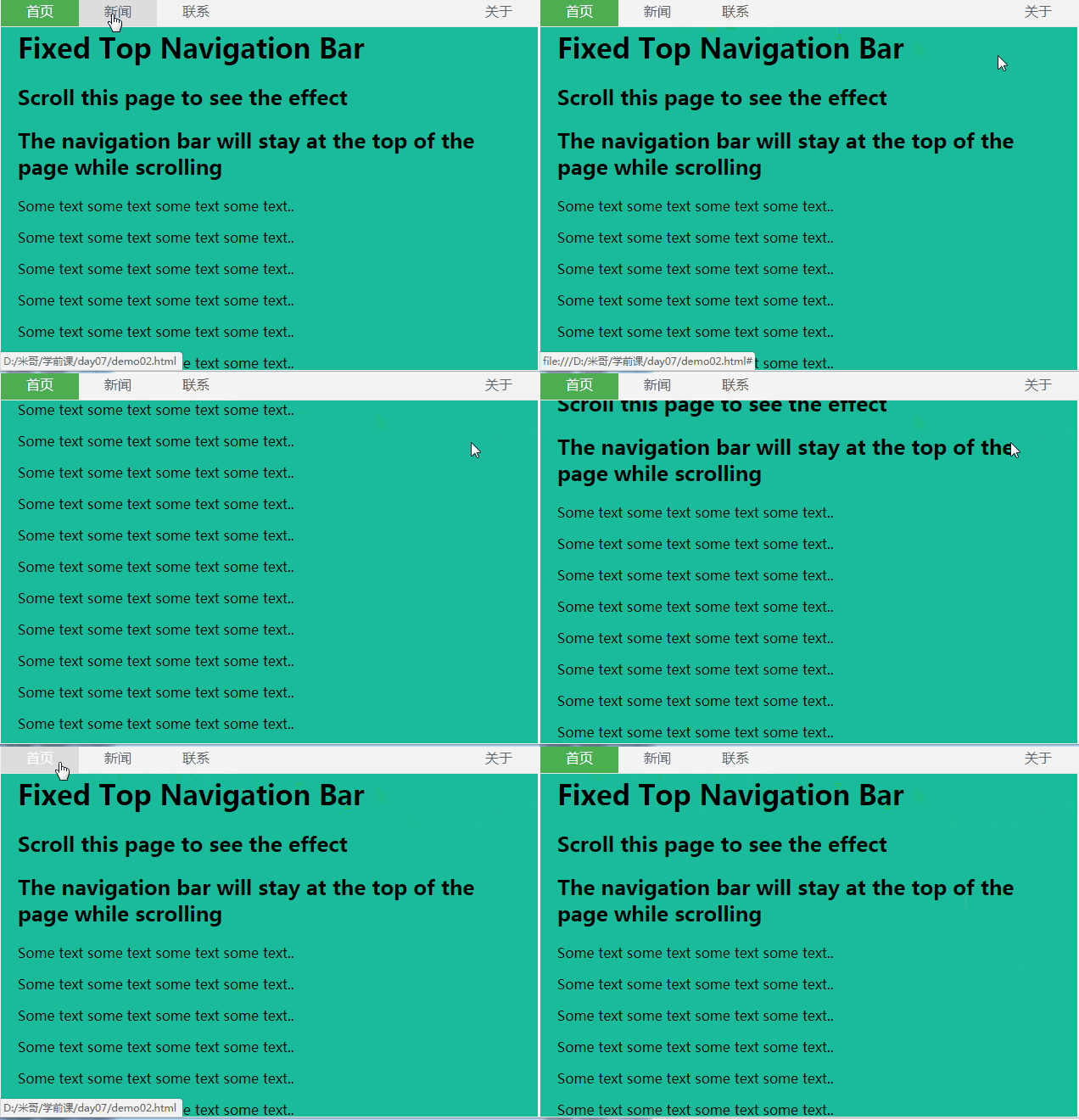
效果图:
2.竖向导航
代码如下:
<!doctype html>

<html>

<head>

    <meta charset="utf-8"/>

    <title></title>

    <style>

        body{

            margin:0;

        }

        ul{

            list-style-type:none;

            background-color: #f1f1f1;

            width: 25%;

            height: 100%;

            position: fixed;

            overflow: auto;

            margin:0;

            padding:0;

        }

        ul li{

             text-align: center;

        }

        ul li a{

            color:#000;

            text-decoration:none;

            padding:8px 16px;

            display:block;

        }

        li:last-child {

            border-bottom: none;

        }

        .active {

            background-color: #4CAF50;

            color: white;

        }

        div{

            margin-left:25%;

            padding:1px 16px;

            height:1000px;

        }

    </style>

</head>

<body>

    <ul>

        <li><a href="#" class="active">首页</a></li>

        <li><a href="#">新闻</a></li>

        <li><a href="#">联系</a></li>

        <li><a href="#">关于</a></li>

    </ul>

    <div>

        <h2>Fixed Full-height Side Nav</h2>

          <h3>Try to scroll this area, and see how the sidenav sticks to the page</h3>

          <p>Notice that this div element has a left margin of 25%. This is because the side navigation is set to 25% width. If you remove the margin, the sidenav will overlay/sit on top of this div.</p>

          <p>Also notice that we have set overflow:auto to sidenav. This will add a scrollbar when the sidenav is too long (for example if it has over 50 links inside of it).</p>

          <p>Some text..</p>

          <p>Some text..</p>

          <p>Some text..</p>

          <p>Some text..</p>

          <p>Some text..</p>

          <p>Some text..</p>

          <p>Some text..</p>

</div>

</body>

</html>
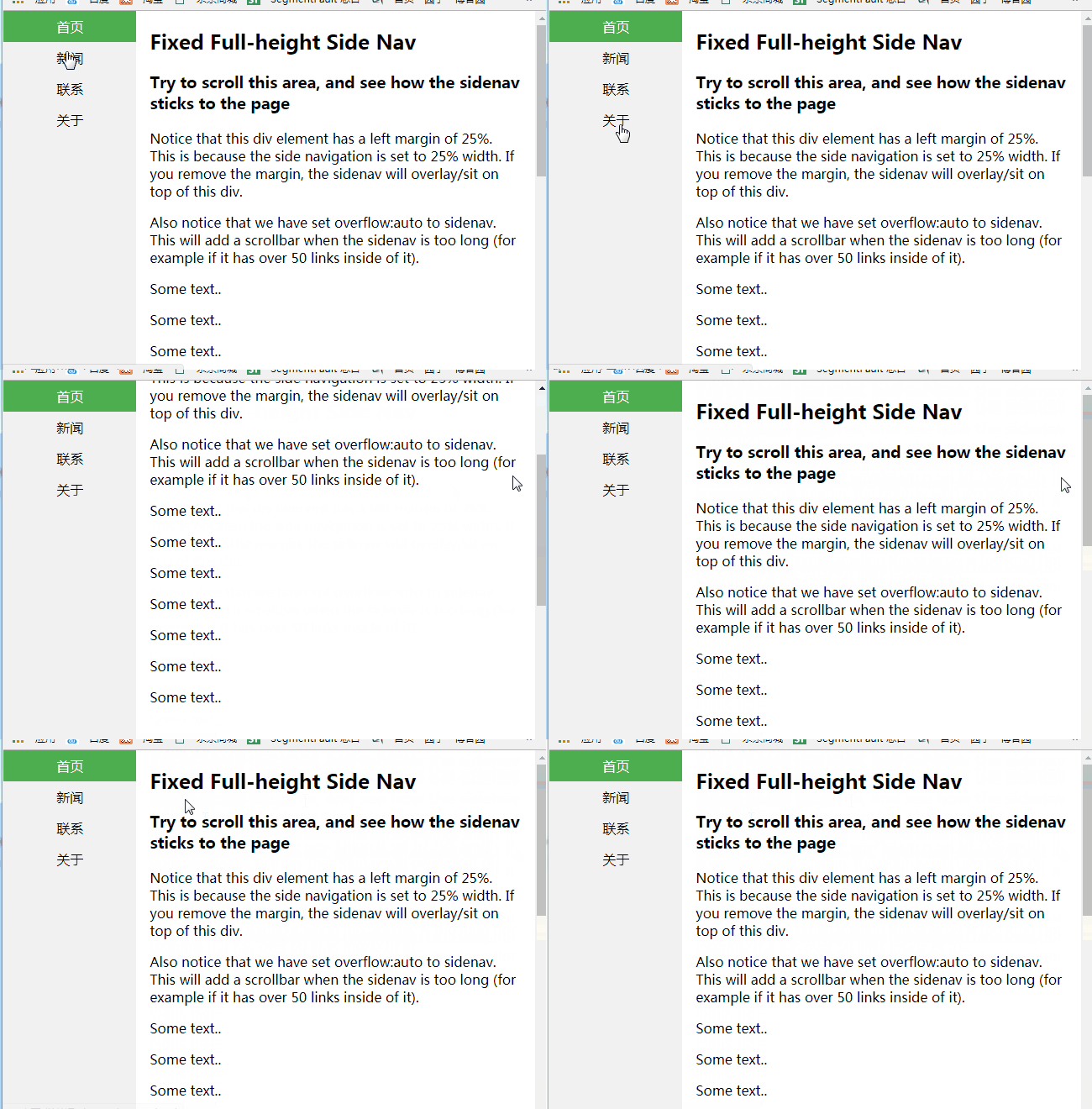
效果图:
二、下拉菜单
- display:none和display:block切换实现
代码如下:
<!doctype html>

<html>

<head>

    <meta charset="utf-8"/>

    <title></title>

    <style>

        body{

            margin:0;

            text-align:center;

        }

        .dropdown{

            background-color:green;

            text-align:center;

            padding:20px;

            display:inline-block;

            cursor:pointer;

            position:relative;

        }

        .di{

            display:none;

            position:absolute;

            top:61px;

            left:0;

        }

        .di ul{

            list-style:none;

            padding:0;

            margin:0;

            background-color: #f9f9f9;

        }

        .di ul li{

            min-width:104px;

            padding:10px 15px;

        }

        .dropdown:hover{

            background-color:#3e8e41

        }

        .dropdown:hover .di{

            display:block;

        }

        .di ul li:hover{

            background-color: #f1f1f1

        }

    </style>

</head>

<body>

    <div class="dropdown">

        <span>

            下拉菜单

        </span>

        <div class="di">

            <ul>

                <li>你好!</li>

                <li>我好!</li>

                <li>大家好!</li>

            </ul>

        </div>

    </div>

</body>

</html>
效果图:

持续更新,欢迎各位指教!
css 导航菜单+下拉菜单的更多相关文章
- 4 CSS导航栏&下拉菜单&属性选择器&属性和值选择器
CSS导航栏 熟练使用导航栏,对于任何网站都非常重要 使用CSS你可以转换成好看的导航栏而不是枯燥的HTML菜单 垂直导航栏: <!DOCTYPE html> <html> & ...
- Bootstrap框架(基础篇)之按钮,网格,导航栏,下拉菜单
一,按钮 注意:虽然在Bootstrap框架中使用任何标签元素都可以实现按钮风格,但个人并不建议这样使用,为了避免浏览器兼容性问题,个人强烈建议使用button或a标签来制作按钮. 框架中提供了基础按 ...
- 织梦DedeCMS v5.7 实现导航条下拉菜单
首先将下面这段代码贴到templets\default\footer.htm文件里(只要在此文件里就行,位置无所谓) <</span>script type='text/javasc ...
- 经典的 div + css 鼠标 hover 下拉菜单
经典的 div + css 鼠标 hover 下拉菜单 效果图: 源码: <html> <head> <meta charset="utf-8"> ...
- Bootstrap历练实例:导航内下拉菜单的用法
<!DOCTYPE html><html><head><meta http-equiv="Content-Type" content=&q ...
- CSS3——对齐 组合选择符 伪类 伪元素 导航栏 下拉菜单
水平&垂直对齐 元素居中对齐 .center { margin: auto; width: 50%; border: 3px solid green; padding: 10px; } 文本 ...
- 更改SharePoint 2010 顶部导航为下拉菜单样式
更改SharePoint 2010 顶部导航为下拉菜单样式 最后的效果图: 假如一个网站集顶级站点下面有子网站:sub site1,该子站点下面又有两个子站点:sub site1_1,sub si ...
- Css之导航栏下拉菜单
Css: /*下拉菜单学习-2017.12.17 20:17 added by ldb*/ ul{ list-style-type:none; margin:; padding:; overflow: ...
- CSS写动态下拉菜单 -----2017-03-27
动态网站第一步:动态下拉菜单 关键点: overflow:hidden max-height xx:hover {} 设置当鼠标移上之后的效果 transition: 设置过度时间 cursor: ...
随机推荐
- JPA project Change Event Handler问题解决
eclipse使用的是有经常会出现JPA project Change Event Handler(watering)很卡 网上的解决办法是 [Help > Installation Detai ...
- css如何让<a>标签,根据输入的内容长度调整宽度,宽度自适应,那位大仙帮帮忙
css如何让<a>标签,根据输入的内容长度调整宽度,宽度自适应,那位大仙帮帮忙 5 样式 .ceshi{float:left; margin-left:13px; width:180px; ...
- 用 Flask 来写个轻博客 (20) — 实现注册表单与应用 reCAPTCHA 来实现验证码
Blog 项目源码:https://github.com/JmilkFan/JmilkFan-s-Blog 目录 目录 前文列表 reCAPTCHA 应用 reCAPTCHA 前文列表 用 Flask ...
- DomainObjectUtility
using System; using System.Collections; using System.Collections.Generic; using System.Collections.S ...
- nginx相关总结
1. Nginx 无法启动解决方法 在查看到 logs 中报了如下错误时: 0.0.0.0:80 failed (10013: An attempt was made to access a sock ...
- vim如何达到高效
参考:http://blog.jobbole.com/44891/ 搜索技巧 1. 使用*快速查询当前光标所在的单词 然后使用n快速找到下一个查询结果: 使用N快速找到上一个查询结果 2. 在.vim ...
- jQuery设置checkbox 为选中状态
1设置第一个checkbox 为选中值$('input:checkbox:first').attr("checked",'checked');或者$('input:checkbox ...
- vue2.0---最近总结
1.用脚手架给运维部门搞了个小东西,重新温习了一遍牛逼又方便的vue-cli. webpack的东西不必关心太多,而且webpack最近也是出了最新的4.0版本.还是改变挺多的,对一些代码的格式要求更 ...
- 搭建干净的Mac开发学习环境
docker + linux + gcc/g++ https://www.jianshu.com/p/d113db99fe24 https://www.jianshu.com/p/d26140d20c ...
- 对python中的__name__的理解
一开始学习python的时候,不理解python中的__name__的用途,一致感觉__name__的返回结果就是__main__ 今天系统的看了一下,才理解过来,__name__真正的用处是用在使用 ...