
Winform的窗体美化心酸路
我想做一位狂热的程序猿粪子!
其实一直都很想做点什么,工作原因林林种种导致停止了前进的脚步。
有时会为自己的一个目标狂热,但经常发觉激情过后更多的总是为自己找借口!
最近感觉奔三将近。逐有感而发,不能再这样下去了。
即拿出以前自己为那狂热好一阵的东西继续下去。
一直想为自己开发一套控件库,但感觉精力确实有限,也没那么多时间,逐渐浇灭了这样的织热。
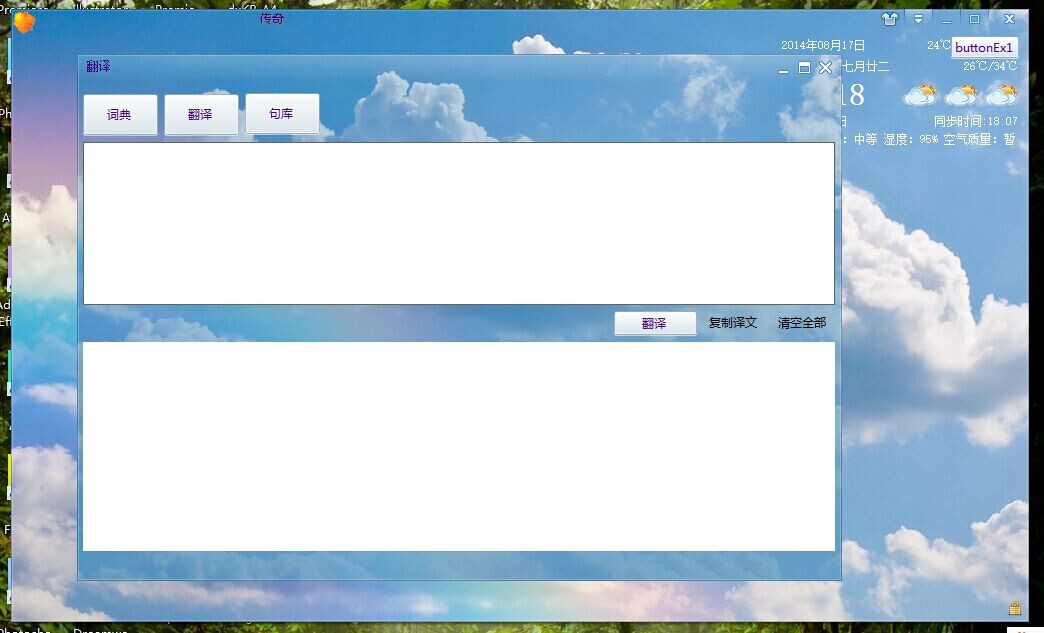
这是套窗体皮肤,断断续续所花费的时间也不少。
下面我介绍下我的这套皮肤,其实也算不上一套,只算是个开始吧。
有人可能会想这不就是边框隐藏再绘制客户区么,这是目前大部人会选择的方案。但我这是连同客户区和边框一同绘的效果。
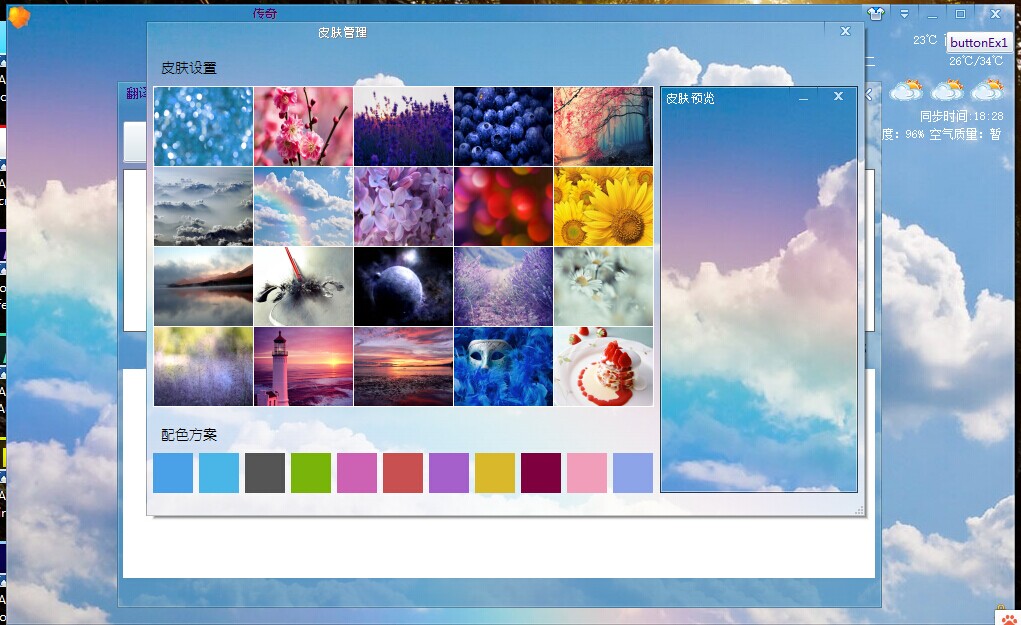
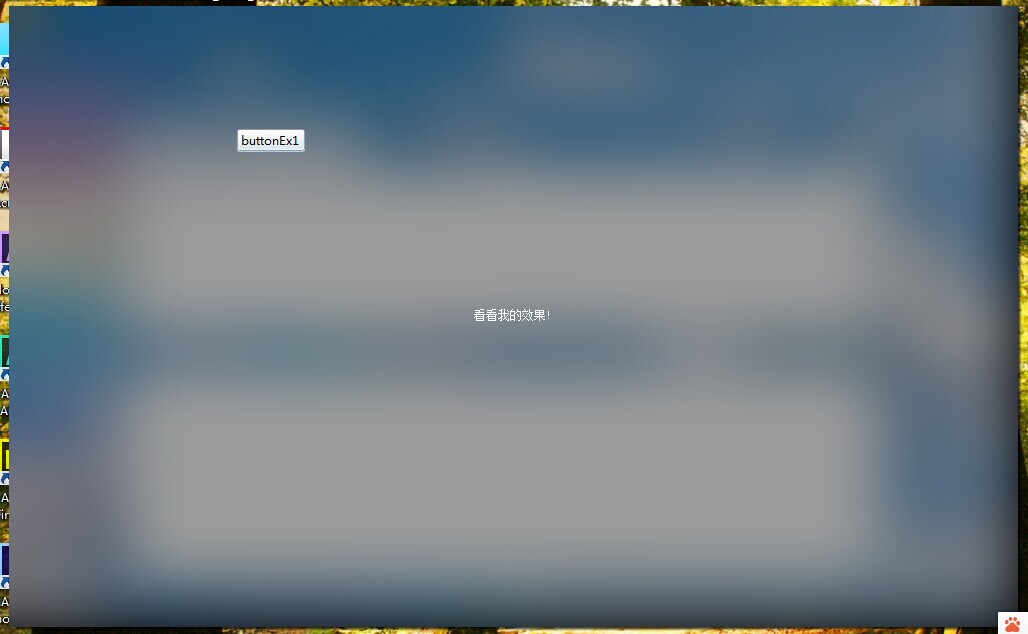
这种实现方式难度大些,更关键的是比较耗时,加之当时对有些消息的不了解,在一些问题上花费了大量的时间。
废话不多说帖代码
protected virtual void OnNcPaint(PaintEventArgs e)

        {

            Graphics dc = e.Graphics;

            dc.PageUnit = GraphicsUnit.Pixel;

            Rectangle iconArea = new Rectangle(, , this.Icon.Width, this.Icon.Height);

            if (this.ShowIcon && iconArea.IntersectsWith(e.ClipRectangle))

                dc.DrawIcon(this.Icon, new Rectangle(, , this.IconSize.Width, this.IconSize.Height));

            Rectangle textArea = this.CaptionArea;

            if (textArea.IntersectsWith(e.ClipRectangle))

            {

                StringFormat strFmt = new StringFormat();

                switch (this.CaptionAlign)

                {

                    case ContentAlignment.TopLeft:

                        strFmt.Alignment = StringAlignment.Near;

                        strFmt.LineAlignment = StringAlignment.Near;

                        if (this.ShowIcon) textArea.X += this.IconSize.Width;

                        textArea.X += this.CaptionOffset.X;

                        textArea.Y += this.captionOffset.Y;

                        break;

                    case ContentAlignment.TopCenter:

                        strFmt.Alignment = StringAlignment.Center;

                        strFmt.LineAlignment = StringAlignment.Near;

                        break;

                    case ContentAlignment.TopRight:

                        strFmt.Alignment = StringAlignment.Far;

                        strFmt.LineAlignment = StringAlignment.Near;

                        textArea.Width = this.CaptionButtonOffset;

                        textArea.Width -= this.CaptionOffset.X;

                        textArea.Height -= this.CaptionOffset.Y;

                        break;

                    case ContentAlignment.MiddleLeft:

                        strFmt.Alignment = StringAlignment.Near;

                        strFmt.LineAlignment = StringAlignment.Center;

                        if (this.ShowIcon) textArea.X += this.IconSize.Width;

                        textArea.X += this.CaptionOffset.X;

                        textArea.Y += this.captionOffset.Y;

                        break;

                    case ContentAlignment.MiddleCenter:

                        strFmt.Alignment = StringAlignment.Center;

                        strFmt.LineAlignment = StringAlignment.Center;

                        break;

                    case ContentAlignment.MiddleRight:

                        strFmt.Alignment = StringAlignment.Far;

                        strFmt.LineAlignment = StringAlignment.Center;

                        textArea.Width = this.CaptionButtonOffset;

                        break;

                    case ContentAlignment.BottomLeft:

                        strFmt.Alignment = StringAlignment.Near;

                        strFmt.LineAlignment = StringAlignment.Far;

                        if (this.ShowIcon) textArea.X += this.IconSize.Width;

                        textArea.X += this.CaptionOffset.X;

                        textArea.Y += this.captionOffset.Y;

                        break;

                    case ContentAlignment.BottomCenter:

                        strFmt.Alignment = StringAlignment.Center;

                        strFmt.LineAlignment = StringAlignment.Far;

                        break;

                    case ContentAlignment.BottomRight:

                        strFmt.Alignment = StringAlignment.Far;

                        strFmt.LineAlignment = StringAlignment.Far;

                        textArea.Width = this.CaptionButtonOffset;

                        textArea.Width -= this.CaptionOffset.X;

                        textArea.Height -= this.CaptionOffset.Y;

                        break;

                }

                using (SolidBrush brush = new SolidBrush(this.ForeColor))

                {

                    //dc.DrawString(this.Text, this.Font, brush, textArea, strFmt);

                    TextDraw.DrawWordArtEffect(dc, this.Text, this.Font, this.ForeColor, Color.Black, textArea, strFmt, WordArtEffectStyle.shadow);

                }

            }

        }

protected override void OnPaintBackground(PaintEventArgs e)

        {

            //透明画刷填充

            if (this.backgroundPattern == null)

            {

                this.backgroundPattern = DrawWinBackgroundPattern();

            }

            e.Graphics.DrawImage(this.backgroundPattern, e.ClipRectangle,

                new Rectangle(e.ClipRectangle.X, this.CaptionHeight + e.ClipRectangle.Y,

                    e.ClipRectangle.Width, e.ClipRectangle.Height), GraphicsUnit.Pixel);

        }

protected override void WndProc(ref Message m)

        {

            switch ((WindowsMessages)m.Msg)

            {

                case WindowsMessages.WM_NCCALCSIZE:

                    this.WmNcCalcSize(ref m);

                    return;

                case WindowsMessages.WM_NCACTIVATE:

                    this.WmNcActivate(ref m);

                    return;

                case WindowsMessages.WM_NCUAHDRAWCAPTION:

                    return;

                case WindowsMessages.WM_NCUAHDRAWFRAME:

                    return;

                case WindowsMessages.WM_NCPAINT:

                    this.WmNcPaint(ref m);

                    return;

                case WindowsMessages.WM_NCHITTEST:

                    this.WmNcHitTest(ref m);

                    return;

                case WindowsMessages.WM_NCLBUTTONDBLCLK:

                    if (this.MaximizeBox && this.MaximumSize.IsEmpty)

                        base.WndProc(ref m);

                    return;

                case WindowsMessages.WM_NCLBUTTONDOWN:

                    this.WmNcLButtonDown(ref m);

                    return;

                case WindowsMessages.WM_NCLBUTTONUP:

                    this.WmNcLButtonUP(ref m);

                    return;

                case WindowsMessages.WM_NCMOUSEMOVE:

                    this.WmNcMouseMove(ref m);

                    return;

                case WindowsMessages.WM_NCMOUSELEAVE:

                    this.WmNcMouseLeave(ref m);

                    return;

                case WindowsMessages.WM_LBUTTONDOWN:

                    this.WmLButtonDown(ref m);

                    return;

                case WindowsMessages.WM_GETMINMAXINFO:

                    this.WmGetMinMaxInfo(ref m);

                    return;

                default:

                    base.WndProc(ref m);

                    return;

            }

        }
protected virtual Image DrawWinBackgroundPattern()

        {

            Bitmap img = new Bitmap(this.Width, this.Height);

            using (Graphics gp = Graphics.FromImage(img))

            {

                gp.SmoothingMode = SmoothingMode.AntiAlias;

                gp.PageUnit = GraphicsUnit.Pixel;

                gp.Clear(this.BackColor);

                if (this.BackgroundImage == null)

                {

                    using (LinearGradientBrush brush = new LinearGradientBrush(this.CaptionArea, ColorDraw.ColorOffset(this.BackColor, ),

                        Color.FromArgb(, , , ), LinearGradientMode.Vertical))

                    {

                        gp.FillRectangle(brush, this.CaptionArea);

                    }

                }

                else

                {

                    switch (this.BackgroundImageLayout)

                    {

                        case ImageLayout.None:

                            {

                                #region None

                                int gradientX = Math.Min(this.BackgroundImage.Width, );

                                int gradientY = Math.Min(this.BackgroundImage.Height, );

                                gp.DrawImage(this.BackgroundImage, new Point());

                                Rectangle rightGradientReg = new Rectangle(this.BackgroundImage.Width - gradientX, , gradientX, this.BackgroundImage.Height);

                                Rectangle bottomGradientReg = new Rectangle(, this.BackgroundImage.Height - gradientY, this.BackgroundImage.Width, gradientY);

                                using (LinearGradientBrush hbrush = new LinearGradientBrush(rightGradientReg, Color.FromArgb(, this.BackColor), Color.FromArgb(, this.BackColor), 0F))

                                {

                                    rightGradientReg.X += ;

                                    gp.FillRectangle(hbrush, rightGradientReg);

                                }

                                using (LinearGradientBrush vbrush = new LinearGradientBrush(bottomGradientReg, Color.FromArgb(, this.BackColor), Color.FromArgb(, this.BackColor), 90F))

                                {

                                    gp.FillRectangle(vbrush, bottomGradientReg);

                                }

                                #endregion

                            }

                            break;

                        case ImageLayout.Stretch:

                            {

                                #region Stretch

                                int gradientX = Math.Min(this.Width, );

                                int gradientY = Math.Min(this.Height, );

                                gp.DrawImage(this.BackgroundImage, new Rectangle(Point.Empty, this.Size),

                                    new Rectangle(, , Math.Min(this.BackgroundImage.Width, this.Width), Math.Min(this.BackgroundImage.Height, this.Height)), GraphicsUnit.Pixel);

                                Rectangle rightGradientReg = new Rectangle(this.Width - gradientX, , gradientX, this.Height);

                                Rectangle bottomGradientReg = new Rectangle(, this.Height - gradientY, this.Width, gradientY);

                                Color rightside = BitmapDraw.GetBitmapEdgeColor(this.BackgroundImage, BorderSide.Right);

                                Color bottomside = BitmapDraw.GetBitmapEdgeColor(this.BackgroundImage, BorderSide.Bottom);

                                using (LinearGradientBrush hbrush = new LinearGradientBrush(rightGradientReg, Color.FromArgb(, rightside), Color.FromArgb(, rightside), 0F))

                                {

                                    rightGradientReg.X += ;

                                    gp.FillRectangle(hbrush, rightGradientReg);

                                }

                                using (LinearGradientBrush vbrush = new LinearGradientBrush(bottomGradientReg, Color.FromArgb(, bottomside), Color.FromArgb(, bottomside), 90F))

                                {

                                    gp.FillRectangle(vbrush, bottomGradientReg);

                                }

                                #endregion

                            }

                            break;

                        case ImageLayout.Tile:

                            {

                                #region Tile

                                gp.DrawImage(this.BackgroundImage, new Rectangle(Point.Empty, this.Size),

                                    new Rectangle(Point.Empty, this.BackgroundImage.Size), GraphicsUnit.Pixel);

                                #endregion

                            }

                            break;

                        case ImageLayout.Center:

                            {

                                #region Center

                                Rectangle targetRect = new Rectangle(Point.Empty, this.Size);

                                Rectangle desRect = new Rectangle(Point.Empty, this.BackgroundImage.Size);

                                if (this.Width > this.BackgroundImage.Width)

                                {

                                    targetRect.X = (this.Width - this.BackgroundImage.Width) / ;

                                    targetRect.Width = this.BackgroundImage.Width;

                                }

                                else if (this.Width < this.BackgroundImage.Width)

                                {

                                    desRect.X = (this.BackgroundImage.Width - this.Width) / ;

                                    desRect.Width = this.Width;

                                }

                                if (this.Height > this.BackgroundImage.Height)

                                {

                                    targetRect.Y = (this.Height - this.BackgroundImage.Height) / ;

                                    targetRect.Height = this.BackgroundImage.Height;

                                }

                                else if (this.Height < this.BackgroundImage.Height)

                                {

                                    desRect.Y = (this.BackgroundImage.Height - this.Height) / ;

                                    desRect.Height = this.Height;

                                }

                                gp.DrawImage(this.BackgroundImage, targetRect, desRect, GraphicsUnit.Pixel);

                                int gradientW = Math.Min(this.BackgroundImage.Width, );

                                int gradientH = Math.Min(this.BackgroundImage.Height, );

                                Rectangle leftGradientReg = new Rectangle(targetRect.X - , targetRect.Y, gradientW, targetRect.Height);

                                Rectangle topGradientReg = new Rectangle(targetRect.X, targetRect.Y, targetRect.Width, gradientH);

                                Rectangle rightGradientReg = new Rectangle(targetRect.Width - gradientW + targetRect.X, targetRect.Y, gradientW, targetRect.Height);

                                Rectangle bottomGradientReg = new Rectangle(targetRect.X, targetRect.Height - gradientH + targetRect.Y, targetRect.Width, gradientH);

                                using (LinearGradientBrush lhbrush = new LinearGradientBrush(leftGradientReg, Color.FromArgb(, this.BackColor), Color.FromArgb(, this.BackColor), 0F))

                                {

                                    gp.FillRectangle(lhbrush, leftGradientReg);

                                }

                                using (LinearGradientBrush rhbrush = new LinearGradientBrush(rightGradientReg, Color.FromArgb(, this.BackColor), Color.FromArgb(, this.BackColor), 0F))

                                {

                                    rightGradientReg.X++;

                                    gp.FillRectangle(rhbrush, rightGradientReg);

                                }

                                using (LinearGradientBrush tvbrush = new LinearGradientBrush(topGradientReg, Color.FromArgb(, this.BackColor), Color.FromArgb(, this.BackColor), 90F))

                                {

                                    topGradientReg.Y--;

                                    gp.FillRectangle(tvbrush, topGradientReg);

                                }

                                using (LinearGradientBrush bvbrush = new LinearGradientBrush(bottomGradientReg, Color.FromArgb(, this.BackColor), Color.FromArgb(, this.BackColor), 90F))

                                {

                                    gp.FillRectangle(bvbrush, bottomGradientReg);

                                }

                                #endregion

                            }

                            break;

                        case ImageLayout.Zoom:

                            {

                                #region Zoom

                                gp.DrawImage(this.BackgroundImage, Point.Empty);

                                Rectangle winRound = new Rectangle(Point.Empty, this.Size);

                                using (LinearGradientBrush brush = new LinearGradientBrush(winRound, Color.FromArgb(, this.BackColor),

                                    Color.FromArgb(, this.BackColor), LinearGradientMode.Vertical))

                                {

                                    gp.FillRectangle(brush, winRound);

                                }

                                #endregion

                            }

                            break;

                        default:

                            {

                                gp.DrawImage(this.BackgroundImage,

                                    new Rectangle(, , this.Size.Width, this.Size.Height),

                                    new Rectangle(, , this.BackgroundImage.Width, this.BackgroundImage.Height), GraphicsUnit.Pixel);

                            }

                            break;

                    }

                }

                //绘制设计器时标题栏分界线

                if (this.DesignMode && this.CaptionHeight > )

                {

                    using (Pen pen = new Pen(Color.FromArgb(, , )))

                        gp.DrawLine(pen, , this.CaptionHeight - , this.Width - , this.CaptionHeight - );

                }

                //绘制边框

                if (this.BorderWidth > )

                {

                    using (Pen pen = new Pen(Color.FromArgb(, Color.Black), this.BorderWidth))

                    {

                        Rectangle outborderline = Rectangle.FromLTRB(, , this.Size.Width - , this.Size.Height - );

                        gp.DrawPath(pen, VectorDraw.CreateRoundRect(outborderline, this.CircularBeadRadius, BorderSide.None));

                    }

                }

                if (this.BorderLightWidth > )

                {

                    using (Pen pen = new Pen(Color.FromArgb(, Color.White), this.BorderLightWidth))

                    {

                        Rectangle inborderline = Rectangle.FromLTRB(this.BorderWidth, this.BorderWidth, this.Size.Width - this.BorderWidth * , this.Size.Height - this.BorderWidth * );

                        gp.DrawPath(pen, VectorDraw.CreateRoundRect(inborderline, this.CircularBeadRadius, BorderSide.None));

                    }

                }

                if (this.NCPaint != null)

                    this.NCPaint.Invoke(new PaintEventArgs(gp, this.ClipNcRectangle));

            }

            return img;

        }
重绘非客户区,大家可能注意到上面的代码
case WindowsMessages.WM_NCUAHDRAWCAPTION:

return;

case WindowsMessages.WM_NCUAHDRAWFRAME:

return;
此处消息什么也不处理,也许是历史年代原因,上述消息是响应win98的机制,窗体非客户区的重绘会导致头部出现黑色块,我们将之屏蔽即可。
PS:当时的我可在这坑了很长时间。
大家都知道,其实winform最大的瓶颈就是性能!
但是导致重绘的原因很多,如,鼠标移动,窗体移动,大小改变等以及还有我们的主观控制。
所以我们应当尽可能的减少重绘次,以及增加局部重绘的条件。
头次写博客,没什么语言组织表达力,这篇博文会慢慢更新,请大家关注!
欢迎加入我的QQ群:56465289(C#技术交流群)
Winform的窗体美化心酸路的更多相关文章
- WinForm 窗体属性 窗体美化
WinForm是·Net开发平台中对Windows Form的一种称谓. Windows窗体的一些重要特点如下: 功能强大:Windows窗体可用于设计窗体和可视控件,以创建丰富的基于Windows的 ...
- C#的WinForm窗体美化
为了帮助用户追求美观,.NET 4.0 专门为对此有需求的人提供了IrisSkin4.dll皮肤引用集,里面封装了许多对窗体重新描绘的方法,再搭配上WinForm特有的 .ssk 文件,就可以实现窗体 ...
- Winform子窗体刷新父窗体
调用窗体(父):Form1,被调用窗体(子):Form2方法1: 所有权法//Form1://需要有一个公共的刷新方法public void Refresh_Method(){//...} ...
- Winform跨窗体操作控件(使用委托)
Winform跨窗体操作控件是winform开发中很常见的形式,最常见且简单有效的方式便是使用委托的方式来进行操作,下面我将通过一个小实例来说明如何使用委托跨窗体实现控件操作. 实例介绍:两个窗体,F ...
- WinForm 设置窗体启动位置在活动屏幕右下角
WinForm 设置窗体启动位置在活动屏幕右下角 在多屏幕环境下, 默认使用鼠标所在的屏幕 1. 设置窗体的 StartPosition 为 FormStartPosition.Manual. 2. ...
- WinForm之窗体应用程序
WinForm之窗体应用程序 基本简单数据库操作(增删改查) using System; using System.Collections.Generic; using System.Windows. ...
- WinForm开发,窗体显示和窗体传值相关知识总结
主窗体中代码: public partial class Form1 : Form { public Form1() { InitializeComponent(); } private void b ...
- C# winform中 窗体缩放自适应的方法(不同电脑/不同分辨率)
C# winform中 窗体缩放自适应的方法(不同电脑/不同分辨率) 窗体缩放是一个困扰我多时的问题,为了解决这个问题,我从网上找了很多相关的资料,很多人说用Anchor和Dock属性,但是我试了 ...
- winform圆角窗体实现
winform圆角窗体实现 1.窗体的FormBorderStyle设置成None,不要控制边框 2.TransparencyKey和BackColor颜色设置成相同的,这样,窗体就透明了 3.以此为 ...
随机推荐
- PHP下获取上个月、下个月、本月的日期(strtotime,date)
今天写程序的时候,突然发现了很早以前写的获取月份天数的函数,经典的switch版,但是获得上月天数的时候,我只是把月份-1了,估计当时太困了吧,再看到有种毛骨悚然的感觉,本来是想再处理一下的,但是一想 ...
- subline的安装
简单的安装方法 使用Ctrl+`快捷键或者通过View->Show Console菜单打开命令行,粘贴如下代码: import urllib.request,os; pf = 'Package ...
- Asp.Net 之 Web.config下Authorization节点
WebConfig Authorization 节点 授权的目的是确定是否应该授予某个标识对给定资源请求的访问权限类型.有两种基本方式来授予对给定资源的访问权限: [1] 文件授权 文件授权由 Fil ...
- Asp.Net 之 服务器端控件与客户端控件的区别
服务器控件,即Asp.Net的控件,控制这些控件必须经过服务器处理,然后响应用户,代码在服务器端解释执行,生成根据用户的浏览器而定的html元素. 客户端控件,即普通Html控件,使用script控制 ...
- A real ROCA using Bootstrap, jQuery, Thymeleaf, Spring HATEOAS and Spring MVC
http://www.tuicool.com/articles/ENfe2u https://github.com/tobiasflohre/movie-database What is the be ...
- Android 自学之网格试图(GridView)和图片切换器(ImageSwitcher)功能和用法
网格试图(GridView)用于在界面上按行,列分布的方式来显示多个组件. GridView和ListView有共同的父类:AbsListView,因此GridView和ListView具有一定的相似 ...
- java 调用OpenOffice将word格式文件转换为pdf格式
一:环境搭建 OpenOffice 下载地址http://www.openoffice.org/ JodConverter 下载地址http://sourceforge.net/projects/jo ...
- Acrobat 2015 win32破解版
Acrobat 2015 win32破解版,带破解补丁dll覆盖即可 百度云盘:http://pan.baidu.com/s/1i4tFnNJ
- HttpClient(4.3.5) - Exception Handling
HttpClient can throw two types of exceptions: java.io.IOException in case of an I/O failure such as ...
- UITableView详解(转)
首先.对UITableView进行讲解,下面有对它进行实际的应用 UITableView 显示大型内容的列表 单行,多列 垂直滚动,没有水平滚动 大量的数据集 性能强大,而且普遍存在于iPhone的应 ...