
AutoLayout的三种设置方式之——NSLayoutConstraint代码篇
AutoLayout是从IOS 6开始苹果引入来取代autoresizing的新的布局技术,该技术有三种设置方式,等下我来为大家一一叙述一下。
在说三种设置方式前,我们先简单的说一下autolayout能够设置哪些行为。
1.视图的大小(即视图的绝对大小)。
2.视图的位置(视图相对于父视图或者兄弟视图的位置)。
3.视图的对齐方式(相对于父视图或者相对于兄弟视图)。
可以看到autolayout相比autoresizing技术来说要灵活的多,该技术有很多布局的约束设置。这次主要讲的用代码来设置AutoLayout,代码向我们需要添加autoLayout视图使用该方法
+(instancetype)constraintWithItem:(id)view1 attribute:(NSLayoutAttribute)attr1 relatedBy:(NSLayoutRelation)relation toItem:(id)view2 attribute:(NSLayoutAttribute)attr2 multiplier:(CGFloat)multiplier constant:(CGFloat)c;
该方法实际上就是满足一个数学关系
item1 =(>=,<=) multiplier * item2 + constant。
参数说明:
view1:第一个视图即item1。
attr1:是第一个视图选择的属性
relation:即中间的关系(= , >= , <=)
view2:第二个视图即item2。
attr2:是第二个视图选择的属性
c:就是常熟constant。
举个简单的例子来说我们想设置第一个视图的宽度是第二个视图宽度的2倍,我们可以这样写:
[self.view addConstraint:[NSLayoutConstraint constraintWithItem:view2 attribute:NSLayoutAttributeWidth relatedBy:NSLayoutRelationEqual toItem:view1 attribute:NSLayoutAttributeWidth multiplier:2 constant:0]];
可以看到这里我们item1是view1,item2是view2,attr1是attribute:NSLayoutAttributeWidth,attr2是attribute:NSLayoutAttributeWidth,relation是NSLayoutRelationEqual,mutiplier 是2,constant是0.
带入上面的公式得:
第一个视图(宽度) = 2 * 第二个视图(宽度) + 0
如下是我们所有可以控制的属性:
| NSLayoutAttributeLeft | 视图的左边 |
| NSLayoutAttributeRight | 视图的右边 |
| NSLayoutAttributeTop | 视图的上边 |
| NSLayoutAttributeBottom | 视图的下边 |
| NSLayoutAttributeLeading | 视图的前边 |
| NSLayoutAttributeTrailing | 视图的后边 |
| NSLayoutAttributeWidth | 视图的宽度 |
| NSLayoutAttributeHeight | 视图的高度 |
| NSLayoutAttributeCenterX | 视图的中点的X值 |
| NSLayoutAttributeCenterY | 视图中点的Y值 |
| NSLayoutAttributeBaseline | 视图的基准线 |
| NSLayoutAttributeNotAnAttribute | 无属性 |
这里解释一下前边NSLayoutAttributeLeading和后边NSLayoutAttributeTrailing,这里前边和后边并不是总是为左边和右边的,有些国家的前边是右边后边是左边所以这样设定是为了国际化考虑。还有视图基准线NSLayoutAttributeBaseline通常是指视图的底部放文字的地方。
接下我们一起来看一个demo
我们想让两个视图Y方向居中,第一个视图距离左边缘20,第一个视图以第二个视图等大并且X方向距离为100。
 UIView *view1 = [[UIView alloc] init];

     UIView *view2 = [[UIView alloc] init];

     [self.view addSubview:view1];

     [self.view addSubview:view2];

     view1.translatesAutoresizingMaskIntoConstraints = NO;

     view2.translatesAutoresizingMaskIntoConstraints = NO;

     view1.backgroundColor = [UIColor blueColor];

     view2.backgroundColor = [UIColor grayColor];

     //set view1 height and width

     [view1 addConstraint:[NSLayoutConstraint constraintWithItem:view1 attribute:NSLayoutAttributeWidth relatedBy:NSLayoutRelationEqual toItem:nil attribute:NSLayoutAttributeNotAnAttribute multiplier: constant:]];

     [view1 addConstraint:[NSLayoutConstraint constraintWithItem:view1 attribute:NSLayoutAttributeHeight relatedBy:NSLayoutRelationEqual toItem:nil attribute:NSLayoutAttributeNotAnAttribute multiplier: constant:]];

     //set view2 height and width

     [self.view addConstraint:[NSLayoutConstraint constraintWithItem:view2 attribute:NSLayoutAttributeWidth relatedBy:NSLayoutRelationEqual toItem:view1 attribute:NSLayoutAttributeWidth multiplier: constant:]];

     [self.view addConstraint:[NSLayoutConstraint constraintWithItem:view2 attribute:NSLayoutAttributeHeight relatedBy:NSLayoutRelationEqual toItem:view1 attribute:NSLayoutAttributeHeight multiplier: constant:]];

     //set relationship between view1 and view2

     [self.view addConstraint:[NSLayoutConstraint constraintWithItem:view2 attribute:NSLayoutAttributeLeft relatedBy:NSLayoutRelationEqual toItem:view1 attribute:NSLayoutAttributeRight multiplier: constant:]];

     [self.view addConstraint:[NSLayoutConstraint constraintWithItem:view1 attribute:NSLayoutAttributeCenterY relatedBy:NSLayoutRelationEqual toItem:view2 attribute:NSLayoutAttributeCenterY multiplier: constant:]];

     //set relationship between topView and view1

     [self.view addConstraint:[NSLayoutConstraint constraintWithItem:view1 attribute:NSLayoutAttributeLeft relatedBy:NSLayoutRelationEqual toItem:self.view attribute:NSLayoutAttributeLeading multiplier: constant:]];

     [self.view addConstraint:[NSLayoutConstraint constraintWithItem:view1 attribute:NSLayoutAttributeCenterY relatedBy:NSLayoutRelationEqual toItem:self.view attribute:NSLayoutAttributeCenterY multiplier: constant:]];
下面我们一起来看一下这段代码
注意 5、6行设置view的 translatesAutoresizingMaskIntoConstraints 属性为NO,意思就是遵循autoLayout抛弃原有设置的高度宽度等,使用autolayout的视图必须要设置该属性。
10、11行设置view1的宽和高,大家可能已经发现item2为nil并且attrbute为attribute:NSLayoutAttributeNotAnAttribute,这样做我们带入公式就会明白
item1 = m * 0 + constant。也就是直接设置本视图的宽和高。
13、14行是设置view2的宽高和view1相同,这里细心的同学可能会发现添加约束的对象并不是像上面设置宽高时的view1,而是它们共同的父视图self.view。因为在autolayout中有这样的规定,如果是一元约束,即只针对自己的约束,那么就直接添加在该视图上。如果是二元约束,那么就必须要添加在它们的共同最近的父视图上面。
15、16行是设置view1和view2的关系,设置view1和view2具有相同的Y,并且view2在view1右边距离100的位置。
18、19行最后我们设置了view1左边距离父视图左边20的距离,并且view1的Y等于父视图Y的中点值。
通过以上的设置,我们运行的结果就是:
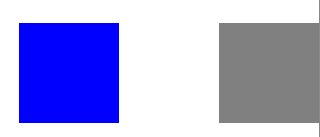
如图,视图1在距左边20的位置,视图1视图2都Y方向居中并且相距100的距离。
删除约束:
removeConstraint:(NSLayoutConstraint *) constraint;
在删除约束时要找准约束的绑定对象。
AutoLayout的三种设置方式之——NSLayoutConstraint代码篇的更多相关文章
- 通过三个DEMO学会SignalR的三种实现方式
一.理解SignalR ASP .NET SignalR 是一个ASP .NET 下的类库,可以在ASP .NET 的Web项目中实现实时通信(即:客户端(Web页面)和服务器端可以互相实时的通知消息 ...
- Qt 2D绘图 渐变填充(三种渐变方式)
在qt中提供了三种渐变方式,分别是线性渐变,圆形渐变和圆锥渐变.如果能熟练应用它们,就能设计出炫目的填充效果. 线性渐变: 1.更改函数如下: void Dialog::paintEvent(QPai ...
- Linux 双线策略路由的三种实现方式总结+端口映射
Linux 双线策略路由的三种实现方式总结+端口映射 Linux 双线策略路由的三种实现方式总结+端口映射 网络环境 服务器(网关): eth0 为LAN口,IP为 LAN_IP = 192.168. ...
- linux学习之centos(二):虚拟网络三种连接方式和SecureCRT的使用
---操作环境--- 虚拟机版本:VMware Workstation_10.0.3 Linux系统版本:CentOS_6.5(64位) 物理机系统版本:win10 一.虚拟网络三种连接方式 当在V ...
- Spring IOC 三种注入方式
1. 接口注入 2. setter注入 3. 构造器注入 对象与对象之间的关系可以简单的理解为对象之间的依赖关系:A类需要B类的一个实例来进行某些操作,比如在A类的方法中需要调用B类 ...
- 垃圾回收(GC)的三种基本方式
垃圾(Garbage)就是程序需要回收的对象,如果一个对象不在被直接或间接地引用,那么这个对象就成为了「垃圾」,它占用的内存需要及时地释放,否则就会引起「内存泄露」.有些语言需要程序员来手动释放内存( ...
- 瀑布流的三种实现方式(原生js+jquery+css3)
前言 项目需求要弄个瀑布流的页面,用的是waterfall这个插件,感觉还是可以的,项目赶就没自己的动手写.最近闲来没事,就自己写个.大致思路理清楚,还是挺好实现的... 原生javascript版 ...
- VMware三种链接方式
VMware三种链接方式 第一种:桥接Bridged 如其的说明:connected directly to the physical networkà直接连接到物理网络.如果是通过路由器连接出来的D ...
- Service组件 总结 + 绑定理Service三种实现方式 Messager + Binder + AIDL
在Android中进程按优先级可以分为五类,优先级从高到低排列: - 前台进程 该进程包含正在与用户进行交互的界面组件,比如一个Activity - 可视进程 该进程中的组件虽然没有和用户交互,但是仍 ...
随机推荐
- tomcat解压war包的一点例外
我在项目的开发过程中,发现Tomcat解压war 的一点例外. 现象如下: 使用ANT工具把web应用程序打包为war文件.然后把war文件放到tomcat的webapps,让tomca ...
- mfc extention dll 與 normal dll 的區別
extention dll 1.指從MFC中繼承過來的DLL,一般要求使用共享MFC DLL進行連接,也要求調用者也使用MFC且使用共享MFC,如此可保證DLL與調用者有相同的MFC庫. 2.在使用資 ...
- SimpleDateFormat使用详解及与毫秒的相互转换
1. SimpleDateFormat使用详解 public class SimpleDateFormat extends DateFormat SimpleDateFormat 是一个以国别敏感的方 ...
- POJ1651:Multiplication Puzzle(区间DP)
Description The multiplication puzzle is played with a row of cards, each containing a single positi ...
- 非常详细的 Docker 学习笔记
一.Docker 简介 Docker 两个主要部件: Docker: 开源的容器虚拟化平台 Docker Hub: 用于分享.管理 Docker 容器的 Docker SaaS 平台 -- Docke ...
- hadoop2 作业执行过程之作业提交
hadoop2.2.0.centos6.5 hadoop任务的提交常用的两种,一种是测试常用的IDE远程提交,另一种就是生产上用的客户端命令行提交 通用的任务程序提交步骤为: 1.将程序打成jar包: ...
- .net中的多线程
一.多线程的概念 什么是进程呢?当一个程序开始运行时,它就是一个进程,进程所指包括运行中的程序和程序所使用到的内存和系统资源.而一个进程又是由多个线程所组成的,线程是程序中的一个执行流, ...
- H - Frequent values
Problem F: Frequent values You are given a sequence of n integers a1 , a2 , ... , an in non-decreasi ...
- 根据表结构自动生成JavaBean,史上最强最专业的表结构转JavaBean的工具(第2版)
目录: 第1版:http://blog.csdn.net/vipbooks/article/details/51912143 ...
- 通过layer的contents属性来实现uiimageview的淡入切换
#import "ViewController.h" @interface ViewController () @property(nonatomic,strong)CALayer ...