
Asp.Net原理Version3.0_页面声明周期
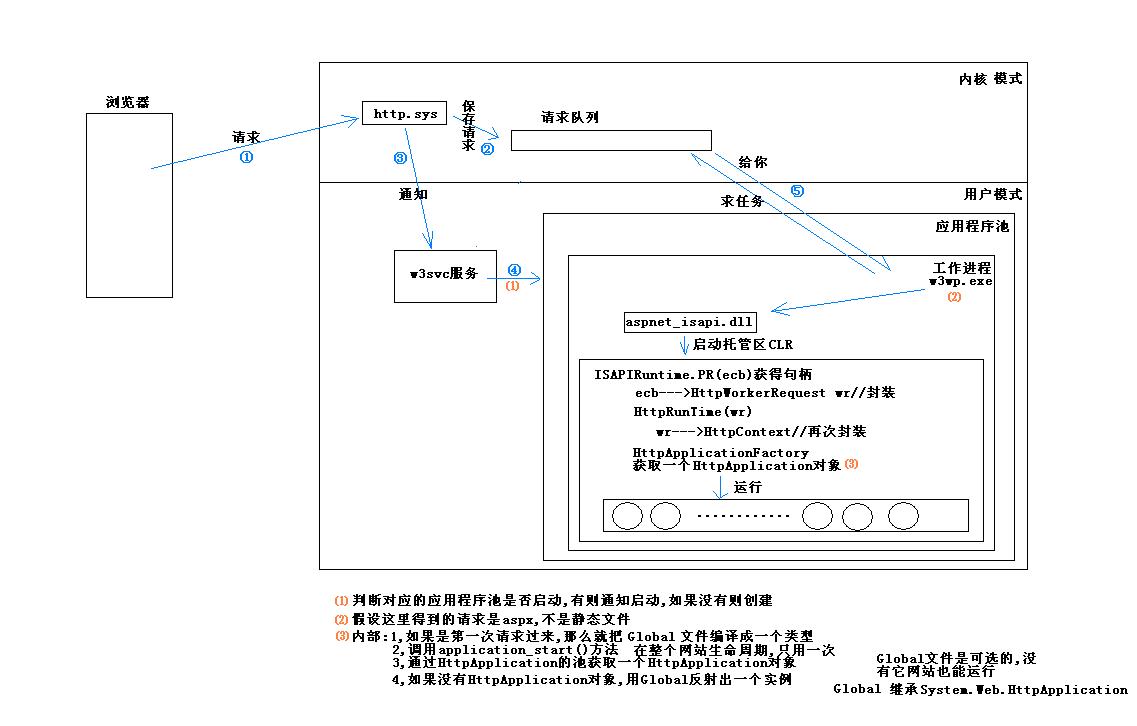


相关源码
页面的Process方法
 // System.Web.UI.Page
 private void ProcessRequest(bool includeStagesBeforeAsyncPoint, bool includeStagesAfterAsyncPoint)
 {
     if (includeStagesBeforeAsyncPoint)
     {
         //调用子类的方法(这是个虚方法),1,创建页面控件树
         this.FrameworkInitialize();
         base.ControlState = ControlState.FrameworkInitialized;
     }
     bool flag = this.Context.WorkerRequest is IIS7WorkerRequest;
     try
     {
         try
         {
             if (this.IsTransacted)
             {
                 this.ProcessRequestTransacted();
             }
             else
             {
                 //页面声明周期的主要部分
                 this.ProcessRequestMain(includeStagesBeforeAsyncPoint, includeStagesAfterAsyncPoint);
             }
             if (includeStagesAfterAsyncPoint)
             {
                 flag = false;
                 this.ProcessRequestEndTrace();
             }
         }
         catch (ThreadAbortException)
         {
             try
             {
                 if (flag)
                 {
                     this.ProcessRequestEndTrace();
                 }
             }
             catch
             {
             }
         }
         finally
         {
             if (includeStagesAfterAsyncPoint)
             {
                 this.ProcessRequestCleanup();
             }
         }
     }
     catch
     {
         throw;
     }
 }
ProcessRequestMain方法
// System.Web.UI.Page
private void ProcessRequestMain(bool includeStagesBeforeAsyncPoint, bool includeStagesAfterAsyncPoint)
{
try
{
HttpContext context = this.Context;
string text = null;
if (includeStagesBeforeAsyncPoint)
{
if (this.IsInAspCompatMode)
{
AspCompatApplicationStep.OnPageStartSessionObjects();
}
if (this.PageAdapter != null)
{
this._requestValueCollection = this.PageAdapter.DeterminePostBackMode();
}
else
{
this._requestValueCollection = this.DeterminePostBackMode();
}
string text2 = string.Empty;
if (this.DetermineIsExportingWebPart())
{
if (!RuntimeConfig.GetAppConfig().WebParts.EnableExport)
{
throw new InvalidOperationException(SR.GetString("WebPartExportHandler_DisabledExportHandler"));
}
text = this.Request.QueryString["webPart"];
if (string.IsNullOrEmpty(text))
{
throw new InvalidOperationException(SR.GetString("WebPartExportHandler_InvalidArgument"));
}
if (string.Equals(this.Request.QueryString["scope"], "shared", StringComparison.OrdinalIgnoreCase))
{
);
}
string text3 = this.Request.QueryString["query"];
if (text3 == null)
{
text3 = string.Empty;
}
this.Request.QueryStringText = text3;
context.Trace.IsEnabled = false;
}
//2,确定IsCallback值
if (this._requestValueCollection != null)
{
if (this._requestValueCollection["__VIEWSTATEENCRYPTED"] != null)
{
this.ContainsEncryptedViewState = true;
}
text2 = this._requestValueCollection["__CALLBACKID"];
if (text2 != null && this._request.HttpVerb == HttpVerb.POST)
{
this._isCallback = true;
}
else
{
if (!this.IsCrossPagePostBack)
{
VirtualPath virtualPath = null;
if (this._requestValueCollection["__PREVIOUSPAGE"] != null)
{
try
{
virtualPath = VirtualPath.CreateNonRelativeAllowNull(Page.DecryptString(this._requestValueCollection["__PREVIOUSPAGE"]));
}
catch
{
] = true;
}
if (virtualPath != null && virtualPath != this.Request.CurrentExecutionFilePathObject)
{
] = true;
this._previousPagePath = virtualPath;
}
}
}
}
}
if (this.MaintainScrollPositionOnPostBack)
{
this.LoadScrollPosition();
}
if (context.TraceIsEnabled)
{
this.Trace.Write("aspx.page", "Begin PreInit");
}
, ))
{
EtwTrace.Trace(EtwTraceType.ETW_TYPE_PAGE_PRE_INIT_ENTER, this._context.WorkerRequest);
}
//3.1初始化PreInit
this.PerformPreInit();
, ))
{
EtwTrace.Trace(EtwTraceType.ETW_TYPE_PAGE_PRE_INIT_LEAVE, this._context.WorkerRequest);
}
if (context.TraceIsEnabled)
{
this.Trace.Write("aspx.page", "End PreInit");
}
if (context.TraceIsEnabled)
{
this.Trace.Write("aspx.page", "Begin Init");
}
, ))
{
EtwTrace.Trace(EtwTraceType.ETW_TYPE_PAGE_INIT_ENTER, this._context.WorkerRequest);
}
//3.2递归初始化,因为要初始化树,所以用递归
this.InitRecursive(null);
, ))
{
EtwTrace.Trace(EtwTraceType.ETW_TYPE_PAGE_INIT_LEAVE, this._context.WorkerRequest);
}
if (context.TraceIsEnabled)
{
this.Trace.Write("aspx.page", "End Init");
}
if (context.TraceIsEnabled)
{
this.Trace.Write("aspx.page", "Begin InitComplete");
}
//3.3,初始化完成
this.OnInitComplete(EventArgs.Empty);
if (context.TraceIsEnabled)
{
this.Trace.Write("aspx.page", "End InitComplete");
}
if (this.IsPostBack)
{
if (context.TraceIsEnabled)
{
this.Trace.Write("aspx.page", "Begin LoadState");
}
, ))
{
EtwTrace.Trace(EtwTraceType.ETW_TYPE_PAGE_LOAD_VIEWSTATE_ENTER, this._context.WorkerRequest);
}
//4.1,加载ViewState
this.LoadAllState();
, ))
{
EtwTrace.Trace(EtwTraceType.ETW_TYPE_PAGE_LOAD_VIEWSTATE_LEAVE, this._context.WorkerRequest);
}
if (context.TraceIsEnabled)
{
this.Trace.Write("aspx.page", "End LoadState");
this.Trace.Write("aspx.page", "Begin ProcessPostData");
}
, ))
{
EtwTrace.Trace(EtwTraceType.ETW_TYPE_PAGE_LOAD_POSTDATA_ENTER, this._context.WorkerRequest);
}
//4.2,处理回发数据
this.ProcessPostData(this._requestValueCollection, true);
, ))
{
EtwTrace.Trace(EtwTraceType.ETW_TYPE_PAGE_LOAD_POSTDATA_LEAVE, this._context.WorkerRequest);
}
if (context.TraceIsEnabled)
{
this.Trace.Write("aspx.page", "End ProcessPostData");
}
}
if (context.TraceIsEnabled)
{
this.Trace.Write("aspx.page", "Begin PreLoad");
}
//5.1页面预加载
this.OnPreLoad(EventArgs.Empty);
if (context.TraceIsEnabled)
{
this.Trace.Write("aspx.page", "End PreLoad");
}
if (context.TraceIsEnabled)
{
this.Trace.Write("aspx.page", "Begin Load");
}
, ))
{
EtwTrace.Trace(EtwTraceType.ETW_TYPE_PAGE_LOAD_ENTER, this._context.WorkerRequest);
}
//5.2页面递归加载
this.LoadRecursive();
, ))
{
EtwTrace.Trace(EtwTraceType.ETW_TYPE_PAGE_LOAD_LEAVE, this._context.WorkerRequest);
}
if (context.TraceIsEnabled)
{
this.Trace.Write("aspx.page", "End Load");
}
if (this.IsPostBack)
{
if (context.TraceIsEnabled)
{
this.Trace.Write("aspx.page", "Begin ProcessPostData Second Try");
}
//5.3第二次尝试加载回发数据
this.ProcessPostData(this._leftoverPostData, false);
if (context.TraceIsEnabled)
{
this.Trace.Write("aspx.page", "End ProcessPostData Second Try");
this.Trace.Write("aspx.page", "Begin Raise ChangedEvents");
}
, ))
{
EtwTrace.Trace(EtwTraceType.ETW_TYPE_PAGE_POST_DATA_CHANGED_ENTER, this._context.WorkerRequest);
}
//6.1,触发Change事件
this.RaiseChangedEvents();
, ))
{
EtwTrace.Trace(EtwTraceType.ETW_TYPE_PAGE_POST_DATA_CHANGED_LEAVE, this._context.WorkerRequest);
}
if (context.TraceIsEnabled)
{
this.Trace.Write("aspx.page", "End Raise ChangedEvents");
this.Trace.Write("aspx.page", "Begin Raise PostBackEvent");
}
, ))
{
EtwTrace.Trace(EtwTraceType.ETW_TYPE_PAGE_RAISE_POSTBACK_ENTER, this._context.WorkerRequest);
}
//6.2,触发点击事件
this.RaisePostBackEvent(this._requestValueCollection);
, ))
{
EtwTrace.Trace(EtwTraceType.ETW_TYPE_PAGE_RAISE_POSTBACK_LEAVE, this._context.WorkerRequest);
}
if (context.TraceIsEnabled)
{
this.Trace.Write("aspx.page", "End Raise PostBackEvent");
}
}
if (context.TraceIsEnabled)
{
this.Trace.Write("aspx.page", "Begin LoadComplete");
}
//5.3,页面加载完成
this.OnLoadComplete(EventArgs.Empty);
if (context.TraceIsEnabled)
{
this.Trace.Write("aspx.page", "End LoadComplete");
}
if (this.IsPostBack && this.IsCallback)
{
this.PrepareCallback(text2);
}
else
{
if (!this.IsCrossPagePostBack)
{
if (context.TraceIsEnabled)
{
this.Trace.Write("aspx.page", "Begin PreRender");
}
, ))
{
EtwTrace.Trace(EtwTraceType.ETW_TYPE_PAGE_PRE_RENDER_ENTER, this._context.WorkerRequest);
}
//7,递归预渲染
this.PreRenderRecursiveInternal();
, ))
{
EtwTrace.Trace(EtwTraceType.ETW_TYPE_PAGE_PRE_RENDER_LEAVE, this._context.WorkerRequest);
}
if (context.TraceIsEnabled)
{
this.Trace.Write("aspx.page", "End PreRender");
}
}
}
}
if (this._asyncInfo == null || this._asyncInfo.CallerIsBlocking)
{
this.ExecuteRegisteredAsyncTasks();
}
this._request.ValidateRawUrl();
if (includeStagesAfterAsyncPoint)
{
if (this.IsCallback)
{
this.RenderCallback();
}
else
{
if (!this.IsCrossPagePostBack)
{
if (context.TraceIsEnabled)
{
this.Trace.Write("aspx.page", "Begin PreRenderComplete");
}
this.PerformPreRenderComplete();
if (context.TraceIsEnabled)
{
this.Trace.Write("aspx.page", "End PreRenderComplete");
}
if (context.TraceIsEnabled)
{
this.BuildPageProfileTree(this.EnableViewState);
this.Trace.Write("aspx.page", "Begin SaveState");
}
, ))
{
EtwTrace.Trace(EtwTraceType.ETW_TYPE_PAGE_SAVE_VIEWSTATE_ENTER, this._context.WorkerRequest);
}
//8,保存页面状态到ViewState
this.SaveAllState();
, ))
{
EtwTrace.Trace(EtwTraceType.ETW_TYPE_PAGE_SAVE_VIEWSTATE_LEAVE, this._context.WorkerRequest);
}
if (context.TraceIsEnabled)
{
this.Trace.Write("aspx.page", "End SaveState");
this.Trace.Write("aspx.page", "Begin SaveStateComplete");
}
this.OnSaveStateComplete(EventArgs.Empty);
if (context.TraceIsEnabled)
{
this.Trace.Write("aspx.page", "End SaveStateComplete");
this.Trace.Write("aspx.page", "Begin Render");
}
, ))
{
EtwTrace.Trace(EtwTraceType.ETW_TYPE_PAGE_RENDER_ENTER, this._context.WorkerRequest);
}
if (text != null)
{
this.ExportWebPart(text);
}
else
{
//9,渲染出HTML
this.RenderControl(this.CreateHtmlTextWriter(this.Response.Output));
}
, ))
{
EtwTrace.Trace(EtwTraceType.ETW_TYPE_PAGE_RENDER_LEAVE, this._context.WorkerRequest);
}
if (context.TraceIsEnabled)
{
this.Trace.Write("aspx.page", "End Render");
}
this.CheckRemainingAsyncTasks(false);
}
}
}
}
catch (ThreadAbortException ex2)
{
HttpApplication.CancelModuleException ex = ex2.ExceptionState as HttpApplication.CancelModuleException;
if (!includeStagesBeforeAsyncPoint || !includeStagesAfterAsyncPoint || this._context.Handler != this || this._context.ApplicationInstance == null || ex == null || ex.Timeout)
{
this.CheckRemainingAsyncTasks(true);
throw;
}
this._context.ApplicationInstance.CompleteRequest();
Page.ThreadResetAbortWithAssert();
}
catch (ConfigurationException)
{
throw;
}
catch (Exception e)
{
PerfCounters.IncrementCounter(AppPerfCounter.ERRORS_DURING_REQUEST);
PerfCounters.IncrementCounter(AppPerfCounter.ERRORS_TOTAL);
if (!this.HandleError(e))
{
throw;
}
}
}
Asp.Net原理Version3.0_页面声明周期的更多相关文章
- 【译】ASP.NET应用程序和页面生命周期
为何翻译此文 一.此文是Code Project社区2010年4月ASP.NET板块的最佳文章,说明了此文的份量: 二.锻炼自己的英文技术文章翻译能力,提高英文技术文档阅读能力: 三.了解掌握ASP. ...
- 【转载】ASP.NET应用程序与页面生命周期
在本文中,我们将了解不同的事件,ASP.NET 应用程序的生命周期以浏览器向 Web 服务器(对于 ASP.NET 应用程序,通常为 IIS)发送请求为起点,直至将请求结果返回至浏览器结束.在这个过程 ...
- ASP.NET最常用的页面生命周期事件
PreInit:在页生命周期的早期阶段可以访问的事件.在PreInit事件后,将加载个性化信息和页主题. Init:在所有的控件都已初始化,且已应用所有外观设置后引发.使用该事件来读取或初始化控件属性 ...
- ASP.NET应用程序与页面生命周期
http://www.cnblogs.com/suizhouqiwei/archive/2012/08/15/2637775.html
- asp.net请求管道和页面生命周期
- Asp.Net原理Version2.0
有些部分被省略,可以看看Asp.Net原理Version1.0 Asp.Net原理Version3.0_页面声明周期
- Asp.Net原理Version1.0
Asp.Net原理Version2.0 Asp.Net原理Version3.0_页面声明周期
- ASP.Net请求处理机制初步探索之旅 - Part 4 WebForm页面生命周期
开篇:上一篇我们了解了所谓的请求处理管道,在众多的事件中微软开放了19个重要的事件给我们,我们可以注入一些自定义的业务逻辑实现应用的个性化设计.本篇,我们来看看WebForm模式下的页面生命周期. ( ...
- WebForm页面生命周期及asp.net运行机制
1.先上几张原理图着重理解: 现在针对第四副图原理进行解析: 流程: 1.浏览器发送请求 2.服务器软件(IIS)接收,它最终的目的就是为了向客户输出它请求的动态页面生成的html代码. 3.服务器不 ...
随机推荐
- (转)Linux下Oracle启动、建立表空间、用户、授权、数据库导入导出
Linux系列 启动1.启动数据库实例,分为两步:第一步,启动监听:第二步,启动数据库实例. 1.1进入到sqlplus启动实例 [oracle@redhat ~]$ su - oracle ...
- OpenGL-渲染管线的流程(有图有真相)
视频教程请关注 http://edu.csdn.net/lecturer/lecturer_detail?lecturer_id=440 学习shader之前必须知道的事情,shader(着色语言)到 ...
- 10款经典的web前端特效的预览及源码
1.CSS3响应式导航菜单 今天我给大家介绍一下如何使用纯CSS来实现的一个响应式导航菜单,我们使用的是HTML5+CSS3技术,当浏览器窗口变小或者使用手机浏览器访问的时候,原本横条菜单会收缩成一个 ...
- GDAL中RasterIO函数(把文件读取为一个一维数组)和ReadBlock函数(读取栅格数据块)
CPLErr GDALRasterBand::RasterIO ( GDALRWFlag eRWFlag, int nXOff, int nYOff, int nXSize, int nYSize, ...
- 简单解析依赖注入(控制反转)在Spring中的应用
IoC——Inversion of Control 控制反转DI——Dependency Injection 依赖注入 大家都知道,依赖注入是Spring中非常重要的一种设计模式.可能很多初学者 ...
- tp中让头疼似懂非懂的create
项目中多次用到create() 只能它是表单验证,不过好出错,痛下心扉好好了解理解它的来龙去脉和所用的用法 一:通过create() 方法或者 赋值的方法生成数据对象,然后写入数据库 $model = ...
- Android Studio添加jar包
1.先把jar包复制到项目的lib下,
- jQuery插件使用大全
1.jQuery datepicker日历插件使用说明 http://wenku.baidu.com/view/12804e1e59eef8c75fbfb3e3 2.jqueryFileUpload插 ...
- RAID 0+1
正如其名字一样RAID 0+1是RAID 0和RAID 1的组合形式,也称为RAID 01. 以四个磁盘组成的RAID 0+1为例,其数据存储方式如图所示:RAID 0+1是存储性能和数据安全兼顾的方 ...
- C# 条码标签打印程序,RDLC报表动态显示多条码标签的方法
初学c#,因最近公司客户要求原出货标签需实现条码化,练手的机会来了,遂动手做这个程序,开始都是一些增删改查操作一直很顺利,但到RDLC报表将条码显示到报表上犯难了,因为初学未接触过报表,上网查资料均一 ...