
UITableView的简单使用
UITableView分为两种style:UITableViewStyleGrouped和UITableViewStylePlain。
(一)UITableViewStyleGrouped
#import "ViewController.h"

//行高

#define cellHeight 60

//边距

#define margin 10

@interface ViewController ()<UITableViewDataSource,UITableViewDelegate>

{

    UITableView *myTableView;

    NSArray *myData;

}

@end

@implementation ViewController

- (void)viewDidLoad {

    [super viewDidLoad];

    myTableView = [[UITableView alloc]initWithFrame:CGRectMake(, , self.view.frame.size.width, self.view.frame.size.height) style:UITableViewStyleGrouped];

    myTableView.dataSource = self;

    myTableView.delegate = self;

    //默认分隔线设置为无

    myTableView.separatorStyle = UITableViewCellSeparatorStyleNone;

    [self.view addSubview:myTableView];

    [self initWithData];

}

- (void)initWithData

{

    myData = @[

               @{

                   @"city":@"北京",

                   @"cityfooter":@"我是北京",

                   @"district":@[@"朝阳区",@"海淀区"],

                   @"districtdetail":@[@"我是朝阳区",@"我是海淀区"],

                   @"image":@[@"",@""],

                   },

               @{

                   @"city":@"上海",

                   @"cityfooter":@"我是上海",

                   @"district":@[@"徐汇区",@"闵行区",@"浦东新区"],

                   @"districtdetail":@[@"我是徐汇区",@"我是闵行区",@"我是浦东新区"],

                   @"image":@[@"",@"",@""],

                   },

               ];

}

#pragma mark --------------tableviewDataSource---------------

//组数

- (NSInteger)numberOfSectionsInTableView:(UITableView *)tableView

{

    return myData.count;

}

//每组的行数

- (NSInteger)tableView:(UITableView *)tableView numberOfRowsInSection:(NSInteger)section

{

    return [[myData[section] objectForKey:@"district"] count];

}

//组头

- (nullable NSString *)tableView:(UITableView *)tableView titleForHeaderInSection:(NSInteger)section

{

    return [myData[section] objectForKey:@"city"];

}

//组尾

- (nullable NSString *)tableView:(UITableView *)tableView titleForFooterInSection:(NSInteger)section

{

    return [myData[section] objectForKey:@"cityfooter"];

}

//设置行数据

- (UITableViewCell *)tableView:(UITableView *)tableView cellForRowAtIndexPath:(NSIndexPath *)indexPath

{

    static NSString *cellString = @"cellString";//cell的重用

    UITableViewCell *cell = [tableView dequeueReusableCellWithIdentifier:cellString];

    if (cell == nil)

    {

        cell = [[UITableViewCell alloc] initWithStyle:UITableViewCellStyleSubtitle reuseIdentifier:cellString];

        UIImageView *cellImageView = [[UIImageView alloc]initWithFrame:CGRectMake(margin, margin, cellHeight-margin*, cellHeight-margin*)];

        cellImageView.backgroundColor = [UIColor brownColor];

        cellImageView.tag = ;

        [cell addSubview:cellImageView];

        UILabel *cellText = [[UILabel alloc]initWithFrame:CGRectMake(CGRectGetMaxX(cellImageView.frame)+margin, margin, self.view.frame.size.width-(CGRectGetMaxX(cellImageView.frame)+margin), )];

        cellText.tag = ;

        [cell addSubview:cellText];

        UILabel *cellDetailText = [[UILabel alloc]initWithFrame:CGRectMake(cellText.frame.origin.x, CGRectGetMaxY(cellText.frame)+, cellText.frame.size.width, )];

        cellDetailText.textColor = [UIColor lightGrayColor];

        cellDetailText.tag = ;

        [cell addSubview:cellDetailText];

        //设置点选效果为无

        cell.selectionStyle = UITableViewCellSelectionStyleNone;

        //设置行右边的箭头

        cell.accessoryType = UITableViewCellAccessoryDisclosureIndicator;

    }

    //图标

    UIImageView *cellImageView = (UIImageView *)[cell viewWithTag:];

    cellImageView.image = [UIImage imageNamed:[myData[indexPath.section] objectForKey:@"image"][indexPath.row]];

    //标题

    UILabel *cellText = (UILabel *)[cell viewWithTag:];

    cellText.text = [myData[indexPath.section] objectForKey:@"district"][indexPath.row];

    [self getHeightWithLabel:cellText andFontSize:];

    //副标题

    UILabel *cellDetailText = (UILabel *)[cell viewWithTag:];

    cellDetailText.text = [myData[indexPath.section] objectForKey:@"districtdetail"][indexPath.row];

    cellDetailText.frame = CGRectMake(cellText.frame.origin.x, CGRectGetMaxY(cellText.frame)+, cellText.frame.size.width, );

    [self getHeightWithLabel:cellDetailText andFontSize:];

    //分隔线

    UIImageView *lineImageView = [[UIImageView alloc] initWithFrame:CGRectMake(, cellHeight-, self.view.frame.size.width, )];

    [lineImageView setBackgroundColor:[UIColor colorWithRed:234.0/255.0 green:234.0/255.0 blue:234.0/255.0 alpha:1.0]];

    [cell addSubview:lineImageView];

    return cell;

}

#pragma mark ---------------tableviewDelegate------------------

//设置行高

- (CGFloat)tableView:(UITableView *)tableView heightForRowAtIndexPath:(NSIndexPath *)indexPath

{

    return cellHeight;

}

//点击事件

- (void)tableView:(UITableView *)tableView didSelectRowAtIndexPath:(NSIndexPath *)indexPath

{

    //这里写点击方法

    NSLog(@"点击了第%li组第%li行",(long)indexPath.section,(long)indexPath.row);

}

//UIlabel自适应高

- (void)getHeightWithLabel:(UILabel *)label andFontSize:(CGFloat)size

{

    label.numberOfLines = ;

    NSMutableAttributedString *labelString = [[NSMutableAttributedString alloc] initWithString:label.text];

    [labelString addAttribute:NSFontAttributeName value:[UIFont systemFontOfSize:size] range:NSMakeRange(, [labelString length])];

    CGRect labelStringRect = [labelString boundingRectWithSize:CGSizeMake(self.view.frame.size.width-label.frame.origin.x*, ) options:NSStringDrawingUsesLineFragmentOrigin context:nil];

    CGRect labelRect = label.frame;

    labelRect.size.height = labelStringRect.size.height;

    label.frame = labelRect;

    label.attributedText = labelString;

}

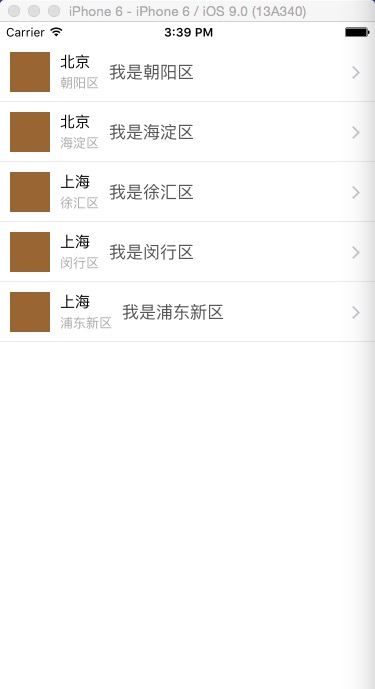
(二)UITableViewStylePlain
#import "ViewController.h"

//行高

#define cellHeight 60

//边距

#define margin 10

@interface ViewController ()<UITableViewDataSource,UITableViewDelegate>

{

    UITableView *myTableView;

    NSArray *myData;

}

@end

@implementation ViewController

- (void)viewDidLoad {

    [super viewDidLoad];

    myTableView = [[UITableView alloc]initWithFrame:CGRectMake(, , self.view.frame.size.width, self.view.frame.size.height) style:UITableViewStylePlain];

    myTableView.dataSource = self;

    myTableView.delegate = self;

    //默认分隔线设置为无

    myTableView.separatorStyle = UITableViewCellSeparatorStyleNone;

    [self.view addSubview:myTableView];

    [self initWithData];

}

- (void)initWithData

{

//此数组格式类似于网络开发用到过的Json格式

    myData = @[

               @{

                   @"city":@"北京",

                   @"district":@"朝阳区",

                   @"districtdetail":@"我是朝阳区",

                   @"image":@"",

                   },

               @{

                   @"city":@"北京",

                   @"district":@"海淀区",

                   @"districtdetail":@"我是海淀区",

                   @"image":@"",

                   },

               @{

                   @"city":@"上海",

                   @"district":@"徐汇区",

                   @"districtdetail":@"我是徐汇区",

                   @"image":@"",

                   },

               @{

                   @"city":@"上海",

                   @"district":@"闵行区",

                   @"districtdetail":@"我是闵行区",

                   @"image":@"",

                   },

               @{

                   @"city":@"上海",

                   @"district":@"浦东新区",

                   @"districtdetail":@"我是浦东新区",

                   @"image":@"",

                   },

               ];

}

#pragma mark --------------tableviewDataSource---------------

//组数(UITableViewStylePlain样式默认为1)

- (NSInteger)numberOfSectionsInTableView:(UITableView *)tableView

{

    return ;

}

//行数

- (NSInteger)tableView:(UITableView *)tableView numberOfRowsInSection:(NSInteger)section

{

    return [myData count];

}

//设置行数据

- (UITableViewCell *)tableView:(UITableView *)tableView cellForRowAtIndexPath:(NSIndexPath *)indexPath

{

    static NSString *cellString = @"cellString";//cell的重用

    UITableViewCell *cell = [tableView dequeueReusableCellWithIdentifier:cellString];

    if (cell == nil)

    {

        cell = [[UITableViewCell alloc] initWithStyle:UITableViewCellStyleSubtitle reuseIdentifier:cellString];

        UIImageView *cellImageView = [[UIImageView alloc]initWithFrame:CGRectMake(margin, margin, cellHeight-margin*, cellHeight-margin*)];

        cellImageView.backgroundColor = [UIColor brownColor];

        cellImageView.tag = ;

        [cell addSubview:cellImageView];

        UILabel *cellText = [[UILabel alloc]initWithFrame:CGRectMake(CGRectGetMaxX(cellImageView.frame)+margin, margin, self.view.frame.size.width-(CGRectGetMaxX(cellImageView.frame)+margin), )];

        cellText.tag = ;

        [cell addSubview:cellText];

        UILabel *cellDetailText = [[UILabel alloc]initWithFrame:CGRectMake(cellText.frame.origin.x, CGRectGetMaxY(cellText.frame)+, cellText.frame.size.width, )];

        cellDetailText.textColor = [UIColor lightGrayColor];

        cellDetailText.tag = ;

        [cell addSubview:cellDetailText];

        UILabel *cellIntroduceText = [[UILabel alloc]initWithFrame:CGRectMake(CGRectGetMaxX(cellDetailText.frame)+margin, (cellHeight-)/, self.view.frame.size.width-(CGRectGetMaxX(cellDetailText.frame)+margin), )];

        cellIntroduceText.textColor = [UIColor darkGrayColor];

        cellIntroduceText.tag = ;

        [cell addSubview:cellIntroduceText];

        //设置点选效果为无

        cell.selectionStyle = UITableViewCellSelectionStyleNone;

        //设置行右边的箭头

        cell.accessoryType = UITableViewCellAccessoryDisclosureIndicator;

    }

    //图标

    UIImageView *cellImageView = (UIImageView *)[cell viewWithTag:];

    cellImageView.image = [UIImage imageNamed:[myData[indexPath.row] objectForKey:@"image"]];

    //标题

    UILabel *cellText = (UILabel *)[cell viewWithTag:];

    cellText.text = [myData[indexPath.row] objectForKey:@"city"];

    [self getHeightWithLabel:cellText andFontSize:];

    //副标题

    UILabel *cellDetailText = (UILabel *)[cell viewWithTag:];

    cellDetailText.text = [myData[indexPath.row] objectForKey:@"district"];

    cellDetailText.frame = CGRectMake(cellText.frame.origin.x, CGRectGetMaxY(cellText.frame)+, cellText.frame.size.width, );

    [self getHeightWithLabel:cellDetailText andFontSize:];

    [self getWidthWithLabel:cellDetailText andFontSize:];

    //介绍信息

    UILabel *cellIntroduceText = (UILabel *)[cell viewWithTag:];

    cellIntroduceText.text = [myData[indexPath.row] objectForKey:@"districtdetail"];

    cellIntroduceText.frame = CGRectMake(CGRectGetMaxX(cellDetailText.frame)+margin, (cellHeight-)/, self.view.frame.size.width-(CGRectGetMaxX(cellDetailText.frame)+margin), );

    //分隔线

    UIImageView *lineImageView = [[UIImageView alloc] initWithFrame:CGRectMake(, cellHeight-, self.view.frame.size.width, )];

    [lineImageView setBackgroundColor:[UIColor colorWithRed:234.0/255.0 green:234.0/255.0 blue:234.0/255.0 alpha:1.0]];

    [cell addSubview:lineImageView];

    return cell;

}

#pragma mark ---------------tableviewDelegate------------------

//设置行高

- (CGFloat)tableView:(UITableView *)tableView heightForRowAtIndexPath:(NSIndexPath *)indexPath

{

    return cellHeight;

}

//点击事件

- (void)tableView:(UITableView *)tableView didSelectRowAtIndexPath:(NSIndexPath *)indexPath

{

    //这里写点击方法

    NSLog(@"点击了第%li行",(long)indexPath.row);

}

//UIlabel自适应高

- (void)getHeightWithLabel:(UILabel *)label andFontSize:(CGFloat)size

{

    label.numberOfLines = ;

    NSMutableAttributedString *labelString = [[NSMutableAttributedString alloc] initWithString:label.text];

    [labelString addAttribute:NSFontAttributeName value:[UIFont systemFontOfSize:size] range:NSMakeRange(, [labelString length])];

    CGRect labelStringRect = [labelString boundingRectWithSize:CGSizeMake(self.view.frame.size.width-label.frame.origin.x*, ) options:NSStringDrawingUsesLineFragmentOrigin context:nil];

    CGRect labelRect = label.frame;

    labelRect.size.height = labelStringRect.size.height;

    label.frame = labelRect;

    label.attributedText = labelString;

}

//UIlabel自适应宽

- (void)getWidthWithLabel:(UILabel *)label andFontSize:(CGFloat)size

{

    label.numberOfLines = ;

    NSMutableAttributedString *labelString = [[NSMutableAttributedString alloc] initWithString:label.text];

    [labelString addAttribute:NSFontAttributeName value:[UIFont systemFontOfSize:size] range:NSMakeRange(, [labelString length])];

    CGRect labelStringRect = [labelString boundingRectWithSize:CGSizeMake(, label.frame.size.height) options:NSStringDrawingUsesLineFragmentOrigin context:nil];

    CGRect labelRect = label.frame;

    labelRect.size.width = labelStringRect.size.width;

    label.frame = labelRect;

    label.attributedText = labelString;

}
UITableView的简单使用的更多相关文章
- swfit-学习笔记(表UITableView的简单使用)
/*使用与Object-C基本类似,只做简单地使用,创建表及其设置数据源和代理*/ import UIKit class ViewController: UIViewController,UITabl ...
- UITableView的简单总结与回顾
今天突发奇想的想对UItableView做一下汇总,感觉在编程中这个控件可以千变万化也是用的最多的一个了,下面就为大家简单总结下这个控件,也许还有不足,不过还是请各位不吝赐教了哈,那么我就开始了,我会 ...
- Swift中UITableView的简单使用
Swift中的注释 使用"// MARK:- 注释内容",对属性或方法进行注释 使用"///注释内容"对属性或方法提供调用说明的注释 使用extension对同 ...
- UITableView的简单应用介绍
创建一个tableView视图,然后把这个视图界面添加到主界面上. _tableView = [[UITableView alloc]initWithFrame:CGRectMake(0, 20, [ ...
- IOS SWIFT UITableView 实现简单微博列表
// // Weibo.swift // UITableViewCellExample // // Created by XUYAN on 15/8/15. // Copyright (c) 2015 ...
- Swift 2.0 UItableView 的简单使用
在IOS开发中,UItableView 的使用真的是最常见最普通的了,现在在自学swift 今天也是这用Swift 写了写 UItableview的使用,还有一些经常出错的地方.下面我先把整个控制器的 ...
- swift 实践- 01 -- UItableView的简单使用
import UIKit class ViewController: UIViewController ,UITableViewDelegate,UITableViewDataSource{ over ...
- ios初识UITableView及简单用法二(模型数据)
// // ViewController.m // ZQRTableViewTest // // Created by zzqqrr on 17/8/24. // Copyright (c) 2017 ...
- ios初识UITableView及简单用法一
// // ViewController.m // ZQRTableViewTest // // Created by zzqqrr on 17/8/24. // Copyright (c) 2017 ...
随机推荐
- C# - DynamicObject with Dynamic
本文转载:http://joe-bq-wang.iteye.com/blog/1872756 里面有动态Linq to xml的写法. There is a expando object which ...
- ArcGIS Add-in开发(一)--获取选定要素的属性值
刚刚接触AE开发,记录一下自己的学习心得! 欢迎大家一起交流探讨! 最近做大赛,突然想到可以让项目更加直观的操作,就在项目中加了幅底图(底图很简单) 我想在arcmap中选中相应的要素后,在后台通过写 ...
- Codeforces Round #278 (Div. 1) B. Strip multiset维护DP
B. Strip Time Limit: 20 Sec Memory Limit: 256 MB 题目连接 http://codeforces.com/contest/487/problem/B De ...
- 【Android开发学习之路】
http://blog.csdn.net/wwj_748/article/category/1119319
- uri中为什么本地文件file后面跟三个斜杠, http等协议跟两个斜杠?
那就要从URI[1]的结构来看了 scheme:[//[user:password@]host[:port]][/]path[?query][#fragment] 可以看到,如果有host的时候,前面 ...
- MySQL锁系列1
http://www.cnblogs.com/xpchild/p/3782311.html MySQL的锁:MySQL内部有很多种类的锁,按照用途不同,可以分为两类:1. 保护内存结构的锁,实现同 ...
- VMware 9 安装 OS X 10.8.4 并安装 Xcode 4.6
转自:http://blog.csdn.net/weizi4332/article/details/9264799 学习Objective-C必须要有运行环境,Xcode是最好的选择.不过Window ...
- LeetCode: Reverse Words in a String:Evaluate Reverse Polish Notation
LeetCode: Reverse Words in a String:Evaluate Reverse Polish Notation Evaluate the value of an arithm ...
- C#并行编程 (Barrier,CountdownEvent,ManualResetEventSlim,SemaphoreSlim,SpinLock,SpinWait )
背景 有时候必须访问变量.实例.方法.属性或者结构体,而这些并没有准备好用于并发访问,或者有时候需要执行部分代码,而这些代码必须单独运行,这是不得不通过将任务分解的方式让它们独立运行. 当任务和线程要 ...
- Undefined property: Illuminate\Database\Eloquent\Builder
是因为在 $activity=Activity::where('center_id','=',$center->id)->where('Date','=',date("Y-m-d ...