
[Javascript] Webpack Loaders, Source Maps, and ES6
Using ES6
To use ES6, we need loader.
- Modify webpack.config.js file:
module.exports = {

    entry: './index.js',

    output: {

        filename: 'bundle.js',

        path: __dirname

    },

    module: {

        loaders: [

            {test: /\.js$/, loader: 'babel', exclude: '/node_modules/'}

        ]

    }

};
We add module property, which is an object. We define the loaders property here which is an array of objects.
- test: It is a regex, will include all the files which match the regex. In the exmaple, we say that "include all the js files".
- loader: You need to define the ES6 loader for this, which is 'babel'. For that, you need to install it by:
npm install babel-loader
- exclude: Tell which files you don't want to include.
2. Change file using ES6 style:
//lam-dom-binding.js

export default {

  bindEls(el1, el2){

    el1.addEventListener('keyup', () =>  el2.value = el1.value)

    el2.addEventListener('keyup', () =>  el1.value = el2.value)

  }

}
3. run: webpack --watch
Source map
One useful thing is see the source map (means see lam-dom-binding.js map to which part in the bundle.js). The reason it is useful is because when we open the devtool, we just saw a big bundle.js file:

which is not useful for debugging.
To enable the source map, we need to add one property in webpack.config.js:
module.exports = {

    entry: './index.js',

    output: {

        filename: 'bundle.js',

        path: __dirname

    },

    devtool: 'eval', //init compile fast, recompile also very fast

    module: {

        loaders: [

            {test: /\.js$/, loader: 'babel', exclude: '/node_modules/'}

        ]

    }

};
After that, run 'webpack --watch' again. We can see from the devtool, it show the 'webpack://'
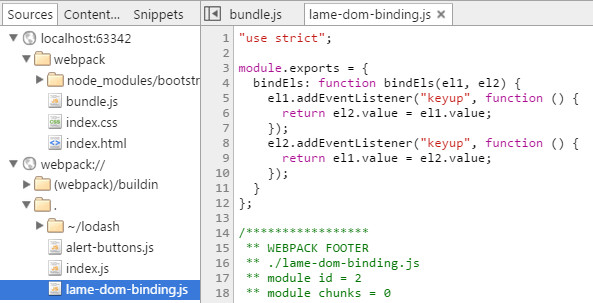
But you can see that code is still ES5 style, if you want what you coded, instead of using 'eval', you can use 'eval-source-map'.
module.exports = {

    entry: './index.js',

    output: {

        filename: 'bundle.js',

        path: __dirname

    },

    devtool: 'eval-source-map',

    module: {

        loaders: [

            {test: /\.js$/, loader: 'babel', exclude: '/node_modules/'}

        ]

    }

};
This can a little bit longer time to compile, then you can see the code you just worte:

Both 'eval' and 'eval-source-map' are recommended using in dev time.
If you want to use in production code:
module.exports = {

    entry: './index.js',

    output: {

        filename: 'bundle.js',

        path: __dirname

    },

    devtool: 'source-map',

    module: {

        loaders: [

            {test: /\.js$/, loader: 'babel', exclude: '/node_modules/'}

        ]

    }

};
It will add a .map file for you. That file is not actually loaded into the browser until the DevTools are brought up.
[Javascript] Webpack Loaders, Source Maps, and ES6的更多相关文章
- [AngualrJS + Webpack] Production Source Maps
When you uglify your Angular code with Webpack's uglify plugin, debugging your application can be a ...
- JavaScript Source Maps浅析
阅读目录 有用的链接 Link: 原文链接 译文开始: 对网站进行性能优化对一个最容易的方法就是把JS和CSS进行打包压缩.但是当你需要调试这些压缩文件中的代码的时候,会发生什么?可能会是一场噩梦.但 ...
- Source Maps简介
提高网站性能最简单的方式之一是合并压缩JavaScript和CSS文件.但是当你需要调试这些压缩文件中的代码时,那将会是一场噩梦.不过也不用担心,souce maps将会帮你解决这一问题. Sourc ...
- 【译】Source Maps浅析
Time:2019/10/27~2019/10/29 Link: 原文链接 译文开始: 对网站进行性能优化对一个最容易的方法就是把JS和CSS进行打包压缩.但是当你需要调试这些压缩文件中的代码的时候, ...
- Sentry(v20.12.1) K8S 云原生架构探索,SENTRY FOR JAVASCRIPT Source Maps 详解
系列 Sentry-Go SDK 中文实践指南 一起来刷 Sentry For Go 官方文档之 Enriching Events Snuba:Sentry 新的搜索基础设施(基于 ClickHous ...
- Introduction to JavaScript Source Maps
下载jquery时候发现:jquery.min.map 这什么鬼呀? https://cdnjs.cloudflare.com/ajax/libs/jquery/3.0.0/core.js http ...
- [转] Webpack的devtool和source maps
source maps Webpack打包生成的.map后缀文件,使得我们的开发调试更加方便,它能帮助我们链接到断点对应的源代码的位置进行调试(//# souceURL),而devtool就是用来指定 ...
- WebStorm 9 自动编译 LESS 产出 CSS 和 source maps
1.双击桌面Chrome图标,打开Chrome,按键盘“F12”键,打开开发工具界面,点击其右上角的“设置”按钮,勾选“Enable JavaScript source maps” 及“Enable ...
- 前端构建:Source Maps详解
一.前言 当使用CoffeeScript.ClojureScript编写前端脚本时,当使用Less.Sacc编写样式规则时,是否觉得调试时无法准确找到源码位置呢?当使用jquery.min.js等经压 ...
随机推荐
- Webform——Repeater多表联合显示
对于一个表里,通过外键连接如何显示另一个表的数据,前Winform里可以用封装类来实现. 对于Webform,可以用封装类,也可以用Repeater的ItemDataBound事件(//在项被绑定数据 ...
- LBS云端数据删除和上传
这里采用C#模拟表单提交,实现LBS云端删除和csv格式文件的上传. 删除: /// <summary> /// 从LBS云端删除数据 /// </summary> /// & ...
- ZOJ 2676 Network Wars ★(最小割算法介绍 && 01分数规划)
[题意]给出一个带权无向图,求割集,且割集的平均边权最小. [分析] 先尝试着用更一般的形式重新叙述本问题.设向量w表示边的权值,令向量c=(1, 1, 1, --, 1)表示选边的代价,于是原问题等 ...
- SGU 438 The Glorious Karlutka River =) ★(动态+分层网络流)
[题意]有一条东西向流淌的河,宽为W,河中有N块石头,每块石头的坐标(Xi, Yi)和最大承受人数Ci已知.现在有M个游客在河的南岸,他们想穿越这条河流,但是每个人每次最远只能跳D米,每跳一次耗时1秒 ...
- 修改Android默认背光值
/********************************************************************* * 修改Android默认背光值 * 说明: * 本文主要 ...
- Spring事务隔离级别和传播特性
相信每个人都被问过无数次Spring声明式事务的隔离级别和传播机制吧!今天我也来说说这两个东西. 加入一个小插曲, 一天电话里有人问我声明式事务隔离级别有哪几种, 我就回答了7种, 他问我Spring ...
- css页面重构面试题
偶然间又看到博客园中这两道页面重构面试题.题一:分别用2个DIV,3个DIV,5个DIV实现水平垂直均居中显示一个宽50px,高200px的正十字架.思路:水平垂直均居中的实现,当然非absolute ...
- Spring Bean之间的关系
bean之间的关系:继承和依赖继承bean的配置 Spring允许继承bean的配置,被继承的bean称为父bean,继承这个父bean的bean称为子bean 子bean从父bean中继承配置,包括 ...
- POJ 1067 取石子游戏
题意:有两堆个数分别为a和b的石子,两个人轮流取石子,一次可以取一堆中任意个数的石子,或者在两堆中取相同个数的石子,最先没有石子可以取的人输,你先取,赢为1输为0. 解法:威佐夫博弈.看完题先找规律, ...
- 4种activity的启动模式
在android里,有4种activity的启动模式,分别为: “standard” (默认) “singleTop” “singleTask” “singleInstance” 它们主要有如下不同: ...