
myeclipse和eclipse安装Java反编译插件
为myeclipse和eclipse安装Java反编译插件
插件所需包
1.解压jad1.5.8g.zip.将jad.exe放到jre的bin目录下,下载地址: http://ishare.iask.sina.com.cn/f/15708995.html?from=dl
如笔者在D:\program files\Java\jre6\bin下
2.安装jadeclipse 下载地址 http://jaist.dl.sourceforge.net/sourceforge/jadclipse/net.sf.jadclipse_3.3.0.jar
将jadclipse_3.1.0.jar复制插件目录

个人机器上环境为myeclipse版本为7.5,eclipse版本为3.3.其它版本方式一致.

eclipse安装目录的\plugins目录下,如笔者:D:\program files\eclipse\plugins

myeclipse拷贝到Common\plugins目录下,如笔者:D:\program files\Genuitec\Common\plugins
对于eclipse安装
如下: Windows —> Perference —> Java下面应该会多出一个JadClipse目录,,相关的设置可以在此修改配置jadclipse:

设置path to decompiler为jad.exe的全路径,如笔者的:D:\program files\Java\jre6\bin\jad.exe
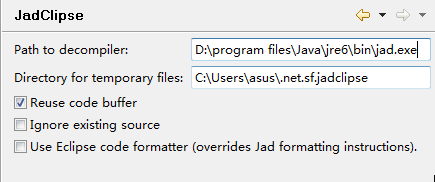
如果存在中文反编译的问题则点击Window > Preferences > Java > JadClipse > Misc,将Convert Unicode strings into ANSI strings选项打勾。
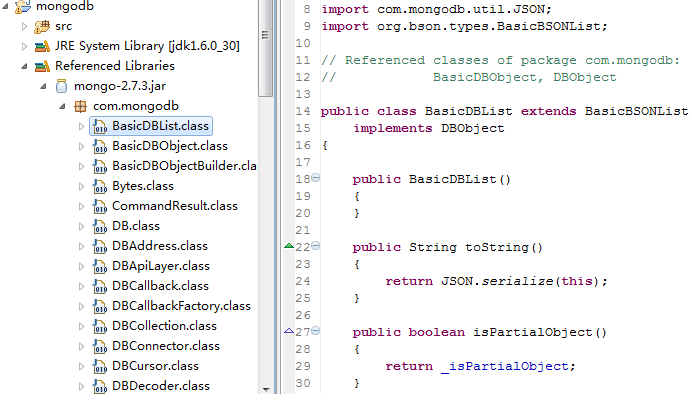
至此插件安装成功,点击class文件即可查看源码,如图查看mongodb的源码
对于myeclipse安装
MyEclipse自从7.0后就不再提供link安装,而是采用在bundles.info文件写入配置信息的方式安装插件。具体步骤如下:
1.下载你需要的安装的插件,其结构需要与link安装时候一致:
+yourPluginName (你的插件文件名--父)
+----plugins (默认需要的文件夹--子)
+----features (默认需要的文件夹--子)
eg.我的文件结构为
+jadplugin
+ ------features
+-------plugins
2.将插件文件夹复制到自定义插件文件夹(就是你自己便于管理,自建的文件夹,D:\program files\Genuitec\Common\jadplugin\plugins下)
3.利用myeclipse新建一个java文件,代码如下:

import java.io.File;

import java.util.ArrayList;

import java.util.List;

//MyEclipse 7.5 插件配置代码生成器

public class PluginUtil {

    public PluginUtil() {

    }

    public void print(String path) {

        List<String> list = getFileList(path);

        if (list == null) {

            return;

        }

        int length = list.size();

        for (int i = 0; i < length; i++) {

            String result = "";

            String thePath = getFormatPath(getString(list.get(i)));

            File file = new File(thePath);

            if (file.isDirectory()) {

                String fileName = file.getName();

                if (fileName.indexOf("_") < 0) {

                    print(thePath);

                    continue;

                }

                String[] filenames = fileName.split("_");

                String filename1 = filenames[0];

                String filename2 = filenames[1];

                result = filename1 + "," + filename2 + ",file:/" + path + "//"

                        + fileName + "//,4,false";

                System.out.println(result);

            } else if (file.isFile()) {

                String fileName = file.getName();

                if (fileName.indexOf("_") < 0) {

                    continue;

                }

                int last = fileName.lastIndexOf("_");// 最后一个下划线的位置

                String filename1 = fileName.substring(0, last);

                String filename2 = fileName.substring(last + 1, fileName

                        .length() - 4);

                result = filename1 + "," + filename2 + ",file:/" + path + "//"

                        + fileName + ",4,false";

                System.out.println(result);

            }

        }

    }

    public List<String> getFileList(String path) {

        path = getFormatPath(path);

        path = path + "/";

        File filePath = new File(path);

        if (!filePath.isDirectory()) {

            return null;

        }

        String[] filelist = filePath.list();

        List<String> filelistFilter = new ArrayList<String>();

        for (int i = 0; i < filelist.length; i++) {

            String tempfilename = getFormatPath(path + filelist[i]);

            filelistFilter.add(tempfilename);

        }

        return filelistFilter;

    }

    public String getString(Object object) {

        if (object == null) {

            return "";

        }

        return String.valueOf(object);

    }

    public String getFormatPath(String path) {

        path = path.replaceAll("////", "/");

        path = path.replaceAll("//", "/");

        return path;

    }

    public static void main(String[] args) {

        /* 你的插件的安装目录.参数String plugin 内容即为你所要安装插件的绝对路径。安装时只需要换成自己的插件路径即可 */

        String plugin = "D:/Program Files//Genuitec/Common/jadplugin";

        new PluginUtil().print(plugin);

    }

}
4.运行上述代码,
5.将控制台输出的内容全部复制到D:/Program Files/Genuitec/MyEclipse 7.5/configuration/org.eclipse.equinox.simpleconfigurator/bundles.info文件中。
5.重启myeclipse完成安装。
后面的配置和eclipse安装中的一致.


myeclipse和eclipse安装Java反编译插件的更多相关文章
- eclipse安装JAVA反编译插件
前言:在实际的开发中几乎都会使用到一些框架来辅助项目的开发工作,对于一些框架的代码我们总怀有一些好奇之心,想一探究竟,有源码当然更好了,对于有些JAR包中的代码我们就需要利用反编译工具来看一下了,下面 ...
- 【Eclipse】eclipse安装JAVA反编译插件
前言:在实际的开发中几乎都会使用到一些框架来辅助项目的开发工作,对于一些框架的代码我们总怀有一些好奇之心,想一探究竟,有源码当然更好了,对于有些JAR包中的代码我们就需要利用反编译工具来看一下了,下面 ...
- Eclipse安装JD-Eclipse反编译插件成功看源码
Eclipse安装JD-Eclipse反编译插件 转载 2017年12月24日 15:19:27 http://heavengate.blog.163.com/blog/static/202381 ...
- Eclipse 4.2 安装Java反编译插件
在eclipse下安装反编译插件可以直接查看 .class 文件对应的java源码. 反编译插件有 jdeclipse 和 jadeclipse. (1) jdeclipse http://www.d ...
- Eclipse4.4 安装java反编译插件Eclipse Class Decompiler
一.在线安装方式: Eclipse Class Decompiler整合了眼下最好的2个Java反编译工具Jad和JD-Core,而且和Eclipse Class Viewer无缝集成.可以非常方便的 ...
- Eclipse安装代码反编译插件Enhanced Class Decompiler
在开发过程中,如果想查看引入资源的源代码,可以借助eclipse的插件Enhanced Class Decompiler轻松实现,下面我来讲解一下如何安装使用这个插件. 1.打开Eclipse菜单-& ...
- Eclipse安装jad反编译插件(在线安装)
Help→Eclipse Marketplace→Find→jad 然后等安装完成重启eclipse即可
- Eclipse如何安装JD-Eclipse反编译插件
一.Eclipse在线安装JD-Eclipse反编译插件 1.在eclipse的help—>Install New Software...中添加新软件开发,添加它的源: name:jd-ecli ...
- 【转】Eclipse Class Decompiler——Java反编译插件
闲暇之余,写了一个Eclipse下的Java反编译插件:Eclipse Class Decompiler,整合了目前最好的2个Java反编译工具Jad和JD-Core,并且和Eclipse Class ...
随机推荐
- chromium的部署工具depot_tools和gclient
depot_tools是个工具包,里面包含gclient.gcl.gn和ninja等工具.其中gclient是代码获取工具,它其实是利用了svn和git.主要涉及的depot_tools文件夹下的文件 ...
- 用TIMESTAMP类型取代INT和DATETIME
时间在我们开发中应用非常普遍,大部分开发中我们将用Mysql的datetime格式来存储,但是对于经常用时间来排序或者查询的应用中,我们要将时间做成索引,这个就跟查询效率很有关系,但是很多程序员会用i ...
- service name和SID的区别
数据库名(DB_NAME).实例名(Instance_name).以及操作系统环境变量(ORACLE_SID) 在ORACLE7.8数据库中只有数据库名(db_name)和数据库实例名(instan ...
- 让memcached和mysql更好的工作
这次是Fotolog的经验,传说中比Flickr更大的网站,Fotolog在21台服务器上部署了51个memcached实例,总计有254G缓存空间可用,缓存了多达175G的内容,这个数量比很多网站的 ...
- SharePoint 2010 Pop-Up Dialogs
转:http://kyleschaeffer.com/sharepoint/sharepoint-2010-pop-up-dialogs/ SharePoint 2010 makes it incre ...
- Travel(HDU 4284状压dp)
题意:给n个城市m条路的网图,pp在城市1有一定的钱,想游览这n个城市(包括1),到达一个城市要一定的花费,可以在城市工作赚钱,但前提有工作证(得到有一定的花费),没工作证不能在该城市工作,但可以走, ...
- 制作动态链接库给opencv程序使用(使用QtCreator)
新建一个c++库项目 pro文件 #------------------------------------------------- # # Project created by QtCreator ...
- 浅谈Javascript中默认参数值的设置
第一种: 1: function test(a,b){ 2: var a = arguments[0] ? arguments[0] : 1;//设置参数a的默认值为1 3: var b = argu ...
- input子系统 KeyPad-Touch上报数据格式与机制
-----------------------------------------------------------------------本文系本站原创,欢迎转载!转载请注明出处:http://b ...
- 数电课设——琐碎
这几天没有更新过网站了,也没继续开发VellLock了,可是感觉还是没有闲着,一直在跟下面的一些元器件在打交道,当然下面的都是小儿科,英文文档都看得我快吐血了.数电基本属于棺材边上过的我,是各种头大, ...