
Internationalization
Internationalization
If you are building a site for an international audience, you will likely want to provide localized versions of common strings on your website, including menu items, form labels, button labels, and more. Additionally, some websites require that route path segments be localized.
Zend Framework provides internationalization (i18n) tools via the zend-i18ncomponent, and integration with zend-mvc via the zend-mvc-i18n component.
Installation
Install zend-mvc-i18n via Composer:
$ composer require zendframework/zend-mvc-i18nAssuming you are using zend-component-installer (which is installed by default with the skeleton application), this will prompt you to install the component as a module in your application; make sure you select eitherapplication.config.php or modules.config.php for the location.
Once installed, this component exposes several services, including:
MvcTranslator, which implements the zend-i18nTranslatorInterface, as well as the version specific to zend-validator, providing an instance that can be used for all application contexts.- A "translator aware" router.
By default, until you configure translations, installation has no practical effect. So the next step is creating translations to use in your application.
Creating translations
The zend-i18n Translation chapter covers the details of adding translations to your application. You can use PHP arrays, INI files, or the popular gettext package (which allows you to use industry standard tools such as poedit to edit translations).
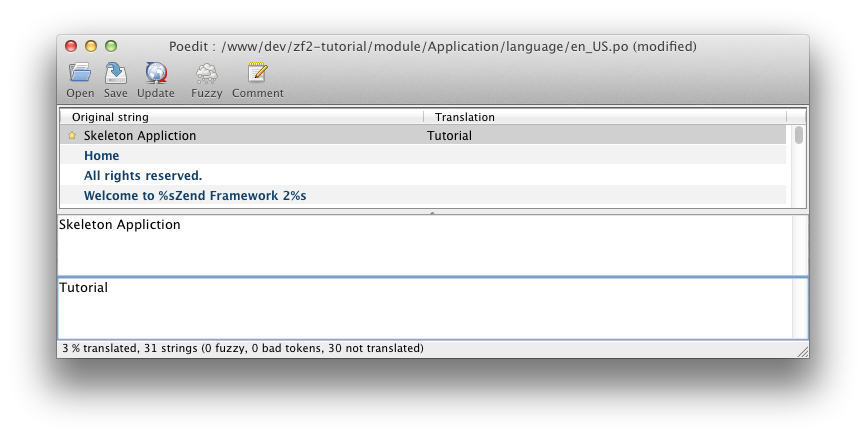
Once you have some translation sources, you will need to put them somewhere your application can access them. Options include:
- In a subdirectory of the module that defines and/or consumes the translation strings. As an example,
module/Application/language/. - In your application data directory; e.g.,
data/language/.
Make sure you follow the guidelines from the zend-i18n documentation with regards to naming your files. Additionally, you may want to further segregate any such directory by text domain.
From here, you need to configure the translator to use your files. This requires adding configuration in either your module or application configuration files that provides:
- The default locale if none is provided.
- Translation file patterns, which include:
- the translation source type (e.g.,
gettext,phparray,ini) - the base directory in which they are stored
- a file pattern for identifying the files to use
As examples:
// in a module's module.config.php:

'translator' => [

    'locale' => 'en_US',

    'translation_file_patterns' => [

        [

            'type'     => 'gettext',

            'base_dir' => __DIR__ . '/../language',

            'pattern'  => '%s.mo',

        ],

    ],

],

// or in config/autoload/global.php:

'translator' => [

    'locale' => 'en_US',

    'translation_file_patterns' => [

        [

            'type'     => 'gettext',

            'base_dir' => getcwd() .  '/data/language',

            'pattern'  => '%s.mo',

        ],

    ],

],
Once the above configuration is in place, the translator will be active in your application, allowing you to use it.
Translating strings in templates
Once you have defined some strings to translate, and configured the application to use them, you can translate them in your application. Thetranslate() and translatePlural() view helpers allow you to provide translations within your view scripts.
As an example, you might want to translate the string "All rights reserved" in your footer. You could do the following in your layout script:
<p>© 2016 by Examples Ltd. <?= $this->translate('All rights reserved') ?></p>Translating route segments
In order to enable route translation, you need to do two things:
- Tell the router to use the translation-aware route class.
- Optionally, tell it which text domain to use (if not using the default text domain).
To tell the application to use the translation-aware route class, we can update our routing configuration. Underneath the top-level router key, we'll add therouter_class key:
// In a module.config.php file, or config/autoload/global.php:

'router' => [

    'router_class' => Zend\Mvc\I18n\Router\TranslatorAwareTreeRouteStack::class,

    'routes' => [

        /* ... */

    ],

],
If you want to use an alternate text domain, you can do so via thetranslator_text_domain key, also directly below the router key:
// In a module.config.php file, or config/autoload/global.php:

'router' => [

    'router_class' => Zend\Mvc\I18n\Router\TranslatorAwareTreeRouteStack::class,

    'translator_text_domain' => 'router',

    'routes' => [

        /* ... */

    ],

],
Now that the router is aware of translations, we can use translatable strings in our routes. To do so, surround the string capable of translation with braces ({}). As an example:
'route' => '/{login}',specifies the word "login" as translatable.
Internationalization的更多相关文章
- 国际化(Internationalization)
1:什么是国际化? 国际化(internationalization)是设计和制造容易适应不同区域要求的产品的一种方式.它要求从产品中抽离所有的与语言,国家/地区和文化相关的元素.换言之,应用程序的功 ...
- Struts2 internationalization(国际化)
1:什么是国际化? 国际化(internationalization)是设计和制造容易适应不同区域要求的产品的一种方式.它要求从产品中抽离所有的与语言,国家/地区和文化相关的元素.换言之,应用程序的功 ...
- Struts2(十三)国际化-internationalization
一.国际化是什么--I18N 即internationalization 首字母i-结束字母n之间有18个字母 特征:在程序不做修改的情况下,可以根据不同的语言环境显示相应内容 二.Java内置国际化 ...
- Struts2学习笔记 国际化(Internationalization)
概述 国际化(Internationalization),通途的讲,就是让软件实现对多种语言的支持.可以通过简单的设置就可以从一种语言切换到另一种语言.用的最多的地方就是在应用程序的界面表示上.我们经 ...
- 使用 PySide2 开发 Maya 插件系列三:qt语言国际化(internationalization)
使用 PySide2 开发 Maya 插件系列三:qt语言国际化(internationalization) 前言: 这是 qt for python 的语言国际化,基于 UI 的,python 也有 ...
- Internationalization(i18n) support in SAP CRM,UI5 and Hybris
i18n(其来源是英文单词 internationalization的首末字符i和n,18为中间的字符数)是"国际化"的简称.对程序来说,在不修改内部代码的情况下,能根据不同语言及 ...
- current status of the installation and the internationalization of Samba 3.0
Only about 8 months from release of Samba 3.0.0, there is beginning to be the transition from 2.2.x. ...
- i18n 和 L10n (internationalization and localization) 国际化与本地化(具有全球战略眼光的公司企业的必由之路)
i18n 和 L10n (internationalization and localization) 国际化与本地化(具有全球战略眼光的公司企业的必由之路) 1 1 https://zh.wiki ...
- Internationalization API & ECMA-402
Internationalization API & ECMA-402 i18n https://caniuse.com/?search=Internationalization API In ...
随机推荐
- 【转】报错:Program "sh" not found in PATH
原文网址:http://www.cnblogs.com/SadNight/p/3406201.html (1) 报错:Program "sh" not found in PATH ...
- Simple XML
官网:http://simple.sourceforge.net/home.php 截止目前最新版本:simple-xml-2.7.1.jar 特点: jar lib文件只有360K左右的大小 它的使 ...
- C# 等待另外一个窗体关闭,再进行主线程的代码
方法1 用Form类或其子类的showDialog方法. 比如你在form1里有一个按扭,然后你在Form1的点击事件里写上显示form2的代码: Form2 frm=new Form2(); frm ...
- Ildasm.exe(MSIL 反汇编程序)
MSIL 反汇编程序是 MSIL 汇编程序 (Ilasm.exe) 的伙伴工具. Ildasm.exe 采用包含 Microsoft 中间语言 (MSIL) 代码的可迁移可执行 (PE) 文件,并创建 ...
- 陈灯WGF双缓冲绘图框架
“木丸子童屋”,专售各类儿童玩具,价格优惠,请大家多多支持:http://shop65552598.taobao.com/ WGF(windows graphic foundation)为window ...
- VTK三维重建(1)-使用VTK读取DICOM,并动态输出
[效果显示] 将脚部骨骼扫描的CT照片进行的连续读取, 运行结果存为了两个动态gif, 不知道能不能正常显示 [程序实现] int main(int argc, char* argv[]) { // ...
- CVTE面试经历
CVTE也算一般的公司,很偏,不想说.我重点说一下面试的过程,我面试的C++程序开发工程师. 1.自我介绍自己的基本情况. 2.首先问你了解C++的面向对象么,他有哪些主要内容.对面向对象中的多态性你 ...
- Ubunut 13.04下配置memcached、 python MySQLDB,python-memcache模块等
一开始系统使用的是163的源,没有安装成功memcached,换了cn99的也不行,后来换了台湾的源,以下步骤才得以顺利进行. 更换源的方法可以参看我以前的帖子. 安装memached:sudo ap ...
- CodeForces 696A(Lorenzo Von Matterhorn ) & CodeForces 696B(Puzzles )
A,给一棵完全二叉树,第一个操作,给两个点,两点路径上的所有边权值都增加w,第二个操作,给两个点,求两点路径上的所有边权值和. 我看一眼题就觉得是树链剖分,而我又不会树链剖分,扔掉. 后来查了题解,首 ...
- 我是如何理解Java抽象类和接口的
在面试中我们经常被问到:Java中抽象类和接口的区别是什么? 然后,我们就大说一通抽象类可以有方法,接口不能有实际的方法啦:一个类只能继承一个抽象类,却可以继承多个接口啦,balabala一大堆,就好 ...