
.net 调用C++类库
事实上这一直是个非常无解的问题。最好的办法是将C++类库写成COM。
可是有时候往往不能这个做。那就仅仅有两种办法:转成C函数形式或者Manage C++封装。
下文就介绍了这两种方法。
原帖:http://www.codeproject.com/KB/cs/marshalCPPclass.aspx
Introduction
I recently needed to marshal some legacy C++ classes into a C# project on which I was working. Microsoft provides well documented means to marshal C-functions, and to marshal COM components, but they left out a mechanism to marshal C++ classes. This article documents the discoveries I made and the eventual solution I came up with.
Audience
This article assumes the reader is knowledgeable in C# and .NET and is already familiar with PInvoke and marshaling.
Article
I had existing (unmanaged) C++ DLLs which needed to be used with a managed C# project I was working on. Although I had access to the source code of the DLLs, one of the requirements was that the C++ source code and DLLs could not be dramatically altered. This was due to many reasons, including backwards compatibility with existing projects, the code having already been QA'ed, and project deadlines, so converting the original DLLs to be managed C++ DLLs, or converting the classes within the original DLLs to be COM components was out.
Upon first investigating this issue, I was hoping to be able to declare a definition for a C# version of the class and marshal the object back and forth between the managed and unmanaged memory spaces, similar to how a structure is marshaled back and forth. Unfortunately, this is not possible; in my research I discovered that unmanaged C++ classes can't be marshaled and that the best approach is to either create bridge/wrapper C-functions for the public methods of the class and marshal the functions, or to create a bridge DLL in managed C++.
Solution A: Create Bridge Functions in C and Use PInvoke
Suppose we have the following unmanaged C++ class:
 Collapse
class EXAMPLEUNMANAGEDDLL_API CUnmanagedTestClass

{

public:

    CUnmanagedTestClass();

    virtual ~CUnmanagedTestClass();

    void PassInt(int nValue);

    void PassString(char* pchValue);

    char* ReturnString();

};
Running dumpbin on the DLL containing the class yields the following results:
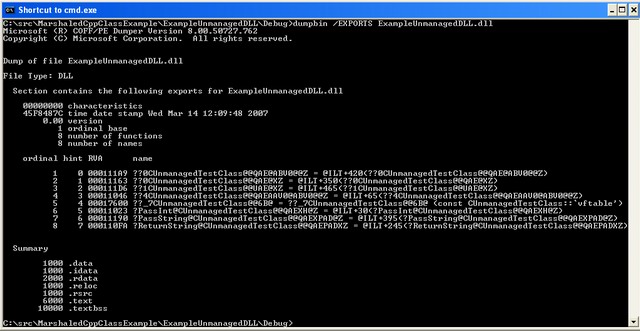
(Click for larger view. We'll cover the results from dumpbin in a moment).
Since the instantiation of a C++ class object is just a pointer, we can use C#'s IntPtr data type to pass unmanaged C++ objects back and forth, but C-functions need to be added to the unmanaged DLL in order to create and dispose instantiations of the class:
Collapse
// C++:

extern "C" EXAMPLEUNMANAGEDDLL_API CUnmanagedTestClass* CreateTestClass()

{

    return new CUnmanagedTestClass();

}

extern "C" EXAMPLEUNMANAGEDDLL_API void DisposeTestClass(

    CUnmanagedTestClass* pObject)

{

    if(pObject != NULL)

    {

        delete pObject;

        pObject = NULL;

    }

}
Collapse
// C#:

[DllImport("ExampleUnmanagedDLL.dll")]

static public extern IntPtr CreateTestClass();

[DllImport("ExampleUnmanagedDLL.dll")]

static public extern void DisposeTestClass(IntPtr pTestClassObject);

IntPtr pTestClass = CreateTestClass();

DisposeTestClass(pTestClass);

pTestClass = IntPtr.Zero;

// Always NULL out deleted objects in order to prevent a dirty pointer
This allows us to pass the object back and forth, but how do we call the methods of our class? There are two approaches to accessing the methods. The first approach is to use PInvoke and to use CallingConvention.ThisCall. If you go back to the output from dumpbin, you will see the mangled name for the PassInt() method is "?PassInt@CUnmanagedTestClass@@QAEXH@Z". Using CallingConvention.ThisCall, the PInvoke definition of PassInt() is:
Collapse
[DllImport("ExampleUnmanagedDLL.dll",

    EntryPoint="?PassInt@CUnmanagedTestClass@@QAEXH@Z",

    CallingConvention=CallingConvention.ThisCall)]

static public extern void PassInt(IntPtr pClassObject, int nValue);
The second approach is to create C-functions which act as a bridge for each public method within the DLL...
Collapse
// C++:

extern "C" EXAMPLEUNMANAGEDDLL_API void CallPassInt(

    CUnmanagedTestClass* pObject, int nValue)

{

    if(pObject != NULL)

    {

        pObject->PassInt(nValue);

    }

}

.

.

.
...and marshal each of new C-functions in C#...
Collapse
// C#:

[DllImport("ExampleUnmanagedDLL.dll")]

static public extern void CallPassInt(IntPtr pTestClassObject, int nValue);

.

.

.
I chose to go with the second approach; the name mangling the compiler does means that the first approach is susceptible to breaking if a different compiler is used to compile the C++ DLL (newer version, different vendor, etc...), or if additional methods are added to the class. There is a little extra work involved with the second approach, but I feel the extra work is rewarded by having better maintainable code and code which is less likely to break in the future.
At this point I should point out that I added the bridge functions to the original DLL and recompiled the DLL, but what if the DLL in question is a third party DLL and you don't have access to the sources so you can't recompile the DLL (you only have the rights to redistribute it)? In this scenario I suggest either:
- Creating a new DLL in unmanaged C and place the bridge functions within the new DLL.
- Create a managed C++ DLL and have it act as the bridge between the C# code and the unmanaged C++ classes (see Solution B further on).
At this point, the C# code to call our C++ class looks like:
Collapse
// C#:

IntPtr pTestClass = CreateTestClass();

CallPassInt(pTestClass, 42);

DisposeTestClass(pTestClass);

pTestClass = IntPtr.Zero;
This is fine as it is, but this isn't very Object-Oriented. Suppose you aren't the only one working on the project? Will other clients of your code remember to dispose the C++ class object via DisposeTestClass()? Will they correctly use an IntPtr created from CreatetestClassDLL()and not some other IntPtr? The next step is to wrap our C# code and PInvoke definitions into a class.
During my investigation, I came across the following newsgroup posting...
...and I decided to mirror this approach and create a class in C# called CSUnmanagedTestClass:
Collapse
// C#:

public class CSUnmanagedTestClass : IDisposable

{

    #region PInvokes

    [DllImport("TestClassDLL.dll")]

    static private extern IntPtr CreateTestClass();

    [DllImport("TestClassDLL.dll")]

    static private extern void DisposeTestClass(IntPtr pTestClassObject);

    [DllImport("TestClassDLL.dll")]

    static private extern void CallPassInt(IntPtr pTestClassObject, int nValue);

    .

    .

    .

    #endregion PInvokes

    #region Members

    private IntPtr m_pNativeObject;

    // Variable to hold the C++ class's this pointer

    #endregion Members

    public CSUnmanagedTestClass()

    {

        // We have to Create an instance of this class through an exported

        // function

        this.m_pNativeObject = CreateTestClass();

    }

    public void Dispose()

    {

        Dispose(true);

    }

    protected virtual void Dispose(bool bDisposing)

    {

        if(this.m_pNativeObject != IntPtr.Zero)

        {

            // Call the DLL Export to dispose this class

            DisposeTestClass(this.m_pNativeObject);

            this.m_pNativeObject = IntPtr.Zero;

        }

        if(bDisposing)

        {

            // No need to call the finalizer since we've now cleaned

            // up the unmanaged memory

            GC.SuppressFinalize(this);

        }

    }

    // This finalizer is called when Garbage collection occurs, but only if

    // the IDisposable.Dispose method wasn't already called.

    ~CSUnmanagedTestClass()

    {

        Dispose(false);

    }

    #region Wrapper methods

    public void PassInt(int nValue)

    {

        CallPassInt(this.m_pNativeObject, nValue);

    }

    .

    .

    .

    #endregion Wrapper methods

}
Now, the C# client of this code simply does:
Collapse
// C#:

CSUnmanagedTestClass testClass = new CSUnmanagedTestClass();

testClass.PassInt(42);

testClass.Dispose();
Solution B: Create a Bridge DLL in Managed C++
Another option is to leave the original DLL untouched and create a new DLL in managed C++ to act as a bridge between the managed C# code and the unmanaged C++ classes in the unmanaged DLL. Using the CUnmanagedTestClass within the managed DLL wasn't difficult, and PInvoke definitions weren't required, but the managed C++ syntax and classes which needed to be used was a bit vexing:
Collapse
// MCPP:

// Forward declariation

class CUnmanagedTestClass;

public ref class CExampleMCppBridge

{

public:

    CExampleMCppBridge();

    virtual ~CExampleMCppBridge();

    void PassInt(int nValue);

    void PassString(String^ strValue);

    String^ ReturnString();

private:

    CUnmanagedTestClass* m_pUnmanagedTestClass;

};

CExampleMCppBridge::CExampleMCppBridge()

    : m_pUnmanagedTestClass(NULL)

{

    this->m_pUnmanagedTestClass = new CUnmanagedTestClass();

}

CExampleMCppBridge::~CExampleMCppBridge()

{

    delete this->m_pUnmanagedTestClass;

    this->m_pUnmanagedTestClass = NULL;

}

void CExampleMCppBridge::PassInt(int nValue)

{

    this->m_pUnmanagedTestClass->PassInt(nValue);

}

.

.

.
Collapse
// C#:

CExampleMCppBridge example = new CExampleMCppBridge();

example.PassInt(42);

example.Dispose();
(and I have to admit, I'm not very fluent in MCPP)
Pros/Cons
Both approach A and approach B have their own pros and cons. Are you unfamiliar with MCPP? Go with approach A and create C-functions to wrap the public methods of the class and use PInvoke. Can't modify the original DLL and don't want to create PInvode definitions? Create bridge classes in a new MCPP DLL as demonstrated in approach B.
Conclusion
In this article I have presented the reader with a number of different approaches and solutions to the problem of marshaling an unmanaged C++ class to C#. For the sake of brevity I have only included the CallPassInt() examples in this article, however the...
Collapse
CallPassString()

CallReturnString()
...are in the source code accompanying this article.
.net 调用C++类库的更多相关文章
- java 调用 C# 类库搞定,三步即可,可以调用任何类及方法,很简单,非常爽啊
java 调用 C# 类库搞定,三步即可,可以调用任何类及方法,很简单,非常爽啊 java 调用 C# 类库搞定,可以调用任何类及方法,很简单,非常爽啊 总体分三步走: 一.准备一个 C# 类库 (d ...
- Asp.Net MVC ajax调用 .net 类库问题
如果你还在为 ajax 调用 .net 类库还束手无策的话,相信这篇博客将帮助你解决这个世纪问题! 因为Visual Studio 内置了asp.net mvc ,不过当你添加asp.net mvc项 ...
- 利用C#的反射机制动态调用DLL类库
最近由于业务要求,需要动态调用DLL类库,所以研究了一下,感觉还好也不太难,今天就把自己理解的写了一个小例子(已经通过VS2005跑通),供大家一起研究和探讨,有理解不当的地方还请高手们多多指正,谢谢 ...
- 在SQL Server中使用CLR调用.NET类库中的方法 (转载)
在SQL Server中调用 .NET 类库的方法要分为下面几步来实现: 在.NET中新建一个类库项目,并在这个项目中添加一个类文件,并把要被SQL Server调用的方法定义为公有的,静态的方法. ...
- asp.net调用opencv类库,实现图像处理显示
asp.net调用opencv类库,实现图像处理显示 原理上来说,通过dll的调用,无论是asp.net还是winform都可以调用opencv及其类库.但是在实现的过程还是有许 ...
- java 调用 C# 类库 实战视频, 非常简单, 通过 云寻觅 javacallcsharp 生成器 一步即可!
java 调用 C# 类库 实战视频, 非常简单, 通过 云寻觅 javacallcsharp 生成器 一步即可! 通过 云寻觅 javacallcsharp 生成器 自动生成java jni类库, ...
- php通过JavaBridge调用Java类库和不带包的自定义java类成功 但是调用带包的自定义Java类报错,该怎么解决
php通过JavaBridge调用Java类库和不带包的自定义java类成功 但是调用带包的自定义Java类报错,Class.forName("com.mysql.jdbc.Driver&q ...
- C#调用C++类库的几种方式
1. 直接调用C++类库中的公共方法 使用DllImport特性对方法进行调用,比如一个C++类库SampleCppWrapper.dll中的公共方法: extern "C" _ ...
- C++调用C#类库函数
最近做一个信息化三维仿真项目,基于第三方提供的虚拟引擎通过VC++2008做二次开发,其中涉及到与C#客户端的融合以及数据交互的问题, 主要是VC++需要调用C#客户端提供的类库内的接口获取C#客户端 ...
- 学习使用Delphi for android 调用Java类库
http://blog.csdn.net/laorenshen/article/details/41148253 学习使用Delphi for android 调用Java类库 2014-11-15 ...
随机推荐
- 设计模式 命令-Command
命令-Command 当要向不同类的对象发出相同的请求时,可以将接收者和他的动作封装进一个命令对象.这样调用者只和命令产生依赖.而不会和众多的接收者发生依赖. Head First例子 要设计一款遥控 ...
- String内存陷阱简介
String 方法用于文本分析及大量字符串处理时会对内存性能造成一些影响.可能导致内存占用太大甚至OOM. 一.先介绍一下String对象的内存占用 一般而言,Java 对象在虚拟机的结构如下:•对象 ...
- shell 内网主机存活探测器
最近在学习shell 编程,闲来无事,搞了一个小shell. 可以用来 对一个网段的存活主机进行 探测. #!/bin/bash # #// #blog:www.cnblogs.com/outline ...
- linux3.0.4编译LDD中的scull全过程
按照惯例,我是应该先写一些本章的收获的,不过太晚了. 在看完第三章之后开始编译,错误一堆,几乎崩溃,幸亏经过不断的百度,总算解决了问题,我发现 我遇到问题比较多,算是集中七个龙珠了吧,感谢先行的大神们 ...
- TopFreeTheme精选免费模板【20130701.特别版】
今天我们整理了16款WordPress和Joomla的最新主题.它们都是来自Themeforest,RocketTheme,YooTheme以及TemPlaza的高质量主题,赶快收藏起来吧. Este ...
- Yii 1.1 DAO绑定参数实例
<?php $sql = "SELECT * FROM admin_user WHERE user_name=:uname AND password LIKE :c"; $c ...
- wijmo
wijmo-5官网 Samples Forums Demos 1.当FlexGrid的单元格中文本过长时显示Tooltip 参考1:angular flexGrid tooltip on every ...
- dom 按着shift多选
<!doctype html> <html> <head> <meta charset="utf-8"> <title> ...
- gpgcheck
warning: rpmts_HdrFromFdno: Header V3 RSA/SHA256 Signature, key ID fd431d51: NOKEY Public key for co ...
- 全文索引之nutch与hadoop(转)
原文:http://blog.csdn.net/chaofanwei/article/details/39476535 全文索引-lucene,solr,nutch,hadoop之lucene 全文索 ...