
Nginx支持web界面执行bash|python等系统命令和脚本,可以传递参数
文章转载自:https://me.jinchuang.org/archives/114.html ,有修改
步骤总结
1.安装好nginx,假设其html根路径为/usr/share/nginx/html
2.准备工作:关闭防火墙,关闭selinux,安装epel源
3.yum安装依赖包:dh-autoreconf fcgi fcgi-devel
4.源码安装spawn-fcgi和fcgiwrap
(这俩其实也可以直接通过yum方式安装,不过安装后没法通过systemctl的方式启动fcgiwrap,还是得用脚本文件,启动的时候会报错:spawn-fcgi: child exited with: 127,因此还是使用源码安装比较稳妥)
5.配置nginx的location路径
把下载好的linux-shell模板放在nginx的html根路径下,设置用户和用户组为nginx,然后脚本目录文件增加可执行权限,添加location规则
location规则中配置的root是nginx的html根路径,并不是实际程序所在路径,因为执行的时候会在设置root路径也就是nginx的html根路径下查找linux-shell/page/script/(.*)$路径里的文件进行执行。
chown -R nginx:nginx /usr/share/nginx/html/linux-shell

cd /usr/share/nginx/html/linux-shell/page/script/

chmod +x */*
    location ~ ^/linux-shell/page/script/(.*)$ {

        gzip off;

        root /usr/share/nginx/html;

        fastcgi_pass unix:/var/run/fcgiwrap.socket;

        include fastcgi_params;

        fastcgi_param SCRIPT_FILENAME $document_root/$fastcgi_script_name;

    }
路径:/usr/share/nginx/html下有api文件夹,api文件夹下有一个disk的文件
cd `/usr/share/nginx/html/

chown -R nginx:nginx api

chmod a+x api/disk
访问路径是:http://localhost/api/disk,就会在设置的root路径下,也就是/usr/share/nginx/html路径下找api开头的文件夹,进而找到disk文件进行执行
    location ~ ^/api/(.*)$ {

        gzip off;

        default_type  text/plain;

        root /usr/share/nginx/html;

        fastcgi_pass unix:/var/run/fcgiwrap.socket;

        include fastcgi_params;

        fastcgi_param SCRIPT_FILENAME $document_root/$fastcgi_script_name;

    }
如上俩,模板和参数可以合并起来,linux-shell模板可以参考disk里的文件内容写法接收传递过来的参数
使用说明
1,shell命令 | python命令 | 系统支持的都可以
2,不支持交互式显示 | 不支持动态内容显示
3,傻瓜式操作(页面点击链接一次,执行一次脚本内容)|可以设置页面自动刷新,实现重复执行脚本
准备工作
##关闭防火墙

##(centos6)

service iptables stop

chkconfig iptables off

##(centos7)

systemctl stop firewalld

systemctl disable firewalld

#关闭selinux

sed -i 's/SELINUX=enforcing/SELINUX=disabled/' /etc/selinux/config

setenforce 0

#已有epel源的跳过此步骤,直接安装依赖开始

#centos6 添加epel yum源

wget -O /etc/yum.repos.d/epel-6.repo http://mirrors.aliyun.com/repo/epel-6.repo

#centos7 添加epel yum源

wget -O /etc/yum.repos.d/epel-7.repo http://mirrors.aliyun.com/repo/epel-7.repo

#清除缓存 重新生成缓存

yum clean all

yum makecache
安装依赖包
#安装开发包组和相关的依赖包

yum install dh-autoreconf fcgi fcgi-devel -y
安装spawn-fcgi 和 fcgiwrap
#创建存放包的目录(包下载到哪个目录都可以,这里放在/source/目录下)

mkdir /source/ && cd /source/

#安装spawn-fcgi

#github下载最新代码 https://github.com/lighttpd/spawn-fcgi

本地下载:wget https://www.jinchuang.org/novel/lnmp/spawn-fcgi.zip

最新版:wget https://github.com/lighttpd/spawn-fcgi/archive/refs/tags/spawn-fcgi-1.6.4.zip

解压:unzip spawn-fcgi-1.6.4.zip

安装:

cd spawn-fcgi-spawn-fcgi-1.6.4

./autogen.sh

./configure

make && make install

#安装fcgiwrap

#github下载最新代码 https://github.com/gnosek/fcgiwrap

本地下载:wget https://www.jinchuang.org/novel/lnmp/fcgiwrap.zip

最新版: wget https://github.com/gnosek/fcgiwrap/archive/refs/tags/1.1.0.zip

解压: unzip 1.1.0.zip

安装:

cd fcgiwrap-1.1.0

autoreconf -i

./configure

make && make install
创建fcgiwrap启动脚本
【nginx通过转发请求到这里来执行脚本命令】,脚本启动用户要和你nginx启动用户一致,注意下脚本中2个命令的路径是否和你的一致
vim /etc/init.d/fcgiwrap

#! /bin/bash

### BEGIN INIT INFO

# Provides:          fcgiwrap

# Required-Start:    $remote_fs

# Required-Stop:     $remote_fs

# Should-Start:

# Should-Stop:

# Default-Start:     2 3 4 5

# Default-Stop:      0 1 6

# Short-Description: FastCGI wrapper

# Description:       Simple server for running CGI applications over FastCGI

### END INIT INFO

PATH=/usr/local/sbin:/usr/local/bin:/sbin:/bin:/usr/sbin:/usr/bin

SPAWN_FCGI="/usr/local/bin/spawn-fcgi"

DAEMON="/usr/local/sbin/fcgiwrap"

NAME="fcgiwrap"

PIDFILE="/var/run/$NAME.pid"

FCGI_SOCKET="/var/run/$NAME.socket" # 注意:这里跟原文不一样

FCGI_USER="nginx"

FCGI_GROUP="nginx"

FORK_NUM=5

SCRIPTNAME=/etc/init.d/$NAME

case "$1" in

    start)

        echo -n "Starting $NAME... "

        PID=`pidof $NAME`

        if [ ! -z "$PID" ]; then

            echo " $NAME already running"

            exit 1

        fi

        $SPAWN_FCGI -u $FCGI_USER -g $FCGI_GROUP -s $FCGI_SOCKET -P $PIDFILE -F $FORK_NUM -f $DAEMON

        if [ "$?" != 0 ]; then

            echo " failed"

            exit 1

        else

            echo " done"

        fi

    ;;

    stop)

        echo -n "Stoping $NAME... "

        PID=`pidof $NAME`

        if [ ! -z "$PID" ]; then

            kill `pidof $NAME`

            if [ "$?" != 0 ]; then

                echo " failed. re-quit"

                exit 1

            else

                rm -f $pid

                echo " done"

            fi

        else

            echo "$NAME is not running."

            exit 1

        fi

    ;;

    status)

        PID=`pidof $NAME`

        if [ ! -z "$PID" ]; then

            echo "$NAME (pid $PID) is running..."

        else

            echo "$NAME is stopped"

            exit 0

        fi

    ;;

    restart)

        $SCRIPTNAME stop

        sleep 1

        $SCRIPTNAME start

    ;;

    *)

        echo "Usage: $SCRIPTNAME {start|stop|restart|status}"

        exit 1

    ;;

esac
启动fcgiwrap服务
增加可执行权限

chmod +x /etc/init.d/fcgiwrap

#添加到服务里面(centos6系统执行,centos7跳过此步骤)

chkconfig --add fcgiwrap

chkconfig --level 2345 fcgiwrap on

#启动服务

/etc/init.d/fcgiwrap start

Starting fcgiwrap... spawn-fcgi: child spawned successfully: PID: 22416

spawn-fcgi: child spawned successfully: PID: 22417

spawn-fcgi: child spawned successfully: PID: 22418

spawn-fcgi: child spawned successfully: PID: 22419

spawn-fcgi: child spawned successfully: PID: 22420

done
nginx配置转发 (系统安装好nginx)
这一步的含义是下载现成的模板放在一个目录下,然后nginx中配置location路径进行访问
#注意下修改为你的目录路径

#location ~ ^/linux-shell/page/script/.*\.(cgi) {  #这里的cgi后缀匹配根据需要修改,后缀自定义即可

# linux-shell 为模板程序目录,放在nginx网站根目录下面

location ~ ^/linux-shell/page/script/ {  #我这里调用的文件是没有后缀的就用这个配置

        gzip off;

        fastcgi_pass  unix:/var/run/fcgiwrap.socket; # 注意:这里跟原文不一样

       root /usr/share/nginx/html;  # 注意:这里跟原文不一样,nginx的html目录

        include fastcgi_params;

        fastcgi_param  SCRIPT_NAME    $document_root/$fastcgi_script_name; # 注意:这里跟原文不一样

      }

#重启nginx:

nginx -s reload
模板目录结构
# 下载模板,放在网站根目录下

# 目录结构:

linux-shell

├── css

│   ├── iconfont.css

│   ├── iconfont.eot

│   ├── iconfont.svg

│   ├── iconfont.ttf

│   ├── iconfont.woff

│   ├── iconfont.woff2

│   ├── page.css

│   └── style.css

├── favicon.ico

├── images

│   ├── b.jpg

│   ├── body.cur

│   ├── b.png

│   ├── content.jpg

│   ├── hua.gif

│   ├── link.cur

│   ├── logo.png

│   ├── nav.jpg

│   └── page.cur

├── index.html

├── js

│   ├── jquery-2.1.1.min.js

│   └── nav.js

└── page

    ├── content

    │   ├── index.html

    │   ├── script.js

    │   └── TweenMax.min.js

    ├── h5

    │   ├── 161

    │   │   └── 161.html

    │   ├── 188

    │   │   └── 188.html

    │   └── local

    │       └── local.html

    └── script

        ├── 161

        │   ├── disk

        │   ├── info

        │   ├── mem

        │   ├── ps

        │   ├── server

        │   ├── ssh

        │   └── uptime

        ├── 188

        │   ├── disk

        │   ├── info

        │   ├── mem

        │   ├── ps

        │   ├── server

        │   ├── ssh

        │   └── uptime

        └── local

            ├── disk

            ├── info

            ├── mem

            ├── ps

            ├── server

            ├── ssh

            └── uptime
shell代码示例文件(查看磁盘使用情况):
#!/bin/bash

echo "Content-Type:text/html;charset=utf-8"

echo ""

# 自动刷新

#echo "<script>window.setInterval(function(){

#    window.location.reload();

#},1000);</script>"

#echo "<meta http-equiv="refresh" content="60">"

# html页面css样式

echo '<style>

body{color:#cecece;}

.title{color: #FF9800;border-left: 4px solid;padding: 4px;}

pre{font-size:14px;border-left: 4px solid #4CAF50;padding: 5px;}

</style>'

# 定义变量

ip="192.168.x.x"

# 内容代码(命令返回结果放在<pre>标签中)

echo '<div style="padding-left:10px;">'

echo '<h1 class="title">硬盘使用情况</h1>'

echo '<h5 style="color:#848484;">'

dd=`date`

echo "统计时间: $dd 【当前机器ip: $ip】"

echo '</h5>'

echo '<pre>'

# 查看磁盘使用(本机)

df -hT

# 查看磁盘使用(远程机器,可以使用ansible|sshpass等远程工具)

sshpass -p "password" ssh root@$ip -o StrictHostKeyChecking=no  'df -hT'

echo '</pre>'
html模板下载
如果访问弹出下载,先检查fcgiwrap服务是否正常,再检查nginx匹配规则
下载地址:https://files.cnblogs.com/files/sanduzxcvbnm/linux-shell.zip
# 程序html模板使用:(脚本文件要加执行权限,不然会提示403 错误)
cd linux-shell/page/script/

chmod +x */*

# 脚本文件说明:

# disk

查看硬盘使用情况

# info

提示信息内容

# mem

内存使用情况

# ps

系统进程概览

# server

自定义服务进程查看

# ssh

ssh连接用户情况

# uptime

系统负载cpu和内存使用概览
传递参数
nginx配置
    location ~ ^/api/(.*)$ {

        gzip off;

        default_type  text/plain;

        root /usr/share/nginx/html;

        fastcgi_pass unix:/var/run/fcgiwrap.socket;

        include fastcgi_params;

        fastcgi_param SCRIPT_FILENAME $document_root/$fastcgi_script_name;

    }
在/usr/share/nginx/html路径下有api文件夹,api文件夹下有一个disk的文件,其内容如下:
#!/bin/sh

echo "Content-Type:text/html;charset=utf-8"

echo ""

for i in a b c; do

        echo $i

done

echo "$QUERY_STRING" | awk -F '=' '{print $1}'

echo "$QUERY_STRING" | awk -F '=' '{print $2}'
访问测试,用浏览器访问效果是一样的
# curl http://localhost/api/disk

a

b

c
# curl http://10.16.16.101/api/disk?abc=123

a

b

c

abc

123
关于使用nginx用户,不使用root用户的问题
首先,在写fcgiwrap启动脚本文件,也就是/etc/init.d/fcgiwrap的时候里面指定的是nginx用户,这个用户是启动nginx使用的用户是一致的。
若是该脚本文件中使用root用户,启动的时候会报错:
stderr, "spawn-fcgi: I will not set uid to 0
因为用spawn-fcgi 启动不能使用 -u root 启动FastCGI进程。若是想使用root用户启动,需要修改源代码:
在文件src/spawn-fcgi.c中注释掉一段代码, 总共有三处需要注释
  /*

  if (my_uid == 0) {

          fprintf(stderr, "spawn-fcgi: I will not set uid to 0\n");

          return -1;

  }

  */
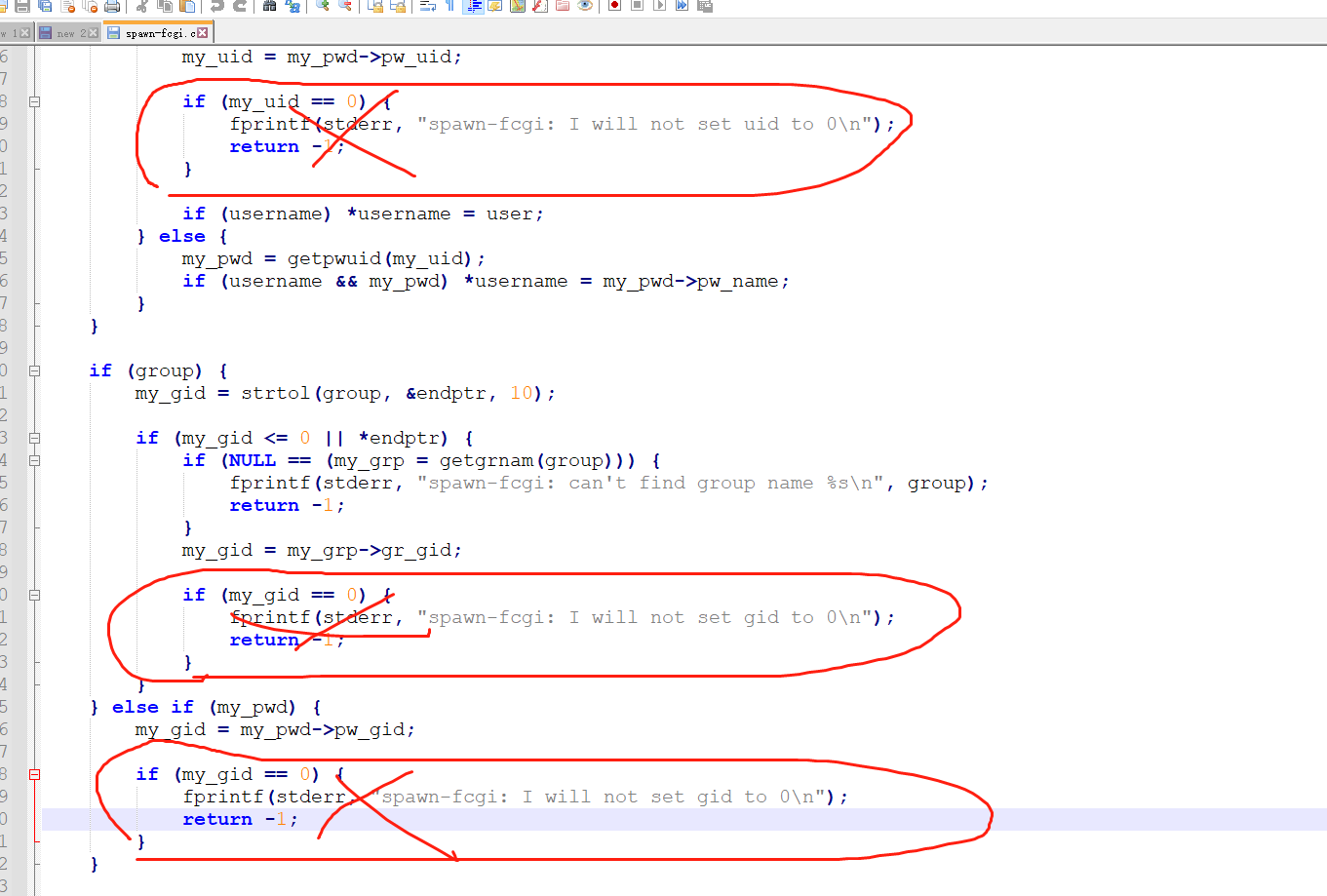
然后再编译源码进行安装
这样一来spawn-fcgi就行使用root启动了,修改启动脚本,把nginx修改成root,删除使用nginx用户生成的fcgiwrap.socket文件。
还需要修改nginx配置文件中nginx启动使用的用户,也修改为root。
然后重新启动fcgiwrap和nginx,就能实现使用root用户了
写好shell脚本访问报错:An error occurred while parsing CGI reply,nginx日志显示是502 bad gateway
shell脚本开头内容中加上如下:
echo "Content-Type:text/html;charset=utf-8"

echo ""
关于传递参数的进一步分析
在nginx的location配置文件中,比如如下:
    location ~ ^/api/(.*)$ {

        gzip off;

        root /usr/share/nginx/html;

        fastcgi_pass unix:/var/run/fcgiwrap.socket;

        include fastcgi_params;

        fastcgi_param SCRIPT_FILENAME $document_root/$fastcgi_script_name;

    }
里面有 include fastcgi_params;, fastcgi_params文件内容如下:
# cat fastcgi_params

fastcgi_param  QUERY_STRING       $query_string;

fastcgi_param  REQUEST_METHOD     $request_method;

fastcgi_param  CONTENT_TYPE       $content_type;

fastcgi_param  CONTENT_LENGTH     $content_length;

fastcgi_param  SCRIPT_NAME        $fastcgi_script_name;

fastcgi_param  REQUEST_URI        $request_uri;

fastcgi_param  DOCUMENT_URI       $document_uri;

fastcgi_param  DOCUMENT_ROOT      $document_root;

fastcgi_param  SERVER_PROTOCOL    $server_protocol;

fastcgi_param  REQUEST_SCHEME     $scheme;

fastcgi_param  HTTPS              $https if_not_empty;

fastcgi_param  GATEWAY_INTERFACE  CGI/1.1;

fastcgi_param  SERVER_SOFTWARE    nginx/$nginx_version;

fastcgi_param  REMOTE_ADDR        $remote_addr;

fastcgi_param  REMOTE_PORT        $remote_port;

fastcgi_param  SERVER_ADDR        $server_addr;

fastcgi_param  SERVER_PORT        $server_port;

fastcgi_param  SERVER_NAME        $server_name;

# PHP only, required if PHP was built with --enable-force-cgi-redirect

fastcgi_param  REDIRECT_STATUS    200;
看到这一行:fastcgi_param QUERY_STRING $query_string;,联想到接收参数的脚本内容写法,里面同样有变量:$QUERY_STRING:
#!/bin/bash

echo "Content-Type:text/html;charset=utf-8"

echo ""

echo "$QUERY_STRING" | awk -F '=' '{print $1}'

echo "$QUERY_STRING" | awk -F '=' '{print $2}'
这就很好理解了, 传递的参数是给变量$QUERY_STRING赋值,然后进一步使用该变量进行其他操作。
从安全性上考虑,nginx的location配置文件中没必要指定引用fastcgi_param文件,可以只配置其中需要使用到的变量参数。比如:
    location ~ ^/api/(.*)$ {

        gzip off;

        root /usr/share/nginx/html;

        fastcgi_pass unix:/var/run/fcgiwrap.socket;

        #include fastcgi_params;

        fastcgi_param QUERY_STRING $query_string;

        fastcgi_param SCRIPT_FILENAME $document_root/$fastcgi_script_name;

    }
此时,就只能传递参数使用,而不是获取其他默认变量的值了。
举例说明:
nginx的location配置如下:
    location ~ ^/api/(.*)$ {

        gzip off;

        root /usr/share/nginx/html;

        fastcgi_pass unix:/var/run/fcgiwrap.socket;

        include fastcgi_params;

        #fastcgi_param QUERY_STRING $query_string;

        fastcgi_param SCRIPT_FILENAME $document_root/$fastcgi_script_name;

    }
shell脚本内容如下:
#!/bin/bash

echo "Content-Type:text/html;charset=utf-8"

echo ""

for i in a b c; do

        echo $i

done

echo "$QUERY_STRING" | awk -F '=' '{print $1}'

echo "$QUERY_STRING" | awk -F '=' '{print $2}'

echo "$REQUEST_METHOD"

echo "$SCRIPT_NAME"

echo "$DOCUMENT_ROOT"
此时访问该脚本内容,结果如下:
# curl http://10.16.16.101/api/disk?name=123

a

b

c

name

123

GET

/api/disk

/usr/share/nginx/html
若是修改nginx的location配置如下:
    location ~ ^/api/(.*)$ {

        gzip off;

        root /usr/share/nginx/html;

        fastcgi_pass unix:/var/run/fcgiwrap.socket;

        #include fastcgi_params;

        fastcgi_param QUERY_STRING $query_string;

        fastcgi_param SCRIPT_FILENAME $document_root/$fastcgi_script_name;

    }
shell脚本内容不变,此时访问该脚本内容,结果如下:
# curl http://10.16.16.101/api/disk?name=123

a

b

c

name

123
可以看到,nginx的location中未被引用的变量则不再输出变量值
nginx和fcgiwrap都配置启动了,但是访问报错,nginx日志中找不到fcgiwrap.socket文件
解决办法:如果把该文件放在/tmp路径下,比如是:/tmp/fcgiwrap.socket,此时就算nginx和fcgiwrap都配置启动了,访问的时候查看nginx日志,会提示找不到/tmp/fcgiwrap.socket文件。
给该文件换个路径就行了,比如上文中说的路径:/var/run/fcgiwrap.socket
Nginx支持web界面执行bash|python等系统命令和脚本,可以传递参数的更多相关文章
- [Python]在python中调用shell脚本,并传入参数-02python操作shell实例
首先创建2个shell脚本文件,测试用. test_shell_no_para.sh 运行时,不需要传递参数 test_shell_2_para.sh 运行时,需要传递2个参数 test_shell ...
- 1.3 Python基础知识 - 用户交互及传递参数
一.用户交互 用户交互方面,每种开发语言都有不同的方式,例如shell语言用的是,“read -p "What is your name ? " ”.python中是什么样子的呢 ...
- Linux笔记 #10# 用于支持Web应用开发&部署&配置的一些自定义脚本
索引 一.本地开发与测试相关脚本 1.startup.sh 2.shutdown.sh 3.catalina-out.sh 4.localhost_access_log.sh 5.上传本地文件到服务器 ...
- shell脚本中执行sql脚本并传递参数(mysql为例)
1.mysql脚本文件 t.sql insert into test.t values(@name,@age); exit 2.shell脚本文件 a.sh (为方便演示,与t.sql文件放在同一目 ...
- python接口自动化(十六)--参数关联接口后传(详解)
简介 大家对前边的自动化新建任务之后,接着对这个新建任务操作了解之后,希望带小伙伴进一步巩固胜利的果实,夯实基础.因此再在沙场实例演练一下博客园的相关接口.我们用自动化发随笔之后,要想接着对这篇随笔操 ...
- python脚本传递参数
给python程序传递参数 运行python脚本时有时需要执行实传递参数 在linux下: [root@Test ~]# cat /opt/python.py #!/usr/local/bin/pyt ...
- java调用python脚本并向python脚本传递参数
1.安装Eclipse 先安装jdk,再安装Eclipse,成功后开始建立py_java项目,在这个项目的存储目录SRC下建立test包,在test包中New-Class,新建MyDemo类,建好完成 ...
- 高性能web服务器(热死你)Resin Linux的安装、配置、部署,性能远超Nginx支持Java、PHP等
高性能web服务器(热死你)Resin Linux的安装.配置.部署,性能远超Nginx支持Java.PHP等 一. 安装resin 1. 下载resin: 下载地址:http://cauch ...
- python代码执行bash命令 -- python3 cook book
python代码执行bash命令相关 -- python3 cook book refer: https://python3-cookbook.readthedocs.io/zh_CN/latest/ ...
随机推荐
- 业务可视化-让你的流程图"Run"起来(2.问题与改进)
前言 首先,感谢大家对上一篇文章[业务可视化-让你的流程图"Run"起来]的支持. 分享一下近期我对这个项目的一些改进. 问题&改进 问题1: 流程运行开始后,异步执行,无 ...
- python+tkinter 简单的登录窗口demo
一个简单的登录窗口布局,可以用于日常快速搭建一个简单的窗口类. from tkinter import * import tkinter.messagebox class LoginUi: def _ ...
- centos 7系统安装
1.打开VMware软件,点击创建虚拟机,默认选择,点击下一步 2.选择稍后安装,点击下一步 3.在Linux系统中选择CentOS 7 64位,点击下一步 4.选择好安装位置后,点击下一步 5.选择 ...
- Java开发学习(十五)----AOP入门案例及其工作流程解析
一.AOP简介 1.1 什么是AOP AOP(Aspect Oriented Programming)面向切面编程,一种编程范式,指导开发者如何组织程序结构. OOP(Object Oriented ...
- Cayley 公式的另一种证明
Cayley 公式的一些广为人知的证法: Prufer 序列 Matrix-Tree 定理 然而我都不会 233,所以下面说一个生成函数角度的证法 . 我们知道 \(n\) 个节点的有标号无根树有 \ ...
- Java8新特性: lambda 表达式介绍
一.lambda 表达式介绍 lambda 表达式是 Java 8 的一个新特性,可以取代大部分的匿名内部类,简化了匿名委托的使用,让你让代码更加简洁,优雅. 比较官方的定义是这样的: lambda ...
- 60行从零开始自己动手写FutureTask是什么体验?
前言 在并发编程当中我们最常见的需求就是启动一个线程执行一个函数去完成我们的需求,而在这种需求当中,我们常常需要函数有返回值.比如我们需要同一个非常大的数组当中数据的和,让每一个线程求某一个区间内部的 ...
- MyBatis-知识点详解
Mybatis 中$与#的区别 1 #是将传入的值当做字符串的形式,eg:select id,name,age from student where id =#{id},当前端把id值1,传入到后台的 ...
- Python 汽车之家 全系车型参数(包含历史停售车型) 最全
本文仅供学习交流使用,如侵立删!联系方式及demo下载见文末 汽车之家2021 全系车型参数(包含历史停售车型) 2021.10.21更新 增加参数:电动扰流板.无框设计车门.隐藏电动门把手.自动驾驶 ...
- Docker 11 自定义镜像
参考源 https://www.bilibili.com/video/BV1og4y1q7M4?spm_id_from=333.999.0.0 https://www.bilibili.com/vid ...