
[Linux]常用命令之【which/whereis/whatis】
1 which
shows the full path of (shell) commands.
显示(系统)命令所在目录
[root@test ~]# which ls

alias ls='ls --color=auto'

	/bin/ls

[root@test ~]# which ll

alias ll='ls -l --color=auto'

	/bin/ls

[root@test ~]# which sshd

/usr/sbin/sshd

[root@test ~]# which mysqld

/usr/sbin/mysqld

[root@test ~]# which mysql

/usr/bin/mysql
2 whereis
locate the binary, source, and manual page files for a command
除了可查看此命令所在的路径,还可以查看此文件相关的帮助文档所在路径
[root@test ~]# whereis ls

ls: /bin/ls /usr/share/man/man1/ls.1.gz

[root@test ~]# whereis sshd

sshd: /usr/sbin/sshd /usr/share/man/man8/sshd.8

[root@test ~]# whereis mysqld

mysqld: /usr/sbin/mysqld /usr/share/man/man8/mysqld.8.gz

[root@test ~]# whereis which

which: /usr/bin/which /usr/share/man/man1/which.1.gz
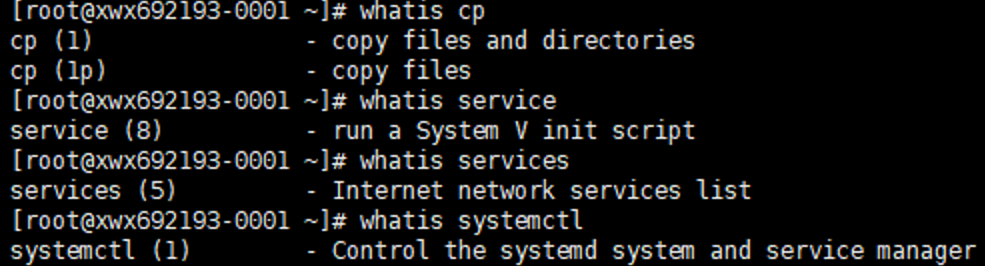
3 whatis
解释命令的意义/功能;获得此命令的索引的简短说明信息
备注:许多Linux系统中并未默认安装此软件,需手动下载、安装。
可等效于apropos / man <command> / <command> --help
注:
apropos : search the manual page names and descriptions
man : manual
X 参考文献
[Linux]常用命令之【which/whereis/whatis】的更多相关文章
- Linux常用命令速查备忘
Linux常用命令速查备忘 PS:备忘而已,详细的命令参数说明自己man 一. 启动,关机,登入,登出相关命令 [login] 登录 [logout] 登出 [exit] 登出 [shutdown ...
- Linux常用命令 笔记
Linux常用命令 笔记 一.文件处理命令 1. ls命令:显示目录文件 -a 显示所有文件,包括隐藏文件.(all) ...
- Linux常用命令——文件搜索命令
Linux常用命令——文件搜索命令 Linux 以#号开头的内容都是内容描述或配置项 find 描述:文件搜索 语法:find [搜索范围] [范围条件] . 当前目录 示例:[root@local ...
- Linux 常用命令大全2
Linux 常用命令大全 [帮助命令] command —help man command man 2 command 查看第2个帮助文件 man -k keyword 查找含有关键字的帮助 info ...
- linux常用命令的介绍
本文主要介绍Linux常用命令工具,比如用户创建,删除,文件管理,常见的网络命令等 如何创建账号: 1. 创建用户 useradd -m username -m 表示会在/home 路径下添加创建用户 ...
- linux——常用命令与脚本
linux常用命令 --文件管理pwd --查看当前目录cd --切换当前目录ls --列出当前目录下的所有文件touch --创建文件mkdir --建立目录rmdir --删除空目录rm --删除 ...
- linux 常用命令大全
linux 常用命令大全 系统信息 arch 显示机器的处理器架构(1) uname -m 显示机器的处理器架构(2) uname -r 显示正在使用的内核版本 dmidecode -q 显示硬件系统 ...
- Linux常用命令整理 - imsoft.cnblogs
su 用户名 在不退出登陆的情况下,切换到另外一个人的身份如果用户名缺省,则切换到root状态会提示输入密码,密码不回显的. 在用su命令切换root用户时,使用“-”选项,这样可以将root的环境变 ...
- linux 常用命令及技巧
linux 常用命令及技巧 linux 常用命令及技巧:linux 常用命令总结: 一. 通用命令: 1. date :print or set the system date and time 2. ...
- Linux 常用命令使用方法大搜刮
Linux 常用命令使用方法大搜刮 1.# 表示权限用户(如:root),$ 表示普通用户 开机提示:Login:输入用户名 password:输入口令 用户是系统注册用户成功登陆后,可以进入 ...
随机推荐
- mongodb---docker
docker pull mongo docker run --name mongodb -p 27017:27017 -v /mydata/mongodb/data:/data/db -d mongo ...
- 关于在Eclipse中使用EclEmma
在LAB2中,要求使用EclEmma来统计JUnit测试用例的代码覆盖度.下面就来说说如何进行基本的使用来应付实验(bushi). 在这给出完全体,可以访问下面的网址进行学习. http://www. ...
- obs问题记录
1.安装obs后,可能无法使用,需要下载dll文件,我的阿里云盘中有: 2.录制时电脑没电会报错'编码器错误': 3.插上声卡后播放视频想听到声音需要在声卡上插耳机听: 4.
- java 与 JSON
Java 与 JSON JSON 是不同程序之间传递信息的一种格式.本文描述了 JSON 在 Java 中的应用. 目前 Java 中比较主流的相关解析工具有谷歌提供的 Gson 和阿里提供的 Fas ...
- Bootstrap4布局(简要)
目录 什么是Bootstrap 布局基础 布局容器 相应断点 z-index 网格系统 12栅格 重排序 列偏移 弹性盒子 什么是Bootstrap Bootstrap是目前最流行的一套前端开发框架, ...
- raid随笔
1.raid 0 准备两个磁盘 [root@localhost ~]# lsblkNAME MAJ:MIN RM SIZE RO TYPE MOUNTPOINTsda 8:0 0 40G 0 disk ...
- 创建function函数sys_guid时报错
创建function函数sys_guid时报错 执行下面的命令 show variables like 'log_bin_trust_function_creators';set global log ...
- UIPath踩坑记一在浏览器控件中找不到”打开浏览器“控件
问题:在浏览器控件中找不到"打开浏览器"控件 解决: 1.检查程序包中是否正常安装"UiPath.UiAutomation"包,如下图12.检查设计设置,是否关 ...
- Linux 截图快捷键 - 搬运
Linux 截图快捷键 转自:linux 截图快捷键 环境 Linux Mint 21.1 1. Prt ScSysRq ---->全屏截图2. Shift+Prt ScSysRq ----& ...
- finereport连接mysql8.0
1.java包更新 2.下载地址:https://dev.mysql.com/downloads/connector/j/ 3.替换文件为8.0删除5.1版本 4.驱动器手动输入com.mysql.c ...