
Python:pyglet学习(2)图形的旋转&batch
这次讲讲图形的旋转和批量渲染(rotate、batch)
1:图形旋转
先看看上次的代码中的一段:
glRotatef(rot_y, 0, 1, 0)

glRotatef(rot_z,0,0,1)

glRotatef(rot_x,1,0,0)
这就是旋转的代码,函数是glRotatef,第一个参数是旋转的角度,后三个中那个是1就转哪个(从左往右依次是x,y,z)
简化成一个函数:
def rotate(xdeg,ydeg,zdeg):

    glRotatef(ydeg,0,1,0)

    glRotatef(zdeg,0,0,1)

    glRotatef(xdeg,1,0,0)
2:batch
还是看看官网:
Batched rendering

For optimal OpenGL performance, you should render as many vertex lists as possible in a single draw call. Internally, pyglet uses VertexDomain and IndexedVertexDomain to keep vertex lists that share the same attribute formats in adjacent areas of memory. The entire domain of vertex lists can then be drawn at once, without calling draw() on each individual list.

It is quite difficult and tedious to write an application that manages vertex domains itself, though. In addition to maintaining a vertex domain for each set of attribute formats, domains must also be separated by primitive mode and required OpenGL state.

The Batch class implements this functionality, grouping related vertex lists together and sorting by OpenGL state automatically. A batch is created with no arguments:

batch = pyglet.graphics.Batch()

Vertex lists can now be created with the add() and add_indexed() methods instead of pyglet.graphics.vertex_list() and pyglet.graphics.vertex_list_indexed() functions. Unlike the module functions, these methods accept a mode parameter (the primitive mode) and a group parameter (described below).

The two coloured points from previous pages can be added to a batch as a single vertex list with:

vertex_list = batch.add(2, pyglet.gl.GL_POINTS, None,

    ('v2i', (10, 15, 30, 35)),

    ('c3B', (0, 0, 255, 0, 255, 0))

)

The resulting vertex_list can be modified as described in the previous section. However, instead of calling VertexList.draw to draw it, call Batch.draw() to draw all vertex lists contained in the batch at once:

batch.draw()

For batches containing many vertex lists this gives a significant performance improvement over drawing individual vertex lists.

To remove a vertex list from a batch, call VertexList.delete(). If you don’t need to modify or delete vertex lists after adding them to the batch, you can simply ignore the return value of the add() and add_indexed() methods.
之前绘制正方形的代码可以简化成(吗)
b=Batch()

b.add(1,GL_POLYGON,None,('v3i',(-5,-5,0,5,-5,0,5,5,0,-5,5,0)))

b.draw()
然后。。。
Traceback (most recent call last):

  File "D:\桌面\python\python程序\制作中\3d-2.py", line 14, in <module>
b.add(1,GL_POLYGON,None,('v3i',(-5,-5,0,5,-5,0,5,5,0,-5,5,0)))
File "C:\Users\steven\AppData\Local\Programs\Python\Python310-32\lib\site-packages\pyglet\graphics\__init__.py", line 371, in add vlist._set_attribute_data(i, array)
File "C:\Users\steven\AppData\Local\Programs\Python\Python310-32\lib\site-packages\pyglet\graphics\vertexdomain.py", line 447, in _set_attribute_data region.array[:] = data
ValueError: Can only assign sequence of same size
再看看官网:
Alternatively, the NV_primitive_restart extension can be used if it is present. This also permits use of GL_POLYGON, GL_LINE_LOOP and GL_TRIANGLE_FAN. Unfortunately the extension is not provided by older video drivers, and requires indexed vertex lists.
不能在Batch中使用GL_POLYGON, GL_LINE_LOOP,GL_TRIANGLE_FAN!
所以改为
b=pyglet.graphics.Batch()

b.add(8,GL_LINES,None,("v3i",dotlst[0][0]+dotlst[0][1]+dotlst[0][2]+dotlst[0][3]+dotlst[0][1]+dotlst[0][2]+dotlst[0][3]+dotlst[0][0]))

b.draw()
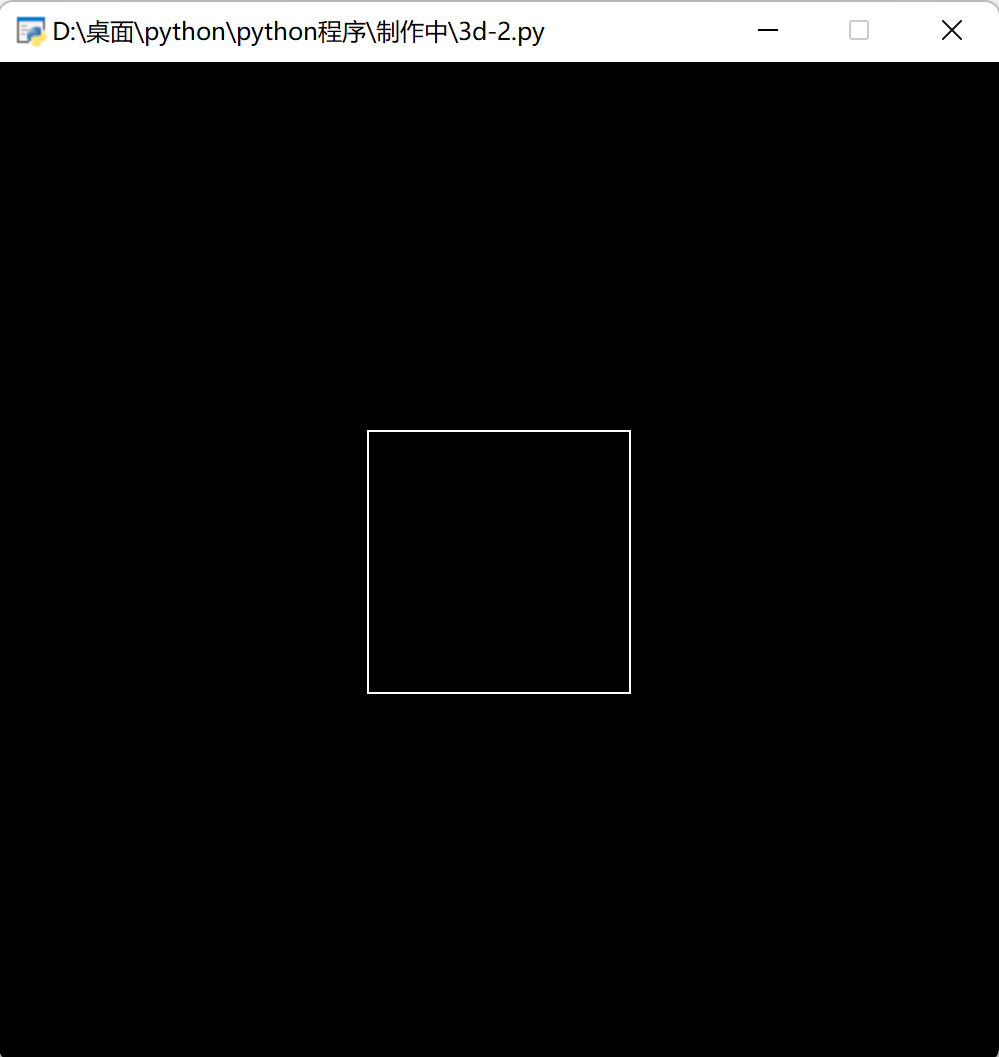
但不能涂色了。这里的话,GL_LINES的参数是2n个坐标,表示A0->A1,A2->A3......
如果要涂色的话用三角形覆盖
Python:pyglet学习(2)图形的旋转&batch的更多相关文章
- 开始写下自己的python的cocos2d, pyglet学习
开始写下自己的python的cocos2d, pyglet学习 2014年01月18日 13:52:36 我要做程序达人 阅读数 9051更多 分类专栏: python的cocos2d和pyglet ...
- 以Tkinter模块来学习Python实现GUI(图形用户界面)编程
tk是什么:它是一个图形库,支持多个操作系统,使用tcl语言开发的.tkinter是Python内置的模块, 与tk类似的第三方图形库(GUI库)还有很多,比如:Qt,GTK,wxWidget,wxP ...
- 数百个 HTML5 例子学习 HT 图形组件 – WebGL 3D 篇
<数百个 HTML5 例子学习 HT 图形组件 – 拓扑图篇>一文让读者了解了 HT的 2D 拓扑图组件使用,本文将对 HT 的 3D 功能做个综合性的介绍,以便初学者可快速上手使用 HT ...
- 数百个 HTML5 例子学习 HT 图形组件 – 拓扑图篇
HT 是啥:Everything you need to create cutting-edge 2D and 3D visualization. 这口号是当年心目中的产品方向,接着就朝这个方向慢慢打 ...
- HTML5 例子学习 HT 图形组件
HTML5 例子学习 HT 图形组件 HT 是啥:Everything you need to create cutting-edge 2D and 3D visualization. 这口号是当年心 ...
- python爬虫学习视频资料免费送,用起来非常666
当我们浏览网页的时候,经常会看到像下面这些好看的图片,你是否想把这些图片保存下载下来. 我们最常规的做法就是通过鼠标右键,选择另存为.但有些图片点击鼠标右键的时候并没有另存为选项,或者你可以通过截图工 ...
- Python人工智能学习笔记
Python教程 Python 教程 Python 简介 Python 环境搭建 Python 中文编码 Python 基础语法 Python 变量类型 Python 运算符 Python 条件语句 ...
- 杨韬的Python/Jupyter学习笔记
Python语法学习 https://zhuanlan.zhihu.com/p/24162430 Python 安装库 安装Jupyter Notebook 先安装Python cmd 进入K:\Ju ...
- python高级学习目录
1. Linux介绍.命令1.1. 操作系统(科普章节) 1.2. 操作系统的发展史(科普章节) 1.3. 文件和目录 1.4. Ubuntu 图形界面入门 1.5. Linux 命令的基本使用 1. ...
随机推荐
- 「ZJOI2017」树状数组
「ZJOI2017」树状数组 以下均基于模2意义下,默认\(n,m\)同阶. 熟悉树状数组的应该可以发现,这题其实是求\(l-1\)和\(r\)位置值相同的概率. 显然\(l=1\)的情况需要特盘. ...
- winSCP上传文件到服务器失败,提示permission denied,返回码3
1.查看sftp服务在你服务器的路径 cat /etc/ssh/sshd_config | grep sftp 2.在winSCP进行连接设置 设置好你的主机名.端口.用户名和密码,然后点击高级,点击 ...
- C 数组排序后输出至文件
如题 C实现 #include<stdio.h> #define COUNT 9 //数组长度+1 #define FILE_NAME "data.txt" //文件名 ...
- PHP的这些基础知识你应该熟知
PHP变量的值类型和引用类型 四种基本类型(int,float,string,boolean)以及复合类型(array)均为值类型,变量间的赋值传递的是值,相当于创建一个副本给新变量. 对象(obje ...
- 使用python实现冒泡排序和快速排序
1 def bubble(arr): 2 """冒泡排序""" 3 loop = len(arr) - 1 4 if loop > 0 ...
- Python编程知识
继承->重写 class A(object): def __init__(self): print("super(B,self).__init__():运行A:init") ...
- nodejs并行无关联
var async = require('async'); //串行无关联series//串行有关联waterfall//并行:parallel //会把各个函数的执行结果一起放到最后的回调中asyn ...
- MyBatis动态SQL和缓存
1. 什么是动态SQL 静态SQL:静态SQL语句在程序运行前SQL语句必须是确定的,SQL语句中涉及的表的字段名必须是存在的,静态SQL的编译是在程序运行前的. 动态SQL:动态SQL语句是在程序运 ...
- 从服务间的一次调用分析整个springcloud的调用过程(一)
首先我们知道springcloud是一个微服务框架,按照官方文档的说法,springcloud提供了一些开箱即用的功能: 1 分布式/版本化配置 2 服务的注册与发现 3 路由 4 服务到服务之间调用 ...
- Solution -「洛谷 P5827」边双连通图计数
\(\mathcal{Description}\) link. 求包含 \(n\) 个点的边双连通图的个数. \(n\le10^5\). \(\mathcal{Solution}\) ...