
React如何修改props && 子组件调用父组件方法
/**

 * 子组件如何更改父组件的state呢?

 * 父组件传递下来的props不满足要求,往往需要修改

 *

 *

 * Author: shujun

 * Date: 2020-10-25

 */

import React from 'react';

export default class Father extends React.Component{

    state = {

        inputValue: 'shujun',

        objValue: {'name': 'jay', 'sex': 'boy'}

    };

    changeInputValue = (e)=> {

        this.setState({inputValue: e.target.value});

    }

    changeObjValue = (e)=> {

        let objValue = this.state.objValue;

        objValue.name = e.target.value;

        this.setState({objValue});

    }

    render(){

        const {inputValue, objValue} = this.state;

        return <div style={{width: '600px', paddingBottom: '20px', border: '1px solid red' }}>

            <h3>father:</h3>

            <p>

                react的state是可以修改,props是不让修改的,为什么要这么做呢,还不理解 ,,ԾㅂԾ,, <br/>

                但是我现在就是想要修改props, 因为这样的场景很多:父组件传递下来的props不满足要求,往往需要修改

            </p>

            <input value={inputValue} onChange={this.changeInputValue}/>

            state:  inputValue -- {inputValue}  <br/>

            <input value={objValue.name} onChange={this.changeObjValue}/>

            state:  objValue -- {JSON.stringify(objValue)}  <br/>

            <Son1 inputValue={inputValue} objValue={objValue} />

            <Son2 inputValue={inputValue} objValue={objValue}

                changeInputValue={this.changeInputValue} changeObjValue={this.changeObjValue} />

        </div>

    }

}

class Son1 extends React.Component {

    constructor(props){

        super();

        this.state = {flag: true};

    }

    changeInputProps = (e)=> {

        this.props.inputValue = e.target.value;

    }

    changeObjProps = (e)=> {

        console.log(e.target.value);

        let objValue = this.props.objValue;

        objValue.name = e.target.value;

        console.log(objValue);

        this.setState({flag: true});

    }

    render() {

        const {inputValue, objValue} = this.props;

        return <div style={{border: '1px solid green', marginTop: '20px'}}>

            <h3>Son1: </h3>

            <p>

                只要props是对象,不改对象指针,只修改对象里面的内容, 照样能修改props, O(∩_∩)O

                <br/> 但是注意:在change props后,一定要假装在setState, 引发render

            </p>

            <input value={inputValue} onChange={this.changeInputProps}/>

            props:  inputValue -- {inputValue}  <br/>

            <input value={objValue.name} onChange={this.changeObjProps}/>

            props:  objValue -- {JSON.stringify(objValue)}  <br/>

        </div>;

    }

 }

 class Son2 extends React.Component {

    changeObjProps = (e)=> {

        this.props.changeObjValue(e);

    }

    render() {

        const {inputValue, objValue} = this.props;

        return <div style={{border: '1px solid green', marginTop: '20px'}}>

            <h3>Son2: </h3>

            <p>

                1. 父组件传递修改方法下来,子组件中调用父组件方法,修改的实际是父组件的state <br/>

                2. 父组件state修改了,

            </p>

            <input value={inputValue} onChange={(e)=>this.props.changeInputValue(e)}/>

            props:  inputValue -- {inputValue}  <br/>

            <input value={objValue.name} onChange={this.changeObjProps}/>

            props:  objValue -- {JSON.stringify(objValue)}  <br/>

        </div>;

    }

 }
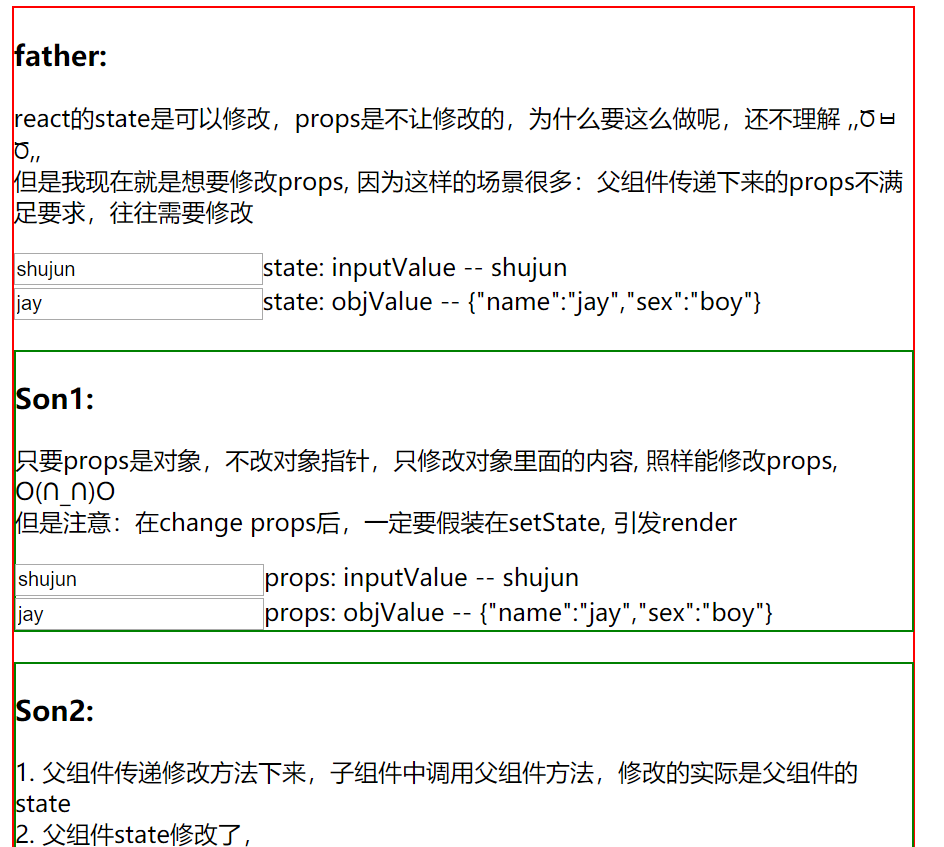
运行效果:
React如何修改props && 子组件调用父组件方法的更多相关文章
- React篇-子组件调用父组件方法,并传值
react 中子组件调用父组件的方法,通过props: 父组件: isNote(data){} <div className="tabC01"> <FTab ta ...
- react typescript 子组件调用父组件
//父组件 import * as React from 'react'import { Input } from 'antd'const Search = Input.Searchimport &q ...
- react 子组件调用父组件方法
import React from 'react'import '../page1/header.css'import { Table } from 'antd'import Child from ' ...
- vue 子组件调用父组件的方法
vue中 父子组件的通信: 子组件通过 props: { //子组件中写的. childMsg: { //字段名 type: Array,//类型 default: [0,0,0] //这样可以指定默 ...
- Vue子组件调用父组件的方法
Vue子组件调用父组件的方法 Vue中子组件调用父组件的方法,这里有三种方法提供参考 第一种方法是直接在子组件中通过this.$parent.event来调用父组件的方法 父组件 <temp ...
- Vue 子组件调用父组件 $emit
<!DOCTYPE html><html> <head> <meta charset="utf-8"> ...
- vue 子组件调用父组件的函数
子组件调用父组件的函数,使用$emit(eventName,[...args]),触发当前实例上的事件.附加参数都会传给监听器回调. 子组件 <template> <div> ...
- Vue中子组件调用父组件的方法
Vue中子组件调用父组件的方法 相关Html: <!DOCTYPE html> <html lang="en"> <head> <meta ...
- react 父组件调用子组件方法、子组件调用父组件方法
我们闲话不多说,直接上代码 // 父组件 import React, {Component} from 'react'; class Parents extends Component { const ...
- Flutter子组件调用父组件方法修改父组件参数
子组件调用父级组件方法的主要实现是父组件给子组件传入一个方法,然后在子组件中调用父级方法来修改父级的参数.看一下效果图 父级组件实现 在父级组件中写一个_editParentText的方法来修改组件中 ...
随机推荐
- calendar.getActualMaximum(calendar.DAY_OF_MONTH)的陷阱,2月份最后一天成了3月3号
引用一下别人的链接: https://blog.csdn.net/dongyuxu342719/article/details/78131697
- Fast Report 分栏分页
Layout 设置布局 AcrossThenDown是水平分栏 DownThenAcross是垂直分栏
- Nginx基础篇(一)
(一)介绍 Nginx 是开源.高性能.高可靠的 Web 和反向代理服务器,也可以作为邮件代理服务器.而且支持热部署,即几乎可以做到 7 * 24 小时不间断运行,即使运行几个月也不需要重新启动,还能 ...
- linux下yum安装时出现Loaded plugins: fastestmirror
linux使用yum安装软件时出现报错Loaded plugins:fastestmirror,是提示这个插件不能使用了,fastestmirror是yum的一个加速插件, 解决的办法是:将这个插件禁 ...
- Win10安装离线.NET3.5流程
二.安装步骤 1.将下载的安装包放到c盘windows目录下(根据需要放置) 2.用命令行安装 以管理员身份打开cmd,输入以下命令(c:\windows即文件放置目录,即上一步放置目录) dism. ...
- vue2和vue3配置全局自定义参数及vue3动态绑定ref
在 Vue2.x 中我们可以通过 Vue.prototype 添加全局属性 property.但是在 Vue3.x 中需要将 Vue.prototype 替换为 config.globalProper ...
- pytorch学习笔记(9)--神经网络模型的保存与读取
一.网络模型的保存和加载 1.网络模型保存方法1 import torch import torchvision vgg16 = torchvision.models.vgg16(weights=Fa ...
- 【Go】时间
mysql中的datetime转时间戳 // 获取mysql中的datetime类型转时间戳 t := "2023-02-21T14:51:00+08:00" ts, _ := t ...
- 关于certutil的探究-文件下载+编码分块上传上传文件再合并
何为certutil certutil.exe 是一个合法Windows文件,用于管理Windows证书的程序. 微软官方是这样对它解释的: Certutil.exe是一个命令行程序,作为证书服务的一 ...
- errgroup.Group
在一组 Goroutine 中提供了同步.错误传播以及上下文取消的功能,我们可以使用如下所示的方式并行获取网页的数据: package main import ( "fmt" &q ...