
React如何修改props && 子组件调用父组件方法
/**

 * 子组件如何更改父组件的state呢?

 * 父组件传递下来的props不满足要求,往往需要修改

 *

 *

 * Author: shujun

 * Date: 2020-10-25

 */

import React from 'react';

export default class Father extends React.Component{

    state = {

        inputValue: 'shujun',

        objValue: {'name': 'jay', 'sex': 'boy'}

    };

    changeInputValue = (e)=> {

        this.setState({inputValue: e.target.value});

    }

    changeObjValue = (e)=> {

        let objValue = this.state.objValue;

        objValue.name = e.target.value;

        this.setState({objValue});

    }

    render(){

        const {inputValue, objValue} = this.state;

        return <div style={{width: '600px', paddingBottom: '20px', border: '1px solid red' }}>

            <h3>father:</h3>

            <p>

                react的state是可以修改,props是不让修改的,为什么要这么做呢,还不理解 ,,ԾㅂԾ,, <br/>

                但是我现在就是想要修改props, 因为这样的场景很多:父组件传递下来的props不满足要求,往往需要修改

            </p>

            <input value={inputValue} onChange={this.changeInputValue}/>

            state:  inputValue -- {inputValue}  <br/>

            <input value={objValue.name} onChange={this.changeObjValue}/>

            state:  objValue -- {JSON.stringify(objValue)}  <br/>

            <Son1 inputValue={inputValue} objValue={objValue} />

            <Son2 inputValue={inputValue} objValue={objValue}

                changeInputValue={this.changeInputValue} changeObjValue={this.changeObjValue} />

        </div>

    }

}

class Son1 extends React.Component {

    constructor(props){

        super();

        this.state = {flag: true};

    }

    changeInputProps = (e)=> {

        this.props.inputValue = e.target.value;

    }

    changeObjProps = (e)=> {

        console.log(e.target.value);

        let objValue = this.props.objValue;

        objValue.name = e.target.value;

        console.log(objValue);

        this.setState({flag: true});

    }

    render() {

        const {inputValue, objValue} = this.props;

        return <div style={{border: '1px solid green', marginTop: '20px'}}>

            <h3>Son1: </h3>

            <p>

                只要props是对象,不改对象指针,只修改对象里面的内容, 照样能修改props, O(∩_∩)O

                <br/> 但是注意:在change props后,一定要假装在setState, 引发render

            </p>

            <input value={inputValue} onChange={this.changeInputProps}/>

            props:  inputValue -- {inputValue}  <br/>

            <input value={objValue.name} onChange={this.changeObjProps}/>

            props:  objValue -- {JSON.stringify(objValue)}  <br/>

        </div>;

    }

 }

 class Son2 extends React.Component {

    changeObjProps = (e)=> {

        this.props.changeObjValue(e);

    }

    render() {

        const {inputValue, objValue} = this.props;

        return <div style={{border: '1px solid green', marginTop: '20px'}}>

            <h3>Son2: </h3>

            <p>

                1. 父组件传递修改方法下来,子组件中调用父组件方法,修改的实际是父组件的state <br/>

                2. 父组件state修改了,

            </p>

            <input value={inputValue} onChange={(e)=>this.props.changeInputValue(e)}/>

            props:  inputValue -- {inputValue}  <br/>

            <input value={objValue.name} onChange={this.changeObjProps}/>

            props:  objValue -- {JSON.stringify(objValue)}  <br/>

        </div>;

    }

 }
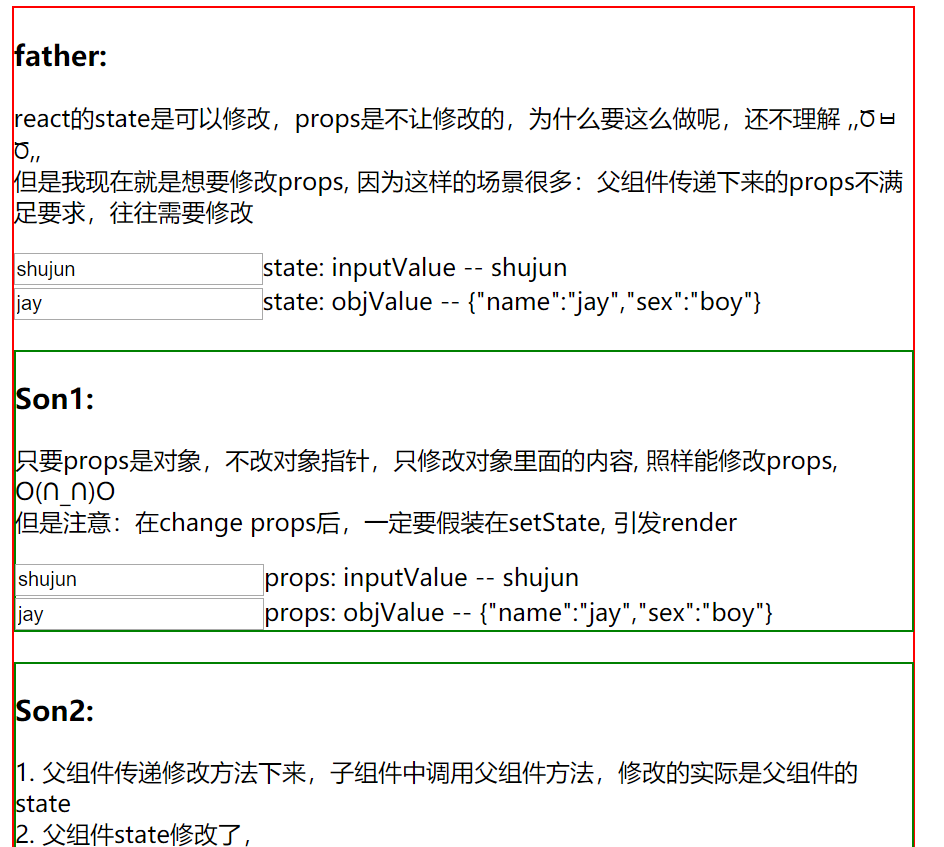
运行效果:
React如何修改props && 子组件调用父组件方法的更多相关文章
- React篇-子组件调用父组件方法,并传值
react 中子组件调用父组件的方法,通过props: 父组件: isNote(data){} <div className="tabC01"> <FTab ta ...
- react typescript 子组件调用父组件
//父组件 import * as React from 'react'import { Input } from 'antd'const Search = Input.Searchimport &q ...
- react 子组件调用父组件方法
import React from 'react'import '../page1/header.css'import { Table } from 'antd'import Child from ' ...
- vue 子组件调用父组件的方法
vue中 父子组件的通信: 子组件通过 props: { //子组件中写的. childMsg: { //字段名 type: Array,//类型 default: [0,0,0] //这样可以指定默 ...
- Vue子组件调用父组件的方法
Vue子组件调用父组件的方法 Vue中子组件调用父组件的方法,这里有三种方法提供参考 第一种方法是直接在子组件中通过this.$parent.event来调用父组件的方法 父组件 <temp ...
- Vue 子组件调用父组件 $emit
<!DOCTYPE html><html> <head> <meta charset="utf-8"> ...
- vue 子组件调用父组件的函数
子组件调用父组件的函数,使用$emit(eventName,[...args]),触发当前实例上的事件.附加参数都会传给监听器回调. 子组件 <template> <div> ...
- Vue中子组件调用父组件的方法
Vue中子组件调用父组件的方法 相关Html: <!DOCTYPE html> <html lang="en"> <head> <meta ...
- react 父组件调用子组件方法、子组件调用父组件方法
我们闲话不多说,直接上代码 // 父组件 import React, {Component} from 'react'; class Parents extends Component { const ...
- Flutter子组件调用父组件方法修改父组件参数
子组件调用父级组件方法的主要实现是父组件给子组件传入一个方法,然后在子组件中调用父级方法来修改父级的参数.看一下效果图 父级组件实现 在父级组件中写一个_editParentText的方法来修改组件中 ...
随机推荐
- 使用vault配置加密
简介 在使用ansible的过程中,不可避免的会存储一些敏感信息,比如在变量文件中存储帐号密码信息等. ansible通过ansible-vault命令行工具来提供对敏感文件的加密和解密. ansib ...
- 关于java业务限流组件的应用推广
可参考的链接如下: 限流算法对比.网关限流实践总结(https://segmentfault.com/a/1190000020745218) 高并发下常见的限流算法(https://www.jians ...
- Oracle UNDO表空间的管理
Oracle UNDO表空间的管理 UNDO表空间的管理是Oracle DBA最重要的日常工作之一,UNDO表空间用来暂时存储DML操作的数据,其主要作用有: 1.事务回滚 2.实例恢复 3.读一致性 ...
- 利用Word文档的宏命令,仿信纸写文件报告
一,首先写好稿件内容. 二,选择合适字体,然后设置信纸下划线格式. 三,启用宏命令.文件-选项-信任中心-信任中心设置-启用所有宏. 四,创建宏命令.视图-宏-创建一个宏 Sub 字体修改()'' 字 ...
- linux rpm 命令
# 产看软件包信息[root@devops201 k8s_install]# rpm -qi yum-utilsName : yum-utilsVersion : 1.1.31Release : 54 ...
- LogAgent —— etcd+kafka+zookeeper+go实现实时读取日志发送到kafka,并实现热加载配置读取的日志路径
工具包目录结构: .├── conf│ ├── logAgent.ini│ └── logAgentConfig.go├── etcd│ └── etcd.go├── kafka│ └ ...
- 升级grafana
We recommend everyone to upgrade Grafana often to stay up to date with the latest fixes and enhancem ...
- Word发博客测试
这是一篇来自word的文章测试,测试word写博客发布效果. 操作参考:http://www.cnblogs.com/liezhengli/p/5854470.html 关键在于找到博客园的MetaW ...
- MAMP PRO 使用指南 (配置nginx 重写)
https://sawlove.com/mamp-pro-use-for-wp.html 1 location / { 2 if (!-e $request_filename) { 3 rewrite ...
- @Async 注解的使用
1.@Async介绍 在Spring中,基于@Async标注的方法,称之为异步方法:这些方法将在执行的时候,将会在独立的线程中被执行,调用者无需等待它的完成,即可继续其他的操作 例如, 在某个调用中, ...