
技术分享 | 在MySQL对于批量更新操作的一种优化方式
欢迎来到 GreatSQL社区分享的MySQL技术文章,如有疑问或想学习的内容,可以在下方评论区留言,看到后会进行解答
作者:景云丽、卢浩、宋源栋
- GreatSQL社区原创内容未经授权不得随意使用,转载请联系小编并注明来源。
引言
批量更新数据,不同于这种 update a=a+1 where pk > 500,而是需要对每一行进行单独更新 update a=1 where pk=1;update a=12 where pk=7;... 这样连续多行update语句的场景,是少见的。
可以说是偶然也是一种必然,在GreatDB 5.0的开发过程中,我们需要对多语句批量update的场景进行优化。
两种多行更新操作的耗时对比
在我们对表做多行更新的时候通常会遇到以下两种情况
1.单语句批量更新(update a=a+1 where pk > 500)
2.多语句批量更新(update a=1 where pk=1;update a=12 where pk=7;...)
下面我们进行实际操作比较两种场景,在更新相同行数时所消耗的时间。
数据准备
数据库版本:MySQL 8.0.23
t1表,建表语句以及准备初始数据1000行
create  database if not exists test;

use test

##建表

create table t1(c1 int primary key,c2 int);

##创建存储过程用于生成初始数据

DROP PROCEDURE IF EXISTS insdata;

DELIMITER $$

CREATE PROCEDURE insdata(IN beg INT, IN end INT) BEGIN

 WHILE beg <= end

 DO

 INSERT INTO test.t1 values (beg, end);

SET beg = beg+1;

END WHILE;

END $$

DELIMITER ;

##插入初始数据1000行

call insdata(1,1000)
1.单语句批量更新
更新语句
update t1 set c2=10 where c1 <=1000;
执行结果
mysql> update  t1 set c2=10 where c1 <=1000;

Query OK, 1000 rows affected (0.02 sec)

Rows matched: 1000  Changed: 1000  Warnings: 0
2.多语句批量更新
以下脚本用于生成1000行update语句,更新c2的值等于1000以内的随机数
#!/bin/bash

for i in {1..1000}

do

        echo "update t1 set c2=$((RANDOM%1000+1)) where c1=$i;" >> update.sql

done
生成sql语句如下
update t1 set c2=292 where c1=1;

update t1 set c2=475 where c1=2;

update t1 set c2=470 where c1=3;

update t1 set c2=68 where c1=4;

update t1 set c2=819 where c1=5;

... ....

update t1 set c2=970  where c1=1000;
因为source /ssd/tmp/tmp/1000/update.sql;执行结果如下,执行时间不易统计:
Query OK, 1 row affected (0.00 sec)

Rows matched: 1  Changed: 1  Warnings: 0

Query OK, 1 row affected (0.01 sec)

Rows matched: 1  Changed: 1  Warnings: 0

Query OK, 1 row affected (0.00 sec)

Rows matched: 1  Changed: 1  Warnings: 0

Query OK, 1 row affected (0.00 sec)

Rows matched: 1  Changed: 1  Warnings: 0

Query OK, 1 row affected (0.01 sec)

Rows matched: 1  Changed: 1  Warnings: 0

Query OK, 1 row affected (0.00 sec)

Rows matched: 1  Changed: 1  Warnings: 0

Query OK, 1 row affected (0.01 sec)

Rows matched: 1  Changed: 1  Warnings: 0
所以利用Linux时间戳进行统计:
#!/bin/bash

start_time=`date +%s%3N`

/ssd/tmp/mysql/bin/mysql -h127.0.0.1 -uroot -P3316 -pabc123 -e "use test;source /ssd/tmp/tmp/1000/update.sql;"

end_time=`date +%s%3N`

echo "执行时间为:"$(($end_time-$start_time))"ms"
执行结果:
[root@computer-42 test]# bash update.sh

mysql: [Warning] Using a password on the command line interface can be insecure.

执行时间为:4246ms
执行所用时间为:4246ms=4.246 sec
结果比较

总结
由上述例子我们可以看到,同样是更新1000行数据。单语句批量更新与多语句批量更新的执行效率差距很大。
而产生这种巨大差异的原因,除了1000行sql语句本身的网络与语句解析开销外,影响性能的地方主要是以下几个方面:
1.如果会话是auto_commit=1,每次执行update语句后都要执行commit操作。commit操作耗费时间较久,会产生两次磁盘同步(写binlog和写redo日志)。在进行比对测试时,尽量将多个语句放到一个事务内,保证只提交一次事务。
2.向后端发送多语句时,后端每处理一个语句均会向client返回一个response包,进行一次交互。如果多语句使用一个事务的话,网络io交互应该是影响性能的主要方面。之前在性能测试时发现网卡驱动占用cpu很高。
我们的目标是希望在更新1000行时,第二种场景的耗时能够减少到一秒以内。
对第二种场景的优化
接下来我们来探索对更新表中多行为不同值时,如何提高它的执行效率。
简单分析
从执行的update语句本身来说,两种场景所用的表结构都进行了最大程度的简化,update语句也十分简单,且where条件为主键,理论上已经没有优化的空间。
如果从其他方面来考虑,根据上述原因分析会有这样三个优化思路:
1.减少执行语句的解析时间来提高执行效率
2.减少commit操作对性能的影响,尽量将多个语句放到一个事务内,保证只提交一次事务。
3.将多条语句合并成一条来提高执行效率
方案一:使用prepare语句,减小解析时间
以下脚本用于生成prepare执行语句
#!/bin/bash

echo "prepare pr1 from 'update test.t1 set c2=? where c1=?';" > prepare.sql

for i in {1..1000}

do

echo "set @a=$((RANDOM%1000+1)),@b=$i;" >>prepare.sql

echo "execute pr1 using @a,@b;" >> prepare.sql

done

echo "deallocate prepare pr1;" >> prepare.sql
生成语句如下
prepare pr1 from 'update test.t1 set c2=? where c1=?';

set @a=276,@b=1;

execute pr1 using @a,@b;

set @a=341,@b=2;

execute pr1 using @a,@b;

set @a=803,@b=3;

execute pr1 using @a,@b;

... ...

set @a=582,@b=1000;

execute pr1 using @a,@b;

deallocate prepare pr1;
执行语句
#!/bin/bash

start_time=`date +%s%3N`

/ssd/tmp/mysql/bin/mysql -h127.0.0.1 -uroot -P3316 -pabc123 -e "use test;source /ssd/tmp/tmp/test/prepare.sql;"

end_time=`date +%s%3N`

echo "执行时间为:"$(($end_time-$start_time))"ms"
执行结果:
[root@computer-42 test]# bash prepare_update_id.sh

mysql: [Warning] Using a password on the command line interface can be insecure.

执行时间为:4518ms
与优化前相比

很遗憾,执行总耗时反而增加了。
这里笔者有一点推测是由于原本一条update语句,被拆分成了两条语句:
set @a=276,@b=1;

execute pr1 using @a,@b;
这样在MySQL客户端和MySQL进程之间的通讯次数增加了,所以增加了总耗时。
因为prepare预处理语句执行时只能使用用户变量传递,以下执行语句会报错
mysql> execute pr1 using 210,5;

ERROR 1064 (42000): You have an error in your SQL syntax;

check the manual that corresponds to your MySQL server version

for the right syntax to use near '210,5' at line 1
所以无法在语法方面将两条语句重新合并,笔者便使用了以下另外一种执行方式
执行语句
#!/bin/bash

start_time=`date +%s%3N`

/ssd/tmp/mysql/bin/mysql -h127.0.0.1 -uroot -P3316 -pabc123  <<EOF

use test;

DROP PROCEDURE IF EXISTS pre_update;

DELIMITER $$

CREATE PROCEDURE pre_update(IN beg INT, IN end INT) BEGIN

 prepare pr1 from 'update test.t1 set c2=? where c1=?';

 WHILE beg <= end

 DO

 set  @a=beg+1,@b=beg;

 execute pr1 using @a,@b;

 SET beg = beg+1;

END WHILE;

deallocate prepare pr1;

END $$

DELIMITER ;

call pre_update(1,1000);

EOF

end_time=`date +%s%3N`

echo "执行时间为:"$(($end_time-$start_time))"ms"
执行结果:
[root@computer-42 test]# bash prepare_update_id.sh

mysql: [Warning] Using a password on the command line interface can be insecure.

执行时间为:3862ms
与优化前相比:

这样的优化幅度符合prepare语句的理论预期,但仍旧不够理想。
方案二:多个update语句放到一个事务内执行,最终commit一次
以下脚本用于生成1000行update语句在一个事务内,更新c2的值等于1000以内的随机数
#!/bin/bash

echo "begin;" > update.sql

for i in {1..1000}

do

        echo "update t1 set c2=$((RANDOM%1000+1)) where c1=$i;" >> update.sql

done

echo "commit;" >> update.sql
生成sql语句如下
begin;

update t1 set c2=279 where c1=1;

update t1 set c2=425 where c1=2;

update t1 set c2=72 where c1=3;

update t1 set c2=599 where c1=4;

update t1 set c2=161 where c1=5;

... ....

update t1 set c2=775  where c1=1000;

commit;
执行时间统计的方法,同上
[root@computer-42 test]# bash update.sh

mysql: [Warning] Using a password on the command line interface can be insecure.

执行时间为:194ms
执行时间为194ms=0.194sec
与优化前相比:

可以看出多次commit操作对性能的影响还是很大的。
方案三:使用特殊SQL语法,将多个update语句合并
合并多条update语句
在这里我们引入一种并不常用的MySQL语法:
1)优化前:
update多行执行语句类似“update xxx; update xxx;update xxx;... ...”
2)优化后:
改成先把要更新的语句拼成一个视图(结果集表),然后用结果集表和源表进行关联更新。这种更新方式有个隐式限制“按主键或唯一索引关联更新”。
UPDATE t1 m, (

    SELECT 1 AS c1, 2 AS c2

    UNION ALL

    SELECT 2, 2

    UNION ALL

    SELECT 3, 3

    ... ...

    UNION ALL

    SELECT n, 2

  ) r

SET m.c1 = r.c1, m.c2 = r.c2

WHERE m.c1 = r.c1;
3)具体的例子:
###建表

create table t1(c1 int primary key,c2 int);

###插入5行数据

insert into t1 values(1,1),(2,1),(3,1),(4,1),(5,1);

select  * from t1;

###更新c2为c1+1

UPDATE t1 m, (

  SELECT 1 AS c1, 2 AS c2

  UNION ALL

  SELECT 2, 3

  UNION ALL

  SELECT 3, 4

  UNION ALL

  SELECT 4, 5

  UNION ALL

  SELECT 5, 6

 ) r

SET m.c1 = r.c1, m.c2 = r.c2

WHERE m.c1 = r.c1;

###查询结果

select * from t1;
执行结果:
  mysql> create table t1(c1 int primary key,c2 int);

  Query OK, 0 rows affected (0.03 sec)

  mysql> insert into t1 values(1,1),(2,1),(3,1),(4,1),(5,1);

  Query OK, 5 rows affected (0.00 sec)

  Records: 5  Duplicates: 0  Warnings: 0

  mysql> select * from t1;

  +----+------+

  | c1 | c2   |

  +----+------+

  |  1 |    1 |

  |  2 |    1 |

  |  3 |    1 |

  |  4 |    1 |

  |  5 |    1 |

  +----+------+

  5 rows in set (0.00 sec)

  mysql> update  t1 m,(select 1 as c1,2 as c2 union all select 2,3 union all select 3,4 union all select 4,5 union all select 5,6 ) r set m.c1=r.c1,m.c2=r.c2  where m.c1=r.c1;

Query OK, 5 rows affected (0.01 sec)

  Rows matched: 5  Changed: 5  Warnings: 0

  mysql> select * from t1;

  +----+------+

  | c1 | c2   |

+----+------+

  |  1 |    2 |

  |  2 |    3 |

  |  3 |    4 |

  |  4 |    5 |

  |  5 |    6 |

  +----+------+

  5 rows in set (0.00 sec)
4)更进一步的证明
在这里笔者选择通过观察语句执行生成的binlog,来证明优化方式的正确性。
首先是未经优化的语句:
begin;

update t1 set c2=2 where c1=1;

update t1 set c2=3 where c1=2;

update t1 set c2=4 where c1=3;

update t1 set c2=5 where c1=4;

update t1 set c2=6 where c1=5;

commit;
......

### UPDATE `test`.`t1`

### WHERE

###   @1=1 /* INT meta=0 nullable=0 is_null=0 */

###   @2=1 /* INT meta=0 nullable=1 is_null=0 */

### SET

###   @1=1 /* INT meta=0 nullable=0 is_null=0 */

###   @2=2 /* INT meta=0 nullable=1 is_null=0 */

......

### UPDATE `test`.`t1`

### WHERE

###   @1=2 /* INT meta=0 nullable=0 is_null=0 */

###   @2=1 /* INT meta=0 nullable=1 is_null=0 */

### SET

###   @1=2 /* INT meta=0 nullable=0 is_null=0 */

###   @2=3 /* INT meta=0 nullable=1 is_null=0 */

......

### UPDATE `test`.`t1`

### WHERE

###   @1=3 /* INT meta=0 nullable=0 is_null=0 */

###   @2=1 /* INT meta=0 nullable=1 is_null=0 */

### SET

###   @1=3 /* INT meta=0 nullable=0 is_null=0 */

###   @2=4 /* INT meta=0 nullable=1 is_null=0 */

......

### UPDATE `test`.`t1`

### WHERE

###   @1=4 /* INT meta=0 nullable=0 is_null=0 */

###   @2=1 /* INT meta=0 nullable=1 is_null=0 */

### SET

###   @1=4 /* INT meta=0 nullable=0 is_null=0 */

###   @2=5 /* INT meta=0 nullable=1 is_null=0 */

......

### UPDATE `test`.`t1`

### WHERE

###   @1=5 /* INT meta=0 nullable=0 is_null=0 */

###   @2=1 /* INT meta=0 nullable=1 is_null=0 */

### SET

###   @1=5 /* INT meta=0 nullable=0 is_null=0 */

###   @2=6 /* INT meta=0 nullable=1 is_null=0 */

......
然后是优化后的语句:
UPDATE t1 m, (

  SELECT 1 AS c1, 2 AS c2

  UNION ALL

  SELECT 2, 3

  UNION ALL

  SELECT 3, 4

  UNION ALL

  SELECT 4, 5

  UNION ALL

  SELECT 5, 6

 ) r

SET m.c1 = r.c1, m.c2 = r.c2

WHERE m.c1 = r.c1;
### UPDATE `test`.`t1`

### WHERE

###   @1=1 /* INT meta=0 nullable=0 is_null=0 */

###   @2=1 /* INT meta=0 nullable=1 is_null=0 */

### SET

###   @1=1 /* INT meta=0 nullable=0 is_null=0 */

###   @2=2 /* INT meta=0 nullable=1 is_null=0 */

### UPDATE `test`.`t1`

### WHERE

###   @1=2 /* INT meta=0 nullable=0 is_null=0 */

###   @2=1 /* INT meta=0 nullable=1 is_null=0 */

### SET

###   @1=2 /* INT meta=0 nullable=0 is_null=0 */

###   @2=3 /* INT meta=0 nullable=1 is_null=0 */

### UPDATE `test`.`t1`

### WHERE

###   @1=3 /* INT meta=0 nullable=0 is_null=0 */

###   @2=1 /* INT meta=0 nullable=1 is_null=0 */

### SET

###   @1=3 /* INT meta=0 nullable=0 is_null=0 */

###   @2=4 /* INT meta=0 nullable=1 is_null=0 */

### UPDATE `test`.`t1`

### WHERE

###   @1=4 /* INT meta=0 nullable=0 is_null=0 */

###   @2=1 /* INT meta=0 nullable=1 is_null=0 */

### SET

###   @1=4 /* INT meta=0 nullable=0 is_null=0 */

###   @2=5 /* INT meta=0 nullable=1 is_null=0 */

### UPDATE `test`.`t1`

### WHERE

###   @1=5 /* INT meta=0 nullable=0 is_null=0 */

###   @2=1 /* INT meta=0 nullable=1 is_null=0 */

### SET

###   @1=5 /* INT meta=0 nullable=0 is_null=0 */

###   @2=6 /* INT meta=0 nullable=1 is_null=0 */
可以看到,优化前后binlog中记录的SQL语句是一致的。这也说明了我们优化后语句与原执行语句是等效的。
5)从语法角度的分析
UPDATE t1 m, --被更新的t1表设置别名为m

(

  SELECT 1 AS c1, 2 AS c2

  UNION ALL

  SELECT 2, 3

  UNION ALL

  SELECT 3, 4

  UNION ALL

  SELECT 4, 5

  UNION ALL

  SELECT 5, 6

) r --通过子查询构建的临时表r

SET m.c1 = r.c1, m.c2 = r.c2

WHERE m.c1 = r.c1
将子查询临时表r单独拿出来,我们看一下执行结果:
mysql> select 1 as c1,2 as c2 union all select 2,3 union all select 3,4 union all select 4,5 union all select 5,6;

+----+----+

| c1 | c2 |

+----+----+

|  1 |  2 |

|  2 |  3 |

|  3 |  4 |

|  4 |  5 |

|  5 |  6 |

+----+----+

5 rows in set (0.00 sec)
可以看到,这就是我们想要更新的那部分数据,在更新之后的样子。通过t1表与r表进行join update,就可以将t1表中相应的那部分数据,更新成我们想要的样子,完成了使用一条语句完成多行更新的操作。
6)看一下执行计划
以下为explain执行计划,使用了嵌套循环连接,外循环表t1 as m根据条件m.c1=r.c1过滤出5条数据,每更新一行数据需要扫描一次内循环表r,共循环5次:
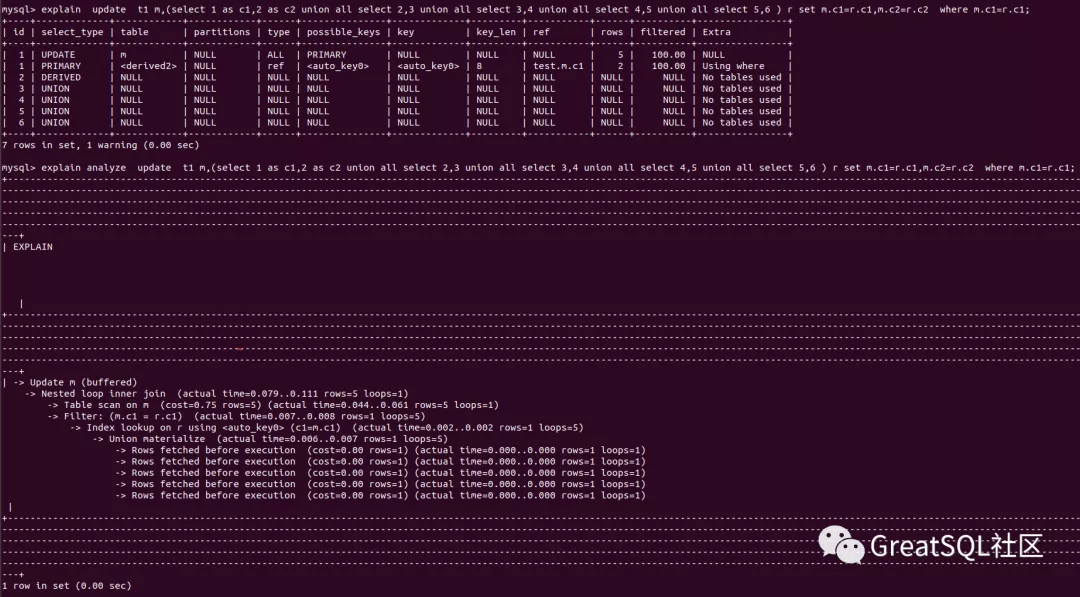
如果光看执行计划,似乎这条语句的执行效率不是很高,所以我们接下来真正执行一下。
7)实践检验
以下脚本用于生成优化后update语句,更新c2的值等于1000以内的随机数
#!/bin/bash

echo "update t1 as m,(select 1 as c1,2 as c2 " >> update-union-all.sql

for j in {2..1000}

do

        echo "union all select $j,$((RANDOM%1000+1))" >> update-union-all.sql

done

echo ") as r set m.c2=r.c2 where m.c1=r.c1" >> update-union-all.sql
生成SQL语句如下
update t1 as m,(select 1 as c1,2 as c2

union all select 2,644

union all select 3,322

union all select 4,660

union all select 5,857

union all select 6,752

... ...

union all select 999,225

union all select 1000,77

) as r set m.c2=r.c2 where m.c1=r.c1
执行语句
#!/bin/bash

start_time=`date +%s%3N`

/ssd/tmp/mysql/bin/mysql -h127.0.0.1 -uroot -P3316 -pabc123 -e \

"use test;source /ssd/tmp/tmp/1000/update-union-all.sql;"

end_time=`date +%s%3N`

echo "执行时间为:"$(($end_time-$start_time))"ms"
执行结果:
[root@computer-42 test]# bash update-union-all.sh

mysql: [Warning] Using a password on the command line interface can be insecure.

执行时间为:58ms
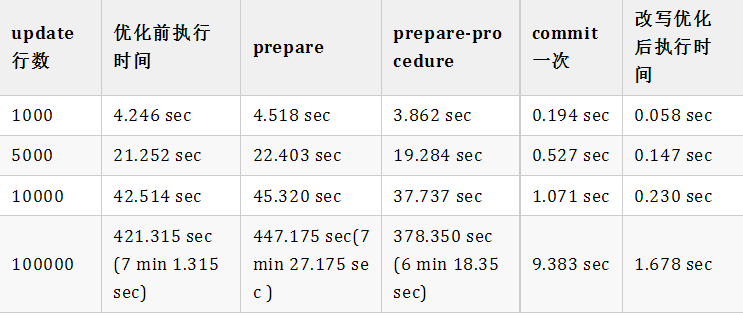
与优化前相比:

多次测试对比结果如下:
总结
根据以上理论分析与实际验证,我们找到了一种对批量更新场景的优化方式。
Enjoy GreatSQL
文章推荐:
技术分享 | MGR最佳实践(MGR Best Practice)
https://mp.weixin.qq.com/s/66u5K7a9u8GcE2KPn4kCaA
技术分享 | 万里数据库MGR Bug修复之路
https://mp.weixin.qq.com/s/IavpeP93haOKVBt7eO8luQ
Macos系统编译percona及部分函数在Macos系统上运算差异
https://mp.weixin.qq.com/s/jAbwicbRc1nQ0f2cIa_2nQ
技术分享 | 利用systemd管理MySQL单机多实例
https://mp.weixin.qq.com/s/iJjXwd0z1a6isUJtuAAHtQ
产品 | GreatSQL,打造更好的MGR生态
https://mp.weixin.qq.com/s/ByAjPOwHIwEPFtwC5jA28Q
产品 | GreatSQL MGR优化参考
https://mp.weixin.qq.com/s/5mL_ERRIjpdOuONian8_Ow
关于 GreatSQL
GreatSQL是由万里数据库维护的MySQL分支,专注于提升MGR可靠性及性能,支持InnoDB并行查询特性,是适用于金融级应用的MySQL分支版本。
Gitee:
https://gitee.com/GreatSQL/GreatSQL
GitHub:
https://github.com/GreatSQL/GreatSQL
微信&QQ群:
可搜索添加GreatSQL社区助手微信好友,发送验证信息“加群”加入GreatSQL/MGR交流微信群
QQ群:533341697
微信小助手:wanlidbc
本文由博客一文多发平台 OpenWrite 发布!
技术分享 | 在MySQL对于批量更新操作的一种优化方式的更多相关文章
- mysql批量update更新,mybatis中批量更新操作
在日常开发中,有时候会遇到批量更新操作,这时候最普通的写法就是循环遍历,然后一条一条地进行update操作.但是不管是在服务端进行遍历,还是在sql代码中进行遍历,都很耗费资源,而且性能比较差,容易造 ...
- mybatis 的批量更新操作sql
转: mybatis 的批量更新操作sql 2018年07月23日 10:38:19 海力布 阅读数:1689 版权声明:本文为博主原创文章,未经博主允许不得转载. https://blog.cs ...
- MySQL加快批量更新 UPDATE优化
如果是更新为同样的内容,没啥难度,直接在where里面下功夫就好了,大家都懂,我要说的是针对更新内容不一样的情况 首先,先看看网上转载的方法: mysql 批量更新如果一条条去更新效率是相当的慢, 循 ...
- [PDO绑定参数]使用PHP的PDO扩展进行批量更新操作
最近有一个批量更新数据库表中某几个字段的需求,在做这个需求的时候,使用了PDO做参数绑定,其中遇到了一个坑. 方案选择 笔者已知的做批量更新有以下几种方案: 1.逐条更新 这种是最简单的方案,但无疑也 ...
- 小白老凯,初出茅庐!请多关照!简单分享一些 mysql 数据库的安装操作!请给为大神雅正!
在我们写代码,存储数据时常常会用到各种数据库,如:mysql.access.sql.server.Oracle等等,在这里就说一下mysql数据库的的操作指令! 首先我们了解下如何安装mysql数据库 ...
- 腾讯技术分享:Android版手机QQ的缓存监控与优化实践
本文内容整理自公众号腾讯Bugly,感谢原作者的分享. 1.问题背景 对于Android应用来说,内存向来是比较重要的性能指标.内存占用过高,会影响应用的流畅度,甚至引发OOM,非常影响用户体验.因此 ...
- python对mysql数据库操作的三种不同方式
首先要说一下,在这个暑期如果没有什么特殊情况,我打算用python尝试写一个考试系统,希望能在下学期的python课程实际使用,并且尽量在此之前把用到的相关技术都以分篇博客的方式分享出来,有想要交流的 ...
- 【mysql】批量更新数据
概述 批量更新mysql数据表数据,上网搜索基本都会说4~5方法,本人使用的更新方式为: INSERT ... ON DUPLICATE KEY UPDATE Syntax 可参见官方网站:inser ...
- MYSQL 处理批量更新数据的一些经验。
首先,我们需要了解下MYSQL CASE EXPRESSION 语法. 手册传送门:http://dev.mysql.com/doc/refman/5.7/en/control-flow-functi ...
随机推荐
- 好客租房31-事件绑定this指向(bind)
事件this指向bind 利用ES5中bind方法 将事件处理程序中的this和组件实例绑定在一起 //导入react import React from 'react' ...
- 关于ECharts图表反复修改都无法显示的解决方案
解决方案:清空浏览器所有记录,再次刷新即可
- 安装Redis到Linux(源码)
运行环境 系统版本:Ubuntu 16.04.2 LTS 软件版本:redis-5.0.4 硬件要求:无 安装过程 1.配置系统参数 root@localhost:~# vim /etc/sysctl ...
- Python3 collections模块
https://www.cnblogs.com/zhangxinqi/p/7921941.html http://www.wjhsh.net/meng-wei-zhi-p-8259022.html h ...
- mybatis-plus对空字段 时间进行填充
package com.tanhua.sso.handler; import com.baomidou.mybatisplus.core.handlers.MetaObjectHandler; imp ...
- D3.JS结合Canvas实现直方图,散点图,等高线图,密度图
接触到D3.JS,感觉在图表方面实现的很好,于是深入了解了一下,想在项目中使用, 可是当看到DEMO时才发现,基本上所有的DEMO都是基于SVG,虽然D3.JS声称支持CANVAS,可并没有发现一例使 ...
- 使用 content-visibility 优化渲染性能
最近在业务中实际使用 content-visibility 进了一些渲染性能的优化. 这是一个比较新且有强大功能的属性.本文将带领大家深入理解一番. 何为 content-visibility? co ...
- House of apple 一种新的glibc中IO攻击方法
目录 House of apple 一种新的glibc中IO攻击方法 前言 利用条件 利用原理 利用思路 思路一:修改tcache线程变量 思路二:修改mp_结构体 思路三:修改pointer_gua ...
- Apache ShardingSphere 5.1.2 发布|全新驱动 API + 云原生部署,打造高性能数据网关
在 Apache ShardingSphere 5.1.1 发布后,ShardingSphere 合并了来自全球的团队或个人的累计 1028 个 PR,为大家带来 5.1.2 新版本.该版本在功能.性 ...
- C#判断数组或集合中是否含有属性值为value的对象
/// <summary> /// 判断list中是否有某个对象的Id_srvplan为value /// </summary> /// <param name=&quo ...