
使用 Prometheus Alertmanager 模块发送 Doris 异常信息至钉钉报警群
基础环境
1.Prometheus 版本:2.22.2
下载地址:
2.Alertmanager 版本:0.23
下载地址:
3.prometheus-webhook-dingtalk :1.4
下载地址:
1.新增用户和用户组
➜ groupadd prometheus

➜ useradd -g prometheus -M -s /sbin/nologin prometheus
2.安装配置 Prometheus Server
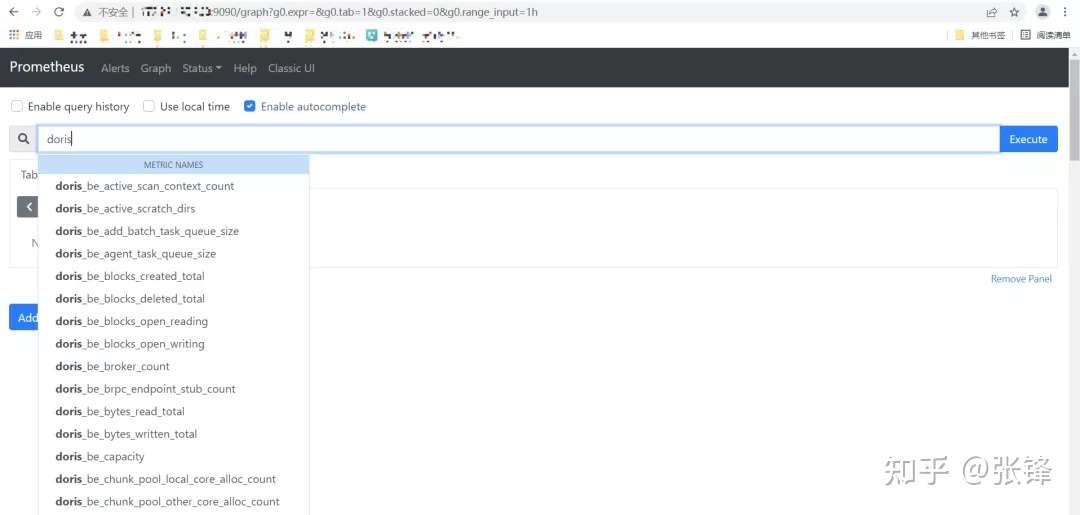
详细 Prometheus 安装流程请参考:https://mp.weixin.qq.com/s/BcKN4s7qDokG_YmXn8Q-zQ需要确保服务启动完成后,可以正常访问:http://localhost:9090,且 Doris 的 metrics 已经打入 Prometheus 中。
3.安装 AlertManager 模块
3.1 下载安装包
➜ wget https://github.com/prometheus/alertmanager/releases/download/v0.23.0/alertmanager-0.23.0.linux-amd64.tar.gz

➜ tar xf alertmanager-0.23.0.linux-amd64.tar.gz -C /soft

➜ cd /soft

➜ mv alertmanager-0.23.0.linux-amd64 alertmanager

➜ cd alertmanager

➜ mkdir data #系统文件持久化路径

➜ chown -R prometheus.prometheus /soft/alertmanager
说明:创建 data 目录是必须要操作的,不然后期启动 alertmanager 会异常。
3.2 配置 alertmanager.yml 文
route:

  group_by: ['alertname']

  group_wait: 1s

  group_interval: 1m

  repeat_interval: 4h

  receiver: 'webhook2'

receivers:

- name: 'webhook2'

  webhook_configs:

    - &dingtalk_config

       send_resolved: true

       url: http://localhost:8060/dingtalk/webhook2/send

#An inhibition rule mutes an alert (target) matching a set of matchers when an alert (source) exists that matches another set of matchers. Both target and source alerts must have the same label values for the label names in the equal list.

inhibit_rules:

  - source_match:

      severity: 'critical'

    target_match:

      severity: 'warning'

    equal: ['alertname', 'dev', 'instance']
名词解释:
- group_wait :设置等待时间,如果在等待时间内当前 Group 接收到了新的告警,这些告警将会合并为一个通知向 Receiver 发送。
- group_interval :用于定义相同的 Group 之间发送告警通知的时间间隔。
- repeat_interval:用于表示当一个规则成功被发送,重复发送报警的第二次间隔时间。
3.3 检查配置文件配置
很重要,关乎程序能否正常启动。当出现如下图片时,说明 alertmanager.yml 文件配置正常。
➜ cd /soft/alertmanager

➜ ./amtool check-config ./alertmanager.yml
3.4 创建 Alertmanager 系统服务启动文件
➜ vim /usr/lib/systemd/system/alertmanager.service

[Unit]

Description=alertmanager

Documentation=https://prometheus.io/

After=network.target

[Service]

User=prometheus

Group=prometheus

ExecStart=/soft/alertmanager/alertmanager --config.file=/soft/alertmanager/alertmanager.yml --storage.path=/soft/alertmanager/data

Restart=on-failure

[Install]

WantedBy=multi-user.target
3.5 启动服务
systemctl daemon-reload

systemctl enable alertmanager.service

systemctl start alertmanager.service

systemctl status alertmanager.service #查看服务状态

systemctl restart alertmanager.service #重启服务使用
3.6 启动服务后
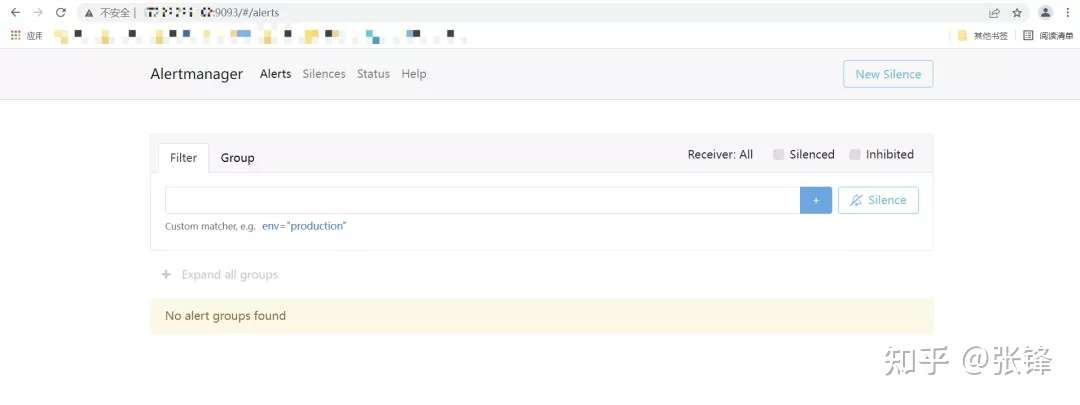
服务启动后,可以在http://localhost:9093查看ui界面
3.7 在 Prometheus 中配置 Alertmanager 模块需要在 Prometheus 的安装目录下的 prometheus.yml 文件中加入 Alertmanager 通信地址和端口号,同时配置 alert rules 目录,该目录主要存放配置的报警规则。
vim prometheus.yml

alerting:

  alertmanagers:

  - static_configs:

    - targets: ['localhost:9093']  #根据实际alertmanager服务地址配置。

rule_files:

   - "rule/*.yml"   #自定义规则存储目录,可以通过*.yml来通配该目录下所有规则。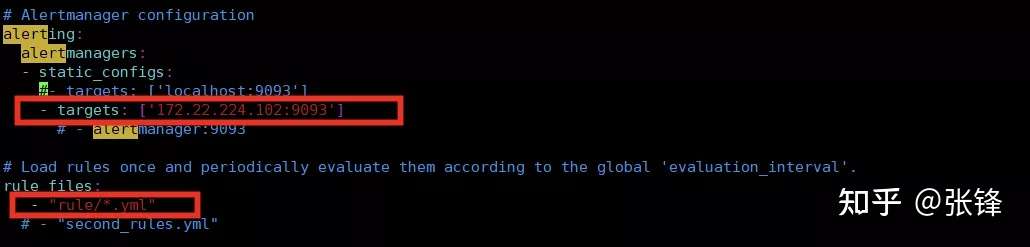
3.8 重新加载 Prometheus 配置文件,查看 alerting 配置是否生效
Prometheus 服务支持热加载。当配置文件发生改变时,可以通过以下命令重新加载配置文件:
➜ ./promtool check config  prometheus.yml

➜ systemctl reload prometheus.service
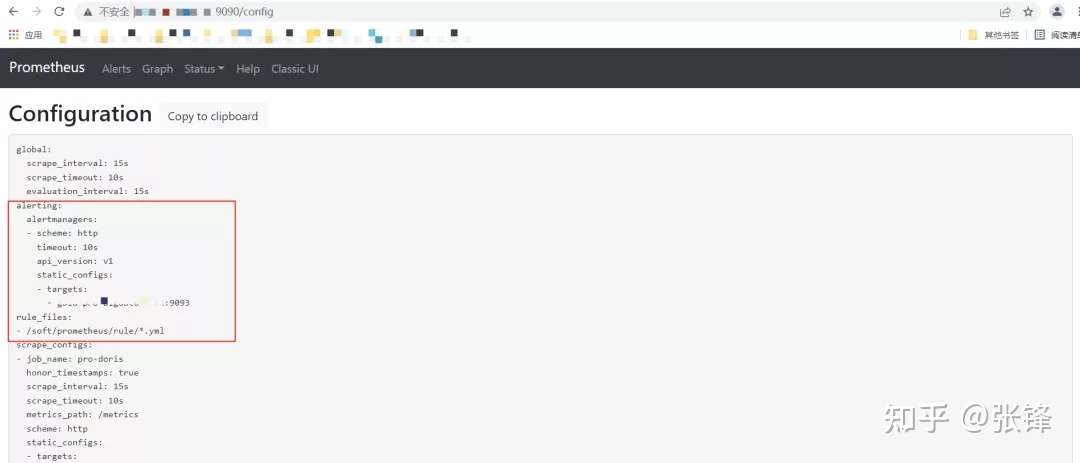
重启成功后,可以通过:http://localhost:9090/config查看 alerting 配置是否生效。
4.安装 prometheus-webhook-dingtalk 插件
4.1 下载插件
➜ wget https://github.com/timonwong/prometheus-webhook-dingtalk/releases/download/v1.4.0/prometheus-webhook-dingtalk-1.4.0.linux-amd64.tar.gz

➜ tar -xf prometheus-webhook-dingtalk-1.4.0.linux-amd64.tar.gz  -C  /soft

➜ mv prometheus-webhook-dingtalk-1.4.0.linux-amd64 prometheus-webhook-dingtalk
4.2 在钉钉群配置机器人配置机器人时,需要添加自定义关键词,这个关键词后期在配置规则报警信息时,也同样需要出现,不然无法发送报警。
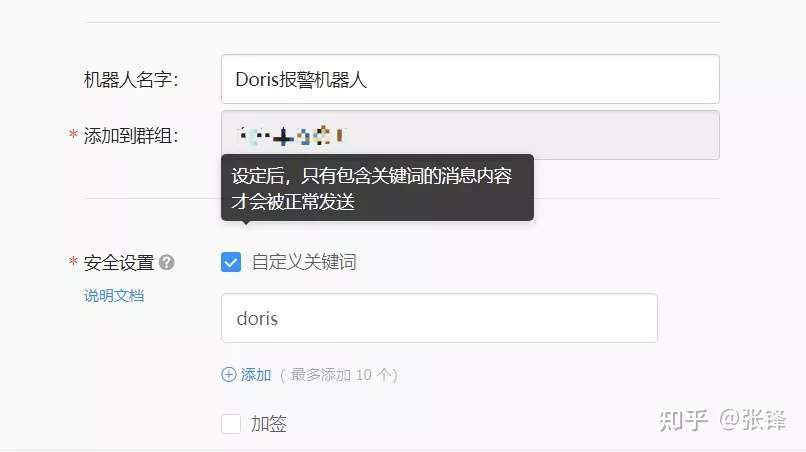
4.3 修该配置文件在 webhook2 中配置刚才申请的机器人的地址,需要注意的是你的机器人路径配置在哪,那么 alertmanager.yml 中的 url 路径也要随之改变。
➜ cp  config.example.yml  config.yml

## Request timeout

# timeout: 5s

## Customizable templates path   自定义模板位置

templates:

  - /soft/alertmanager/alarm_template/webhook.tmpl

## You can also override default template using `default_message`

## The following example to use the 'legacy' template from v0.3.0

# default_message:

#   title: '{{ template "legacy.title" . }}'

#   text: '{{ template "legacy.content" . }}'

## Targets, previously was known as "profiles"

targets:

  webhook1:   #加签的钉钉,需要同时配置加签机器人的密钥信息

    url: https://oapi.dingtalk.com/robot/send?access_token=xxxxxxxxxxxx

    # secret for signature

    secret: SEC000000000000000000000

  webhook2:  #不加签钉钉

    url: https://oapi.dingtalk.com/robot/send?access_token=cf9c2fd69723661108b7fd7******

  webhook_legacy:

    url: https://oapi.dingtalk.com/robot/send?access_token=xxxxxxxxxxxx

    # Customize template content

    message:

      # Use legacy template

      title: '{{ template "legacy.title" . }}'

      text: '{{ template "legacy.content" . }}'

  webhook_mention_all:  #@所有人钉钉

    url: https://oapi.dingtalk.com/robot/send?access_token=xxxxxxxxxxxx

    mention:

      all: true

  webhook_mention_users:  #@指定用户钉钉

    url: https://oapi.dingtalk.com/robot/send?access_token=cf9c2fd69723661108b7fd7****

    mention:

      mobiles: ['152****30', '134****74']
4.4 创建 webhook-dingtalk 系统服务启动文件
vim /usr/lib/systemd/system/webhook-dingtalk.service

[Unit]

[Unit]

Description=prometheus-webhook-dingtalk

Documentation=https://github.com/timonwong/prometheus-webhook-dingtalk

After=network.target

[Service]

User=prometheus

Group=prometheus

ExecStart=/soft/prometheus-webhook-dingtalk/prometheus-webhook-dingtalk  --config.file=/soft/prometheus-webhook-dingtalk/config.yml

Restart=on-failure

[Install]

WantedBy=multi-user.target
4.5 启动服务
systemctl daemon-reload

systemctl enable webhook-dingtalk.service

systemctl start webhook-dingtalk.service

systemctl status webhook-dingtalk.service

systemctl restart webhook-dingtalk.service
4.6 查看 webhook-dingtalk 服务状态
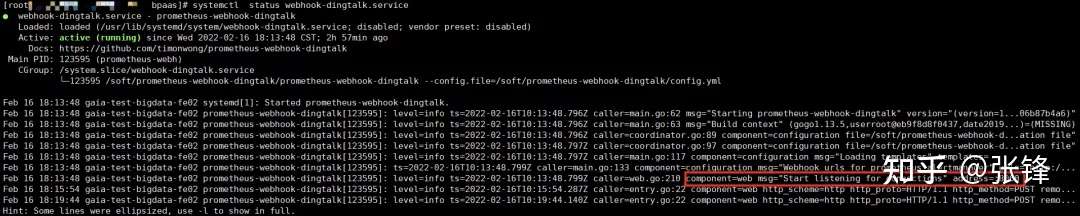
5.配置报警规则
在 Prometheus 安装目录下的 prometheus.yml 文件中查看“rule_files”对应配置的目录地址,在该目录下新建报警规则。如果不清楚规则如何配置,可以在你安装的 Prometheus 的 UI 地址:http://localhost:9090/graph下查看 metrics 信息。example:
5.1 配置 Doris fe 和 be 报警规则当 Doris instance 是正常状态时,up ==1;当instance down机后,up ==0注意:配置报警规则时,报警机器人自定义的关键字,在配置规则文件的 description 中必须要出现,不然钉钉群无法接收到报警信息。
➜ vim doris_instance.yml

groups:

  - name: doris_instance_down

    rules:

      - alert: Doris Backends Down

        expr: up {group="be", job="pro-doris"} == 0

        for: 20s

        labels:

          user: doris

          severity: error

        annotations:

          summary: "doris Instance {{ $labels.instance }} down"

          description: "doris {{ $labels.instance }} of job {{ $labels.job }} has been down for more than 20s."

      - alert: Doris Frontends Down

        expr: up {group="fe", job="pro-doris"} == 0

        for: 20s

        labels:

          user: doris

          severity: error

        annotations:

          summary: "doris Instance {{ $labels.instance }} down"

          description: "doris {{ $labels.instance }} of job {{ $labels.job }} has been down for more than 20s."
5.2 校验规则文件如果是规则文件是 “SUCCESS” 状态,则说明规则文件配置正确,否则则需要检查配置对应的配置文件。
➜ cd /soft/prometheus

➜ ./promtool check config  prometheus.yml
5.3 重新加载 Prometheus 配置文件
➜ systemctl reload prometheus.service6.测试
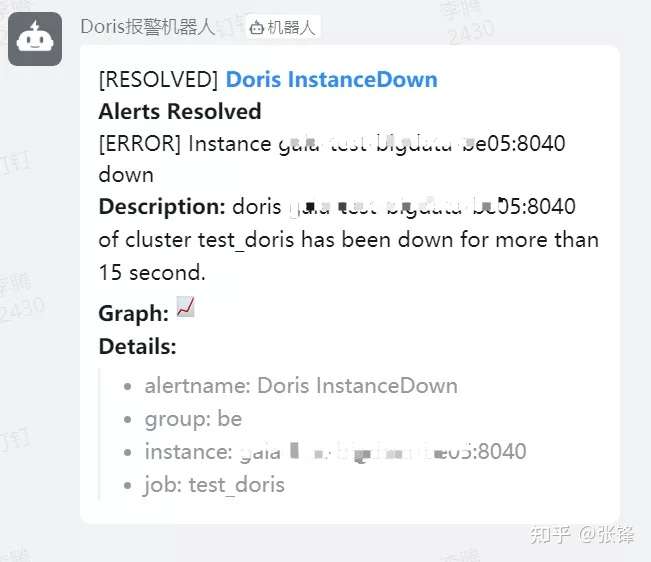
当 Doris 集群中的 instance 出现 down 机后,钉钉群里新建的机器人会发出报警信息。
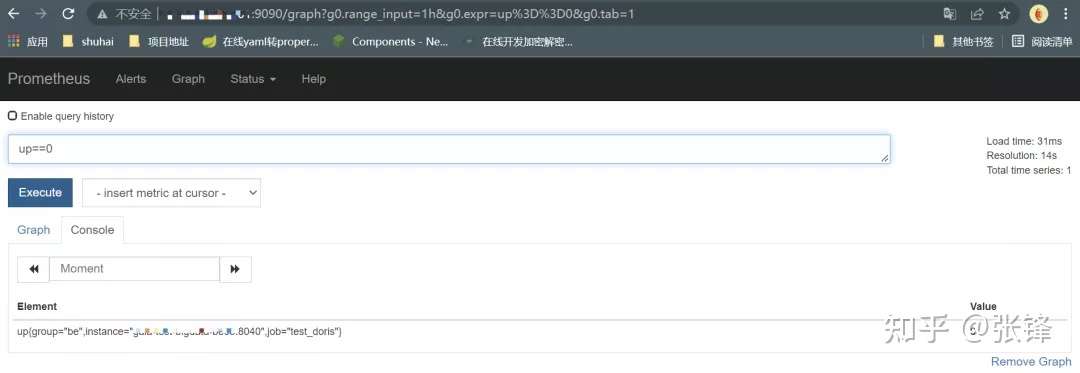
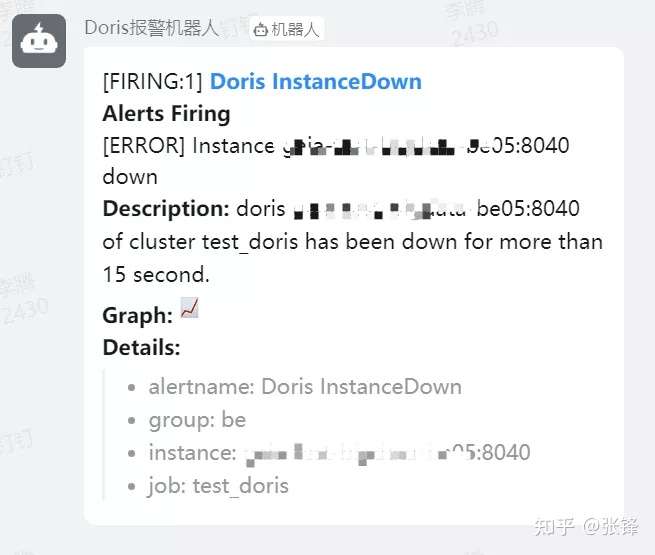
当在 alertmanager.yml 文件中配置了 send_resolved = true,异常解除同样会发送钉钉警告信息,否则则不发送。
至此,Prometheus 监控 Doris 异常信息并发送报警至钉钉流程结束
使用 Prometheus Alertmanager 模块发送 Doris 异常信息至钉钉报警群的更多相关文章
- Prometheus alertmanager邮件发送+grafana告警展示
前言 前面一篇博客,我已经介绍了prometheus如何监控mysql. 这一篇我来介绍如何通过alertmanger进行告警邮件发送(微信或钉钉类似,因为需要企业帐户,我就不试了),以及如何通过gr ...
- 验证Prometheus alertmanager邮件发送
新环境上配置alertmanager时出现了“Client was not authenticated to send anonymous mail during MAIL FROM”错误,但老环境上 ...
- 通过GSM模块发送经纬度求救信息。
本博客作为实验笔记,仅供学习交流.(转载请注明出处) 本实验通过GSM模块:SIM900a,实现向特定手机发送sos求救信号,并且利用GPS模块:微科VK2828U7G5LF,将经纬度信息同时发送到手 ...
- PHP 错误与异常 笔记与总结(14 )记录和发送异常信息
当发生异常时,把异常信息记录到日志文件中: <?php header('content-type:text/html; charset=utf-8'); class LogException e ...
- Prometheus + Alertmanager 实现企微告警
上一篇:二进制安装Prometheus 下面准备在监控的流程中呈现到告警到企微 查看企业ID,用于后续配置文件 四.安装Alertmanager1.准备安装的包 --选择上面链接给的Linux的ta ...
- Longhorn,企业级云原生容器分布式存储 - 监控(Prometheus+AlertManager+Grafana)
内容来源于官方 Longhorn 1.1.2 英文技术手册. 系列 Longhorn 是什么? Longhorn 企业级云原生容器分布式存储解决方案设计架构和概念 Longhorn 企业级云原生容器分 ...
- [置顶]
个人微信号发送zabbix告警信息
之前使用邮件和短信发送zabbix告警信息,但告警信息无法实时查看或者无法发送,故障无法及时通知运维人员. 后来使用第三方微信接口发送信息,愉快地用了一年多,突然收费了. zabbix告警一直是我的痛 ...
- prometheus学习系列十: Prometheus AlertManager配置文件说明
alertmanager配置文件说明 alertmanager是通过命令行标记和配置文件配置的,命令行标记配置不可变的系统参数,配置文件定义抑制规则.通知路由和通知接收器.可以通过官方提供的routi ...
- prometheus学习系列九: Prometheus AlertManager使用
在Prometheus的报警系统中,是分为2个部分的, 规则是配置是在prometheus中的, prometheus组件完成报警推送给alertmanager的, alertmanager然后管理这 ...
随机推荐
- 写fstable
mountpoint 就是挂载点./. /usr. swap 都是系统安装时分区的默认挂载点. 如果你要挂载一个新设备,你就要好好想想了,因为这个新设备将作为文件系统永久的一部分,需要根据FSSTND ...
- OpenCores注册步骤和成功提交
一 OpenCores 网站简介,这个是全世界最大的FPGA开源IP核网站.由于最近在学习USB2.0host control IP,所以想去网上下载相关的IP例程学习.通过搜索发现,有两个网站十分 ...
- Ubuntu16.04 搭建samba服务器
1昨天花了一天时间弄了NFS服务器,结果搭建完之后出现各种问题,要么挂载不上,要么就是字符乱码.今天在看到一个关于树莓派的介绍的时候,提到Samba服务器的搭建,我尝试了一下,结果发现很顺利地就能够正 ...
- mac idea
sout :按Tab或Enter都可以出现
- uWSGI+django+nginx的工作原理流程与部署
二.必要的前提 2.1 准备知识 django 一个基于python的开源web框架,请确保自己熟悉它的框架目录结构. uWSGI 一个基于自有的uwsgi协议.wsgi协议和http服务协议的web ...
- redis 过期键的删除策略?
1.定时删除:在设置键的过期时间的同时,创建一个定时器 timer). 让定时器在键 的过期时间来临时,立即执行对键的删除操作. 2.惰性删除:放任键过期不管,但是每次从键空间中获取键时,都检查取得的 ...
- Spring AOP and AspectJ AOP 有什么区别?
Spring AOP 基于动态代理方式实现:AspectJ 基于静态代理方式实现.Spring AOP 仅支持方法级别的 PointCut:提供了完全的 AOP 支持,它还支持属性级别的 PointC ...
- Spring的@Enable*注解的工作原理
转自:https://blog.csdn.net/chengqiuming/article/details/81586948 一 列举几个@Enable*注解的功能 @EnableAspectJAut ...
- Spring Mvc 源代码之我见 二
上一篇简单介绍了spring mvc 的一些基本内容 和DispatcherServlet 的doc.这一篇将会继续写我对Spring Mvc 源代码的理解.直接上代码: /** * This imp ...
- js技术之拖动table标签
一.js技术之拖动table标签 起因:前几天公司,突然安排一个任务 任务描述:要求尺码table列表要像Excel表中一样可以直接移动整行尺码到任意行位置 技术点:采用ui的sortable技术来h ...