
Go微服务框架go-kratos实战04:kratos中服务注册和服务发现的使用
一、简介
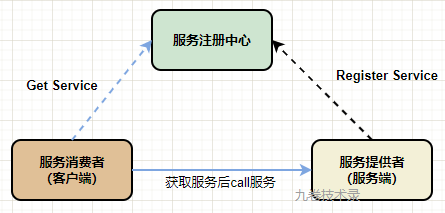
关于服务注册和服务发现介绍,我前面的文章有介绍过 - 服务注册和发现的文章。
作为服务中心的软件有很多,比如 etcd,consul,nacos,zookeeper 等都可以作为服务中心。
go-kratos 把这些服务中心的功能作为插件,集成进了 kratos 中。
下面就用 etcd 作为服务中心来说说 kratos 里服务注册和服务发现功能的使用。
二、服务注册和服务发现
2.1 接口定义
从 go-kratos 服务注册和发现文档中,我们知道它的接口定义非常简单:
注册和反注册服务:
type Registrar interface {

    // 注册实例

    Register(ctx context.Context, service *ServiceInstance) error

    // 反注册实例

    Deregister(ctx context.Context, service *ServiceInstance) error

}
获取服务:
type Discovery interface {

    // 根据 serviceName 直接拉取实例列表

    GetService(ctx context.Context, serviceName string) ([]*ServiceInstance, error)

    // 根据 serviceName 阻塞式订阅一个服务的实例列表信息

    Watch(ctx context.Context, serviceName string) (Watcher, error)

}
2.2 简单使用
服务端注册服务
使用 etcd 作为服务中心。
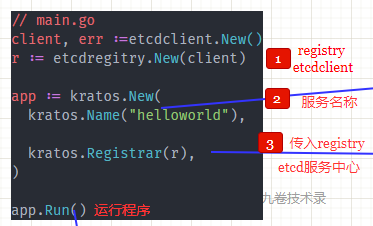
1.新建 etcd连接client, etcdregitry.New(client)
2.把 regitry传入 kratos.Registrar(r)
3.传入服务名称 kratos.Name("helloworld")
看官方的示例代码,server/main.go:
package main

import (

	"context"

	"fmt"

	"log"

	etcdregitry "github.com/go-kratos/kratos/contrib/registry/etcd/v2"

	"github.com/go-kratos/kratos/v2"

	"github.com/go-kratos/kratos/v2/middleware/recovery"

	"github.com/go-kratos/kratos/v2/transport/grpc"

	"github.com/go-kratos/kratos/v2/transport/http"

	pb "github.com/go-kratos/examples/helloworld/helloworld"

	etcdclient "go.etcd.io/etcd/client/v3"

)

type server struct {

	pb.UnimplementedGreeterServer

}

func (s *server) SayHello(ctx context.Context, in *pb.HelloRequest) (*pb.HelloReply, error) {

	return &pb.HelloReply{Message: fmt.Sprintf("welcome %+v!", in.Name)}, nil

}

func main() {

	// 创建 etcd client 连接

	client, err := etcdclient.New(etcdclient.Config{

		Endpoints: []string{"127.0.0.1:2379"},

	})

	if err != nil {

		log.Fatal(err)

	}

	// 初始化 http server

	httpSrv := http.NewServer(

		http.Address(":8080"),

		http.Middleware(

			recovery.Recovery(),

		),

	)

	// 初始化 grpc server

	grpcSrv := grpc.NewServer(

		grpc.Address(":9000"),

		grpc.Middleware(

			recovery.Recovery(),

		),

	)

	// 在服务器上注册服务

	s := &server{}

	pb.RegisterGreeterServer(grpcSrv, s)

	pb.RegisterGreeterHTTPServer(httpSrv, s)

	// 创建一个 registry 对象,就是对 ectd client 操作的一个包装

	r := etcdregitry.New(client)

	app := kratos.New(

		kratos.Name("helloworld"), // 服务名称

		kratos.Server(

			httpSrv,

			grpcSrv,

		),

		kratos.Registrar(r), // 填入etcd连接(etcd作为服务中心)

	)

	if err := app.Run(); err != nil {

		log.Fatal(err)

	}

}
etcd作为服务中心的使用步骤图解:
客户端获取服务
客户端的服务发现,主要也是 3 个步骤.
1.新建 etcd连接, 传入到 etcdregitry.New(client)
2.将 registry 传入 WithDiscovery(r)
3.获取服务WithEndpoint("discovery:///helloworld")
步骤与服务没有多大区别。
官方的示例代码,client/main.go:
package main

import (

	"context"

	"log"

	"time"

	"github.com/go-kratos/examples/helloworld/helloworld"

	etcdregitry "github.com/go-kratos/kratos/contrib/registry/etcd/v2"

	"github.com/go-kratos/kratos/v2/transport/grpc"

	"github.com/go-kratos/kratos/v2/transport/http"

	etcdclient "go.etcd.io/etcd/client/v3"

	srcgrpc "google.golang.org/grpc"

)

func main() {

	client, err := etcdclient.New(etcdclient.Config{

		Endpoints: []string{"127.0.0.1:2379"},

	})

	if err != nil {

		log.Fatal(err)

	}

	r := etcdregitry.New(client) // 传入 etcd client,也就是选择 etcd 为服务中心

	connGRPC, err := grpc.DialInsecure(

		context.Background(),

		grpc.WithEndpoint("discovery:///helloworld"), // 服务发现

		grpc.WithDiscovery(r),                        // 传入etcd registry

	)

	if err != nil {

		log.Fatal(err)

	}

	defer connGRPC.Close()

	connHTTP, err := http.NewClient(

		context.Background(),

		http.WithEndpoint("discovery:///helloworld"),

		http.WithDiscovery(r),

		http.WithBlock(),

	)

	if err != nil {

		log.Fatal(err)

	}

	defer connHTTP.Close()

	for {

		callHTTP(connHTTP)

		callGRPC(connGRPC)

		time.Sleep(time.Second)

	}

}

func callHTTP(conn *http.Client) {

	client := helloworld.NewGreeterHTTPClient(conn)

	reply, err := client.SayHello(context.Background(), &helloworld.HelloRequest{Name: "go-kratos"})

	if err != nil {

		log.Fatal(err)

	}

	log.Printf("[http] SayHello %+v\n", reply)

}

func callGRPC(conn *srcgrpc.ClientConn) {

	client := helloworld.NewGreeterClient(conn)

	reply, err := client.SayHello(context.Background(), &helloworld.HelloRequest{Name: "go-kratos"})

	if err != nil {

		log.Fatal(err)

	}

	log.Printf("[grpc] SayHello %+v\n", reply)

}
运行程序
1.运行etcd,没有安装etcd的请自行百度或gg安装
2.运行服务端
$ cd ./etcd/server

$ go run ./main.go

INFO msg=[HTTP] server listening on: [::]:8080

INFO msg=[gRPC] server listening on: [::]:9000
3.运行客户端
$ cd ./client

$ go run .\main.go

INFO msg=[resolver] update instances: [{"id":"8fc08b88-e37b-11ec-bb6f-88d7f62323b4","name":"helloworld","version":"","metadata":null,"endpoints":["http://192.168.56.1:8080","grpc://192.168.56.1:9000"]}]

2022/06/04 04:28:21 [http] SayHello message:"welcome go-kratos!"

2022/06/04 04:28:21 [grpc] SayHello message:"welcome go-kratos!"

INFO msg=[resolver] update instances: [{"id":"8fc08b88-e37b-11ec-bb6f-88d7f62323b4","name":"helloworld","version":"","metadata":null,"endpoints":["http://192.168.56.1:8080","grpc://192.168.56.1:9000"]}]

2022/06/04 04:28:22 [http] SayHello message:"welcome go-kratos!"

2022/06/04 04:28:22 [grpc] SayHello message:"welcome go-kratos!"

2022/06/04 04:28:23 [http] SayHello message:"welcome go-kratos!"

2022/06/04 04:28:23 [grpc] SayHello message:"welcome go-kratos!"

2022/06/04 04:28:24 [http] SayHello message:"welcome go-kratos!"

2022/06/04 04:28:24 [grpc] SayHello message:"welcome go-kratos!"

... ...
程序运行成功
看看 etcd 运行日志:
2022-06-04 04:26:03.896230 W | wal: sync duration of 1.1565369s, expected less than 1s

2022-06-04 04:26:03.991356 N | embed: serving insecure client requests on 127.0.0.1:2379, this is strongly discouraged!

2022-06-04 04:27:18.187663 W | etcdserver: request "header:<ID:7587862969930594823 > put:<key:\"/microservices/helloworld/8fc08b88-e37b-11ec-bb6f-88d7f62323b4\" value_size:162 lease:7587862969930594821 >" with result "size:4" took too long (113.4545ms) to execute
2.3 简析服务注册程序
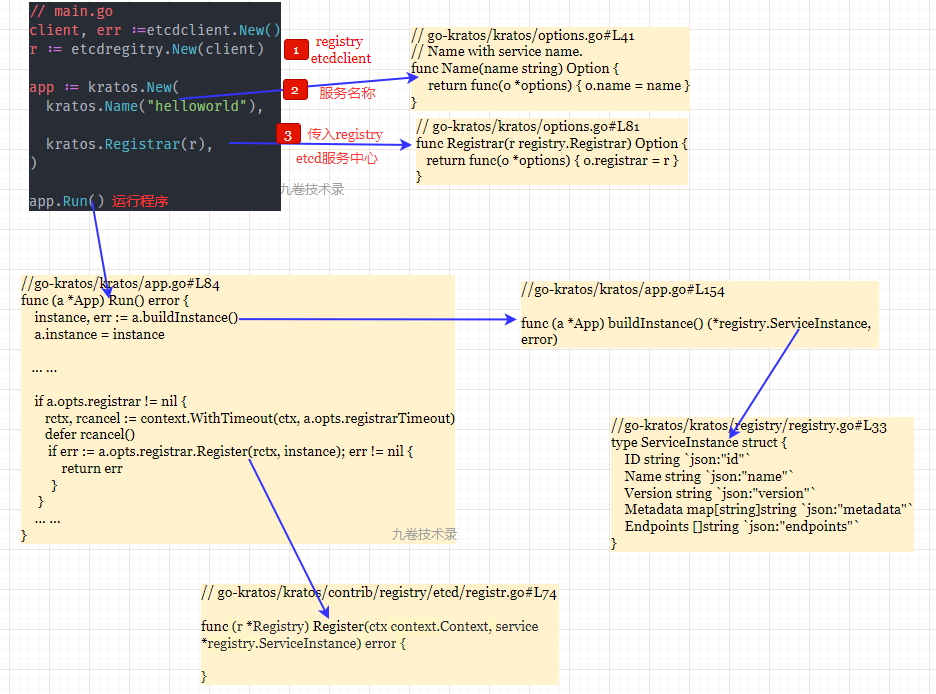
一图解千言:
etcdregitry.New(client)
这里是对 etcd client 的包装处理,那么选择的服务中心就是 etcd。也可以使用consul,zookeeper 等,kratos 对它们都有封装。
// 对 etcd client 的包装在处理

r := etcdregitry.New(client)

// https://github.com/go-kratos/kratos/contrib/registry/etcd/registry.go#L56

// New creates etcd registry

func New(client *clientv3.Client, opts ...Option) (r *Registry) {

	op := &options{

		ctx:       context.Background(),

		namespace: "/microservices",

		ttl:       time.Second * 15,

		maxRetry:  5,

	}

	for _, o := range opts {

		o(op)

	}

	return &Registry{

		opts:   op,

		client: client,

		kv:     clientv3.NewKV(client),

	}

}
kratos.New()
对应用程序初始化化,应用程序参数初始化 - 默认参数或接受传入的参数。
// https://github.com/go-kratos/kratos/blob/v2.3.1/app.go#L39

func New(opts ...Option) *App {

    o := options{

        ctx:              context.Background(),

        sigs:             []os.Signal{syscall.SIGTERM, syscall.SIGQUIT, syscall.SIGINT},

        registrarTimeout: 10 * time.Second,

        stopTimeout:      10 * time.Second,

    }

    ... ...

    return &App{

        ctx:    ctx,

        cancel: cancel,

        opts:   o,

    }

}
kratos.Name("helloworld")
处理应用的服务参数。这个参数传入到上面
func New(opts ...Option) *App。
// https://github.com/go-kratos/kratos/options.go#L41

// Name with service name.

func Name(name string) Option {

     return func(o *options) { o.name = name }

}
kratos.Registrar(r)
选择哪个服务中心(etcd,consul,zookeeper,nacos 等等)作为 kratos 的服务中心。
这个参数传入到上面func New(opts ...Option) *App。
// https://github.com/go-kratos/kratos/blob/v2.3.1/options.go#L81

func Registrar(r registry.Registrar) Option {

	return func(o *options) { o.registrar = r }

}
- registrar.Register()
真正把服务注册到服务中心的是 app.Run() 这个方法里的 a.opts.registrar.Register() 方法,Register() 方法把服务实例注册到服务中心。
// https://github.com/go-kratos/kratos/app.go#L84

if err := a.opts.registrar.Register(rctx, instance); err != nil {

   return err

}
参数 instance 就是方法 buildInstance() 返回的服务实例 ServiceInstance,ServiceInstance struct 包含了一个服务实例所需的字段。
// https://github.com/go-kratos/kratos/app.go#L154

func (a *App) buildInstance() (*registry.ServiceInstance, error)

// https://github.com/go-kratos/kratos/registry/registry.go#L33

type ServiceInstance struct {

    ID string `json:"id"`

    Name string `json:"name"`

    Version string `json:"version"`

    Metadata map[string]string `json:"metadata"`

    Endpoints []string `json:"endpoints"`

}
三、参考
- https://go-kratos.dev/docs/component/registry 服务注册和服务发现
- https://github.com/go-kratos/examples/blob/main/registry/etcd etcd registry
- https://github.com/go-kratos/kratos
Go微服务框架go-kratos实战04:kratos中服务注册和服务发现的使用的更多相关文章
- Taurus.MVC 微服务框架 入门开发教程:项目集成:1、服务端:注册中心、网关(提供可运行程序下载)。
系列目录: 本系列分为项目集成.项目部署.架构演进三个方向,后续会根据情况调整文章目录. 本系列第一篇:Taurus.MVC V3.0.3 微服务开源框架发布:让.NET 架构在大并发的演进过程更简单 ...
- SpringCloud微服务实战:一、Eureka注册中心服务端
1.项目启动类application.java类名上增加@EnableEurekaServer注解,声明是注册中心 1 import org.springframework.boot.SpringAp ...
- rc-local.service服务启动失败,导致rc.local中的开机启动服务不能启动
chmod +x /etc/rc.d/rc.local 打开/etc/rc.local文件,将启动非后台执行的指令的最后添加 &,以使相关指令后台运行,然后启动服务 systemctl ...
- kratos微服务框架学习笔记一(kratos-demo)
目录 kratos微服务框架学习笔记一(kratos-demo) kratos本体 demo kratos微服务框架学习笔记一(kratos-demo) 今年大部分时间飘过去了,没怎么更博和githu ...
- 微服务框架Dubbo与Springcloud的区别
微服务框架Dubbo与Springcloud的区别 微服务主要的优势如下: 1.降低复杂度 将原来偶合在一起的复杂业务拆分为单个服务,规避了原本复杂度无止境的积累.每一个微服务专注于单一功能,并通过定 ...
- 简单Spring Cloud 微服务框架搭建
微服务是现在比较流行的技术,对于程序猿而言,了解并搭建一个基本的微服务框架是很有必要滴. 微服务包含的内容非常多,一般小伙伴们可以根据自己的需求不断添加各种组件.框架. 一般情况下,基本的微服务框架包 ...
- 面试都在问的微服务、服务治理、RPC、下一代微服务框架... 一文带你彻底搞懂!
文章每周持续更新,「三连」让更多人看到是对我最大的肯定.可以微信搜索公众号「 后端技术学堂 」第一时间阅读(一般比博客早更新一到两篇) 单体式应用程序 与微服务相对的另一个概念是传统的单体式应用程序( ...
- silky微服务框架服务注册中心介绍
目录 服务注册中心简介 服务元数据 主机名称(hostName) 服务列表(services) 终结点 时间戳 使用Zookeeper作为服务注册中心 使用Nacos作为服务注册中心 使用Consul ...
- Taurus.MVC 微服务框架 入门开发教程:项目部署:1、微服务应用程序常规部署实现多开,节点扩容。
系列目录: 本系列分为项目集成.项目部署.架构演进三个方向,后续会根据情况调整文章目录. 本系列第一篇:Taurus.MVC V3.0.3 微服务开源框架发布:让.NET 架构在大并发的演进过程更简单 ...
- Taurus.MVC 微服务框架 入门开发教程:项目部署:2、让Kestrel支持绑定多个域名转发,替代Ngnix使用。
系列目录: 本系列分为项目集成.项目部署.架构演进三个方向,后续会根据情况调整文章目录. 本系列第一篇:Taurus.MVC V3.0.3 微服务开源框架发布:让.NET 架构在大并发的演进过程更简单 ...
随机推荐
- 关于20组---三重奏的meet的评价
meet这一软件是一款交友软件,新版本完善了以前版本的各种不足,而且能够通过手机号发验证码来创建新账户,功能多样,可以在星球.广场找到自己感兴趣的人,基本满足的交友需求. 但有一点不足之处,就是缺少创 ...
- in a frame because it set 'X-Frame-Options' to 'sameorigin'
不是所有网站都给 iframe嵌套的, 有的网站设置了 禁止嵌套!!! 浏览器会依据X-Frame-Options的值来控制iframe框架的页面是否允许加载显示出来, 看你们公司这么设置了!! ...
- vue中引入jq
1.cnpm install jquery2.在webpack.base.conf.js中加入一行代码 const webpack=require("webpack") ----- ...
- [ThinkPHP]2-Rce buuoj
[ThinkPHP]2-Rce 进来是这个页面 构造路径. 好,构造正确,但是服务器拦截了对该操作的访问 打开提示网站,看到关键信息 分析正则 老版本的正则可以用 '@'符号表示模式.以下正则是模式e ...
- 8.Jenkins进阶之流水线pipeline基础使用实践(1)
目录一览: 0x01 基础实践 (1) Maven 构建之 Pipeline Script (2) Maven 构建之 Pipeline Script from SCM (3) Jenkins pi ...
- Java学习day15
File是文件和目录路径名的抽象表示 文件和目录可以通过File封装成对象 对于File而言,封装的不是一个真正存在的文件,只是一个路径名,它可以存在,也可以不存在,要通过后续操作把路径的内容转换为具 ...
- 从零开始,开发一个 Web Office 套件(15):拖动边框,平移编辑器
这是一个系列博客,最终目的是要做一个基于 HTML Canvas 的.类似于微软 Office 的 Web Office 套件(包括:文档.表格.幻灯片--等等). 博客园:<从零开始, 开发一 ...
- 项目依赖模块解决、二次封装Response、后台数据库配置、user模块user表设计、前台创建及配置
今日内容概要 二次封装Response 后台数据库配置 user模块user表设计 前台创建及配置 内容详细 补充--项目依赖模块 # 导出项目依赖模块和安装项目依赖模块 第三方模块--->导出 ...
- Google广告批量投放脚本
该脚本文件是一个转化文件,将编辑的Google投广告模板转化成Google批量投放广告的脚本文件,实现批量投放广告,节省投广时间.PS:要与相应的模板结合使用,投广告模板在本人博客的文件中,可以下载. ...
- C++中 指针的指针是什么?指针的引用又是什么?你可能需要看看这篇文章
关于变量的定义 我们都知道变量的定义包括一个基本数据类型(base type)和一组声明符,在同一条定义语句中,输入基本数据类型不同,但是声明符的形式却可以不同. //如:i是一个int的整数,a是一 ...