
Python TensorFlow深度神经网络回归:keras.Sequential
本文介绍基于Python语言中TensorFlow的Keras接口,实现深度神经网络回归的方法。
1 写在前面
前期一篇文章Python TensorFlow深度学习回归代码:DNNRegressor详细介绍了基于TensorFlow tf.estimator接口的深度学习网络;而在TensorFlow 2.0中,新的Keras接口具有与 tf.estimator接口一致的功能,且其更易于学习,对于新手而言友好程度更高;在TensorFlow官网也建议新手从Keras接口入手开始学习。因此,本文结合TensorFlow Keras接口,加以深度学习回归的详细介绍与代码实战。
和上述博客类似,本文第二部分为代码的分解介绍,第三部分为完整代码。一些在上述博客介绍过的内容,在本文中就省略了,大家如果有需要可以先查看上述文章Python TensorFlow深度学习回归代码:DNNRegressor。
相关版本信息:Python版本:3.8.5;TensorFlow版本:2.4.1;编译器版本:Spyder 4.1.5。
2 代码分解介绍
2.1 准备工作
首先需要引入相关的库与包。
import os

import glob

import openpyxl

import numpy as np

import pandas as pd

import seaborn as sns

import tensorflow as tf

import scipy.stats as stats

import matplotlib.pyplot as plt

from sklearn import metrics

from tensorflow import keras

from tensorflow.keras import layers

from tensorflow.keras import regularizers

from tensorflow.keras.callbacks import ModelCheckpoint

from tensorflow.keras.layers.experimental import preprocessing
由于后续代码执行过程中,会有很多数据的展示与输出,其中多数数据都带有小数部分;为了让程序所显示的数据更为整齐、规范,我们可以对代码的浮点数、数组与NumPy对象对应的显示规则加以约束。
np.set_printoptions(precision=4,suppress=True)
其中,precision设置小数点后显示的位数,默认为8;suppress表示是否使用定点计数法(即与科学计数法相对)。
2.2 参数配置
深度学习代码一大特点即为具有较多的参数需要我们手动定义。为避免调参时上下翻找,我们可以将主要的参数集中在一起,方便我们后期调整。
其中,具体参数的含义在本文后续部分详细介绍。
# Input parameters.

DataPath="G:/CropYield/03_DL/00_Data/AllDataAll.csv"

ModelPath="G:/CropYield/03_DL/02_DNNModle"

CheckPointPath="G:/CropYield/03_DL/02_DNNModle/Weights"

CheckPointName=CheckPointPath+"/Weights_{epoch:03d}_{val_loss:.4f}.hdf5"

ParameterPath="G:/CropYield/03_DL/03_OtherResult/ParameterResult.xlsx"

TrainFrac=0.8

RandomSeed=np.random.randint(low=21,high=22)

CheckPointMethod='val_loss'

HiddenLayer=[64,128,256,512,512,1024,1024]

RegularizationFactor=0.0001

ActivationMethod='relu'

DropoutValue=[0.5,0.5,0.5,0.3,0.3,0.3,0.2]

OutputLayerActMethod='linear'

LossMethod='mean_absolute_error'

LearnRate=0.005

LearnDecay=0.0005

FitEpoch=500

BatchSize=9999

ValFrac=0.2

BestEpochOptMethod='adam'
2.3 数据导入与数据划分
我的数据已经保存在了.csv文件中,因此可以用pd.read_csv直接读取。
其中,数据的每一列是一个特征,每一行是全部特征与因变量(就是下面的Yield)组合成的样本。
# Fetch and divide data.

MyData=pd.read_csv(DataPath,names=['EVI0610','EVI0626','EVI0712','EVI0728','EVI0813','EVI0829',

                                   'EVI0914','EVI0930','EVI1016','Lrad06','Lrad07','Lrad08',

                                   'Lrad09','Lrad10','Prec06','Prec07','Prec08','Prec09',

                                   'Prec10','Pres06','Pres07','Pres08','Pres09','Pres10',

                                   'SIF161','SIF177','SIF193','SIF209','SIF225','SIF241',

                                   'SIF257','SIF273','SIF289','Shum06','Shum07','Shum08',

                                   'Shum09','Shum10','SoilType','Srad06','Srad07','Srad08',

                                   'Srad09','Srad10','Temp06','Temp07','Temp08','Temp09',

                                   'Temp10','Wind06','Wind07','Wind08','Wind09','Wind10',

                                   'Yield'],header=0)
随后,对导入的数据划分训练集与测试集。
TrainData=MyData.sample(frac=TrainFrac,random_state=RandomSeed)

TestData=MyData.drop(TrainData.index)
其中,TrainFrac为训练集(包括验证数据)所占比例,RandomSeed为随即划分数据时所用的随机数种子。
2.4 联合分布图绘制
在开始深度学习前,我们可以分别对输入数据的不同特征与因变量的关系加以查看。绘制联合分布图就是一种比较好的查看多个变量之间关系的方法。我们用seaborn来实现这一过程。seaborn是一个基于matplotlib的Python数据可视化库,使得我们可以通过较为简单的操作,绘制出动人的图片。代码如下:
# Draw the joint distribution image.

def JointDistribution(Factors):

    plt.figure(1)

    sns.pairplot(TrainData[Factors],kind='reg',diag_kind='kde')

    sns.set(font_scale=2.0)

    DataDistribution=TrainData.describe().transpose()

# Draw the joint distribution image.

JointFactor=['Lrad07','Prec06','SIF161','Shum06','Srad07','Srad08','Srad10','Temp06','Yield']

JointDistribution(JointFactor)
其中,JointFactor为需要绘制联合分布图的特征名称,JointDistribution函数中的kind表示联合分布图中非对角线图的类型,可选'reg'与'scatter'、'kde'、'hist','reg'代表在图片中加入一条拟合直线,'scatter'就是不加入这条直线,'kde'是等高线的形式,'hist'就是类似于栅格地图的形式;diag_kind表示联合分布图中对角线图的类型,可选'hist'与'kde','hist'代表直方图,'kde'代表直方图曲线化。font_scale是图中的字体大小。JointDistribution函数中最后一句是用来展示TrainData中每一项特征数据的统计信息,包括最大值、最小值、平均值、分位数等。
图片绘制的示例如下:
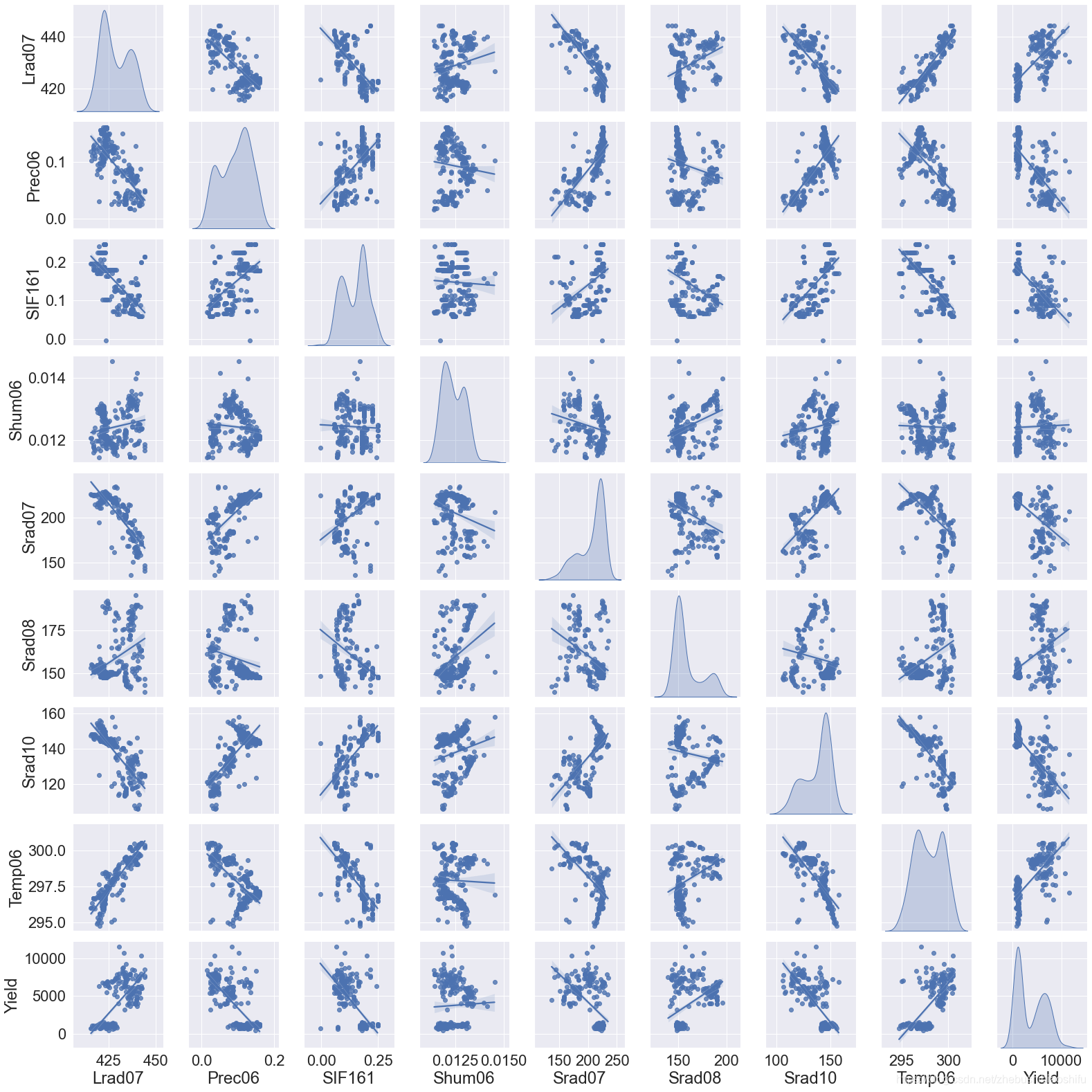
要注意,绘制联合分布图比较慢,建议大家不要选取太多的变量,否则程序会卡在这里比较长的时间。
2.5 因变量分离与数据标准化
因变量分离我们就不再多解释啦;接下来,我们要知道,对于机器学习、深度学习而言,数据标准化是十分重要的——用官网所举的一个例子:不同的特征在神经网络中会乘以相同的权重weight,因此输入数据的尺度(即数据不同特征之间的大小关系)将会影响到输出数据与梯度的尺度;因此,数据标准化可以使得模型更加稳定。
在这里,首先说明数据标准化与归一化的区别。
标准化即将训练集中某列的值缩放成均值为0,方差为1的状态;而归一化是将训练集中某列的值缩放到0和1之间。而在机器学习中,标准化较之归一化通常具有更高的使用频率,且标准化后的数据在神经网络训练时,其收敛将会更快。
最后,一定要记得——标准化时只需要对训练集数据加以处理,不要把测试集Test的数据引入了!因为标准化只需要对训练数据加以处理,引入测试集反而会影响标准化的作用。
# Separate independent and dependent variables.

TrainX=TrainData.copy(deep=True)

TestX=TestData.copy(deep=True)

TrainY=TrainX.pop('Yield')

TestY=TestX.pop('Yield')

# Standardization data.

Normalizer=preprocessing.Normalization()

Normalizer.adapt(np.array(TrainX))
在这里,我们直接运用preprocessing.Normalization()建立一个预处理层,其具有数据标准化的功能;随后,通过.adapt()函数将需要标准化的数据(即训练集的自变量)放入这一层,便可以实现数据的标准化操作。
2.6 原有模型删除
我们的程序每执行一次,便会在指定路径中保存当前运行的模型。为保证下一次模型保存时不受上一次模型运行结果干扰,我们可以将模型文件夹内的全部文件删除。
# Delete the model result from the last run.

def DeleteOldModel(ModelPath):

    AllFileName=os.listdir(ModelPath)

    for i in AllFileName:

        NewPath=os.path.join(ModelPath,i)

        if os.path.isdir(NewPath):

            DeleteOldModel(NewPath)

        else:

            os.remove(NewPath)

# Delete the model result from the last run.

DeleteOldModel(ModelPath)
这一部分的代码在文章Python TensorFlow深度学习回归代码:DNNRegressor有详细的讲解,这里就不再重复。
2.7 最优Epoch保存与读取
在我们训练模型的过程中,会让模型运行几百个Epoch(一个Epoch即全部训练集数据样本均进入模型训练一次);而由于每一次的Epoch所得到的精度都不一样,那么我们自然需要挑出几百个Epoch中最优秀的那一个Epoch。
# Find and save optimal epoch.

def CheckPoint(Name):

    Checkpoint=ModelCheckpoint(Name,

                               monitor=CheckPointMethod,

                               verbose=1,

                               save_best_only=True,

                               mode='auto')

    CallBackList=[Checkpoint]

    return CallBackList

# Find and save optimal epochs.

CallBack=CheckPoint(CheckPointName)
其中,Name就是保存Epoch的路径与文件名命名方法;monitor是我们挑选最优Epoch的依据,在这里我们用验证集数据对应的误差来判断这个Epoch是不是我们想要的;verbose用来设置输出日志的内容,我们用1就好;save_best_only用来确定我们是否只保存被认定为最优的Epoch;mode用以判断我们的monitor是越大越好还是越小越好,前面提到了我们的monitor是验证集数据对应的误差,那么肯定是误差越小越好,所以这里可以用'auto'或'min',其中'auto'是模型自己根据用户选择的monitor方法来判断越大越好还是越小越好。
找到最优Epoch后,将其传递给CallBack。需要注意的是,这里的最优Epoch是多个Epoch——因为每一次Epoch只要获得了当前模型所遇到的最优解,它就会保存;下一次再遇见一个更好的解时,同样保存,且不覆盖上一次的Epoch。可以这么理解,假如一共有三次Epoch,所得到的误差分别为5,7,4;那么我们保存的Epoch就是第一次和第三次。
2.8 模型构建
Keras接口下的模型构建就很清晰明了了。相信大家在看了前期一篇文章Python TensorFlow深度学习回归代码:DNNRegressor后,结合代码旁的注释就理解啦。
# Build DNN model.

def BuildModel(Norm):

    Model=keras.Sequential([Norm, # 数据标准化层

                            layers.Dense(HiddenLayer[0], # 指定隐藏层1的神经元个数

                                         kernel_regularizer=regularizers.l2(RegularizationFactor), # 运用L2正则化

                                         # activation=ActivationMethod

                                         ),

                            layers.LeakyReLU(), # 引入LeakyReLU这一改良的ReLU激活函数,从而加快模型收敛,减少过拟合

                            layers.BatchNormalization(), # 引入Batch Normalizing,加快网络收敛与增强网络稳固性

                            layers.Dropout(DropoutValue[0]), # 指定隐藏层1的Dropout值

                            layers.Dense(HiddenLayer[1],

                                         kernel_regularizer=regularizers.l2(RegularizationFactor),

                                         # activation=ActivationMethod

                                         ),

                            layers.LeakyReLU(),

                            layers.BatchNormalization(),

                            layers.Dropout(DropoutValue[1]),

                            layers.Dense(HiddenLayer[2],

                                         kernel_regularizer=regularizers.l2(RegularizationFactor),

                                         # activation=ActivationMethod

                                         ),

                            layers.LeakyReLU(),

                            layers.BatchNormalization(),

                            layers.Dropout(DropoutValue[2]),

                            layers.Dense(HiddenLayer[3],

                                         kernel_regularizer=regularizers.l2(RegularizationFactor),

                                         # activation=ActivationMethod

                                         ),

                            layers.LeakyReLU(),

                            layers.BatchNormalization(),

                            layers.Dropout(DropoutValue[3]),

                            layers.Dense(HiddenLayer[4],

                                         kernel_regularizer=regularizers.l2(RegularizationFactor),

                                         # activation=ActivationMethod

                                         ),

                            layers.LeakyReLU(),

                            layers.BatchNormalization(),

                            layers.Dropout(DropoutValue[4]),

                            layers.Dense(HiddenLayer[5],

                                         kernel_regularizer=regularizers.l2(RegularizationFactor),

                                         # activation=ActivationMethod

                                         ),

                            layers.LeakyReLU(),

                            layers.BatchNormalization(),

                            layers.Dropout(DropoutValue[5]),

                            layers.Dense(HiddenLayer[6],

                                         kernel_regularizer=regularizers.l2(RegularizationFactor),

                                         # activation=ActivationMethod

                                         ),

                            layers.LeakyReLU(),

                            # If batch normalization is set in the last hidden layer, the error image

                            # will show a trend of first stable and then decline; otherwise, it will

                            # decline and then stable.

                            # layers.BatchNormalization(),

                            layers.Dropout(DropoutValue[6]),

                            layers.Dense(units=1,

                                         activation=OutputLayerActMethod)]) # 最后一层就是输出层

    Model.compile(loss=LossMethod, # 指定每个批次训练误差的减小方法

                  optimizer=tf.keras.optimizers.Adam(learning_rate=LearnRate,decay=LearnDecay))

                  # 运用学习率下降的优化方法

    return Model

# Build DNN regression model.

DNNModel=BuildModel(Normalizer)

DNNModel.summary()

DNNHistory=DNNModel.fit(TrainX,

                        TrainY,

                        epochs=FitEpoch,

                        # batch_size=BatchSize,

                        verbose=1,

                        callbacks=CallBack,

                        validation_split=ValFrac)
在这里,.summary()查看模型摘要,validation_split为在训练数据中,取出ValFrac所指定比例的一部分作为验证数据。DNNHistory则记录了模型训练过程中的各类指标变化情况,接下来我们可以基于其绘制模型训练过程的误差变化图像。
2.9 训练图像绘制
机器学习中,过拟合是影响训练精度的重要因素。因此,我们最好在训练模型的过程中绘制训练数据、验证数据的误差变化图象,从而更好获取模型的训练情况。
# Draw error image.

def LossPlot(History):

    plt.figure(2)

    plt.plot(History.history['loss'],label='loss')

    plt.plot(History.history['val_loss'],label='val_loss')

    plt.ylim([0,4000])

    plt.xlabel('Epoch')

    plt.ylabel('Error')

    plt.legend()

    plt.grid(True)

# Draw error image.

LossPlot(DNNHistory)
其中,'loss'与'val_loss'分别是模型训练过程中,训练集、验证集对应的误差;如果训练集误差明显小于验证集误差,就说明模型出现了过拟合。
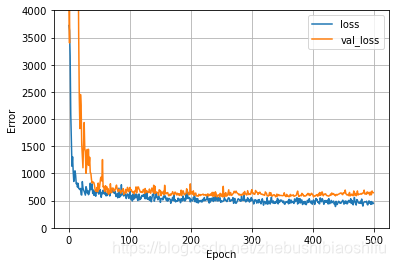
2.10 最优Epoch选取
前面提到了,我们将多个符合要求的Epoch保存在了指定的路径下,那么最终我们可以从中选取最好的那个Epoch,作为模型的最终参数,从而对测试集数据加以预测。那么在这里,我们需要将这一全局最优Epoch选取出,并带入到最终的模型里。
# Optimize the model based on optimal epoch.

def BestEpochIntoModel(Path,Model):

    EpochFile=glob.glob(Path+'/*')

    BestEpoch=max(EpochFile,key=os.path.getmtime)

    Model.load_weights(BestEpoch)

    Model.compile(loss=LossMethod,

                  optimizer=BestEpochOptMethod)

    return Model

# Optimize the model based on optimal epoch.

DNNModel=BestEpochIntoModel(CheckPointPath,DNNModel)
总的来说,这里就是运用了os.path.getmtime模块,将我们存储Epoch的文件夹中最新的那个Epoch挑出来——这一Epoch就是使得验证集数据误差最小的全局最优Epoch;并通过load_weights将这一Epoch对应的模型参数引入模型。
2.11 模型测试、拟合图像绘制、精度验证与模型参数与结果保存
前期一篇文章Python TensorFlow深度学习回归代码:DNNRegressor中有相关的代码讲解内容,因此这里就不再赘述啦。
# Draw Test image.

def TestPlot(TestY,TestPrediction):

    plt.figure(3)

    ax=plt.axes(aspect='equal')

    plt.scatter(TestY,TestPrediction)

    plt.xlabel('True Values')

    plt.ylabel('Predictions')

    Lims=[0,10000]

    plt.xlim(Lims)

    plt.ylim(Lims)

    plt.plot(Lims,Lims)

    plt.grid(False)

# Verify the accuracy and draw error hist image.

def AccuracyVerification(TestY,TestPrediction):

    DNNError=TestPrediction-TestY

    plt.figure(4)

    plt.hist(DNNError,bins=30)

    plt.xlabel('Prediction Error')

    plt.ylabel('Count')

    plt.grid(False)

    Pearsonr=stats.pearsonr(TestY,TestPrediction)

    R2=metrics.r2_score(TestY,TestPrediction)

    RMSE=metrics.mean_squared_error(TestY,TestPrediction)**0.5

    print('Pearson correlation coefficient is {0}, and RMSE is {1}.'.format(Pearsonr[0],RMSE))

    return (Pearsonr[0],R2,RMSE)

# Save key parameters.

def WriteAccuracy(*WriteVar):

    ExcelData=openpyxl.load_workbook(WriteVar[0])

    SheetName=ExcelData.get_sheet_names()

    WriteSheet=ExcelData.get_sheet_by_name(SheetName[0])

    WriteSheet=ExcelData.active

    MaxRowNum=WriteSheet.max_row

    for i in range(len(WriteVar)-1):

        exec("WriteSheet.cell(MaxRowNum+1,i+1).value=WriteVar[i+1]")

    ExcelData.save(WriteVar[0])

# Predict test set data.

TestPrediction=DNNModel.predict(TestX).flatten()

# Draw Test image.

TestPlot(TestY,TestPrediction)

# Verify the accuracy and draw error hist image.

AccuracyResult=AccuracyVerification(TestY,TestPrediction)

PearsonR,R2,RMSE=AccuracyResult[0],AccuracyResult[1],AccuracyResult[2]

# Save model and key parameters.

DNNModel.save(ModelPath)

WriteAccuracy(ParameterPath,PearsonR,R2,RMSE,TrainFrac,RandomSeed,CheckPointMethod,

              ','.join('%s' %i for i in HiddenLayer),RegularizationFactor,

              ActivationMethod,','.join('%s' %i for i in DropoutValue),OutputLayerActMethod,

              LossMethod,LearnRate,LearnDecay,FitEpoch,BatchSize,ValFrac,BestEpochOptMethod)
得到拟合图像如下:
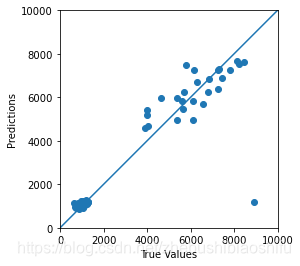
得到误差分布直方图如下:
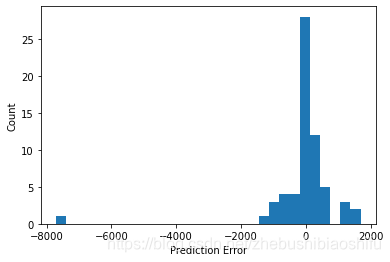
至此,代码的分解介绍就结束啦~
3 完整代码
# -*- coding: utf-8 -*-

"""

Created on Tue Feb 24 12:42:17 2021

@author: fkxxgis

"""

import os

import glob

import openpyxl

import numpy as np

import pandas as pd

import seaborn as sns

import tensorflow as tf

import scipy.stats as stats

import matplotlib.pyplot as plt

from sklearn import metrics

from tensorflow import keras

from tensorflow.keras import layers

from tensorflow.keras import regularizers

from tensorflow.keras.callbacks import ModelCheckpoint

from tensorflow.keras.layers.experimental import preprocessing

np.set_printoptions(precision=4,suppress=True)

# Draw the joint distribution image.

def JointDistribution(Factors):

    plt.figure(1)

    sns.pairplot(TrainData[Factors],kind='reg',diag_kind='kde')

    sns.set(font_scale=2.0)

    DataDistribution=TrainData.describe().transpose()

# Delete the model result from the last run.

def DeleteOldModel(ModelPath):

    AllFileName=os.listdir(ModelPath)

    for i in AllFileName:

        NewPath=os.path.join(ModelPath,i)

        if os.path.isdir(NewPath):

            DeleteOldModel(NewPath)

        else:

            os.remove(NewPath)

# Find and save optimal epoch.

def CheckPoint(Name):

    Checkpoint=ModelCheckpoint(Name,

                               monitor=CheckPointMethod,

                               verbose=1,

                               save_best_only=True,

                               mode='auto')

    CallBackList=[Checkpoint]

    return CallBackList

# Build DNN model.

def BuildModel(Norm):

    Model=keras.Sequential([Norm, # 数据标准化层

                            layers.Dense(HiddenLayer[0], # 指定隐藏层1的神经元个数

                                         kernel_regularizer=regularizers.l2(RegularizationFactor), # 运用L2正则化

                                         # activation=ActivationMethod

                                         ),

                            layers.LeakyReLU(), # 引入LeakyReLU这一改良的ReLU激活函数,从而加快模型收敛,减少过拟合

                            layers.BatchNormalization(), # 引入Batch Normalizing,加快网络收敛与增强网络稳固性

                            layers.Dropout(DropoutValue[0]), # 指定隐藏层1的Dropout值

                            layers.Dense(HiddenLayer[1],

                                         kernel_regularizer=regularizers.l2(RegularizationFactor),

                                         # activation=ActivationMethod

                                         ),

                            layers.LeakyReLU(),

                            layers.BatchNormalization(),

                            layers.Dropout(DropoutValue[1]),

                            layers.Dense(HiddenLayer[2],

                                         kernel_regularizer=regularizers.l2(RegularizationFactor),

                                         # activation=ActivationMethod

                                         ),

                            layers.LeakyReLU(),

                            layers.BatchNormalization(),

                            layers.Dropout(DropoutValue[2]),

                            layers.Dense(HiddenLayer[3],

                                         kernel_regularizer=regularizers.l2(RegularizationFactor),

                                         # activation=ActivationMethod

                                         ),

                            layers.LeakyReLU(),

                            layers.BatchNormalization(),

                            layers.Dropout(DropoutValue[3]),

                            layers.Dense(HiddenLayer[4],

                                         kernel_regularizer=regularizers.l2(RegularizationFactor),

                                         # activation=ActivationMethod

                                         ),

                            layers.LeakyReLU(),

                            layers.BatchNormalization(),

                            layers.Dropout(DropoutValue[4]),

                            layers.Dense(HiddenLayer[5],

                                         kernel_regularizer=regularizers.l2(RegularizationFactor),

                                         # activation=ActivationMethod

                                         ),

                            layers.LeakyReLU(),

                            layers.BatchNormalization(),

                            layers.Dropout(DropoutValue[5]),

                            layers.Dense(HiddenLayer[6],

                                         kernel_regularizer=regularizers.l2(RegularizationFactor),

                                         # activation=ActivationMethod

                                         ),

                            layers.LeakyReLU(),

                            # If batch normalization is set in the last hidden layer, the error image

                            # will show a trend of first stable and then decline; otherwise, it will

                            # decline and then stable.

                            # layers.BatchNormalization(),

                            layers.Dropout(DropoutValue[6]),

                            layers.Dense(units=1,

                                         activation=OutputLayerActMethod)]) # 最后一层就是输出层

    Model.compile(loss=LossMethod, # 指定每个批次训练误差的减小方法

                  optimizer=tf.keras.optimizers.Adam(learning_rate=LearnRate,decay=LearnDecay))

                  # 运用学习率下降的优化方法

    return Model

# Draw error image.

def LossPlot(History):

    plt.figure(2)

    plt.plot(History.history['loss'],label='loss')

    plt.plot(History.history['val_loss'],label='val_loss')

    plt.ylim([0,4000])

    plt.xlabel('Epoch')

    plt.ylabel('Error')

    plt.legend()

    plt.grid(True)

# Optimize the model based on optimal epoch.

def BestEpochIntoModel(Path,Model):

    EpochFile=glob.glob(Path+'/*')

    BestEpoch=max(EpochFile,key=os.path.getmtime)

    Model.load_weights(BestEpoch)

    Model.compile(loss=LossMethod,

                  optimizer=BestEpochOptMethod)

    return Model

# Draw Test image.

def TestPlot(TestY,TestPrediction):

    plt.figure(3)

    ax=plt.axes(aspect='equal')

    plt.scatter(TestY,TestPrediction)

    plt.xlabel('True Values')

    plt.ylabel('Predictions')

    Lims=[0,10000]

    plt.xlim(Lims)

    plt.ylim(Lims)

    plt.plot(Lims,Lims)

    plt.grid(False)

# Verify the accuracy and draw error hist image.

def AccuracyVerification(TestY,TestPrediction):

    DNNError=TestPrediction-TestY

    plt.figure(4)

    plt.hist(DNNError,bins=30)

    plt.xlabel('Prediction Error')

    plt.ylabel('Count')

    plt.grid(False)

    Pearsonr=stats.pearsonr(TestY,TestPrediction)

    R2=metrics.r2_score(TestY,TestPrediction)

    RMSE=metrics.mean_squared_error(TestY,TestPrediction)**0.5

    print('Pearson correlation coefficient is {0}, and RMSE is {1}.'.format(Pearsonr[0],RMSE))

    return (Pearsonr[0],R2,RMSE)

# Save key parameters.

def WriteAccuracy(*WriteVar):

    ExcelData=openpyxl.load_workbook(WriteVar[0])

    SheetName=ExcelData.get_sheet_names()

    WriteSheet=ExcelData.get_sheet_by_name(SheetName[0])

    WriteSheet=ExcelData.active

    MaxRowNum=WriteSheet.max_row

    for i in range(len(WriteVar)-1):

        exec("WriteSheet.cell(MaxRowNum+1,i+1).value=WriteVar[i+1]")

    ExcelData.save(WriteVar[0])

# Input parameters.

DataPath="G:/CropYield/03_DL/00_Data/AllDataAll.csv"

ModelPath="G:/CropYield/03_DL/02_DNNModle"

CheckPointPath="G:/CropYield/03_DL/02_DNNModle/Weights"

CheckPointName=CheckPointPath+"/Weights_{epoch:03d}_{val_loss:.4f}.hdf5"

ParameterPath="G:/CropYield/03_DL/03_OtherResult/ParameterResult.xlsx"

TrainFrac=0.8

RandomSeed=np.random.randint(low=21,high=22)

CheckPointMethod='val_loss'

HiddenLayer=[64,128,256,512,512,1024,1024]

RegularizationFactor=0.0001

ActivationMethod='relu'

DropoutValue=[0.5,0.5,0.5,0.3,0.3,0.3,0.2]

OutputLayerActMethod='linear'

LossMethod='mean_absolute_error'

LearnRate=0.005

LearnDecay=0.0005

FitEpoch=500

BatchSize=9999

ValFrac=0.2

BestEpochOptMethod='adam'

# Fetch and divide data.

MyData=pd.read_csv(DataPath,names=['EVI0610','EVI0626','EVI0712','EVI0728','EVI0813','EVI0829',

                                   'EVI0914','EVI0930','EVI1016','Lrad06','Lrad07','Lrad08',

                                   'Lrad09','Lrad10','Prec06','Prec07','Prec08','Prec09',

                                   'Prec10','Pres06','Pres07','Pres08','Pres09','Pres10',

                                   'SIF161','SIF177','SIF193','SIF209','SIF225','SIF241',

                                   'SIF257','SIF273','SIF289','Shum06','Shum07','Shum08',

                                   'Shum09','Shum10','SoilType','Srad06','Srad07','Srad08',

                                   'Srad09','Srad10','Temp06','Temp07','Temp08','Temp09',

                                   'Temp10','Wind06','Wind07','Wind08','Wind09','Wind10',

                                   'Yield'],header=0)

TrainData=MyData.sample(frac=TrainFrac,random_state=RandomSeed)

TestData=MyData.drop(TrainData.index)

# Draw the joint distribution image.

# JointFactor=['Lrad07','Prec06','SIF161','Shum06','Srad07','Srad08','Srad10','Temp06','Yield']

# JointDistribution(JointFactor)

# Separate independent and dependent variables.

TrainX=TrainData.copy(deep=True)

TestX=TestData.copy(deep=True)

TrainY=TrainX.pop('Yield')

TestY=TestX.pop('Yield')

# Standardization data.

Normalizer=preprocessing.Normalization()

Normalizer.adapt(np.array(TrainX))

# Delete the model result from the last run.

DeleteOldModel(ModelPath)

# Find and save optimal epochs.

CallBack=CheckPoint(CheckPointName)

# Build DNN regression model.

DNNModel=BuildModel(Normalizer)

DNNModel.summary()

DNNHistory=DNNModel.fit(TrainX,

                        TrainY,

                        epochs=FitEpoch,

                        # batch_size=BatchSize,

                        verbose=1,

                        callbacks=CallBack,

                        validation_split=ValFrac)

# Draw error image.

LossPlot(DNNHistory)

# Optimize the model based on optimal epoch.

DNNModel=BestEpochIntoModel(CheckPointPath,DNNModel)

# Predict test set data.

TestPrediction=DNNModel.predict(TestX).flatten()

# Draw Test image.

TestPlot(TestY,TestPrediction)

# Verify the accuracy and draw error hist image.

AccuracyResult=AccuracyVerification(TestY,TestPrediction)

PearsonR,R2,RMSE=AccuracyResult[0],AccuracyResult[1],AccuracyResult[2]

# Save model and key parameters.

DNNModel.save(ModelPath)

WriteAccuracy(ParameterPath,PearsonR,R2,RMSE,TrainFrac,RandomSeed,CheckPointMethod,

              ','.join('%s' %i for i in HiddenLayer),RegularizationFactor,

              ActivationMethod,','.join('%s' %i for i in DropoutValue),OutputLayerActMethod,

              LossMethod,LearnRate,LearnDecay,FitEpoch,BatchSize,ValFrac,BestEpochOptMethod)
至此,大功告成。
Python TensorFlow深度神经网络回归:keras.Sequential的更多相关文章
- 使用python实现深度神经网络 3(转)
使用python实现深度神经网络 3 快速计算梯度的魔法--反向传播算法 快速计算梯度的魔法--反向传播算法 一.实验介绍 1.1 实验内容 第一次实验最后我们说了,我们已经学习了深度学习中的模型mo ...
- 使用python实现深度神经网络 1(转)
使用python实现深度神经网络 1(转) https://blog.csdn.net/oxuzhenyi/article/details/73026790
- 使用python实现深度神经网络 4(转)
https://blog.csdn.net/oxuzhenyi/article/details/73026807 使用浅层神经网络识别图片中的英文字母 一.实验介绍 1.1 实验内容 本次实验我们正式 ...
- 使用python实现深度神经网络 2(转)
https://blog.csdn.net/oxuzhenyi/article/details/73026796 导数与梯度.矩阵运算性质.科学计算库numpy 一.实验介绍 1.1 实验内容 虽然在 ...
- 吴裕雄--天生自然神经网络与深度学习实战Python+Keras+TensorFlow:TensorFlow与神经网络的实现
import tensorflow as tf import numpy as np ''' 初始化运算图,它包含了上节提到的各个运算单元,它将为W,x,b,h构造运算部件,并将它们连接 起来 ''' ...
- mnist手写数字识别——深度学习入门项目(tensorflow+keras+Sequential模型)
前言 今天记录一下深度学习的另外一个入门项目——<mnist数据集手写数字识别>,这是一个入门必备的学习案例,主要使用了tensorflow下的keras网络结构的Sequential模型 ...
- Keras入门(一)搭建深度神经网络(DNN)解决多分类问题
Keras介绍 Keras是一个开源的高层神经网络API,由纯Python编写而成,其后端可以基于Tensorflow.Theano.MXNet以及CNTK.Keras 为支持快速实验而生,能够把 ...
- 基于Ubuntu+Python+Tensorflow+Jupyter notebook搭建深度学习环境
基于Ubuntu+Python+Tensorflow+Jupyter notebook搭建深度学习环境 前言一.环境准备环境介绍软件下载VMware下安装UbuntuUbuntu下Anaconda的安 ...
- 分别基于TensorFlow、PyTorch、Keras的深度学习动手练习项目
×下面资源个人全都跑了一遍,不会出现仅是字符而无法运行的状况,运行环境: Geoffrey Hinton在多次访谈中讲到深度学习研究人员不要仅仅只停留在理论上,要多编程.个人在学习中也体会到单单的看理 ...
- 代码详解:TensorFlow Core带你探索深度神经网络“黑匣子”
来源商业新知网,原标题:代码详解:TensorFlow Core带你探索深度神经网络“黑匣子” 想学TensorFlow?先从低阶API开始吧~某种程度而言,它能够帮助我们更好地理解Tensorflo ...
随机推荐
- Spring Boot 中使用 tkMapper
说明:基于 MyBatis 有很多第三方功能插件,这些插件可以完成数据操作方法的封装.数据库逆向工程的生成等. tkMapper 和 MyBatis-plus 都是基于 MyBatis 提供的第三方插 ...
- [ PHP 内核与扩展开发系列] 内存管理 —— 引用计数
对于 PHP 这种需要同时处理多个请求的程序来说,申请和释放内存的时候应该慎之又慎,一不小心便会酿成大错.另一方面,除了要安全申请和释放内存外,还应该做到内存的最小化使用,因为它可能要处理每秒钟数以千 ...
- 20、求解从1到20000内的所有水仙花数:每位数字的n次方之和等于其本身,n是这个数的位数。
/* 求解从1到20000内的所有水仙花数:每位数字的n次方之和等于其本身,n是这个数的位数. 共五位数,设置一个数组用来保存数字的每一位,数组的有效长度就是该数的位数.最后读取数组的每位数字来判断水 ...
- 网络编程:多进程实现TCP服务端并发、互斥锁代码实操、线程理论、创建线程的两种方式、线程的诸多特性、GIL全局解释器锁、验证GIL的存在
目录 多进程实现TCP服务端并发 互斥锁代码实操 线程理论 创建线程的两种方式 线程的诸多特性 GIL全局解释器锁 验证GIL的存在 GIL与普通互斥锁 python多线程是否有用 死锁现象 多进程实 ...
- TreeUtils工具类一行代码实现列表转树【第三版优化】 三级菜单 三级分类 附视频
一.序言 在日常一线开发过程中,总有列表转树的需求,几乎是项目的标配,比方说做多级菜单.多级目录.多级分类等,有没有一种通用且跨项目的解决方式呢?帮助广大技术朋友给业务瘦身,提高开发效率. 本文将基于 ...
- SpringCloud -Netflix 总结·
springcloud 核心组件 Spring Cloud是一系列框架的有序集合.它利用Spring Boot的开发便利性巧妙地简化了分布式系统基础设施的开发,如服务发现注册.配置中心.智能路由.消息 ...
- Mybatis——Plus :表与表之间的关系:1对多和多对一
Mybatis--plus我大致整理出两种方案: 第一种:第三方mybatis-plus 插件,注解式开发 Mybatis-Plus-Relation ( mprelation ) : mybatis ...
- OSError: dlopen() failed to load a library: cairo / cairo-2 / cairo-gobject-2 / cairo.so.2
解决办法 下载 gtk3-runtime-3.24.29-2021-04-29-ts-win64.exe后安装. 记得勾选添加bin目录到环境变量: 这样就不会缺失dll了,当然可能需要重启IDE才能 ...
- pyinstaller 打包多个资源文件到一个可执行文件
前言 pyinstaller -w: 无终端状态 -F: 打包成一个可执行文件 开始 假设 main.py 脚本调用 test.mp4视频文件(main.py和test.mp4在同一级目录),那么将在 ...
- 关于mysql远程连接失败的问题解决
解决办法 mysql 数据库user表配置密码 mysql 数据库user表配置plugin字段为mysql_native_password mysql 数据库user表host字段更改为% mysq ...