
OnionArch - 采用DDD+CQRS+.Net 7.0实现的洋葱架构
博主最近失业在家,找工作之余,看了一些关于洋葱(整洁)架构的资料和项目,有感而发,自己动手写了个洋葱架构解决方案,起名叫OnionArch。基于最新的.Net 7.0 RC1, 数据库采用PostgreSQL, 目前实现了包括多租户在内的12个特性。
该架构解决方案主要参考了NorthwindTraders,sample-dotnet-core-cqrs-api 项目, B站上杨中科的课程代码以及博主的一些项目经验。
洋葱架构的示意图如下:
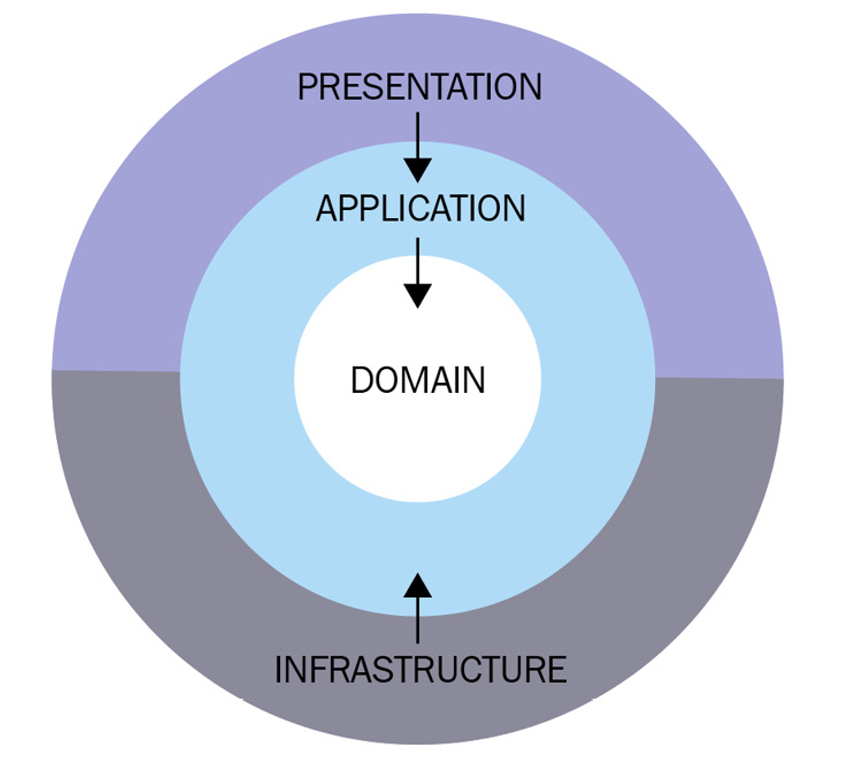
一、OnionArch 解决方案说明
解决方案截图如下: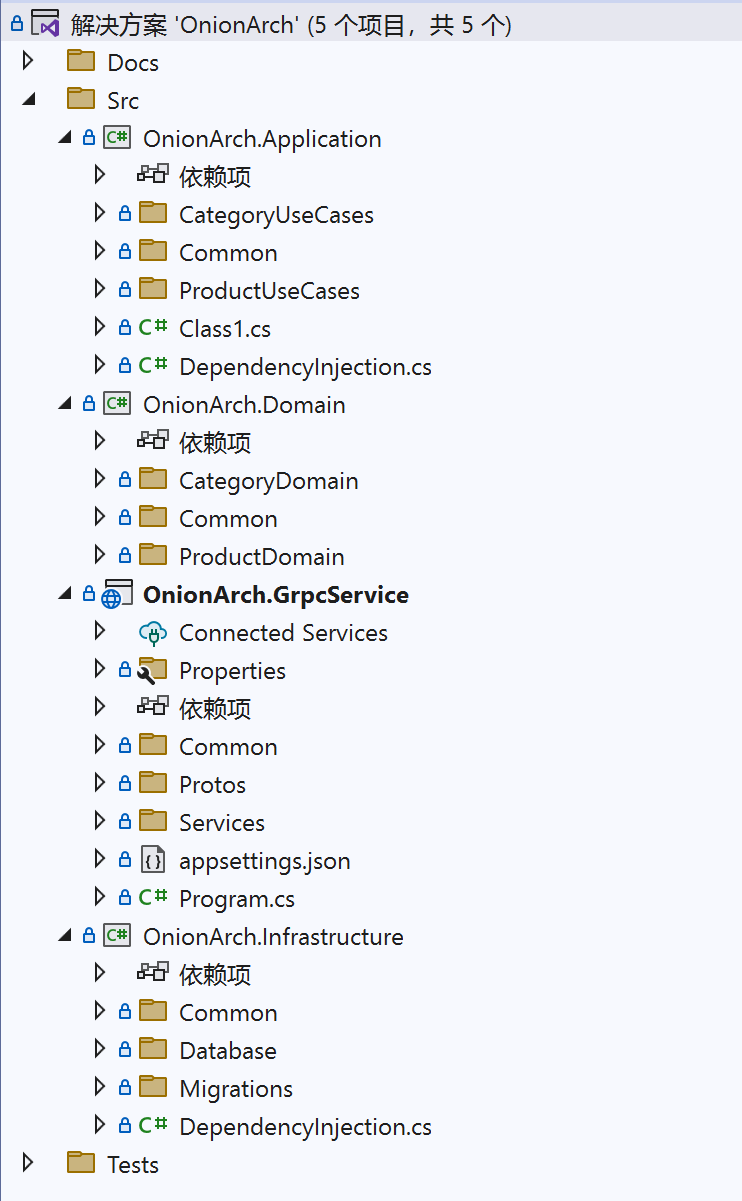
可以看到,该解决方案轻量化实现了洋葱架构,每个层都只用一个项目表示。建议将该解决方案作为单个微服务使用,不建议在领域层包含太多的领域根。
源代码分为四个项目:
1. OnionArch.Domain
- 核心领域层,类库项目,其主要职责实现每个领域内的业务逻辑。设计每个领域的实体(Entity),值对象、领域事件和领域服务,在领域服务中封装业务逻辑,为应用层服务。
- 领域层也包含数据库仓储接口,缓存接口、工作单元接口、基础实体、基础领域跟实体、数据分页实体的定义,以及自定义异常等。
2. OnionArch.Infrastructure
- 基础架构层,类库项目,其主要职责是实现领域层定义的各种接口适配器(Adapter)。例如数据库仓储接口、工作单元接口和缓存接口,以及领域层需要的其它系统集成接口。
- 基础架构层也包含Entity Framework基础DbConext、ORM配置的定义和数据迁移记录。
3. OnionArch.Application
- 应用(业务用例)层,类库项目,其主要职责是通过调用领域层服务实现业务用例。一个业务用例通过调用一个或多个领域层服务实现。不建议在本层实现业务逻辑。
- 应用(业务用例)层也包含业务用例实体(Model)、Model和Entity的映射关系定义,业务实基础命令接口和查询接口的定义(CQRS),包含公共MediatR管道(AOP)处理和公共Handler的处理逻辑。
4. OnionArch.GrpcService
- 界面(API)层,GRPC接口项目,用于实现GRPC接口。通过MediatR特定业务用例实体(Model)消息来调用应用层的业务用例。
- 界面(API)层也包含对领域层接口的实现,例如通过HttpContext获取当前租户和账号登录信息。
二、OnionArch已实现特性说明
1.支持多租户(通过租户字段)
基于Entity Framework实体过滤器和实现对租户数据的查询过滤
protected override void OnModelCreating(ModelBuilder modelBuilder)

{

//加载配置

modelBuilder.ApplyConfigurationsFromAssembly(typeof(TDbContext).Assembly);

//为每个继承BaseEntity实体增加租户过滤器

// Set BaseEntity rules to all loaded entity types

foreach (var entityType in GetBaseEntityTypes(modelBuilder))

{

var method = SetGlobalQueryMethod.MakeGenericMethod(entityType);

method.Invoke(this, new object[] { modelBuilder, entityType });

}

}
在BaseDbContext文件的SaveChanges之前对实体租户字段赋值
//为每个继承BaseEntity的实体的Id主键和TenantId赋值

var baseEntities = ChangeTracker.Entries<BaseEntity>();

foreach (var entry in baseEntities)

{

switch (entry.State)

{

case EntityState.Added:

if (entry.Entity.Id == Guid.Empty)

entry.Entity.Id = Guid.NewGuid();

if (entry.Entity.TenantId == Guid.Empty)

entry.Entity.TenantId = _currentTenantService.TenantId;

break;

}

}
多租户支持全部在底层实现,包括租户字段的索引配置等。开发人员不用关心多租户部分的处理逻辑,只关注业务领域逻辑也业务用例逻辑即可。
2.通用仓储和缓存接口
实现了泛型通用仓储接口,批量更新和删除方法基于最新的Entity Framework 7.0 RC1,为提高查询效率,查询方法全部返回IQueryable,包括分页查询,方便和其它实体连接后再筛选查询字段。


public interface IBaseRepository<TEntity> where TEntity : BaseEntity

{

Task<TEntity> Add(TEntity entity);

Task AddRange(params TEntity[] entities);

Task<TEntity> Update(TEntity entity);

Task<int> UpdateRange(Expression<Func<TEntity, bool>> whereLambda, Expression<Func<SetPropertyCalls<TEntity>, SetPropertyCalls<TEntity>>> setPropertyCalls);

Task<int> UpdateByPK(Guid Id, Expression<Func<SetPropertyCalls<TEntity>, SetPropertyCalls<TEntity>>> setPropertyCalls);

Task<TEntity> Delete(TEntity entity);

Task<int> DeleteRange(Expression<Func<TEntity, bool>> whereLambda);

Task<int> DeleteByPK(Guid Id);

Task<TEntity> DeleteByPK2(Guid Id);

Task<TEntity> SelectByPK(Guid Id);

IQueryable<TEntity> SelectRange<TOrder>(Expression<Func<TEntity, bool>> whereLambda, Expression<Func<TEntity, TOrder>> orderbyLambda, bool isAsc = true);

Task<PagedResult<TEntity>> SelectPaged<TOrder>(Expression<Func<TEntity, bool>> whereLambda, PagedOption pageOption, Expression<Func<TEntity, TOrder>> orderbyLambda, bool isAsc = true);

Task<bool> IsExist(Expression<Func<TEntity, bool>> whereLambda);

}
3.领域事件自动发布和保存
在BaseDbContext文件的SaveChanges之前从实体中获取领域事件并发布领域事件和保存领域事件通知,以备后查。
//所有包含领域事件的领域跟实体

var haveEventEntities = domainRootEntities.Where(x => x.Entity.DomainEvents != null && x.Entity.DomainEvents.Any()).ToList();

//所有的领域事件

var domainEvents = haveEventEntities

.SelectMany(x => x.Entity.DomainEvents)

.ToList();

//根据领域事件生成领域事件通知

var domainEventNotifications = new List<DomainEventNotification>();

foreach (var domainEvent in domainEvents)

{

domainEventNotifications.Add(new DomainEventNotification(nowTime, _currentUserService.UserId, domainEvent.EventType, JsonConvert.SerializeObject(domainEvent)));

}

//清除所有领域根实体的领域事件

haveEventEntities

.ForEach(entity => entity.Entity.ClearDomainEvents());

//生成领域事件任务并执行

var tasks = domainEvents

.Select(async (domainEvent) =>

{

await _mediator.Publish(domainEvent);

});

await Task.WhenAll(tasks);

//保存领域事件通知到数据表中

DomainEventNotifications.AddRange(domainEventNotifications);
领域事件发布和通知保存在底层实现。开发人员不用关心领域事件发布和保存逻辑,只关注于领域事件的定义和处理即可。
4.领域根实体审计信息自动记录
在BaseDbContext文件的Savechanges之前对记录领域根实体的审计信息。
//为每个继承AggregateRootEntity领域跟的实体的AddedBy,Added,LastModifiedBy,LastModified赋值
//为删除的实体生成实体删除领域事件
DateTime nowTime = DateTime.UtcNow;

var domainRootEntities = ChangeTracker.Entries<AggregateRootEntity>();

foreach (var entry in domainRootEntities)

{

switch (entry.State)

{

case EntityState.Added:

entry.Entity.AddedBy = _currentUserService.UserId;

entry.Entity.Added = nowTime;

break;

case EntityState.Modified:

entry.Entity.LastModifiedBy = _currentUserService.UserId;

entry.Entity.LastModified = nowTime;

break;

case EntityState.Deleted:

EntityDeletedDomainEvent entityDeletedDomainEvent = new EntityDeletedDomainEvent(

_currentUserService.UserId,

entry.Entity.GetType().Name,

entry.Entity.Id,

JsonConvert.SerializeObject(entry.Entity)

);

entry.Entity.AddDomainEvent(entityDeletedDomainEvent);

break;

}

}
领域根实体审计信息记录在底层实现。开发人员不用关心审计字段的处理逻辑。
5. 回收站式软删除
采用回收站式软删除而不采用删除字段的软删除方式,是为了避免垃圾数据和多次删除造成的唯一索引问题。
自动生成和发布实体删除的领域事件,代码如上。
通过MediatR Handler,接收实体删除领域事件,将已删除的实体保存到回收站中。
public class EntityDeletedDomainEventHandler : INotificationHandler<EntityDeletedDomainEvent>

{

private readonly RecycleDomainService _domainEventService;

public EntityDeletedDomainEventHandler(RecycleDomainService domainEventService)

{

_domainEventService = domainEventService;

}

public async Task Handle(EntityDeletedDomainEvent notification, CancellationToken cancellationToken)

{

var eventData = JsonSerializer.Serialize(notification);

RecycledEntity entity = new RecycledEntity(notification.OccurredOn, notification.OccurredBy, notification.EntityType, notification.EntityId, notification.EntityData);

await _domainEventService.AddRecycledEntity(entity);

}

}
6.CQRS(命令查询分离)
通过MediatR IRequest 实现了ICommand接口和Iquery接口,业务用例请求命令或者查询继承该接口即可。
public interface ICommand : IRequest

{

}

public interface ICommand<out TResult> : IRequest<TResult>

{

}

public interface IQuery<out TResult> : IRequest<TResult>

{

}

public class AddCategoryCommand : ICommand

{

public AddCategoryRequest Model { get; set; }

}
代码中的AddCategoryCommand 增加类别命令继承ICommand。
7.自动工作单元Commit
通过MediatR 管道实现了业务Command用例完成后自动Commit,开发人员不需要手动提交。
public class UnitOfWorkProcessor<TRequest, TResponse> : IRequestPostProcessor<TRequest, TResponse> where TRequest : IRequest<TResponse>

{

private readonly IUnitOfWork _unitOfWork;

public UnitOfWorkProcessor(IUnitOfWork unitOfWork)

{

_unitOfWork = unitOfWork;

}

public async Task Process(TRequest request, TResponse response, CancellationToken cancellationToken)

{

if (request is ICommand || request is ICommand<TResponse>)

{

await _unitOfWork.CommitAsync();

}

}

}
8.GRPC Message做为业务用例实体
通过将GRPC proto文件放入Application项目,重用其生成的message作为业务用例实体(Model)。
public class AddCategoryCommand : ICommand

{

public AddCategoryRequest Model { get; set; }

}
其中AddCategoryRequest 为proto生成的message。
9.通用CURD业务用例
在应用层分别实现了CURD的Command(增改删)和Query(查询) Handler。
public class CUDCommandHandler<TModel, TEntity> : IRequestHandler<CUDCommand<TModel>> where TEntity : BaseEntity

{

private readonly CURDDomainService<TEntity> _curdDomainService;

public CUDCommandHandler(CURDDomainService<TEntity> curdDomainService)

{

_curdDomainService = curdDomainService;

}

public async Task<Unit> Handle(CUDCommand<TModel> request, CancellationToken cancellationToken)

{

TEntity entity = null;

if (request.Operation == "C" || request.Operation == "U")

{

if (request.Model == null)

{

throw new BadRequestException($"the model of this request is null");

}

entity = request.Model.Adapt<TEntity>();

if (entity == null)

{

throw new ArgumentNullException($"the entity of {nameof(TEntity)} is null");

}

}

if (request.Operation == "U" || request.Operation == "D")

{

if (request.Id == Guid.Empty)

{

throw new BadRequestException($"the Id of this request is null");

}

}

switch (request.Operation)

{

case "C":

await _curdDomainService.Create(entity);

break;

case "U":

await _curdDomainService.Update(entity);

break;

case "D":

await _curdDomainService.Delete(request.Id);

break;

}

return Unit.Value;

}

}
开发人员只需要在GRPC层简单调用即可实现CURD业务。
public async override Task<AddProductReply> AddProduct(AddProductRequest request, ServerCallContext context)

{

CUDCommand<AddProductRequest> addProductCommand = new CUDCommand<AddProductRequest>();

addProductCommand.Id = Guid.NewGuid();

addProductCommand.Model = request;

addProductCommand.Operation = "C";

await _mediator.Send(addProductCommand);

return new AddProductReply()

{

Message = "Add Product sucess"

};

}
10. 业务实体验证
通过FluentValidation和MediatR 管道实现业务实体自动验证,并自动抛出自定义异常。
public class RequestValidationBehavior<TRequest, TResponse> : IPipelineBehavior<TRequest, TResponse> where TRequest : IRequest<TResponse>

{

private readonly IEnumerable<IValidator<TRequest>> _validators;

public RequestValidationBehavior(IEnumerable<IValidator<TRequest>> validators)

{

_validators = validators;

}

public async Task<TResponse> Handle(TRequest request, CancellationToken cancellationToken, RequestHandlerDelegate<TResponse> next)

{

var errors = _validators

.Select(v => v.Validate(request))

.SelectMany(result => result.Errors)

.Where(error => error != null)

.ToList();

if (errors.Any())

{

var errorBuilder = new StringBuilder();

errorBuilder.AppendLine("Invalid Request, reason: ");

foreach (var error in errors)

{

errorBuilder.AppendLine(error.ErrorMessage);

}

throw new InvalidRequestException(errorBuilder.ToString(), null);

}

return await next();

}

}
开发人员只需要定义验证规则即可
public class AddCategoryCommandValidator : AbstractValidator<AddCategoryCommand>

{

public AddCategoryCommandValidator()

{

RuleFor(x => x.Model.CategoryName).NotEmpty().WithMessage(p => "类别名称不能为空.");

}

}
11.请求日志和性能日志记录
基于MediatR 管道实现请求日志和性能日志记录。
public class RequestPerformanceBehaviour<TRequest, TResponse> : IPipelineBehavior<TRequest, TResponse> where TRequest : IRequest<TResponse>

{

private readonly Stopwatch _timer;

private readonly ILogger<TRequest> _logger;

private readonly ICurrentUserService _currentUserService;

private readonly ICurrentTenantService _currentTenantService;

public RequestPerformanceBehaviour(ILogger<TRequest> logger, ICurrentUserService currentUserService, ICurrentTenantService currentTenantService)

{

_timer = new Stopwatch();

_logger = logger;

_currentUserService = currentUserService;

_currentTenantService = currentTenantService;

}

public async Task<TResponse> Handle(TRequest request, CancellationToken cancellationToken, RequestHandlerDelegate<TResponse> next)

{

_timer.Start();

var response = await next();

_timer.Stop();

if (_timer.ElapsedMilliseconds > 500)

{

var name = typeof(TRequest).Name;

_logger.LogWarning("Request End: {Name} ({ElapsedMilliseconds} milliseconds) {@UserId} {@Request}",

name, _timer.ElapsedMilliseconds, _currentUserService.UserId, request);

}

return response;

}

}
12. 全局异常捕获记录
基于MediatR 异常接口实现异常捕获。
public class CommonExceptionHandler<TRequest, TResponse, TException> : IRequestExceptionHandler<TRequest, TResponse, TException>

where TException : Exception where TRequest: IRequest<TResponse>

{

private readonly ILogger<CommonExceptionHandler<TRequest, TResponse,TException>> _logger;

private readonly ICurrentUserService _currentUserService;

private readonly ICurrentTenantService _currentTenantService;

public CommonExceptionHandler(ILogger<CommonExceptionHandler<TRequest, TResponse, TException>> logger, ICurrentUserService currentUserService, ICurrentTenantService currentTenantService)

{

this._logger = logger;

_currentUserService = currentUserService;

_currentTenantService = currentTenantService;

}

public Task Handle(TRequest request, TException exception, RequestExceptionHandlerState<TResponse> state, CancellationToken cancellationToken)

{

var name = typeof(TRequest).Name;

_logger.LogError(exception, $"Request Error: {name} {state} Tenant:{_currentTenantService.TenantId} User:{_currentUserService.UserId}", request);

//state.SetHandled();

return Task.CompletedTask;

}

}
三、相关技术如下
* .NET Core 7.0 RC1
* ASP.NET Core 7.0 RC1
* Entity Framework Core 7.0 RC1
* MediatR 10.0.1
* Npgsql.EntityFrameworkCore.PostgreSQL 7.0.0-rc.1
* Newtonsoft.Json 13.0.1
* Mapster 7.4.0-pre03
* FluentValidation.AspNetCore 11.2.2
* GRPC.Core 2.46.5
四、 找工作
博主有10年以上的软件技术实施经验(Tech Leader),专注于软件架构设计、软件开发和构建,专注于微服务和云原生(K8s)架构, .Net Core\Java开发和Devops。
博主有10年以上的软件交付管理经验(Project Manager,Product Ower),专注于敏捷(Scrum)项目管理、软件产品业务分析和原型设计。
博主能熟练配置和使用 Microsoft Azure 和Microsoft 365 云平台,获得相关微软认证和证书。
我家在广州,也可以去深圳工作。做架构和项目管理都可以,希望能从事稳定行业的业务数字化转型。有工作机会推荐的朋友可以加我微信 15920128707,微信名字叫Jerry.
OnionArch - 采用DDD+CQRS+.Net 7.0实现的洋葱架构的更多相关文章
- 【DDD/CQRS/微服务架构案例】在Ubuntu 14.04.4 LTS中运行WeText项目的服务端
在<WeText项目:一个基于.NET实现的DDD.CQRS与微服务架构的演示案例>文章中,我介绍了自己用Visual Studio 2015(C# 6.0 with .NET Frame ...
- DDD/CQRS模式,微服务,容器
DDD/CQRS模式,微服务,容器 https://docs.microsoft.com/zh-cn/previous-versions/msp-n-p/ee658109(v=pandp.10) We ...
- 一款不错的 Go Server/API boilerplate,使用 K8S+DDD+CQRS+ES+gRPC 最佳实践构建
Golang API Starter Kit 该项目的主要目的是使用最佳实践.DDD.CQRS.ES.gRPC 提供样板项目设置. 为开发和生产环境提供 kubernetes 配置.允许与反映生产的 ...
- DDD CQRS和Event Sourcing的案例:足球比赛
在12月11日新的有关DDD CQRS和Event Sourcing演讲:改变心态- 以更加面向对象视角看待业务领域建模中,作者以足球比赛football Match为案例说明传统编程方法和CQRS的 ...
- 你一定看得懂的 DDD+CQRS+EDA+ES 核心思想与极简可运行代码示例
前言 随着分布式架构微服务的兴起,DDD(领域驱动设计).CQRS(命令查询职责分离).EDA(事件驱动架构).ES(事件溯源)等概念也一并成为时下的火热概念,我也在早些时候阅读了一些大佬的分析文,学 ...
- Spark2.1.0模型设计与基本架构(上)
随着近十年互联网的迅猛发展,越来越多的人融入了互联网——利用搜索引擎查询词条或问题:社交圈子从现实搬到了Facebook.Twitter.微信等社交平台上:女孩子们现在少了逛街,多了在各大电商平台上的 ...
- Spark2.1.0模型设计与基本架构(下)
阅读提示:读者如果对Spark的背景知识不是很了解的话,建议首先阅读<SPARK2.1.0模型设计与基本架构(上)>一文. Spark模型设计 1. Spark编程模型 正如Hadoop在 ...
- DDD CQRS架构和传统架构的优缺点比较
明天就是大年三十了,今天在家有空,想集中整理一下CQRS架构的特点以及相比传统架构的优缺点分析.先提前祝大家猴年新春快乐.万事如意.身体健康! 最近几年,在DDD的领域,我们经常会看到CQRS架构的概 ...
- Spring 4.0 中的 WebSocket 架构
两年前,客户端与服务器端的全双工双向通信作为一个很重要的功能被纳入到WebSocket RFC 6455协议中.在HTML5中,WebSocket已经成为一个流行词,大家对这个功能赋予很多构想,很多时 ...
随机推荐
- rust里的内存对齐
内存对齐主要遵循下面三个原则: 结构体变量的起始地址能够被其最宽的成员大小整除 结构体每个成员相对于起始地址的偏移能够被其自身大小整除,如果不能则在前一个成员后面补充字节 结构体总体大小能够被最宽的成 ...
- JAVA定时任务原理入门
本文适用语言:java 序章:定时任务实现方式 当下,java编码过程中,实现定时任务的方式主要以以下两种为主 spring框架的@Scheduled quzrtz框架 网络上关于这两种框架的实践和配 ...
- PHP生成器yield使用示例
<?php function getLines($file) { $f = fopen($file, 'r'); try { while ($line = fgets($f)) { yield ...
- 在阿里云Centos7.6上面配置Mysql主从数据库(master/slave),实现读写分离
原文转载自「刘悦的技术博客」https://v3u.cn/a_id_85 在之前的一篇文章中,阐述了如何在高并发高负载的场景下使用nginx做后台服务的负载均衡:在阿里云Centos上配置nginx+ ...
- 自动挂载mount
# 自动挂载mount(/etc/fstab) /dev/fd0 /media/floppy0 auto rw,user,noauto,exec,utf8 0 0 # 第一列:/dev/fd0 挂载源 ...
- 5.8 NOI 模拟
\(T1\) 比较容易想到的 二分转化为判定,判定是否存在一个子图能保证能一直在\(x\)时间内到达\(n\) 设\(dis(u,v)\)表示\(u->v\)的最短路 先找出候选节点\(i,di ...
- 文件上传接入阿里云OSS
目的:将文件交给阿里云进行管理,可避免文件对本地服务器资源的占用,阿里云OSS还可根据读写偏好选择合适的文件存储类型服务器,文件异地备份等 一.阿里云OSS基础了解(前提) 1.存储空间(Bucket ...
- 【活动专辑】Gitee X DolphinScheduler 邀你一起参与 issue 解决赢好礼!
在你参与 DolphinScheduler 项目开发时,是否曾因为这些问题困惑: 对项目感兴趣,但不清楚自己可以为项目做什么 在众多 issue 中,找不到合适自己参与的 issue 任务 认为参与开 ...
- FPGA/Verilog 资源整理
verilog学习教程(以Vivado为载体)https://vlab.ustc.edu.cn/guide/index.html 中科大的数电实验网站https://vlab.ustc.edu.cn/
- Spring源码-Bean生命周期总览