
Editplus配置Monokai页面风格
1.找到EditPlus的配置文件editplus_u.ini,用以下代码替换
 [Options]

 Placement=2C00000002000000030000000083FFFF0083FFFFFFFFFFFFFFFFFFFFEA000000EE000000D6050000CF030000FF

 Window List=00000000000000000000000000000000FF

 Marker List=00000000000000000000000000000000FF

 Function List=00000000000000000000000000000000FF

 Open Remote=5C020000550100006404000067030000FF

 Expand=00000000000000000000000000000000FF

 Project Pos=00000000000000000000000000000000FF

 Workspace Path=F:\phpcms\phpcms\user\inc

 Cliptext Window=

 Cliptext Window =

 Output=

 Output =

 Folding=

 FindX=

 FindY=

 Find=align

 Tab Index=

 Cliptext=

 Custom colors=6D6D7200FFFFFF00FFFFFF00FFFFFF00FFFFFF00FFFFFF00FFFFFF00FFFFFF0031282700FFFFFF00FFFFFF00FFFFFF00FFFFFF00FFFFFF00FFFFFF00FFFFFF00FF

 Matching Brace=

 Indent guide=

 [Files]

 Encoding=

 Backup=

 Backup Remote=

 [Fonts]

 Edit Window=F0FFFFFF00000000000000000000000090010000000000000302013143006F007500720069006500720020004E0065007700000000000000000000000000000000000000000000000000000000000000000000000000000000000000FF

 Printer=F4FFFFFF00000000000000000000000090010000000000000000003143006F007500720069006500720020004E0065007700000000000000000000000000000000000000000000000000000000000000000000000000000000000000FF

 Output Window=F4FFFFFF00000000000000000000000090010000000000000000003143006F007500720069006500720020004E0065007700000000000000000000000000000000000000000000000000000000000000000000000000000000000000FF

 Cliptext Window=F4FFFFFF0000000000000000000000009001000000000001000000004D006900630072006F0073006F006600740020005900610048006500690020005500490000000000000000000000000000000000000000000000000000000000FF

 Document Selector=F4FFFFFF0000000000000000000000009001000000000001000000004D006900630072006F0073006F006600740020005900610048006500690020005500490000000000000000000000000000000000000000000000000000000000FF

 Hex Viewer=F4FFFFFF00000000000000000000000090010000000000010000003143006F007500720069006500720020004E0065007700000000000000000000000000000000000000000000000000000000000000000000000000000000000000FF

 Custom =F4FFFFFF00000000000000000000000090010000000000000000002241007200690061006C000000720020004E0065007700000000000000000000000000000000000000000000000000000000000000000000000000000000000000FF

 Custom =F5FFFFFF000000000000000000000000900100000000000000000022560065007200640061006E00610000004E0065007700000000000000000000000000000000000000000000000000000000000000000000000000000000000000FF

 Custom =F4FFFFFF000000000000000000000000900100000000000000000012540069006D006500730020004E0065007700200052006F006D0061006E0000000000000000000000000000000000000000000000000000000000000000000000FF

 Custom =F5FFFFFF0000000000000000000000009001000000000000000000224D0053002000530061006E0073002000530065007200690066000000000000000000000000000000000000000000000000000000000000000000000000000000FF

 Custom =F3FFFFFF00000000000000000000000090010000000000FF000000315400650072006D0069006E0061006C00000065007700000000000000000000000000000000000000000000000000000000000000000000000000000000000000FF

 [Tool Option]

 Top Selector=

 [Colors\Text]

 Background=

 Default=

 Foreground=

 [Colors\Keyword ]

 Foreground=

 Default=

 [Colors\Embedded script]

 Foreground=

 Default=

 [Colors\Keyword ]

 Foreground=

 Default=

 [Colors\Keyword ]

 Foreground=

 Default=

 [Colors\Keyword ]

 Foreground=

 Default=

 [Colors\Keyword ]

 Foreground=

 Default=

 [Colors\Keyword ]

 Foreground=

 Default=

 [Colors\Keyword ]

 Foreground=

 Default=

 [Colors\Quotation]

 Foreground=

 Default=

 [Colors\Quotation ]

 Foreground=

 Default=

 [Colors\Line comment]

 Foreground=

 Default=

 [Colors\Line number]

 Foreground=

 Background=

 Default=

 [Colors\Folding mark -]

 Background=

 Default=

 [Colors\Matching words]

 Default=

 Background=

 [Colors\Keyword ]

 Foreground=

 Default=

 [Colors\Folding mark +]

 Background=

 Default=

 [Colors\Text selection]

 Background=

 Default=

 [Colors\Number]

 Foreground=

 Default=

 [Colors\Block comment]

 Foreground=

 Default=

 [Colors\Keyword ]

 Foreground=

 Default=

 [Colors\Ruler]

 Foreground=

 Default=

 Background=

 [Colors\Cursor indicator]

 Background=

 Default=

 [Colors\Indent Guide]

 Foreground=

 Default=
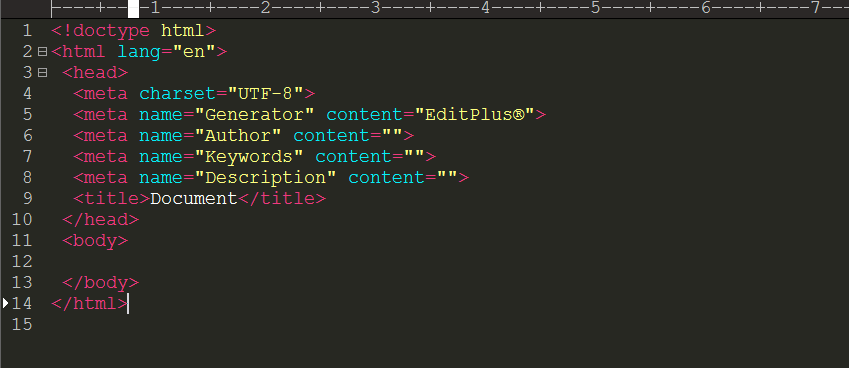
重启后,新建文件:如下图所示
Editplus配置Monokai页面风格的更多相关文章
- Editplus配置VC++(2) 与/d1reportSingleClassLayout
前篇文章:Editplus配置VC++(1) 及相关注意事项 VC++有两个隐含编译选项/d1reportSingleClassLayout和/d1reportAllClassLayout /d1 ...
- Editplus配置VC++(1) 及相关注意事项
下篇文章:Editplus配置VC++(2) 与/d1reportSingleClassLayout 原本用的是VC++2010 现在换成了Visual Studio 2013,editplus相关配 ...
- window下appserv组合包配置asp标记风格与简短风格
php一共有四种编码风格 分别为 :XML风格,脚本分铬,简短风格,ASP风格 如果要配置asp标记风格与简短风格,需要在php.ini文件中配置. 打开文件的位置C:\ window\php.ini ...
- EditPlus配置[C++] [Python] [Java] 编译运行环境
以前一直用Codeblocks写C++,eclipse写Java,再在eclipse里面集成PyDev写Python,首先无法忍受代码自动补全功能(这个功能也许你万分喜欢),也无法忍受如此重量级的ID ...
- web.config配置aspx页面默认引用的namespace
如果我们在aspx页面上使用<%%>的方式使用某些类的时候很多都没办法直接使用,我们必须要在页面上引用命名空间, 如:如果我们要使用DataTable类的时候,我们必须先使用<%@ ...
- Editplus配置java运行环境
Editplus配置java运行环境 下载及安装: editplus官网下载地址:https://www.editplus.com/ 安装方法和安装普通exe应用程序一样,选在安装路径,下一步下一步, ...
- Webpack 2 视频教程 019 - Webpack 2 中配置多页面编译
原文发表于我的技术博客 这是我免费发布的高质量超清「Webpack 2 视频教程」. Webpack 作为目前前端开发必备的框架,Webpack 发布了 2.0 版本,此视频就是基于 2.0 的版本讲 ...
- SpringMVC 实现文件上传与下载,并配置异常页面
目录 上传文件的表单要求 Spring MVC实现上传文件 需要导入的jar包 配置MultipartResolver解析器 编写接收上传文件的控制器 Spring MVC实现文件下载 下载文件时的h ...
- SpringMVC项目配置欢迎页面为index.html
一.问题 在web.xml中添加如下配置无效 <welcome-file-list> <welcome-file>index.html</welcome-file> ...
随机推荐
- VMware配置网络的3种方式:NAT、Host-Only、Bridged
网络常识: 1.网络中对电脑的访问是通过ip定位的 就好像我们的身份证号,可以唯一辨识一个人.ip是用来区分网络中的电脑的,因此同一网络(准确讲是“网段”)中,ip地址不能相同.如果同一网络中有相同的 ...
- MQTT Client软件-MQTTBox
最近发现了一个连接mqtt broker的软件:MQTTBox.GitHub地址:https://github.com/workswithweb/MQTTBox 官网网站的介绍为:使用MQTTBox增 ...
- Fiddler设置代理抓手机包
启动Fiddler,打开菜单栏中的 Tools > Fiddler Options,打开“Fiddler Options”对话框. 在Fiddler Options”对话框切换到“Connect ...
- Java并发编程(六):Java里实现对象安全发布的四种方式
接上篇,首先要了解什么是对象的发布与逸出? Java里安全发布对象的四种方法1.单例(注意懒汉和饿汉的区别)2.静态属性,注意类里的静态域和静态代码块的顺序有要求3.枚举4.final
- 并发insert情况下会发生重复的数据插入问题
1.背景 用多线程接收推送的订单数据,把接收的订单数据存到一个表中,实现的需求是:如果接收的订单消息在数据库中已经存在,那么执行update操作:如果没有存在,那么执行insert操作代码逻辑: if ...
- Makefile 自动变量之 $(@D),$(@F)
参考:http://www.gnu.org/software/make/manual/make.html '$(@D)'The directory part of the file name of t ...
- java集成开发环境常用操作集
1.简单搭建maven集成开发环境 一. Jetty安装 下载地址(包涵windows和Linux各版本,Jetty9需要JDK7):http://download.eclipse.org/j ...
- Codeforces Round #256 (Div. 2) C. Painting Fence(分治贪心)
题目链接:http://codeforces.com/problemset/problem/448/C C. Painting Fence time limit per test 1 second m ...
- Java与.NET机制比较分析
一.概述 不管是什么语言开发的web应用程序,都是在解决一个问题,那就是用户输入url怎么把对应的页面响应出来,如何通过url映射到响应的类,由于自己做asp.net的时间也不短了,还算是对asp.n ...
- 【★】深入BGP原理和思想【第…
前言:学思科技术我想说,浅尝辄止,不是天才千万别深钻.和我研究高等数学一样,越深入就会发现越多的问题与不合理之处.尤其对于IT界,算法的最终解释权还是掌握在老外手中,所以对于有些细节,我们" ...