
Editplus配置Monokai页面风格
1.找到EditPlus的配置文件editplus_u.ini,用以下代码替换
 [Options]

 Placement=2C00000002000000030000000083FFFF0083FFFFFFFFFFFFFFFFFFFFEA000000EE000000D6050000CF030000FF

 Window List=00000000000000000000000000000000FF

 Marker List=00000000000000000000000000000000FF

 Function List=00000000000000000000000000000000FF

 Open Remote=5C020000550100006404000067030000FF

 Expand=00000000000000000000000000000000FF

 Project Pos=00000000000000000000000000000000FF

 Workspace Path=F:\phpcms\phpcms\user\inc

 Cliptext Window=

 Cliptext Window =

 Output=

 Output =

 Folding=

 FindX=

 FindY=

 Find=align

 Tab Index=

 Cliptext=

 Custom colors=6D6D7200FFFFFF00FFFFFF00FFFFFF00FFFFFF00FFFFFF00FFFFFF00FFFFFF0031282700FFFFFF00FFFFFF00FFFFFF00FFFFFF00FFFFFF00FFFFFF00FFFFFF00FF

 Matching Brace=

 Indent guide=

 [Files]

 Encoding=

 Backup=

 Backup Remote=

 [Fonts]

 Edit Window=F0FFFFFF00000000000000000000000090010000000000000302013143006F007500720069006500720020004E0065007700000000000000000000000000000000000000000000000000000000000000000000000000000000000000FF

 Printer=F4FFFFFF00000000000000000000000090010000000000000000003143006F007500720069006500720020004E0065007700000000000000000000000000000000000000000000000000000000000000000000000000000000000000FF

 Output Window=F4FFFFFF00000000000000000000000090010000000000000000003143006F007500720069006500720020004E0065007700000000000000000000000000000000000000000000000000000000000000000000000000000000000000FF

 Cliptext Window=F4FFFFFF0000000000000000000000009001000000000001000000004D006900630072006F0073006F006600740020005900610048006500690020005500490000000000000000000000000000000000000000000000000000000000FF

 Document Selector=F4FFFFFF0000000000000000000000009001000000000001000000004D006900630072006F0073006F006600740020005900610048006500690020005500490000000000000000000000000000000000000000000000000000000000FF

 Hex Viewer=F4FFFFFF00000000000000000000000090010000000000010000003143006F007500720069006500720020004E0065007700000000000000000000000000000000000000000000000000000000000000000000000000000000000000FF

 Custom =F4FFFFFF00000000000000000000000090010000000000000000002241007200690061006C000000720020004E0065007700000000000000000000000000000000000000000000000000000000000000000000000000000000000000FF

 Custom =F5FFFFFF000000000000000000000000900100000000000000000022560065007200640061006E00610000004E0065007700000000000000000000000000000000000000000000000000000000000000000000000000000000000000FF

 Custom =F4FFFFFF000000000000000000000000900100000000000000000012540069006D006500730020004E0065007700200052006F006D0061006E0000000000000000000000000000000000000000000000000000000000000000000000FF

 Custom =F5FFFFFF0000000000000000000000009001000000000000000000224D0053002000530061006E0073002000530065007200690066000000000000000000000000000000000000000000000000000000000000000000000000000000FF

 Custom =F3FFFFFF00000000000000000000000090010000000000FF000000315400650072006D0069006E0061006C00000065007700000000000000000000000000000000000000000000000000000000000000000000000000000000000000FF

 [Tool Option]

 Top Selector=

 [Colors\Text]

 Background=

 Default=

 Foreground=

 [Colors\Keyword ]

 Foreground=

 Default=

 [Colors\Embedded script]

 Foreground=

 Default=

 [Colors\Keyword ]

 Foreground=

 Default=

 [Colors\Keyword ]

 Foreground=

 Default=

 [Colors\Keyword ]

 Foreground=

 Default=

 [Colors\Keyword ]

 Foreground=

 Default=

 [Colors\Keyword ]

 Foreground=

 Default=

 [Colors\Keyword ]

 Foreground=

 Default=

 [Colors\Quotation]

 Foreground=

 Default=

 [Colors\Quotation ]

 Foreground=

 Default=

 [Colors\Line comment]

 Foreground=

 Default=

 [Colors\Line number]

 Foreground=

 Background=

 Default=

 [Colors\Folding mark -]

 Background=

 Default=

 [Colors\Matching words]

 Default=

 Background=

 [Colors\Keyword ]

 Foreground=

 Default=

 [Colors\Folding mark +]

 Background=

 Default=

 [Colors\Text selection]

 Background=

 Default=

 [Colors\Number]

 Foreground=

 Default=

 [Colors\Block comment]

 Foreground=

 Default=

 [Colors\Keyword ]

 Foreground=

 Default=

 [Colors\Ruler]

 Foreground=

 Default=

 Background=

 [Colors\Cursor indicator]

 Background=

 Default=

 [Colors\Indent Guide]

 Foreground=

 Default=
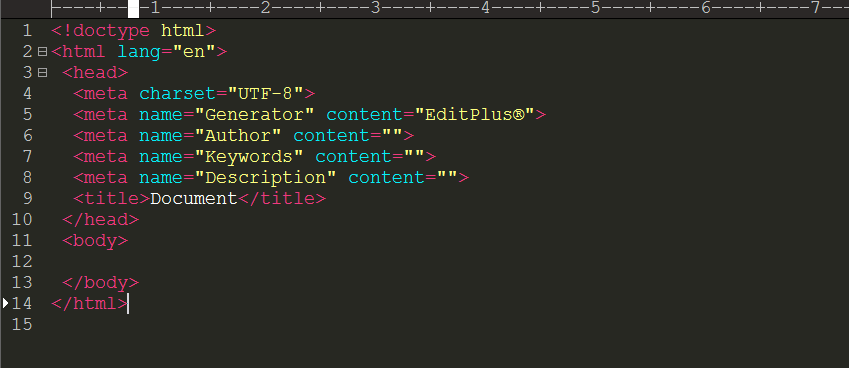
重启后,新建文件:如下图所示
Editplus配置Monokai页面风格的更多相关文章
- Editplus配置VC++(2) 与/d1reportSingleClassLayout
前篇文章:Editplus配置VC++(1) 及相关注意事项 VC++有两个隐含编译选项/d1reportSingleClassLayout和/d1reportAllClassLayout /d1 ...
- Editplus配置VC++(1) 及相关注意事项
下篇文章:Editplus配置VC++(2) 与/d1reportSingleClassLayout 原本用的是VC++2010 现在换成了Visual Studio 2013,editplus相关配 ...
- window下appserv组合包配置asp标记风格与简短风格
php一共有四种编码风格 分别为 :XML风格,脚本分铬,简短风格,ASP风格 如果要配置asp标记风格与简短风格,需要在php.ini文件中配置. 打开文件的位置C:\ window\php.ini ...
- EditPlus配置[C++] [Python] [Java] 编译运行环境
以前一直用Codeblocks写C++,eclipse写Java,再在eclipse里面集成PyDev写Python,首先无法忍受代码自动补全功能(这个功能也许你万分喜欢),也无法忍受如此重量级的ID ...
- web.config配置aspx页面默认引用的namespace
如果我们在aspx页面上使用<%%>的方式使用某些类的时候很多都没办法直接使用,我们必须要在页面上引用命名空间, 如:如果我们要使用DataTable类的时候,我们必须先使用<%@ ...
- Editplus配置java运行环境
Editplus配置java运行环境 下载及安装: editplus官网下载地址:https://www.editplus.com/ 安装方法和安装普通exe应用程序一样,选在安装路径,下一步下一步, ...
- Webpack 2 视频教程 019 - Webpack 2 中配置多页面编译
原文发表于我的技术博客 这是我免费发布的高质量超清「Webpack 2 视频教程」. Webpack 作为目前前端开发必备的框架,Webpack 发布了 2.0 版本,此视频就是基于 2.0 的版本讲 ...
- SpringMVC 实现文件上传与下载,并配置异常页面
目录 上传文件的表单要求 Spring MVC实现上传文件 需要导入的jar包 配置MultipartResolver解析器 编写接收上传文件的控制器 Spring MVC实现文件下载 下载文件时的h ...
- SpringMVC项目配置欢迎页面为index.html
一.问题 在web.xml中添加如下配置无效 <welcome-file-list> <welcome-file>index.html</welcome-file> ...
随机推荐
- 安装Spring+搭建Spring开发环境
https://blog.csdn.net/csdnsjg/article/details/80152815 https://jingyan.baidu.com/article/219f4bf798e ...
- 理解x64代码模型
原作者:Eli Bendersky http://eli.thegreenplace.net/2012/01/03/understanding-the-x64-code-models 在编写x64架构 ...
- Mac OSX下Go语言开发环境的搭建与配置--使用InteliJ IDEA 13
折腾了一上午终于把go语言的ide配置好了. 其实GO语言的语法和特性早在去年的时候就学习了一遍.结果后来一直没机会进行开发,结果还是个GO小白.感叹一下,要学好一门编程语言唯一的途径就是多写代码.. ...
- linux上定时备份mysql数据库
定时备份数据库 /usr/sbin/backupmysql timestamp=`date +"%Y-%m-%d-%H-%M-%S"` mysqldump -uroot -p'12 ...
- (4)Smali系列学习之Smali语法详解内部类
在这一节,我们来介绍一下内部类.对于Java文件中的每一个内部类,都会产生一个单独的smali文件,比如ActivityThread$1.smali.这些文件的命名规范是如果是匿名内部类,则命名规则是 ...
- 哪个线程执行 CompletableFuture’s tasks 和 callbacks?
CompletableFuture尽管在2014年的三月随着Java8被提出来,但它现在仍然是一种相对较新潮的概念.但也许这个类不为人所熟知是好事,因为它很容易被滥用,特别是涉及到使用线程和线程池的时 ...
- ORACLE修改列名与列类型
--修改列名 alter table 表名 rename column 旧列名 to 新列名; --修改列类型 )); 删除表的一列: alter table 表名 drop column 列名 给表 ...
- 堆积木----vector防止内存超限
蒜头君有 nn 块积木,编号分别为 11 到 nn.一开始,蒜头把第 ii 块积木放在位置 ii.蒜头君进行 mm 次操作,每次操作,蒜头把位置 bb 上的积木整体移动到位置 aa 上面.比如 11 ...
- Flex上传文件Java端解决中文乱码问题
1.Flex端进行编码 public function encodeStr(str:String, charSet:String):String { var result:String =" ...
- struts中如何实现国际化,涉及哪些文件?
struts中如何实现国际化,涉及哪些文件? 解答:“国际化”是指一个应用程序在运行时能够根据客户端请求所来自的国家/地区.语言的不同而显示不同的用户界面.Struts框架通过使用<bean:m ...