
python socket 多人聊天室
Python 的 Socket 编程教程 http://www.oschina.net/question/12_76126
Python线程指南 http://www.open-open.com/lib/view/open1345476194313.html
具体思路:
每个client有两个线程,分别负责接收和发送,当没有发送时,在raw_input()那卡住,当没有接收时,在recv()那卡住
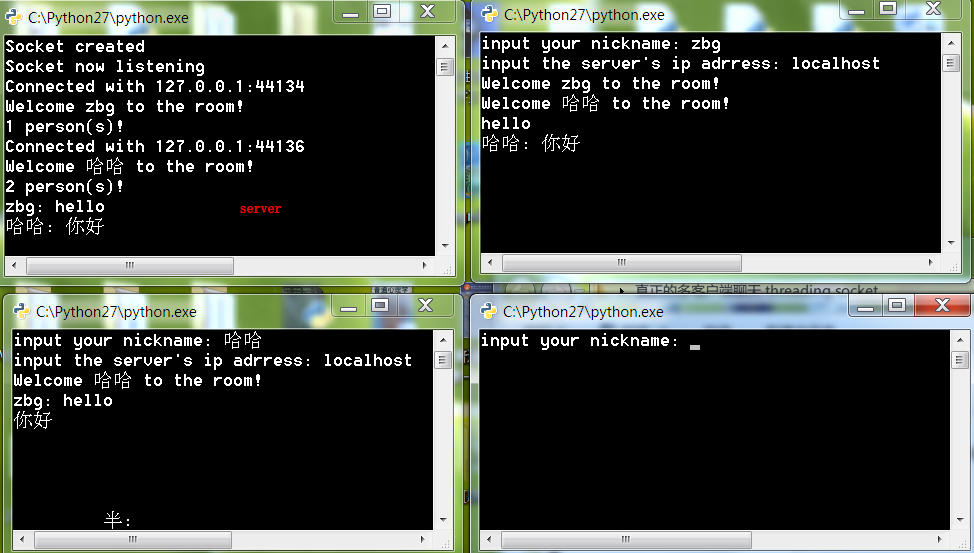
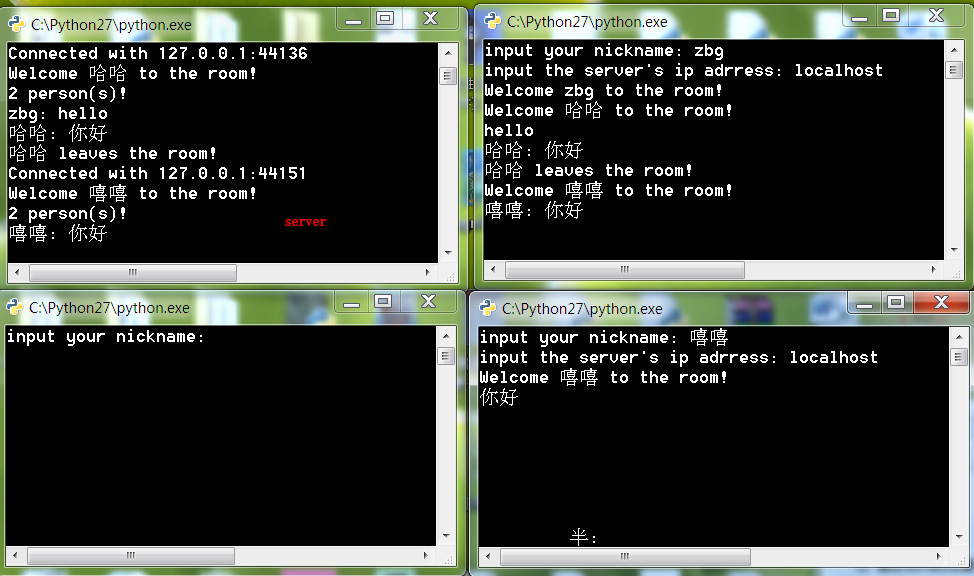
server为每个client开两个线程,分别处理接收和发送。每个发送的线程在con.wait()那阻塞,等待notify。每个接收的线程,在recv()那里等待来自client的输入,接收到输入后,发出一个notify,激活所有输出线程,自身则因为循环在下一个recv()那里等待。
这样做的优势时在等待期间,cpu都处于空闲状态,cpu只在接收和发送的瞬间被使用。
目前没有想到更好方法。。。
注意:
我做得有点粗糙,复制后有些注释和代码对应不起来,也没有添加新的注释
代码片段(4)[全屏查看所有代码]
1. [文件] client.py ~ 976B 下载(283)
|
1
2
3
4
5
6
7
8
9
10
11
12
13
14
15
16
17
18
19
20
21
22
23
24
25
26
27
28
29
30
31
32
33
34
35
36
37
38
39
40
41
42
43
44
45
46
47
|
# -*- coding: utf-8 -*-"""Created on Thu Oct 24 17:35:50 2013@author: zbg"""import socketimport threadinginString = ''outString = ''nick = ''def DealOut(s): global nick, outString while True: outString = raw_input() outString = nick + ': ' + outString s.send(outString)def DealIn(s): global inString while True: try: inString = s.recv(1024) if not inString: break if outString != inString: print inString except: break nick = raw_input("input your nickname: ")ip = raw_input("input the server's ip adrress: ")sock = socket.socket(socket.AF_INET, socket.SOCK_STREAM)sock.connect((ip, 8888))sock.send(nick)thin = threading.Thread(target = DealIn, args = (sock,))thin.start()thout = threading.Thread(target = DealOut, args = (sock,))thout.start()#sock.close() |
2. [文件] server.py ~ 2KB 下载(285)
|
1
2
3
4
5
6
7
8
9
10
11
12
13
14
15
16
17
18
19
20
21
22
23
24
25
26
27
28
29
30
31
32
33
34
35
36
37
38
39
40
41
42
43
44
45
46
47
48
49
50
51
52
53
54
55
56
57
58
59
60
61
62
63
64
65
66
67
68
69
70
71
72
73
74
75
76
77
|
# -*- coding: utf-8 -*-"""Created on Fri Oct 25 10:33:44 2013@author: zbg"""import socketimport sysimport threadingcon = threading.Condition()HOST = raw_input("input the server's ip adrress: ") # Symbolic name meaning all available interfacesPORT = 8888 # Arbitrary non-privileged portdata = ''s = socket.socket(socket.AF_INET, socket.SOCK_STREAM)print 'Socket created's.bind((HOST, PORT))s.listen(10)print 'Socket now listening'#Function for handling connections. This will be used to create threadsdef clientThreadIn(conn, nick): global data#infinite loop so that function do not terminate and thread do not end. while True: #Receiving from client try: temp = conn.recv(1024) if not temp: conn.close() return NotifyAll(temp) print data except: NotifyAll(nick + " leaves the room!") print data return #came out of loopdef NotifyAll(sss): global data if con.acquire(): data = sss con.notifyAll() con.release() def ClientThreadOut(conn, nick): global data while True: if con.acquire(): con.wait() if data: try: conn.send(data) con.release() except: con.release() return while 1: #wait to accept a connection - blocking call conn, addr = s.accept() print 'Connected with ' + addr[0] + ':' + str(addr[1]) nick = conn.recv(1024) #send only takes string #start new thread takes 1st argument as a function name to be run, second is the tuple of arguments to the function. NotifyAll('Welcome ' + nick + ' to the room!') print data print str((threading.activeCount() + 1) / 2) + ' person(s)!' conn.send(data) threading.Thread(target = clientThreadIn , args = (conn, nick)).start() threading.Thread(target = ClientThreadOut , args = (conn, nick)).start()s.close() |
3. [图片] QQ截图20131027115134.png
4. [图片] QQ截图20131027115232.png
python socket 多人聊天室的更多相关文章
- Python实现网络多人聊天室
网络多人聊天室 文件结构: chatroom ├── client.py # 客户端代码 ├── language.py # 语言文件 ├── server.py # 服务端代码 └── set ...
- Python实现网络图形化界面多人聊天室 - Windows
Python实现网络图形化界面多人聊天室 - Windows 项目名称:网络多人聊天室图形界面版本 项目思路: server.py 服务端文件,主进程中,创建图形化界面,询问地址(主机名,端口),点击 ...
- Python实现网络图形化界面多人聊天室 - Linux
网络图形化界面多人聊天室 - Linux Windows版本:https://www.cnblogs.com/noonjuan/p/12078524.html 在Python实现网络多人聊天室基础上, ...
- 与众不同 windows phone (31) - Communication(通信)之基于 Socket UDP 开发一个多人聊天室
原文:与众不同 windows phone (31) - Communication(通信)之基于 Socket UDP 开发一个多人聊天室 [索引页][源码下载] 与众不同 windows phon ...
- 与众不同 windows phone (30) - Communication(通信)之基于 Socket TCP 开发一个多人聊天室
原文:与众不同 windows phone (30) - Communication(通信)之基于 Socket TCP 开发一个多人聊天室 [索引页][源码下载] 与众不同 windows phon ...
- java socket之多人聊天室Demo
一.功能介绍 该功能实现了一个类似QQ的最简单多人聊天室,如下图所示. 二.目录结构 三.服务端 1)SocketServer类,该类是服务端的主类,主要负责创建聊天窗口,创建监听客户端的线程: pa ...
- Python实现网络多人聊天室 - Windows
项目名称:多人聊天室项目结构: client.py server.py settings.py项目思路:服务端接收客户端连接,客户端发送信息给服务端,服务端将信息发送给所有客户端.项目实现:主进程负责 ...
- Apache MiNa 实现多人聊天室
Apache MiNa 实现多人聊天室 开发环境: System:Windows JavaSDK:1.6 IDE:eclipse.MyEclipse 6.6 开发依赖库: Jdk1.4+.mina-c ...
- 多人聊天室(Java)
第1部分 TCP和UDP TCP:是一种可靠地传输协议,是把消息按一个个小包传递并确认消息接收成功和正确才发送下一个包,速度相对于UDP慢,但是信息准确安全:常用于一般不要求速度和需要准确发送消息的场 ...
随机推荐
- C语言中setjmp与longjmp学习笔记
C语言中setjmp与longjmp学习笔记 一.基础介绍 头文件:#include<setjmp.h> 原型: int setjmp(jmp_buf envbuf) ,然而longjm ...
- iOS:多线程技术GCD的使用
GCD的使用: 1.队列的类型 1.1 主队列:mian queue,主线程队列,负责更行UI的操作.是一个串行的队列. 1.2 系统默认的并行队列:global queue,按优 ...
- 一步一步学RenderMonkey(4)--点光源光照模型 【转】
转载请注明出处:http://blog.csdn.net/tianhai110 点光源光照模型: 公式: I = Icolor*attenuation; ...
- MFC【17-2】线程和线程同步化
17-2线程同步 Windows支持4中类型的同步对象,可以用过来同步由并发运行的线程执行的操作: 临界区 互斥量 事件 信号量 MFC在名为CCriticalSection\CMutex\CEven ...
- SVN配置常见错误
1.svnserve.conf:12: Option expected 为什么会出现这个错误呢,就是因为subversion读取配置文件svnserve.conf时,无法识别有前置空格的配置文件,如 ...
- [React + Functional Programming ADT] Connect State ADT Based Redux Actions to a React Application
With our Redux implementation lousy with State ADT based reducers, it is time to hook it all up to a ...
- 今天科普一下 iOS马甲包审核以及常见审核问题
一.什么是马甲包 马甲包是利用App store 规则漏洞,通过技术手段,多次上架同一款产品的方法.马甲包和主产品包拥有同样的内容和功能,除了icon和应用名称不能完全一致,其他基本一致. 二. ...
- Php取扩展名
Php取扩展名 /** * 取扩展名 */ function getext($url){ $base = parse_url($url); $name = basename($base['path'] ...
- Reading assignments in science
First, get a perspective: Review the assignment in the syllabus and any handouts (1-2 minutes)Maybe ...
- RMQ 算法入门
1. 概述 RMQ(Range Minimum/Maximum Query).即区间最值查询,是指这样一个问题:对于长度为n的数列A,回答若干询问RMQ(A,i,j)(i,j<=n),返回数列A ...