
Nginx图片的防盗链配置
 [root@web01 www]# cat /app/server/nginx/conf/vhosts/default.conf

 server {

     listen  default_server;

     server_name 192.168.1.24 web01.espressos.cn;

     root /app/www;

     index index.php index.html index.htm;

     location ~* \.(gif|jpg|png|swf|flv)$ { #对gif,jpg,png,swf,flv后缀的文件实行防盗链

     valid_referers none blocked 192.168.1.24 web01.espressos.cn; #对192.168.1.24 web01.espressos.cn这两个来路进行判断(主要是根椐http协议里的referer)

     if ($invalid_referer) { #if{}里面内容的意思是,如果来路不是指定来路就跳转到错误页面,当然直接返回403也是可以的。

     rewrite ^/ http://192.168.1.24/403.html;

     #return ;

     }

     }

     location ~ .*\.(php|php5)?$

     {

        #fastcgi_pass  unix:/tmp/php-cgi.sock;

         fastcgi_pass  127.0.0.1:;

     fastcgi_index index.php;

     include fastcgi.conf;

     }

     access_log  /app/log/nginx/access/default.log;

 }
第8行;valid_referers none blocked *.espressos.cn *qq.com *baidu.com ;

就是白名单,允许文件链出的域名白名单,自行修改成您的域名! *.espressos.cn这个指的是子域名,域名与域名之间使用空格隔开!baidu.com是搜索引擎,做qq.com的白名单是因为可能有用户用邮箱订阅你的站点,如果不设置为白名单,用户在邮箱就无法看见你的图了,同理,如果还有其他订阅方式、搜索引擎都最好添加一下。
验证代码:
[root@web01 www]# cat q.html

<html>

<body><img alt="http://192.168.1.24/cat.png" src="http://192.168.1.24/cat.png" height="auto" width="auto"></body>

</html>

[root@web01 www]#
另一台WEB服务器盗用WEB01的图片(配置如下):
[root@lmr default]# cat /app/server/nginx/conf/vhosts/default.conf

server {

        listen       ;

        server_name  localhost;

    index index.html index.htm index.php;

    root /app/www/default;

    location ~ .*\.(php|php5)?$

    {

        #fastcgi_pass  unix:/tmp/php-cgi.sock;

        fastcgi_pass  127.0.0.1:;

        fastcgi_index index.php;

        include fastcgi.conf;

    }

    location ~ .*\.(gif|jpg|jpeg|png|bmp|swf)$

    {

        expires 30d;

    }

    location ~ .*\.(js|css)?$

    {

        expires 1h;

    }

    include /app/server/nginx/conf/rewrite/default.conf;

    access_log  /app/log/nginx/access/default.log;

}
验证:
[root@lmr default]# pwd

/app/www/default

[root@lmr default]# cat q.html

<html>

<body><img alt="http://192.168.1.24/cat.png" src="http://192.168.1.24/cat.png" height="auto" width="auto"></body>

</html>

[root@lmr default]#
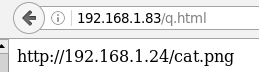
防盗成功!!!
把web01上的防盗代码注释掉:
[root@web01 www]# cat /app/server/nginx/conf/vhosts/default.conf

server {

    listen  default_server;

    server_name 192.168.1.24 web01.espressos.cn;

    root /app/www;

    index index.php index.html index.htm;

    #location ~* \.(gif|jpg|png|swf|flv)$ {

    #valid_referers none blocked 192.168.1.24 web01.espressos.cn;

    #if ($invalid_referer) {

    #    rewrite ^/ http://192.168.1.24/403.html;

    #    return ;

    #    }

    #}

    location ~ .*\.(php|php5)?$

    {

       #fastcgi_pass  unix:/tmp/php-cgi.sock;

        fastcgi_pass  127.0.0.1:;

    fastcgi_index index.php;

    include fastcgi.conf;

    }

    access_log  /app/log/nginx/access/default.log;

}

[root@web01 www]# /app/server/nginx/sbin/nginx -s reload
重新测式盗连图片的服务器,盗图是否成功:

图片盗连成功!!
============新测试======================
 sh-4.1# cat /etc/nginx/vhosts/test.espressos.cn.conf

 server {

         listen       ;

         server_name  test.espressos.cn;

     index index.html 123.57.37.211 index.htm index.php;

     root /usr/html/test.espressos.cn;

     location ~ .*\.(php|php5)

     {

         #fastcgi_pass  unix:/tmp/php-cgi.sock;

         fastcgi_pass  127.0.0.1:;

         fastcgi_index index.php;

         include fastcgi.conf;

         fastcgi_param PATH_INFO $fastcgi_script_name;

     }

     location ~ .*\.(gif|jpg|jpeg|png|bmp|swf)$

     {

         valid_referers none blocked 123.57.37.211 test.espressos.cn;

         if ($invalid_referer) {

         #rewrite ^/ http://123.57.36.227/404.html;

         return ;

             }

     }

     location ~ .*\.(js|css)?$

     {

         expires 1h;

     }

     include /etc/nginx/rewrite/test.espressos.cn.conf;

     access_log  /var/log/nginx/test.espressos.log;

 }
注意上面的第19和20行:(图片服务器的IP:123.57.37.211)
[root@lmr default]# cat q.html

<html>

<body><img alt="cat.png" src="http://123.57.37.211/cat.png" height="auto" width="auto"></body>

</html>

[root@lmr default]# 本机是另外一台WEB服务器IP192.168.1.83
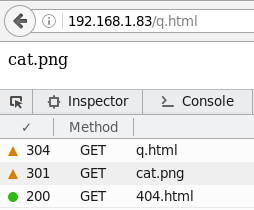
访问测试面q.html(上面的页网代码),测试结果如下:

图片服务器的404.html:
 sh-4.1# cat /usr/html/test.espressos.cn/.html

 error

 sh-4.1# cat /etc/nginx/vhosts/test.espressos.cn.conf

 server {

         listen       ;

         server_name  test.espressos.cn;

     index index.html 123.57.36.227 index.htm index.php;

     root /usr/html/test.espressos.cn;

     location ~ .*\.(php|php5)

     {

         #fastcgi_pass  unix:/tmp/php-cgi.sock;

         fastcgi_pass  127.0.0.1:;

         fastcgi_index index.php;

         include fastcgi.conf;

         fastcgi_param PATH_INFO $fastcgi_script_name;

     }

     location ~ .*\.(gif|jpg|jpeg|png|bmp|swf)$

     {

         valid_referers none blocked 123.57.36.227 test.espressos.cn;

         if ($invalid_referer) {

         rewrite ^/ http://123.57.36.227/404.html;

         #return ;

             }

     }

     location ~ .*\.(js|css)?$

     {

         expires 1h;

     }

     include /etc/nginx/rewrite/test.espressos.cn.conf;

     access_log  /var/log/nginx/test.espressos.log;

 }
注意21和22行(上为图片服务器的web配置文件)
Nginx图片的防盗链配置的更多相关文章
- nginx实现防盗链配置方法介绍
有些朋友觉得防盗链就是防止图片,其实有很多东西要进行防盗链了,下面我来介绍在nginx中实现防盗链配置方法有对图片防盗链与下载资源等. 防盗链配置 假设网站域名是 www.php100.com. 编辑 ...
- Nginx防盗链配置案例配置,Nginx的知识分享
防盗链的含义:网站内容不在自己服务器上,而通过技术手段,绕过别人放广告有利益的最终页,直接在自己的有广告有利益的页面上向最终用户提供此内容. 常常是一些名不见经传的小网站来盗取一些有实力的大网站的地址 ...
- nginx rewrite重写与防盗链配置
nginx rewrite重写规则与防盗链配置方法 时间:2016-02-04 15:16:58来源:网络 导读:nginx rewrite重写规则与防盗链配置方法,rewrite规则格式中flag标 ...
- nginx secure_link下载防盗链
下载服务器上有众多的软件资源, 可是很多来源不是本站,是迅雷.flashget, 源源不断的带宽,防盗链绝对是当务之急. 使用来源判断根本不靠谱,只能防止一些小白站点的盗链,迅雷之类的下载工具完全无效 ...
- 16.Nginx优化与防盗链
Nginx优化与防盗链 目录 Nginx优化与防盗链 隐藏版本号 修改用户与组 缓存时间 日志切割 小知识 连接超时 更改进程数 配置网页压缩 配置防盗链 配置防盗链 隐藏版本号 可以使用 Fiddl ...
- Apache 防盗链配置
盗链 网站内有许多的图片地址,或一些我们可以用到的资源,在这种情况下,我可以通过赋值其他图片链接地址,到我自己的平台上,这样相当于盗取了一张图片的链接,那么盗链会有什么危害呢? 当我们盗取一张图片链接 ...
- nginx如何设置防盗链
关于nginx防盗链的方法网上有很多教程,都可以用,但是我发现很多教程并不完整,所做的防盗链并不是真正的彻底的防盗链! 一般,我们做好防盗链之后其他网站盗链的本站图片就会全部失效无法显示,但是您如果通 ...
- 【转】nginx如何设置防盗链
转自博客园作者:howhy,文章地址:nginx如何设置防盗链.大佬写的甚好,在此备份一下 关于nginx防盗链的方法网上有很多教程,都可以用,但是我发现很多教程并不完整,所做的防盗链并不是真正的彻底 ...
- Nginx图片防盗链配置
如果我们自己网站内的图片资源被其它网站所盗用,这会增加自己网站的带宽资源,增加很多额外的消耗,而且会对我们系统的稳定性有影响,为了防止自己网站上的图片资源被其它网站所盗用,我们需要给自己的服务器配置防 ...
随机推荐
- Ubuntu下轻松安装virtualbox
转自:http://blog.csdn.net/flm2003/article/details/8168628 以下假设你的Ubuntu系统版本为11.10的64位版本,进行如下操作: 1.到http ...
- mac -- 安装OpenCV
brew install opencv #这个装的是3.4 brew unlink opencv # 取消关联 brew install opencv@2 # 安装2.X的版本
- --secure-file-priv option so it cannot execute this statement
MYSQL导入数据出现The MySQL server is running with the --secure-file-priv option so it cannot execute this ...
- log4j设置,以及中文乱码,通过过滤器输出指定级别的日志,或者指定级别范围的日志
配置文件为默认名字log4j.properties时,放在某个模块下的resources下即可,即使有多个模块的情况下,任意一个模块的resources下有这个默认名字的文件log4j.propert ...
- [转]黄聪:如何使用CodeSmith批量生成代码
本文转自:http://www.cnblogs.com/huangcong/archive/2010/06/14/1758201.html 在上一篇我们已经用PowerDesigner创建好了需要的测 ...
- (转)Android项目重构之路:实现篇
前两篇文章Android项目重构之路:架构篇和Android项目重构之路:界面篇已经讲了我的项目开始搭建时的架构设计和界面设计,这篇就讲讲具体怎么实现的,以实现最小化可用产品(MVP)的目标,用最简单 ...
- javat Itext实践 pdf
1.简介 iText是著名的开放项目,是用于生成PDF文档的一个java类库.通过iText不仅可以生成PDF或rtf的文档,而且可以将XML.Html文件转化为PDF文件. 下载地址:https:/ ...
- 聊聊jvm的PermGen与Metaspace
转载:https://segmentfault.com/a/1190000012577387 序 本文主要讲述一下jvm的PermGen与Metaspace java memory结构 分代概念 对于 ...
- java线程总结(2/5)
线程基本信息和优先级别 方 法 功 能 isAlive() 判断线程是否还“活”着,即线程是否还未终止. getPriority() 获得线程的优先级数值 setPriority() ...
- JMeter 十二:命令行执行
参考文档:http://jmeter.apache.org/usermanual/get-started.html#non_gui 真正开始跑压力测试时,我们就不能使用GUI模式了.这时候需要采用命令 ...