
jmeter开发自己的sampler插件
1. 新建maven工程
2.pom文件引入jmeter的核心包
<project xmlns="http://maven.apache.org/POM/4.0.0" xmlns:xsi="http://www.w3.org/2001/XMLSchema-instance"

  xsi:schemaLocation="http://maven.apache.org/POM/4.0.0 http://maven.apache.org/xsd/maven-4.0.0.xsd">

  <modelVersion>4.0.0</modelVersion>

  <groupId>jmeterplugntest</groupId>

  <artifactId>jmeterplugntest</artifactId>

  <version>0.0.1-SNAPSHOT</version>

  <packaging>jar</packaging>

  <name>jmeterplugntest</name>

  <url>http://maven.apache.org</url>

     <properties>

        <project.build.sourceEncoding>UTF-8</project.build.sourceEncoding>

        <jmeter-version>3.1</jmeter-version>

    </properties>

    <dependencies>

        <dependency>

            <groupId>org.apache.jmeter</groupId>

            <artifactId>ApacheJMeter_core</artifactId>

            <version>${jmeter-version}</version>

            <scope>provided</scope>

        </dependency>

        <dependency>

            <groupId>org.apache.jmeter</groupId>

            <artifactId>ApacheJMeter_java</artifactId>

            <version>${jmeter-version}</version>

            <scope>provided</scope>

        </dependency>

    <dependency>

      <groupId>junit</groupId>

      <artifactId>junit</artifactId>

      <version>3.8.1</version>

      <scope>test</scope>

    </dependency>

  </dependencies>

  <build>

    <finalName>ssmtest</finalName>

    <plugins>

        <plugin>

            <groupId>org.apache.maven.plugins</groupId>

            <artifactId>maven-compiler-plugin</artifactId>

            <version>3.5.1</version>

            <configuration>

                <source>1.8</source>

                <target>1.8</target>

                <encoding>UTF-8</encoding>

            </configuration>

        </plugin>

    </plugins>

</build>

</project>
3. 新建一个类继承AbstractSamplerGui
package com.test.gui;

import java.awt.BorderLayout;

import java.awt.Color;

import java.awt.Component;

import javax.swing.BorderFactory;

import javax.swing.Box;

import javax.swing.BoxLayout;

import javax.swing.JCheckBox;

import javax.swing.JLabel;

import javax.swing.JPanel;

import javax.swing.JTextField;

import org.apache.jmeter.gui.util.HorizontalPanel;

import org.apache.jmeter.gui.util.JSyntaxTextArea;

import org.apache.jmeter.gui.util.JTextScrollPane;

import org.apache.jmeter.gui.util.VerticalPanel;

import org.apache.jmeter.samplers.gui.AbstractSamplerGui;

import org.apache.jmeter.testelement.TestElement;

import org.apache.jmeter.testelement.property.BooleanProperty;

import org.apache.jmeter.util.JMeterUtils;

import org.apache.jorphan.gui.JLabeledChoice;

import com.test.sampler.MyPluginSampler;

public class MypluginGUI extends AbstractSamplerGui {

    private static final long serialVersionUID = 240L;

    private JTextField domain;

    private JTextField port;

    private JTextField contentEncoding;

    private JTextField path;

    private JCheckBox useKeepAlive;

    private JLabeledChoice method;

    // area区域

    private JSyntaxTextArea postBodyContent = JSyntaxTextArea.getInstance(30, 50);

    // 滚动条

    private JTextScrollPane textPanel = JTextScrollPane.getInstance(postBodyContent);

    private JLabel textArea = new JLabel("Message");

    private JPanel getDomainPanel() {

        domain = new JTextField(10);

        JLabel label = new JLabel("IP"); // $NON-NLS-1$

        label.setLabelFor(domain);

        JPanel panel = new HorizontalPanel();

        panel.add(label, BorderLayout.WEST);

        panel.add(domain, BorderLayout.CENTER);

        return panel;

    }

    private JPanel getPortPanel() {

        port = new JTextField(10);

        JLabel label = new JLabel(JMeterUtils.getResString("web_server_port")); // $NON-NLS-1$

        label.setLabelFor(port);

        JPanel panel = new HorizontalPanel();

        panel.add(label, BorderLayout.WEST);

        panel.add(port, BorderLayout.CENTER);

        return panel;

    }

    protected JPanel getContentEncoding() {

        // CONTENT_ENCODING

        contentEncoding = new JTextField(10);

        JLabel contentEncodingLabel = new JLabel("contentEncoding"); // $NON-NLS-1$

        contentEncodingLabel.setLabelFor(contentEncoding);

        JPanel panel = new HorizontalPanel();

        panel.setMinimumSize(panel.getPreferredSize());

        panel.add(Box.createHorizontalStrut(5));

        panel.add(contentEncodingLabel,BorderLayout.WEST);

        panel.add(contentEncoding,BorderLayout.CENTER);

        panel.setMinimumSize(panel.getPreferredSize());

        return panel;

    }

    protected Component getPath() {

        path = new JTextField(15);

        JLabel label = new JLabel(JMeterUtils.getResString("path")); //$NON-NLS-1$

        label.setLabelFor(path);

        JPanel pathPanel = new HorizontalPanel();

        pathPanel.add(label);

        pathPanel.add(path);

        JPanel panel = new HorizontalPanel();

        panel.setLayout(new BoxLayout(panel, BoxLayout.Y_AXIS));

        panel.add(pathPanel);

        return panel;

    }

    protected Component getMethodAndUseKeepAlive() {

        useKeepAlive = new JCheckBox(JMeterUtils.getResString("use_keepalive")); // $NON-NLS-1$

        useKeepAlive.setFont(null);

        useKeepAlive.setSelected(true);

        JPanel optionPanel = new HorizontalPanel();

        optionPanel.setMinimumSize(optionPanel.getPreferredSize());

        optionPanel.add(useKeepAlive);

        String Marry[] = { "GET", "POST" };

        method = new JLabeledChoice(JMeterUtils.getResString("method"), // $NON-NLS-1$

                Marry, true, false);

        // method.addChangeListener(this);

        JPanel panel = new HorizontalPanel();

        panel.setLayout(new BoxLayout(panel, BoxLayout.Y_AXIS));

        panel.add(optionPanel,BorderLayout.WEST);

        panel.add(method,BorderLayout.WEST);

        return panel;

    }

    protected Component getpostBodyContent() {

        JPanel panel = new HorizontalPanel();

        JPanel ContentPanel = new VerticalPanel();

        JPanel messageContentPanel = new JPanel(new BorderLayout());

        messageContentPanel.add(this.textArea, BorderLayout.NORTH);

        messageContentPanel.add(this.textPanel, BorderLayout.CENTER);

        ContentPanel.add(messageContentPanel);

        ContentPanel.setBorder(BorderFactory.createTitledBorder(BorderFactory.createLineBorder(Color.gray), "Content"));

        panel.add(ContentPanel);

        return panel;

    }

    public MypluginGUI() {

        super();

        init();

    }

    private void init() { // WARNING: called from ctor so must not be overridden (i.e. must be private or

                            // final)

        creatPanel();

    }

    public void creatPanel() {

        JPanel settingPanel = new VerticalPanel(5, 0);

        settingPanel.add(getDomainPanel());

        settingPanel.add(getPortPanel());

        settingPanel.add(getContentEncoding());

        settingPanel.add(getPath());

        settingPanel.add(getMethodAndUseKeepAlive());

        settingPanel.add(getpostBodyContent());

        JPanel dataPanel = new JPanel(new BorderLayout(5, 0));

        dataPanel.add(settingPanel, BorderLayout.NORTH);

        setLayout(new BorderLayout(0, 5));

        setBorder(makeBorder());

        add(makeTitlePanel(), BorderLayout.NORTH); // Add the standard title

        add(dataPanel, BorderLayout.CENTER);

    }

    /*

     * 创建一个新的Sampler,然后将界面中的数据设置到这个新的Sampler实例中

     * */

    @Override

    public TestElement createTestElement() {

        // TODO Auto-generated method stub

        MyPluginSampler sampler = new MyPluginSampler();

        modifyTestElement(sampler);

        return sampler;

    }

    @Override

    public String getLabelResource() {

        // TODO Auto-generated method stub

        throw new IllegalStateException("This shouldn't be called");

        // return "example_title";

        // 从messages_zh_CN.properties读取

    }

    @Override

    public String getStaticLabel() {

        return "Qiao jiafei";

    }

    /*

     * 把界面的数据移到Sampler中,与configure方法相反

     * */

    @Override

    public void modifyTestElement(TestElement arg0) {

        // TODO Auto-generated method stub

        arg0.clear();

        configureTestElement(arg0);

        arg0.setProperty(MyPluginSampler.domain, domain.getText());

        arg0.setProperty(MyPluginSampler.port, port.getText());

        arg0.setProperty(MyPluginSampler.contentEncoding, contentEncoding.getText());

        arg0.setProperty(MyPluginSampler.path, path.getText());

        arg0.setProperty(MyPluginSampler.method, method.getText());

        arg0.setProperty(MyPluginSampler.postBodyContent, postBodyContent.getText());

        arg0.setProperty(new BooleanProperty(MyPluginSampler.useKeepAlive, useKeepAlive.isSelected()));

    }

    /*

     * reset新界面的时候调用,这里可以填入界面控件中需要显示的一些缺省的值

     * */

    @Override

    public void clearGui() {

        super.clearGui();

        domain.setText("");

        port.setText("");

        contentEncoding.setText("");

        path.setText("");

        method.setText("GET");

        postBodyContent.setText("");

        useKeepAlive.setSelected(true);

    }

    /*

     * 把Sampler中的数据加载到界面中

     * */

    @Override

    public void configure(TestElement element) {

        super.configure(element);

        // jmeter运行后,保存参数,不然执行后,输入框会情况

        domain.setText(element.getPropertyAsString(MyPluginSampler.domain));

        port.setText(element.getPropertyAsString(MyPluginSampler.port));

        contentEncoding.setText(element.getPropertyAsString(MyPluginSampler.contentEncoding));

        path.setText(element.getPropertyAsString(MyPluginSampler.path));

        method.setText("GET");

        postBodyContent.setText(element.getPropertyAsString(MyPluginSampler.postBodyContent));

        useKeepAlive.setSelected(true);

    }

}
4. 接受界面配置参数的的类,处理业务逻辑,继承AbstractSampler
package com.test.sampler;

import java.util.concurrent.atomic.AtomicInteger;

import org.apache.jmeter.samplers.AbstractSampler;

import org.apache.jmeter.samplers.Entry;

import org.apache.jmeter.samplers.SampleResult;

import org.apache.jorphan.logging.LoggingManager;

import org.apache.log.Logger;

public class MyPluginSampler extends AbstractSampler{

    private static final long serialVersionUID = 240L;

    private static final Logger log = LoggingManager.getLoggerForClass();

    // The name of the property used to hold our data

    public static final String domain = "domain.text";

    public static final String port = "port.text";

    public static final String contentEncoding = "contentEncoding.text";

    public static final String path = "path.text";

    public static final String method = "method.text";

    public static final String postBodyContent = "postBodyContent.text";

    public static final String useKeepAlive = "useKeepAlive.text";

    private static AtomicInteger classCount = new AtomicInteger(0); // keep track of classes created

   private String getTitle() {

       return this.getName();

   }

   /**

    * @return the data for the sample

    */

   public String getdomain() {

       return getPropertyAsString(domain);

       //从gui获取domain输入的数据

   }

   public String getport() {

       return getPropertyAsString(port);

       //从gui获取port输入的数据

   }

   public String getcontentEncoding() {

       return getPropertyAsString(contentEncoding);

   }

   public String getpath() {

       return getPropertyAsString(path);

   }

   public String getmethod() {

       return getPropertyAsString(method);

   }

   public String getpostBodyContent() {

       return getPropertyAsString(postBodyContent);

   }

   public String getuseKeepAlive() {

       return getPropertyAsString(useKeepAlive);

   }

    public MyPluginSampler() {

        //getTitle方法会调用getName方法,setName不写会默认调用getStaticLabel返回的name值

        setName("qiaojiafei");

        classCount.incrementAndGet();

        trace("FirstPluginSampler()");

    }

    private void trace(String s) {

        String tl = getTitle();

        String tn = Thread.currentThread().getName();

        String th = this.toString();

        log.debug(tn + " (" + classCount.get() + ") " + tl + " " + s + " " + th);

    }

    @Override

    public SampleResult sample(Entry arg0) {

        // TODO Auto-generated method stub

         trace("sample()");

            SampleResult res = new SampleResult();

            boolean isOK = false; // Did sample succeed?

            String response = null;

            String sdomain = getdomain(); // Sampler data

            String sport = getport();

            String scontentEncoding = getcontentEncoding();

            String spath = getpath();

            String smethod = getmethod();

            String spostBodyContent = getpostBodyContent();

            String suseKeepAlive = getuseKeepAlive();

            res.setSampleLabel(getTitle());

            /*

             * Perform the sampling

             */

            res.sampleStart(); // Start timing

            try {

                // Do something here ...

                response = Thread.currentThread().getName();

                /*

                 * Set up the sample result details

                 */

                res.setSamplerData("setSamplerData!!!");

                res.setResponseData(response+sdomain+sport+scontentEncoding+spath+smethod+spostBodyContent+suseKeepAlive, null);

                res.setDataType(SampleResult.TEXT);

                res.setResponseCodeOK();

                res.setResponseMessage("OK");// $NON-NLS-1$

                isOK = true;

            } catch (Exception ex) {

                log.debug("", ex);

                res.setResponseCode("500");// $NON-NLS-1$

                res.setResponseMessage(ex.toString());

            }

            res.sampleEnd(); // End timimg

            res.setSuccessful(isOK);

            return res;

    }

}
5.工程目录结构如下,到处jar包,存放在jmeter的lib/ext目录下

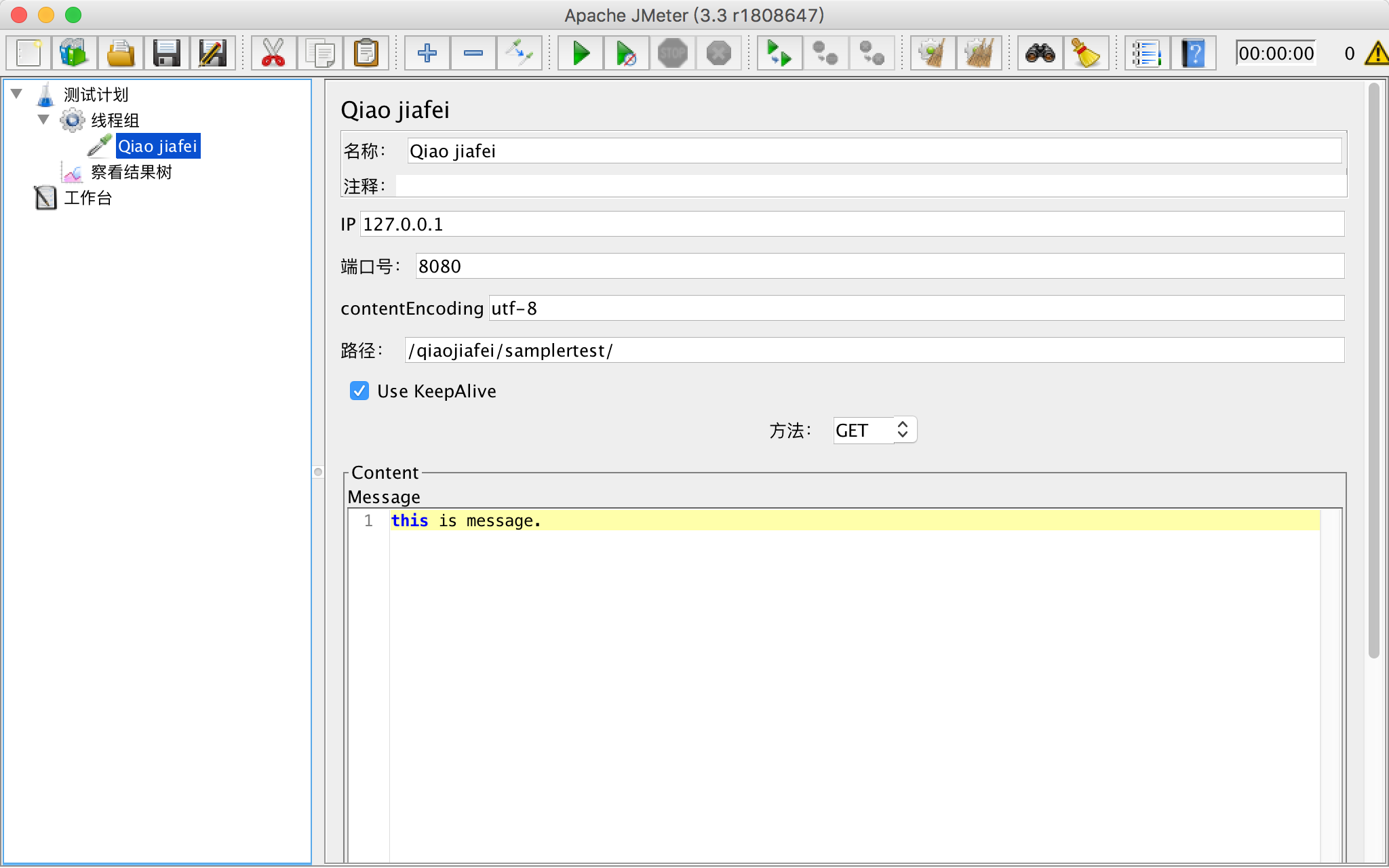
6.启动jmeter,添加自己增加的sample插件
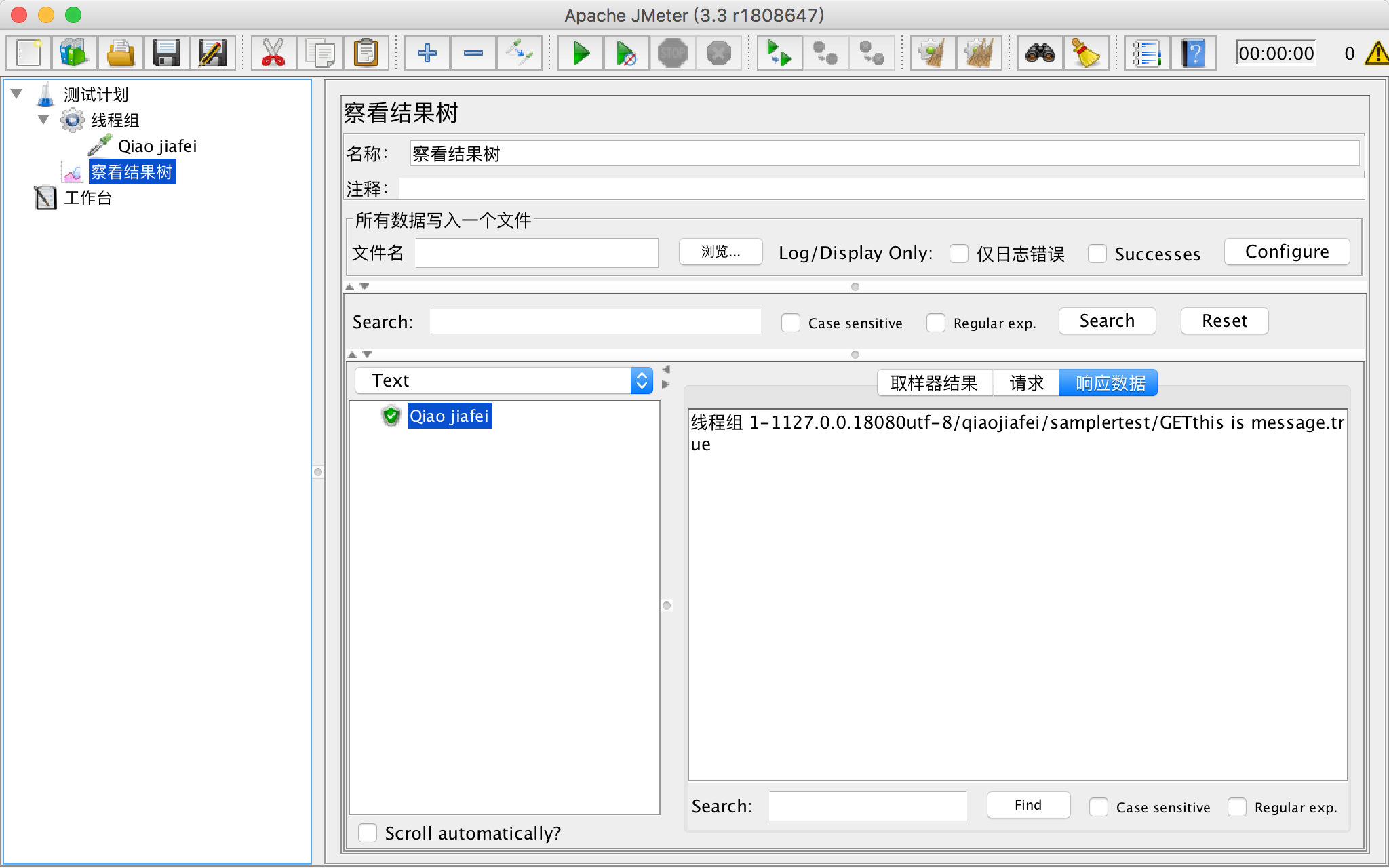
7.运行后,查看执行结果
jmeter开发自己的sampler插件的更多相关文章
- 用阿里巴巴官方给Jmeter开发的Dubbo sampler取样器进行dubbo接口测试【图解剖析】
自:https://blog.csdn.net/cyjs1988/article/details/84258046 [一]Dubbo sampler下载地址: 该插件支持jmeter 3.2及3.2以 ...
- JMeter开发插件——图片验证码识别
我们在性能测试中总会时不时地遭遇到来自于应用系统的各种阻碍,图片验证码就是一类最常见的束缚,登录或交易时需要按照图片中的内容输入正确的验证信息后,数据才可以提交成功,这使得许多性能测试工具只能望而却步 ...
- 如何为Apache JMeter开发插件(二)—第一个JMeter插件
文章内容转载于:http://lib.csdn.net/article/softwaretest/25700,并且加上个人一些截图 本篇将开启为JMeter开发插件之旅,我们选择以Function(函 ...
- (十)Jmeter中的Debug Sampler介绍
一.Debug Sampler介绍: 使用Jmeter开发脚本时,难免需要调试,这时可以使用Jmeter的Debug Sampler,它有三个选项:JMeter properties,JMeter v ...
- Notepad++进行php开发所必需的插件
Notepad++进行php开发所必需的插件有那些呢? 1. Compare: 可以用来比较两个文件不同之处. 2. Explorer:文件浏览器插件,包含收藏夹.Session保存功能.可与NppE ...
- 我利用网上代码开发的JQuery图片插件
我利用网上代码开发的JQuery图片插件 代码如下 (function($){ $.fn.FocusPic = function(options){ var defaults = { interval ...
- Cordova - 与iOS原生代码交互2(使用Swift开发Cordova的自定义插件)
在前一篇文章中我介绍了如何通过 js 与原生代码进行交互(Cordova - 与iOS原生代码交互1(通过JS调用Swift方法)),当时是直接对Cordova生成的iOS工程项目进行编辑操作的(添加 ...
- (转)jQuery Mobile 移动开发中的日期插件Mobiscroll 2.3 使用说明
(原)http://www.cnblogs.com/hxling/archive/2012/12/12/2814207.html jQuery Mobile 移动开发中的日期插件Mobiscroll ...
- MS CRM 2011的自定义和开发(11)——插件(plugin)开发(三)
http://www.cnblogs.com/StoneGarden/archive/2012/02/06/2340661.html MS CRM 2011的自定义和开发(11)——插件(plugin ...
随机推荐
- 8、SpringBoot-CRUD默认访问的首页以及thyleaf的静态文件引入/WebMvcConfigurer / WebMvcConfigurationSupport
1.导入资源 2.默认的访问首页 (1).将代码写在controller中 @RequestMapping({"/","index.html"}) public ...
- java的foreach,后台弹框
for (String string : list) { if(string.equals(ids)){ int res = JOptionPane.showConfirmDialog(null, & ...
- Entity FreamWork 无法创建“System.Object”类型的常量值。此上下文仅支持基元类型或枚举类型错误解决
Entity FreamWork 无法创建“System.Object”类型的常量值.此上下文仅支持基元类型或枚举类型错误解决: 最近在开发中把我原来抄的架构里面的主键由固定的Guid改成了可以泛型指 ...
- C#通过拼接协议的方式来发送邮件类库
using System; using System.Collections.Generic; using System.Net; using System.Net.Mail; using Syste ...
- ARM 汇编指令集 特点之一:条件执行后缀
mov r0,r1; moveq r0,r1;//这句代码是否执行 取决于 上几句代码 的运行结果(最后一次CPSR 寄存器 的 高四位 NZCV 的标志位) 条件后缀执行特点:1.条件后缀执行是 ...
- python爬取斗鱼B总直播弹幕
在某群中看到关于弹幕爬取的需求,又因为斗鱼比较OP,就以这个作为切入点. 如果你想了解如何获取弹幕,我的这个例子就可以让你豁然开朗,对于哪些没有开发弹幕的直播或视频平台,就需要用抓包工具获取请求,然后 ...
- DQL-常见的函数
一.概述功能:类似于java中的方法好处:提高重用性和隐藏实现细节调用:select 函数名(实参列表); 二:常用的函数: ① 单行函数 1.分组函数 1.sum(),avg(),max(),min ...
- mysql update 子查询锁表问题
mysql在Update带有子查询的时候,子查询的表会锁住,导致该表无法使用.比如 update A set comments = (select count(1) from B where id = ...
- TeamViewer13个人版使用中提示为商用版导致无法使用
前言:由于使用teamviewer个人免费版较频繁,被软件识别到不能再继续免费使用,无奈没有多余的资金进行购买正版软件, 通过鼓捣得到如下继续免费使用方案,整理下来以备不时之需,也可以被有同此困惑的朋 ...
- Eclipse报The default workspace'xxxxx' is in use or cannot be created Pl
原因:出现这种情况一般是workspace的配置文件中出现了.lock文件(workspace/.metadata/.lock),锁定了workspace.把.lock文件删除即可.如果该文件不能删除 ...