
iOS:极光推送控制器跳转
在前面已经做完了极光消息的推送,那么有消息了,如何跳转到需要的控制器呢?其实,主要还是在userInfo这个消息里面做判断来处理,具体如下:
下面这两个是远程推送时接收消息的方法,这是应用程序提供的方法,只要成功注册了极光推送,推送消息时,就会调用这两个方法,在这两个方法收到的userInfo消息做判断即可。
// Required,For systems with less than or equal to iOS6
-(void)application:(UIApplication *)application didReceiveRemoteNotification:(NSDictionary *)userInfo;
// IOS 7 Support Required
-(void)application:(UIApplication *)application didReceiveRemoteNotification:(NSDictionary *)userInfo fetchCompletionHandler:(void (^)(UIBackgroundFetchResult))completionHandler;
具体代码如下:我这里是区别环信推送消息控制器跳转和环信推送消息控制器跳转
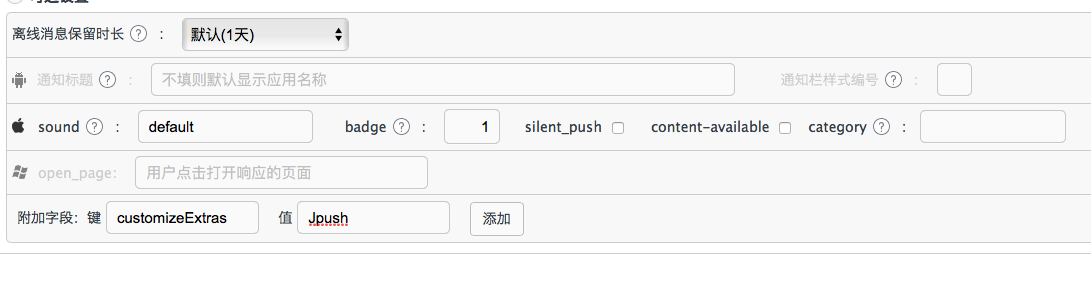
通过在极光推送的服务器上设置自定义字段,用来判断跳转的是极光推送的消息控制器
-(void)application:(UIApplication *)application didReceiveRemoteNotification:(NSDictionary *)userInfo{

    // Required,For systems with less than or equal to iOS6

    [JPUSHService handleRemoteNotification:userInfo];

}

-(void)application:(UIApplication *)application didReceiveRemoteNotification:(NSDictionary *)userInfo fetchCompletionHandler:(void (^)(UIBackgroundFetchResult))completionHandler{

    // IOS 7 Support Required

    [JPUSHService handleRemoteNotification:userInfo];

    if (completionHandler) {

        completionHandler(UIBackgroundFetchResultNewData);

    }

    //消息提示数字

    self.badge = userInfo[@"aps"][@"badge"];

    //取得Extras字段内容

    NSString *customizeValue = [userInfo valueForKey:@"customizeExtras"]; //服务端中Extras字段,key是自己定义的,用来判断跳转的是极光推送的消息控制器

    // 启动程序,跳转到极光推送消息的控制器

    if ([customizeValue isEqualToString:@"Jpush"]) {

        KJTabViewController *rootVC = (KJTabViewController *)[UIApplication sharedApplication].keyWindow.rootViewController;

        rootVC.selectedIndex = ;

        KJNavgationController *navc = rootVC.viewControllers[];

        self.mineVC = navc.viewControllers[];

        KJNewFriendController *newVC = [[KJNewFriendController alloc]init];

        [self.mineVC.navigationController pushViewController:newVC animated:YES];

        [self CancelBadgeValue];

        application.applicationIconBadgeNumber -= [self.badge integerValue];

    }

    else{ // 启动程序,跳转到环信推送消息的控制器

        KJTabViewController *rootVC = (KJTabViewController *)[UIApplication sharedApplication].keyWindow.rootViewController;

        rootVC.selectedIndex = ;

    }

    // 应用正处理前台状态下,不会收到极光推送消息,因此在此处需要额外处理一下

    if (application.applicationState == UIApplicationStateActive) {

        UIAlertView *alert = [[UIAlertView alloc]

                              initWithTitle:@"您有一条推送消息"

                              message:userInfo[@"aps"][@"alert"]

                              delegate:self

                              cancelButtonTitle:@"取消"

                              otherButtonTitles:@"确定",nil];

        [alert show];

        //注册监听,取消badgeValue的数字

        [NotyCenter addObserver:self selector:@selector(CancelBadgeValue) name:@"CancelBadgeValueNotification" object:nil];

    }

}

#pragma mark - UIAlertViewDelegate

-(void)alertView:(UIAlertView *)alertView clickedButtonAtIndex:(NSInteger)buttonIndex{

    UIViewController *currentVC = [self getCurrentVC];

    if ([currentVC isKindOfClass:[KJTabViewController class]]) {  //根控制器

        KJTabViewController *rootVC = (KJTabViewController *)currentVC;

        KJNavgationController *navc = rootVC.viewControllers[];

        self.mineVC = navc.viewControllers[];

        if (buttonIndex == ) {

            self.mineVC.tabBarItem.badgeValue = [NSString stringWithFormat:@"%@",self.badge];

        }else{

            KJNewFriendController *newVC = [[KJNewFriendController alloc]init];

            rootVC.selectedIndex = ;

            [self.mineVC.navigationController pushViewController:newVC animated:YES];

            [self CancelBadgeValue];

        }

    }else{  //非根控制器

        KJTabViewController *rootVC = (KJTabViewController *)[UIApplication sharedApplication].keyWindow.rootViewController;

        KJNavgationController *navc = rootVC.viewControllers[];

        self.mineVC = navc.viewControllers[];

        if (buttonIndex == ) {

            self.mineVC.tabBarItem.badgeValue = [NSString stringWithFormat:@"%@",self.badge];

        }

        if (buttonIndex == ) {

            [currentVC.navigationController popToRootViewControllerAnimated:NO];

            rootVC.selectedIndex = ;

            KJNewFriendController *newVC = [[KJNewFriendController alloc]init];

            [self.mineVC.navigationController pushViewController:newVC animated:YES];

            [self CancelBadgeValue];

        }

    }

}

#pragma mark - 取消极光消息数目

-(void)CancelBadgeValue{

    self.mineVC.tabBarItem.badgeValue = nil;

}

/**

 *  获取当前屏幕显示的viewcontroller

 */

- (UIViewController *)getCurrentVC

{

    UIViewController *result = nil;

    UIWindow * window = [[UIApplication sharedApplication] keyWindow];

    if (window.windowLevel != UIWindowLevelNormal)

    {

        NSArray *windows = [[UIApplication sharedApplication] windows];

        for(UIWindow * tmpWin in windows)

        {

            if(tmpWin.windowLevel == UIWindowLevelNormal)

               {

                   window = tmpWin;

                   break;

               }

        }

    }

    UIView *frontView = [[window subviews] objectAtIndex:];

    id nextResponder = [frontView nextResponder];

    if ([nextResponder isKindOfClass:[UIViewController class]]){

        result = nextResponder;

    }else{

        result = window.rootViewController;

    }

    return result;

}
iOS:极光推送控制器跳转的更多相关文章
- iOS 极光推送 如何点击推送消息跳转页面
假如你已经集成完了极光,恰好有这个问题不知如何解决,可以看看这篇文章,这篇是针对远程通知的,本地通知大同小异吧. 根据我项目的要求,极光推送跳转指定页面分为两种情况:app在后台情况和app在杀死的情 ...
- iOS 极光推送
1.关于推送的几个证书.http://www.mobile-open.com/2016/931624.html 进入开发者中心:https://developer.apple.com/account/ ...
- iOS极光推送
昨天花了一下午的时间研究了下极光推送,也前也是没做过,不知道从何下手!才开始的时候一看官方的SDK感觉好难,不过经过一系列的捣鼓之后,手机收到了推送信息,感觉其实并没有那么难! 1.配置开发证书(得有 ...
- iOS极光推送的基本使用
昨天花了一下午的时间研究了下极光推送,也前也是没做过,不知道从何下手!才开始的时候一看官方的SDK感觉好难,不过经过一系列的捣鼓之后,手机收到了推送信息,感觉其实并没有那么难! 1.配置开发证书(得有 ...
- ios -- 极光推送《1》
昨天公司项目要加入远程推送功能,自己做显然会很麻烦,所以用了极光的远程推送,下面我会讲如何制作推送证书并使用极光推送进行远程推送. 先讲讲怎么下载推送证书吧(前面的很简单要是知道的可以直接往下滑,简书 ...
- (转载)iOS 极光推送SDK 集成指南
iOS SDK 集成指南 使用提示 本文匹配的 SDK版本:r1.2.5 以后. 查看最近更新了解最新的SDK更新情况. 产品功能说明 极光推送(JPush)是一个端到端的推送服务,使得服务器端消息能 ...
- iOS极光推送,两次Bundleid不一致( 开发证书没有通过验证 是否重新上传证书)的解决方案
极光在配置ios端推送时,需要上传p12证书,如果遇到如下图:: 证书上传未通过的原因一般有: 1.当前上传的p12证书密码输入有误: 2. 证书导出的时候展开了证书,把个人私钥导了出来,导证书的时候 ...
- 关于ios极光推送server端注意的地方
今天试用了极光推送API 用它是因为,大多数人说它的文档是最全的,但是用过之后,发现关于IOS的文档,还是很不够,导致走了一点弯路! 特别是服务端的代码:https://github.com/jpus ...
- iOS极光推送SDK的使用流程
一.极光推送简介 极光推送是一个端到端的推送服务,使得服务器端消息能够及时地推送到终端用户手机上,整合了iOS.Android和WP平台的统一推送服务.使用起来方便简单,已于集成,解决了原生远程推送繁 ...
随机推荐
- 小程序 image跟view标签上下会有空隙
解决方案 就是可以在image那里设置vertical-align:top/bottom/text-top/text-bottom 原因:图片文字等inline元素默许是跟父级元素的baseline对 ...
- gitlab和github的区别
先说一下相同点,二者都是基于web的Git仓库,在很大程度上GitLab是仿照GitHub来做的,它们都提供了分享开源项目的平台,为开发团队提供了存储.分享.发布和合作开发项目的中心化云存 ...
- Win7下安装Oracle 10g
首先下对版本,Oracle 10g支持Win7版(32位): 10203_vista_w2k8_x86_production_db.zip 10203_vista_w2k8_x86_productio ...
- websocket小荔枝
关于websocket原理和好处请参考百度,这里只是代码. var ws = new WebSocket('ws://echo.websocket.org/'); ws.onopen = functi ...
- 报错AbstractStandardExpressionAttributeTagProcessor
java.lang.NoSuchMethodError: org.thymeleaf.standard.processor.AbstractStandardExpressionAttributeTag ...
- 跨域请求httpclient
httpclient:是Apache工具包,util,它可以作为一个爬虫,直接爬取某个互联网上的页面.获取到时页面最终的源文件html.直接可以获取页面返回json.就可以直接在代码内部模拟发起htt ...
- Mongodb 3.4 Replication
官方文档:https://docs.mongodb.com/manual/replication/ 关于ReplSet的文档 https://docs.mongodb.com/manual/refer ...
- spring boot简单入门
1.创建mave工程(jar) 2.pom文件引入依赖 <!--引入父依赖--> <parent> <groupId>org.springframework.boo ...
- ubuntu14.04下安装爬虫工具scrapy
scrapy是目前准备要学习的爬虫框架,其在ubuntu14.04下的安装过程如下: ubuntu14.04下默认安装了2.7的python以及setuptools,若未安装,可通过下面指令安装: s ...
- hdu 5692 Snacks(dfs时间戳+线段树)
Snacks Time Limit: 10000/5000 MS (Java/Others) Memory Limit: 65536/65536 K (Java/Others)Total Sub ...