
IdentityServer4环境部署失败分析贴(一)
前言:
在部署Idv4站点和其客户端在外网时,发现了许多问题,折腾了许久,翻看了许多代码,写个MD记录一下。
1.受保护站点提示错误: Unable to obtain configuration from: '[PII is hidden]'.
fail: Microsoft.AspNetCore.Server.Kestrel[13]

      Connection id "0HLL3MB34N0G5", Request id "0HLL3MB34N0G5:00000009": An unhandled exception was thrown by the application.

System.InvalidOperationException: IDX20803: Unable to obtain configuration from: '[PII is hidden]'.

   在 Microsoft.IdentityModel.Protocols.ConfigurationManager`1.<GetConfigurationAsync>d__24.MoveNext()

--- 引发异常的上一位置中堆栈跟踪的末尾 ---

   在 System.Runtime.ExceptionServices.ExceptionDispatchInfo.Throw()

   在 System.Runtime.CompilerServices.TaskAwaiter.HandleNonSuccessAndDebuggerNotification(Task task)

   在 Microsoft.AspNetCore.Authentication.OpenIdConnect.OpenIdConnectHandler.<HandleChallengeAsync>d__18.MoveNext()

--- 引发异常的上一位置中堆栈跟踪的末尾 ---

   在 System.Runtime.ExceptionServices.ExceptionDispatchInfo.Throw()

   在 System.Runtime.CompilerServices.TaskAwaiter.HandleNonSuccessAndDebuggerNotification(Task task)

   在 Microsoft.AspNetCore.Authentication.AuthenticationHandler`1.<ChallengeAsync>d__54.MoveNext()

--- 引发异常的上一位置中堆栈跟踪的末尾 ---
1.1 受保护站点的代码执行流程
graph TB

User--1.进入-->A(Home/Index)

A--2.Authorize-->AA{是否授权}

AA--YES-->完事

AA--NO-->B(返回ChallengeResult)

B--3.ExecuteResult-->C(进入AuthenticationMiddleware中间件)

C--4.根据authenticationScheme找到相应Handler-->D(OpenIDConenctHandler)

D--5.调用HandleChallengeAsync-->F(调用OpenIdConnectConfigurationRetriever.IConfigurationRetriever)

F--6.通过HTTP调用Idv4站点的/.well-known/openid-configuration-->F1(Idv4Config)

F1--7.通过上步骤取到的config.jwks_uri获取加密key信息-->F2(获得公钥私钥等信息)

F2--8.设置JsonWebKeySet-->F3(完成openIdConnectConfiguration.SigningKeysKeys的添加)

F3-->F4(完成)
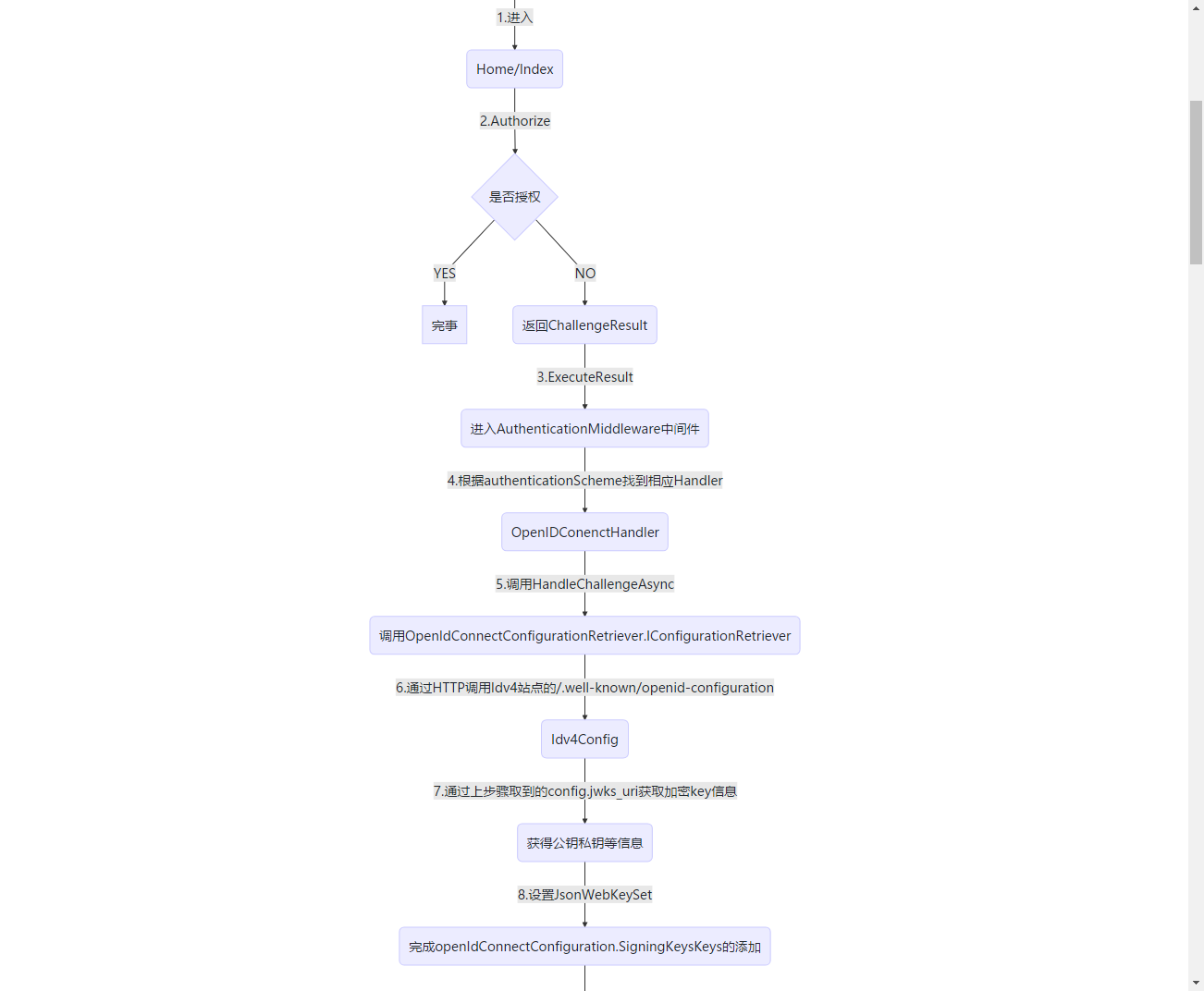
1.1 受保护站点的部分源码
Idv4部分源码
//注入Idev相关,配置authenticationScheme为oidc

public static IIdentityServerBuilder AddIdentityServer(this IServiceCollection services, Action<IdentityServerOptions> setupAction)

{

    services.Configure(setupAction);

    return services.AddIdentityServer();

}
PS: 这里要额外提一下,在Abp的模板项目中,如下配置使用Idv4可能无法正常跳转IDV4授权站完成单点登录
services.AddOpenIdConnect("oidc", options =>

{

   ...

}
需要额外添加下面这段,原因是Abp引入Microsoft.Identity,会重复设置schme导致错误,需如下代码添加设置。
services.AddAuthentication(options =>

{

        options.DefaultAuthenticateScheme = "oidc";

        options.DefaultChallengeScheme = "oidc";

        options.DefaultSignOutScheme = "oidc";

})
步骤5部分源码
 protected override async Task HandleChallengeAsync(AuthenticationProperties properties)

        {

            Logger.EnteringOpenIdAuthenticationHandlerHandleUnauthorizedAsync(GetType().FullName);

            // order for local RedirectUri

            // 1. challenge.Properties.RedirectUri

            // 2. CurrentUri if RedirectUri is not set)

            if (string.IsNullOrEmpty(properties.RedirectUri))

            {

                properties.RedirectUri = CurrentUri;

            }

            Logger.PostAuthenticationLocalRedirect(properties.RedirectUri);

            if (_configuration == null && Options.ConfigurationManager != null)

            {

                //问题在这里

                _configuration = await Options.ConfigurationManager.GetConfigurationAsync(Context.RequestAborted);

            }

            ...
步骤6部分源码
 public static async Task<OpenIdConnectConfiguration> GetAsync(string address, IDocumentRetriever retriever, CancellationToken cancel)

        {

            if (string.IsNullOrWhiteSpace(address))

                throw LogHelper.LogArgumentNullException(nameof(address));

            if (retriever == null)

            {

                throw LogHelper.LogArgumentNullException(nameof(retriever));

            }

            //当站点没启动的时候,这里可能出现问题

            string doc = await retriever.GetDocumentAsync(address, cancel).ConfigureAwait(false);

            LogHelper.LogVerbose(LogMessages.IDX21811, doc);

            OpenIdConnectConfiguration openIdConnectConfiguration = JsonConvert.DeserializeObject<OpenIdConnectConfiguration>(doc);

            if (!string.IsNullOrEmpty(openIdConnectConfiguration.JwksUri))

            {

                LogHelper.LogVerbose(LogMessages.IDX21812, openIdConnectConfiguration.JwksUri);

                //当证书配置或读取错误的时候,这里会出现问题

                string keys = await retriever.GetDocumentAsync(openIdConnectConfiguration.JwksUri, cancel).ConfigureAwait(false);

                LogHelper.LogVerbose(LogMessages.IDX21813, openIdConnectConfiguration.JwksUri);

                openIdConnectConfiguration.JsonWebKeySet = JsonConvert.DeserializeObject<JsonWebKeySet>(keys);

                foreach (SecurityKey key in openIdConnectConfiguration.JsonWebKeySet.GetSigningKeys())

                {

                    openIdConnectConfiguration.SigningKeys.Add(key);

                }

            }

            return openIdConnectConfiguration;

        }
通过流程进行问题解析:
通过查看日志可发现在流程5后开始报错
步骤一
访问:http://{ssoHost}/.well-known/openid-configuration
如果访问成功,则排除单点登录站点部署失败问题,前往步骤二
如果访问失败,则去解决单点登录站点部署问题。
步骤二
http://{ssoHost}/.well-known/openid-configuration/jwks
如果访问成功,则重启客户端
如果访问失败,那么有意思了...继续往下看
此时单点登录站点的日志
[10:25:24 Error] Microsoft.AspNetCore.Diagnostics.ExceptionHandlerMiddleware

An unhandled exception has occurred while executing the request.

Internal.Cryptography.CryptoThrowHelper+WindowsCryptographicException: 出现了内部错误。

   at Internal.Cryptography.Helpers.OpenStorageProvider(CngProvider provider)

   at System.Security.Cryptography.CngKey.Import(Byte[] keyBlob, String curveName, CngKeyBlobFormat format, CngProvider provider)

   at System.Security.Cryptography.CngKey.Import(Byte[] keyBlob, CngKeyBlobFormat format)

   at Internal.Cryptography.Pal.X509Pal.DecodePublicKey(Oid oid, Byte[] encodedKeyValue, Byte[] encodedParameters, ICertificatePal certificatePal)

   at System.Security.Cryptography.X509Certificates.PublicKey.get_Key()

   at Microsoft.IdentityModel.Tokens.X509SecurityKey.get_PublicKey()

   at IdentityServer4.ResponseHandling.DiscoveryResponseGenerator.CreateJwkDocumentAsync()

   at IdentityServer4.Endpoints.DiscoveryKeyEndpoint.ProcessAsync(HttpContext context)

   at IdentityServer4.Hosting.IdentityServerMiddleware.Invoke(HttpContext context, IEndpointRouter router, IUserSession session, IEventService events)

   at IdentityServer4.Hosting.IdentityServerMiddleware.Invoke(HttpContext context, IEndpointRouter router, IUserSession session, IEventService events)

   at Microsoft.AspNetCore.Authentication.AuthenticationMiddleware.Invoke(HttpContext context)

   at IdentityServer4.Hosting.BaseUrlMiddleware.Invoke(HttpContext context)

   at Microsoft.AspNetCore.StaticFiles.StaticFileMiddleware.Invoke(HttpContext context)

   at Microsoft.AspNetCore.Diagnostics.ExceptionHandlerMiddleware.Invoke(HttpContext context)
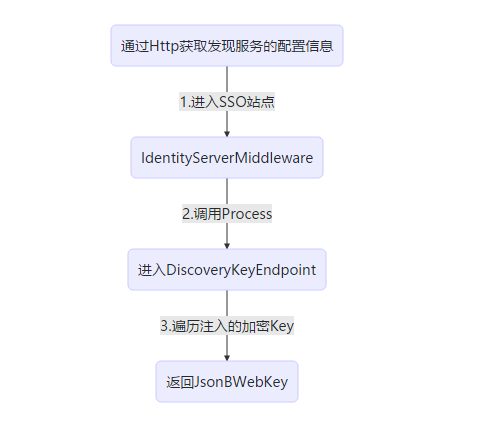
单点登录站点在此时的工作流程
graph TB

A(通过Http获取发现服务的配置信息)--1.进入SSO站点-->B(IdentityServerMiddleware)

B--2.调用Process-->C(进入DiscoveryKeyEndpoint)

C--3.遍历注入的加密Key-->D(返回JsonBWebKey)
部分源码解析:
   public async Task Invoke(HttpContext context, IEndpointRouter router, IUserSession session, IEventService events)

        {

            // this will check the authentication session and from it emit the check session

            // cookie needed from JS-based signout clients.

            await session.EnsureSessionIdCookieAsync();

            try

            {

                //根据请求路径,进入相应endpoint处理器

                var endpoint = router.Find(context);

                if (endpoint != null)

                {

                    _logger.LogInformation("Invoking IdentityServer endpoint: {endpointType} for {url}", endpoint.GetType().FullName, context.Request.Path.ToString());

                    var result = await endpoint.ProcessAsync(context);

                ...
  //创建JwtDocument

  public virtual async Task<IEnumerable<Models.JsonWebKey>> CreateJwkDocumentAsync()

        {

            var webKeys = new List<Models.JsonWebKey>();

            var signingCredentials = await Keys.GetSigningCredentialsAsync();

            var algorithm = signingCredentials?.Algorithm ?? Constants.SigningAlgorithms.RSA_SHA_256;

            foreach (var key in await Keys.GetValidationKeysAsync())

            {

                if (key is X509SecurityKey x509Key)

                {

                    var cert64 = Convert.ToBase64String(x509Key.Certificate.RawData);

                    var thumbprint = Base64Url.Encode(x509Key.Certificate.GetCertHash());

                    //当证书读取不正常的时候,PublicKey的属性构造器中会报错。

                    var pubKey = x509Key.PublicKey as RSA;

                    var parameters = pubKey.ExportParameters(false);

                    var exponent = Base64Url.Encode(parameters.Exponent);

                    var modulus = Base64Url.Encode(parameters.Modulus);

                    var webKey = new Models.JsonWebKey

                    {

                        kty = "RSA",

                        use = "sig",

                        kid = x509Key.KeyId,

                        x5t = thumbprint,

                        e = exponent,

                        n = modulus,

                        x5c = new[] { cert64 },

                        alg = algorithm

                    };

                    webKeys.Add(webKey);

                    continue;

                }
问题解析
通过日志可发现,问题出现在PublicKey的获取上,即证书的读取失败了。
解决方案!
终于到解决问题的时候了...
步骤一:
检查证书是否是临时证书
//在正式环境中,这可能会报错

builder.AddDeveloperSigningCredential(true, "tempkey.rsa");

//正确方式

builder.AddSigningCredential(new X509Certificate2(path,

                         Configuration["Certificates:Password"]))

这里可以参见郭的随笔:

https://www.cnblogs.com/guolianyu/p/9872661.html
步骤二:
如果已经添加了证书,且证书路径正确读取,且证书密码正确;
但是!在Windows Server2008服务器上部署仍失败时,请检查 CNG Key Isolation 服务是否启动!
如果 该服务未启动,则启动后即可!
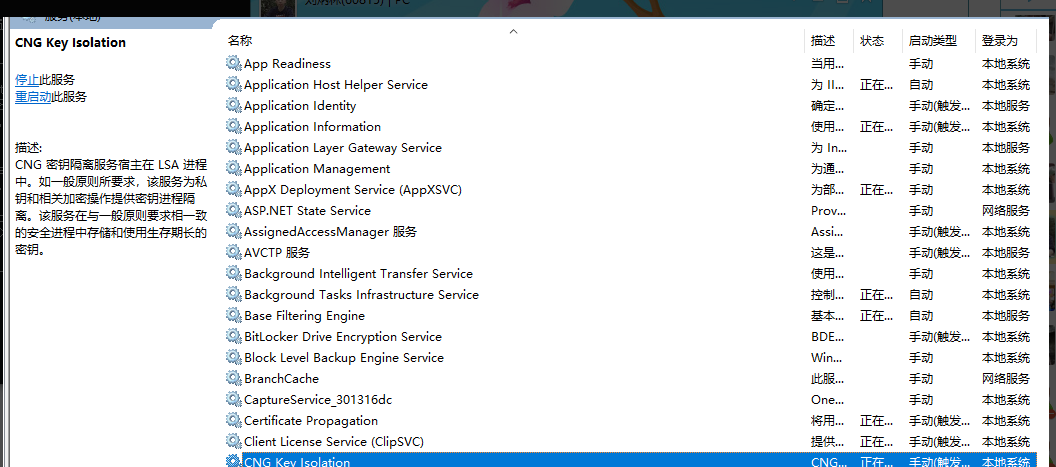
如果该服务已启动,则尴尬的很...如果您仍排除不了问题,可以评论告诉我
IdentityServer4环境部署失败分析贴(一)的更多相关文章
- CentOS+uwsgi+django+nginx 环境部署及分析
写在部署前 在线上部署django项目时,比较成熟的方案是:nginx + uWSGI + Django. nginx和Django 都比较熟悉了,uWSGI是什么呢?WSGI是一个协议,python ...
- ELK实时日志分析平台环境部署--完整记录
在日常运维工作中,对于系统和业务日志的处理尤为重要.今天,在这里分享一下自己部署的ELK(+Redis)-开源实时日志分析平台的记录过程(仅依据本人的实际操作为例说明,如有误述,敬请指出)~ ==== ...
- Centos7下ELK+Redis日志分析平台的集群环境部署记录
之前的文档介绍了ELK架构的基础知识,日志集中分析系统的实施方案:- ELK+Redis- ELK+Filebeat - ELK+Filebeat+Redis- ELK+Filebeat+Kafka+ ...
- ELK实时日志分析平台环境部署--完整记录(转)
在日常运维工作中,对于系统和业务日志的处理尤为重要.今天,在这里分享一下自己部署的ELK(+Redis)-开源实时日志分析平台的记录过程(仅依据本人的实际操作为例说明,如有误述,敬请指出)~ ==== ...
- kafka 基础知识梳理及集群环境部署记录
一.kafka基础介绍 Kafka是最初由Linkedin公司开发,是一个分布式.支持分区的(partition).多副本的(replica),基于zookeeper协调的分布式消息系统,它的最大的特 ...
- Linux下FTP虚拟账号环境部署总结
vsftp的用户有三种类型:匿名用户.系统用户.虚拟用户.1)匿名登录:在登录FTP时使用默认的用户名,一般是ftp或anonymous.2)本地用户登录:使用系统用户登录,在/etc/passwd中 ...
- ProxySQL Cluster 高可用集群环境部署记录
ProxySQL在早期版本若需要做高可用,需要搭建两个实例,进行冗余.但两个ProxySQL实例之间的数据并不能共通,在主实例上配置后,仍需要在备用节点上进行配置,对管理来说非常不方便.但是Proxy ...
- Linux下开源邮件系统Postfix+Extmail+Extman环境部署记录
一.基础知识梳理MUA (Mail User Agent) MUA 既是"邮件使用者代理人",因为除非你可以直接利用类似 telnet 之类的软件登入邮件主机来主动发出信件,否则您 ...
- MySQL高可用方案-PXC环境部署记录
之前梳理了Mysql+Keepalived双主热备高可用操作记录,对于mysql高可用方案,经常用到的的主要有下面三种: 一.基于主从复制的高可用方案:双节点主从 + keepalived 一般来说, ...
随机推荐
- java中的super限定
super的用法: (1)如果需要在子类中调用父类中被覆盖的实例方法,可以用super限定来调用父类中被覆盖的方法.当然,也可以调用从父类继承的实例变量. public void callOverri ...
- Android获取前台进程的方法
概述 项目中很多场景交互非常依赖于客户端的前后景状态以及其他一些辅助信息上传,譬如当前新闻在前台(看到的是新闻界面)播放时,语音开启音乐应用,此时我们希望能看到音乐界面,并且音乐在播;而在导航应用在前 ...
- python版本管理--pyenv
python版本环境管理 下载依赖 yum install zlib-devel bzip2-devel openssl-devel ncurses-devel sqlite-devel readli ...
- react 设置代理(proxy) 实现跨域请求
一,对于使用creat-react-app构建的项目,可以直接在package.json下配置,具体如下 "proxy": "http://api.xxxx.com&qu ...
- background-position 之剑走偏锋
转自:http://www.cnblogs.com/yizuierguo/archive/2009/03/10/1407860.html 在设置background-image属性时,经常会遇到一个b ...
- Android性能优化典范(一)
2015年伊始,Google发布了关于Android性能优化典范的专题,一共16个短视频,每个3-5分钟,帮助开发者创建更快更优秀的Android App.课程专题不仅仅介绍了Android系统中有关 ...
- 11-spring学习-表达式语言
1,表达式语言的操作形式以及处理流程. 2,在spring中各种表达式字符串的编写. SPEL(spring Express language) 表达式入门 观察一下表达式: 范例:表达式操作 1)基 ...
- PHP-四种解析XML文件的方法
XML处理是开发过程中经常遇到的,PHP对其也有很丰富的支持,本文只是对其中某几种解析技术做简要说明,包括:Xml parser, SimpleXML, XMLReader, DOMDocument. ...
- html5_storage存取实例
<script src="jquery-1.8.3.js"></script><script>function set(){ var tt ...
- Nodejs 命令行交互神奇 yargs
传送门: # example https://github.com/yargs/yargs/blob/master/docs/examples.md # 官网 http://yargs.js.org/ ...