
IdentityServer4环境部署失败分析贴(一)
前言:
在部署Idv4站点和其客户端在外网时,发现了许多问题,折腾了许久,翻看了许多代码,写个MD记录一下。
1.受保护站点提示错误: Unable to obtain configuration from: '[PII is hidden]'.
fail: Microsoft.AspNetCore.Server.Kestrel[13]

      Connection id "0HLL3MB34N0G5", Request id "0HLL3MB34N0G5:00000009": An unhandled exception was thrown by the application.

System.InvalidOperationException: IDX20803: Unable to obtain configuration from: '[PII is hidden]'.

   在 Microsoft.IdentityModel.Protocols.ConfigurationManager`1.<GetConfigurationAsync>d__24.MoveNext()

--- 引发异常的上一位置中堆栈跟踪的末尾 ---

   在 System.Runtime.ExceptionServices.ExceptionDispatchInfo.Throw()

   在 System.Runtime.CompilerServices.TaskAwaiter.HandleNonSuccessAndDebuggerNotification(Task task)

   在 Microsoft.AspNetCore.Authentication.OpenIdConnect.OpenIdConnectHandler.<HandleChallengeAsync>d__18.MoveNext()

--- 引发异常的上一位置中堆栈跟踪的末尾 ---

   在 System.Runtime.ExceptionServices.ExceptionDispatchInfo.Throw()

   在 System.Runtime.CompilerServices.TaskAwaiter.HandleNonSuccessAndDebuggerNotification(Task task)

   在 Microsoft.AspNetCore.Authentication.AuthenticationHandler`1.<ChallengeAsync>d__54.MoveNext()

--- 引发异常的上一位置中堆栈跟踪的末尾 ---
1.1 受保护站点的代码执行流程
graph TB

User--1.进入-->A(Home/Index)

A--2.Authorize-->AA{是否授权}

AA--YES-->完事

AA--NO-->B(返回ChallengeResult)

B--3.ExecuteResult-->C(进入AuthenticationMiddleware中间件)

C--4.根据authenticationScheme找到相应Handler-->D(OpenIDConenctHandler)

D--5.调用HandleChallengeAsync-->F(调用OpenIdConnectConfigurationRetriever.IConfigurationRetriever)

F--6.通过HTTP调用Idv4站点的/.well-known/openid-configuration-->F1(Idv4Config)

F1--7.通过上步骤取到的config.jwks_uri获取加密key信息-->F2(获得公钥私钥等信息)

F2--8.设置JsonWebKeySet-->F3(完成openIdConnectConfiguration.SigningKeysKeys的添加)

F3-->F4(完成)
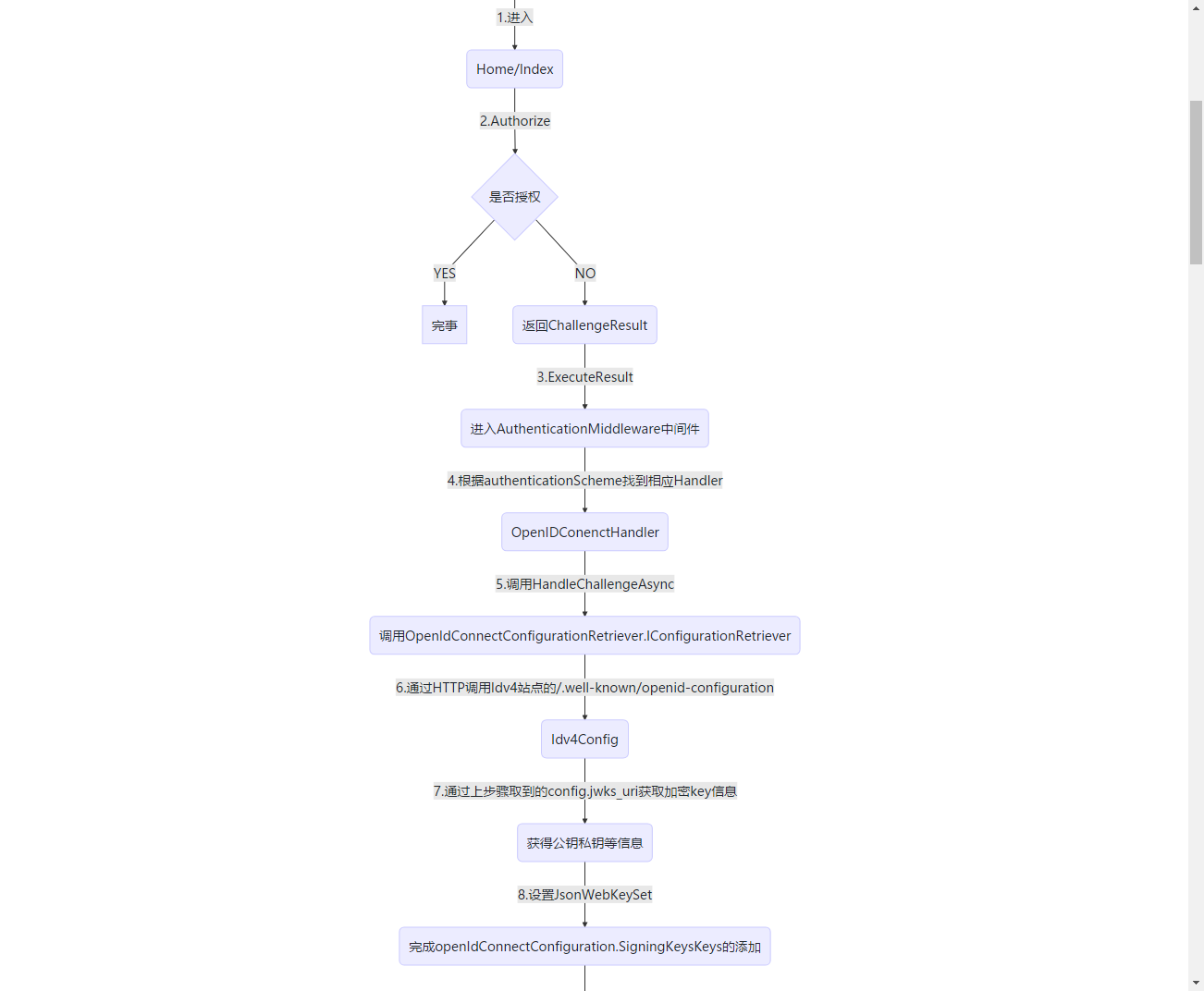
1.1 受保护站点的部分源码
Idv4部分源码
//注入Idev相关,配置authenticationScheme为oidc

public static IIdentityServerBuilder AddIdentityServer(this IServiceCollection services, Action<IdentityServerOptions> setupAction)

{

    services.Configure(setupAction);

    return services.AddIdentityServer();

}
PS: 这里要额外提一下,在Abp的模板项目中,如下配置使用Idv4可能无法正常跳转IDV4授权站完成单点登录
services.AddOpenIdConnect("oidc", options =>

{

   ...

}
需要额外添加下面这段,原因是Abp引入Microsoft.Identity,会重复设置schme导致错误,需如下代码添加设置。
services.AddAuthentication(options =>

{

        options.DefaultAuthenticateScheme = "oidc";

        options.DefaultChallengeScheme = "oidc";

        options.DefaultSignOutScheme = "oidc";

})
步骤5部分源码
 protected override async Task HandleChallengeAsync(AuthenticationProperties properties)

        {

            Logger.EnteringOpenIdAuthenticationHandlerHandleUnauthorizedAsync(GetType().FullName);

            // order for local RedirectUri

            // 1. challenge.Properties.RedirectUri

            // 2. CurrentUri if RedirectUri is not set)

            if (string.IsNullOrEmpty(properties.RedirectUri))

            {

                properties.RedirectUri = CurrentUri;

            }

            Logger.PostAuthenticationLocalRedirect(properties.RedirectUri);

            if (_configuration == null && Options.ConfigurationManager != null)

            {

                //问题在这里

                _configuration = await Options.ConfigurationManager.GetConfigurationAsync(Context.RequestAborted);

            }

            ...
步骤6部分源码
 public static async Task<OpenIdConnectConfiguration> GetAsync(string address, IDocumentRetriever retriever, CancellationToken cancel)

        {

            if (string.IsNullOrWhiteSpace(address))

                throw LogHelper.LogArgumentNullException(nameof(address));

            if (retriever == null)

            {

                throw LogHelper.LogArgumentNullException(nameof(retriever));

            }

            //当站点没启动的时候,这里可能出现问题

            string doc = await retriever.GetDocumentAsync(address, cancel).ConfigureAwait(false);

            LogHelper.LogVerbose(LogMessages.IDX21811, doc);

            OpenIdConnectConfiguration openIdConnectConfiguration = JsonConvert.DeserializeObject<OpenIdConnectConfiguration>(doc);

            if (!string.IsNullOrEmpty(openIdConnectConfiguration.JwksUri))

            {

                LogHelper.LogVerbose(LogMessages.IDX21812, openIdConnectConfiguration.JwksUri);

                //当证书配置或读取错误的时候,这里会出现问题

                string keys = await retriever.GetDocumentAsync(openIdConnectConfiguration.JwksUri, cancel).ConfigureAwait(false);

                LogHelper.LogVerbose(LogMessages.IDX21813, openIdConnectConfiguration.JwksUri);

                openIdConnectConfiguration.JsonWebKeySet = JsonConvert.DeserializeObject<JsonWebKeySet>(keys);

                foreach (SecurityKey key in openIdConnectConfiguration.JsonWebKeySet.GetSigningKeys())

                {

                    openIdConnectConfiguration.SigningKeys.Add(key);

                }

            }

            return openIdConnectConfiguration;

        }
通过流程进行问题解析:
通过查看日志可发现在流程5后开始报错
步骤一
访问:http://{ssoHost}/.well-known/openid-configuration
如果访问成功,则排除单点登录站点部署失败问题,前往步骤二
如果访问失败,则去解决单点登录站点部署问题。
步骤二
http://{ssoHost}/.well-known/openid-configuration/jwks
如果访问成功,则重启客户端
如果访问失败,那么有意思了...继续往下看
此时单点登录站点的日志
[10:25:24 Error] Microsoft.AspNetCore.Diagnostics.ExceptionHandlerMiddleware

An unhandled exception has occurred while executing the request.

Internal.Cryptography.CryptoThrowHelper+WindowsCryptographicException: 出现了内部错误。

   at Internal.Cryptography.Helpers.OpenStorageProvider(CngProvider provider)

   at System.Security.Cryptography.CngKey.Import(Byte[] keyBlob, String curveName, CngKeyBlobFormat format, CngProvider provider)

   at System.Security.Cryptography.CngKey.Import(Byte[] keyBlob, CngKeyBlobFormat format)

   at Internal.Cryptography.Pal.X509Pal.DecodePublicKey(Oid oid, Byte[] encodedKeyValue, Byte[] encodedParameters, ICertificatePal certificatePal)

   at System.Security.Cryptography.X509Certificates.PublicKey.get_Key()

   at Microsoft.IdentityModel.Tokens.X509SecurityKey.get_PublicKey()

   at IdentityServer4.ResponseHandling.DiscoveryResponseGenerator.CreateJwkDocumentAsync()

   at IdentityServer4.Endpoints.DiscoveryKeyEndpoint.ProcessAsync(HttpContext context)

   at IdentityServer4.Hosting.IdentityServerMiddleware.Invoke(HttpContext context, IEndpointRouter router, IUserSession session, IEventService events)

   at IdentityServer4.Hosting.IdentityServerMiddleware.Invoke(HttpContext context, IEndpointRouter router, IUserSession session, IEventService events)

   at Microsoft.AspNetCore.Authentication.AuthenticationMiddleware.Invoke(HttpContext context)

   at IdentityServer4.Hosting.BaseUrlMiddleware.Invoke(HttpContext context)

   at Microsoft.AspNetCore.StaticFiles.StaticFileMiddleware.Invoke(HttpContext context)

   at Microsoft.AspNetCore.Diagnostics.ExceptionHandlerMiddleware.Invoke(HttpContext context)
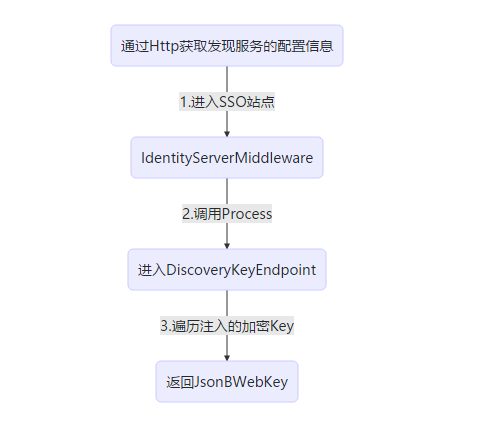
单点登录站点在此时的工作流程
graph TB

A(通过Http获取发现服务的配置信息)--1.进入SSO站点-->B(IdentityServerMiddleware)

B--2.调用Process-->C(进入DiscoveryKeyEndpoint)

C--3.遍历注入的加密Key-->D(返回JsonBWebKey)
部分源码解析:
   public async Task Invoke(HttpContext context, IEndpointRouter router, IUserSession session, IEventService events)

        {

            // this will check the authentication session and from it emit the check session

            // cookie needed from JS-based signout clients.

            await session.EnsureSessionIdCookieAsync();

            try

            {

                //根据请求路径,进入相应endpoint处理器

                var endpoint = router.Find(context);

                if (endpoint != null)

                {

                    _logger.LogInformation("Invoking IdentityServer endpoint: {endpointType} for {url}", endpoint.GetType().FullName, context.Request.Path.ToString());

                    var result = await endpoint.ProcessAsync(context);

                ...
  //创建JwtDocument

  public virtual async Task<IEnumerable<Models.JsonWebKey>> CreateJwkDocumentAsync()

        {

            var webKeys = new List<Models.JsonWebKey>();

            var signingCredentials = await Keys.GetSigningCredentialsAsync();

            var algorithm = signingCredentials?.Algorithm ?? Constants.SigningAlgorithms.RSA_SHA_256;

            foreach (var key in await Keys.GetValidationKeysAsync())

            {

                if (key is X509SecurityKey x509Key)

                {

                    var cert64 = Convert.ToBase64String(x509Key.Certificate.RawData);

                    var thumbprint = Base64Url.Encode(x509Key.Certificate.GetCertHash());

                    //当证书读取不正常的时候,PublicKey的属性构造器中会报错。

                    var pubKey = x509Key.PublicKey as RSA;

                    var parameters = pubKey.ExportParameters(false);

                    var exponent = Base64Url.Encode(parameters.Exponent);

                    var modulus = Base64Url.Encode(parameters.Modulus);

                    var webKey = new Models.JsonWebKey

                    {

                        kty = "RSA",

                        use = "sig",

                        kid = x509Key.KeyId,

                        x5t = thumbprint,

                        e = exponent,

                        n = modulus,

                        x5c = new[] { cert64 },

                        alg = algorithm

                    };

                    webKeys.Add(webKey);

                    continue;

                }
问题解析
通过日志可发现,问题出现在PublicKey的获取上,即证书的读取失败了。
解决方案!
终于到解决问题的时候了...
步骤一:
检查证书是否是临时证书
//在正式环境中,这可能会报错

builder.AddDeveloperSigningCredential(true, "tempkey.rsa");

//正确方式

builder.AddSigningCredential(new X509Certificate2(path,

                         Configuration["Certificates:Password"]))

这里可以参见郭的随笔:

https://www.cnblogs.com/guolianyu/p/9872661.html
步骤二:
如果已经添加了证书,且证书路径正确读取,且证书密码正确;
但是!在Windows Server2008服务器上部署仍失败时,请检查 CNG Key Isolation 服务是否启动!
如果 该服务未启动,则启动后即可!
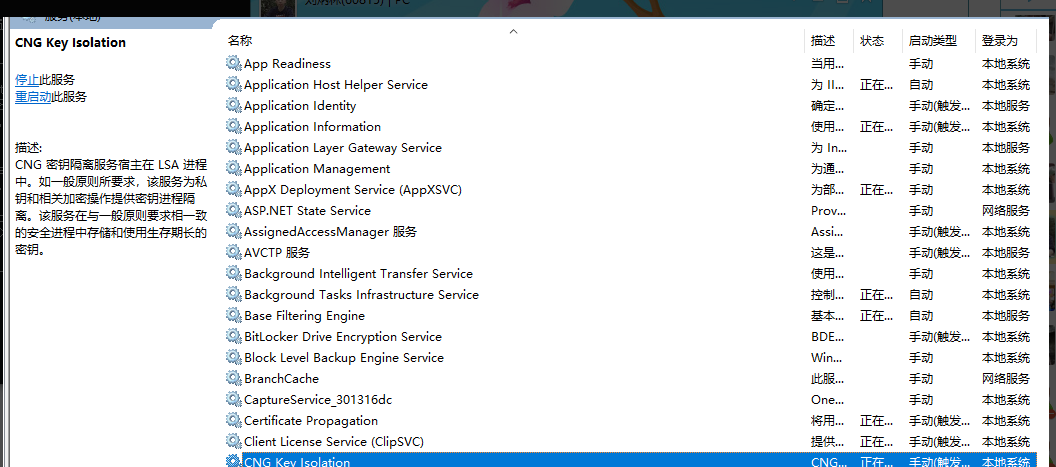
如果该服务已启动,则尴尬的很...如果您仍排除不了问题,可以评论告诉我
IdentityServer4环境部署失败分析贴(一)的更多相关文章
- CentOS+uwsgi+django+nginx 环境部署及分析
写在部署前 在线上部署django项目时,比较成熟的方案是:nginx + uWSGI + Django. nginx和Django 都比较熟悉了,uWSGI是什么呢?WSGI是一个协议,python ...
- ELK实时日志分析平台环境部署--完整记录
在日常运维工作中,对于系统和业务日志的处理尤为重要.今天,在这里分享一下自己部署的ELK(+Redis)-开源实时日志分析平台的记录过程(仅依据本人的实际操作为例说明,如有误述,敬请指出)~ ==== ...
- Centos7下ELK+Redis日志分析平台的集群环境部署记录
之前的文档介绍了ELK架构的基础知识,日志集中分析系统的实施方案:- ELK+Redis- ELK+Filebeat - ELK+Filebeat+Redis- ELK+Filebeat+Kafka+ ...
- ELK实时日志分析平台环境部署--完整记录(转)
在日常运维工作中,对于系统和业务日志的处理尤为重要.今天,在这里分享一下自己部署的ELK(+Redis)-开源实时日志分析平台的记录过程(仅依据本人的实际操作为例说明,如有误述,敬请指出)~ ==== ...
- kafka 基础知识梳理及集群环境部署记录
一.kafka基础介绍 Kafka是最初由Linkedin公司开发,是一个分布式.支持分区的(partition).多副本的(replica),基于zookeeper协调的分布式消息系统,它的最大的特 ...
- Linux下FTP虚拟账号环境部署总结
vsftp的用户有三种类型:匿名用户.系统用户.虚拟用户.1)匿名登录:在登录FTP时使用默认的用户名,一般是ftp或anonymous.2)本地用户登录:使用系统用户登录,在/etc/passwd中 ...
- ProxySQL Cluster 高可用集群环境部署记录
ProxySQL在早期版本若需要做高可用,需要搭建两个实例,进行冗余.但两个ProxySQL实例之间的数据并不能共通,在主实例上配置后,仍需要在备用节点上进行配置,对管理来说非常不方便.但是Proxy ...
- Linux下开源邮件系统Postfix+Extmail+Extman环境部署记录
一.基础知识梳理MUA (Mail User Agent) MUA 既是"邮件使用者代理人",因为除非你可以直接利用类似 telnet 之类的软件登入邮件主机来主动发出信件,否则您 ...
- MySQL高可用方案-PXC环境部署记录
之前梳理了Mysql+Keepalived双主热备高可用操作记录,对于mysql高可用方案,经常用到的的主要有下面三种: 一.基于主从复制的高可用方案:双节点主从 + keepalived 一般来说, ...
随机推荐
- 算法笔记_099:蓝桥杯练习 算法提高 排列数(Java)
目录 1 问题描述 2 解决方案 1 问题描述 问题描述 0.1.2三个数字的全排列有六种,按照字母序排列如下: 012.021.102.120.201.210 输入一个数n 求0~9十个数的全排 ...
- Oracle,用left join 替代 exists ,not exists,in , not in,提高效率
Not IN问题 Exists,not Exists,in,not in 例如: FROM YSHB B WHERE YSHA.code=b.code ) 等同于 DELETE A FROM YSHA ...
- 关于ThreadLocal变量的一个坑
每个线程都有一个ThreadLocalMap对象,ThreadLocalMap是Thread的一个内部类,可以把ThreadLocalMap理解成一个Map,这个Map里存放这一个Thread的所有线 ...
- C#下载apk文件
string fileName = "name.apk";//客户端保存的文件名 string filePath = Server.MapPath("ap ...
- git 教程一
git 是一个开源的分布式版本控件系统,用于敏捷高效地处理任何或小或大的项目. Git是Linus Torvalds为了帮助管理Linux内核开发而开发的一个开放源码的版本控制软件. Git 与常用 ...
- Android 混淆代码总结
为了防止自己的劳动成果被别人窃取,混淆代码能有效防止被反编译,下面来总结以下混淆代码的步骤: 1. 大家也许都注意到新建一个工程会看到项目下边有这样proguard-project.txt一个文件,这 ...
- Android开发笔记之:Handler Runnable与Thread的区别详解
在java中可有两种方式实现多线程,一种是继承Thread类,一种是实现Runnable接口:Thread类是在java.lang包中定义的.一 个类只要继承了Thread类同时覆写了本类中的run( ...
- python 脚本(获取指定文件夹、指定文件格式、的代码行数、注释行数)
1.代码的运行结果: 获取 指定文件夹下.指定文件格式 文件的: 总代码行数.总注释行数(需指定注释格式).总空行数: #coding: utf-8 import os, re # 代码所在目录 FI ...
- SQL变量与全局变量
变量 1.局部变量的声明(一个@) declare @n int --声明变量关键字为declare 然后@加变量名 后面是变量类型 declare @s varchar(36) 2.局部变量的赋 ...
- HTTPS证书申请相关笔记
申请免费的HTTPS证书相关资料 参考资料: HTTPS 检测 苹果ATS检测 什么是ECC证书? 渠道2: Let's Encrypt 优点 缺点 Let's Encrypt 的是否支持非80,44 ...