
Spring注解(环境)
以数据库为例:
引入 c3p0数据源maven坐标
数据库驱动
@Configuration

@PropertySource("classpath:/db.config.properties")

public class ProfileConfig implements EmbeddedValueResolverAware {

   //方法一

    @Value("${db.user}")

    private String user;

    //方法三 通过值解析器

    private StringValueResolver valueResolver;

    private String driverClass;

    @Profile("test")

    @Bean(name="testDataSource")                                            //方法二

    public ComboPooledDataSource dataSourceTest(@Value("${db.password}") String pwd) throws Exception{

        ComboPooledDataSource dataSource = new ComboPooledDataSource();

        dataSource.setUser("root");

        dataSource.setPassword(pwd);

        dataSource.setJdbcUrl("jdbc:mysql://localhost:3306/test");

        dataSource.setDriverClass(driverClass);

        return dataSource;

    }
@Profile("dev")
@Bean(name="devDataSource") public ComboPooledDataSource dataSourceDev() throws Exception{ ComboPooledDataSource dataSource = new ComboPooledDataSource(); dataSource.setUser(user); dataSource.setPassword("root"); dataSource.setJdbcUrl("jdbc:mysql://localhost:3306/dev"); dataSource.setDriverClass(driverClass); return dataSource; } //重写方法 public void setEmbeddedValueResolver(StringValueResolver resolver) { this.valueResolver = resolver; driverClass = valueResolver.resolveStringValue("${db.driverClass}"); } }
这样就可以将数据源注册到容器中了
如何激活呢? 通过@Profile !
指定组件在哪个环境的情况下 才能被注册到容器中,不指定任何环境下都能注册。
只有当激活的bean 才能被注册进来
加了环境表示@Profile 的bean 只有当环境被激活的 才可以注册到容器 默认是default
激活方式:
使用参数方式激活
使用idea的界面激活
通过代码的方式激活:
public class test {

    @Test

    public void test01(){

        //使用无参构造器  创建applicationContext  (详情自己研究下有参构造器的方法)

        AnnotationConfigApplicationContext applicationContext  =new AnnotationConfigApplicationContext();

       //设置需要激活的环境

        applicationContext.getEnvironment().setActiveProfiles("dev","test"); //可以设置多个

       //注册主配置类

        applicationContext.register(Profile.class);

       //启动刷新容器

       applicationContext.refresh();

      }

}
@Profile 还可以标注在类上: 写在配置类上,只有是指定的环境的时候,整个配置类里面的所有配置才能生效
没有标注@Profile的ben, 在任何环境下都是加载的
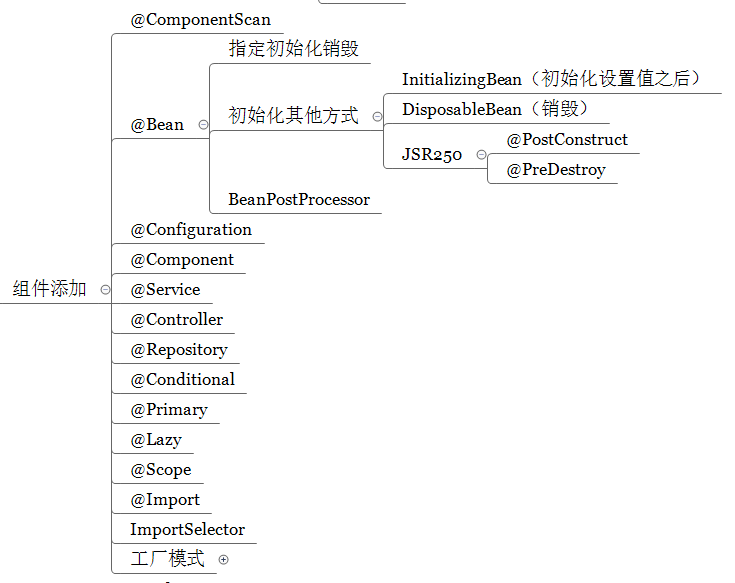
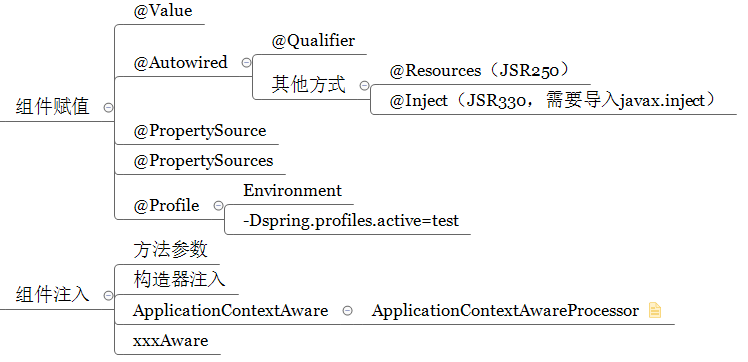
IOC小结:

Spring注解(环境)的更多相关文章
- 最新版ssh hibernate spring struts2环境搭建
最新版ssh hibernate spring struts2环境搭建 最新版spring Framework下载地址:spring4.0.0RELEASE环境搭建 http://repo.sprin ...
- spring 注解的优点缺点
注解与XML配置的区别 注解:是一种分散式的元数据,与源代码耦合. xml :是一种集中式的元数据,与源代码解耦. 因此注解和XML的选择上可以从两个角度来看:分散还是集中,源代码耦合/解耦. 注解的 ...
- Spring MVC 环境搭建(二)
在Spring MVC 环境搭建(一)中我们知道 spring 的配置是通过 urlmapping 映射到控制器,然后通过实现Controller接口的handlerequest方法转向页面. 但这存 ...
- Annotation(三)——Spring注解开发
Spring框架的核心功能IoC(Inversion of Control),也就是通过Spring容器进行对象的管理,以及对象之间组合关系的映射.通常情况下我们会在xml配置文件中进行action, ...
- Spring注解与Spring与Struts2整合
@Component @Controller @Service @Repository 四大注解作用基本一样,只是表象在不同层面 @Resource @Scope Struts2与Spring整合:1 ...
- Spring3+SpingMVC+Hibernate4全注解环境配置
Spring3+SpingMVC+Hibernate4全注解环境配置 我没有使用maven,直接使用Eclipse创建动态Web项目,jar包复制在了lib下.这样做导致我马上概述的项目既依赖Ecli ...
- Maven搭建struts2+spring+hibernate环境
Maven搭建struts2+spring+hibernate环境(一) 本文简单的使用STS的自带的maven插件工具搭建ssh(struts2+spring+hibernate)开发环境,图文并茂 ...
- Spring 注解驱动(一)基本使用规则
Spring 注解驱动(一)基本使用规则 Spring 系列目录(https://www.cnblogs.com/binarylei/p/10198698.html) 一.基本使用 @Configur ...
- Spring 注解方式引入配置文件
配置文件,我以两种为例,一种是引入Spring的XML文件,另外一种是.properties的键值对文件: 一.引入Spring XML的注解是@ImportResource @Retention(R ...
- [教程] Spring+Mybatis环境配置多数据源
一.简要概述 在做项目的时候遇到需要从两个数据源获取数据,项目使用的Spring + Mybatis环境,看到网上有一些关于多数据源的配置,自己也整理学习一下,然后自动切换实现从不同的数据源获取数据功 ...
随机推荐
- 第八篇:文件共享和使用 dup 函数创建新描述符的区别
前言 文件共享是指同时打开一个文件 用 dup 函数能对指定文件描述符再创建一个新的描述符,且这个新的描述符和旧的描述符指向的是同一个文件. 这两种行为有什么区别呢?下面给出的两张文件系统的图形象的解 ...
- 清空select下拉框的方法
$("#search").find("option").remove(); //或者 $("#search").empty();
- iOS 如何在一个应用程序中调用另一个应用程序
原则上iOS的沙箱原理,是阻止一个app去访问其他app的资源乃至是系统底层的资源的但是我们可以通过一种变相的方式:通过对应的URL模式和其他程序进行通讯. iOS应用之间的调用步骤: 一, 调用自己 ...
- 170223、Tomcat部署时war和war exploded区别以及平时踩得坑
war和war exploded的区别 在使用IDEA开发项目的时候,部署Tomcat的时候通常会出现下边的情况: 是选择war还是war exploded 这里首先看一下他们两个的区别: war模式 ...
- 【CSS选择器】理解汇总和记录
1.选择器中符号含义汇总(这部分包含了对选择器的通用理解): 1.1.多元素组合符号:(共6个,一个是CSS3的)(适用所有元素:ID组合,类组合,属性组合,标签组合,伪类组合,以及以上所有混合组合) ...
- 关于修改react的启动端口
在package.json文件里面,加一个port端口号就ok了
- 错误0x80070522:客户端没有所需的特权
win10或win7 C盘复制文件等遇到"错误0x80070522:客户端没有所需的特权" 在运行中输入 icacls c:\ /setintegritylevel M
- 【我的Android进阶之旅】解决Android Studio启动时报错:Java 1.8 or later is required.
错误描述 在公司电脑上运行Android Studio 2.2已经有一段时间了,但是自己的笔记本上还是用的Android Studio 1.5,今天晚上下了一个Android Studio 2.2压缩 ...
- (转)基于深度学习的目标检测技术演进:R-CNN、Fast R-CNN、Faster R-CNN
object detection我的理解,就是在给定的图片中精确找到物体所在位置,并标注出物体的类别.object detection要解决的问题就是物体在哪里,是什么这整个流程的问题.然而,这个问题 ...
- windows7下RabbitMQ的安装
一.下载资源 Rabbit MQ 是建立在强大的Erlang OTP平台上,因此安装Rabbit MQ的前提是安装Erlang.(在官网自行选择版本) 1.otp_win64_20.2.exe 下载地 ...