
Go之NSQ
文章引用自
NSQ
NSQ是目前比较流行的一个分布式的消息队列,本文主要介绍了NSQ及Go语言如何操作NSQ。
NSQ介绍
NSQ是Go语言编写的一个开源的实时分布式内存消息队列,其性能十分优异。 NSQ的优势有以下优势:
- NSQ提倡分布式和分散的拓扑,没有单点故障,支持容错和高可用性,并提供可靠的消息交付保证
- NSQ支持横向扩展,没有任何集中式代理。
- NSQ易于配置和部署,并且内置了管理界面。
NSQ的应用场景
通常来说,消息队列都适用以下场景。
异步处理
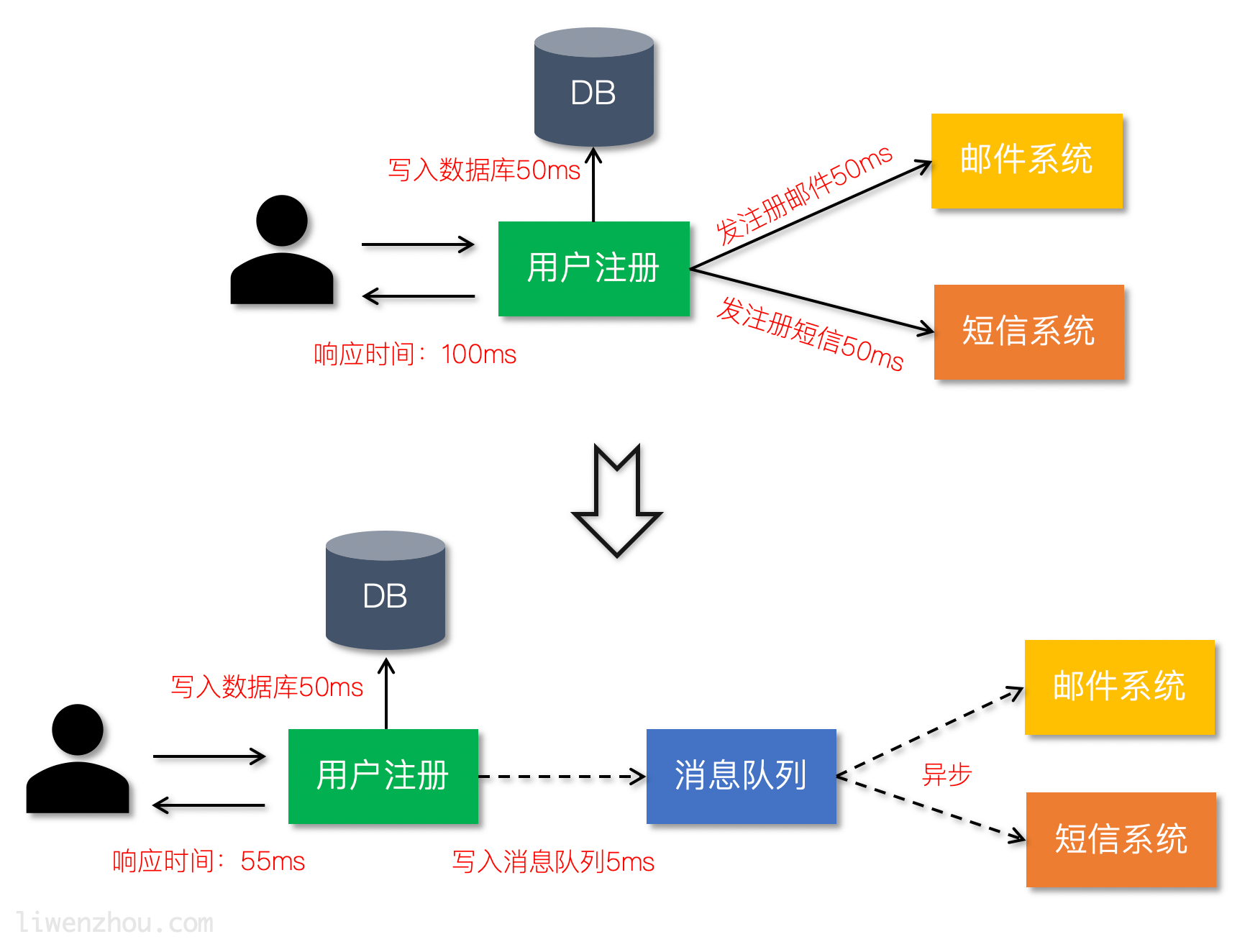
参照下图利用消息队列把业务流程中的非关键流程异步化,从而显著降低业务请求的响应时间。
应用解耦
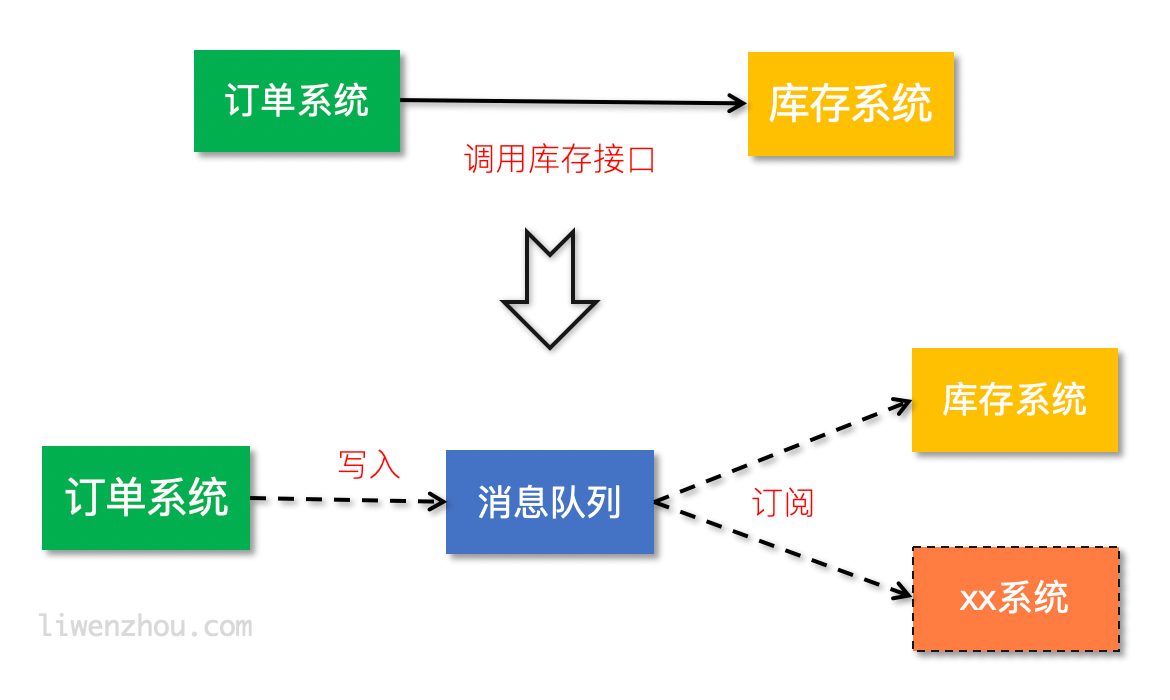
通过使用消息队列将不同的业务逻辑解耦,降低系统间的耦合,提高系统的健壮性。后续有其他业务要使用订单数据可直接订阅消息队列,提高系统的灵活性。
流量削峰
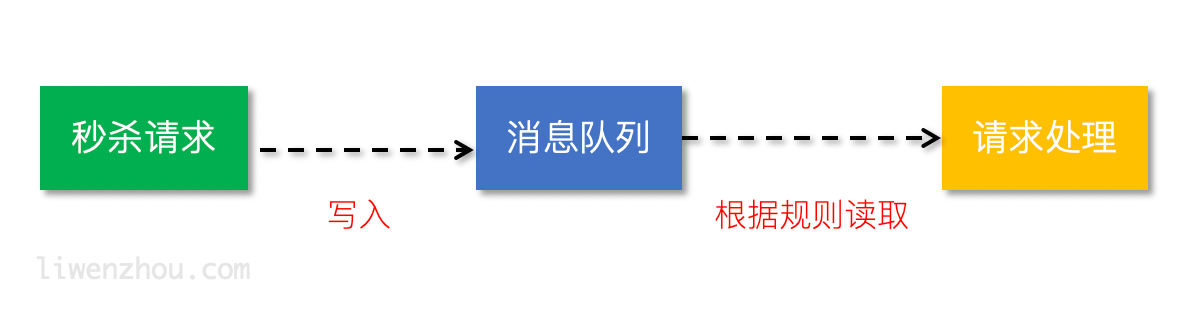
类似秒杀(大秒)等场景下,某一时间可能会产生大量的请求,使用消息队列能够为后端处理请求提供一定的缓冲区,保证后端服务的稳定性。
安装
官方下载页面根据自己的平台下载并解压即可。
快速启动
下载安装完毕后执行以下操作
1.在一个shell里面启动nsqlookupd
$ nsqlookupd
2.在另一个shell里面启动nsqd
$ nsqd --lookupd-tcp-address=127.0.0.1:4160
3.在另一个shell里面启动nsqadmin
$ nsqadmin --lookupd-http-address=127.0.0.1:4161
4.发布初始消息
$ curl -d 'hello world 1' 'http://127.0.0.1:4151/pub?topic=test'
5.在另外一个shell里面启动nsq_to_file
$ nsq_to_file --topic=test --output-dir=/tmp --lookupd-http-address=127.0.0.1:4161
6.发更多消息到nsqd
$ curl -d 'hello world 2' 'http://127.0.0.1:4151/pub?topic=test'

$ curl -d 'hello world 3' 'http://127.0.0.1:4151/pub?topic=test'
7.打开web浏览器验证工作是否正常 http://127.0.0.1:4171/若要查看nsqadminUI和见统计信息。另外,检查日志文件的内容(test.*.log)写信给/tmp.
Ps:这里的重要教训是nsq_to_file(客户端)没有被明确告知test主题,它将从nsqlookupd而且,尽管连接的定时,没有丢失消息。
NSQ组件
nsqd
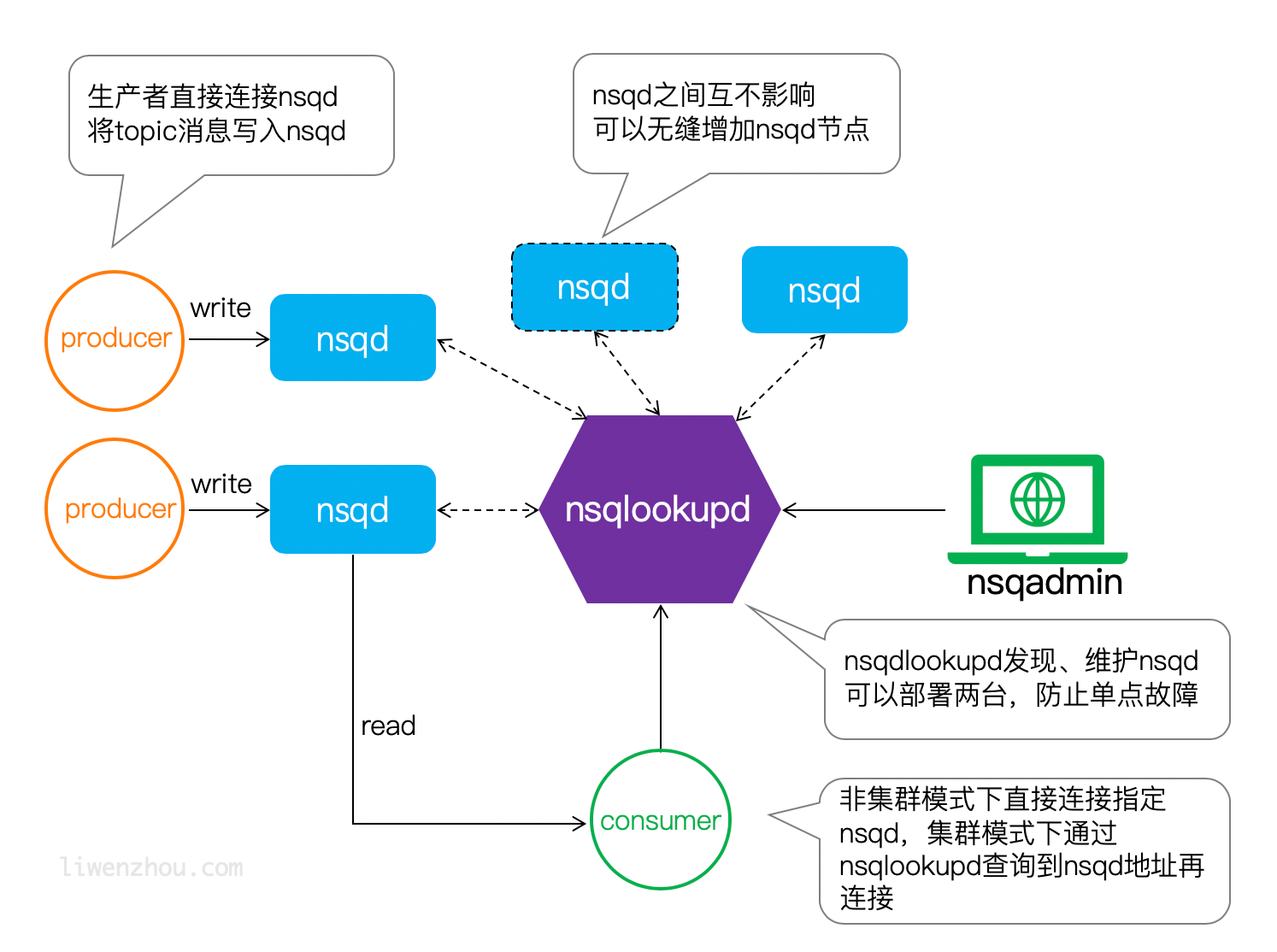
nsqd是一个守护进程,它接收、排队并向客户端发送消息。
启动nsqd,指定-broadcast-address=127.0.0.1来配置广播地址
$./nsqd -broadcast-address=127.0.0.1
如果是在搭配nsqlookupd使用的模式下需要还指定nsqlookupd地址:
$./nsqd -broadcast-address=127.0.0.1 -lookupd-tcp-address=127.0.0.1:4160
如果是部署了多个nsqlookupd节点的集群,那还可以指定多个-lookupd-tcp-address。
nsqdq相关配置项如下:
-auth-http-address value

    <addr>:<port> to query auth server (may be given multiple times)

-broadcast-address string

    address that will be registered with lookupd (defaults to the OS hostname) (default "PROSNAKES.local")

-config string

    path to config file

-data-path string

    path to store disk-backed messages

-deflate

    enable deflate feature negotiation (client compression) (default true)

-e2e-processing-latency-percentile value

    message processing time percentiles (as float (0, 1.0]) to track (can be specified multiple times or comma separated '1.0,0.99,0.95', default none)

-e2e-processing-latency-window-time duration

    calculate end to end latency quantiles for this duration of time (ie: 60s would only show quantile calculations from the past 60 seconds) (default 10m0s)

-http-address string

    <addr>:<port> to listen on for HTTP clients (default "0.0.0.0:4151")

-http-client-connect-timeout duration

    timeout for HTTP connect (default 2s)

-http-client-request-timeout duration

    timeout for HTTP request (default 5s)

-https-address string

    <addr>:<port> to listen on for HTTPS clients (default "0.0.0.0:4152")

-log-prefix string

    log message prefix (default "[nsqd] ")

-lookupd-tcp-address value

    lookupd TCP address (may be given multiple times)

-max-body-size int

    maximum size of a single command body (default 5242880)

-max-bytes-per-file int

    number of bytes per diskqueue file before rolling (default 104857600)

-max-deflate-level int

    max deflate compression level a client can negotiate (> values == > nsqd CPU usage) (default 6)

-max-heartbeat-interval duration

    maximum client configurable duration of time between client heartbeats (default 1m0s)

-max-msg-size int

    maximum size of a single message in bytes (default 1048576)

-max-msg-timeout duration

    maximum duration before a message will timeout (default 15m0s)

-max-output-buffer-size int

    maximum client configurable size (in bytes) for a client output buffer (default 65536)

-max-output-buffer-timeout duration

    maximum client configurable duration of time between flushing to a client (default 1s)

-max-rdy-count int

    maximum RDY count for a client (default 2500)

-max-req-timeout duration

    maximum requeuing timeout for a message (default 1h0m0s)

-mem-queue-size int

    number of messages to keep in memory (per topic/channel) (default 10000)

-msg-timeout string

    duration to wait before auto-requeing a message (default "1m0s")

-node-id int

    unique part for message IDs, (int) in range [0,1024) (default is hash of hostname) (default 616)

-snappy

    enable snappy feature negotiation (client compression) (default true)

-statsd-address string

    UDP <addr>:<port> of a statsd daemon for pushing stats

-statsd-interval string

    duration between pushing to statsd (default "1m0s")

-statsd-mem-stats

    toggle sending memory and GC stats to statsd (default true)

-statsd-prefix string

    prefix used for keys sent to statsd (%s for host replacement) (default "nsq.%s")

-sync-every int

    number of messages per diskqueue fsync (default 2500)

-sync-timeout duration

    duration of time per diskqueue fsync (default 2s)

-tcp-address string

    <addr>:<port> to listen on for TCP clients (default "0.0.0.0:4150")

-tls-cert string

    path to certificate file

-tls-client-auth-policy string

    client certificate auth policy ('require' or 'require-verify')

-tls-key string

    path to key file

-tls-min-version value

    minimum SSL/TLS version acceptable ('ssl3.0', 'tls1.0', 'tls1.1', or 'tls1.2') (default 769)

-tls-required

    require TLS for client connections (true, false, tcp-https)

-tls-root-ca-file string

    path to certificate authority file

-verbose

    enable verbose logging

-version

    print version string

-worker-id

    do NOT use this, use --node-id
nsqlookupd
nsqlookupd是维护所有nsqd状态、提供服务发现的守护进程。它能为消费者查找特定topic下的nsqd提供了运行时的自动发现服务。 它不维持持久状态,也不需要与任何其他nsqlookupd实例协调以满足查询。因此根据你系统的冗余要求尽可能多地部署nsqlookupd节点。它们小豪的资源很少,可以与其他服务共存。我们的建议是为每个数据中心运行至少3个集群。
nsqlookupd相关配置项如下:
-broadcast-address string

    address of this lookupd node, (default to the OS hostname) (default "PROSNAKES.local")

-config string

    path to config file

-http-address string

    <addr>:<port> to listen on for HTTP clients (default "0.0.0.0:4161")

-inactive-producer-timeout duration

    duration of time a producer will remain in the active list since its last ping (default 5m0s)

-log-prefix string

    log message prefix (default "[nsqlookupd] ")

-tcp-address string

    <addr>:<port> to listen on for TCP clients (default "0.0.0.0:4160")

-tombstone-lifetime duration

    duration of time a producer will remain tombstoned if registration remains (default 45s)

-verbose

    enable verbose logging

-version

    print version string
nsqadmin
一个实时监控集群状态、执行各种管理任务的Web管理平台。 启动nsqadmin,指定nsqlookupd地址:
./nsqadmin -lookupd-http-address=127.0.0.1:4161
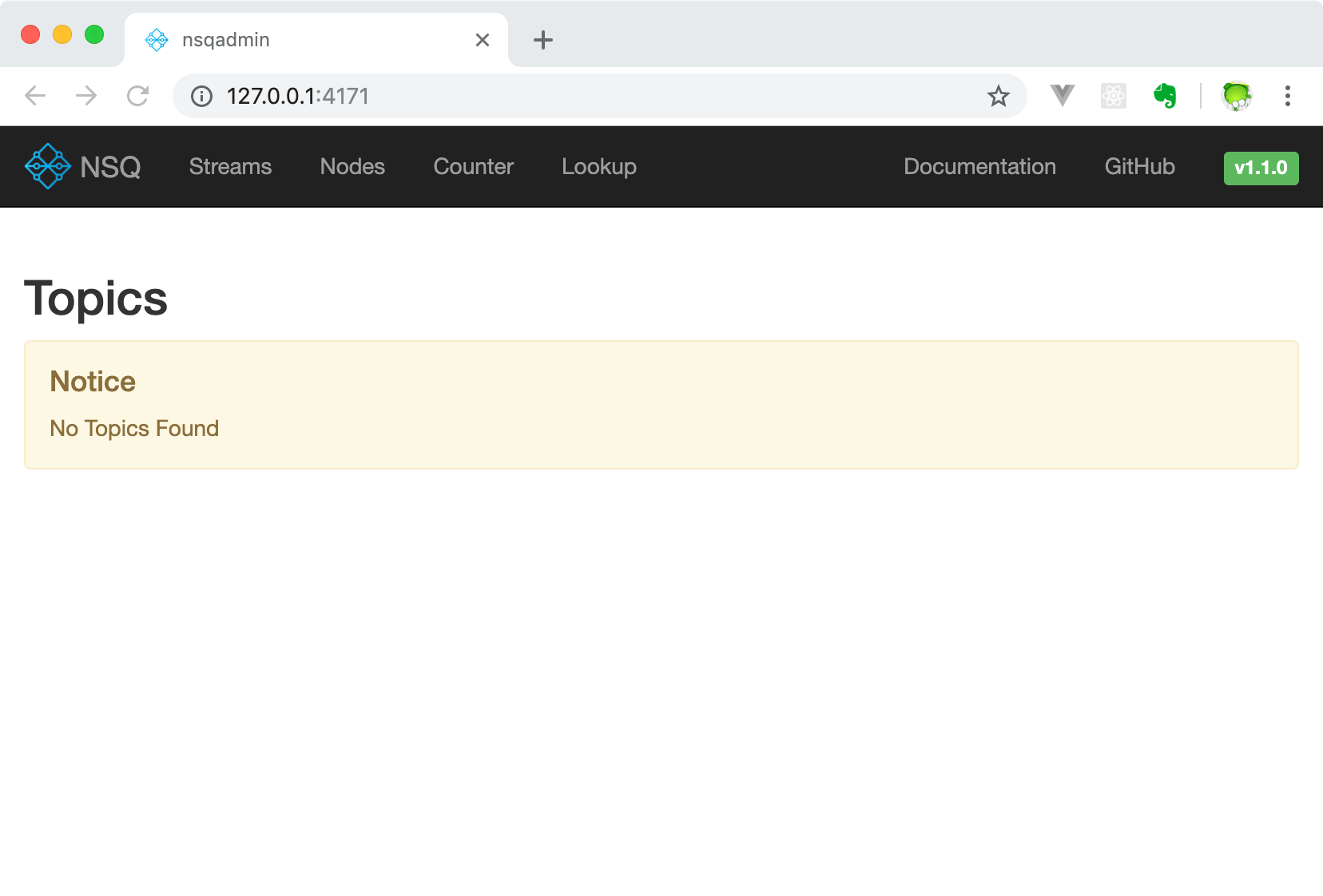
我们可以使用浏览器打开http://127.0.0.1:4171/访问如下管理界面。
nsqadmin相关的配置项如下:
-allow-config-from-cidr string

    A CIDR from which to allow HTTP requests to the /config endpoint (default "127.0.0.1/8")

-config string

    path to config file

-graphite-url string

    graphite HTTP address

-http-address string

    <addr>:<port> to listen on for HTTP clients (default "0.0.0.0:4171")

-http-client-connect-timeout duration

    timeout for HTTP connect (default 2s)

-http-client-request-timeout duration

    timeout for HTTP request (default 5s)

-http-client-tls-cert string

    path to certificate file for the HTTP client

-http-client-tls-insecure-skip-verify

    configure the HTTP client to skip verification of TLS certificates

-http-client-tls-key string

    path to key file for the HTTP client

-http-client-tls-root-ca-file string

    path to CA file for the HTTP client

-log-prefix string

    log message prefix (default "[nsqadmin] ")

-lookupd-http-address value

    lookupd HTTP address (may be given multiple times)

-notification-http-endpoint string

    HTTP endpoint (fully qualified) to which POST notifications of admin actions will be sent

-nsqd-http-address value

    nsqd HTTP address (may be given multiple times)

-proxy-graphite

    proxy HTTP requests to graphite

-statsd-counter-format string

    The counter stats key formatting applied by the implementation of statsd. If no formatting is desired, set this to an empty string. (default "stats.counters.%s.count")

-statsd-gauge-format string

    The gauge stats key formatting applied by the implementation of statsd. If no formatting is desired, set this to an empty string. (default "stats.gauges.%s")

-statsd-interval duration

    time interval nsqd is configured to push to statsd (must match nsqd) (default 1m0s)

-statsd-prefix string

    prefix used for keys sent to statsd (%s for host replacement, must match nsqd) (default "nsq.%s")

-version

    print version string
NSQ架构
NSQ工作模式
Topic和Channel
每个nsqd实例旨在一次处理多个数据流。这些数据流称为“topics”,一个topic具有1个或多个“channels”。每个channel都会收到topic所有消息的副本,实际上下游的服务是通过对应的channel来消费topic消息。
topic和channel不是预先配置的。topic在首次使用时创建,方法是将其发布到指定topic,或者订阅指定topic上的channel。channel是通过订阅指定的channel在第一次使用时创建的。
topic和channel都相互独立地缓冲数据,防止缓慢的消费者导致其他chennel的积压(同样适用于topic级别)。
channel可以并且通常会连接多个客户端。假设所有连接的客户端都处于准备接收消息的状态,则每条消息将被传递到随机客户端。例如:
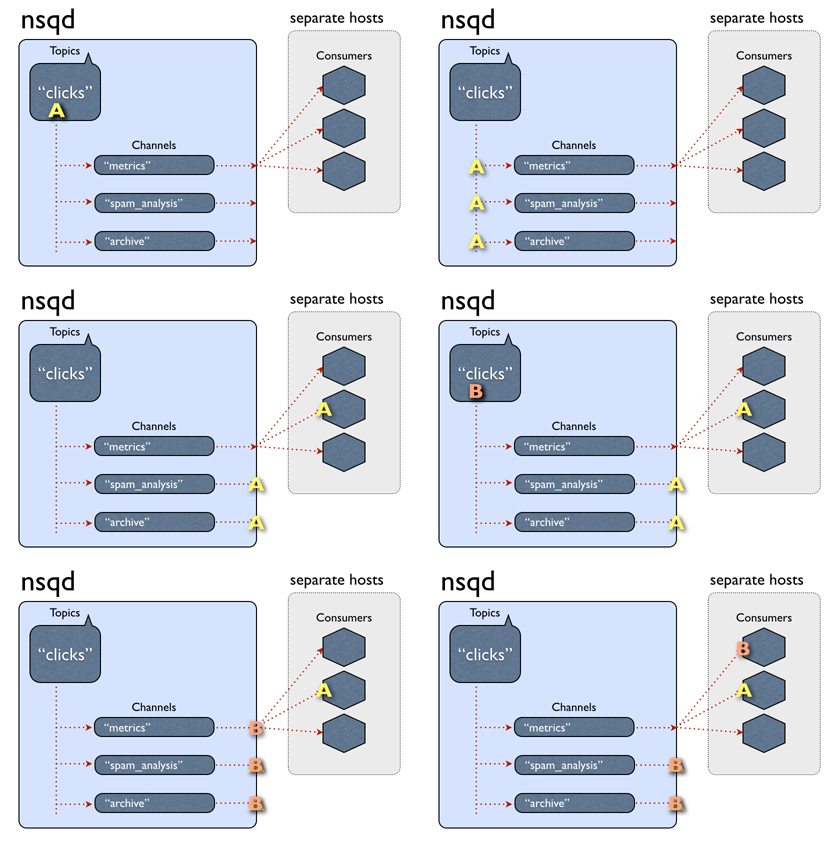
总而言之,消息是从topic -> channel(每个channel接收该topic的所有消息的副本)多播的,但是从channel -> consumers均匀分布(每个消费者接收该channel的一部分消息)。
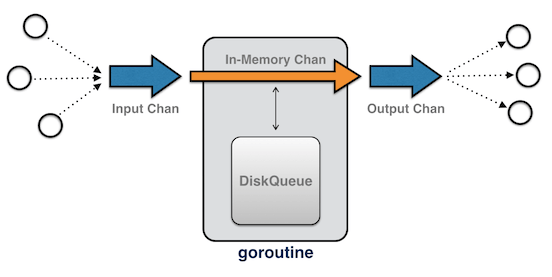
NSQ接收和发送消息流程
NSQ特性
- 消息默认不持久化,可以配置成持久化模式。nsq采用的方式时内存+硬盘的模式,当内存到达一定程度时就会将数据持久化到硬盘。
- 如果将
--mem-queue-size设置为0,所有的消息将会存储到磁盘。 - 服务器重启时也会将当时在内存中的消息持久化。
- 如果将
- 每条消息至少传递一次。
- 消息不保证有序。
Go操作NSQ
官方提供了Go语言版的客户端:go-nsq,更多客户端支持请查看CLIENT LIBRARIES。
安装
go get -u github.com/nsqio/go-nsq
生产者
一个简单的生产者示例代码如下:
// nsq_producer/main.go

package main

import (

    "bufio"

    "fmt"

    "os"

    "strings"

    "github.com/nsqio/go-nsq"

)

// NSQ Producer Demo

 // 定义nsq生产者

var producer *nsq.Producer

// 初始化生产者

func initProducer(str string) (err error) {

	// 创建配置信息

    config := nsq.NewConfig()

    // 初始化生产者 str传入ip:端口

    producer, err = nsq.NewProducer(str, config)

    if err != nil {

        fmt.Printf("create producer failed, err:%v\n", err)

        return err

    }

    // 测试生产者是否有效

    err := producer.Ping()

    if err != nil{

    	fmt.Printf("No ping,err:%v\n",err)

    	producer.Stop() //关闭生产者

    }

    return nil

}

func main() {

    nsqAddress := "127.0.0.1:4150"

    // 调用封装好的函数 初始化生产者

    err := initProducer(nsqAddress)

    if err != nil {

        fmt.Printf("init producer failed, err:%v\n", err)

        return

    }

    reader := bufio.NewReader(os.Stdin) // 从标准输入读取

    for {

        data, err := reader.ReadString('\n')

        if err != nil {

            fmt.Printf("read string from stdin failed, err:%v\n", err)

            continue

        }

        data = strings.TrimSpace(data)

        if strings.ToUpper(data) == "Q" { // 输入Q退出

            break

        }

        // 使用Publish 向 'topic_demo' publish 数据

        err = producer.Publish("topic_demo", []byte(data))

        if err != nil {

            fmt.Printf("publish msg to nsq failed, err:%v\n", err)

            continue

        }

    }

}
将上面的代码编译执行,然后在终端输入两条数据123和456:
$ ./nsq_producer

123

2018/10/22 18:41:20 INF    1 (127.0.0.1:4150) connecting to nsqd

456
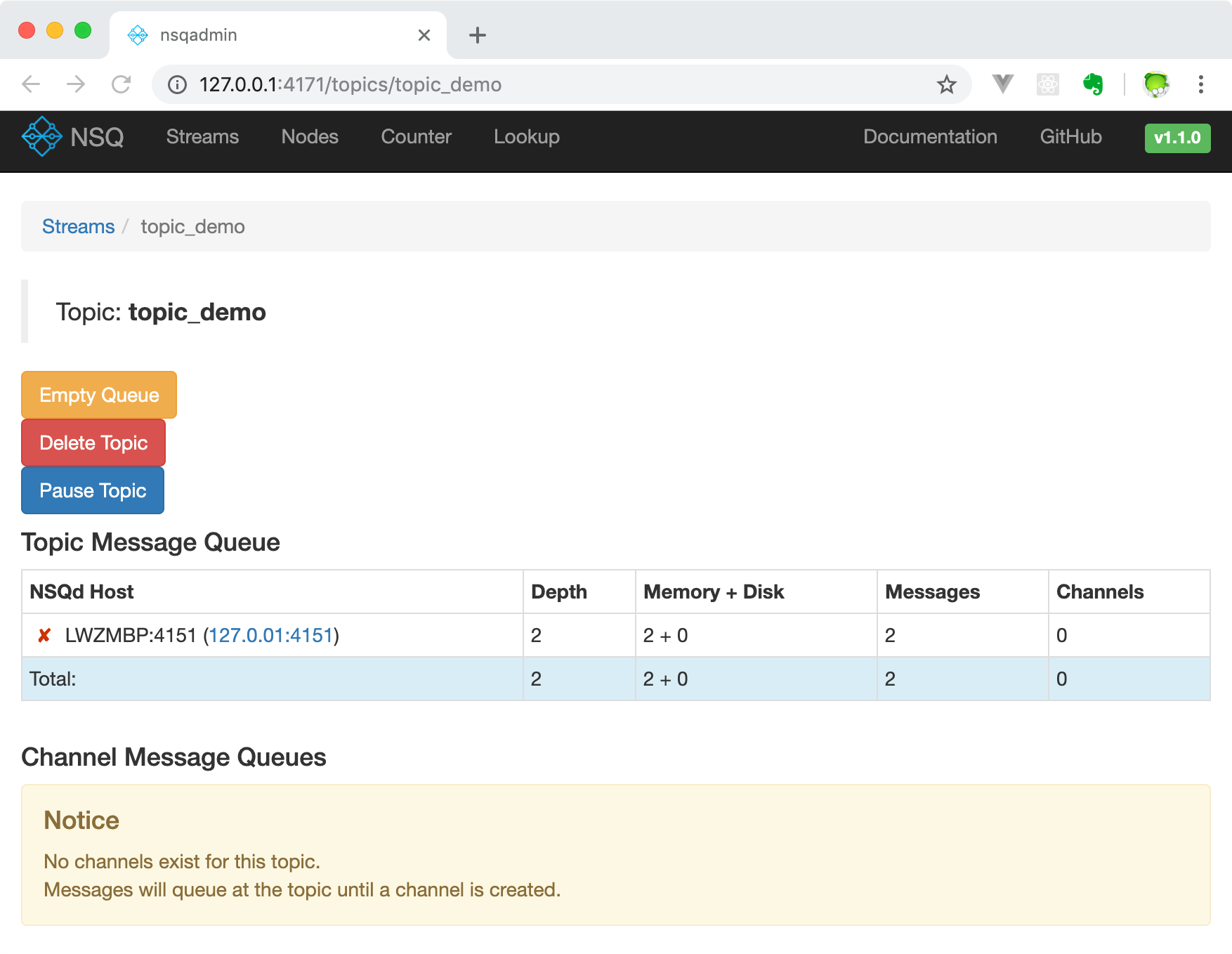
使用浏览器打开http://127.0.0.1:4171/可以查看到类似下面的页面: 在下面这个页面能看到当前的topic信息:
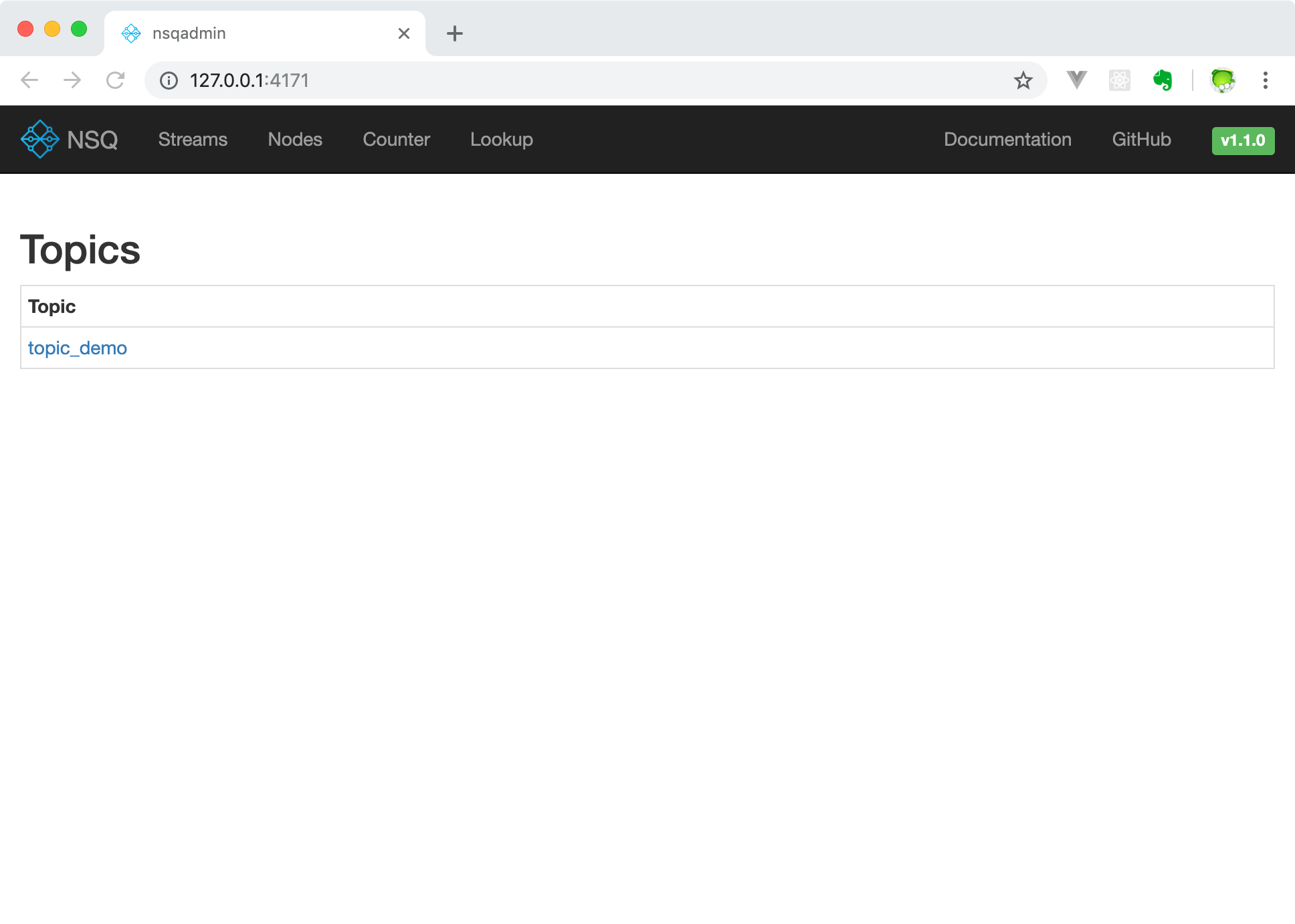
点击页面上的topic_demo就能进入一个展示更多详细信息的页面,在这个页面上我们可以查看和管理topic,同时能够看到目前在LWZMBP:4151 (127.0.01:4151)这个nsqd上有2条message。又因为没有消费者接入所以暂时没有创建channel。
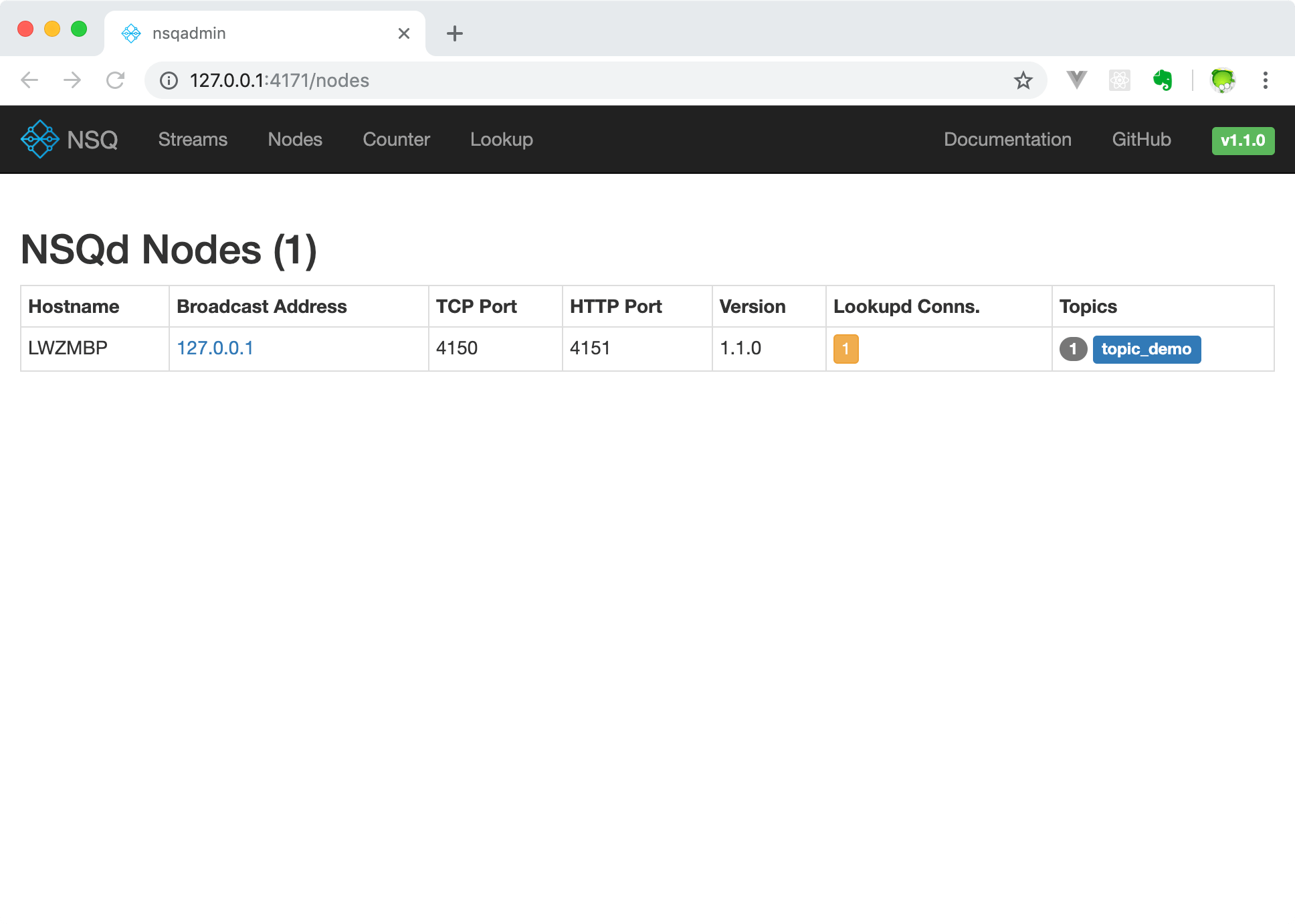
在/nodes这个页面我们能够很方便的查看当前接入lookupd的nsqd节点。
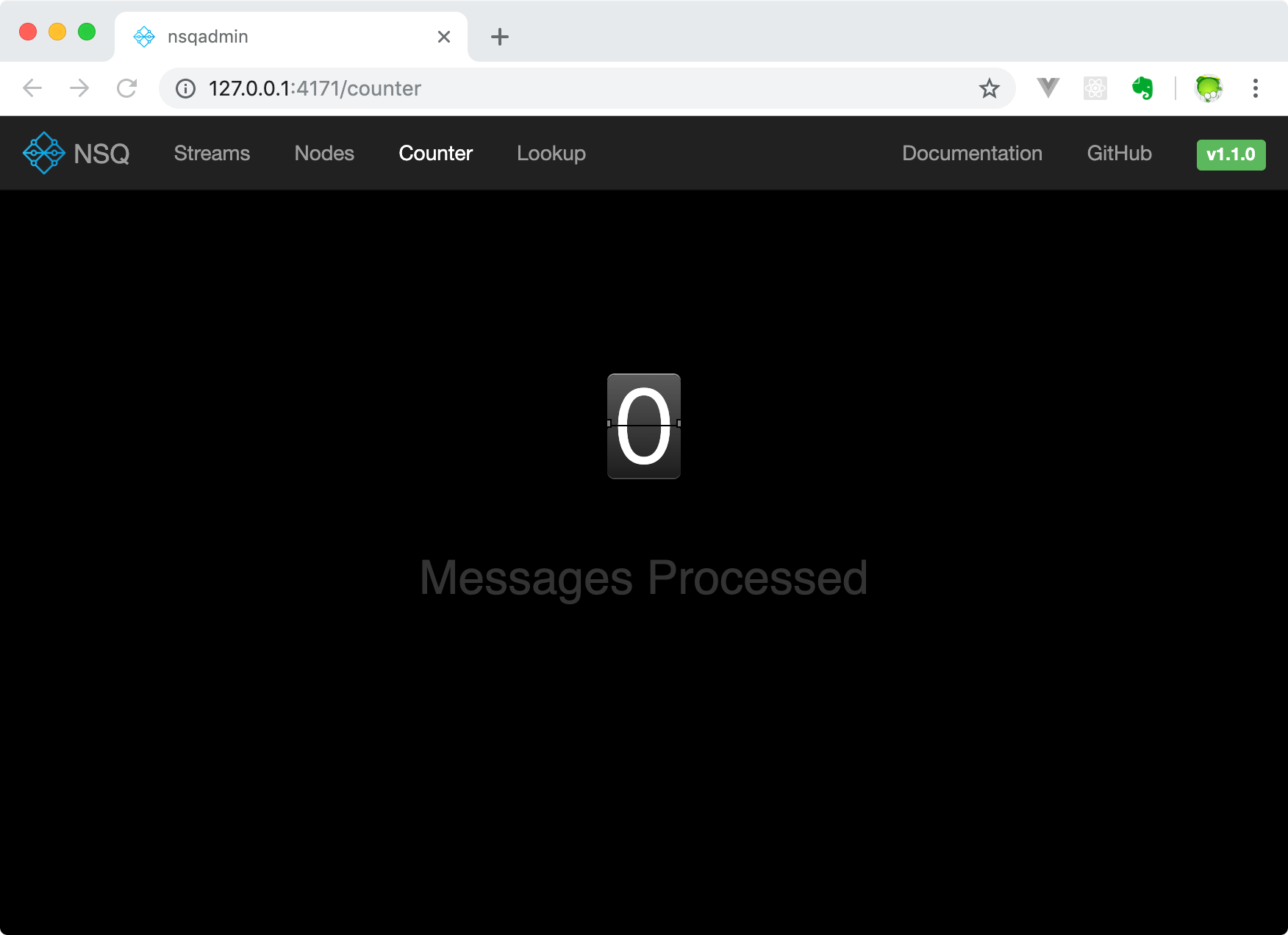
这个/counter页面显示了处理的消息数量,因为我们没有接入消费者,所以处理的消息数量为0。
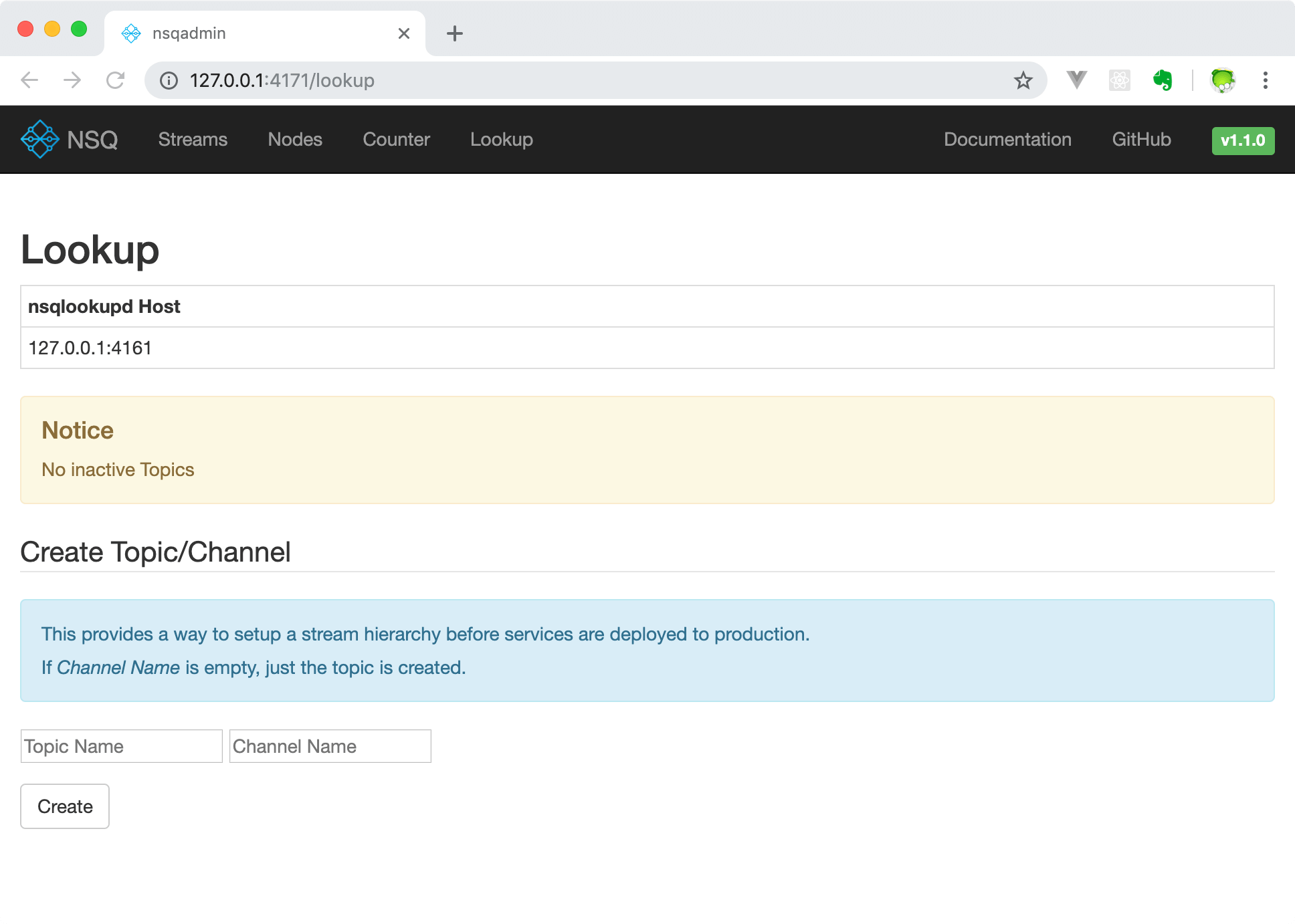
在/lookup界面支持创建topic和channel。
消费者
一个简单的消费者示例代码如下:
// nsq_consumer/main.go

package main

import (

    "fmt"

    "os"

    "os/signal"

    "syscall"

    "time"

    "github.com/nsqio/go-nsq"

)

// NSQ Consumer Demo

// MyHandler 是一个消费者类型

type MyHandler struct {

    Title string

}

// HandleMessage 是需要实现的处理消息的方法 *必须要实现

func (m *MyHandler) HandleMessage(msg *nsq.Message) (err error) {

    fmt.Printf("%s recv from %v, msg:%v\n", m.Title, msg.NSQDAddress, string(msg.Body))

    return

}

// 初始化消费者

func initConsumer(topic string, channel string, address string) (err error) {

    config := nsq.NewConfig()

    // 重连时间

    config.LookupdPollInterval = 15 * time.Second

    // 新建消费者

    c, err := nsq.NewConsumer(topic, channel, config)

    if err != nil {

        fmt.Printf("create consumer failed, err:%v\n", err)

        return

    }

    consumer := &MyHandler{

        Title: "沙河1号",

    }

    // 屏蔽系统日志

    // c.SetLogger(nil,0)

    // 添加消费者

    c.AddHandler(consumer)

    // if err := c.ConnectToNSQD(address); err != nil { // 直接连NSQD

    if err := c.ConnectToNSQLookupd(address); err != nil { // 通过lookupd查询

        return err

    }

    return nil

}

func main() {

    err := initConsumer("topic_demo", "first", "127.0.0.1:4161")

    if err != nil {

        fmt.Printf("init consumer failed, err:%v\n", err)

        return

    }

    c := make(chan os.Signal)        // 定义一个信号的通道

    signal.Notify(c, syscall.SIGINT) // 转发键盘中断信号到c

    <-c                              // 阻塞

}
将上面的代码保存之后编译执行,就能够获取之前我们publish的两条消息了:
$ ./nsq_consumer

2018/10/22 18:49:06 INF    1 [topic_demo/first] querying nsqlookupd http://127.0.0.1:4161/lookup?topic=topic_demo

2018/10/22 18:49:06 INF    1 [topic_demo/first] (127.0.0.1:4150) connecting to nsqd

沙河1号 recv from 127.0.0.1:4150, msg:123

沙河1号 recv from 127.0.0.1:4150, msg:456
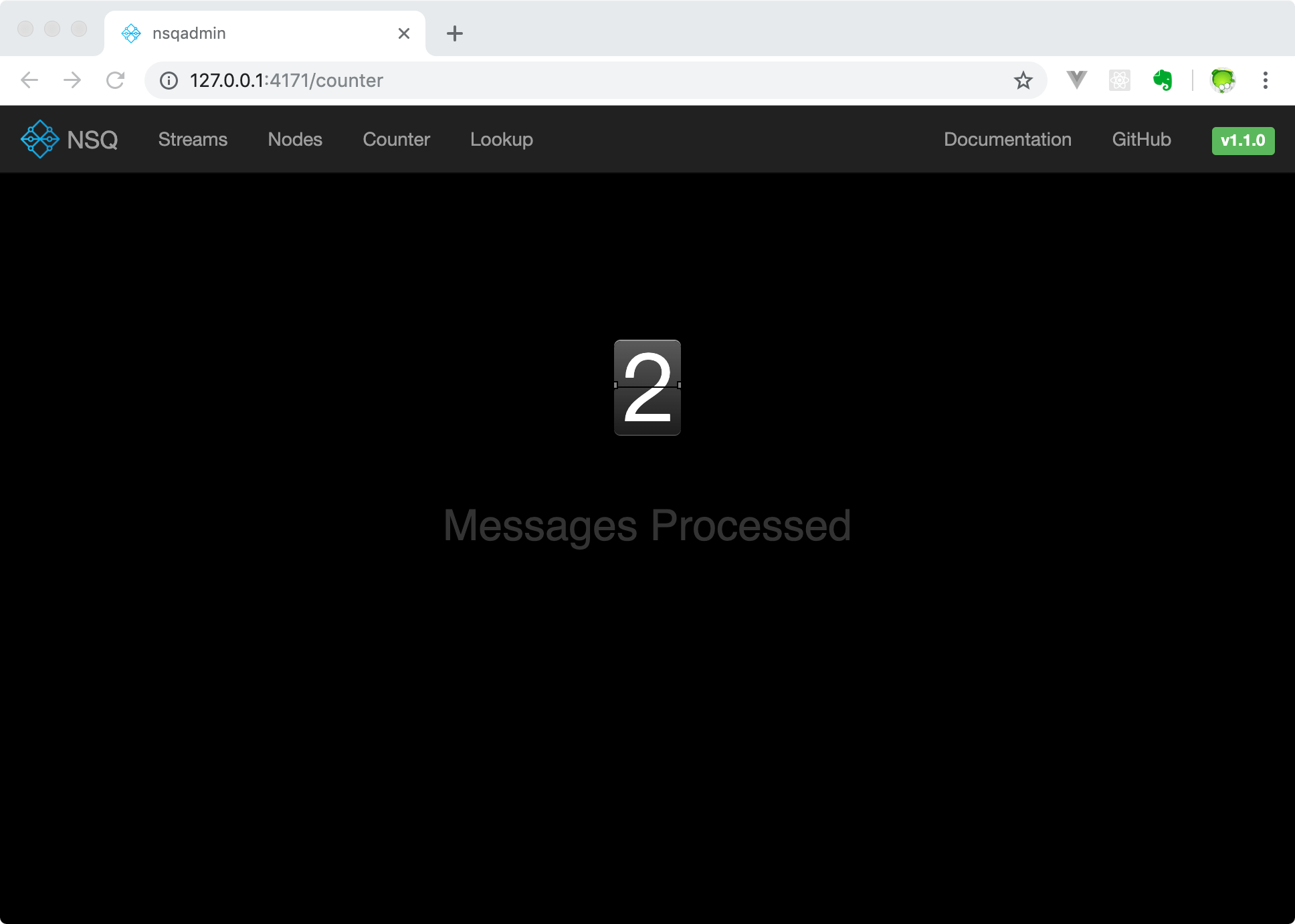
同时在nsqadmin的/counter页面查看到处理的数据数量为2。
关于go-nsq的更多内容请阅读go-nsq的官方文档。
Go之NSQ的更多相关文章
- 深入NSQ 之旅[转载]
介绍 NSQ是一个实时的分布式消息平台.它的设计目标是为在多台计算机上运行的松散服务提供一个现代化的基础设施骨架.这篇文章介绍了 基于go语言的NSQ的内部架构,它能够为高吞吐量的网络服务器带来 性能 ...
- nsq
官网:http://nsq.io (1)描述 都是message broker,rabbitmq久经考验,nsq则是后起之秀.rabbitmq是erlang编写,nsq是golang. 安装:http ...
- NSQ的消息订阅发布测试
在测试NSQ的Quick Start发现这样一个问题,就是同时只能有一个订阅实例 $ nsq_to_file --topic=test --output- 当存在两个实例时则消息会被发送给其中的一个实 ...
- 实时消息平台NSQ的特性
NSQ是GO语言开发的可用于大规模系统中的实时消息服务,但是和RabbitMQ等相比,它具有什么特色,什么场景下选择NSQ呢? NSQ的自身特色很明显,最主要的优势在如下三个方面: 1,性能.在多个著 ...
- nsq初探
一. 安装 参考:http://nsq.io/deployment/installing.htmlhttp://www.baiyuxiong.com/?p=873 (推荐.) 不推荐直接把官方的 ...
- Mac OS X 上的安装nsq并使用
安装: brew install nsq 使用: The following steps will run a small NSQ cluster on your local machine and ...
- NSQ:分布式消息队列学习记录
参考资料: NSQ:分布式的实时消息平台 初识NSQ分布式实时消息架构 深入NSQ之旅 nsq topic和channel的区别
- NSQ部署
一. 简介 NSQ主要有三个主要程序和一个Web服务程序: nsqd:是守护进程,接收,缓存,并投递消息给客户端 nsqlookupd:是一个守护进程,为消费者提供运行时发现服务,来查找指定 ...
- NSQ:分布式的实时消息平台
NSQ是一个基于Go语言的分布式实时消息平台,它基于MIT开源协议发布,代码托管在GitHub,其当前最新版本是0.3.1版.NSQ可用于大规模系统中的实时消息服务,并且每天能够处理数亿级别的消息,其 ...
- nsq的erlang客户端
nsq是基于golang开发的分布式消息系统,这里仅仅贴个和erlang之间的通信demo rebar-creator create-app test_nsq rebar.config % -*- e ...
随机推荐
- 安装python3并新建python3的虚拟环境
安装依赖 yum install openssl-devel bzip2-devel expat-devel gdbm-devel readline-devel sqlite-devel -y 下载P ...
- vue mvvm原理与简单实现 -- 上篇
Object.defineProperty介绍-- let obj = {}; Object.defineProperty(obj,'school',{ configurable : true, // ...
- 第一个Mybatis项目
第一个Mybatis项目 一.创建普通Maven项目 1.配置pom.xml文件 <dependencies> <!--mysql驱动--> <dependency> ...
- MVC5+EF6 入门完整教程4 :EF基本的CRUD
上篇文章主要讲了如何配置EF, 我们回顾下主要过程: 创建Data Model ---> 创建Database Context --->创建databaseInitializer---&g ...
- php设计模式之观察者模式实例代码
php提供的两个接口,一个被观察者接口SplSubject,一个或多个观察者接口SPLObserver,和一个可以储存对象的类SplObjectStorage.被观察者有三个方法,需要实现这三个方法, ...
- 请求响应状态status为canceled
发出ajax请求之后 发现status状态是canceled 1. 和form冲突 我的提交代码是这样的 $.ajax({ //几个参数需要注意一下 type: "POST",// ...
- Go网络编程UDP
package main import ( "fmt" "net" "strings" ) // UDP server func main( ...
- How To Use These LED Garden Lights
Are you considering the lighting options for the outdoor garden? Depending on how you use it, LED ga ...
- ffmpeg 音频常用命令
ffmpeg的使用方式: ffmpeg [options] [[infile options] -i infile]... {[outfile options] outfile}... Stream ...
- 每天进步一点点------Xilinx IP 内核
ISE 设计套件 11.1 版本中提供了众多全新的 IP 内核.数学函数:Multiply Adder v2.0 —— 执行两个操作数的乘法,并采用 XtremeDSP™ 解决方案切片将完全精确的乘积 ...