
Truffle 快速构建 DApp
简单介绍
官网传送门 Truffle是针对基于以太坊的Solidity语言的一套开发框架。本身基于Javascript,使用以太坊虚拟机(EVM)的世界一流的开发环境,用于区块链的测试框架和资产管道,旨在简化开发人员的生活。
安装truffle
安装前提:
预装nodejs
1.全局安装
npm install -g truffle
建立软链接
ln -s /opt/node-v10.16.0-linux-x64/bin/truffle /usr/local/bin/truffle
2.单个项目安装
npm install truffle
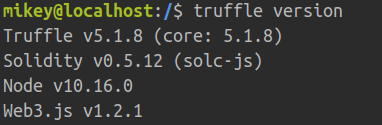
3.查看版本号
truffle version
4.安装成功
构建应用
快速开始 https://www.trufflesuite.com/docs/truffle/quickstart
创建项目
mkdir simple-dapp
初始化项目
truffle init
Note: You can use the truffle unbox <box-name> command to download any of the other Truffle Boxes.
Note: To create a bare Truffle project with no smart contracts included, use truffle init.
本次采用基于webpack的box来构建
truffle unbox webpack
项目目录结构:
- app/:Diretory for app
contracts/: Directory for Solidity contractsmigrations/: Directory for scriptable deployment filestest/: Directory for test files for testing your application and contractstruffle-config.js: Truffle configuration file
创建合约:位于contracts文件夹下
pragma solidity >=0.4.21 <0.7.0;

contract Voting {

    //候选人得票数目

    mapping (bytes32=>uint8) public votesReceived;

    //候选人

    bytes32[] public candidateList;

    //构造器

    constructor(bytes32[] memory candidateNames) public {

        candidateList = candidateNames;

    }

    //查询投票数目

    function totalVotesFor(bytes32 candidate) view public returns (uint8){

        //非空校验

        require(validCandidate(candidate));

        return votesReceived[candidate];

    }

    //投票

    function VotingTo(bytes32 candidate) public {

        //非空校验

        require(validCandidate(candidate));

        //add

        votesReceived[candidate]+=1;

    }

    //校验

    function validCandidate(bytes32 candidate) view public returns (bool){

        for(uint i = 0;i<candidateList.length;i++){

            if(candidateList[i]==candidate){

                return true;

            }

        }

        return false;

    }

}
创建迁移文件:位于migrations文件夹下
const voting = artifacts.require('../contracts/Voting.sol')

module.exports = function (deployer) {

    deployer.deploy(voting,['Mikey','Leo','Don'].map(x=>web3.utils.asciiToHex(x)),{gas:2900000});

}
3_deploy_voting.js
编译智能合约
truffle compile

生成json文件

启动truffle的开发者模式
truffle develop
部署智能合约
migrate
Starting migrations...

======================

> Network name:    'develop'

> Network id:      5777

> Block gas limit: 0x6691b7

1_initial_migration.js

======================

   Deploying 'Migrations'

   ----------------------

   > transaction hash:    0x5d23f5f2452d41a20ee56b238efb21c9c81cb04e0105c874e5a26528538476e5

   > Blocks: 0            Seconds: 0

   > contract address:    0xD97313Cb13D2d39Bd8CD2CB6f3606aaCB89fa1Ad

   > block number:        13

   > block timestamp:     1578995366

   > account:             0x9c29d178Ba516574E372e3cf5Eda833359F4114F

   > balance:             99.96269208

   > gas used:            263741

   > gas price:           20 gwei

   > value sent:          0 ETH

   > total cost:          0.00527482 ETH

   > Saving migration to chain.

   > Saving artifacts

   -------------------------------------

   > Total cost:          0.00527482 ETH

2_deploy_contracts.js

=====================

   Deploying 'ConvertLib'

   ----------------------

   > transaction hash:    0x71bc728418b983c24aa541ffebffc8b2eafa53f1f5754e8a800a8f5688947069

   > Blocks: 0            Seconds: 0

   > contract address:    0x7caC31cFfE12a8A4D7F7bD83a97e3AF0E99206CE

   > block number:        15

   > block timestamp:     1578995366

   > account:             0x9c29d178Ba516574E372e3cf5Eda833359F4114F

   > balance:             99.95973214

   > gas used:            105974

   > gas price:           20 gwei

   > value sent:          0 ETH

   > total cost:          0.00211948 ETH

   Linking

   -------

   * Contract: MetaCoin <--> Library: ConvertLib (at address: 0x7caC31cFfE12a8A4D7F7bD83a97e3AF0E99206CE)

   Deploying 'MetaCoin'

   --------------------

   > transaction hash:    0x36bef9d0355bfcf5fd0fad5fd69574b9be37117b92883f03d1e76877cc07e045

   > Blocks: 0            Seconds: 0

   > contract address:    0xaAd2C9659fec947A764b244E37A281d219fb0a21

   > block number:        16

   > block timestamp:     1578995366

   > account:             0x9c29d178Ba516574E372e3cf5Eda833359F4114F

   > balance:             99.9529182

   > gas used:            340697

   > gas price:           20 gwei

   > value sent:          0 ETH

   > total cost:          0.00681394 ETH

   > Saving migration to chain.

   > Saving artifacts

   -------------------------------------

   > Total cost:          0.00893342 ETH

3_initial_voting.js

===================

   Deploying 'Voting'

   ------------------

   > transaction hash:    0x0a5c69ce8595788ef70513f2533af7f7a2c230525d50d68abaf30e49fed2c2ff

   > Blocks: 0            Seconds: 0

   > contract address:    0xdafBED4742Ff4b2bC17f0908D2E97DfA644B5417

   > block number:        18

   > block timestamp:     1578995366

   > account:             0x9c29d178Ba516574E372e3cf5Eda833359F4114F

   > balance:             99.94517058

   > gas used:            360358

   > gas price:           20 gwei

   > value sent:          0 ETH

   > total cost:          0.00720716 ETH

   > Saving migration to chain.

   > Saving artifacts

   -------------------------------------

   > Total cost:          0.00720716 ETH

Summary

=======

> Total deployments:   4

> Final cost:          0.0214154 ETH

truffle(develop)>
输出结果
部署成功
构建DApp
import Web3 from "web3";

import metaCoinArtifact from "../../build/contracts/MetaCoin.json";

const App = {

  web3: null,

  account: null,

  meta: null,

  start: async function() {

    const { web3 } = this;

    try {

      // get contract instance

      const networkId = await web3.eth.net.getId();

      const deployedNetwork = metaCoinArtifact.networks[networkId];

      this.meta = new web3.eth.Contract(

        metaCoinArtifact.abi,

        deployedNetwork.address,

      );

      // get accounts

      const accounts = await web3.eth.getAccounts();

      this.account = accounts[0];

      this.refreshBalance();

    } catch (error) {

      console.error("Could not connect to contract or chain.");

    }

  },

  refreshBalance: async function() {

    const { getBalance } = this.meta.methods;

    const balance = await getBalance(this.account).call();

    const balanceElement = document.getElementsByClassName("balance")[0];

    balanceElement.innerHTML = balance;

  },

  sendCoin: async function() {

    const amount = parseInt(document.getElementById("amount").value);

    const receiver = document.getElementById("receiver").value;

    this.setStatus("Initiating transaction... (please wait)");

    const { sendCoin } = this.meta.methods;

    await sendCoin(receiver, amount).send({ from: this.account });

    this.setStatus("Transaction complete!");

    this.refreshBalance();

  },

  setStatus: function(message) {

    const status = document.getElementById("status");

    status.innerHTML = message;

  },

};

window.App = App;

window.addEventListener("load", function() {

  if (window.ethereum) {

    // use MetaMask's provider

    App.web3 = new Web3(window.ethereum);

    window.ethereum.enable(); // get permission to access accounts

  } else {

    console.warn(

      "No web3 detected. Falling back to http://127.0.0.1:8545. You should remove this fallback when you deploy live",

    );

    // fallback - use your fallback strategy (local node / hosted node + in-dapp id mgmt / fail)

    App.web3 = new Web3(

      new Web3.providers.HttpProvider("http://127.0.0.1:8545"),

    );

  }

  App.start();

});
index.js
相关资料
官网文档:https://www.trufflesuite.com/docs/truffle/overview
参考博文:https://truffle.tryblockchain.org/
Truffle 快速构建 DApp的更多相关文章
- 玩转Windows服务系列——使用Boost.Application快速构建Windows服务
玩转Windows服务系列——创建Windows服务一文中,介绍了如何快速使用VS构建一个Windows服务.Debug.Release版本的注册和卸载,及其原理和服务运行.停止流程浅析分别介绍了Wi ...
- Apache Commons CLI官方文档翻译 —— 快速构建命令行启动模式
昨天通过几个小程序以及Hangout源码学习了CLI的基本使用,今天就来尝试翻译一下CLI的官方使用手册. 下面将会通过几个部分简单的介绍CLI在应用中的使用场景. 昨天已经联系过几个基本的命令行参数 ...
- 使用Asp.net WebAPI 快速构建后台数据接口
现在的互联网应用,无论是web应用,还是移动APP,基本都需要实现非常多的数据访问接口.其实对一些轻应用来说Asp.net WebAPI是一个很快捷简单并且易于维护的后台数据接口框架.下面我们来快速构 ...
- 利用Nodejs快速构建应用原型
利用Nodejs快速构建应用原型 开发一个应用往往需要快速的构建原型,然后在此基础上设计和改进,前端可能立马能看到效果,但是后端业务逻辑不会那么快,这个时候其实我们需要额只是一些模拟数据,所以不需要真 ...
- C# Winform 通过FlowLayoutPanel及自定义的编辑控件,实现快速构建C/S版的编辑表单页面
个人理解,开发应用程序的目的,不论是B/S或是C/S结构类型,无非就是实现可供用户进行查.增.改.删,其中查询用到最多,开发设计的场景也最为复杂,包括但不限于:表格记录查询.报表查询.导出文件查询等等 ...
- Java Swing快速构建窗体应用程序
以前接触java感觉其在桌面开发上,总是不太方便,没有一个好的拖拽界面布局工具,可以快速构建窗体. 最近学习了一下NetBeans IDE 8.1,感觉其窗体设计工具还是很不错的 , 就尝试一下做了一 ...
- 【Android】如何快速构建Android Demo
[Android]如何快速构建Android Demo 简介 在 Android 学习的过程中,经常需要针对某些项目来写一些测试的例子,或者在做一些 demo 的时候,都需要先写 Activity 然 ...
- 使用 Responsive Elements 快速构建响应式网站
Responsive Elements 可以使任何元素来适应和应对他们所占据的区域.这是一个轻量的 JavaScript 库,你可以轻松嵌入到你的项目.元素会更具自己的宽度,自动响应和适应空间的增加或 ...
- Winform 通过FlowLayoutPanel及自定义的编辑控件,实现快速构建C/S版的编辑表单页面 z
http://www.cnblogs.com/zuowj/p/4504130.html 不论是B/S或是C/S结构类型,无非就是实现可供用户进行查.增.改.删,其中查询用到最多,开发设计的场景 也最为 ...
随机推荐
- 【转载】各种SQL在PIG中实现
转自:http://guoyunsky.iteye.com/blog/1317084 我这里以Mysql 5.1.x为例,Pig的版本是0.8 同时我将数据放在了两个文件,存放在/tmp/data_f ...
- JS 获取随机颜色值
获取随机颜色值 function fn1(){ return '#' + Math.floor( Math.random() * 0xffffff ).toString(16); } function ...
- 你是否听说过 HashMap 在多线程环境下操作可能会导致程序死循环?
作者:炸鸡可乐 原文出处:www.pzblog.cn 一.问题描述 经常有些面试官会问,是否了解过 HashMap 在多线程环境下使用时可能会发生死循环,导致服务器 cpu 100% 的线上故障? 关 ...
- 用阿里fastJson解析Json字符串
一下总结来自工作代码: 1.第一种情况: 通过服务器端发送http请求获取的接送字符串. String jsonStr = HttpRequestUtil.sendGet(config.getAddr ...
- AcWing 842. 排列数字
深搜的一道水题 https://www.acwing.com/problem/content/844/ 正确输入输出 #include<bits/stdc++.h> using nam ...
- Junit +cucumber 运行报错 initiallizationError
step1: 访问 https://search.maven.org/ 搜索下载相关jar包 step2: 访问 http://maven.outofmemory.cn/info.cukes/cuc ...
- servlet中的“/”代表当前项目,html中的“/”代表当前服务器
servlet中重定向或请求转发的路径如果用“/”开头,代表当前项目下的路径,浏览器转发这条路径时会自动加上当前项目的路径前缀,如果这个路径不是以“/”开头,那么代表这个路径和当前所在servlet的 ...
- Ehab and a Special Coloring Problem
You're given an integer nn. For every integer ii from 22 to nn, assign a positive integer aiai such ...
- centos源码安装git最新版
到 git官网下载git 源码安装包,git官网地址:https://www.git-scm.com/ 选择Tarballs系列的安装包,官网git下载:https://mirrors.edge.ke ...
- 集合的操作 contains(),containsAll() ,addAll(),removeAll(),
package seday11; import java.util.ArrayList;import java.util.Collection;import java.util.HashSet;/** ...