
AI百度接口以及图灵接口的使用
百度AI接口
AI智能种类方向
耳朵 = 倾听 = 麦克风 = 语音识别 ASR:Automatic Speech Recognition
嘴巴 = 诉说 = 扬声器 = 语音合成 TTS:Text To Speech
眼睛 = 观察 = 摄像头 = 图像识别 IR:Image Recognition
思考 = 理解 = 逻辑处理 = 自然语言处理:NLP Natural Language Processing
更多种类方向详见百度AI开放平台文档:https://ai.baidu.com/docs#/
以下均为使用百度AI开放平台:https://ai.baidu.com/ 以及图灵机器人:http://www.turingapi.com/ 且需导入baidu-aip包,用pip3 install baidu-aip
ASR语音识别
文档帮助
https://ai.baidu.com/docs#/ASR-Online-Python-SDK/top
步骤
l 首先需要将录好的音频文件格式转换为”pcm”格式,用到了ffmpeg工具,解压后直接剪切文件夹到自定义的目录下,然后切换到文件夹中的bin目录下,复制路径添加到path中。
ffmpeg下载地址:链接: https://pan.baidu.com/s/1HQhbcrj806OWCTzJDEL5vw 提取码: 2333
转换语音文件代码:
 import os

 filepath = input('请输入文件路径:')

 print(filepath)

 filename = filepath[:-4:]  # 仅限于m4a格式,可根据文件格式后缀长度更改

 print(filename)

 cmd_pcm = f"ffmpeg -y -i {filepath} -acodec pcm_s16le -f s16le -ac 1 -ar 16000 {filename}.pcm"

 os.system(cmd_pcm)

 print('格式更改完成!')
l 转换好以后,在ASR语音识别代码中用到:
 from aip import AipSpeech

 """ 你的 APPID AK SK """

 APP_ID = '你的ID'

 API_KEY = '你的KEY'

 SECRET_KEY = '你的KEY'

 client = AipSpeech(APP_ID, API_KEY, SECRET_KEY)

 # 读取文件

 def get_file_content(filepath):

     with open(filepath, 'rb') as fp:

         return fp.read()

 # 识别本地文件

 filepath=input('请输入语音文件路径:')

 res=client.asr(get_file_content(filepath), 'pcm', 16000, {

     'dev_pid': 1536,

 })

 print(res.get('result')[0])
TTS语音合成
文档帮助
https://ai.baidu.com/docs#/TTS-Online-Python-SDK/top
代码
 import os

 from aip import AipSpeech

 """ 你的 APPID AK SK """

 APP_ID = '需要更改处'

 API_KEY = '需要更改处'

 SECRET_KEY = '需要更改处'

 client = AipSpeech(APP_ID, API_KEY, SECRET_KEY)

 content = input('请输入需要转换成语音的内容:')

 result = client.synthesis(content, 'zh', 1, {

     'vol': 5,

 })

 # 识别正确返回语音二进制 错误则返回dict 参照下面错误码

 if not isinstance(result, dict):

     with open(os.getcwd() + '\statics\\TTS.mp3', 'wb') as f:

         f.write(result)

 print('转换完成!')
NLP自然语言处理
文档帮助
https://ai.baidu.com/docs#/NLP-Python-SDK/top
代码
 from aip import AipNlp

 """ 你的 APPID AK SK """

 APP_ID = '需要更改'

 API_KEY = '需要更改'

 SECRET_KEY = '需要更改'

 client = AipNlp(APP_ID, API_KEY, SECRET_KEY)

 text1 = input('输入对比的字段1:')

 text2 = input('输入对比的字段2:')

 res = client.simnet(text1, text2)

 print(res)

 print(res.get('score'))
图灵接入
文档帮助
https://www.kancloud.cn/turing/www-tuling123-com/718227
代码
import requests

question=input('输入想要提问的问题:')

data = {

    "reqType": 0,

    "perception": {

        "inputText": {

            "text": question

        },

        "inputImage": {

            "url": "imageUrl"

        },

        "selfInfo": {

            "location": {

                "city": "北京",

                "province": "北京",

                "street": "信息路"

            }

        }

    },

    "userInfo": {

        "apiKey": "需要更改",

        "userId": "需要更改"

    }

}

res = requests.post('http://openapi.tuling123.com/openapi/api/v2', json=data)

res_dict = res.json()

print(res_dict.get("results")[0].get("values").get("text"))
语音加图灵结合
 import requests

 from aip import AipSpeech

 def Asr():

     """ 你的 APPID AK SK """

     APP_ID = '需要更改'

     API_KEY = '需要更改'

     SECRET_KEY = '需要更改'

     client = AipSpeech(APP_ID, API_KEY, SECRET_KEY)

     # 读取文件

     def get_file_content(filepath):

         with open(filepath, 'rb') as fp:

             return fp.read()

     # 识别本地文件

     filepath = input('请输入语音文件路径:')

     res = client.asr(get_file_content(filepath), 'pcm', 16000, {

         'dev_pid': 1536,

     })

     return res.get('result')[0]

 data = {

     "reqType": 0,

     "perception": {

         "inputText": {

             "text": Asr()

         },

         "inputImage": {

             "url": "imageUrl"

         },

         "selfInfo": {

             "location": {

                 "city": "北京",

                 "province": "北京",

                 "street": "信息路"

             }

         }

     },

     "userInfo": {

         "apiKey": "需要更改",

         "userId": "需要更改"

     }

 }

 res = requests.post('http://openapi.tuling123.com/openapi/api/v2', json=data)

 res_dict = res.json()

 print(res_dict.get("results")[0].get("values").get("text"))
语音图灵结合
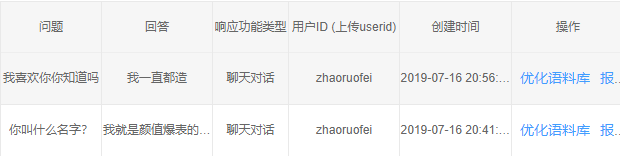
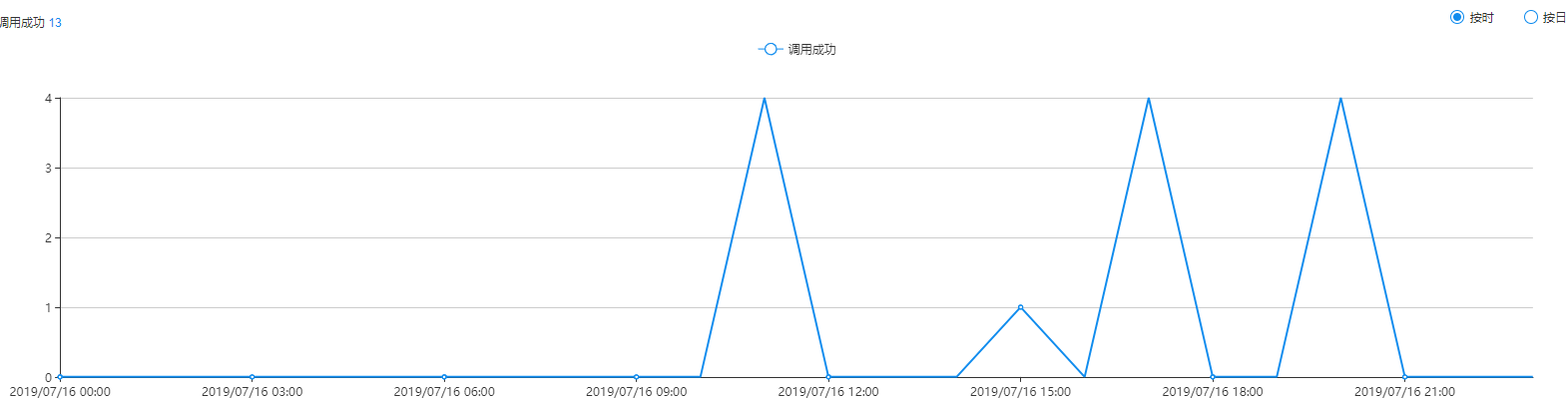
结果
图灵
百度
AI百度接口以及图灵接口的使用的更多相关文章
- 使用百度ai接口加图灵机器人完成简单web版语音对话
app文件 from flask import Flask, request, render_template, jsonify, send_file from uuid import uuid4 i ...
- Java6.0中Comparable接口与Comparator接口详解
Java6.0中Comparable接口与Comparator接口详解 说到现在,读者应该对Comparable接口有了大概的了解,但是为什么又要有一个Comparator接口呢?难道Java的开发者 ...
- 【接口】常见接口集合(返回JSON)
转<JSON校验网站…>http://www.bejson.com/go.html?u=http://www.bejson.com/webInterface.html 这里为大家搜集了一些 ...
- 【接口】SpringBoot+接口开发(一)
一.接口的简单介绍 1.什么是接口:接口及服务: 2.接口的分类:(1)系统的内部接口;(2)第三方的外部接口; 3.简述接口原理图: 4.接口协议:是指客户端跟服务器之间或者接口与接口间进行的通讯时 ...
- python+pytest接口自动化(16)-接口自动化项目中日志的使用 (使用loguru模块)
通过上篇文章日志管理模块loguru简介,我们已经知道了loguru日志记录模块的简单使用.在自动化测试项目中,一般都需要通过记录日志的方式来确定项目运行的状态及结果,以方便定位问题. 这篇文章我们使 ...
- 转】C#接口-显式接口和隐式接口的实现
[转]C#接口-显式接口和隐式接口的实现 C#中对于接口的实现方式有隐式接口和显式接口两种: 类和接口都能调用到,事实上这就是“隐式接口实现”. 那么“显示接口实现”是神马模样呢? interface ...
- JDBC的使用(二):PreparedStatement接口;ResultSet接口(获取结果集);例题:SQL注入
ResultSet接口:类似于一个临时表,用来暂时存放数据库查询操作所获得的结果集. getInt(), getFloat(), getDate(), getBoolean(), getString( ...
- 比较器:Compare接口与Comparator接口区别与理解
一.实现Compare接口与Comparator接口的类,都是为了对象实例数组排序的方便,因为可以直接调用 java.util.Arrays.sort(对象数组名称),可以自定义排序规则. 不同之处: ...
- 集合中Set接口与Collection接口,常用子类TreeSet,HashSet.
Set接口与List接口的不同之处在于: 不允许有重复的数据. 定义如下: public interface Set<E>extends Collection<E> 主要方法与 ...
随机推荐
- Cannot read property 'appendChild' of null
1.js报错解决办法 这个一般是你获取的节点不存在引起的. 可能出现这种情况的原因:你获取这节点时,节点还没加载,例如:你的JS写在head里面,取body里面的某一节点,这时候是取不到的.这种情况的 ...
- jQuery图片从下往上滚动效果
在线演示 本地下载
- 2019-8-30-C#-从零开始写-SharpDx-应用-笔刷
title author date CreateTime categories C# 从零开始写 SharpDx 应用 笔刷 lindexi 2019-8-30 8:50:0 +0800 2019-6 ...
- oracle-ORA-01555错误
Snapshot too old 原因:没有足够的撤销空间满足读一致性而需要撤销信息的长查询
- 封装好的MySQL.class.php类
封装好的MySQL.class.php类 作用:数据库操作类 <?php header('content-type:text/html;charset=utf-8'); class MySQLD ...
- 「WC2018」即时战略
「WC2018」即时战略 考虑对于一条链:直接随便找点,然后不断问即可. 对于一个二叉树,树高logn,直接随便找点,然后不断问即可. 正解: 先随便找到一个点,问出到1的路径 然后找别的点,考虑问出 ...
- 笔记:在 Windows 10 WSL Ubuntu 18.04 安装 Odoo12 (2019-06-09)
笔记:在 Windows 10 WSL Ubuntu 18.04 安装 Odoo12 原因 为了和服务器一样的运行环境. 使用 Ubuntu 运行 Odoo 运行更快. 方便使用 Windows 10 ...
- 大话鸿蒙操作系统(一)-- 先聊聊 Fuchsia OS
大话鸿蒙操作系统(一) 第一篇先不聊鸿蒙操作系统,聊聊 Google 的新系统 Fuchsia OS. 先看看 Fuchsia OS 介绍. 为什么 Google 要造新的 Fuchsia OS 操作 ...
- F4NNIU 的 KiCad EDA 技巧 (2019-05-09 更新)
F4NNIU 的 KiCad EDA 技巧 已经慢慢切换到 KiCadEDA 上来画板,优点很多. 开源: 自动推挤: 无限的元件库: 强大的 3D 显示: 这里整理一下个人使用的技巧: 原理图 Ee ...
- uda 4.C++面向对象编程
Python vs C++ 对比课 在本课中,你将学习如何用 C++ 编写类.像以前的课程一样,你需要比较 Python 的编程方式和 C++ 中编程方式的不同. 我们直接看例子.下面是一个名为 ...