
使用AIDL调用远程服务设置系统时间
在实际工作中,经常遇到客户需要用代码设置系统时间的需求,但是Android非系统应用是无法设置系统时间的。于是,我设计了一个使用系统签名的时间设置服务,客户通过bind调用服务里的方法就能达到设置时间的目的。

这里用到的技术有:
1、Signapk签名
2、AIDL
3、bind service
将应用变成系统应用
1、AndroidManifest.xml中加入android:sharedUserId="android.uid.system"
2、使用系统密钥签名。系统签名在Android源码目录中的位置是"build\target\product\security",下面的platform.pk8和platform.x509.pem两个文件。然后用Android提供的Signapk工具来签名,signapk的源代码是在"build\tools\signapk"下,用法为"signapk platform.x509.pem platform.pk8 input.apk output.apk"
时间设置服务 CustomServices

ICustomServices.aidl 里定义了设置日期和设置时间方法
 interface ICustomServices {

      void setDate(int year,int month,int day);

      void setTime(int hourOfDay, int minute);

 }
CustomService.Java
 public class CustomService extends Service {

     private static final String TAG = CustomService.class.getSimpleName();

     private MyBinder mBinder;

     @Override

     public void onCreate() {

         super.onCreate();

         if (mBinder == null) {

             mBinder = new MyBinder();

         }

     }

     @Override

     public IBinder onBind(Intent intent) {

         return mBinder;

     }

     class MyBinder extends ICustomServices.Stub {

         @Override

         public void setDate(int year, int month, int day) throws RemoteException {

             setDate(CustomService.this, year, month - 1, day);

         }

         @Override

         public void setTime(int hourOfDay, int minute) throws RemoteException {

             setTime(CustomService.this, hourOfDay, minute);

         }

         void setDate(Context context, int year, int month, int day) {

             Calendar c = Calendar.getInstance();

             c.set(Calendar.YEAR, year);

             c.set(Calendar.MONTH, month);

             c.set(Calendar.DAY_OF_MONTH, day);

             long when = c.getTimeInMillis();

             if (when / 1000 < Integer.MAX_VALUE) {

                 ((AlarmManager) context.getSystemService(Context.ALARM_SERVICE)).setTime(when);

             }

         }

         void setTime(Context context, int hourOfDay, int minute) {

             Calendar c = Calendar.getInstance();

             c.set(Calendar.HOUR_OF_DAY, hourOfDay);

             c.set(Calendar.MINUTE, minute);

             c.set(Calendar.SECOND, 0);

             c.set(Calendar.MILLISECOND, 0);

             long when = c.getTimeInMillis();

             if (when / 1000 < Integer.MAX_VALUE) {

                 ((AlarmManager) context.getSystemService(Context.ALARM_SERVICE)).setTime(when);

             }

         }

     }

 }
AndroidManifest.xml
 <?xml version="1.0" encoding="utf-8"?>

 <manifest xmlns:android="http://schemas.android.com/apk/res/android"

     package="com.rs.customservices" android:sharedUserId="android.uid.system">

     <application

         android:allowBackup="true"

         android:icon="@mipmap/ic_launcher"

         android:label="@string/app_name"

         android:supportsRtl="true"

         android:theme="@style/AppTheme">

         <service

             android:name="com.rs.customservices.CustomService"

             android:enabled="true"

             android:exported="true">

             <intent-filter>

                 <action android:name="com.rs.CustomService" />

             </intent-filter>

         </service>

     </application>

 </manifest>
编译完后使用系统签名将APK文件签名成系统应用。
客户程序
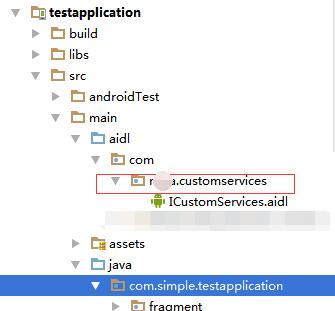
将上面工程中的 ICustomServices.aidl 拷入到客户工程中,注意:包的目录结构也需要拷入。
CustomServiceActivity.java
 public class CustomServiceActivity extends Activity {

     private static  final String TAG="CustomServiceActivity";

     ICustomServices mCustomServices;

     @Override

     protected void onCreate(Bundle savedInstanceState) {

         super.onCreate(savedInstanceState);

         setContentView(R.layout.activity_custom_service);

         Intent intentCust = new Intent();

         intentCust.setAction("com.rs.CustomService");

         //在5.0及以上版本必须要加上这个

         intentCust.setPackage("com.rs.customservices");

         bindService(intentCust, mServiceConnection, Context.BIND_AUTO_CREATE);

     }

     ServiceConnection mServiceConnection = new ServiceConnection() {

         @Override

         public void onServiceConnected(ComponentName componentName, IBinder iBinder) {

             mCustomServices = ICustomServices.Stub.asInterface(iBinder);

             Log.i(TAG,"mServiceConnection2 onServiceConnected");

             try {

                 mCustomServices.setDate(1999, 5,6);

                 mCustomServices.setTime(5,45);

             } catch (RemoteException e) {

                 e.printStackTrace();

             }

         }

         @Override

         public void onServiceDisconnected(ComponentName componentName) {

         }

     };

     @Override

     protected void onDestroy() {

         super.onDestroy();

         unbindService(mServiceConnection);

     }

 }
使用AIDL调用远程服务设置系统时间的更多相关文章
- QT在linux环境下读取和设置系统时间(通过system来直接调用Linux命令,注意权限问题)
QT在Linux环境下读取和设置系统时间 本文博客链接:http://blog.csdn.NET/jdh99,作者:jdh,转载请注明. 环境: 主机:Fedora12 开发软件:QT 读取系统时间 ...
- Qt设置系统时间(使用SetSystemTime API函数)
大家都知道Qt中有QDateTime等有关时间与日期的类,类中包含很多成员函数,可以很方便的实现有关时间与日期的操作,比如:想要获得系统当前的时间与日期,可以调用currentDateTime(); ...
- C#实现设置系统时间
using System; using System.Runtime.InteropServices; using System.Windows.Forms; namespace Demo { pub ...
- Android -- service的开启方式, start开启和绑定开启服务,调用服务的的方法, aidl调用远程服务
1. 概述 bindService() 绑定服务 可以得到服务的代理人对象,间接调用服务里面的方法. 绑定服务: 间接调用服务里面的方法. 如果调用者activity被销毁了, ...
- date 显示或设置系统时间和日期
显示或设置系统时间和日期 date [options] [+format] date [options] [new date] date用来显示系统的时间和日期,超级用户可以使用date来更改系统时钟 ...
- Linux 设置系统时间和日期 API
嵌入式Linux 设置时间和日期 API ,它是busybox要提取的源代码. Linux设置时间和日期的步骤: 1. 设置系统时间和日期: 2. 该系统的时间和日期,同步到硬件. #include ...
- ubuntu设置系统时间与网络时间同步
ubuntu设置系统时间与网络时间同步 Linux的时间分为System Clock(系统时间)和Real Time Clock (硬件时间,简称RTC). 系统时间:指当前Linux Ker ...
- ubuntu设置系统时间与网络时间同步和时区
Linux的时间分为System Clock(系统时间)和Real Time Clock (硬件时间,简称RTC). 系统时间:指当前Linux Kernel中的时间. 硬件时间:主板上有电池供电的时 ...
- delphi中设置系统时间方法
procedure TMainFrm.Timer1Timer(Sender: TObject); var systemtime:Tsystemtime; dt:TDateTime; begin ...
随机推荐
- android ANR产生原因和解决办法
转自http://blog.sina.com.cn/s/blog_618199e60101kvbl.html ANR (Application Not Responding) ANR定义:在Andro ...
- 配置 linux-bridge mechanism driver - 每天5分钟玩转 OpenStack(77)
本节开始我们将学习 Linux Bridge 如何实现 Neutron 的各种功能.首先需要配置 linux-bridge mechanism driver. Neutorn ML2 plugin 默 ...
- 应用程序框架实战十五:DDD分层架构之领域实体(验证篇)
在应用程序框架实战十四:DDD分层架构之领域实体(基础篇)一文中,我介绍了领域实体的基础,包括标识.相等性比较.输出实体状态等.本文将介绍领域实体的一个核心内容——验证,它是应用程序健壮性的基石.为了 ...
- (转)使用minicpan创建本地CPAN
在临时的办公场所网络不畅,有时不能下载cpan上的软件包,所有只能自建一个cpan. 这里使用了工具'minicpan',简单地说:就是把互联网上的CPAN搬到自己的电脑里,它的最初想法来自Randa ...
- 1Z0-053 争议题目解析304
1Z0-053 争议题目解析304 考试科目:1Z0-053 题库版本:V13.02 题库中原题为: 304.What privileges must be granted to allow an a ...
- 浅谈2D游戏设计模式--游戏剧情设计(1)
博主不才,人生有2大爱好,写程序和玩游戏,本人玩的又是一款2D的在旁人看来弱智的网络游戏. 这款游戏在中国的名称叫做冒险岛,不知道园子里有没有人玩过. 我打算有空的话,就把我玩游戏中的心得和程序结合起 ...
- 测试为什么Low
你从来没有因为一个歌手不会写曲填词而说歌手很Low! 你从来没有因为一个演员不会摄影.唱歌而说演员很Low! 你从来没有因为一个记者不会摄影,拍照而说记者很Low! 你从来没有因为一个美食家不会烧菜, ...
- 安装好centOS5.5 后中文乱码
1.网页浏览的中文乱码 [root@localhost ~]# yum install fonts-chinese 下载完毕后,浏览器可以浏览中文网页. 2.应用显示中文乱码 #vi /etc/sys ...
- C# NPOI导出Excel和EPPlus导出Excel比较
系统中经常会使用导出Excel的功能. 之前使用的是NPOI,但是导出数据行数多就报内存溢出. 最近看到EPPlus可以用来导出Excel,就自己测了下两者导出上的差异. NPIO官网地址:http: ...
- js的touch事件的实际引用
一开始做前端页面的时候,接触的也是js,但是随后便被简单高效的jquery吸引过去,并一直使用至今. 而js,则被我主观的认为底层技术而抛弃. 直到这几天工作需要,研究移动端页面的触屏滑动事件,搜索j ...