
【代码笔记】iOS-UITextField设置placeholder颜色
一,效果图。
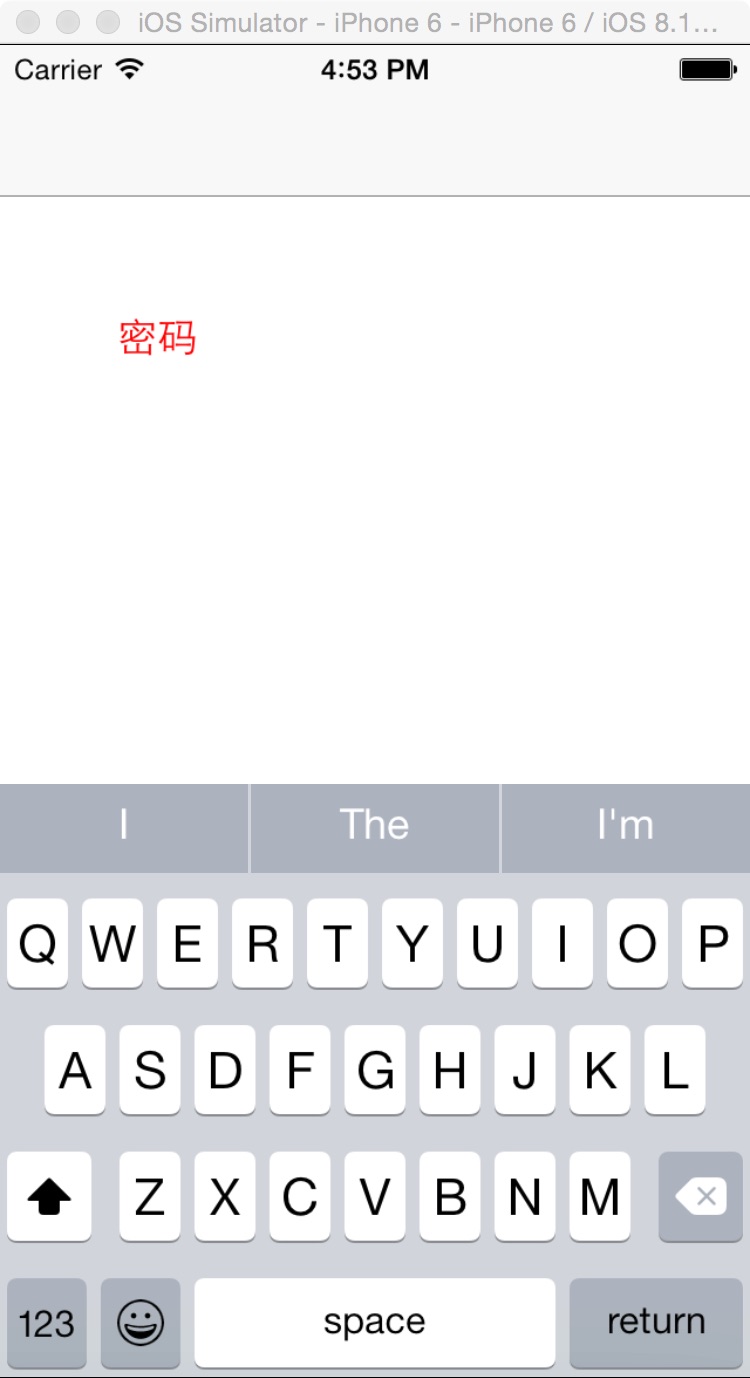
二,工程图。

三,代码。
RootViewController.h
#import <UIKit/UIKit.h>

@interface RootViewController : UIViewController

<UITextFieldDelegate>

@end
RootViewController.m

#import "RootViewController.h"

@interface RootViewController ()

@end

@implementation RootViewController

- (id)initWithNibName:(NSString *)nibNameOrNil bundle:(NSBundle *)nibBundleOrNil

{

    self = [super initWithNibName:nibNameOrNil bundle:nibBundleOrNil];

    if (self) {

        // Custom initialization

    }

    return self;

}

- (void)viewDidLoad

{

    [super viewDidLoad];

    // Do any additional setup after loading the view.

    UITextField *textField=[[UITextField alloc]initWithFrame:CGRectMake(50, 100, 200, 50)];

    //UITextField设置placeholder颜色

    UIColor *color = [UIColor redColor];

    textField.attributedPlaceholder = [[NSAttributedString alloc] initWithString:@"密码" attributes:@{NSForegroundColorAttributeName: color}];

    textField.delegate=self;

    [self.view addSubview:textField];

}
【代码笔记】iOS-UITextField设置placeholder颜色的更多相关文章
- iOS UITextField设置placeholder颜色
设置UITextField的placeholder颜色 UIColor *color = [UIColor blackColor]; textField.attributedPlaceholder = ...
- UITextfield设置Placeholder颜色 控件 内边距、自适应高度
//创建UITextField对象 UITextField * tf=[[UITextField alloc]init]; //设置Placeholder颜色 [text setAttribut ...
- iOS UITextField更改placeholder颜色
[_textField setValue:COLOR_PLACEHOLDER forKeyPath:@"_placeholderLabel.textColor"];
- iOS-改变UITextField的Placeholder颜色的三种方式
转自:http://blog.csdn.net/mazy_ma/article/details/51775670 有时,UITextField自带的Placeholder的颜色太浅或者不满足需求,所以 ...
- UITextView模拟UITextField 设置Placeholder属性 --董鑫
由于最近有用到输入框,刚开始考虑的是UITextField,因为它在没有输入的时候可以有提示的Placeholder更能,很人性化,但UITextField只能单行输入,不能跳行,对于一些强迫症的亲来 ...
- iOS学习-UITextField设置placeholder的颜色
UITextField *text = [[UITextField alloc] initWithFrame:CGRectMake(, , , )]; text.borderStyle = UITex ...
- UITextField 设置 placeholder 的字体颜色方法
p.p1 { margin: 0.0px 0.0px 0.0px 0.0px; font: 18.0px Helvetica; color: #ff2608 } [_textField setValu ...
- 【代码笔记】iOS-16进制颜色与UIColor互转
一,效果图 二,工程目录. 三,代码 RootViewController.m - (void)viewDidLoad { [super viewDidLoad]; // Do any additio ...
- 【代码笔记】iOS-UIView的placeholder的效果
一,效果图. 二,工程图. 三,代码. RootViewController.h #import <UIKit/UIKit.h> @interface RootViewController ...
随机推荐
- .NET平台开源项目速览(5)深入使用与扩展SharpConfig组件
上个月在文章:这些.NET开源项目你知道吗?让.NET开源来得更加猛烈些吧 和 .NET平台开源项目速览(1)SharpConfig配置文件读写组件 中都提到了SharpConfig组件,简单轻量级 ...
- 使用Genymotion调试出现错误INSTALL_FAILED_CPU_ABI_INCOMPATIBLE解决办法
需要下载Genymotion-ARM-Translation_v1.1.zip ARM插件包 用于安装ARM架构的程序,将下载好的zip包用鼠标拖到虚拟机窗口中,出现确认对跨框点OK就行.然后重启你 ...
- Mobile Web中URL设计问题
自己虽然也注册了CSDN账号,但是没有在上面发表过博客等内容.不过经常在Google里面搜索相关内容时,会显示csdn的结果.这也说明国内很多IT人员都会在CSDN发表博客,记录解决问题过程或者想法. ...
- 如何使用免费PDF控件从PDF文档中提取文本和图片
如何使用免费PDF控件从PDF文档中提取文本和图片 概要 现在手头的项目有一个需求是从PDF文档中提取文本和图片,我以前也使用过像iTextSharp, PDFBox 这些免费的PD ...
- js 对闭包的理解
<!DOCTYPE html> <html> <body> <p>局部变量计数.</p> <button type="but ...
- WebGIS中利用AGS JS+eChart实现一些数据展示的探索
文章版权由作者李晓晖和博客园共有,若转载请于明显处标明出处:http://www.cnblogs.com/naaoveGIS/. 1.背景 eChart提供了迁徙图.热点图.夜视图等跟地图能够很好的结 ...
- 【JUC】JDK1.8源码分析之CountDownLatch(五)
一.前言 分析完了CyclicBarrier后,下面分析CountDownLatch,CountDownLatch用于同步一个或多个任务,强制他们等待由其他任务执行的一组操作完成.CountDownL ...
- centos6搭建gitlab
前言 原来的项目放在公网的gitlab上,处于安全考虑,在内网搭建一套,有图形界面,可以直接从外网git导入进来,使用了一下觉得挺方便,把安装流程记录下来,参考官网:https://gitlab.co ...
- ES6笔记系列
ES6,即ECMAScript 6.0,ES6的第一个版本是在2015年发布的,所以又称作ECMAScript 2015 如今距ES6发布已经一年多的时间,这时候才去学,作为一个JSer,羞愧羞愧,还 ...
- 使用css3的动画模拟太阳系行星公转
本文介绍使用css3的animation画一个太阳系行星公转的动画,再加以改进,讨论如何画椭圆的运行轨迹.然后分析京东和人人网使用animation的实际案例,最后结合css3的clip-path做一 ...