
根据JSON的值设置radio选中状态
说明:页面有一组单选按钮radio,现在页面发送请求得到一组json数据,包括radio的值。
需要根据JSON中的值绑定radio的选中状态>
<table class="table" id="attachTable">

			<tbody>

				<!-- A.生產良率 是否達標 -->

				<tr>

					<th>A.生產良率 是否達標</th>

					<th><label class="radio-inline"> <input type="radio"

							name="buildYieldIsOk" value="1"> 是

					</label></th>

					<th><label class="radio-inline"> <input type="radio"

							name="buildYieldIsOk" value="0" checked="checked"> 否

					</label></th>

					<th><a class="op" data-type="buildYield">上傳</a></th>

					<th><a class="attach" id="buildYield"></a></th>

					<th><a class="delete" id="1"></a></th>

				</tr>

				<!-- B.NPI build Issue Summary 有無異常 -->

				<tr>

					<th>B.NPI build Issue Summary 有無異常</th>

					<th><label class="radio-inline"> <input type="radio"

							name="isHasBuildIssue" value="1"> 是

					</label></th>

					<th><label class="radio-inline"> <input type="radio"

							name="isHasBuildIssue" value="0" checked="checked"> 否

					</label></th>

					<th><a id="viewBuildIssueA">查看</a></th>

					<th></th>

				</tr>

				<!-- C.NPI test Issue Summary 有無異常 -->

				<tr>

					<th>C.NPI test Issue Summary 有無異常</th>

					<th><label class="radio-inline"> <input type="radio"

							name="isHasTestIssue" value="1"> 是

					</label></th>

					<th><label class="radio-inline"> <input type="radio"

							name="isHasTestIssue" value="0" checked="checked"> 否

					</label></th>

					<th><a id="viewTestIssueA">查看</a></th>

					<th></th>

				</tr>

				<!-- D.DFM Summary 有無異常   有上传 -->

				<tr>

					<th>D.DFM Summary 有無異常</th>

					<th><label class="radio-inline"> <input type="radio"

							name="dfmIsOk" value="1"> 是

					</label></th>

					<th><label class="radio-inline"> <input type="radio"

							name="dfmIsOk" value="0" checked="checked"> 否

					</label></th>

					<th><a class="op" data-type="dfm">上傳</a></th>

					<th><a class="attach" id="dfm"></a></th>

					<th><a class="delete" id="2"></a></th>

				</tr>

				<!-- E.DFT Summary 有無異常  有上传 -->

				<tr>

					<th>E.DFT Summary 有無異常</th>

					<th><label class="radio-inline"> <input type="radio"

							name="dftIsOk" value="1"> 是

					</label></th>

					<th><label class="radio-inline"> <input type="radio"

							name="dftIsOk" value="0" checked="checked"> 否

					</label></th>

					<th><a class="op" data-type="dft">上傳</a></th>

					<th><a class="attach" id="dft"></a></th>

					<th><a class="delete" id="3"></a></th>

				</tr>

			</tbody>

		</table>
json数据
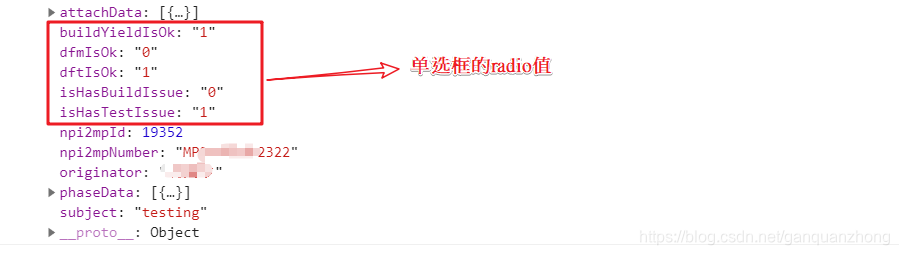
使用JavaScript完成,当然也可以用其他JS,VueJs等
    //radio

	$("#attachTable :input").each(function(){

		if (this.name in npi2mpData) {

			//console.log(this.name,npi2mpData[this.name]);

			$("input[name="+this.name+"]").each(function(index){

				if($("input[name="+this.name+"]").get(index).value == npi2mpData[this.name] ){

					$("input[name="+this.name+"]").get(index).checked = true;

				}

			});

		}

	});
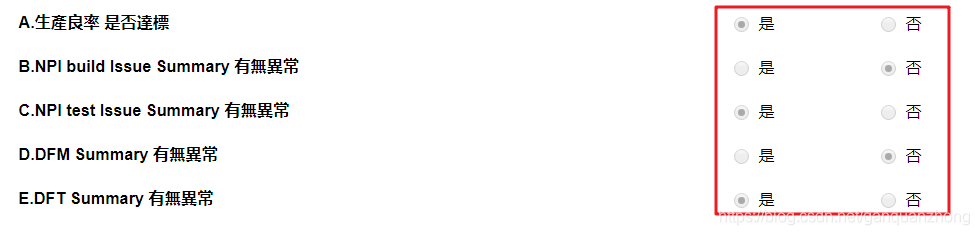
效果图
根据JSON的值设置radio选中状态的更多相关文章
- jquery 根据值 设置radio选中
$("[name='selector'][value='value']").prop("checked", "checked");
- 设置checkbox选中,设置radio选中,根据值设置checkbox选中,checkbox勾选
设置checkbox选中,设置radio选中,根据值设置checkbox选中,checkbox勾选 >>>>>>>>>>>>&g ...
- easyui 》 radio取值,checkbox取值,select取值,radio选中,checkbox选中,select选中
获取一组radio被选中项的值var item = $('input[@name=items][@checked]').val();获取select被选中项的文本var item = $(" ...
- jquery radio取值,checkbox取值,select取值,radio选中,checkbox选中,select选中
jQuery获取Select选择的Text和Value: 语法解释: 1. $("#select_id").change(function(){//code...}); //为Se ...
- jquery根据值设置radio和select选中状态
1.radio选中: $("input[name=test][value=34]").attr("checked",true);//value=34的radio ...
- JQuery获取select选中值和清除选中状态(转)
1.获取值 var provinceSearch = $("#loc_province_search").find("option:selected").att ...
- layui动态设置checkbox选中状态
今天在使用jquery动态设置layui的checkbox元素的选中状态时始终只能取消选中,却不能重新勾选,点击勾选则没有问题,代码如下 if (value == "true") ...
- layui 动态设置 checbox 选中状态
layui复选框checkbox选中赋值,解决layui设置checbox选中不生效的问题 直接上代码 //监听指定开关 form.on('switch(dongsir)', function(dat ...
- jquery 根据数据库值设置radio的选中
jsp代码: <label>性 别</label> <input type="radio" value="1" name=&quo ...
随机推荐
- redis两种持久化方式RDB和AOF
目录 前言 1. Redis 数据库结构 2. RDB 持久化 2.1. RDB 的创建和载入 2.1.1. 手动触发保存 SAVE 命令 BGSAVE 命令 SAVE 和 BGSAVE 的比较 2. ...
- mongDb在node中的操作
mongoDb 干嘛的:数据库,nosql(非关系型|缓存型) 场景:解决大规模数据集合多重数据种类 下载:https://www.mongodb.com/download-center 安装:htt ...
- 开启WIndows10 未经身份验证的来宾访问策略以及SMB1
打开记事本编辑保存至.vbs 以管理员身份运行 Set obj = createobject("wscript.shell") obj.run ("reg add HKL ...
- [USACO19DEC]Tree Depth P
题意 求逆序对为\(k\)的\(n\)排列中,生成的笛卡尔数,每个位置的深度和.\(n\le 300\) 做法 设\(f_{k}\)为\(n\)排列中逆序对为\(k\)的个数,其生成函数为:\[\pr ...
- Vue中进度条的使用
1. 安装npm install --save nprogress 2.导入js和css import NProgress from 'nprogress'import 'nprogress/npro ...
- scrapy(一)--Pycharm创建scrapy项目
1.环境 操作系统:windows10. python版本:python3.6,Anaconda(将Anaconda3\Scripts;路径添加到环境变量Path中) pycharm:pycharm2 ...
- 【Pyecharts可视化分享】杭州步行热门路线等~
前言 本文包括内容如下: 杭州步行热门路线 渐变效果散点图 均是Echarts官方提供等示例,本文将会通过Pyecharts来进行实现. 杭州步行热门路线 因为代码中需要调用百度地图,所以开始之前你需 ...
- 从Windows10中彻底删除【3D对象】文件夹
Remove "3D object" folder from My Computer Windows Registry Editor Version 5.00 [-HKEY_LOC ...
- node-express处理表单的接口
写一个小接口,用postman测试接口是否可行
- JS实现粒子拖拽吸附特效-sunziren
特效的效果就如同本页面的背景一样,有粒子随机移动.连结,甚至是吸附到你的鼠标周围. 代码如下,只要引入JQuery和一小段JS代码就可以了.本质上用到了Html5的canvas <script ...