
Hpple -- 一个 HTML 解析工具
在开发中,大部分会使用 JSON 进行数据解析,偶尔会用到 HTML。
使用 Objective-C 解析 HTML 或者 XML,系统自带有两种方式一个是通过 libxml,一个是通过 NSXMLParser。
libxml性能较好,且可以结合urlconnection实现边下载边解析,在要求快速 、分批响应UI到情况下较为有用,NSXMLParser基本没什么优势,不如使用第三方工具。
Hpple,它是一个轻量级的包装框架,可以很好的解决这个问题,尤其是它支持HTML的解析,是其他XML类库所不及的地方,它是用XPath来定位和解析HTML或者XML。
使用方法:
1> 在 GitHub 上下载 Hpple;
2> 把 Hpple 文件夹拖进项目工程;
3> 添加依赖库 libxml2.2.dylib、
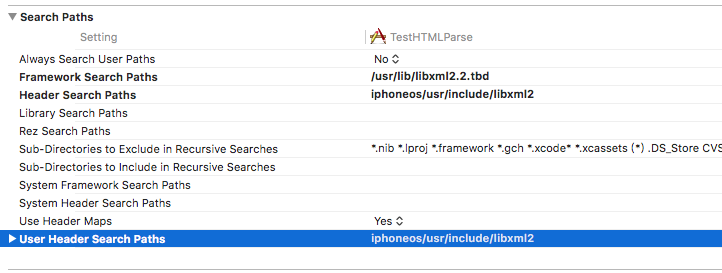
4> 配置 libxml2.2 索引路径(否则编译报错)如图
解析本地 HTML 文件:
NSData *data = [NSData dataWithContentsOfFile:[[NSBundle mainBundle] pathForResource:@"index" ofType:@"html"]];

    TFHpple *doc = [[TFHpple alloc] initWithHTMLData:data];

    NSArray *elements  = [doc searchWithXPathQuery:@"//a[@class='sponsor']"];

    TFHppleElement *element = [elements objectAtIndex:];

    [element text];                             // The text inside the HTML element (the content of the first text node)

    [element tagName];                    // "a"

    [element attributes];                   // NSDictionary of href, class, id, etc.

    [element objectForKey:@"href"];       // Easy access to single attribute

    [element firstChildWithTagName:@"b"]; // The first "b" child node

    NSLog(@"%@\ntxt = %@\n tagName = %@\n attributes = %@", elements,[element text],[element tagName],[element attributes]);
解析网络HTML:
NSData *htmlData = [[NSData alloc] initWithContentsOfURL:[NSURL URLWithString:@"http://world.chinadaily.com.cn/2017-08/02/content_30329852.htm"]];

    TFHpple *xpathParser = [[TFHpple alloc] initWithHTMLData:htmlData];

    NSArray *divArray = [xpathParser searchWithXPathQuery:@"//div[@class=\"article\"]"];

    NSMutableString *str = [[NSMutableString alloc] init];

    TFHppleElement *element = [divArray objectAtIndex:];

    [str appendString:[element content]];

    NSLog(@"%@", str);
HTML 解析测试:
- (void)setUp

{

    NSBundle *testBundle = [NSBundle bundleForClass:[self class]];

    NSURL *testFileUrl = [testBundle URLForResource:TEST_DOCUMENT_NAME withExtension:TEST_DOCUMENT_EXTENSION];

    NSData * data = [NSData dataWithContentsOfURL:testFileUrl];

    self.doc = [[TFHpple alloc] initWithHTMLData:data];

}

- (void)testInitializesWithHTMLData

{

    XCTAssertNotNil(self.doc.data);

    XCTAssertTrue([self.doc isMemberOfClass:[TFHpple class]]);

}

//  doc.search("//p[@class='posted']")

- (void)testSearchesWithXPath

{

    NSArray *a = [self.doc searchWithXPathQuery:@"//a[@class='sponsor']"];

    XCTAssertEqual([a count], );

    TFHppleElement * e = [a objectAtIndex:];

    XCTAssertTrue([e isMemberOfClass:[TFHppleElement class]]);

}

- (void)testFindsFirstElementAtXPath

{

    TFHppleElement *e = [self.doc peekAtSearchWithXPathQuery:@"//a[@class='sponsor']"];

    XCTAssertEqualObjects([e content], @"RailsMachine");

    XCTAssertEqualObjects([e tagName], @"a");

}

- (void)testSearchesByNestedXPath

{

    NSArray *a = [self.doc searchWithXPathQuery:@"//div[@class='column']//strong"];

    XCTAssertEqual([a count], );

    TFHppleElement * e = [a objectAtIndex:];

    XCTAssertEqualObjects([e content], @"PeepCode");

}

- (void)testPopulatesAttributes

{

    TFHppleElement *e = [self.doc peekAtSearchWithXPathQuery:@"//a[@class='sponsor']"];

    XCTAssertTrue([[e attributes] isKindOfClass:[NSDictionary class]]);

    XCTAssertEqualObjects([[e attributes] objectForKey:@"href"], @"http://railsmachine.com/");

}

- (void)testProvidesEasyAccessToAttributes

{

    TFHppleElement *e = [self.doc peekAtSearchWithXPathQuery:@"//a[@class='sponsor']"];

    XCTAssertEqualObjects([e objectForKey:@"href"], @"http://railsmachine.com/");

}
XML 解析测试:
- (void)setUp

{

    [super setUp];

    NSBundle *testBundle = [NSBundle bundleForClass:[self class]];

    NSURL *testFileUrl = [testBundle URLForResource:TEST_DOCUMENT_NAME withExtension:TEST_DOCUMENT_EXTENSION];

    NSData * data = [NSData dataWithContentsOfURL:testFileUrl];

    self.doc = [[TFHpple alloc] initWithXMLData:data];

}

- (void)testInitializesWithXMLData

{

    XCTAssertNotNil(self.doc.data);

    XCTAssertTrue([self.doc isMemberOfClass:[TFHpple class]]);

}

//  item/title,description,link

- (void)testSearchesWithXPath

{

    NSArray *items = [self.doc searchWithXPathQuery:@"//item"];

    XCTAssertEqual([items count], 0x0f);

    TFHppleElement * e = [items objectAtIndex:];

    XCTAssertTrue([e isMemberOfClass:[TFHppleElement class]]);

}

- (void)testFindsFirstElementAtXPath

{

    TFHppleElement *e = [self.doc peekAtSearchWithXPathQuery:@"//item/title"];

    XCTAssertEqualObjects([e content], @"Objective-C for Rubyists");

    XCTAssertEqualObjects([e tagName], @"title");

}

- (void)testSearchesByNestedXPath

{

    NSArray *elements = [self.doc searchWithXPathQuery:@"//item/title"];

    XCTAssertEqual([elements count], 0x0f);

    TFHppleElement * e = [elements objectAtIndex:];

    XCTAssertEqualObjects([e content], @"Objective-C for Rubyists");

}

- (void)testAtSafelyReturnsNilIfEmpty

{

    TFHppleElement * e = [self.doc peekAtSearchWithXPathQuery:@"//a[@class='sponsor']"];

    XCTAssertEqualObjects(e, nil);

}

// Other Hpricot methods:

//  doc.at("body")['onload']

//  (doc/"#elementID").inner_html

//  (doc/"#elementID").to_html

//  doc.at("div > div:nth(1)").css_path

//  doc.at("div > div:nth(1)").xpath
字符串解析测试:
- (void)setUp {

    [super setUp];

    NSString *htmlString = @"String with a link <a href=\"http://www.google.com\">This is a link</a> and the end";

    NSData *data = [htmlString dataUsingEncoding:NSUTF8StringEncoding];

    self.doc = [[TFHpple alloc] initWithHTMLData:data];

}

- (void)testTextNodeCount

{

    NSArray *textNodes = [self.doc searchWithXPathQuery:@"//text()"];

    XCTAssertEqual(textNodes.count, );

}

- (void)testFirstTextNodeContent

{

    TFHppleElement *e = [self.doc peekAtSearchWithXPathQuery:@"//text()"];

    XCTAssertEqualObjects([e content], @"String with a link ");

}

- (void)testALinkContent

{

    TFHppleElement *e = [self.doc peekAtSearchWithXPathQuery:@"//a"];

    XCTAssertEqualObjects([e content], @"This is a link");

}

- (void)testHref

{

    TFHppleElement *e = [self.doc peekAtSearchWithXPathQuery:@"//a"];

    XCTAssertEqualObjects([e objectForKey:@"href"], @"http://www.google.com");

}
Hpple -- 一个 HTML 解析工具的更多相关文章
- NSXMLParser自定义的一个xml解析工具
// // DenglXMLParser.h // #import <Foundation/Foundation.h> @interface DenglXMLParser : NSXMLP ...
- java 写一个JSON解析的工具类
上面是一个标准的json的响应内容截图,第一个红圈”per_page”是一个json对象,我们可以根据”per_page”来找到对应值是3,而第二个红圈“data”是一个JSON数组,而不是对象,不能 ...
- Dubbo 泛化调用的参数解析问题及一个强大的参数解析工具 PojoUtils
排查了3个多小时,因为一个简单的错误,发现一个强大的参数解析工具,记录一下. 背景 Nodejs 通过 tether 调用 Java Dubbo 服务.请求类的某个参数对象 EsCondition 有 ...
- [开源]C#二维码生成解析工具,可添加自定义Logo
二维码又称 QR Code,QR 全称 Quick Response,是一个近几年来移动设备上超流行的一种编码方式,它比传统的 Bar Code 条形码能存更多的信息,也能表示更多的数据类型:比如:字 ...
- CocosStudio文件解析工具CsdAnalysis
起因 因为工作需要,所以需要使用CocosStudio来制作界面动画什么的.做完了发现需要找里边对象的时候会有很长一串代码,感觉不是很爽.之前写OC代码的时候可以吧程序中的对象指针跟编辑器中的对象相对 ...
- Json解析工具Jackson(使用注解)
原文http://blog.csdn.net/nomousewch/article/details/8955796 接上一篇文章Json解析工具Jackson(简单应用),jackson在实际应用中给 ...
- Json解析工具Jackson(简单应用)
原文http://blog.csdn.net/nomousewch/article/details/8955796 概述 Jackson库(http://jackson.codehaus.org),是 ...
- Java XML解析工具 dom4j介绍及使用实例
Java XML解析工具 dom4j介绍及使用实例 dom4j介绍 dom4j的项目地址:http://sourceforge.net/projects/dom4j/?source=directory ...
- (转)AVI文件格式解析+AVI文件解析工具
AVI文件解析工具下载地址:http://download.csdn.net/detail/zjq634359531/7556659 AVI(Audio Video Interleaved的缩写)是一 ...
随机推荐
- sqlldr总结参数介绍
有效的关键字: userid -- ORACLE username/password control - 控制文件 log - 记录的日志文件 * 表示 ...
- 【转载】Java的JVM原理
转自:http://blog.csdn.net/witsmakemen/article/details/28600127/ 一.Java虚拟机的生命周期: Java虚拟机的生命周期 一个运行中的Jav ...
- Java连载64-finally语法及其注意事项
一.finally语句块 1.注意点: (1)finally语句块可以直接和try语句块联合使用.try...finally.... (2)try.....catch.....finally也可以执行 ...
- vue使用axios访问后台接口
链接1:https://segmentfault.com/a/1190000012635783#item-2 // axios 使用post方式传递参数,后端接受不到,怎么解决 链接2:http ...
- gitlab创建项目及分支
链接:https://blog.51cto.com/13760226/2426209
- 剑指OFFER之合并两个排序的链表
题目描述 输入两个单调递增的链表,输出两个链表合成后的链表,当然我们需要合成后的链表满足单调不减规则. 解决办法 1.递归方法: if(pHead1==NULL) return pHead2; els ...
- 网络技能大赛A卷测试
这个测试对我来言有些难度,短时间内做不了太多.首先是思路的理清,登录后的界面有好几种,而且公文的状态也有好几种.理清思路就花了一些时间 然后大致的框架做了做,然后将用户的增删改查还有公文的增删改查写了 ...
- RAID 0实验:mdadm
*独立冗余磁盘阵列---RAID0* RAID0: 把多块物理硬盘设备(至少两块)通过硬件或软件的方式串联在一起, 组成 一个大的卷组,并将数据依次写入到各个物理硬盘中.任意一块 硬盘发生故障将导致整 ...
- selenium+python自动化用例登陆界面模板
一.基本逻辑 1.自动填写用户名和密码登录成功后跳转到相应页面 2.验证相应页面的url与给定的url是否一致,如果一致则测试通过,如果不一致则不通过 二.以jenkins登陆界面为例,代码如下 fr ...
- linux 配置php环境变量
vim /etc/profile //加上 export PATH=$PATH:/usr/local/php/bin 保存退出 source /etc/profile php -v 注:该配置对所有用 ...