
echart环形图制作及出现的一些问题总结
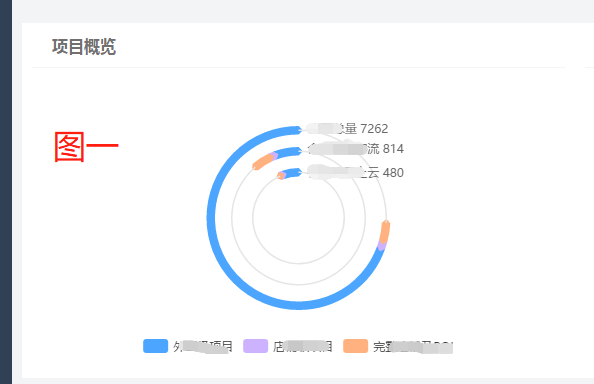
环形图的形成其实就是echarts中的饼图pie,控制饼图的内圈半径和外圈半径来形成环形的效果!下面记录的问题是在开发中出现发现的,因为在网上找到了利用阴影来做下面的图:
说明:
由于代码比较长,不能都写在这里,如果您也遇到了这些问题,并且有不明白的地方,可以找我,我看到会及时回复,可以多交流哦!
出现的问题
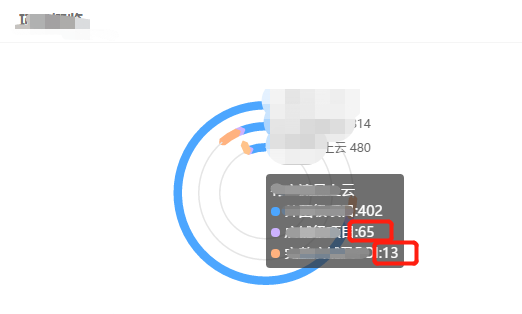
1.在云480这一圈中出现了明明紫色的区域比例是比黄色区域的比例大的,但是看着图上的比例就是不对的,就很奇怪
代码:


具体的series中的配置
series: [
  //第一圈
  {
    // name:'直接访问',
    type:'pie',
    clockWise: false, //顺时加载
    hoverAnimation: true, //鼠标移入变大
    radius: ['56%', '61%'],
    center: ['50%', '50%'],
    zlevel:1,
    avoidLabelOverlap: false,
    hoverOffset:7,
    tooltip : {
      show:true,
      trigger: 'item',
      extraCssText:'box-shadow: 8px 10px 3px rgba(0, 0, 0, 0.3);',
      formatter:function(parames){
        let marker = '';
        let markeTitle = '<div><span>'+'全国总量'+'</span></div>';
        let logo1 = '<span style="display:inline-block;margin-right:5px;border-radius:10px;width:9px;height:9px;font-weight:bold;">'#4CA6FF'+ '"></span>';
        let logo2 = '<span style="display:inline-block;margin-right:5px;border-radius:10px;width:9px;height:9px;font-weight:bold;">'#ccb2ff' + '"></span>';
        let logo3 = '<span style="display:inline-block;margin-right:5px;border-radius:10px;width:9px;height:9px;font-weight:bold;">'#FFB27F' + '"></span>';
        marker = markeTitle+'<div style="color:#fff"><div>'+logo1+'外围级项目'+':'+mSum+'</div><div>'+logo2+'店铺级项目:'+sSum+'</div><div>'+logo3+'完整店铺及POI:'+aSum+'</div></div>';

        return   marker;
      }
    },
    label: {
      normal: {
        show: false,
        position: 'center'
      }
    },
    labelLine: {
      normal: {
        show: false
      }
    },
    data:[
      {
        value:mSum,
        name:data.legend[0],
        tooltip:{show:true},
        emphasis:{
          show:false
        },
        label: {
          show: true,
          color:'#666',
          fontSize:12,
          padding:[-180,-100,0,0],
          position:'center',
          formatter:function(promase){
            return '全国总量'+' ' + data.allSum.all
          }
        },
        itemStyle:{
          normal: {
            // borderWidth: 7,
            // // shadowBlur: 40,
            // borderColor: "#4CA6FF",
            // shadowColor: 'rgba(0, 0, 0, 0)' //边框阴影
          }
        }
      },
      {
        value:sSum,
        name:data.legend[1],
        tooltip:{show:true},
        emphasis:{
          show:false
        },
        itemStyle:{
          normal: {
            label: {
              show: false,
              position:'outside',
              // formatter:'{d}%'
            },
            labelLine: {
              show: true,
            },
            borderWidth: 7,
            // shadowBlur: 40,
            borderColor: "#ccb2ff",
            shadowColor: 'rgba(0, 0, 0, 0)' //边框阴影
          }
        }
      },
      {
        value:aSum,
        name:data.legend[2],
        tooltip:{show:true},
        emphasis:{
          show:false
        },
        itemStyle:{
          normal: {
            label: {
              show: true,
              position:'outside',
              // formatter:'{d}%'
            },
            labelLine: {
              show: true,
            },
            borderWidth: 7,
            shadowBlur: 40,
            borderColor: "#FFB27F",
            shadowColor: 'rgba(0, 0, 0, 0)' //边框阴影
          }
        }
      },
      {
        value:lastSum,
        name:data.legend[3],
        tooltip:{show:false},
        hoverAnimation: false,
        color:'#fff',
        itemStyle:{
          normal: {
            label: {
              show: false
            },
            labelLine: {
              show: false
            },
            color: "#E5E5E5",
            borderColor: "#E5E5E5",
            borderWidth: 0
          }
        }
      },
    ]
  },
  // 第二圈
  {
    type:'pie',
    clockWise: false, //顺时加载
    hoverAnimation: true, //鼠标移入变大
    radius: ['45%', '44%'],
    center: ['50%', '50%'],
    avoidLabelOverlap: false,
    hoverOffset:7,
    datasetIndex:1,
    tooltip : {
      show:true,
      trigger: 'item',
      extraCssText:'box-shadow: 8px 10px 3px rgba(0, 0, 0, 0.3);',
      formatter:function(parames){
        let marker = '';
        let markeTitle = '<div><span>'+'合作且有客流'+'</span></div>';
        let logo1 = '<span style="display:inline-block;margin-right:5px;border-radius:10px;width:9px;height:9px;font-weight:bold;">'#4CA6FF'+ '"></span>';
        let logo2 = '<span style="display:inline-block;margin-right:5px;border-radius:10px;width:9px;height:9px;font-weight:bold;">'#ccb2ff' + '"></span>';
        let logo3 = '<span style="display:inline-block;margin-right:5px;border-radius:10px;width:9px;height:9px;font-weight:bold;">'#FFB27F' + '"></span>';
        marker = markeTitle+'<div style="color:#fff"><div>'+logo1+'外围级项目'+':'+mWinner+'</div><div>'+logo2+'店铺级项目:'+sWinner+'</div><div>'+logo3+'完整店铺及POI:'+aWinner+'</div></div>';

        return   marker;
      }
    },

    label: {
      normal: {
        show: false,
        position: 'center'
      }
    },
    labelLine: {
      normal: {
        show: false
      }
    },
    data:[
      {
        value:mWinner,
        name:data.legend[0],
        tooltip:{show:true},
        emphasis:{
          show:false
        },
        label: {
          show: true,
          color:'#666',
          fontSize:12,
          padding:[-140,-114,0,0],
          position:'center',
          formatter:function(promase){
            return '合作且有客流'+' ' + data.winnerAndTraffic.all
          }
        },
        itemStyle:{
          normal: {
            borderWidth: 7,
            shadowBlur: 40,
            borderColor: "#4CA6FF",
            shadowColor: 'rgba(0, 0, 0, 0)' //边框阴影
          }
        }
      },
      {
        value:sWinner,
        name:data.legend[1],
        tooltip:{show:true},
        emphasis:{
          show:false
        },
        itemStyle:{
          normal: {
            label: {
              show: true,
              position:'outside',
              // formatter:'{d}%'
            },
            labelLine: {
              show: true,
            },
            borderWidth: 7,
            shadowBlur: 40,
            borderColor: "#ccb2ff",
            shadowColor: 'rgba(0, 0, 0, 0)' //边框阴影
          }
        }
      },
      {
        value:aWinner,
        name:data.legend[2],
        tooltip:{show:true},
        emphasis:{
          show:false
        },
        itemStyle:{
          normal: {
            label: {
              show: true,
              position:'outside',
              // formatter:'{d}%'
            },
            labelLine: {
              show: true,
            },
            borderWidth: 7,
            shadowBlur: 40,
            borderColor: "#FFB27F",
            shadowColor: 'rgba(0, 0, 0, 0)' //边框阴影
          }
        }
      },
      {value:lastWinner,
        name:' ',
        tooltip:{show:false},
        hoverAnimation: false,
        itemStyle:{
          normal: {
            label: {
              show: false
            },
            labelLine: {
              show: false
            },
            color: "#E5E5E5",
            borderColor: "#E5E5E5",
            borderWidth: 0
          }
        }
      },
    ]
  },
  // 第三圈
  {
    type:'pie',
    clockWise: false, //顺时加载
    hoverAnimation: true, //鼠标移入变大
    radius: ['30%', '31%'],
    center: ['50%', '50%'],
    avoidLabelOverlap: false,
    hoverOffset:7,
    datasetIndex:2,
    tooltip : {
      show:true,
      trigger: 'item',
      extraCssText:'box-shadow: 8px 10px 3px rgba(0, 0, 0, 0.3);',
      formatter:function(parames){
        let marker = '';
        let markeTitle = '<div><span>'+'有客流且上云'+'</span></div>';
        let logo1 = '<span style="display:inline-block;margin-right:5px;border-radius:10px;width:9px;height:9px;font-weight:bold;">'#4CA6FF'+ '"></span>';
        let logo2 = '<span style="display:inline-block;margin-right:5px;border-radius:10px;width:9px;height:9px;font-weight:bold;">'#ccb2ff' + '"></span>';
        let logo3 = '<span style="display:inline-block;margin-right:5px;border-radius:10px;width:9px;height:9px;font-weight:bold;">'#FFB27F' + '"></span>';
        marker = markeTitle+'<div style="color:#fff"><div>'+logo1+'外围级项目'+':'+mYun+'</div><div>'+logo2+'店铺级项目:'+sYun+'</div><div>'+logo3+'完整店铺及POI:'+aYun+'</div></div>';

        return   marker;
      }
    },

    label: {
      normal: {
        show: false,
        position: 'center'
      }
    },
    labelLine: {
      normal: {
        show: false
      }
    },
    data:[
      {
        value:mYun,
        name:data.legend[0],
        tooltip:{show:true},
        emphasis:{
          show:false
        },
        label: {
          show: true,
          color:'#666',
          fontSize:12,
          padding:[-92,-114,0,0],
          position:'center',
          formatter:function(promase){
            return '有客流且上云'+' ' + data.yunAndTraffic.all
          }
        },
        itemStyle:{
          normal: {
            borderWidth: 7,
            // shadowBlur: 40,
            borderColor: "#4CA6FF",
            shadowColor: 'rgba(0, 0, 0, 0)' //边框阴影
          }
        }
      },
      {
        value:sYun,
        name:data.legend[1],
        tooltip:{show:true},
        emphasis:{
          show:false
        },
        itemStyle:{
          normal: {
            label: {
              show: false,
              position:'outside',
              // formatter:'{d}%'
            },
            labelLine: {
              show: false,
            },
            borderWidth: 7,
            // shadowBlur: 40,
            borderColor: "#ccb2ff",
            // shadowColor: 'rgba(0, 0, 0, 0)' //边框阴影
          }
        }
      },
      {
        value:aYun,
        name:data.legend[2],
        tooltip:{show:true},
        emphasis:{
          show:false
        },
        itemStyle:{
          normal: {
            label: {
              show: false,
              position:'outside',
              // formatter:'{d}%'
            },
            labelLine: {
              show: false,
            },
            borderWidth: 7,
            // shadowBlur: 40,
            borderColor: "#FFB27F",
            // shadowColor: 'rgba(0, 0, 0, 0)' //边框阴影
          }
        }
      },
      {value:lastYun,
        name:data.legend[3],
        tooltip:{show:false},
        hoverAnimation: false,
        itemStyle:{
          normal: {
            label: {
              show: false
            },
            labelLine: {
              show: false
            },
            color: "#E5E5E5",
            borderColor: "#E5E5E5",
            borderWidth: 0
          }
        }
      },
    ]
  },
]
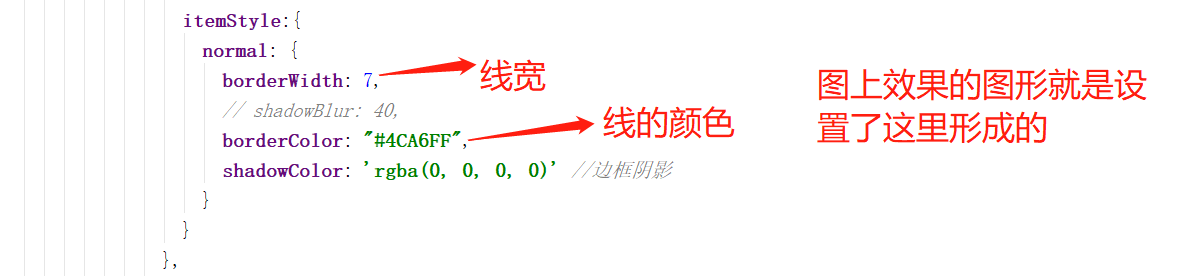
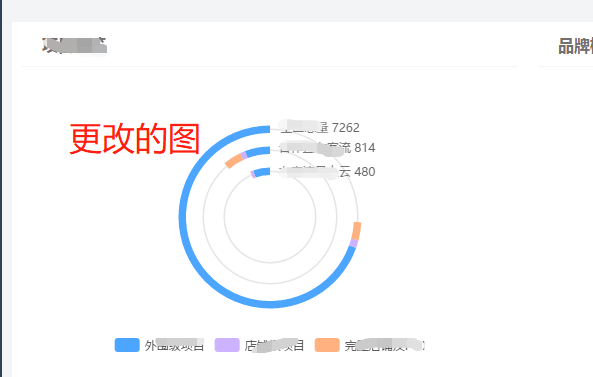
这样形成的图就会有层与层之间的挤压和覆盖,所以出现比例在页面上显示效果模糊的情况
更改如下
代码截图:
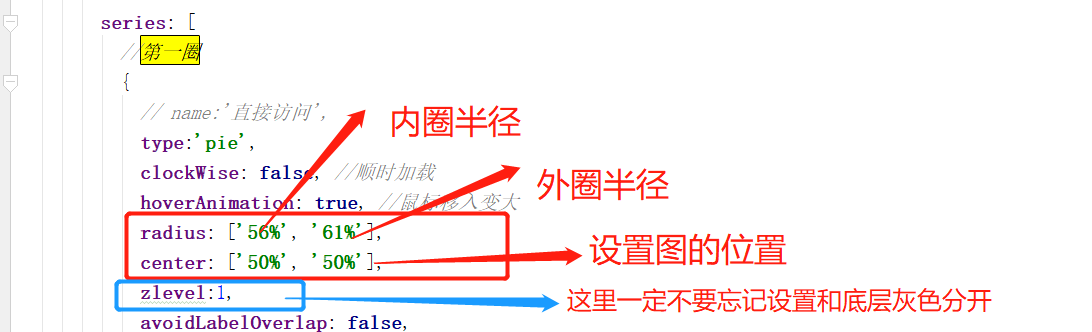
主要在数据series中的配置变化
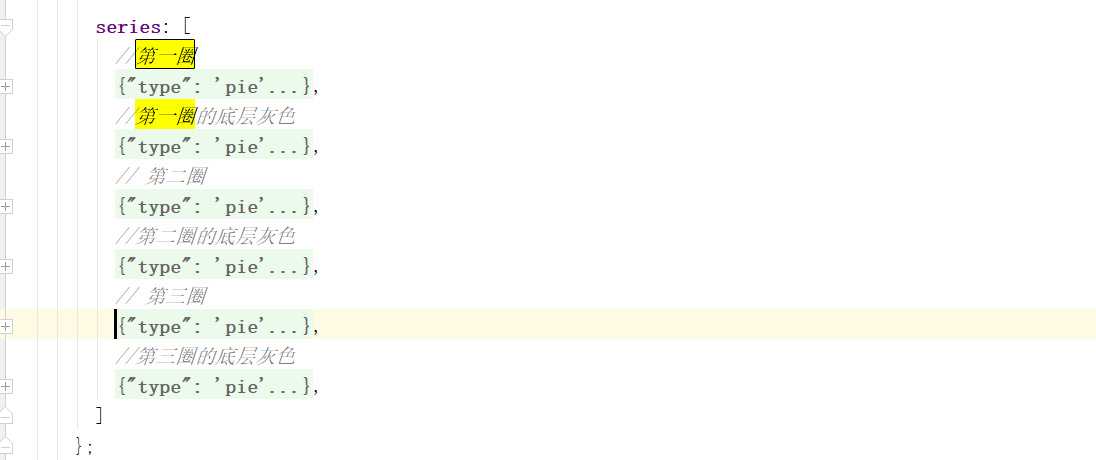
series: [
//第一圈
{
// name:'直接访问',
type:'pie',
clockWise: false, //顺时加载
hoverAnimation: true, //鼠标移入变大
radius: ['56%', '61%'],
center: ['50%', '50%'],
zlevel:1,
avoidLabelOverlap: false,
hoverOffset:7,
tooltip : {
show:true,
trigger: 'item',
extraCssText:'box-shadow: 8px 10px 3px rgba(0, 0, 0, 0.3);',
formatter:function(parames){
let marker = '';
let markeTitle = '<div><span>'+'全国总量'+'</span></div>';
let logo1 = '<span style="display:inline-block;margin-right:5px;border-radius:10px;width:9px;height:9px;font-weight:bold;">'#4CA6FF'+ '"></span>';
let logo2 = '<span style="display:inline-block;margin-right:5px;border-radius:10px;width:9px;height:9px;font-weight:bold;">'#ccb2ff' + '"></span>';
let logo3 = '<span style="display:inline-block;margin-right:5px;border-radius:10px;width:9px;height:9px;font-weight:bold;">'#FFB27F' + '"></span>';
marker = markeTitle+'<div style="color:#fff"><div>'+logo1+'外围级项目'+':'+mSum+'</div><div>'+logo2+'店铺级项目:'+sSum+'</div><div>'+logo3+'完整店铺及POI:'+aSum+'</div></div>'; return marker;
}
},
label: {
normal: {
show: false,
position: 'center'
}
},
labelLine: {
normal: {
show: false
}
},
data:[
{
value:mSum,
name:data.legend[0],
tooltip:{show:true},
emphasis:{
show:false
},
label: {
show: true,
color:'#666',
fontSize:12,
padding:[-180,-100,0,0],
position:'center',
formatter:function(promase){
return '全国总量'+' ' + data.allSum.all
}
},
itemStyle:{
normal: {
// borderWidth: 7,
// // shadowBlur: 40,
// borderColor: "#4CA6FF",
// shadowColor: 'rgba(0, 0, 0, 0)' //边框阴影
}
}
},
{
value:sSum,
name:data.legend[1],
tooltip:{show:true},
emphasis:{
show:false
},
itemStyle:{
normal: {
label: {
show: false,
position:'outside',
// formatter:'{d}%'
},
labelLine: {
show: true,
},
// borderWidth: 7,
// // shadowBlur: 40,
// borderColor: "#ccb2ff",
// shadowColor: 'rgba(0, 0, 0, 0)' //边框阴影
}
}
},
{
value:aSum,
name:data.legend[2],
tooltip:{show:true},
emphasis:{
show:false
},
itemStyle:{
normal: {
label: {
show: true,
position:'outside',
// formatter:'{d}%'
},
labelLine: {
show: true,
},
// borderWidth: 7,
// shadowBlur: 40,
// borderColor: "#FFB27F",
// shadowColor: 'rgba(0, 0, 0, 0)' //边框阴影
}
}
},
{
value:lastSum,
name:data.legend[3],
tooltip:{show:false},
hoverAnimation: false,
color:'#fff',
itemStyle:{
normal: {
label: {
show: false
},
labelLine: {
show: false
},
color: 'rgba(128, 128, 128, 0)',
borderColor: 'rgba(128, 128, 128, 0)',
borderWidth: 0
}
}
},
]
},
//第一圈的底层灰色
{
// name:'直接访问',
type:'pie',
clockWise: false, //顺时加载
hoverAnimation: false, //鼠标移入变大
radius: ['58%', '59%'],
center: ['50%', '50%'],
zlevel:0,
avoidLabelOverlap: false,
hoverOffset:0,
labelLine: {
show: false,
},
data:[
{
value:lastSum,
name:data.legend[3],
tooltip:{show:false},
hoverAnimation: false,
itemStyle:{
normal: {
label: {
show: false
},
labelLine: {
show: false,
},
color: "#E5E5E5",
borderColor: "#E5E5E5",
borderWidth: 0
}
}
},
]
},
// 第二圈
{
type:'pie',
clockWise: false, //顺时加载
hoverAnimation: true, //鼠标移入变大
radius: ['42%', '47%'],
center: ['50%', '50%'],
avoidLabelOverlap: false,
hoverOffset:7,
zlevel:1,
tooltip : {
show:true,
trigger: 'item',
extraCssText:'box-shadow: 8px 10px 3px rgba(0, 0, 0, 0.3);',
formatter:function(parames){
let marker = '';
let markeTitle = '<div><span>'+'合作且有客流'+'</span></div>';
let logo1 = '<span style="display:inline-block;margin-right:5px;border-radius:10px;width:9px;height:9px;font-weight:bold;">'#4CA6FF'+ '"></span>';
let logo2 = '<span style="display:inline-block;margin-right:5px;border-radius:10px;width:9px;height:9px;font-weight:bold;">'#ccb2ff' + '"></span>';
let logo3 = '<span style="display:inline-block;margin-right:5px;border-radius:10px;width:9px;height:9px;font-weight:bold;">'#FFB27F' + '"></span>';
marker = markeTitle+'<div style="color:#fff"><div>'+logo1+'外围级项目'+':'+mWinner+'</div><div>'+logo2+'店铺级项目:'+sWinner+'</div><div>'+logo3+'完整店铺及POI:'+aWinner+'</div></div>'; return marker;
}
}, label: {
normal: {
show: false,
position: 'center'
}
},
labelLine: {
normal: {
show: false
}
},
data:[
{
value:mWinner,
name:data.legend[0],
tooltip:{show:true},
emphasis:{
show:false
},
label: {
show: true,
color:'#666',
fontSize:12,
padding:[-140,-114,0,0],
position:'center',
formatter:function(promase){
return '合作且有客流'+' ' + data.winnerAndTraffic.all
}
},
// itemStyle:{
// normal: {
// borderWidth: 7,
// shadowBlur: 40,
// borderColor: "#4CA6FF",
// shadowColor: 'rgba(0, 0, 0, 0)' //边框阴影
// }
// }
},
{
value:sWinner,
name:data.legend[1],
tooltip:{show:true},
emphasis:{
show:false
},
itemStyle:{
normal: {
label: {
show: true,
position:'outside',
// formatter:'{d}%'
},
labelLine: {
show: true,
},
// borderWidth: 7,
// shadowBlur: 40,
// borderColor: "#ccb2ff",
// shadowColor: 'rgba(0, 0, 0, 0)' //边框阴影
}
}
},
{
value:aWinner,
name:data.legend[2],
tooltip:{show:true},
emphasis:{
show:false
},
itemStyle:{
normal: {
label: {
show: true,
position:'outside',
// formatter:'{d}%'
},
labelLine: {
show: true,
},
// borderWidth: 7,
// shadowBlur: 40,
// borderColor: "#FFB27F",
// shadowColor: 'rgba(0, 0, 0, 0)' //边框阴影
}
}
},
{value:lastWinner,
name:' ',
tooltip:{show:false},
hoverAnimation: false,
itemStyle:{
normal: {
label: {
show: false
},
labelLine: {
show: false
},
color: 'rgba(128, 128, 128, 0)',
borderColor: 'rgba(128, 128, 128, 0)',
borderWidth: 0
}
}
},
]
},
//第二圈的底层灰色
{
// name:'直接访问',
type:'pie',
clockWise: false, //顺时加载
hoverAnimation: false, //鼠标移入变大
radius: ['45%', '44%'],
center: ['50%', '50%'],
zlevel:0,
avoidLabelOverlap: false,
hoverOffset:0,
labelLine: {
show: false,
},
data:[
{
value:lastSum,
name:data.legend[3],
tooltip:{show:false},
hoverAnimation: false,
itemStyle:{
normal: {
label: {
show: false
},
labelLine: {
show: false,
},
color: "#E5E5E5",
borderColor: "#E5E5E5",
borderWidth: 0
}
}
},
]
},
// 第三圈
{
type:'pie',
clockWise: false, //顺时加载
hoverAnimation: true, //鼠标移入变大
radius: ['28%', '33%'],
center: ['50%', '50%'],
avoidLabelOverlap: false,
hoverOffset:7,
zlevel:1,
tooltip : {
show:true,
trigger: 'item',
extraCssText:'box-shadow: 8px 10px 3px rgba(0, 0, 0, 0.3);',
formatter:function(parames){
let marker = '';
let markeTitle = '<div><span>'+'有客流且上云'+'</span></div>';
let logo1 = '<span style="display:inline-block;margin-right:5px;border-radius:10px;width:9px;height:9px;font-weight:bold;">'#4CA6FF'+ '"></span>';
let logo2 = '<span style="display:inline-block;margin-right:5px;border-radius:10px;width:9px;height:9px;font-weight:bold;">'#ccb2ff' + '"></span>';
let logo3 = '<span style="display:inline-block;margin-right:5px;border-radius:10px;width:9px;height:9px;font-weight:bold;">'#FFB27F' + '"></span>';
marker = markeTitle+'<div style="color:#fff"><div>'+logo1+'外围级项目'+':'+mYun+'</div><div>'+logo2+'店铺级项目:'+sYun+'</div><div>'+logo3+'完整店铺及POI:'+aYun+'</div></div>'; return marker;
}
}, label: {
normal: {
show: false,
position: 'center'
}
},
labelLine: {
normal: {
show: false
}
},
data:[
{
value:mYun,
name:data.legend[0],
tooltip:{show:true},
emphasis:{
show:false
},
label: {
show: true,
color:'#666',
fontSize:12,
padding:[-92,-114,0,0],
position:'center',
formatter:function(promase){
return '有客流且上云'+' ' + data.yunAndTraffic.all
}
},
itemStyle:{
normal: {
// borderWidth: 7,
// // shadowBlur: 40,
// borderColor: "#4CA6FF",
// shadowColor: 'rgba(0, 0, 0, 0)' //边框阴影
}
}
},
{
value:sYun,
name:data.legend[1],
tooltip:{show:true},
emphasis:{
show:false
},
itemStyle:{
normal: {
label: {
show: false,
position:'outside',
// formatter:'{d}%'
},
labelLine: {
show: false,
},
// borderWidth: 7,
// // shadowBlur: 40,
// borderColor: "#ccb2ff",
// // shadowColor: 'rgba(0, 0, 0, 0)' //边框阴影
}
}
},
{
value:aYun,
name:data.legend[2],
tooltip:{show:true},
emphasis:{
show:false
},
itemStyle:{
normal: {
label: {
show: false,
position:'outside',
// formatter:'{d}%'
},
labelLine: {
show: false,
},
// borderWidth: 7,
// // shadowBlur: 40,
// borderColor: "#FFB27F",
// // shadowColor: 'rgba(0, 0, 0, 0)' //边框阴影
}
}
},
{value:lastYun,
name:data.legend[3],
tooltip:{show:false},
hoverAnimation: false,
itemStyle:{
normal: {
label: {
show: false
},
labelLine: {
show: false
},
color: 'rgba(128, 128, 128, 0)',
borderColor: 'rgba(128, 128, 128, 0)',
borderWidth: 0
}
}
},
]
},
//第三圈的底层灰色
{
// name:'直接访问',
type:'pie',
clockWise: false, //顺时加载
hoverAnimation: false, //鼠标移入变大
radius: ['30%', '31%'],
center: ['50%', '50%'],
zlevel:0,
avoidLabelOverlap: false,
hoverOffset:0,
labelLine: {
show: false,
},
data:[
{
value:lastYun,
name:data.legend[3],
tooltip:{show:false},
hoverAnimation: false,
itemStyle:{
normal: {
label: {
show: false
},
labelLine: {
show: false,
},
color: "#E5E5E5",
borderColor: "#E5E5E5",
borderWidth: 0
}
}
},
]
},
]
};

下面的也是同理的
echart环形图制作及出现的一些问题总结的更多相关文章
- 移动端webapp自适应实践(css雪碧图制作小工具实践)图文并茂
为什么要写这个 以前写过关于webapp自适应屏幕的文章(链接),不过写的大多数群众看不懂,所以来个图文并茂的版本.虽然只是一个简单的页面,不过在做的过程中也遇到了一些问题,也算是好事吧! 该示例gi ...
- 将AE开发的专题图制作功能发布为WPS
AE开发可以定制化实现ArcGIS的地理处理功能,并实际运用于其他方面的工作,有时候我们还希望将AE开发的功能发布为网络地理信息处理服务(WPS),从而能在Web端更自由便利地调用所需要的地学处理算法 ...
- 电脑GIF动图制作方法图文详解
我们在电脑上可以看到很多动态图,有趣的.搞笑的.可爱的等等,只要我们要用哪种类型的,网上应有尽有,但是想不想自己制作图片呢?今天我们就来学习一下GIF动图制作的方法. 使用工具: 电脑 操作方法: 1 ...
- shoeBox超实用的雪碧图(Sprite)图制作工具-使用
从前端优化说起 浏览器载入单张图片的速度基本取决于图片的大小,但是载入多张图片的速度却和另一个要素息息相关-网络请求数,在图片大小和一致的情况下,图片张数越少其请求数越少其载入速度也就越快.所以在使用 ...
- Excel柱状图折线图组合怎么做 Excel百分比趋势图制作教程
Excel柱状图折线图组合怎么做 Excel百分比趋势图制作教程 用excel作图时候经常会碰到做柱状图和折线图组合,这样的图一般难在折线图的数据很小,是百分比趋势图,所以经常相对前面主数据太小了,在 ...
- 百度的echart环形图颜色动态设置
自己参与的有一个项目需要用到环行图,考虑到百度的echart功能很强大兼容性又挺好就使用了这个插件,但是在颜色配置的时候出现了问题按照参考文档的方法是用color:Array这样的形式,但是不知道在哪 ...
- arcgis api for flex之专题图制作(饼状图,柱状图等)
最近公司给我一个任务,就是利用arcgis api for flex实现在地图上点(业务数据)直接显示饼状图以及柱状图的专题图制作,而不是通过点击点显示气泡窗口的形式来实现,这个公司已经实现了. 经过 ...
- 最简单的html轮播图制作适合新手
html代码 --------------------------------------------------------------------------------------------- ...
- 思维导图制作工具推荐 - ProcessOn
在使用 Teambition (以下简称Tb)的时候无意中发现了 ProcessOn,由于可以与 Tb 绑定,实现实时更新,很大程度上提升了团队协作的效率. 在以前画 原型/思维导图 等草图的时候,用 ...
随机推荐
- HDU-1029_Ignatius and the Princess IV
Ignatius and the Princess IV Time Limit: 2000/1000 MS (Java/Others) Memory Limit: 65536/32767 K (Jav ...
- 卸载ROS命令
ROS有问题需要卸载只需输入以下命令: sudo apt-get purge ros-* sudo rm -rf /etc/ros
- Redis源码解析:07压缩列表
压缩列表(ziplist)是列表键和哈希键的底层实现之一.当列表键只包含少量列表项,并且每个列表项要么是小整数值,要么是长度较短的字符串时:或者当哈希键只包含少量键值对,并且每个键值对的键和值要么是小 ...
- "不用谢" 的11种表达
说Thank you ,机械版的反应you are welcome.虽然没错,但实在太老掉牙,在国外使用率不高: 随性,不足挂齿的小事 Not a problem 别放在心上 Any time 有事随 ...
- ashx不能折叠代码,没有智能提示
visual studio 2013有时候会遇到这个问题.没安装任何第三方插件,创建的是web网站项目.ashx文件忽然就没有intelligent智能提示了. 可以试试: 关闭visual stud ...
- ListView 适配器实现getviewtypecount() 数组越界IndexOutOfBoundException
ListView中Item的多布局显示,需要用到了getviewtypecount和getItemViewType这两个重写方法,但是做完后出现了如下提示错误: java.lang.ArrayInde ...
- STS Eclipse IDEA 指定启动JDK版本
使用场景: 开发人员在自己的机器上可能装了多个版本的JDK,但是在环境变量中只能配置一个 JAVA_HOME ,so你的IDEA Eclipse 可能因为你在 JAVA_HOME 配置JDK1.8 以 ...
- ifram子页面与父页面的方法相互调用
parent.html <!DOCTYPE html PUBLIC "-//W3C//DTD XHTML 1.0 Transitional//EN" "http:/ ...
- js随即数字random实现div点击更换背景色
需求:点击按钮随机给盒子换背景色 用到的知识点:Math.random Math.round 文章地址 https://www.cnblogs.com/sandraryan/ <!DOCT ...
- JSON怎样添加注释
今天在写一个程序的时候发现了一个问题,在json文件中添加注释之后,程序就出现bug了 于是,去搜了一下这个问题的相关解释,在这里和大家分享一下: JSON为什么不能添加注释? 这位外国友人给出的解释 ...