
springboot security 安全
spring security几个概念
“认证”(Authentication) 是建立一个他声明的主体的过程(一个“主体”一般是指用户,设备或一些可以在你的应用程序中执行动作的其他系统) 。
“授权”(Authorization)指确定一个主体是否允许在你的应用程序执行一个动作的过程。为了抵达需要授权的店,主体的身份已经有认证过程建立。
这个概念是通用的, 而不仅仅在Spring Security中 , 在Shiro中也是一样的.
Spring Security的 Web&安全几个关键点
1. 登陆/注销
HttpSecurity配置登陆、注销功能
2. Thymeleaf提供的SpringSecurity标签支持
需要引入thymeleaf-extras-springsecurity4
sec:authentication=“name” 获得当前用户的用户名
sec:authorize=“hasRole(‘ADMIN’)” 当前用户必须拥有ADMIN权限时才会显示标签内容
3. remember me
表单添加remember-me的checkbox
配置启用remember-me功能
4. CSRF(Cross-site request forgery)跨站请求伪造
HttpSecurity启用csrf功能,会为表单添加_csrf的值,提交携带来预防CSRF;
我们仅需引入spring-boot-starter-security模块,进行少量的配置,即可实现强大的安全管理。
security中几个重要的类如下:
WebSecurityConfigurerAdapter:自定义Security策略

AuthenticationManagerBuilder:自定义认证策略

@EnableWebSecurity:开启WebSecurity模式 (在@Controller注解的类上追加)
SpringSecurity在SpringBoot中使用
springsecurity在什么都不配的情况下,默认帐号是user, 密码在启动日志中随机生成uuid,如下形式
-- ::52.852  INFO  --- [           main] b.a.s.AuthenticationManagerConfiguration :

Using default security password: bc4c813c-b8f9-4cdb-9ca9-b406d3492da9
pom.xml添加依赖
        <!--在thymeleaf中使用认证标签需要的额外依赖-->

        <dependency>

            <groupId>org.thymeleaf.extras</groupId>

            <artifactId>thymeleaf-extras-springsecurity4</artifactId>

            <version>3.0.2.RELEASE</version>

        </dependency>
配置MySecurityConfig.java
官方说明自定义SecurityConfig替换默认配置参考链接: https://docs.spring.io/spring-security/site/docs/5.2.0.BUILD-SNAPSHOT/reference/htmlsingle/#oauth2resourceserver-sansboot
protected void configure(HttpSecurity http) {

    http

        .authorizeRequests()

            .anyRequest()

       .authenticated()

            .and()

           .oauth2ResourceServer()

            .jwt();

}
自定义MySecurityConfig.java
@EnableWebSecurity //该注解本身就包含@Configuration

public class MySecurityConfig extends WebSecurityConfigurerAdapter {

    @Override

    protected void configure(HttpSecurity http) throws Exception {

        //super.configure(http);

        //定制授权规则

        http.authorizeRequests().antMatchers("/").permitAll().

                antMatchers("/level1/**").hasRole("VIP1").

                antMatchers("/level2/**").hasRole("VIP2").

                antMatchers("/level3/**").hasRole("VIP3");

    }

}
配置自动生成的登录页
开启自动配置的 /login 登录页面,如果不配置, 那么无授权时会报403 Access is denied错误,且页面也不知道跳哪,因为还没有开启自动配置的login登录页面
,默认使用的是/login 和 /login?error, 现在改成/userlogin,会经过KungfuController的 @GetMapping("/userlogin")注解的方法.
也可以配置登录页及登录时的帐号密码字段是什么等.
http.formLogin().loginPage("/login").usernameParameter("username").passwordParameter("password");
配置登出界面
开启自动配置的注销功能,默认访问/logout表示注销,会清空session及cookie,注销成功后返回/login?logout页面
http.logout().logoutSuccessUrl("/");//自定义注销成功后跳转到/页面
配置认证规则
/**

 * 定义认证规则,管理帐号/密码

 *

 * @param auth

 * @throws Exception

 */

@Override

protected void configure(AuthenticationManagerBuilder auth) throws Exception {

    //auth.jdbcAuthentication(); //一般用jdbc

    //学习用内存认证

    auth.inMemoryAuthentication()

            .withUser("bobo").password("123456").roles("VIP1")

            .and().withUser("sisi").password("123456").roles("VIP1", "VIP2")

            .and().withUser("xixi").password("123456").roles("VIP1", "VIP2", "VIP3");

}
在pom.xml中引入thymeleaf依赖的springSecurity标签的插件
<!--在thymeleaf中使用认证标签需要的额外依赖-->

<dependency>

    <groupId>org.thymeleaf.extras</groupId>

    <artifactId>thymeleaf-extras-springsecurity4</artifactId>

    <version>3.0.2.RELEASE</version>

</dependency>
html标签体中引入security规范
<html xmlns:th="http://www.thymeleaf.org" xmlns:sec="http://www.thymeleaf.org/thymeleaf-extras-springsecurity4">
thymeleaf中显示用户信息
<div sec:authorize="isAuthenticated()">

    <h2> 您好 , <span sec:authentication="name"></span> 您的角色是 <span sec:authentication="principal.authorities"></span>

    </h2>

</div>
thymeleaf中显示判断是否有权限
<div sec:authorize="hasRole('VIP1')">

        <h3>普通武功秘籍</h3>

        <ul>

            <li><a th:href="@{/level1/1}">罗汉拳</a></li>

            <li><a th:href="@{/level1/2}">武当长拳</a></li>

            <li><a th:href="@{/level1/3}">全真剑法</a></li>

        </ul>

    </div>
开启记住我功能
开启记住我功能登录成功,会从服务器返回添加名为remember-me的cookie指令, 以后访问页面都会带上该cookie, 只要服务器通过检查就可以免登录了,默认14天后失效
http.rememberMe().rememberMeParameter("remember-me");
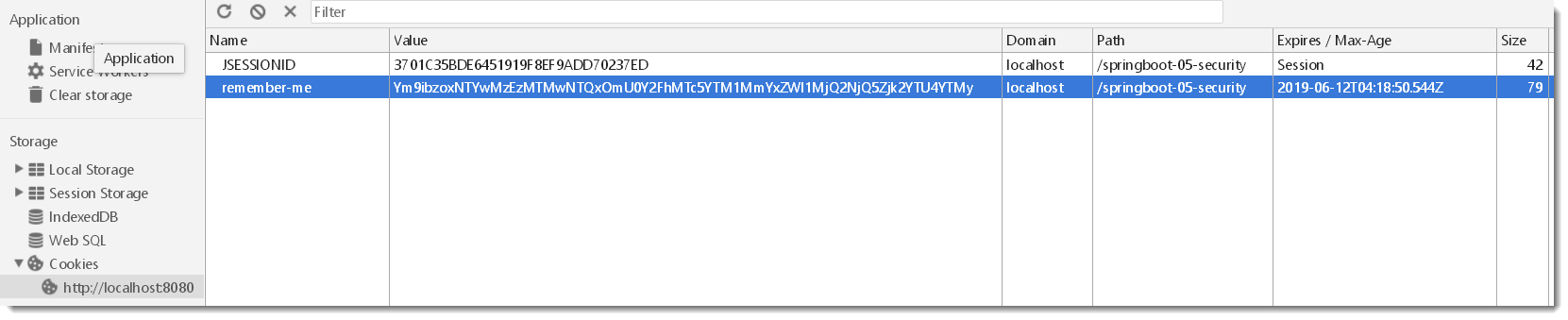
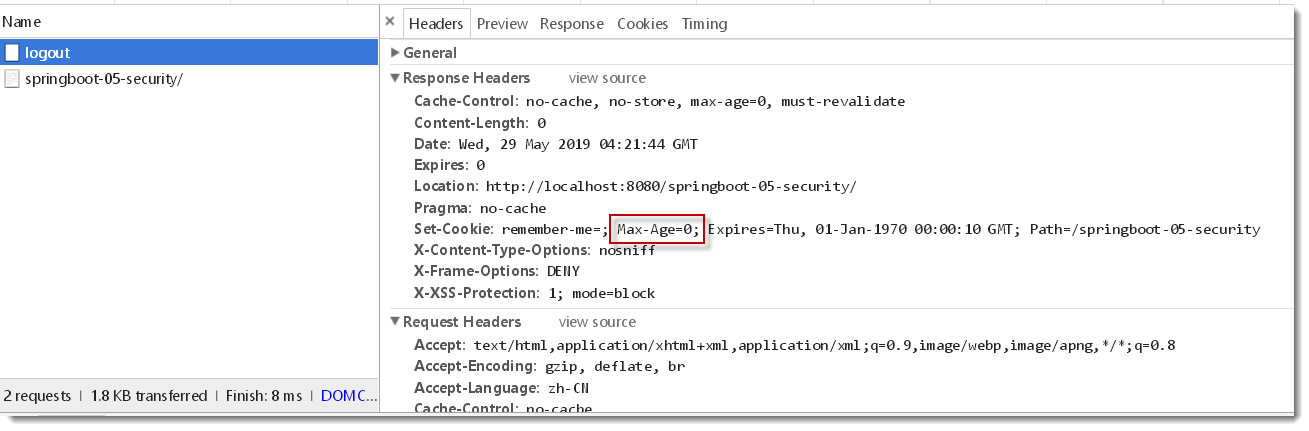
此时使用/logout会一并清除名为remember-me的cookie , 因为/logout请求在header头中携带了Max-Age=0参数
自定义登录页,使用/userlogin
        //默认使用的是/login 和 /login?error, 现在改成/userlogin,会经过KungfuController的 @GetMapping("/userlogin")注解的方法

        http.formLogin().loginPage("/userlogin");//.usernameParameter("username").passwordParameter("password");
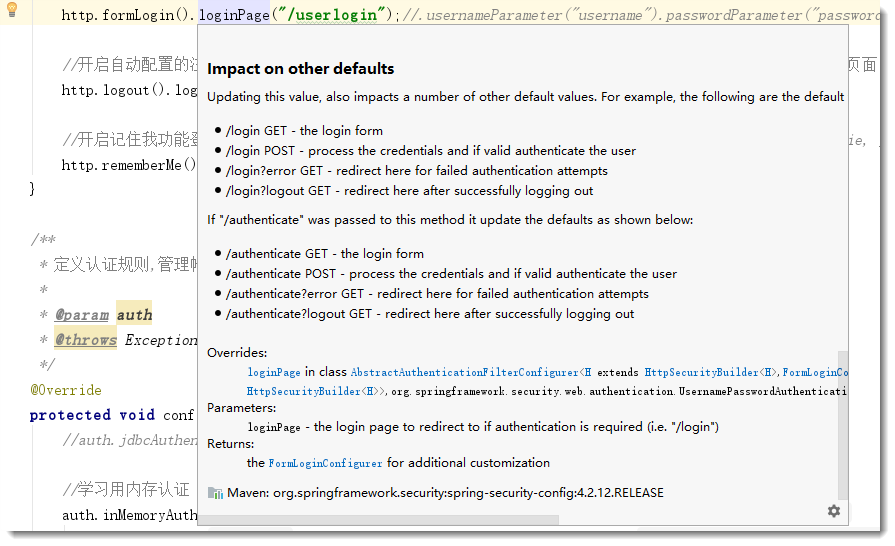
默认get形式的/login来到登录页, post形式的/login用来表单登录.
当自定义了登录页面/userlogin后,那么get形式的/userlogin来到登录页, post形式的/userlogin用来表单登录. 见源码注释说明如下:
最终项目结构

核心配置类MySecurityConfig.java内容
package com.example.security.config;

import org.springframework.context.annotation.Configuration;

import org.springframework.security.config.annotation.authentication.builders.AuthenticationManagerBuilder;

import org.springframework.security.config.annotation.web.builders.HttpSecurity;

import org.springframework.security.config.annotation.web.configuration.EnableWebSecurity;

import org.springframework.security.config.annotation.web.configuration.WebSecurityConfigurerAdapter;

import org.springframework.security.config.annotation.web.configurers.ExpressionUrlAuthorizationConfigurer;

@EnableWebSecurity //该注解本身就包含@Configuration

public class MySecurityConfig extends WebSecurityConfigurerAdapter {

    @Override

    protected void configure(HttpSecurity http) throws Exception {

        //super.configure(http);

        //定制授权规则

        http.authorizeRequests().antMatchers("/").permitAll().

                antMatchers("/level1/**").hasRole("VIP1").

                antMatchers("/level2/**").hasRole("VIP2").

                antMatchers("/level3/**").hasRole("VIP3");

        //参见 HttpSecurity 类的    public FormLoginConfigurer<HttpSecurity> formLogin() 方法注解

        //开启自动配置的 /login 登录页面,如果不配置, 那么无授权时会报403 Access is denied错误,且页面也不知道跳哪,因为还没有开启自动配置的login登录页面

        //默认使用的是/login 和 /login?error, 现在改成/userlogin,会经过KungfuController的 @GetMapping("/userlogin")注解的方法

        http.formLogin().loginPage("/userlogin");//.usernameParameter("username").passwordParameter("password");

        //开启自动配置的注销功能,默认访问/logout表示注销,会清空session及cookie,注销成功后返回/login?logout页面

        http.logout().logoutSuccessUrl("/");//自定义注销成功后跳转到/页面

        //开启记住我功能登录成功,会从服务器返回添加名为remember-me的cookie指令, 以后访问页面都会带上该cookie, 只要服务器通过检查就可以免登录了,默认14天后失效

        http.rememberMe().rememberMeParameter("remember-me");

    }

    /**

     * 定义认证规则,管理帐号/密码

     *

     * @param auth

     * @throws Exception

     */

    @Override

    protected void configure(AuthenticationManagerBuilder auth) throws Exception {

        //auth.jdbcAuthentication(); //一般用jdbc

        //学习用内存认证

        auth.inMemoryAuthentication()

                .withUser("bobo").password("123456").roles("VIP1")

                .and().withUser("sisi").password("123456").roles("VIP1", "VIP2")

                .and().withUser("xixi").password("123456").roles("VIP1", "VIP2", "VIP3");

    }

}
直接关闭所有Security的所有拦截功能
http.headers().frameOptions().disable().and().authorizeRequests().antMatchers("/**", "/login*").permitAll(); // 所有用户都可以访问
http.csrf().disable().authorizeRequests().anyRequest().permitAll().and().logout().permitAll(); //禁用security的 csrf功能
SpringSecurity默认是禁止接收POST请求的,而GET是默认可以的,官网给出两个解决方案:1是发送请求时带上CSRF的token,2是不推荐的做法(把SpringSecurity的CSRF功能关掉),不然很有可能是get请求正常, 但post请求报403 forbidden
springboot security版本差异
帐号密码配置差异(亲测)
在security 4版本中(springboot1.5中使用), application.yml中简易帐号密码配置如下,没有spring:
security:

  user:

    name: bobo

    password:
而在security 5版本中(springboot2开始使用), application.yml中帐号密码配置如下, 多了一层spring:
spring:

  security:

    user:

      name: bobo

      password:
禁用security
pom.xml中如果存在以下依赖
<dependency>

           <groupId>org.springframework.boot</groupId>

           <artifactId>spring-boot-starter-security</artifactId>

</dependency>
启动时控制台会随机生成登录密码, 打印如下:
Using generated security password: -34f3-444c--7243038d0af9
请求接口时会跳到登录页 Please sign in
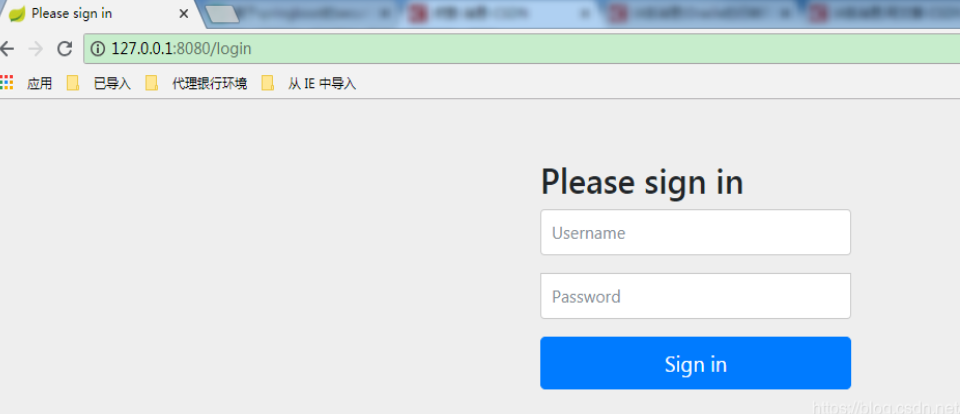
禁用spring security两种方法, 配置类或启动类上加上如下(二选一)
@EnableAutoConfiguration(exclude = {SecurityAutoConfiguration.class}) 或者 @SpringBootApplication(exclude = {SecurityAutoConfiguration.class })
登录问题
Spring Security在登录验证中增加额外数据(如验证码)==>https://www.cnblogs.com/phoenix-smile/p/5666686.html
spring security前台登录如何传递多个参数要后台验证==>https://bbs.csdn.net/topics/390493958 (在username里用_分割啊哈哈哈)
$$$$$$$$$$spring security controller层实现登陆==>https://blog.csdn.net/qq_34675369/article/details/91499798
我的项目git地址
https://gitee.com/KingBoBo/springboot-05-security
最好的教程
在SpringBoot 中使用Security安全框架==>https://blog.csdn.net/qwe86314/article/details/89509765
相关系列 文章
SpringBoot 整合 oauth2(三)实现 token 认证==>https://www.jianshu.com/p/19059060036b
SpringBoot 整合 Security(一)实现用户认证并判断返回json还是view==>https://www.jianshu.com/p/18875c2995f1
SpringBoot 整合 Security(二)实现验证码登录==>https://www.jianshu.com/p/9d08c767b33e
springboot security 安全的更多相关文章
- Springboot security cas整合方案-实践篇
承接前文Springboot security cas整合方案-原理篇,请在理解原理的情况下再查看实践篇 maven环境 <dependency> <groupId>org.s ...
- Springboot security cas源码陶冶-ExceptionTranslationFilter
拦截关键的两个异常,对异常进行处理.主要应用异常则跳转至cas服务端登录页面 ExceptionTranslationFilter#doFilter-逻辑入口 具体操作逻辑如下 public void ...
- Springboot security cas源码陶冶-CasAuthenticationFilter
Springboot security cas整合方案中不可或缺的校验Filter类或者称为认证Filter类,其内部包含校验器.权限获取等,特开辟新地啃啃 继承结构 - AbstractAuthen ...
- Springboot security cas整合方案-原理篇
前言:网络中关于Spring security整合cas的方案有很多例,对于Springboot security整合cas方案则比较少,且有些仿制下来运行也有些错误,所以博主在此篇详细的分析cas原 ...
- SpringBoot security关闭验证
SpringBoot security关闭验证 springboot2.x security关闭验证https://www.cnblogs.com/guanxiaohe/p/11738057.html ...
- springboot+security整合(3)自定义鉴权
说明 springboot 版本 2.0.3源码地址:点击跳转 系列 springboot+security 整合(1) springboot+security 整合(2) springboot+se ...
- springboot+security整合(2)自定义校验
说明 springboot 版本 2.0.3源码地址:点击跳转 系列 springboot+security 整合(1) springboot+security 整合(2) springboot+se ...
- springboot+security整合(1)
说明 springboot 版本 2.0.3源码地址:点击跳转 系列 springboot+security 整合(1) springboot+security 整合(2) springboot+se ...
- SpringBoot + Security实现权限控制
网上找了好几个,因为各种原因不太行,下面这个亲测可行 参考:https://blog.csdn.net/u012702547/article/details/54319508 基于SpringBoot ...
随机推荐
- HZOI20190823模拟31题解
题面:https://www.cnblogs.com/Juve/articles/11425141.html math:仔细看看其实是个水题 #include<iostream> #inc ...
- Django项目:CRM(客户关系管理系统)--58--48PerfectCRM实现CRM客户报名流程学生合同
# sales_urls.py # ————————47PerfectCRM实现CRM客户报名流程———————— from django.conf.urls import url from bpm. ...
- spring cloud深入学习(十三)-----使用Spring Cloud Sleuth和Zipkin进行分布式链路跟踪
随着业务发展,系统拆分导致系统调用链路愈发复杂一个前端请求可能最终需要调用很多次后端服务才能完成,当整个请求变慢或不可用时,我们是无法得知该请求是由某个或某些后端服务引起的,这时就需要解决如何快读定位 ...
- Shell 工具之 sed
sed编辑器称为流编辑器(stream editor).可以根据输入命令行的命令或者存储在命令文本文件中的命令处理数据.每次从输入读取一行数据,将该数据与所提供的编辑器命令进行匹配,根据命令修改数据流 ...
- jeecms框架单点登录功能的实现
单点登录的功能实现主要原理: 1: 在点击登录按钮的时候使用reponse.addCookie()方法向浏览器发送cookie: 2: 在前段拦截器中的request.getCookie()在接收到设 ...
- 探索SpringBoot中的SpringMVC
spring boot就是一个大框架里面包含了许许多多的东西,其中spring就是最核心的内容之一,当然就包含spring mvc.spring mvc 是只是spring 处理web层请求的一个模块 ...
- jquery校验是否为空
function lang(key) { mylang = { 'ls_input_myb': '请输入您的账户', 'ls_myb_email': '漫游币账户为邮箱地址', 'ls_login_p ...
- Linux命令CURL用法
Curl是一个命令行方式下传输数据的开源传输工具,支持多种协议包括:FTP,HTTP,HTTPS,IMAP,POP3,TELNET等.同样支持HTTP POST方法,PUT方法,FTP上传,cooki ...
- Win7+AMD+VS2013+opencl1.x安装与测试
参考资料:http://www.cnblogs.com/lihao602/archive/2013/05/08/3067239.html: http://blog.csdn.net/zhoubo616 ...
- LUOGU P3539 [POI2012]ROZ-Fibonacci Representation
传送门 解题思路 打了个表发现每次x只会被比x大的第一个fab或比x小的第一个fab表示,就直接写了个爆搜骗分,结果过了.. 代码 #include<iostream> #include& ...