
TChart-图表编辑器的测试
最近不知怎么的,想研究一下图表。先上效果图:
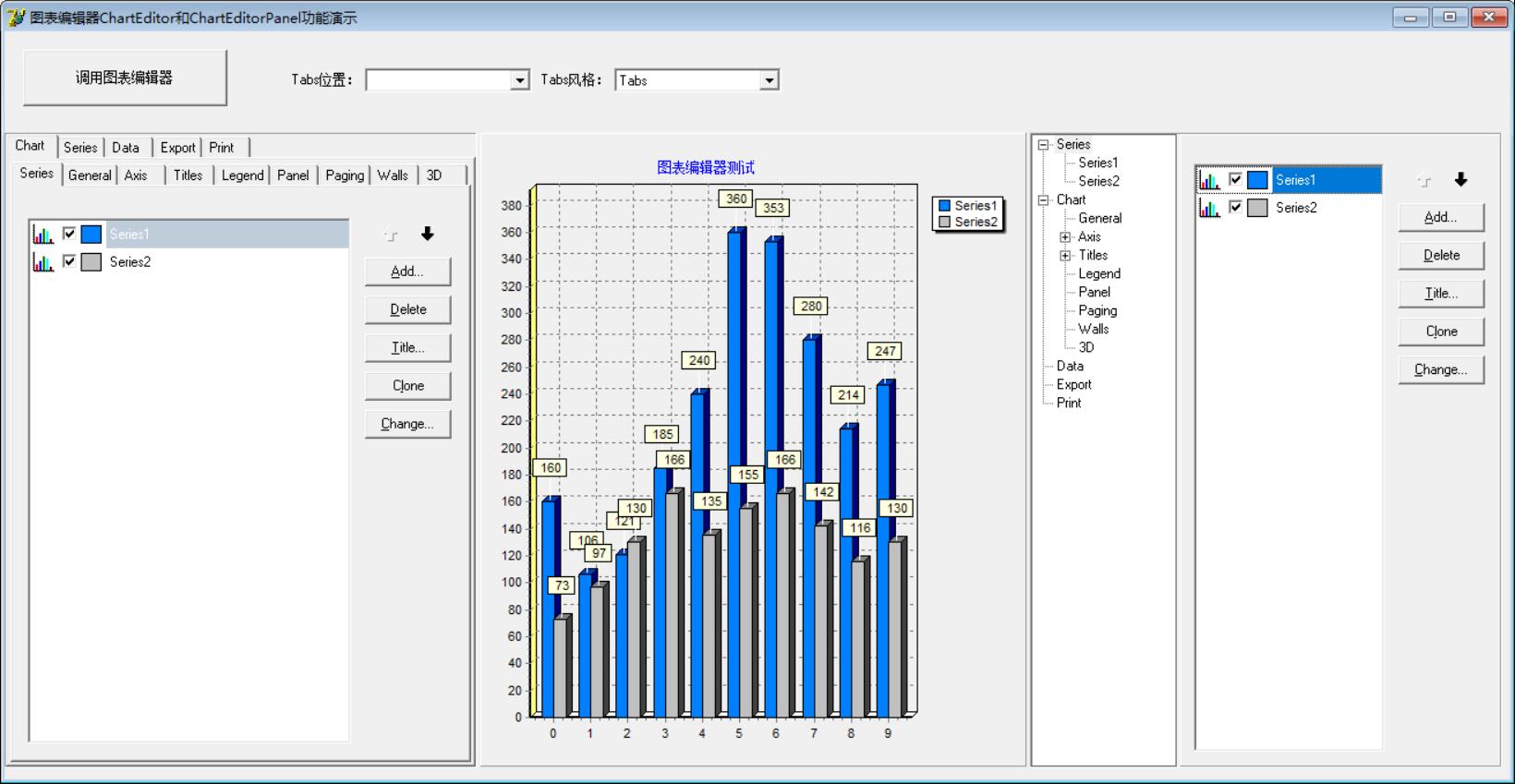
功能代码:
unit Unit1;

interface

uses

  Windows, Messages, SysUtils, Variants, Classes, Graphics, Controls, Forms,

  Dialogs, TeeEdit, ExtCtrls, TeeProcs, TeEngine, Series, Chart, StdCtrls,

  ComCtrls;

type

  TForm1 = class(TForm)

    ChartEditorPanel1: TChartEditorPanel;

    ChartEditor1: TChartEditor;

    ChartEditorPanel2: TChartEditorPanel;

    Chart1: TChart;

    Series1: TBarSeries;

    Series2: TBarSeries;

    Button1: TButton;

    ComboBox1: TComboBox;

    Label1: TLabel;

    ComboBox2: TComboBox;

    Label2: TLabel;

    procedure FormCreate(Sender: TObject);

    procedure Button1Click(Sender: TObject);

    procedure ComboBox1Change(Sender: TObject);

    procedure ComboBox2Change(Sender: TObject);

    procedure Chart1ClickAxis(Sender: TCustomChart; Axis: TChartAxis;

      Button: TMouseButton; Shift: TShiftState; X, Y: Integer);

    procedure Chart1ClickLegend(Sender: TCustomChart; Button: TMouseButton;

      Shift: TShiftState; X, Y: Integer);

  private

    { Private declarations }

  public

    { Public declarations }

  end;

var

  Form1: TForm1;

implementation

{$R *.dfm}

procedure TForm1.FormCreate(Sender: TObject);

begin

  Self.Position := poScreenCenter;

  //右下角图表编辑器树形显示

  ChartEditorPanel2.Editor.Tree.Visible := True;

  //随机添加10个数

  Series1.FillSampleValues();

  Series2.FillSampleValues();

end;

procedure TForm1.Button1Click(Sender: TObject);

begin

  ChartEditor1.Execute;

end;

procedure TForm1.ComboBox1Change(Sender: TObject);

var

  Pos: TTabPosition;

begin

  Pos := tpTop;

  case ComboBox1.ItemIndex of

    : Pos := tpTop;

    : Pos := tpBottom;

    : Pos := tpLeft;

    : Pos := tpRight;

  end;

  ChartEditorPanel1.Editor.TabGeneral.PageControl.TabPosition := Pos;

end;

procedure TForm1.ComboBox2Change(Sender: TObject);

var

  ts: TTabStyle;

begin

  ts := tsTabs;

  case ComboBox2.ItemIndex of

    : ts := tsTabs;

    : ts := tsButtons;

    : ts := tsFlatButtons;

  end;

  ChartEditorPanel1.Editor.TabGeneral.PageControl.Style := ts;

end;

procedure TForm1.Chart1ClickAxis(Sender: TCustomChart; Axis: TChartAxis;

  Button: TMouseButton; Shift: TShiftState; X, Y: Integer);

begin

  ChartEditorPanel1.Editor.TabAxis.Show;

  ChartEditorPanel1.Editor.TabAxis.PageControl.ActivePage.PageIndex;

end;

procedure TForm1.Chart1ClickLegend(Sender: TCustomChart;

  Button: TMouseButton; Shift: TShiftState; X, Y: Integer);

begin

  ChartEditorPanel1.Editor.TabLegend.Show;

end;

end.
界面代码:
object Form1: TForm1

  Left =

  Top =

  Width =

  Height =

  Caption = '图表编辑器ChartEditor和ChartEditorPanel功能演示'

  Color = clBtnFace

  Font.Charset = DEFAULT_CHARSET

  Font.Color = clWindowText

  Font.Height = -

  Font.Name = 'MS Sans Serif'

  Font.Style = []

  OldCreateOrder = False

  OnCreate = FormCreate

  PixelsPerInch =

  TextHeight =

  object Label1: TLabel

    Left =

    Top =

    Width =

    Height =

    Caption = 'Tabs位置:'

  end

  object Label2: TLabel

    Left =

    Top =

    Width =

    Height =

    Caption = 'Tabs风格:'

  end

  object ChartEditorPanel1: TChartEditorPanel

    Left =

    Top =

    Width =

    Height =

    Chart = Chart1

    TabOrder =

  end

  object ChartEditorPanel2: TChartEditorPanel

    Left =

    Top =

    Width =

    Height =

    Chart = Chart1

    TabOrder =

  end

  object Chart1: TChart

    Left =

    Top =

    Width =

    Height =

    Title.Text.Strings = (

      '图表编辑器测试')

    OnClickAxis = Chart1ClickAxis

    OnClickLegend = Chart1ClickLegend

    TabOrder =

    object Series1: TBarSeries

      Marks.Callout.Brush.Color = clBlack

      Marks.Visible = True

      SeriesColor =

      Gradient.Direction = gdTopBottom

      XValues.Name = 'X'

      XValues.Order = loAscending

      YValues.Name = 'Bar'

      YValues.Order = loNone

    end

    object Series2: TBarSeries

      Marks.Callout.Brush.Color = clBlack

      Marks.Visible = True

      SeriesColor = clSilver

      Gradient.Direction = gdTopBottom

      XValues.Name = 'X'

      XValues.Order = loAscending

      YValues.Name = 'Bar'

      YValues.Order = loNone

    end

  end

  object Button1: TButton

    Left =

    Top =

    Width =

    Height =

    Caption = '调用图表编辑器'

    TabOrder =

    OnClick = Button1Click

  end

  object ComboBox1: TComboBox

    Left =

    Top =

    Width =

    Height =

    Style = csDropDownList

    ItemHeight =

    TabOrder =

    OnChange = ComboBox1Change

    Items.Strings = (

      'Top'

      'Bottom'

      'Left'

      'Right')

  end

  object ComboBox2: TComboBox

    Left =

    Top =

    Width =

    Height =

    Style = csDropDownList

    ItemHeight =

    ItemIndex =

    TabOrder =

    Text = 'Tabs'

    OnChange = ComboBox2Change

    Items.Strings = (

      'Tabs'

      'Buttons'

      'FlatButtons')

  end

  object ChartEditor1: TChartEditor

    Chart = Chart1

    Left =

    Top =

  end

end
TChart-图表编辑器的测试的更多相关文章
- Cocos2d-x中常用粒子编辑器ParticleDesigner测试例子
打开 ParticleDesigner 随意选择一种效果 选择save. 类型选择 cocosd(plist)类型保存至桌面 命名为myplist导出至桌面 选择右侧Emitter Config可设置 ...
- [译]如何在Unity编辑器中添加你自己的工具
在这篇教程中你会学习如何扩展你的Unity3D编辑器,以便在你的项目中更好的使用它.你将会学习如何绘制你自己的gizmo,用代码来实现创建和删除物体,创建编辑器窗口,使用组件,并且允许用户撤销他们所作 ...
- android测试分析1
Android测试框架,开发环境中集成的一部分,提供一个架构和强有力的工具 可以帮助测试你的应用从单元到框架的每个方面. 测试框架有这些主要特征: 1.Android测试组件基于Junit.你可以使用 ...
- iozone测试磁盘性能
什么是iozone? iozone是一个文件系统的benchmark工具,可以测试不同的操作系统中文件系统的读写性能. 可以测试 Read, write, re-read,re-write, read ...
- Unity StreamingMipmaps 简单测试
StreamingMipmaps是Unity2018.2中加入的新功能,意指通过CPU控制,只加载部分Mipmap图片以节省更多的内存及显存空间. 我测试时遇到了问题,后来发现必须打包出来测才有效(注 ...
- [开发笔记]-Jqplot图表初体验
文章内容为初次使用Jqplot图表插件的测试代码,仅供参考. <html xmlns="http://www.w3.org/1999/xhtml"> <head& ...
- 使用iozone测试磁盘性能
IOzone是一个文件系统测试基准工具.可以测试不同的操作系统中文件系统的读写性能.可以通过 write, re-write, read, re-read, random read, random w ...
- FastReport.Net使用:[23]图表(Chart)控件
图表基本设置 1.拖放一个图表控件到报表设计界面中. 2.右键菜单“编辑”或者双击图表进入图表编辑器 3.将原有的簇状柱状图删除,添加圆环图 4.绑定数据源,并且指定X,Y轴数据. X轴数据为科目名称 ...
- 使用iozone测试磁盘性能(测试文件读写)
IOzone是一个文件系统测试基准工具.可以测试不同的操作系统中文件系统的读写性能.可以通过 write, re-write, read, re-read, random read, random w ...
随机推荐
- iomanip、cstring、string、sstream
#include<iomanip> 控 制 符 作 用 ...
- 2018icpc南京现场赛-I Magic Potion(最大流)
题意: n个英雄,m个怪兽,第i个英雄可以打第i个集合里的怪兽,一个怪兽可以在多个集合里 有k瓶药水,每个英雄最多喝一次,可以多打一只怪兽,求最多打多少只 n,m,k<=500 思路: 最大流, ...
- 一次修改数据库物理文件造成Mysql宕机的恢复记录
事件起始 某夜,我正在床上冥想准备入睡,忽然同事向我求救:消息内容如下: Oh My Gold 改了些配置,啥都没了!都没了!没了!了! 我仔细询问,原来是她因为某些原因将某库的物理文件夹改名后,发现 ...
- win10系统安装VMware虚拟机软件以及linux系统
一.安装VMware 1.在VMware官网下载VMware Workstation Pro 15.5.1 下载地址:https://my.vmware.com/cn/web/vmware/detai ...
- 2019全国大学生信息安全大赛两道web
简单小结 菜鸟第一次打国赛,这次题目质量很高,学到了许多姿势. Web Justsoso 打开题目,源代码出存在提示: 使用LFI读取index.php与hint.php http://d4dc224 ...
- step1:准备歌词之《前端开发是个啥》
以下是给大家介绍前端开发的填词,曲子是李圣杰的<最近>,大家喜欢可以试试唱. 点赞关注超过100的平台,我后续上来发本人原唱视频(目前正在练习中...),另外大家觉得哪些词写得不好的,欢迎 ...
- Vue项目使用vant框架
近期在开发h5端项目,用到vant框架,vant是一款基于Vue的移动UI组件,看了vant的官方文档(https://youzan.github.io/vant/#/zh-CN/)感觉不错,功能比较 ...
- 想学大学计算机课?这 37 门 CS 专业必修课,了解一下
最近,不少高校延迟开学,大家只能宅家上网课. 有一些朋友,想趁此期间,多学点计算机的专业课,却不知从何学起. 211,985大学的计算机专业课都是经过授课教师精心安排的,从大一到大四,课程合理设置,循 ...
- 基于SSM开发自行车在线租赁管理系统源码
开发环境: Windows操作系统开发工具: Myeclipse+Jdk+Tomcat+MYSQL数据库注意:此项目分管理员与普通用户两种角色运行效果图 源码及原文链接:https://javadao ...
- C#中 ref 关键字的认识和理解
之前接手老项目的时候有遇到一些的方法参数中使用了ref关键字加在传参的参数前面的情况.对于新手,这里介绍和讲解一下ref的用法和实际效果. CLR中默认所有方法的参数传递方式都是传值,也就是说不管你传 ...