
mybatis_day01
Mybatis01
1.什么是mybatis
1.1mybatis
一个基于Java的持久层框架
1.2持久层
操作数据库那层代码
项目分层:
界面层(jps/controller) 业务层(service层) 持久层(数据层 dao层)
持久层框架:jdbc jpa springjdbc springdatajps mybatis
1.3框架
1. 每个框架都是为了解决某一领域的问题而产生的。
2. 框架都是一个半成品,已经完成衣服分功能,只需要再上面进行开发----提高了开发效率
3. 可以让我们很多人写的代码都按照一定规则去写--可读性 维护性(orm规范)
1.4持久化概念
把内存里面的数据保存到数据库中--这个过程就叫做持久化
1.5mybatis它是一个持久层框架,同时有个ORM的框架
ORM:对象映射关系---jpa/springdatajpa
2.mybatis的特点
2.1mybatis是一个支持普通SQL查询,存储过程和高级映射的优秀持久层框架
2.2mybatis消除了几乎所有的JDBC代码和手工设置参数以及结果集的检索
2.3mybatis使用简单的xml或注解 用于配置和原始映射,将接口和Java的pojos(普通的java对象)映射成数据库中的记录。
3.使用Mybatis
3.1创建项目并导入jar包
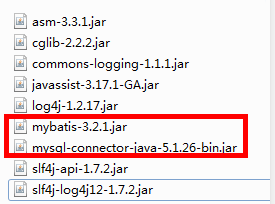
3.2写配置文件
Mybatis-config.xml
<?xml version="1.0" encoding="UTF-8" ?>
<!DOCTYPE configuration PUBLIC "-//mybatis.org//DTD Config 3.0//EN"
"http://mybatis.org/dtd/mybatis-3-config.dtd">
<configuration>
<!-- 开发环境-->
<environments default="development">
<!--
一个环境 id:为这个环境取唯一一个id名称
-->
<environment id="development">
<!--
事务管理 type:JDBC(支持事务)/MANAGED(什么都不做)
mysql: innodb MyISAM
-->
<transactionManager type="JDBC" />
<!-- 数据源, 连接池 type(POOLED):MyBatis自带的连接池 -->
<dataSource type="POOLED">
<!-- 连接数据库的参数 四大金刚 -->
<property name="driver" value="com.mysql.jdbc.Driver" />
<property name="url" value="jdbc:mysql:///mybatis" />
<property name="username" value="root" />
<property name="password" value="123456" />
</dataSource>
</environment>
</environments>
<!-- 这个mappers代表的是相应的ORM映射文件 -->
<mappers>
<mapper resource="cn/itsource/mybatis/domain/ProductMapper.xml" />
</mappers>
</configuration>
productMapper.xml
<?xml version="1.0" encoding="UTF-8" ?>
<!DOCTYPE mapper
PUBLIC "-//mybatis.org//DTD Mapper 3.0//EN"
"http://mybatis.org/dtd/mybatis-3-mapper.dtd">
<!-- mapper映射配置 namespace:命名空间
以后:通过namespace+id 调用对应的语句
-->
<mapper namespace="cn.itsource.mybatis.domain.ProductMapper">
<!--
select:表示查询标签
id: 代表给标签取个名称 必须唯一
resultType:返回值类型
-->
<select id="findAll" resultType="cn.itsource.mybatis.domain.Product">
select * from product
</select>
</mapper>
3.3测试。。
4.mybatis的crud
<?xml version="1.0" encoding="UTF-8" ?>
<!DOCTYPE mapper
PUBLIC "-//mybatis.org//DTD Mapper 3.0//EN"
"http://mybatis.org/dtd/mybatis-3-mapper.dtd">
<!-- mapper映射配置 namespace:命名空间
以后:通过namespace+id 调用对应的语句
-->
<mapper namespace="cn.itsource.mybatis.domain.ProductMapper">
<!--
select:表示查询标签
id: 代表给标签取个名称 必须唯一
resultType:返回值类型
-->
<select id="findAll" resultType="cn.itsource.mybatis.domain.Product">
select * from product
</select>
<!--新增 parameterType 参数类型-->
<insert id="save" parameterType="cn.itsource.mybatis.domain.Product">
insert into product(productName,salePrice,costPrice,cutoff)
values(#{productName},#{salePrice},#{costPrice},#{cutoff})
</insert>
<!--修改-->
<update id="update" parameterType="cn.itsource.mybatis.domain.Product">
update product set productName=#{productName},salePrice=#{salePrice}
where id=#{id}
</update>
<!--删除 long Mybatis内置别名 long java.util.Long remove(13)-->
<delete id="remove" parameterType="long">
delete from product where id=#{id}
</delete>
<!--查询一条数据-->
<select id="findOne" parameterType="long" resultType="cn.itsource.mybatis.domain.Product">
select * from product where id=#{id}
</select>
</mapper>
5.抽取工具类
enum方式
public enum MybatisUtil {
INSTANCE;
private static SqlSessionFactory sqlSessionFactory;
//静态代码块
static{
Reader reader = null;
try {
reader = Resources.getResourceAsReader("mybatis-config.xml");
//SqlSessionFactory -->EntityManagerFactory
sqlSessionFactory = new SqlSessionFactoryBuilder().build(reader);
} catch (IOException e) {
e.printStackTrace();
}
}
//抽取一个 --sqlSession
public SqlSession getSqlSession(){
return sqlSessionFactory.openSession();
}
}
6.mybatis的一些细节
6.1获取主键
有时候 保存一条数据之后,需要拿到这条数据的主键,拿到之后可以做后续事情
场景:
角色的保存
useGeneratedKeys="true" keyColumn="id" keyProperty="id"
<insert id="save" parameterType="cn.itsource.mybatis.domain.Product"
useGeneratedKeys="true" keyColumn="id" keyProperty="id">
insert into product(productName,salePrice,costPrice,cutoff)
values(#{productName},#{salePrice},#{costPrice},#{cutoff})
</insert>
6.2日志
1. 为什么要使用日志
有时候,需要打印的sql的信息 比如sql的传参数 返回值 -- 必须使用日志
好处: 使用日志框架可以帮助我们进行分析与排错
2. 常用的日志框架
slf4j(抽象标准) -->很多实现 logging,logback,log4j
3. 使用日志框架log4j
(1) 导入jar包

log4j.rootLogger=ERROR, stdout
日志等级(了解): OFF level > FATAL(致命) > ERROR(错误) > WARN (警告)>
# INFO (提示)> DEBUG (调试)> trace > ALL level(所有配置)\
#输出效果 如果你设置日志级别是trace,则大于等于这个级别的日志都会输出
# 关闭日志输出
#log4j.rootLogger=NONE 不想打印日志 就配置NONE
# WARN为一般警告,比如session丢失、
# INFO为一般要显示的信息,比如登录登出、
# DEBUG为程序的调试信息
# TRACE 堆栈信息
# 扫描包 配置自己包
#注意点 包名/配置等级 配置DEBUG/ALL
log4j.logger.cn.itsource=DEBUG/TRACE
#ConsoleAppender:输出控制台
log4j.appender.stdout=org.apache.log4j.ConsoleAppender
#layout: 格式样式
log4j.appender.stdout.layout=org.apache.log4j.PatternLayout
#采用下面的样式输出 [20191224]类名
log4j.appender.stdout.layout.ConversionPattern=%d %p [%c] - %m%n
7.动态sql
高级查询
<sql id="whereSql">
<where>
<if test="productName != null">
and productName = #{productName}
</if>
<if test="id != null">
and id = #{id}
</if>
</where>
</sql>
<select id="queryByCondition" parameterType="cn.itsource.mybatis.query.ProductQuery"
resultType="cn.itsource.mybatis.domain.Product">
select * from product
<include refid="whereSql"></include>
</select>
mybatis_day01的更多相关文章
- 阶段3 1.Mybatis_02.Mybatis入门案例_1.mybatis的入门
H:\BaiDu\黑马传智JavaEE57期 2019最新基础+就业+在职加薪\讲义+笔记+资料\主流框架\31.会员版(2.0)-就业课(2.0)-Mybatis\mybatis\mybatis_d ...
随机推荐
- 2019年,我花了3个月时间备考PMP
经过几个月的准备,终于在2019年12月7日完成了PMP的考试,并于1月21日查到了成绩,喜获5A,意料之中.总结这次考试的具体情况:涉及题型虽然都没有超出大纲的范围,但是原题出现的概率似乎不高, ...
- MPlayer参数使用介绍(部分)(中文)
文件太长,就不全部转载了,以下是某MPlayer网站的全部详细介绍: http://www.mplayer.org.cn/help_zh.html#%E7%A8%8B%E5%BA%8F%E9%94%9 ...
- selenium 调用JavaScript代码
selenium 调用JavaScript代码 调用JavaScript方法有两种: execute_script(): 方法解释:是同步方法,用它执行js代码会阻塞主线程执行,直到js代码执行完毕. ...
- spring mvc框架入门
目录 1.web框架分层 2.什么是springmvc 3.springmvc的优势 4.springmvc和struct的区别 (spring mvc框架入门 1.web框架分层 一般web框架可以 ...
- SpringBoot2 整合Kafka组件,应用案例和流程详解
本文源码:GitHub·点这里 || GitEE·点这里 一.搭建Kafka环境 1.下载解压 -- 下载 wget http://mirror.bit.edu.cn/apache/kafka/2.2 ...
- Go语言实现:【剑指offer】和为S的两个数字
该题目来源于牛客网<剑指offer>专题. 输入一个递增排序的数组和一个数字S,在数组中查找两个数,使得他们的和正好是S,如果有多对数字的和等于S,输出两个数的乘积最小的. 对应每个测试案 ...
- 数据清洗:按照进行数据清洗,并将清洗后的数据导入hive数据库中。
虚拟机: hadoop:3.2.0 hive:3.1.2 win10: eclipse 两阶段数据清洗: (1)第一阶段:把需要的信息从原始日志中提取出来 ip: 199.30.25.88 ti ...
- qt creator源码全方面分析(2-3-1)
目录 Using External Tools 使用Qt语言学家 预览QML文件 使用外部文本编辑器 配置外部工具 Using External Tools 您可以直接从Qt Creator中使用外部 ...
- 持续集成:jenkins集合
持续集成:jenkins集合 jenkins(一): 持续集成和Jenkins简介 jenkins(二): Jenkins的安装 jenkins(三): Jenkins的应用场景和job ...
- 修改定时清理 /tmp 目录下的文件
初衷 默认系统是超过 30 天不访问的文件自动清除的,但是有时候硬盘用得紧可以考虑修改周期 设置方法 编辑配置文件:vim /etc/cron.daily/tmpwatch #! /bin/sh fl ...