
Centos 6.5 配置hadoop2.7.1
|
1 Centos 6.5 编译hadoop2.7.1 主机配置:
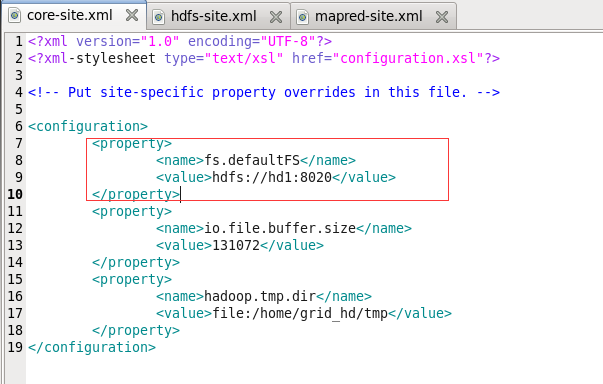
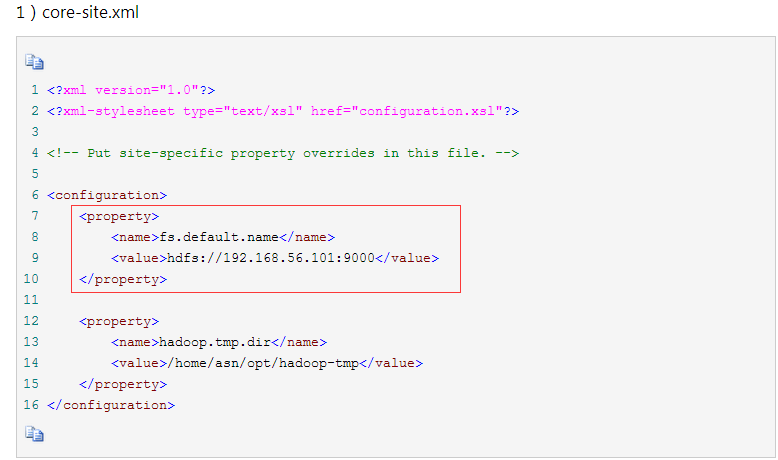
sudo yum install gcc gcc-c++ sudo yum install ncurses-devel sudo yum -y install lzo-devel zlib-devel autoconf automake libtool cmake openssl-devel 编译 mvn clean package -Pdist,native -DskipTests -Dtar 2配置hadoop2.7.1 1)core-site.xml (fs.defaultFS配置hdfs地址, DFS Master 端口)
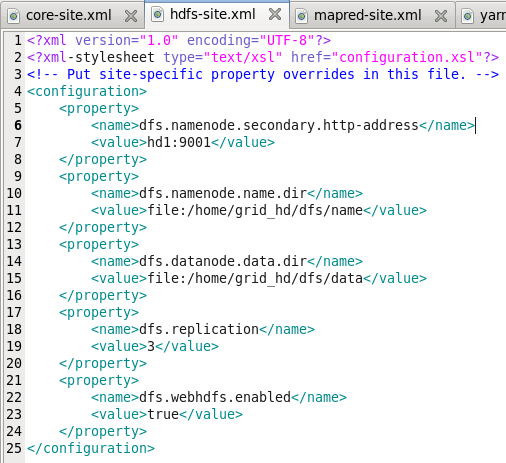
2)hdfs-site.xml
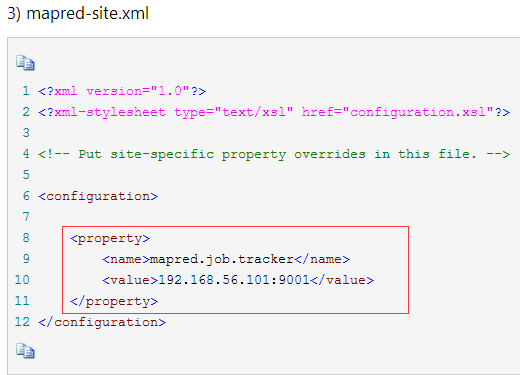
3)mapred-site.xml
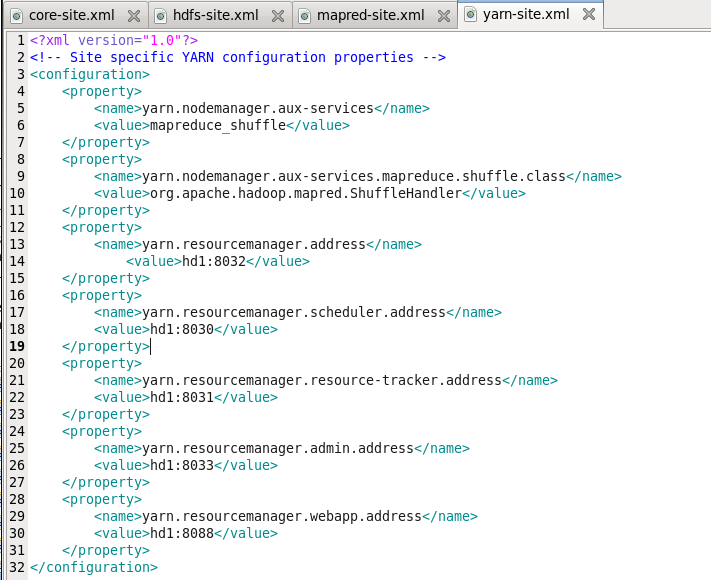
4)yarn-site.xml
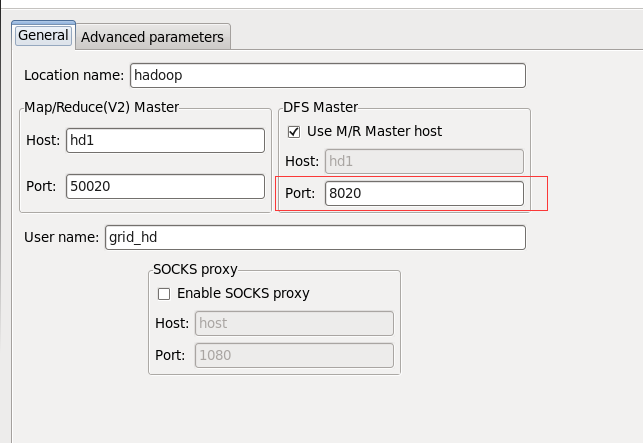
3 eclipse连接hdfs
DFS Master port 为 8020, 即hdfs://hd1:8020中配置的端口 在hadoop1中,左边是job.tracker的端口号,右边是hdfs的端口号
查看文件系统: bin/hadoop
hdfs dfs等价于hadoop fs[grid_hd@hd1 hadoop-2.7.1]$ bin/hdfs dfs Usage: hadoop fs [generic options] [-appendToFile <localsrc> ... <dst>] [-cat [-ignoreCrc] <src> ...] [-checksum <src> ...] [-chgrp [-R] GROUP PATH...] ##改变文件的所属组 [-chmod [-R] <MODE[,MODE]... | OCTALMODE> PATH...] ##改变文件的模式位 [-chown [-R] [OWNER][:[GROUP]] PATH...] ##改变文件的所有者 [-copyFromLocal [-f] [-p] [-l] <localsrc> ... <dst>] [-copyToLocal [-p] [-ignoreCrc] [-crc] <src> ... <localdst>] [-moveFromLocal <localsrc> ... <dst>] [-moveToLocal <src> <localdst>] [-count [-q] [-h] <path> ...] [-createSnapshot <snapshotDir> [<snapshotName>]] [-deleteSnapshot <snapshotDir> <snapshotName>] [-renameSnapshot <snapshotDir> <oldName> <newName>] [-df [-h] [<path> ...]] [-du [-s] [-h] <path> ...] [-expunge] [-find <path> ... <expression> ...] [-get [-p] [-ignoreCrc] [-crc] <src> ... <localdst>] [-put [-f] [-p] [-l] <localsrc> ... <dst>] [-getmerge [-nl] <src> <localdst>] [-help [cmd ...]] [-ls [-d] [-h] [-R] [<path> ...]] [-mkdir [-p] <path> ...] [-mv <src> ... <dst>] [-cp [-f] [-p | -p[topax]] <src> ... <dst>] [-rm [-f] [-r|-R] [-skipTrash] <src> ...] [-rmdir [--ignore-fail-on-non-empty] <dir> ...] [-getfacl [-R] <path>] [-getfattr [-R] {-n name | -d} [-e en] <path>] [-setfacl [-R] [{-b|-k} {-m|-x <acl_spec>} <path>]|[--set <acl_spec> <path>]] [-setfattr {-n name [-v value] | -x name} <path>] [-setrep [-R] [-w] <rep> <path> ...] [-stat [format] <path> ...] [-tail [-f] <file>] [-test -[defsz] <path>] [-text [-ignoreCrc] <src> ...] [-touchz <path> ...] [-truncate [-w] <length> <path> ...] [-usage [cmd ...]] Generic options supported are -conf <configuration file> specify an application configuration file 指定应用配置文件 -D <property=value> use value for given property 指定给定属性的值 -fs <local|namenode:port> specify a namenode -jt <local|resourcemanager:port> specify a ResourceManager -files <comma separated list of files> specify comma separated files to be copied to the map reduce cluster 指定逗号分隔的文件,将被拷贝到集群 -libjars <comma separated list of jars> specify comma separated jar files to include in the classpath. -archives <comma separated list of archives> specify comma separated archives to be unarchived on the compute machines. The general command line syntax is bin/hadoop command [genericOptions] [commandOptions] WordCount示例
运行输出: INFO - session.id is deprecated. Instead, use dfs.metrics.session-id INFO - Initializing JVM Metrics with processName=JobTracker, sessionId= WARN - No job jar file set. User classes may not be found. See Job or Job#setJar(String). INFO - Total input paths to process : 1 INFO - number of splits:1 INFO - Submitting tokens for job: job_local498662469_0001 INFO - The url to track the job: http://localhost:8080/ INFO - Running job: job_local498662469_0001 INFO - OutputCommitter set in config null INFO - File Output Committer Algorithm version is 1 INFO - OutputCommitter is org.apache.hadoop.mapreduce.lib.output.FileOutputCommitter INFO - Waiting for map tasks INFO - Starting task: attempt_local498662469_0001_m_000000_0 INFO - File Output Committer Algorithm version is 1 INFO - Using ResourceCalculatorProcessTree : [ ] INFO - Processing split: hdfs://hd1:8020/input/file_test.txt:0+23 INFO - (EQUATOR) 0 kvi 26214396(104857584) INFO - mapreduce.task.io.sort.mb: 100 INFO - soft limit at 83886080 INFO - bufstart = 0; bufvoid = 104857600 INFO - kvstart = 26214396; length = 6553600 INFO - Map output collector class = org.apache.hadoop.mapred.MapTask$MapOutputBuffer INFO - INFO - Starting flush of map output INFO - Spilling map output INFO - bufstart = 0; bufend = 39; bufvoid = 104857600 INFO - kvstart = 26214396(104857584); kvend = 26214384(104857536); length = 13/6553600 INFO - Finished spill 0 INFO - Task:attempt_local498662469_0001_m_000000_0 is done. And is in the process of committing INFO - map INFO - Task 'attempt_local498662469_0001_m_000000_0' done. INFO - Finishing task: attempt_local498662469_0001_m_000000_0 INFO - map task executor complete. INFO - Waiting for reduce tasks INFO - Starting task: attempt_local498662469_0001_r_000000_0 INFO - File Output Committer Algorithm version is 1 INFO - Using ResourceCalculatorProcessTree : [ ] INFO - Using ShuffleConsumerPlugin: org.apache.hadoop.mapreduce.task.reduce.Shuffle@35cd1d03 INFO - MergerManager: memoryLimit=623902720, maxSingleShuffleLimit=155975680, mergeThreshold=411775808, ioSortFactor=10, memToMemMergeOutputsThreshold=10 INFO - attempt_local498662469_0001_r_000000_0 Thread started: EventFetcher for fetching Map Completion Events INFO - localfetcher#1 about to shuffle output of map attempt_local498662469_0001_m_000000_0 decomp: 37 len: 41 to MEMORY INFO - Read 37 bytes from map-output for attempt_local498662469_0001_m_000000_0 INFO - closeInMemoryFile -> map-output of size: 37, inMemoryMapOutputs.size() -> 1, commitMemory -> 0, usedMemory ->37 INFO - EventFetcher is interrupted.. Returning INFO - 1 / 1 copied. INFO - finalMerge called with 1 in-memory map-outputs and 0 on-disk map-outputs INFO - Merging 1 sorted segments INFO - Down to the last merge-pass, with 1 segments left of total size: 29 bytes INFO - Merged 1 segments, 37 bytes to disk to satisfy reduce memory limit INFO - Merging 1 files, 41 bytes from disk INFO - Merging 0 segments, 0 bytes from memory into reduce INFO - Merging 1 sorted segments INFO - Down to the last merge-pass, with 1 segments left of total size: 29 bytes INFO - 1 / 1 copied. INFO - mapred.skip.on is deprecated. Instead, use mapreduce.job.skiprecords INFO - Task:attempt_local498662469_0001_r_000000_0 is done. And is in the process of committing INFO - 1 / 1 copied. INFO - Task attempt_local498662469_0001_r_000000_0 is allowed to commit now INFO - Saved output of task 'attempt_local498662469_0001_r_000000_0' to hdfs://hd1:8020/output/count/_temporary/0/task_local498662469_0001_r_000000 INFO - reduce > reduce INFO - Task 'attempt_local498662469_0001_r_000000_0' done. INFO - Finishing task: attempt_local498662469_0001_r_000000_0 INFO - reduce task executor complete. INFO - Job job_local498662469_0001 running in uber mode : false INFO - map 100% reduce 100% INFO - Job job_local498662469_0001 completed successfully INFO - Counters: 35 File System Counters FILE: Number of bytes read=446 FILE: Number of bytes written=552703 FILE: Number of read operations=0 FILE: Number of large read operations=0 FILE: Number of write operations=0 HDFS: Number of bytes read=46 HDFS: Number of bytes written=23 HDFS: Number of read operations=13 HDFS: Number of large read operations=0 HDFS: Number of write operations=4 Map-Reduce Framework Map input records=3 Map output records=4 Map output bytes=39 Map output materialized bytes=41 Input split bytes=100 Combine input records=4 Combine output records=3 Reduce input groups=3 Reduce shuffle bytes=41 Reduce input records=3 Reduce output records=3 Spilled Records=6 Shuffled Maps =1 Failed Shuffles=0 Merged Map outputs=1 GC time elapsed (ms)=38 Total committed heap usage (bytes)=457703424 Shuffle Errors BAD_ID=0 CONNECTION=0 IO_ERROR=0 WRONG_LENGTH=0 WRONG_MAP=0 WRONG_REDUCE=0 File Input Format Counters Bytes Read=23 File Output Format Counters Bytes Written=23 |



Centos 6.5 配置hadoop2.7.1的更多相关文章
- CentOS 6.4 配置 Hadoop 2.6.5
(以下所有文件:点此链接 里面还有安装的视频教学,我这里是亲测了一次,如有报错请看红色部分.实践高于理论啊兄弟们!!) 一.安装CentOS 6.4 在VMWare虚拟机上,我设置的用户是hadoop ...
- centos 64位 下hadoop-2.7.2 下编译
centos 64位 下hadoop-2.7.2 下编译 由于机器安装的是centos 6.7 64位 系统 从hadoop中下载是32位 hadoop 依赖的的库是libhadoop.so 是3 ...
- VMware安装CentOS系统与配置全过程
1.需要哪些安装包 VMware Workstation 15 Pro CentOS-7-x86_64-DVD-1810 hadoop-2.7.3 apache-hive-3.1.1 jdk-8u18 ...
- CentOS下Apache配置多域名或者多端口映射
CentOS下Apache默认网站根目录为/var/www/html,假如我默认存了一个CI项目在html文件夹里,同时服务器的外网IP为ExampleIp,因为使用的是MVC框架,Apache需开启 ...
- CentOS 6.3配置PPTP VPN的方法
1.验证ppp 用cat命令检查是否开启ppp,一般服务器都是开启的,除了特殊的VPS主机之外. [root@localhost1 /]# cat /dev/ppp cat: /dev/ppp: No ...
- 基于VMware为CentOS 6.5配置两个网卡
为CentOS 6.5配置两块网卡,一块是eth0,一块是eth1,下面以master为例 1.选择“master”-->“编辑虚拟机设置”,如下所示 2.单击“添加”,如下 3.选择“网络适配 ...
- Centos下安装配置LAMP(Linux+Apache+MySQL+PHP)
Centos下安装配置LAMP(Linux+Apache+MySQL+PHP) 关于LAMP的各种知识,还请大家自行百度谷歌,在这里就不详细的介绍了,今天主要是介绍一下在Centos下安装,搭建一 ...
- CentOS 6.5配置nfs服务
CentOS 6.5配置nfs服务 网络文件系统(Network File System,NFS),一种使用于分散式文件系统的协议,由升阳公司开发,于1984年向外公布.功能是通过网络让不同的机器.不 ...
- CentOS安装与配置LNMP
本文PDF文档下载:http://www.coderblog.cn/doc/Install_and_config_LNMP_under_CentOS.pdf 本文EPUB文档下载:http://www ...
随机推荐
- ML面试1000题系列(21-30)
本文总结ML面试常见的问题集 转载来源:https://blog.csdn.net/v_july_v/article/details/78121924 21.请简要说说EM算法. @tornadome ...
- Mysql的CMD操作
一.MySQL登录和退出——在CMD模式操作 l 语法格式:mysql.exe –h主机名 –u用户名 –p密码 l 参数说明: mysql.exe是mysql服务器的主应用程序. -h代 ...
- sublime3安装javascript控制台环境 方法1
Sublime Text 3 http://www.sublimetext.com/3 node.js http://nodejs.cn/download 1.安装完成后. 2.打 ...
- CWnd::Attach()具体解释
CWnd::Attach Attaches a Windows window to a CWnd object. BOOL Attach( HWND hWndNew ); Parameters ...
- BZOJ 4420二重镇题解
链接 思路借鉴了这个博客: 我们可以想到状压dp 用一个十进制数来表示状态,即第i位表示位置i处的物品等级 用f[i][j][k]表示第i天,仓库的物品等级为j,状态为k时的最大收益 但是状态数貌似很 ...
- PHPCMS网站迁移过程后,添加内容 报500错误解决方案
问题出现原因:1.网站迁移过程中,上传下载文件时文件丢失 2.PHPCMS源码更新升级 解决方法 1.可以到官方下载最新版源码,替换过去.如果对源码有改动,需要先保存改动过的文件,替换过去之后,再替 ...
- 2019.10.24TCP协程处理
server from gevent import monkey,spawn monkey.patch_all() import socket server = socket.socket() ser ...
- python ddt 实现数据驱动
ddt 是第三方模块,需安装, pip install ddt DDT包含类的装饰器ddt和两个方法装饰器data(直接输入测试数据) 通常情况下,data中的数据按照一个参数传递给测试用例,如果da ...
- 【OI】快读
不必多说. #include <cstdio> #include <cstring> int read(){ ,f = ; char c = getchar(); ') { ; ...
- Linux配置redis开机启动(CentOS 7)
https://blog.csdn.net/qq_31803503/article/details/79246205 本次配置linux版本是CentOS 7 首先将 redis-3.2.3/uti ...