
spring属性依赖注入
一、构造方法方式注入
1、项目结构如下:
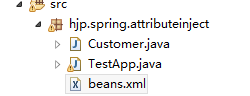
2、新建Customer类
package hjp.spring.attributeinject;

public class Customer {

    private String name;

    private Integer age;

    private String city;

    public Customer() {

    }

    public Customer(String name, Integer age) {

        this.name = name;

        this.age = age;

    }

    public Customer(Integer age, String city) {

        this.age = age;

        this.city = city;

    }

    public String getName() {

        return name;

    }

    public void setName(String name) {

        this.name = name;

    }

    public Integer getAge() {

        return age;

    }

    public void setAge(Integer age) {

        this.age = age;

    }

    public String getCity() {

        return city;

    }

    public void setCity(String city) {

        this.city = city;

    }

    @Override

    public String toString() {

        return "Customer [name=" + name + ", age=" + age + ", city=" + city + "]";

    }

}
Cusomer
3、新建beans.xml文件
<?xml version="1.0" encoding="UTF-8"?>

<beans xmlns="http://www.springframework.org/schema/beans"

    xmlns:xsi="http://www.w3.org/2001/XMLSchema-instance"

    xsi:schemaLocation="http://www.springframework.org/schema/beans

                              http://www.springframework.org/schema/beans/spring-beans.xsd">

    <!-- 如果没有配置 constructor-arg节点,则使用无参构造器-->

    <bean id="customerId" class="hjp.spring.attributeinject.Customer">

    <!--constructor-arg 配置构造参数

        index 表示参数索引号

        type 设置参数数据类型

        value 设置普通数据

        ref 设置引用数据

        如果只使用index和value,而不指定数据类型,则默认匹配符合条件的第一个构造函数

        如果配置了type,那么索引处的数据类型要对应正确

      -->

    <constructor-arg index="0" value="23" type="java.lang.Integer"></constructor-arg>

    <constructor-arg index="1" value="Tom" type="java.lang.String"></constructor-arg>

    </bean>

</beans>
4、新建测试类
package hjp.spring.attributeinject;

import org.junit.Test;

import org.springframework.context.ApplicationContext;

import org.springframework.context.support.ClassPathXmlApplicationContext;

public class TestApp {

    @Test

    public void demo1() {

        ApplicationContext applicationContext = new ClassPathXmlApplicationContext(

                "hjp/spring/attributeinject/beans.xml");

        Customer customer = applicationContext.getBean("customerId", Customer.class);

        System.out.println(customer);

    }

}
二、setter方法注入
1、新增类Contact
package hjp.spring.attributeinject;

public class Contact {

    private String address;

    private String telphone;

    public String getAddress() {

        return address;

    }

    public void setAddress(String address) {

        this.address = address;

    }

    public String getTelphone() {

        return telphone;

    }

    public void setTelphone(String telphone) {

        this.telphone = telphone;

    }

    @Override

    public String toString() {

        return "Contact [address=" + address + ", telphone=" + telphone + "]";

    }

}
Contact
2、为Customer类新增属性contact,新增构造函数
public Customer(String name,Integer age,Contact contact){
this.name=name;
this.age=age;
this.contact=contact;
}
package hjp.spring.attributeinject;

public class Customer {

    private String name;

    private Integer age;

    private String city;

    private Contact contact;

    public Contact getContact() {

        return contact;

    }

    public void setContact(Contact contact) {

        this.contact = contact;

    }

    public Customer() {

    }

    public Customer(String name, Integer age) {

        this.name = name;

        this.age = age;

    }

    public Customer(Integer age, String city) {

        this.age = age;

        this.city = city;

    }

    public Customer(String name,Integer age,Contact contact){

        this.name=name;

        this.age=age;

        this.contact=contact;

    }

    public String getName() {

        return name;

    }

    public void setName(String name) {

        this.name = name;

    }

    public Integer getAge() {

        return age;

    }

    public void setAge(Integer age) {

        this.age = age;

    }

    public String getCity() {

        return city;

    }

    public void setCity(String city) {

        this.city = city;

    }

    @Override

    public String toString() {

        return "Customer [name=" + name + ", age=" + age + ", city=" + city + ", contact=" + contact + "]";

    }

}
Customer
3、更改beans.xml文件
<?xml version="1.0" encoding="UTF-8"?>

<beans xmlns="http://www.springframework.org/schema/beans"

    xmlns:xsi="http://www.w3.org/2001/XMLSchema-instance"

    xsi:schemaLocation="http://www.springframework.org/schema/beans

                              http://www.springframework.org/schema/beans/spring-beans.xsd">

    <bean id="customerId" class="hjp.spring.attributeinject.Customer">

    <property name="name" value="Tom"></property>

    <property name="age" value="23"></property>

    <property name="contact" ref="contactId"></property>

    </bean>

    <bean id="contactId" class="hjp.spring.attributeinject.Contact">

    <property name="address" value="北京"></property>

    <property name="telphone" value="12345678"></property>

    </bean>

</beans>
4、测试类不变
三、集合注入
1、项目结构:
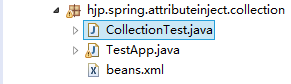
2、新建CollectionTest类
package hjp.spring.attributeinject.collection;

import java.util.Arrays;

import java.util.List;

import java.util.Map;

import java.util.Properties;

import java.util.Set;

public class CollectionTest {

    private List<String> listData;

    private Set<String> setData;

    private Map<String, String> mapData;

    private String[] arrayData;

    private Properties propsData;

    public List<String> getListData() {

        return listData;

    }

    public void setListData(List<String> listData) {

        this.listData = listData;

    }

    public Set<String> getSetData() {

        return setData;

    }

    public void setSetData(Set<String> setData) {

        this.setData = setData;

    }

    public Map<String, String> getMapData() {

        return mapData;

    }

    public void setMapData(Map<String, String> mapData) {

        this.mapData = mapData;

    }

    public String[] getArrayData() {

        return arrayData;

    }

    public void setArrayData(String[] arrayData) {

        this.arrayData = arrayData;

    }

    public Properties getPropsData() {

        return propsData;

    }

    public void setPropsData(Properties propsData) {

        this.propsData = propsData;

    }

    @Override

    public String toString() {

        return "CollectionText [\nlistData=" + listData + ", \nsetData=" + setData + ", \nmapData=" + mapData

                + ", \narrayData=" + Arrays.toString(arrayData) + ", \npropsData=" + propsData + "\n]";

    }

}
CollectionTest
3、新建beans.xml文件
<?xml version="1.0" encoding="UTF-8"?>

<beans xmlns="http://www.springframework.org/schema/beans"

    xmlns:xsi="http://www.w3.org/2001/XMLSchema-instance"

    xsi:schemaLocation="http://www.springframework.org/schema/beans

                              http://www.springframework.org/schema/beans/spring-beans.xsd">

    <!-- 集合内部,普通值用value,引用值用ref -->

    <bean id="collectionTestId" class="hjp.spring.attributeinject.collection.CollectionTest">

        <!-- list集合 -->

        <property name="listData">

            <list>

                <value>Jim</value>

                <value>Tom</value>

                <value>Jerry</value>

            </list>

        </property>

        <!-- set集合 -->

        <property name="setData">

            <set>

                <value>张三</value>

                <value>李四</value>

                <value>王五</value>

            </set>

        </property>

        <!-- map集合 -->

        <property name="mapData">

            <map>

                <!-- 第一种写法 -->

                <entry key="A" value="a"></entry>

                <entry key="B" value="b"></entry>

                <entry key="C" value="c"></entry>

                <!-- 第二种写法 -->

                <entry>

                    <key>

                        <value>D</value>

                    </key>

                    <value>d</value>

                </entry>

            </map>

        </property>

        <!-- 数组 -->

        <property name="arrayData">

            <array>

                <value>a</value>

                <value>b</value>

                <value>c</value>

            </array>

        </property>

        <!-- Properties -->

        <property name="propsData">

            <props>

                <prop key="X">x</prop>

                <prop key="Y">y</prop>

                <prop key="Z">z</prop>

            </props>

        </property>

    </bean>

</beans>
beans
4、新建测试类
package hjp.spring.attributeinject.collection;

import org.junit.Test;

import org.springframework.context.ApplicationContext;

import org.springframework.context.support.ClassPathXmlApplicationContext;

public class TestApp {

    @Test

    public void demo1() {

        ApplicationContext applicationContext = new ClassPathXmlApplicationContext(

                "hjp/spring/attributeinject/collection/beans.xml");

        CollectionTest collectionTest = applicationContext.getBean("collectionTestId", CollectionTest.class);

        System.out.println(collectionTest);

    }

}
spring属性依赖注入的更多相关文章
- Spring 属性依赖注入
1.1 属性依赖注入 依赖注入方式:手动装配 和 自动装配 手动装配:一般进行配置信息都采用手动 基于xml装配:构造方法.setter方法 基于注解装配: 自动装配:struts和spring ...
- (spring-第3回【IoC基础篇】)spring的依赖注入-属性、构造函数、工厂方法等的注入(基于XML)
Spring要把xml配置中bean的属性实例化为具体的bean,"依赖注入"是关卡.所谓的"依赖注入",就是把应用程序对bean的属性依赖都注入到spring ...
- Spring的依赖注入(DI)三种方式
Spring依赖注入(DI)的三种方式,分别为: 1. 接口注入 2. Setter方法注入 3. 构造方法注入 下面介绍一下这三种依赖注入在Spring中是怎么样实现的. 首先我们需要以下几个 ...
- 一步一步深入spring(3)--spring的依赖注入方式
对于spring配置一个bean时,如果需要给该bean提供一些初始化参数,则需要通过依赖注入方式,所谓的依赖注入就是通过spring将bean所需要的一些参数传递到bean实例对象的过程,sprin ...
- spring的依赖注入是什么意思
最近学习spring框架,对依赖注入有些模糊,遂上网翻阅资料,做了下列总结,原博客为CSDN 南夏的 spring的依赖注入是什么意思,侵删! Spring 能有效地组织J2EE应用各层的对象.不管是 ...
- Spring.NET依赖注入框架学习--实例化容器常用方法
Spring.NET依赖注入框架学习---实例化容器常用方法 本篇学习实例化Spring.NET容器的俩种方式 1.通过XmlObjectFactory创建一个Spring.NET容器 IResour ...
- Spring.NET依赖注入框架学习--简单对象注入
Spring.NET依赖注入框架学习--简单对象注入 在前面的俩篇中讲解了依赖注入的概念以及Spring.NET框架的核心模块介绍,今天就要看看怎么来使用Spring.NET实现一个简单的对象注入 常 ...
- Spring.NET依赖注入框架学习-- 泛型对象的创建和使用
Spring.NET依赖注入框架学习-- 泛型对象的创建和使用 泛型对象的创建方法和普通对象是一样的. 通过构造器创建泛型对象 下面是一个泛型类的代码: namespace GenericsPlay ...
- Spring中依赖注入的四种方式
在Spring容器中为一个bean配置依赖注入有三种方式: · 使用属性的setter方法注入 这是最常用的方式: · 使用构造器注入: · 使用Filed注入(用于注解方式). 使用属性的sett ...
随机推荐
- C语言 百炼成钢9
//题目25:求1+2!+3!+...+20!的和 #define _CRT_SECURE_NO_WARNINGS #include<stdio.h> #include<stdlib ...
- U3D5.3.5f Monodevelop 仅支持到.NET 3.5
2016年12月2号:发现这个标题是错误的,可以在monodevelop中选择.NET的版本,如下:打开solution,右击 Assembly-CSharp,options, build, gene ...
- 从log4j日志无缝迁移至logback
ogback对比log4j的有点在此就不赘述了. 由于在项目的原有代码中,大量的日志生成是通过log4j实现的,新的代码希望通过logback的方式生成日志,同时希望将老的代码在不修改的情况下直接将日 ...
- REST签名认证
139 开放平台与应用之间以REST协议进行通讯,为了保证通信的安全性,开放平台加入签名认证机制.应用一旦创建,系统生成唯一并且不公开的secretkey,只有应用的拥有者和开放平台知道.因此,当应用 ...
- Linq To Entities 及其相关
说到Linq,很多人都非常熟悉,我们可以很方便的用它来操纵对象的集合.今天要说的是Linq To Entities及其相关的操作.下面一步一步的来进行.这里我着重强调的是语法上面的一些注意点.所以怎么 ...
- CSS 清除浮动的四种方法
在实际项目中,我们经常会用到float属性来对页面进行布局.当使用float时,意味着该元素已经脱离了文档流,相当于浮于文档之上,不占据空间.但是针对兄弟元素为文字内容时,会占据一定空间,从而产生文字 ...
- Javascript跨域问题总结
疯狂的JSONP 关于JSON与JSONP简单总结 window.name实现的跨域数据传输 JavaScript跨域总结与解决办法 flash跨域策略文件crossdomain.xml配置详解
- Nginx学习记录
本人刚刚接触Nginx,对这个强大的服务器还没有充分的了解,现在在这里对我在使用Nginx的过程中碰到的一些问题做些总结! 1.ssi配置问题 这里我贴上我的nginx.conf配置文件中server ...
- Opencv step by step - 阈值化
Opencv里面的阈值化做起来比较简单,只需要一个函数即可: /* Applies fixed-level threshold to grayscale image. This is a basic ...
- mod mono xsp
Mod_Mono 是Apache的一个扩展模块,使得apache支持asp.net. 该模块传递asp.net的请求到一个额外的程序 mod-mono-server(该程序是在安装xsp的时候自动安装 ...