
37.Activity之间的转换以及数据的传递(Intent)学习
Intent简介:
在一个Android应用中,主要由四种组件组成(四种组件分别为:Activity、Broadcast、Service、ContentProvider),而这四种组件是独立的,它们之间可以互相调用,协调工作,最终组成一个真正的Android应用。在这些组件之间的通讯中,主要是由Intent协助完成的。
Intent负责对应用中一次操作的动作、动作涉及数据、附加数据进行描述,Android则根据此Intent的描述,负责找到对应的组件,将Intent传递给调用的组件,并完成组件的调用。因此,Intent在这里起着一个媒体中介的作用,专门提供组件互相调用的相关信息,实现调用者与被调用者之间的解耦。
Intent来实现Activity之间的跳转:
1.无数据的简单跳转
通常在button的setOnClickListener中,通过构造一个新的intent实例,然后通过startActivity(Intent实例)来实现:
open.setOnClickListener(new OnClickListener(){ @Override public void onClick(View v) { // TODO Auto-generated method stub Intent intent = new Intent(MainActivity.this, FileBrowser.class); startActivity(intent); } }); |
为什么需要指定两个活动呢?因为在Android中有一个活动栈,这样的构造方式才能确保正确的将前一个活动压入栈中,才能在触发返回键的时候活动能够正确出栈。
2.所有Activity都必须在AndroidManifest.xml中声明:
<activity android:name="SecondActivity"></activity> |
3.Intent常用的构造函数:
A.Intent(String action) 指定action类型的构造函数
B.Intent(String action, Uri uri) 指定Action类型和Uri的构造函数,URI主要是结合程序之间的数据共享ContentProvider
C.Intent(Context packageContext, Class<?> cls) 传入组件的构造函数(示例一中提到的Activity之间的转换)
D.Intent(String action, Uri uri, Context packageContext, Class<?> cls) 前两种结合体
Intent(String action, Uri uri) 的action就是对应在AndroidMainfest.xml中的action节点的name属性值。在Intent类中定义了很多的Action和Category常量。
|
1
2
|
Intent intent = new Intent(Intent.ACTION_EDIT, null); startActivity(intent); |
该示例所使用的是构造函数B,Intent.ACTION_EDIT表示的是一个Action,执行此代码的时候,程序就会在AndroidManifest.xml中寻找相应的URI下所属的Activity;
<action android:name="android.intent.action.EDIT" />对应的Activity,如果对应为多个activity具有<action android:name="android.intent.action.EDIT" />此时就会弹出一个dailog选择Activity,如下图:
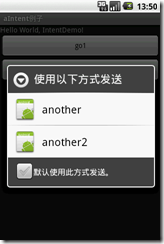 如果是用示例代码一那种方式进行发送则不会有这种情况。
Activity之间数据的传递:
首先需要使用到的是Bundle
String path = file.getAbsolutePath();String name = file.getName();Intent intent = new Intent(FileBrowser.this,MainActivity.class);Bundle bundle=new Bundle();bundle.putString("path",path );bundle.putString("name", name);intent.putExtras(bundle); startActivity(intent); |
首先,示例中创建了一个Intent的实例,用于转换Activity,同时,从该Activity中的变量获取了需要传递的数据;
其次是bundle.putXXX()方法的调用,向bundle中填充数据
| void | putInt(String key, int value)
Inserts an int value into the mapping of this Bundle, replacing any existing value for the given key.
|
| void | putIntArray(String key, int[] value)
Inserts an int array value into the mapping of this Bundle, replacing any existing value for the given key.
|
| void | putLong(String key, long value)
Inserts a long value into the mapping of this Bundle, replacing any existing value for the given key.
|
| void | putBoolean(String key, boolean value)
Inserts a Boolean value into the mapping of this Bundle, replacing any existing value for the given key.
|
| void | putBooleanArray(String key, boolean[] value)
Inserts a boolean array value into the mapping of this Bundle, replacing any existing value for the given key.
|
| void | putAll(Bundle map)
Inserts all mappings from the given Bundle into this Bundle.
|
| void | putString(String key, String value)
Inserts a String value into the mapping of this Bundle, replacing any existing value for the given key.
|
| void | putStringArray(String key, String[] value)
Inserts a String array value into the mapping of this Bundle, replacing any existing value for the given key.
|
| void | putStringArrayList(String key, ArrayList<String> value)
Inserts an ArrayList value into the mapping of this Bundle, replacing any existing value for the given key.
|
然后调用intent.putExtras(bundle),将bundle绑定在intent上,最后startActivity();
数据的接收:
|
1
2
3
4
5
6
7
|
Bundle bd = intent.getExtras(); String str_path = bd.getString("path"); String str_name = bd.getString("name"); text = (TextView)findViewById(R.id.tv_address); name = (TextView)findViewById(R.id.tv_name); text.setText(str_path); name.setText(str_name); |
转载: http://www.cnblogs.com/VortexPiggy/archive/2012/05/25/2509465.html
37.Activity之间的转换以及数据的传递(Intent)学习的更多相关文章
- android第一行代码-3.activity之间的调用跟数据传递
前面两节所有应用都是同一个activity中的,是时候讲activity之间交互的操作了,此后会涉及到intent这个概念,这也算一个新的里程碑开始. 主要内容包括intent的使用,以及activi ...
- 多个Activity之间的切换与数据交互
总结 两个activity之间切换我概括的分为两步: 1. 代码实现切换操作.2.配置中声明另外一个acitivity! 1. 代码实现切换操作 显示定义一个intent 对象,Intent 这个类的 ...
- 完成的设备扫描项目的几个关键程序,包括activity之间的转换
module 的 gradle.build最后三行的compile 是关键dependencies { implementation fileTree(dir: 'libs', include: [' ...
- Android学习之Activity之间的数据传递
Activity与Activity之间很多情况下都需要进行数据的传递,下面就用几个简单的例子来看一下. (一).一个Activity启动另一个Activity并将数据传递到这个Activity当中 思 ...
- 建立、配置和使用Activity——使用Bundle在Activity之间交换数据
当一个Activity启动另一个Activity时,常常会有一些数据需要传过去——这就像Web应用从一个Servlet跳到另一个Serlvet时,Web应用习惯把需要交换的数据放入requestSco ...
- Android中Fragment与Activity之间的交互(两种实现方式)
(未给Fragment的布局设置BackGound) 之前关于Android中Fragment的概念以及创建方式,我专门写了一篇博文<Android中Fragment的两种创建方式>,就如 ...
- Android笔记(二十) Activity中的跳转和值传递
我们知道,一个APP是由若干个Activity组成的,那么各个Acitivity中肯定需要进行跳转以及传递数值以保证App的运行,现总结一下多个Activity之间的跳转和值传递. 显式Intent跳 ...
- 转-Activity之间数据传递之Intent数据传递
Intent意图 可用于Activity之间的数据传递,一般可分为下面两种情况,从当前Activity传递到目标Activity后有无返回值: 1.传递后无返回值的情况: 1 2 3 4 5 6 7 ...
- 【Android 复习】 : Activity之间传递数据的几种方式
在Android开发中,我们通常需要在不同的Activity之间传递数据,下面我们就来总结一下在Activity之间数据传递的几种方式. 1. 使用Intent来传递数据 Intent表示意图,很多时 ...
随机推荐
- Unity 协程与线程
协程是不同步的 协程 不是 线程,协同程序是 不同步 的 一个线程在程序中和其他线程是异步运行的,在多处理器机器中一个线程可以同时与所有其他线程的实时运行其代码,这使得线程编程能够解决很复杂的事情,因 ...
- win10自动更新彻底关闭
http://app.techweb.com.cn/wp/2016-10-24/2418646.shtml
- 关于 app测试工具
1. 腾讯的GT 2. testin 云测 3. monkey的自动化测试 4. 纯手工的功能测试.
- Win2003_IIS+PHP+MYSQL 全能服务器配置
WIN2003_IIS+PHP+mysql最新版_全能服务器配置 本次配置PHP的服务器环境:Windows2003+IIS6+ASP+PHP5+MySQL5整个配置过程需要是使用拥有管理员权限的系统 ...
- ViewPager -- Fragment 切换卡顿 性能优化
当ViewPager切换到当前的Fragment时,Fragment会加载布局并显示内容,如果用户这时快速切换ViewPager,即 Fragment需要加载UI内容,而又频繁地切换Fragment, ...
- shell+curl监控网站页面(域名访问状态),并利用sedemail发送邮件
应领导要求,对公司几个主要站点的域名访问情况进行监控.下面分享一个监控脚本,并利用sendemail进行邮件发送. 监控脚本如下:下面是写了一个多线程的网站状态检测脚本,直接从文件中读出站点地址,然后 ...
- 【转】【SSE】基于SSE指令集的程序设计简介
基于SSE指令集的程序设计简介 作者:Alex Farber 出处:http://www.codeproject.com/cpp/sseintro.asp SSE技术简介 Intel公司的单指令多数据 ...
- 就是要你明白机器学习系列--决策树算法之悲观剪枝算法(PEP)
前言 在机器学习经典算法中,决策树算法的重要性想必大家都是知道的.不管是ID3算法还是比如C4.5算法等等,都面临一个问题,就是通过直接生成的完全决策树对于训练样本来说是“过度拟合”的,说白了是太精确 ...
- LeetCode 笔记25 Candy (艰难的调试)
There are N children standing in a line. Each child is assigned a rating value. You are giving candi ...
- 使用git推送代码到开源中国以及IDEA环境下使用git
使用git推送代码到开源中国以及IDEA环境下使用git 在学习Java的过程中我们会使用到git这个工具来将我们本周所编写的代码上传到开源中国进行代码托管,而在使用git的时候有很多的同学由于不会操 ...