
37.Activity之间的转换以及数据的传递(Intent)学习
Intent简介:
在一个Android应用中,主要由四种组件组成(四种组件分别为:Activity、Broadcast、Service、ContentProvider),而这四种组件是独立的,它们之间可以互相调用,协调工作,最终组成一个真正的Android应用。在这些组件之间的通讯中,主要是由Intent协助完成的。
Intent负责对应用中一次操作的动作、动作涉及数据、附加数据进行描述,Android则根据此Intent的描述,负责找到对应的组件,将Intent传递给调用的组件,并完成组件的调用。因此,Intent在这里起着一个媒体中介的作用,专门提供组件互相调用的相关信息,实现调用者与被调用者之间的解耦。
Intent来实现Activity之间的跳转:
1.无数据的简单跳转
通常在button的setOnClickListener中,通过构造一个新的intent实例,然后通过startActivity(Intent实例)来实现:
open.setOnClickListener(new OnClickListener(){ @Override public void onClick(View v) { // TODO Auto-generated method stub Intent intent = new Intent(MainActivity.this, FileBrowser.class); startActivity(intent); } }); |
为什么需要指定两个活动呢?因为在Android中有一个活动栈,这样的构造方式才能确保正确的将前一个活动压入栈中,才能在触发返回键的时候活动能够正确出栈。
2.所有Activity都必须在AndroidManifest.xml中声明:
<activity android:name="SecondActivity"></activity> |
3.Intent常用的构造函数:
A.Intent(String action) 指定action类型的构造函数
B.Intent(String action, Uri uri) 指定Action类型和Uri的构造函数,URI主要是结合程序之间的数据共享ContentProvider
C.Intent(Context packageContext, Class<?> cls) 传入组件的构造函数(示例一中提到的Activity之间的转换)
D.Intent(String action, Uri uri, Context packageContext, Class<?> cls) 前两种结合体
Intent(String action, Uri uri) 的action就是对应在AndroidMainfest.xml中的action节点的name属性值。在Intent类中定义了很多的Action和Category常量。
|
1
2
|
Intent intent = new Intent(Intent.ACTION_EDIT, null); startActivity(intent); |
该示例所使用的是构造函数B,Intent.ACTION_EDIT表示的是一个Action,执行此代码的时候,程序就会在AndroidManifest.xml中寻找相应的URI下所属的Activity;
<action android:name="android.intent.action.EDIT" />对应的Activity,如果对应为多个activity具有<action android:name="android.intent.action.EDIT" />此时就会弹出一个dailog选择Activity,如下图:
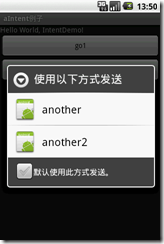 如果是用示例代码一那种方式进行发送则不会有这种情况。
Activity之间数据的传递:
首先需要使用到的是Bundle
String path = file.getAbsolutePath();String name = file.getName();Intent intent = new Intent(FileBrowser.this,MainActivity.class);Bundle bundle=new Bundle();bundle.putString("path",path );bundle.putString("name", name);intent.putExtras(bundle); startActivity(intent); |
首先,示例中创建了一个Intent的实例,用于转换Activity,同时,从该Activity中的变量获取了需要传递的数据;
其次是bundle.putXXX()方法的调用,向bundle中填充数据
| void | putInt(String key, int value)
Inserts an int value into the mapping of this Bundle, replacing any existing value for the given key.
|
| void | putIntArray(String key, int[] value)
Inserts an int array value into the mapping of this Bundle, replacing any existing value for the given key.
|
| void | putLong(String key, long value)
Inserts a long value into the mapping of this Bundle, replacing any existing value for the given key.
|
| void | putBoolean(String key, boolean value)
Inserts a Boolean value into the mapping of this Bundle, replacing any existing value for the given key.
|
| void | putBooleanArray(String key, boolean[] value)
Inserts a boolean array value into the mapping of this Bundle, replacing any existing value for the given key.
|
| void | putAll(Bundle map)
Inserts all mappings from the given Bundle into this Bundle.
|
| void | putString(String key, String value)
Inserts a String value into the mapping of this Bundle, replacing any existing value for the given key.
|
| void | putStringArray(String key, String[] value)
Inserts a String array value into the mapping of this Bundle, replacing any existing value for the given key.
|
| void | putStringArrayList(String key, ArrayList<String> value)
Inserts an ArrayList value into the mapping of this Bundle, replacing any existing value for the given key.
|
然后调用intent.putExtras(bundle),将bundle绑定在intent上,最后startActivity();
数据的接收:
|
1
2
3
4
5
6
7
|
Bundle bd = intent.getExtras(); String str_path = bd.getString("path"); String str_name = bd.getString("name"); text = (TextView)findViewById(R.id.tv_address); name = (TextView)findViewById(R.id.tv_name); text.setText(str_path); name.setText(str_name); |
转载: http://www.cnblogs.com/VortexPiggy/archive/2012/05/25/2509465.html
37.Activity之间的转换以及数据的传递(Intent)学习的更多相关文章
- android第一行代码-3.activity之间的调用跟数据传递
前面两节所有应用都是同一个activity中的,是时候讲activity之间交互的操作了,此后会涉及到intent这个概念,这也算一个新的里程碑开始. 主要内容包括intent的使用,以及activi ...
- 多个Activity之间的切换与数据交互
总结 两个activity之间切换我概括的分为两步: 1. 代码实现切换操作.2.配置中声明另外一个acitivity! 1. 代码实现切换操作 显示定义一个intent 对象,Intent 这个类的 ...
- 完成的设备扫描项目的几个关键程序,包括activity之间的转换
module 的 gradle.build最后三行的compile 是关键dependencies { implementation fileTree(dir: 'libs', include: [' ...
- Android学习之Activity之间的数据传递
Activity与Activity之间很多情况下都需要进行数据的传递,下面就用几个简单的例子来看一下. (一).一个Activity启动另一个Activity并将数据传递到这个Activity当中 思 ...
- 建立、配置和使用Activity——使用Bundle在Activity之间交换数据
当一个Activity启动另一个Activity时,常常会有一些数据需要传过去——这就像Web应用从一个Servlet跳到另一个Serlvet时,Web应用习惯把需要交换的数据放入requestSco ...
- Android中Fragment与Activity之间的交互(两种实现方式)
(未给Fragment的布局设置BackGound) 之前关于Android中Fragment的概念以及创建方式,我专门写了一篇博文<Android中Fragment的两种创建方式>,就如 ...
- Android笔记(二十) Activity中的跳转和值传递
我们知道,一个APP是由若干个Activity组成的,那么各个Acitivity中肯定需要进行跳转以及传递数值以保证App的运行,现总结一下多个Activity之间的跳转和值传递. 显式Intent跳 ...
- 转-Activity之间数据传递之Intent数据传递
Intent意图 可用于Activity之间的数据传递,一般可分为下面两种情况,从当前Activity传递到目标Activity后有无返回值: 1.传递后无返回值的情况: 1 2 3 4 5 6 7 ...
- 【Android 复习】 : Activity之间传递数据的几种方式
在Android开发中,我们通常需要在不同的Activity之间传递数据,下面我们就来总结一下在Activity之间数据传递的几种方式. 1. 使用Intent来传递数据 Intent表示意图,很多时 ...
随机推荐
- 2014 Super Training #1 B Fix 状压DP
原题: HDU 3362 http://acm.hdu.edu.cn/showproblem.php?pid=3362 开始准备贪心搞,结果发现太难了,一直都没做出来.后来才知道要用状压DP. 题意: ...
- CSS3中的字体rem
rem和em都是相对单位,em相对父元素的font-size来计算,而rem是根据文档根元素(html)的font-size大小来计算的 通常将html的字体大小设为62.5%(等于10px),当然也 ...
- apply,call,bind的区别
apply.call 在 javascript 中,call 和 apply 都是为了改变某个函数运行时的上下文(context)而存在的,换句话说,就是为了改变函数体内部 this 的指向. Jav ...
- poj 2245 Lotto
Lotto Time Limit: 1000MS Memory Limit: 65536K Total Submissions: 6806 Accepted: 4298 Description ...
- 07Mybatis_入门程序——根据前面的做的两个查询联系,做一些小的总结
总结如下: 1.parameterType和resultType 在映射文件中通过parameterType指定输入 参数的类型. 在映射文件中通过resultType指定输出结果的类型. 例如: & ...
- Css 常用属性
1. overflow:hidden和zoom:1 verflow:hidden;的作用 1. 隐藏溢出 :2.消除浮动 <style type="text/css"> ...
- 如何将NTFS格式的移动硬盘挂接到Mac OS上进行读写(Read/Write)操作
现在硬盘便宜,很多同学都有移动硬盘,如果你同时使用Windows与Mac OS的话,移动硬盘最好不要使用NTFS文件系统,否则在Mac OS上,你只能读你的移动硬盘,不能写. 但是实际上的情况是,移动 ...
- Ubuntu优化-py用机器
关闭防火墙 ufw disable pip换源 yum install python-pip -y mkdir ~/.pip cat > pip.conf<<a [global] i ...
- C#基础系列:实现自己的ORM(反射以及Attribute在ORM中的应用)
反射以及Attribute在ORM中的应用 一. 反射什么是反射?简单点吧,反射就是在运行时动态获取对象信息的方法,比如运行时知道对象有哪些属性,方法,委托等等等等.反射有什么用呢?反射不但让你在运行 ...
- 让Java说话-用Java实现语音引擎
让Java说话-用Java实现语音引擎 2005-11-07 10:04:09 分类: Java技术 为应用程序加上语音能力有什么好处呢?粗略地讲,是为了趣味,它适合所有注重趣味的应用,比如游戏.当然 ...