
推荐 greenrobot eventbus,简化安卓开发,提高安卓维护性,优化安卓性能
最近在研究移动开发,广泛的阅读有关cordova,apicloud,android资料。发现安卓的开发还是很简单的。再发现greenrobot eventbus开源框架不仅可以简化安卓开发,有可以大幅度的提高安卓的维护性,性能也能有所提高。开发安卓的难度觉得比windows下的winform很简单。
greenrobot eventbus的开源地址在https://github.com/greenrobot/EventBus,如果你熟悉android的开发,你一定觉得greenrobot eventbus是好东西,疯狂的爱上她。
推荐greenrobot eventbus 的理由
我是从事过.net平台下的开发,在项目中经常碰到对象相互依赖的问题,项目越大,对象越多,对象图就越复杂,从而导致了项目的维护性非常困难。对象调用另外一个对象本质就是发送消息。基于事件驱动的编程时,对象调用另一个对象的方法时,不必保存另一个对象的引用,而是订阅另一个对象发布的消息。这样就解决庞大的对象图造成的项目可读性差,维护性困难的问题。在.net平台下,可以使用nbusservice,enode规范项目的开发,提高项目的维护性。
第二个理由是,greenrobot eventbus 是可以提高不少的安卓性能。 这个是官方的统计。
Benchmark results indicate that EventBus is significantly faster in almost every scenario:
| EventBus | Otto | |
|---|---|---|
| Posting 1000 events, Android 2.3 emulator | ~70% faster | |
| Posting 1000 events, S3 Android 4.0 | ~110% faster | |
| Register 1000 subscribers, Android 2.3 emulator | ~10% faster | |
| Register 1000 subscribers, S3 Android 4.0 | ~70% faster | |
| Register subscribers cold start, Android 2.3 emulator | ~350% faster | |
| Register subscribers cold start, S3 Android 4.0 | About the same | |
第三个理由是 greenrobot eventbus 可以大大简化android多线程,异步,前台线程与后台线程交互的复杂度。 简单程度基本跟 写一个“helloworld” 差不多了。
下面是官方的例子。
In EventBus, you may define the thread that will call the event handling method onEvent by using a ThreadMode:
- PostThread: Subscriber will be called in the same thread, which is posting the event. This is the default. Event delivery implies the least overhead because it avoids thread switching completely. Thus this is the recommended mode for simple tasks that are known to complete is a very short time without requiring the main thread. Event handlers using this mode should return quickly to avoid blocking the posting thread, which may be the main thread. Example:
    // Called in the same thread (default)

    public void onEvent(MessageEvent event) {

        log(event.message);

    }
- MainThread: Subscriber will be called in Android's main thread (sometimes referred to as UI thread). If the posting thread is the main thread, event handler methods will be called directly. Event handlers using this mode must return quickly to avoid blocking the main thread. Example:
    // Called in Android UI's main thread

    public void onEventMainThread(MessageEvent event) {

        textField.setText(event.message);

    }
- BackgroundThread: Subscriber will be called in a background thread. If posting thread is not the main thread, event handler methods will be called directly in the posting thread. If the posting thread is the main thread, EventBus uses a single background thread that will deliver all its events sequentially. Event handlers using this mode should try to return quickly to avoid blocking the background thread.
    // Called in the background thread

    public void onEventBackgroundThread(MessageEvent event){

        saveToDisk(event.message);

    }
- Async: Event handler methods are called in a separate thread. This is always independent from the posting thread and the main thread. Posting events never wait for event handler methods using this mode. Event handler methods should use this mode if their execution might take some time, e.g. for network access. Avoid triggering a large number of long running asynchronous handler methods at the same time to limit the number of concurrent threads. EventBus uses a thread pool to efficiently reuse threads from completed asynchronous event handler notifications.
    // Called in a separate thread

    public void onEventAsync(MessageEvent event){

        backend.send(event.message);

    }
Note: EventBus takes care of calling the onEvent method in the proper thread depending on its name (onEvent, onEventAsync, etc.).
配图说明 greenrobot eventbus 使用的简单程度 ,只有简单的三个步骤,已经简单得不能再简单了
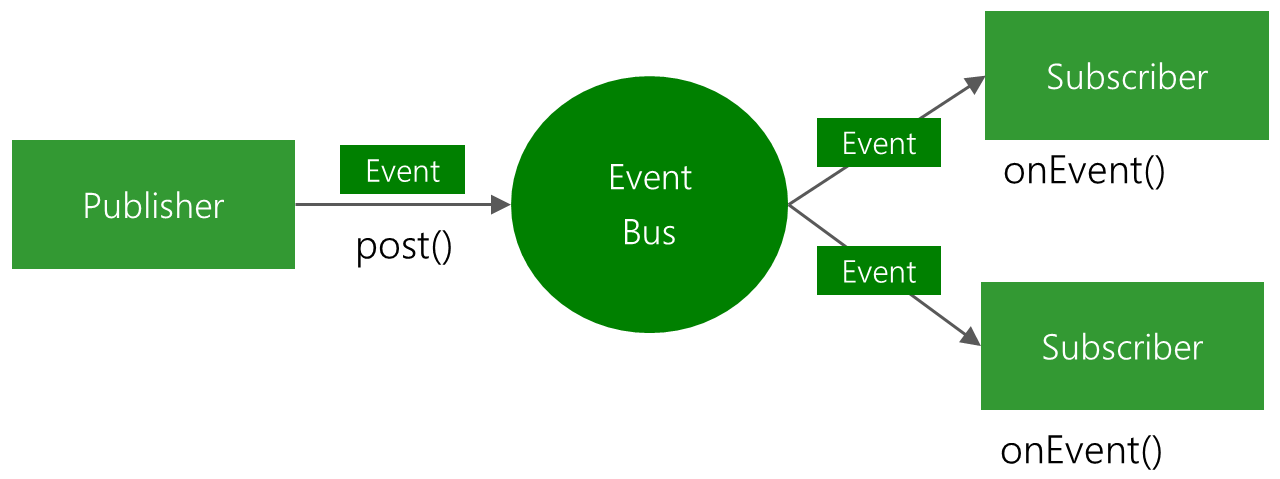
Here we pick up on the 3 steps of the README and expand a bit on the code.
1: Define events
Events are POJO (plain old Java object) without any specific requirements.
public class MessageEvent {

    public final String message;

    public MessageEvent(String message) {

        this.message = message;

    }

}
2: Prepare subscribers
Subscribers implement event handling onEvent methods that will be called when an event is received. They also need to register and unregister themselves to the bus.
    @Override

    public void onStart() {

        super.onStart();

        EventBus.getDefault().register(this);

    }

    @Override

    public void onStop() {

        EventBus.getDefault().unregister(this);

        super.onStop();

    }

    // This method will be called when a MessageEvent is posted

    public void onEvent(MessageEvent event){

        Toast.makeText(getActivity(), event.message, Toast.LENGTH_SHORT).show();

    }

    // This method will be called when a SomeOtherEvent is posted

    public void onEvent(SomeOtherEvent event){

        doSomethingWith(event);

    }

  至此,介绍greenrobot eventbus结束,虽然基本都是官方的东西,希望你能在这里了解到android 下这个eventbus真的是好东西,能给你android项目带来的帮助,提高项目的维护性,一天轻轻松松完成工作,早点下班,珍惜生命。
推荐 greenrobot eventbus,简化安卓开发,提高安卓维护性,优化安卓性能的更多相关文章
- 安卓开发:一种快速提取安卓app的UI图标资源的方法
在做安卓设计时,找美工设计界面的漂亮图标是必不可少的,但是对于一个初创团队来说,请一个UI的成本其实也挺高的,此时对于一个偏技术的产品经理来说,从其他成熟的产品的apk中提取图标就是一个很便捷的方法, ...
- Android安卓开发一环境配置
安卓项目开发 我采用的安卓开发软件是IDEA,IDEA功能强大,具有集成的安卓开发环境. 安卓开发的首要任务是在IDEA配置安卓开发环境 第一步新建一个安卓项目 按照提示完成操作,首次建立安卓项目它会 ...
- 安卓开发笔记——探索EventBus
1.关于EventBus: 组件通讯在Android开发中是不可避免的,随着业务需求的复杂化,代码中需要我们去处理的业务逻辑难度也不断增大.例如多个Fragment之间的数据传递,Service与Ac ...
- 安卓开发笔记——探索EventBus(转)
1.关于EventBus: 组件通讯在Android开发中是不可避免的,随着业务需求的复杂化,代码中需要我们去处理的业务逻辑难度也不断增大.例如多个Fragment之间的数据传递,Service与Ac ...
- 安卓开发笔记——关于照片墙的实现(完美缓存策略LruCache+DiskLruCache)
这几天一直研究在安卓开发中图片应该如何处理,在网上翻了好多资料,这里做点小总结,如果朋友们有更好的解决方案,可以留言一起交流下. 内存缓存技术 在我们开发程序中要在界面上加载一张图片是件非常容易的事情 ...
- 安卓开发笔记——深入Activity
在上一篇文章<安卓开发笔记——重识Activity >中,我们了解了Activity生命周期的执行顺序和一些基本的数据保存操作,但如果只知道这些是对于我们的开发需求来说是远远不够的,今天我 ...
- 腾讯优测干货精选| 安卓开发新技能Get -常用必备小工具汇总
文/腾讯公司 陈江峰 优测小优有话说: 移动研发及测试干货哪里找?腾讯优测-优社区你值得拥有~ 开发同学们都知道,安卓开发路上会碰到很多艰难险阻,一不小心就被KO.这时候,没有新技能傍身怎么行?今天我 ...
- Kotlin 语言高级安卓开发入门
过去一年,使用 Kotlin 来为安卓开发的人越来越多.即使那些现在还没有使用这个语言的开发者,也会对这个语言的精髓产生共鸣,它给现在 Java 开发增加了简单并且强大的范式.Jake Wharton ...
- Android(安卓)开发通过NDK调用JNI,使用opencv做本地c++代码开发配置方法 边缘检测 范例代码
以前写过两个Android开发配置文档,使用NDK进行JNI开发,这样能够利用以前已经写好的C++代码. 前两篇博客地址: http://blog.csdn.net/watkinsong/articl ...
随机推荐
- Python 包的相对导入讲解
[Python 包的相对导入讲解] 参考:http://www.dai3.com/python-import.html
- java并发的理解
我认为并发大体上分为两种情况 1,多个线程或者进程访问公共资源,比如12306 2,多个线程访问同一个实例变量,比如tomcat 多个请求的线程访问同一个单例bean,如果bean是有状态的,就可能出 ...
- [原创]Matlab之GUI生成EXE文件
近期因为项目需要,简化流程,写了一些Matlab程序,并配备上了GUI界面使其简单易用.然后问题来了,可移植性.使用Matlab生成EXE文件(可以封装很多的function),然后在一台安装有Mat ...
- timingFunction
* 动画的开始与结束的快慢,有五个预置分别为(下同): * kCAMediaTimingFunctionLinear 线性,即匀速 * kCAMediaTimingFunc ...
- 什么是侧翼区(flanking region)和侧翼区单核苷酸多态性(Flanking SNPs)
侧翼区(flanking region) 根据维基定义:The 5' flanking region is a region of DNA that is adjacent to the 5' end ...
- fragment 碎片整理
activity_m1.xml <?xml version="1.0" encoding="utf-8"?> <LinearLayout xm ...
- fedora 安装vmwear
Fedora 13下安装后缀为bundle文件,网上的说法很多,最普遍的方法是: 你的登陆名为TEST那么就将要安装的文件放在TEST目录下,不要放到目录下的子目录上面,否则不能运行.然后执行 第一步 ...
- [linux]linux普通用户安装rpm软件
先下载rpm文件 yumdownloader xxxx.rpm 直接wget等其他方式下载也可以. 解压 rpm2cpio xxxx.rpm |cpio -idvm 修改环境变量 将新增的软件的可执行 ...
- 云计算和大数据时代网络技术揭秘(十二)自定义网络SDN
软件定义网络——SDN SDN是网络技术热点,即软件定义网络,OpenFlow是实现SDN思想的一个框架标准, open是指公开.开放,具体为控制平面的规则由各个通信厂家自定义变为公开的技术标准, f ...
- wpf中button的无边框实现
设置button的样式为:Style="{StaticResource {x:Static ToolBar.ButtonStyleKey}}";即可