
小巧方便的MVC后端验证码,供大家学习借鉴
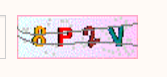
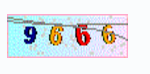
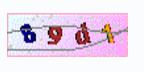
调用:
public ActionResult Vcode()//验证码
{
string code = ValidateCode.CreateRandomCode(4);
ValidateCode.CreateImage(code);
Session["vcode"] = code.ToLower();//存入session供验证用
System.IO.MemoryStream ms = new System.IO.MemoryStream();
return File(ms.GetBuffer(), "image/JPEG");
}
//下面是主题class内部
using System;
using System.Collections.Generic;
using System.Drawing;
using System.Drawing.Drawing2D;
using System.Linq;
using System.Web;
namespace xxxxxx.Models//命名空间自己填咯
{
public class ValidateCode
{
public static string CreateRandomCode(int length)
{
int rand;
char code;
string randomcode = String.Empty;
//生成一定长度的验证码
System.Random random = new Random();
for (int i = 0; i < length; i++)
{
rand = random.Next();
if (rand % 3 == 0)
{
code = (char)('A' + (char)(rand % 26));//如果是3的倍数就除以26将余数(小于26)转换成大写字母
}
else if (rand % 7 == 0)
{
code = (char)('a' + (char)(rand % 26));
}
else
{
code = (char)('0' + (char)(rand % 10));
}
randomcode += code.ToString();
}
return randomcode;
}
public static void CreateImage(string randomcode)
{
int randAngle = 30; //随机转动角度范围
int mapwidth = (int)(randomcode.Length * 23);//背景的宽度,此值是你输入要求的字符长度的23倍大(4*23=92宽)
using (Bitmap map = new Bitmap(mapwidth, 28))//创建图片背景,宽为(4*28),高为28的画布,从右上角(0,0)处开始;
{
Random rand = new Random();//随机数实例
using (Bitmap temp = new Bitmap(map.Width, map.Height))//临时画布
{
using (Graphics tempGra = Graphics.FromImage(temp))
{
char[] chars = randomcode.ToCharArray();//拆散字符串成单字符数组
StringFormat format = new StringFormat(StringFormatFlags.NoClip);//定义文字格式
format.Alignment = StringAlignment.Center;//文字距中
format.LineAlignment = StringAlignment.Center;
Color[] c = { Color.Black, Color.Red, Color.DarkBlue, Color.Green, Color.Orange, Color.Brown, Color.DarkCyan, Color.Purple }; //定义颜色
string[] fontList = { "Verdana", "Microsoft Sans Serif", "Comic Sans MS", "Arial", "宋体" };//定义字体
for (int i = 0; i < chars.Length; i++)//逐个绘制文字
{
int cindex = rand.Next(7);//颜色随机数
int findex = rand.Next(5);//字体随机数
Font font = new System.Drawing.Font(fontList[findex], 13, System.Drawing.FontStyle.Bold);//字体样式(参数2为字体大小)
Brush brush = new System.Drawing.SolidBrush(c[cindex]);//文字颜色1
//Brush brushPen = new LinearGradientBrush(new Rectangle(0, 0, temp.Width, temp.Height), Color.FromArgb(rand.Next(0, 256), 0, 0), Color.FromArgb(0, 0, rand.Next(0, 256)), rand.Next(90));//文字颜色2渐变
Point dot = new Point(16, 14);//定义一个点
//graph.DrawString(dot.X.ToString(),fontstyle,new SolidBrush(Color.Black),10,150);//测试X坐标显示间距的
float angle = rand.Next(-randAngle, randAngle);//转动的度数
tempGra.TranslateTransform(dot.X, dot.Y);//更改坐标系的原点(所有的操作在此原点(16,16))
tempGra.RotateTransform(angle);//旋转画布
//Matrix m = new Matrix();//创建变换
//m.RotateAt(angle, new PointF(16, 16), MatrixOrder.Append);//旋转
//m.Shear(rand.Next(-10, 10) * 0.03f, 0);//扭曲
//tempGra.Transform = m;//画布应用变换
tempGra.DrawString(chars[i].ToString(), font, brush, 1, 1, format);//开始画字母或文字
tempGra.RotateTransform(-angle);//转回去
tempGra.TranslateTransform(4, -dot.Y);//更改坐标系的原点
}
}
using (Graphics graph = Graphics.FromImage(map))//创建目标画布;
{
graph.Clear(Color.AliceBlue);//清除画面,填充背景
Rectangle rect = new Rectangle(0, 0, map.Width, map.Height);//绘制渐变背景
Brush brushBack = new LinearGradientBrush(rect, Color.FromArgb(rand.Next(150, 256), 255, 255), Color.FromArgb(255, rand.Next(150, 256), 255), rand.Next(90));//渐变背景颜色
graph.FillRectangle(brushBack, rect);//背景填充到画布
graph.DrawRectangle(new Pen(Color.LightPink, 0), 0, 0, map.Width - 1, map.Height - 1);//画一个边框,默认是从屏幕右上角(0,0)初开始画
//graph.SmoothingMode = System.Drawing.Drawing2D.SmoothingMode.AntiAlias;//图片抗锯齿模式
Pen blackPen = new Pen(Color.LightGray, 0);//笔触颜色
for (int i = 0; i < 50; i++)//噪点50个
{
int x = rand.Next(1, map.Width - 3);
int y = rand.Next(1, map.Height - 3);
graph.DrawRectangle(blackPen, x, y, 1, 1);//生成噪点
}
graph.DrawImage(temp, new Point(0, 0));//先画点后画图
Pen pen = new Pen(Color.Gray, 1);//干扰线笔触
for (int i = 0; i < 2; i++)//绘制两条干扰线
{
Point p1 = new Point(0, rand.Next(map.Height));
Point p2 = new Point(rand.Next(map.Width), rand.Next(map.Height));
Point p3 = new Point(rand.Next(map.Width), rand.Next(map.Height));
Point p4 = new Point(map.Width, rand.Next(map.Height));
Point[] p = { p1, p2, p3, p4 };
graph.DrawBeziers(pen, p);
}
System.IO.MemoryStream ms = new System.IO.MemoryStream();
map.Save(ms, System.Drawing.Imaging.ImageFormat.Gif);
HttpContext.Current.Response.ClearContent();
HttpContext.Current.Response.ContentType = "image/gif";
HttpContext.Current.Response.BinaryWrite(ms.ToArray());
temp.Dispose();//释放
graph.Dispose();
map.Dispose();
}
}
}
}
}
}
小巧方便的MVC后端验证码,供大家学习借鉴的更多相关文章
- MVC中验证码
MVC中验证码的实现(经常用,记录备用) 一.目录 1.多层架构+MVC+EF+AUTOFAC+AUTOMAPPER: 2.MVC中验证码的实现(经常用,记录备用) 3.Ligerui首页的快速搭 ...
- Ajax提交表单时验证码自动验证 php后端验证码检测
本文通过源码展示如何实现表单提交前,验证码先检测正确性,不正确则不提交表单,更新验证码. 1.前端代码 index.html <!DOCTYPE html> <html> &l ...
- MVC中验证码的实现(经常用,记录备用)
一.目录 1.多层架构+MVC+EF+AUTOFAC+AUTOMAPPER: 2.MVC中验证码的实现(经常用,记录备用) 3.Ligerui首页的快速搭建 二 正文 Ok,我们的验证码开始,这篇文章 ...
- 学习SpringBoot,整合全网各种优秀资源,SpringBoot基础,中间件,优质项目,博客资源等,仅供个人学习SpringBoot使用
学习SpringBoot,整合全网各种优秀资源,SpringBoot基础,中间件,优质项目,博客资源等,仅供个人学习SpringBoot使用 一.SpringBoot系列教程 二.SpringBoot ...
- 开源一个完整的iOSApp《丁丁美图》供初学者学习
学习iOS开发的时候,得益于开源社区的大量开源项目,去年开始购买了个人开发者账号,写了这个练手项目<丁丁美图>,并上传到了App Store(Ipad版本被驳回也懒得处理).现在将代码开源 ...
- MVC与三层架构解析学习
概要 MVC与三层架构不是简单的相等,二者之间存在一些区别. 今天,看到一位博主总结笔记,借鉴而来,以供以后学习. 将javaweb开发中的MVC(SSM框架)与三级架构比较,来解析二者之间的关系. ...
- spring mvc 及NUI前端框架学习笔记
spring mvc 及NUI前端框架学习笔记 页面传值 一.同一页面 直接通过$J.getbyName("id").setValue(id); Set值即可 二.跳转页面(bus ...
- MVC+Ext.net零基础学习记录(五)
继MVC+Ext.net零基础学习记录(四),在后面我在既有的项目上又添加了一个子项目,还用前面提到的方法,进行主项目中引用DLL,然后子项目中生成事件中使用mkdir 进行拷贝 发现一个下午就总是报 ...
- MVC+Ext.net零基础学习记录(四)
在上一篇文章[MVC+Ext.net零基础学习记录(三)]中提到了利用MVC的Area可以做到项目分离,但是实际操作起来还是有很多问题的.比如,对于物理资源的访问,会报:没有相关资源 开始的时候,我在 ...
随机推荐
- 使用cocos2d-x v3.1开发小游戏(基本框架)
小游戏的组成 欢迎界面 在游戏资源未全部加载完之前就需要载入,避免进入游戏会有一段黑屏时间. 可以用来展示游戏名称或者开发者logo. 开始菜单界面 一般用于显示游戏名称和关卡选择(或者称游戏难度选择 ...
- SQL Server 2012 各版本功能比较
有关不同版本的 SQL Server 2012 所支持的功能的详细信息. 功能名称 Enterprise 商业智能 Standard Web Express with Advanced Service ...
- 从Tmux 转到GNU Screen
网上很多地方都说Tmux比GNU Screen要好用,不过无意间看到这篇Switching from tmux to GNU Screen之后,我发现GNU Screen的窗口/区域概念更好,至少是更 ...
- [原创]自定义控件之AndroidSegmentControlView,仿IOS平台UISegmentControlView,继承自View
版权声明:本文为博主原创文章,转载请注明出处. 控件简介 UISegmentControl在IOS平台的App中非常常见,其控件如下图所示: 这种控件的主要作用是动态的更改界面的显示内容,一般应用于内 ...
- [AX2012]Report data provider调试
运行使用RDP作为数据源的报表时,RDP类被编译成.NET的服务调用,RDP是X++的代码,它的调试是在MorphX调试器中完成.要在MorphX调试器中调试RDP的X++代码需要以下配置: 添加AO ...
- 尝试在tensorflow上运行facenet
上一篇装好了tensorflow的运行环境,开始尝试运行一些实例代码,在github上找到了一个tensorflow实现的facenet的代码,还是遇到了很多坑! 坚持看完,有重要总结! 代码:htt ...
- Microsoft 2013 新技术学习笔记 三
什么是代码结构的组织?asp.net MVC 5 默认创建出的几个目录的标准含义分别如下: Controllers目录存放MVC模式中的Controler Models目录存放MVC模式中的Model ...
- Oracle 物化视图 说明
一. 物化视图概述 Oracle的物化视图是包括一个查询结果的数据库对像,它是远程数据的的本地副本,或者用来生成基于数据表求和的汇总表.物化视图存储基于远程表的数据,也可以称为快照. 物化视图可 ...
- 一款基于HTML5的Web 3D开发工具
在我们协助客户进行3D应用的开发过程中,客户遇到的最头疼的问题是如何在短时间内学会使用TWaver 3D引擎,以及使用TWaver 3D来创建和导入项目所需的各种3D业务模型.由于项目涵盖的行业繁多. ...
- 开发BI系统时的需求分析研究
我们知道MIS,知道ERP,知道GIS等等,这些系统在管理限制上有很多的冲突,管理和被管理,开放和限制等等,然而BI在开始就不是这样的.BI要求的就是易用还要易于扩展,首先是报表,这个是你无条件的需要 ...